
Sold by: TurnKey GNU/Linux
Deployed on AWS
Free Trial
AWS Free Tier
This product has charges associated with it for TurnKey Linux integration, automated security updates, backup tooling, and bundled support. It provides Etherpad Lite on Debian 13.
Overview
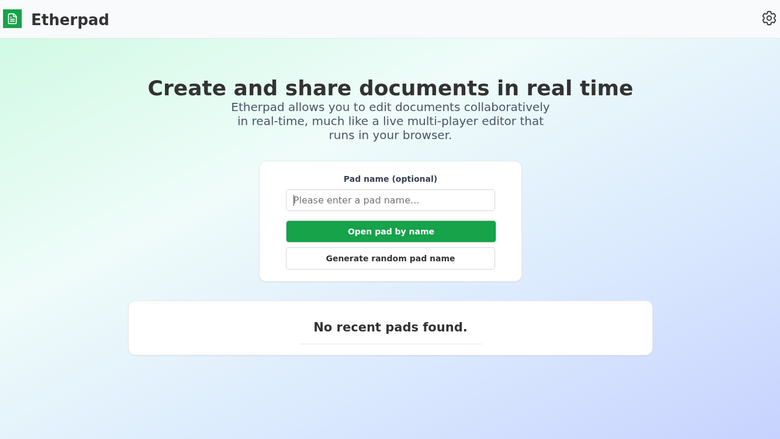
This product has charges associated with it for TurnKey Linux integration, automated security updates, backup tooling, and bundled support. TurnKey Etherpad Lite helps save you time and money by providing a ready-to-run Etherpad Lite solution that is secure, supported and easy to maintain. The system auto-updates itself with security fixes and is built in a transparent 100% open source process free of hidden backdoors.
Etherpad Lite is a real-time collaborative editor, sort of like a web-based multiplayer Notepad that allows groups of users to simultaneously edit a text document, with the ability to display each author's text in their own color. There is also a chat box in the sidebar to allow meta communication.
Highlights
- Secure, supported and easy to maintain: auto-updated daily with latest security patches. Bundled support for no extra charge.
- Free from hidden backdoors and vendor lock-in: transparent 100% opensource build of Debian GNU/Linux with no proprietary components or secret sauce.
- Free 1-click backup, restore and migrate: bundled backup software saves changes to files, databases and package management to encrypted storage which servers can be automatically restored from.
Details
Sold by
Delivery method
Delivery option
64-bit (x86) Amazon Machine Image (AMI)
Latest version
Operating system
Debian 13/Trixie
Deployed on AWS
Features and programs
Financing for AWS Marketplace purchases
AWS Marketplace now accepts line of credit payments through the PNC Vendor Finance program. This program is available to select AWS customers in the US, excluding NV, NC, ND, TN, & VT.

Pricing
Free trial
Try this product free for 7 days according to the free trial terms set by the vendor. Usage-based pricing is in effect for usage beyond the free trial terms. Your free trial gets automatically converted to a paid subscription when the trial ends, but may be canceled any time before that.
Pricing is based on actual usage, with charges varying according to how much you consume. Subscriptions have no end date and may be canceled any time. Alternatively, you can pay upfront for a contract, which typically covers your anticipated usage for the contract duration. Any usage beyond contract will incur additional usage-based costs.
Additional AWS infrastructure costs may apply. Use the AWS Pricing Calculator to estimate your infrastructure costs.
If you are an AWS Free Tier customer with a free plan, you are eligible to subscribe to this offer. You can use free credits to cover the cost of eligible AWS infrastructure. See AWS Free Tier for more details. If you created an AWS account before July 15th, 2025, and qualify for the Legacy AWS Free Tier, Amazon EC2 charges for Micro instances are free for up to 750 hours per month. See Legacy AWS Free Tier for more details.
Dimension | Cost/hour |
|---|---|
t3.small Recommended | $0.02 |
t2.micro | $0.02 |
t3.micro | $0.02 |
c1.medium | $0.02 |
c3.large | $0.02 |
c3.xlarge | $0.02 |
c4.large | $0.02 |
c4.xlarge | $0.02 |
c5.large | $0.02 |
c5.xlarge | $0.02 |
Dimensions summary
You pay by the hour based on the EC2 instance type you choose to run this preconfigured Etherpad appliance. The software itself carries the same hourly rate across all options; your cost changes with the compute size you select. Choices span general-purpose families (m-series, t-series), compute-optimized families (c-series), memory-optimized families (r-series), and storage-optimized families (i-series). Within each family, prices scale with instance size, from nano and micro up through 2xlarge. Smaller instances suit light testing, while larger instances handle more concurrent editing. You can stop anytime, since billing follows actual usage hours.
Top-of-mind questions for buyers
You get a preconfigured appliance with the real-time collaborative editor installed, a relational database set up for production, a web server proxy with SSL out of the box, and a mail transfer agent for sending email. It also bundles cloud backup, restore, and chat and email support through the vendor's hub.
Billing follows running hours, so the software charge stops accruing when the instance is powered off. Stopped instances may still incur AWS storage fees for the attached volume, but the software license meters active running time only. Restarting the instance resumes hourly charges.
The software rate is the same across every instance type listed. Your total cost changes because the underlying AWS compute charge differs by instance family and size. Picking a larger instance raises the compute portion of your bill, not the software portion.
www.turnkeylinux.org+1
Helpful?
Vendor refund policy
90 day money back guarantee if you are not fully satisfied.

Legal
Vendor terms and conditions
Upon subscribing to this product, you must acknowledge and agree to the terms and conditions outlined in the vendor's End User License Agreement (EULA) .
Content disclaimer
Vendors are responsible for their product descriptions and other product content. AWS does not warrant that vendors' product descriptions or other product content are accurate, complete, reliable, current, or error-free.
Delivery details
64-bit (x86) Amazon Machine Image (AMI)
Amazon Machine Image (AMI)
An AMI is a virtual image that provides the information required to launch an instance. Amazon EC2 (Elastic Compute Cloud) instances are virtual servers on which you can run your applications and workloads, offering varying combinations of CPU, memory, storage, and networking resources. You can launch as many instances from as many different AMIs as you need.
Version release notes
- App email delivery: Use TurnKey Hub for application email delivery.
- Easier Hub connection: Connect your server to TurnKey Hub more easily to set up email delivery, backups and DNS.
- HTTPS and DNS: Fix HubDNS and Let's Encrypt certificate setup and renewal.
- Backups: Improve backup and restore reliability in Webmin.
- Make first-boot database setup wait until MariaDB is ready.
- Security: Include Debian security updates.
Additional details
Usage instructions
System initialization
After launch, browse to http://<Public_DNS>/ and complete the first-boot configuration, or connect by SSH using the key pair selected at launch.
Operating system access
Connect using SSH as the Linux user admin with the selected EC2 key pair. Run privileged commands with sudo; this provides full OS-level administration.
Application access
Open http://<Public_DNS>/ in a web browser. The application may redirect to HTTPS after configuration.
Documentation: https://www.turnkeylinux.org/etherpad
Resources
Support
Vendor support
Free unlimited initial "getting started" support, plus one free support incident per instance per month. Please reach out if you have any questions, feedback or to discuss personalized support options.
Contact support via https://hub.turnkeylinux.org or email support@turnkeylinux.org - please quote your AWS user ID and the relevant product name.
Expected response time is within one work day - often quicker.
AWS infrastructure support
AWS Support is a one-on-one, fast-response support channel that is staffed 24x7x365 with experienced and technical support engineers. The service helps customers of all sizes and technical abilities to successfully utilize the products and features provided by Amazon Web Services.
Similar products
HedgeDoc 1.12.0 (AGPL-3.0) on Ubuntu 24.04: real-time collaborative Markdown notes with live preview and slide mode, behind HTTPS with a generated administrator password and anonymous editing and open sign-up turned off.

Etherpad 3.3.15 (Apache-2.0) with PostgreSQL 17 on Ubuntu 24.04, with HTTPS. Every page needs a generated password, so strangers cannot create pads; the admin password is generated on your server.
Stripo Prime provides enterprise-grade teams with a secure, scalable, and highly customizable email design environment - featuring collaborative editing and seamless integrations with enterprise-grade ESPs and marketing platforms such as AWS SES, Pinpoint, Salesforce, Oracle Eloqua, and more.

Create and preview HTML5 2D game projects directly from your browser using visual editing tools and Blockly based game logic.
Customer reviews
No customer reviews yet
Be the first to review this product . We've partnered with PeerSpot to gather customer feedback. You can share your experience by writing or recording a review, or scheduling a call with a PeerSpot analyst.