
Sold by: cloudimg
Deployed on AWS
Free Trial
AWS Free Tier
This product has charges associated with it for seller support. Production-ready NGINX from nginx.org mainline, with web content on a separate resizable volume. Ideal for teams needing a reverse proxy without maintaining their own AMI.
Overview
Image
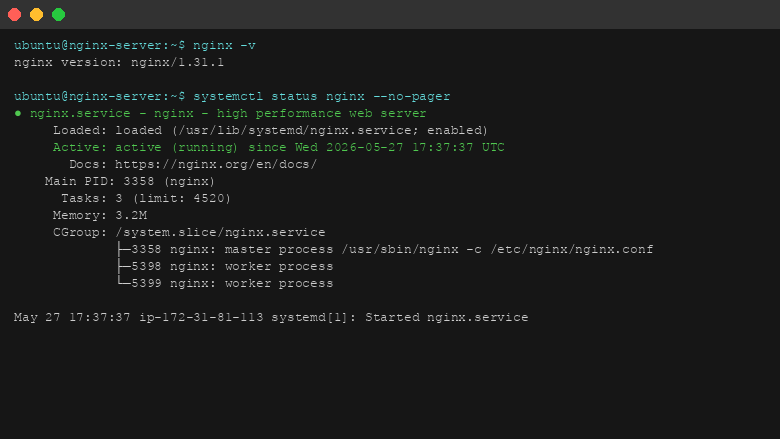
NGINX version and service status
Image
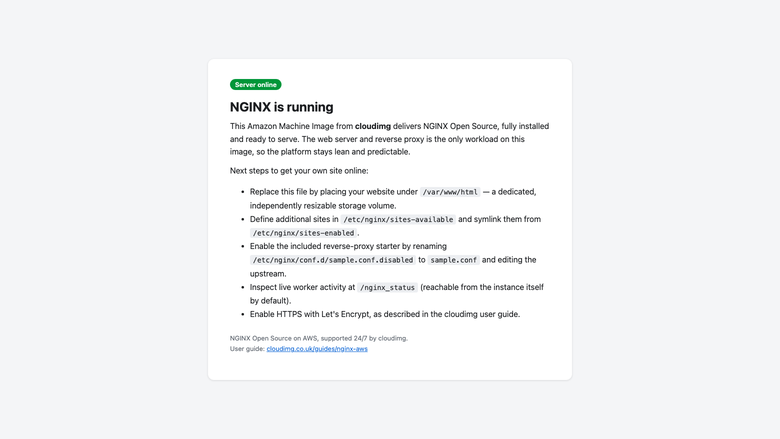
Default landing page in browser
Image
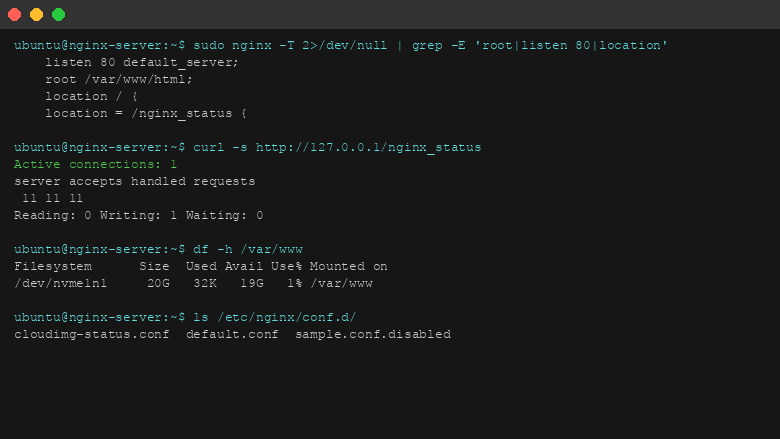
NGINX configuration and stub_status
This is a repackaged open source software product wherein additional charges apply for cloudimg support services.
Overview
NGINX Open Source is the high-performance, BSD-licensed web server and reverse proxy that powers a large share of the busiest sites on the internet. This AMI delivers NGINX fully installed and configured from the official nginx.org APT repository on the mainline stable line - the line nginx.org recommends for new deployments. A production-grade web server and reverse proxy is running within minutes of launch, making it ideal for small engineering teams that need a reliable reverse proxy without building and maintaining their own machine image.
What Is Included
- NGINX Open Source from the official nginx.org repository (mainline 1.27.x at build time), ensuring you receive upstream security patches faster than distro-packaged versions that often lag weeks or months behind.
- The web server is the only workload on the image - no bundled application runtime and no database - so the platform stays lean, predictable, and easy to reason about.
- A cloudimg default landing page served on first boot so you can confirm the server is healthy before deploying your own site.
- The stub_status monitoring endpoint enabled at /nginx_status, restricted to localhost by default for safety.
- A documented reverse-proxy starter configuration at /etc/nginx/conf.d/sample.conf.disabled, ready to be renamed, edited, and reloaded.
Web Content on Its Own Volume
Customer web content lives on a dedicated, independently resizable EBS volume mounted at /var/www, with the document root at /var/www/html. Site files are kept separate from the operating system disk, so content can be grown, snapshotted, and backed up on its own schedule - unlike many competing AMIs that mix web content with the OS disk, making snapshots risky and rollbacks complex.
AWS Integration Points
This AMI is designed to work within the broader AWS ecosystem:
- Amazon CloudWatch - Configure the CloudWatch agent to collect NGINX access and error logs, plus stub_status metrics, for centralized monitoring and alerting.
- AWS Certificate Manager (ACM) - Use ACM with an Application Load Balancer in front of NGINX for managed TLS certificates with automatic renewal, or install certificates from Let's Encrypt using Certbot directly on the instance.
- Elastic Load Balancing - Place NGINX instances behind an ALB or NLB for high availability and auto-scaling across Availability Zones.
- Amazon S3 - Serve static assets from S3 as an origin, using NGINX as a caching front end to reduce latency and origin load.
- Amazon VPC - Deploy within private subnets with security groups restricting inbound traffic to ports 80 and 443 only.
Security Posture
- The stub_status monitoring endpoint is restricted to localhost - nothing sensitive is exposed until you explicitly open it.
- No shared or default application credentials ship in the image; NGINX itself is unauthenticated.
- Unattended security updates are enabled for the underlying OS packages.
- Data in transit is secured by configuring TLS using either ACM with a load balancer or Certbot on the instance. Data at rest is protected by enabling EBS encryption on both the OS and web content volumes at launch time.
- Security groups should restrict SSH access to trusted IP ranges and limit HTTP/HTTPS to expected sources.
Example Scenario: TLS Termination for a Node.js Application Cluster
A development team running three Node.js application servers behind this NGINX instance configures the sample reverse-proxy file to upstream traffic across the app servers on port 3000. TLS is terminated at NGINX using a Let's Encrypt certificate managed by Certbot with automatic renewal. The stub_status endpoint feeds request-rate metrics into Amazon CloudWatch, triggering an Auto Scaling action when concurrent connections exceed a defined threshold. The result is a secure, observable entry point handling thousands of concurrent connections with minimal configuration effort.
Ready to Use
The web server, document root, monitoring endpoint, and reverse-proxy starter are all configured. Browse to the instance address to confirm the default page, then replace it with your own site or enable the reverse-proxy configuration, add virtual hosts, and enable HTTPS as described in the user guide.
cloudimg Support
24/7 technical support by email and live chat. Our engineers help with NGINX deployment, reverse proxy and load balancing configuration, performance tuning, virtual host setup, HTTPS configuration with Let's Encrypt or ACM, and CloudWatch integration. Critical issues receive a one-hour average response time.
Highlights
- NGINX mainline stable from the official nginx.org repository - not a distro-packaged version that lags weeks behind on security patches. The image ships with zero bundled runtimes or databases, keeping the attack surface minimal and behavior predictable. A documented reverse-proxy starter config and stub_status monitoring endpoint are ready from first boot, so you move from launch to production configuration without installing additional packages.
- Web content lives on a dedicated, independently resizable EBS volume at /var/www - separate from the OS disk. This means you can snapshot, back up, and grow your site storage without touching the system volume, eliminating the risk of OS-level changes affecting your content and simplifying disaster recovery compared to single-disk AMIs.
- 24/7 technical support from cloudimg by email and live chat, with a one-hour average response for critical issues. Engineers assist with NGINX reverse proxy configuration, performance tuning, HTTPS setup with Let's Encrypt or AWS Certificate Manager, CloudWatch integration, and virtual host management - expertise that saves teams without dedicated DevOps staff hours of troubleshooting.
Details
Sold by
Delivery method
Delivery option
64-bit (x86) Amazon Machine Image (AMI)
Latest version
Operating system
Ubuntu 24.04
Deployed on AWS
New
Introducing multi-product solutions
You can now purchase comprehensive solutions tailored to use cases and industries.

Features and programs
Financing for AWS Marketplace purchases
AWS Marketplace now accepts line of credit payments through the PNC Vendor Finance program. This program is available to select AWS customers in the US, excluding NV, NC, ND, TN, & VT.

Pricing
Free trial
Try this product free for 7 days according to the free trial terms set by the vendor. Usage-based pricing is in effect for usage beyond the free trial terms. Your free trial gets automatically converted to a paid subscription when the trial ends, but may be canceled any time before that.
Pricing is based on actual usage, with charges varying according to how much you consume. Subscriptions have no end date and may be canceled any time. Alternatively, you can pay upfront for a contract, which typically covers your anticipated usage for the contract duration. Any usage beyond contract will incur additional usage-based costs.
Additional AWS infrastructure costs may apply. Use the AWS Pricing Calculator to estimate your infrastructure costs.
If you are an AWS Free Tier customer with a free plan, you are eligible to subscribe to this offer. You can use free credits to cover the cost of eligible AWS infrastructure. See AWS Free Tier for more details. If you created an AWS account before July 15th, 2025, and qualify for the Legacy AWS Free Tier, Amazon EC2 charges for Micro instances are free for up to 750 hours per month. See Legacy AWS Free Tier for more details.
Dimension | Description | Cost/hour |
|---|---|---|
m5.large Recommended | m5.large | $0.08 |
t3.micro | t3.micro instance type | $0.04 |
t2.micro | t2.micro instance type | $0.04 |
t3a.xlarge | t3a.xlarge instance type | $0.12 |
trn1.32xlarge | trn1.32xlarge instance type | $0.24 |
i7i.metal-24xl | i7i.metal-24xl instance type | $0.24 |
m8id.48xlarge | m8id.48xlarge instance type | $0.24 |
r5ad.4xlarge | r5ad.4xlarge instance type | $0.24 |
r7i.24xlarge | r7i.24xlarge instance type | $0.24 |
r8id.32xlarge | r8id.32xlarge instance type | $0.24 |
Vendor refund policy
Refunds available on request.

Legal
Vendor terms and conditions
Upon subscribing to this product, you must acknowledge and agree to the terms and conditions outlined in the vendor's End User License Agreement (EULA) .
Content disclaimer
Vendors are responsible for their product descriptions and other product content. AWS does not warrant that vendors' product descriptions or other product content are accurate, complete, reliable, current, or error-free.
Delivery details
64-bit (x86) Amazon Machine Image (AMI)
Amazon Machine Image (AMI)
An AMI is a virtual image that provides the information required to launch an instance. Amazon EC2 (Elastic Compute Cloud) instances are virtual servers on which you can run your applications and workloads, offering varying combinations of CPU, memory, storage, and networking resources. You can launch as many instances from as many different AMIs as you need.
Version release notes
Initial release of the NGINX Open Source image.
Additional details
Usage instructions
Connect via SSH on port 22 as the default login user for your operating system variant (the user guide lists it per variant). NGINX serves on port 80. Browse to http://<instance-public-ip>/ to confirm the default landing page. Place your website files in /var/www/html on the dedicated content volume. To enable the included reverse-proxy starter, rename /etc/nginx/conf.d/sample.conf.disabled to sample.conf, edit the upstream address, run nginx -t and then systemctl reload nginx. The stub_status endpoint /nginx_status is restricted to the instance itself by default; the user guide explains how to open it to a trusted network. To enable HTTPS, follow the Let's Encrypt section of the user guide.
Resources
Vendor resources
Support
Vendor support
cloudimg Support
cloudimg provides 24/7 technical support for this NGINX Open Source AMI by email and live chat.
How to Get Help
Contact our support team at support@cloudimg.co.uk . Include your instance ID, region, and a description of the issue for fastest resolution.
What We Help With
- NGINX deployment and initial configuration
- Reverse proxy and load balancing setup
- Performance tuning and optimization
- Virtual host configuration
- HTTPS setup with Let's Encrypt, Certbot, or AWS Certificate Manager
- CloudWatch log and metric integration
- Troubleshooting errors and unexpected behavior
- OS-level package updates related to NGINX operation
- Guidance on security group and VPC configuration for NGINX
Response Times
Critical issues (service down, security vulnerability): one-hour average response, 24/7. General inquiries (configuration questions, best practices): responded to within one business day.
Refunds
If you experience issues with the product, contact support@cloudimg.co.uk and our team will work to resolve the problem. Refund requests are handled on a case-by-case basis.
Prerequisites for Deployment
- An AWS account with permissions to launch EC2 instances and manage EBS volumes
- A VPC with a subnet (public or private depending on your architecture)
- A security group allowing inbound traffic on ports 22 (SSH), 80 (HTTP), and 443 (HTTPS) from appropriate sources
- Minimum recommended instance type: t3.small for light workloads; t3.medium or larger for production reverse proxy use
Getting Started
- Launch the AMI from AWS Marketplace in your chosen region and instance type.
- Connect via SSH using your key pair.
- Browse to the instance public IP to confirm the cloudimg default landing page is served.
- Replace content at /var/www/html with your own site, or rename /etc/nginx/conf.d/sample.conf.disabled to enable the reverse-proxy starter.
- Reload NGINX with "sudo systemctl reload nginx" to apply changes.
AWS infrastructure support
AWS Support is a one-on-one, fast-response support channel that is staffed 24x7x365 with experienced and technical support engineers. The service helps customers of all sizes and technical abilities to successfully utilize the products and features provided by Amazon Web Services.
Similar products

This product has charges associated with it for seller support. Migrate from CentOS 8 EOL to Alma Linux 8 in under 60 seconds with zero licensing fees. 1:1 RHEL 8 compatible, AWS-optimized, backed by 24/7 support with guaranteed 24hr response SLA.

This product has charges associated with it for seller support. Production-ready NGINX reverse proxy and load balancer AMI for DevOps teams. Deploy in minutes with 24/7 expert support and guaranteed 24hr response SLA from cloudimg.

This product has charges associated with it for seller support. Launch a private Git server in minutes with Gitea pre-configured on PostgreSQL and nginx. Secure by default with per-instance credentials and backed by24/7 cloudimg support.

This product has charges associated with it for seller support. Deploy a private push notification server in minutes with zero shared credentials. Gotify pre-configured with PostgreSQL and nginx, backed by 24/7 cloudimg support.
Customer reviews
No customer reviews yet
Be the first to review this product . We've partnered with PeerSpot to gather customer feedback. You can share your experience by writing or recording a review, or scheduling a call with a PeerSpot analyst.