
Sold by: ADEO Imaging
Deployed on AWS
Free Trial
AWS Free Tier
Orthanc is a lightweight DICOM PACS medical imaging server with a web interface for healthcare, radiology, and medical research.
Overview
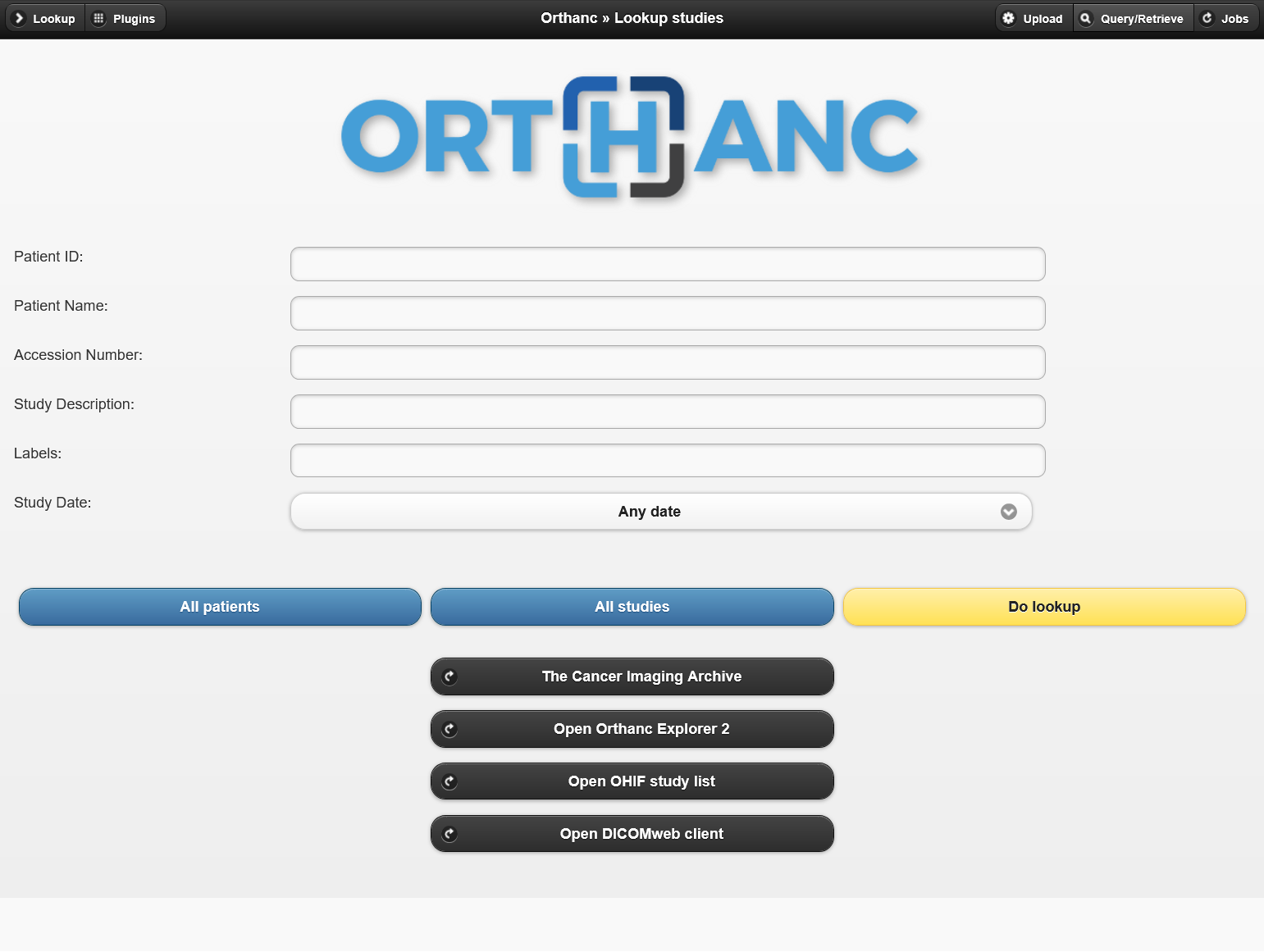
Image
Dashboard.
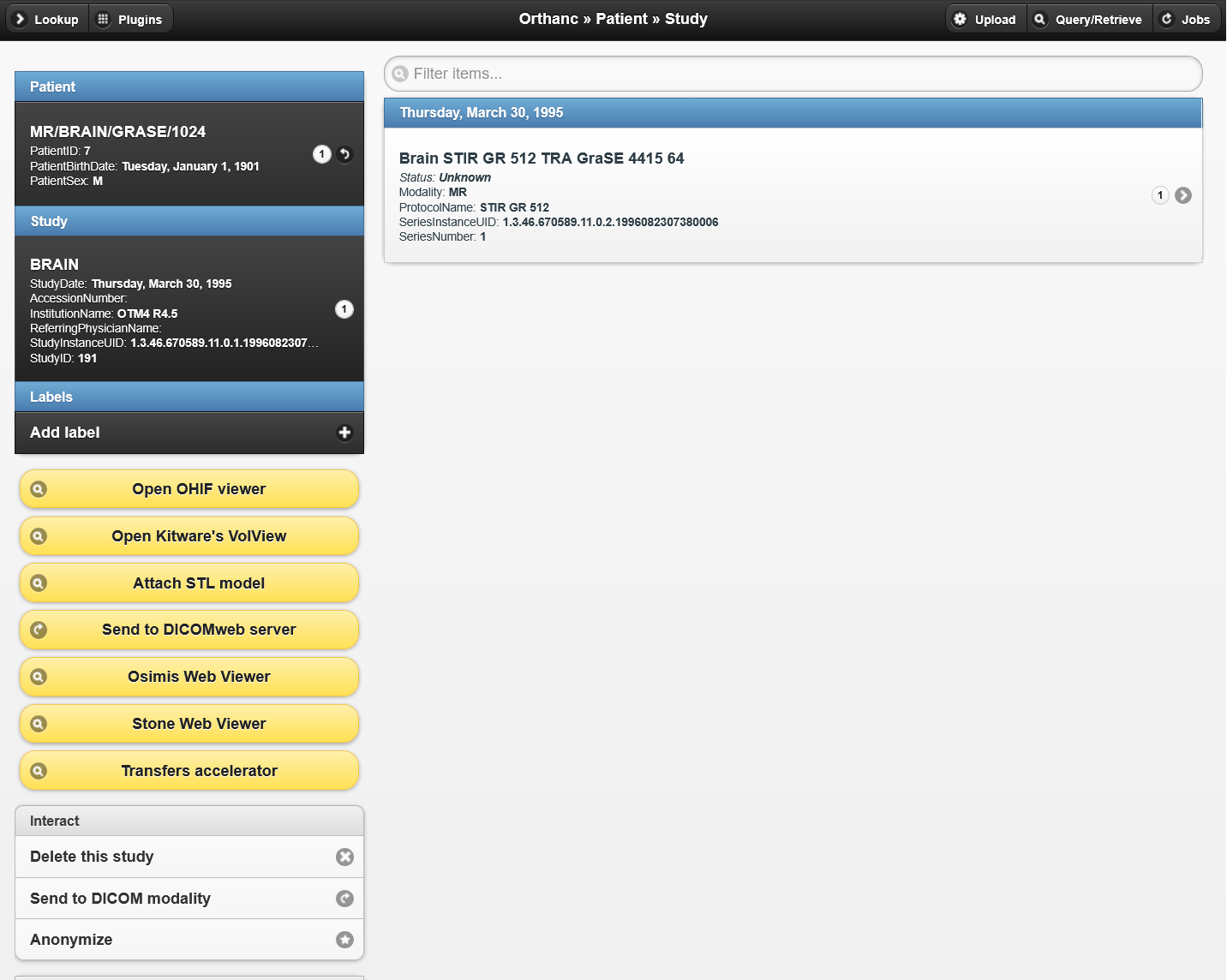
Image
Patient->Study page.
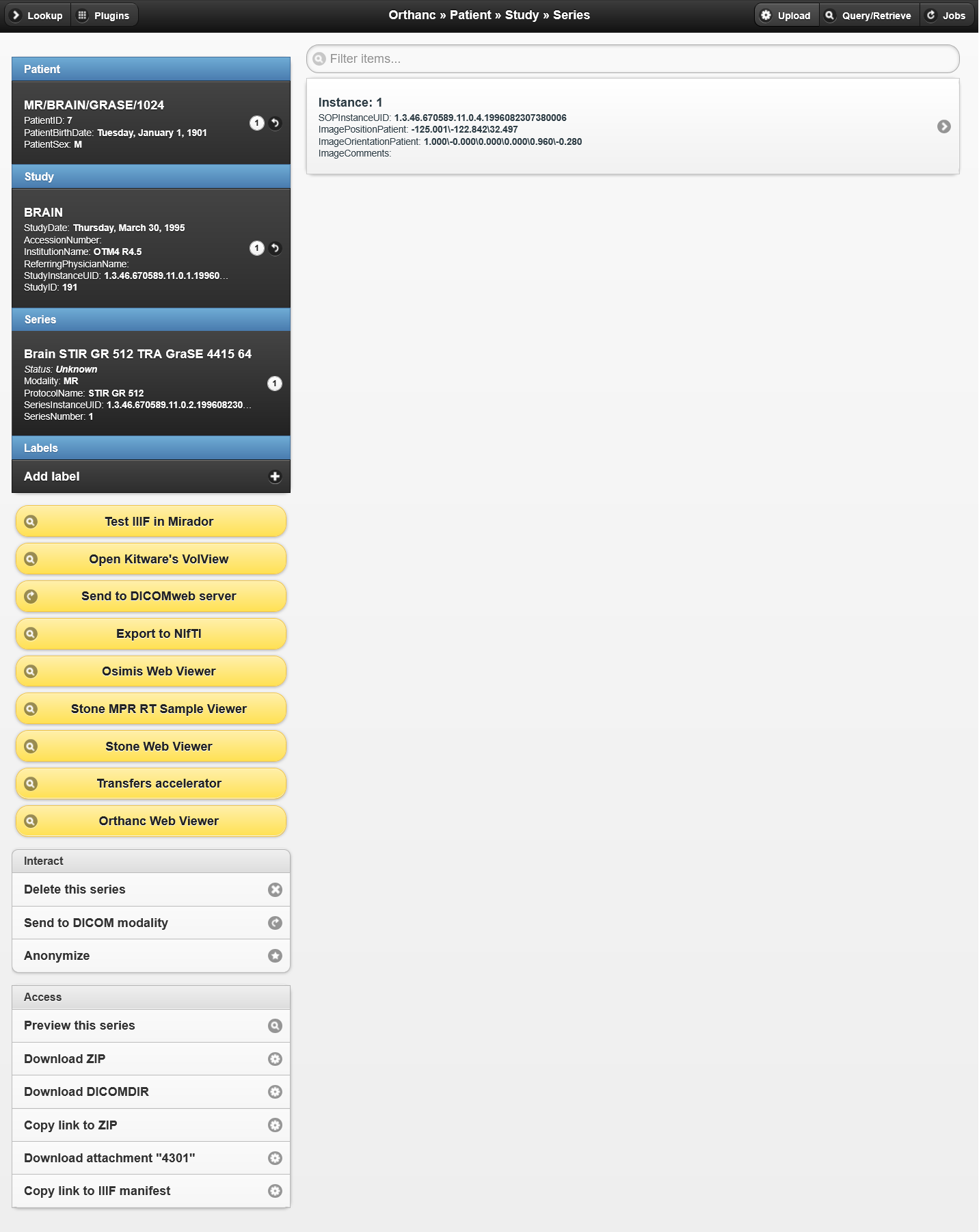
Image
Patient->Study->Series page.
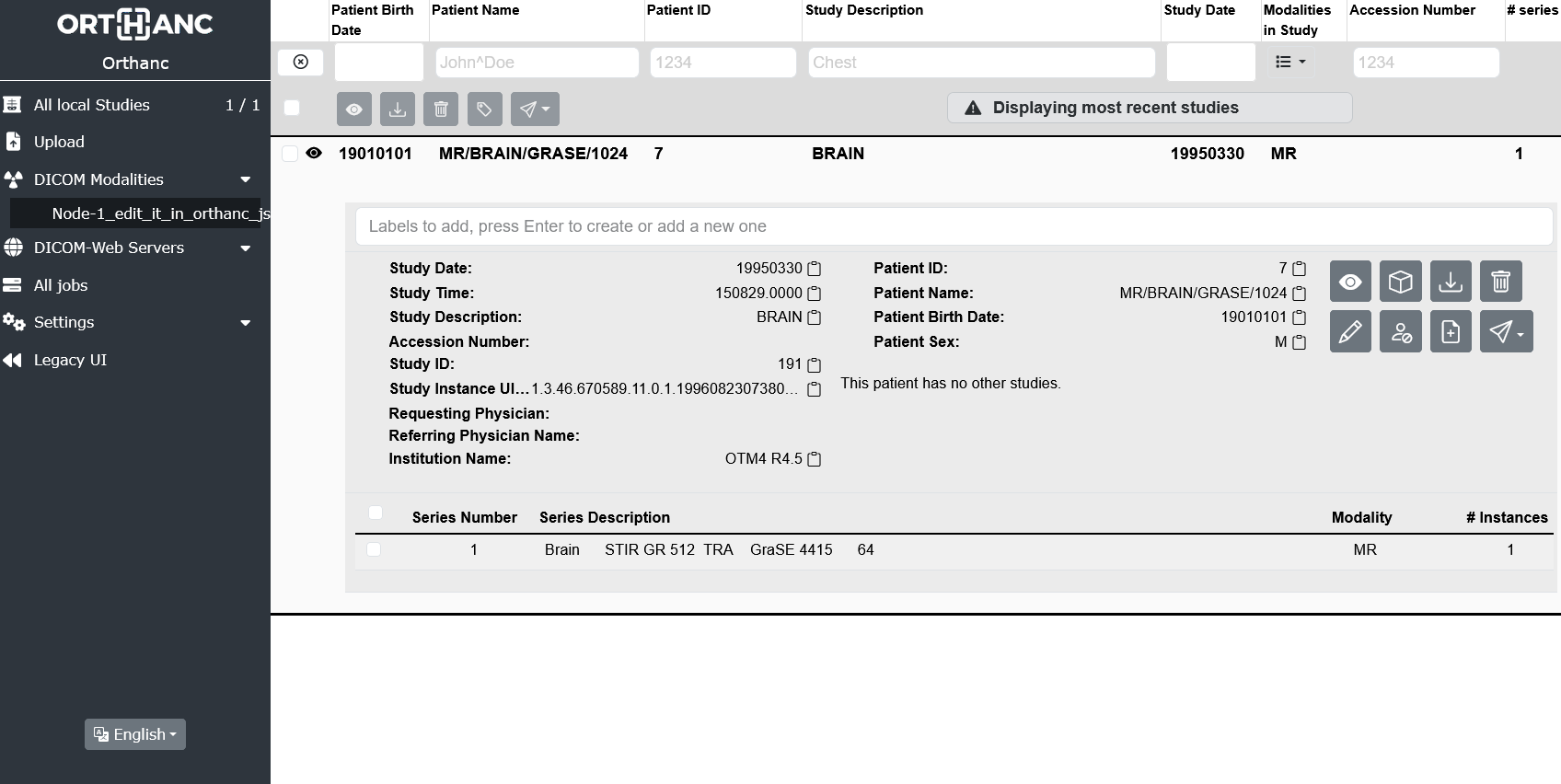
Image
New interface.
Orthanc® is a lightweight DICOM PACS medical imaging server with web interface for healthcare, radiology, and medical research. It is designed to improve the DICOM flows in hospitals and to support research about the automated analysis of medical images. Orthanc® lets its users focus on the content of the DICOM files, hiding the complexity of the DICOM format and of the DICOM protocol.
The server is fully optimized for AWS. When deployed using CloudFormation, an S3 bucket is automatically created and attached as file storage. Additionally, a domain name can be assigned to the server during deployment if it is managed in Route 53. Even if no domain name is specified, the web interface will still be accessible via HTTPS.
Areas of use:
- Medical institutions and healthcare systems, with a particular focus on radiology.
The key features:
- Easy-to-use. After launching, this medical imaging server is immediately operational. No server setup required for the simplest use.
- A convenient web interface.
- Automated AWS S3 Bucket creation and server configuration for file storage when deploying using the CloudFormation template.
- Automated domain binding to the server and installation of a free Let's Encrypt certificate with auto-renewal functionality for HTTPS when deploying using the CloudFormation template.
- HTTPS protocol even if a domain name is not assigned to server with a self-signed certificate generated for it.
- Ports: 8042 - web interface, 4242 - DICOM.
- Possibility to connect with AWS S3 for storing uploaded files.
- Contains additional plugins of recent versions as of June 2024.
Installed plugins:
- Authorization. Advanced authorization plugin for Orthanc. (additional settings are required)
- AWS S3 Storage. Connection to AWS S3 for storing uploaded files.
- Connectivity-checks. Utilities to check connectivity to DICOM modalities, DICOMweb servers and Orthanc peers. (additional settings are required)
- Delayed-deletion. Plugin removing files from storage asynchronously.
- Dicom-Web. Implementation of DICOMweb (QIDO-RS, STOW-RS and WADO-RS) and WADO-URI.
- GDCM. Decoder/transcoder of medical images using GDCM.
- Housekeeper. Optimizes your DB and storage.
- Indexer. Synchronize Orthanc with directories containing DICOM files.
- Multitenant-dicom. Multitenant plugin for Orthanc.
- MySQL-index. Stores the Orthanc index into a MySQL database.
- MySQL-storage. Stores the Orthanc storage area into a MySQL database.
- Neuro. Add support for NIfTI in Orthanc.
- OHIF plugin for Orthanc.
- Orthanc-Explorer-2. Advanced User Interface for Orthanc.
- Osimis-Web-Viewer. Provides a Web viewer of DICOM series within Orthanc.
- Python. Allows you to write and launch your own Python scripts as Orthanc plugins.
- Serve-folders. Serve additional folders with Orthanc. (additional settings are required)
- STL plugin for Orthanc.
- Stone-Webviewer.
- TCIA. Interface with TCIA (The Cancer Imaging Archive).
- Transfers. Accelerates transfers and provides storage commitment between Orthanc peers.
- Kitware's VolView for Orthanc.
- Web-Viewer. Provides a Web viewer of DICOM series within Orthanc.
- Worklists. Serve DICOM modality worklists from a folder with Orthanc.
- WSI. Provides a Web viewer of whole-slide microscopic images within Orthanc.
© 2017-2023, Osimis S.A
Highlights
- AWS Cloud ready DICOM Server with AWS S3 support for file storage.
- Automated S3 Bucket creation and server configuration when deploying using the CloudFormation template. Automated domain binding to the server and installation of a free Let's Encrypt certificate with auto-renewal functionality for HTTPS when deploying using the CloudFormation template.
- Easy-to-use. After launching, this medical imaging server is immediately operational. No server setup required for the simplest use.
Details
Sold by
Delivery method
Delivery option
64-bit (x86) Amazon Machine Image (AMI)
Orthanc DICOM Server (automatic configuration of AWS S3 storage)
Latest version
Operating system
Debian 13
Deployed on AWS
Features and programs
Financing for AWS Marketplace purchases
AWS Marketplace now accepts line of credit payments through the PNC Vendor Finance program. This program is available to select AWS customers in the US, excluding NV, NC, ND, TN, & VT.

Pricing
Free trial
Try this product free for 5 days according to the free trial terms set by the vendor. Usage-based pricing is in effect for usage beyond the free trial terms. Your free trial gets automatically converted to a paid subscription when the trial ends, but may be canceled any time before that.
Pricing is based on actual usage, with charges varying according to how much you consume. Subscriptions have no end date and may be canceled any time. Alternatively, you can pay upfront for a contract, which typically covers your anticipated usage for the contract duration. Any usage beyond contract will incur additional usage-based costs.
Additional AWS infrastructure costs may apply. Use the AWS Pricing Calculator to estimate your infrastructure costs.
If you are an AWS Free Tier customer with a free plan, you are eligible to subscribe to this offer. You can use free credits to cover the cost of eligible AWS infrastructure. See AWS Free Tier for more details. If you created an AWS account before July 15th, 2025, and qualify for the Legacy AWS Free Tier, Amazon EC2 charges for Micro instances are free for up to 750 hours per month. See Legacy AWS Free Tier for more details.
- ...
Dimension | Cost/hour |
|---|---|
t3.small Recommended | $0.063 |
t3.micro | $0.063 |
m5dn.2xlarge | $0.084 |
m5a.12xlarge | $0.084 |
m6a.xlarge | $0.063 |
m6i.metal | $0.084 |
m6a.32xlarge | $0.084 |
t3a.micro | $0.063 |
m5ad.large | $0.063 |
m5ad.8xlarge | $0.084 |
Dimensions summary
You pay by the hour for the EC2 instance size you run this DICOM server on. Every dimension is a compute instance option, so pricing scales with the hardware you choose. Smaller burstable instances (t2, t3, t3a families) suit light or occasional workloads. General-purpose families (m5, m5a, m5ad, m5d, m5dn, m5n, m5zn, m6a, m6i) offer a wide range of vCPU and memory sizes, up to large metal instances. You select the instance that matches your storage and processing needs. Hourly billing means you pay only for the time each instance runs.
Top-of-mind questions for buyers
The hourly rate covers the running software on the EC2 instance size you select. Charges accrue only while the instance runs. A stopped or powered-off instance stops the software hourly charge. Underlying AWS storage fees for the attached volume may still apply while the instance is stopped.
Cost is driven by the single instance type you choose and the number of hours it runs. Larger instance families with more vCPU and memory carry different hourly rates. You run one instance size at a time, so your bill reflects that size multiplied by its running hours.
Yes. This listing runs an Orthanc DICOM PACS server configured with AWS S3 support. Image data can be stored in S3, which is billed separately by AWS based on storage used. The hourly charge here applies only to the compute instance running the server.
www.adeoclouds.eu
Helpful?
Vendor refund policy
You may terminate the instance at anytime to stop incurring charges.

Legal
Vendor terms and conditions
Upon subscribing to this product, you must acknowledge and agree to the terms and conditions outlined in the vendor's End User License Agreement (EULA) .
Content disclaimer
Vendors are responsible for their product descriptions and other product content. AWS does not warrant that vendors' product descriptions or other product content are accurate, complete, reliable, current, or error-free.
Delivery details
64-bit (x86) Amazon Machine Image (AMI)
Amazon Machine Image (AMI)
An AMI is a virtual image that provides the information required to launch an instance. Amazon EC2 (Elastic Compute Cloud) instances are virtual servers on which you can run your applications and workloads, offering varying combinations of CPU, memory, storage, and networking resources. You can launch as many instances from as many different AMIs as you need.
Version release notes
Debian13 version. https://orthanc.uclouvain.be/hg/orthanc/file/Orthanc-1.13.0/NEWS
Additional details
Usage instructions
After deployment and initial startup, this server is ready for use. The web interface is available over HTTPS using a free Let's Encrypt SSL certificate that is automatically issued and renewed. Initial certificate setup may take a few minutes. Keep inbound TCP port 80 open for certificate issuance and renewal, and TCP port 8042 open for web access.
Linux username: admin
Old (classic) web interface:
- https://PUBLIC_IP.sslip.io:8042
- https://PUBLIC_IP:8042
- Default username: admin; initial password: your instance ID
New web interface:
- https://PUBLIC_IP.sslip.io:8042/ui/app/
- https://PUBLIC_IP:8042/ui/app/
- Default username: admin; initial password: your instance ID
Replace PUBLIC_IP with your server's public IP address. Accessing HTTPS directly by IP address will cause a certificate name mismatch.
To use your own domain and SSL certificate, first configure your domain's DNS records to point to the server's public IP address. Before replacing the certificate, disable SSLIP's automatic certificate management:
sudo systemctl disable --now orthanc-sslip-check.timer
sudo systemctl disable --now orthanc-sslip-check.service
sudo mv /etc/letsencrypt/renewal-hooks/deploy/orthanc-sslip.sh
/etc/letsencrypt/renewal-hooks/orthanc-sslip.sh.disabled
Place your private key, followed by your server certificate and intermediate certificates, in a single PEM file at the path specified by SslCertificate in /etc/orthanc/orthanc.json. Then restart Orthanc:
sudo systemctl restart orthanc
Renewal of your custom certificate must be managed separately.
Although the server is ready after startup, review and adjust its configuration for your tasks:
- Server and plugin configuration files: /etc/orthanc/
- Main Orthanc configuration file: /etc/orthanc/orthanc.json
After editing configuration files, restart Orthanc:
sudo systemctl restart orthanc
If you connect this server to other servers, use the Connectivity-checks plugin to check connections to configured DICOM modalities and Orthanc peers. Open the Plugins page in the classic Orthanc Explorer and select "connectivity-checks".
By default, Orthanc uses the instance's disk for file storage. To use an existing AWS S3 bucket, configure the AWS S3 Storage plugin in /etc/orthanc/aws-s3.json To test the S3 plugin, upload a test study using the Upload button in Orthanc Explorer and verify that new objects appear in your S3 bucket. Changing storage settings does not automatically migrate all existing studies.
For more information about Orthanc, visit: https://orthanc.uclouvain.be/book/index.html
Resources
Vendor resources
Support
Vendor support
If you have any questions regarding the deployment or use of this server, you can use the Contact Us form on our website or reach out via email. We guarantee a response within 24 hours.
Contact US: https://www.adeoclouds.eu/contact.php?id=8
E-mail: admin@adeoclouds.eu
AWS infrastructure support
AWS Support is a one-on-one, fast-response support channel that is staffed 24x7x365 with experienced and technical support engineers. The service helps customers of all sizes and technical abilities to successfully utilize the products and features provided by Amazon Web Services.
Updated weekly


By Flywheel
By Cloudian
Top
10
In Education & Research, Image, Healthcare & Life Sciences
Top
50
In Data Preparation
Top
100
In Storage
Sentiment is AI generated from actual customer reviews on AWS and G2
Functionality
Ease of use
Customer service
Cost effectiveness
Positive reviews
Mixed reviews
Negative reviews
AI generated from product descriptions
DICOM Protocol Support
Implements DICOM PACS server functionality with support for DICOM protocol on port 4242 and DICOMweb standards including QIDO-RS, STOW-RS, WADO-RS, and WADO-URI.
Cloud Storage Integration
Supports AWS S3 bucket integration for file storage with automated bucket creation and server configuration through CloudFormation deployment.
Web-Based Viewer and Interface
Provides web interface accessible on port 8042 with multiple viewer plugins including OHIF plugin, Osimis-Web-Viewer, Stone-Webviewer, and Orthanc-Explorer-2 for DICOM series visualization.
Extensible Plugin Architecture
Includes 25+ pre-installed plugins supporting advanced functionality such as Python scripting, MySQL database indexing and storage, multitenant capabilities, NIfTI format support, and whole-slide microscopic image viewing.
Automated HTTPS Configuration
Automatically provisions Let's Encrypt SSL certificates with auto-renewal functionality and generates self-signed certificates for HTTPS access when deployed via CloudFormation with optional Route 53 domain binding.
Medical Imaging Data Ingestion
Capability to ingest medical imaging data from multiple sources into a centralized platform
Data Curation and Standardization
Automated curation of medical imaging data to common standards for consistency and interoperability
Machine Learning Pipeline Automation
Automated processing and machine learning pipeline execution for algorithm development and model training
Data Privacy and Regulatory Compliance
Built-in security controls and compliance mechanisms to maintain data privacy and meet regulatory requirements
Collaborative Analytics Environment
Secure collaboration tools enabling multiple users to perform clinical analytics, cohort discovery, and model training at scale
S3 API Compatibility
Native S3 API support ensures full compatibility with applications designed to employ AWS S3 storage.
Data Encryption and Security
AES-256 server-side encryption for data at rest, SSL/HTTPS for data in transit, transparent key management, role-based access controls (RBAC), audit trail logging, and secure shell with root disable. Certified with U.S. Department of Defense, SEC Rule 17a-4(f), FINRA Rule 4511, CFTC Rule 1.31(c)-(d), Common Criteria EAL2 designation, and FIPS 140-2 Level 1 validation.
Scalable Local Storage Capacity
Highly scalable on-premises storage capacity deployed adjacent to AWS Outposts or Local Zones for local data access and optimized performance.
Multi-Tenant Storage Management
Bucket-level granularity for all storage policies with comprehensive multi-tenant services including Quality of Service (QoS) controls and access controls.
Hybrid Cloud Data Replication
Configurable data replication to Amazon S3 regions enabling hybrid cloud architecture with data locality and residency compliance.
Standard contract
No
Customer reviews
No customer reviews yet
Be the first to review this product . We've partnered with PeerSpot to gather customer feedback. You can share your experience by writing or recording a review, or scheduling a call with a PeerSpot analyst.