
Sold by: Waltsoft Inc.
Deployed on AWS
Quick Launch
SellerPulse is a revenue, payout, churn and tax analytics dashboard for AWS Marketplace sellers. Track MRR, ARR and ARPU, reconcile bank payouts and spot churn risk in one private dashboard that deploys into your own AWS account with one-click CloudFormation.
Overview
Video
SellerPulse: revenue, payouts, churn and tax in one dashboard
Image
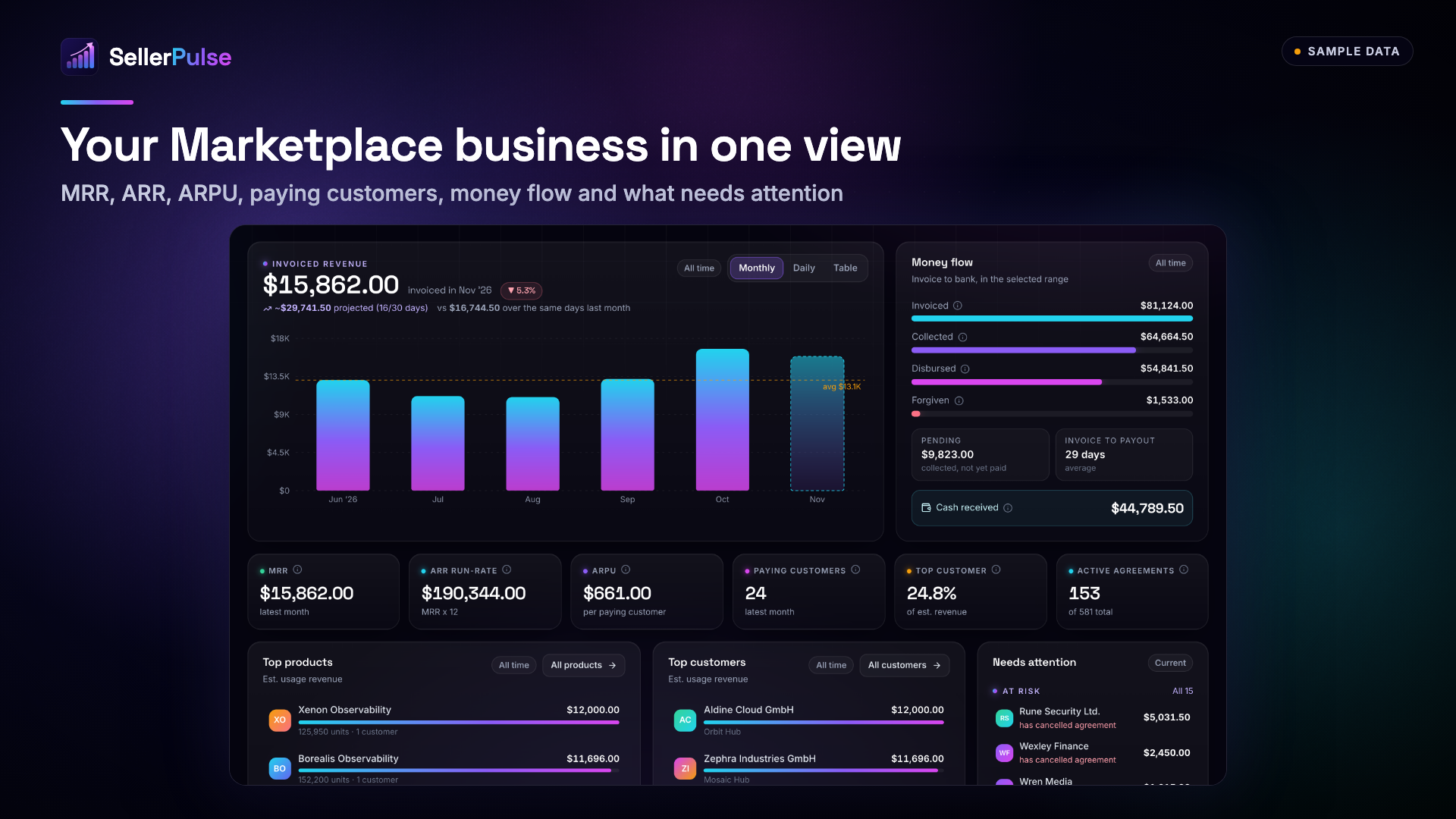
Overview: revenue, customers and cash at a glance
Image
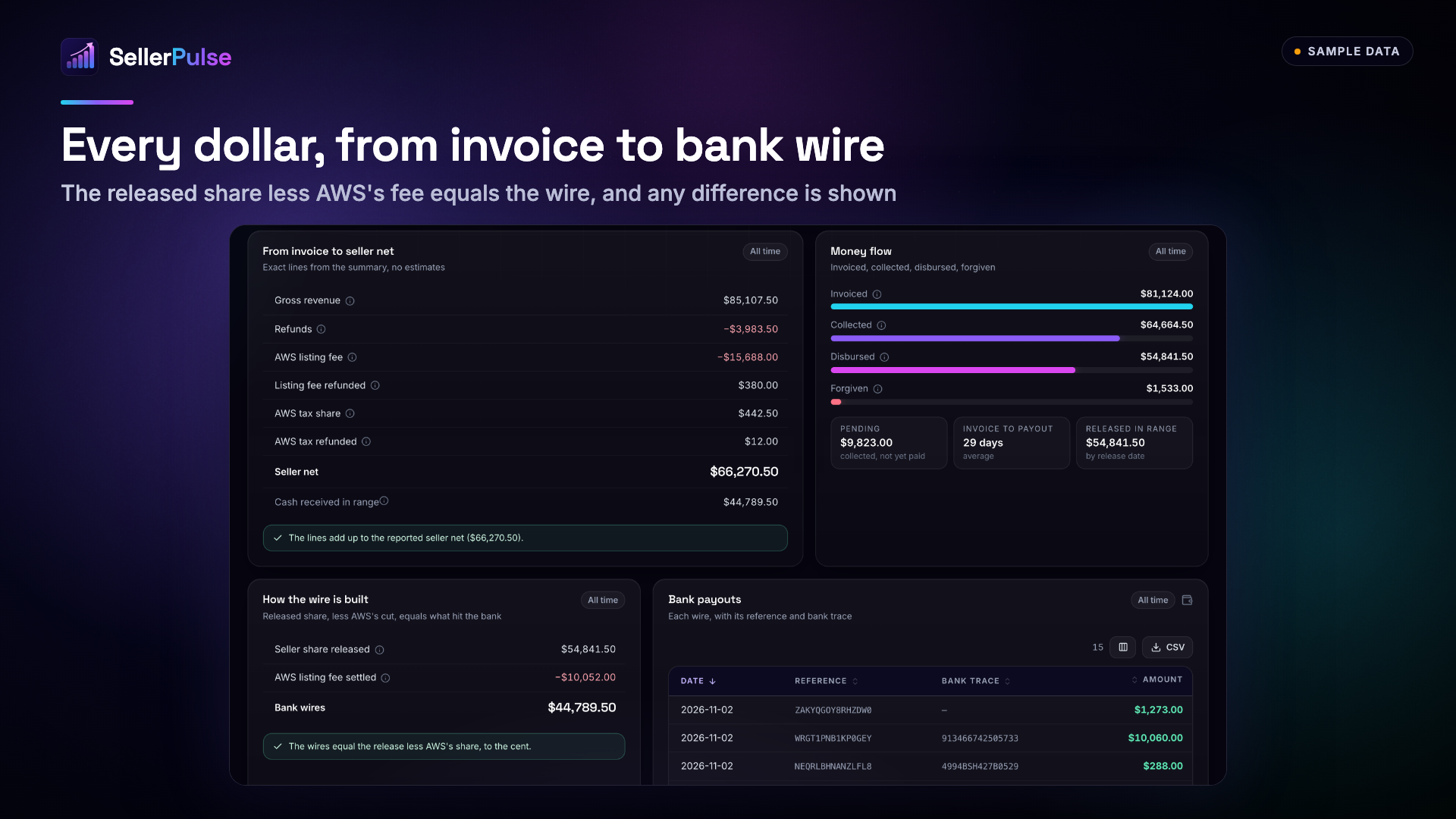
Revenue and cash: from invoice to bank wire
Image
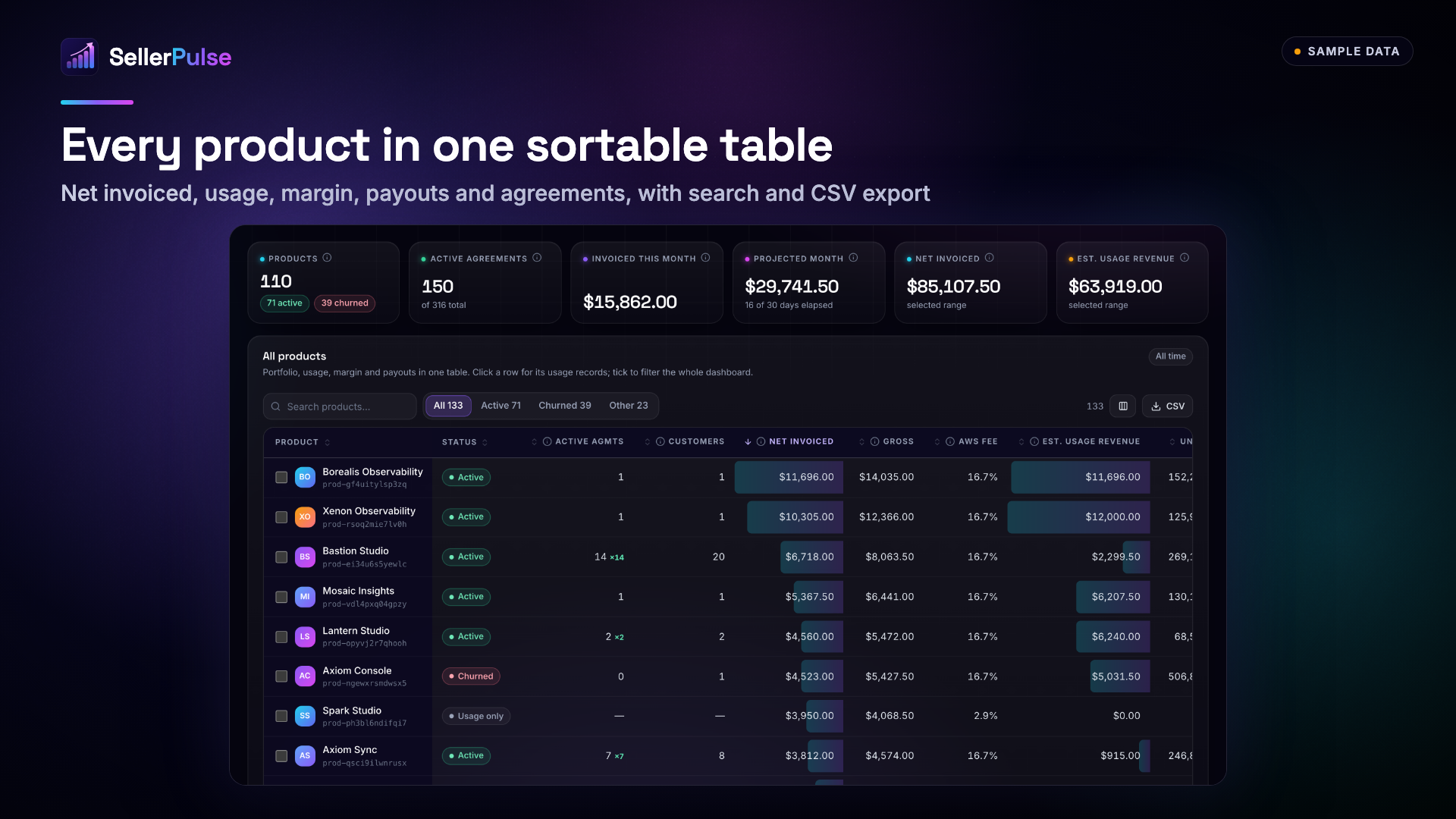
Products: every product in one sortable table
Image
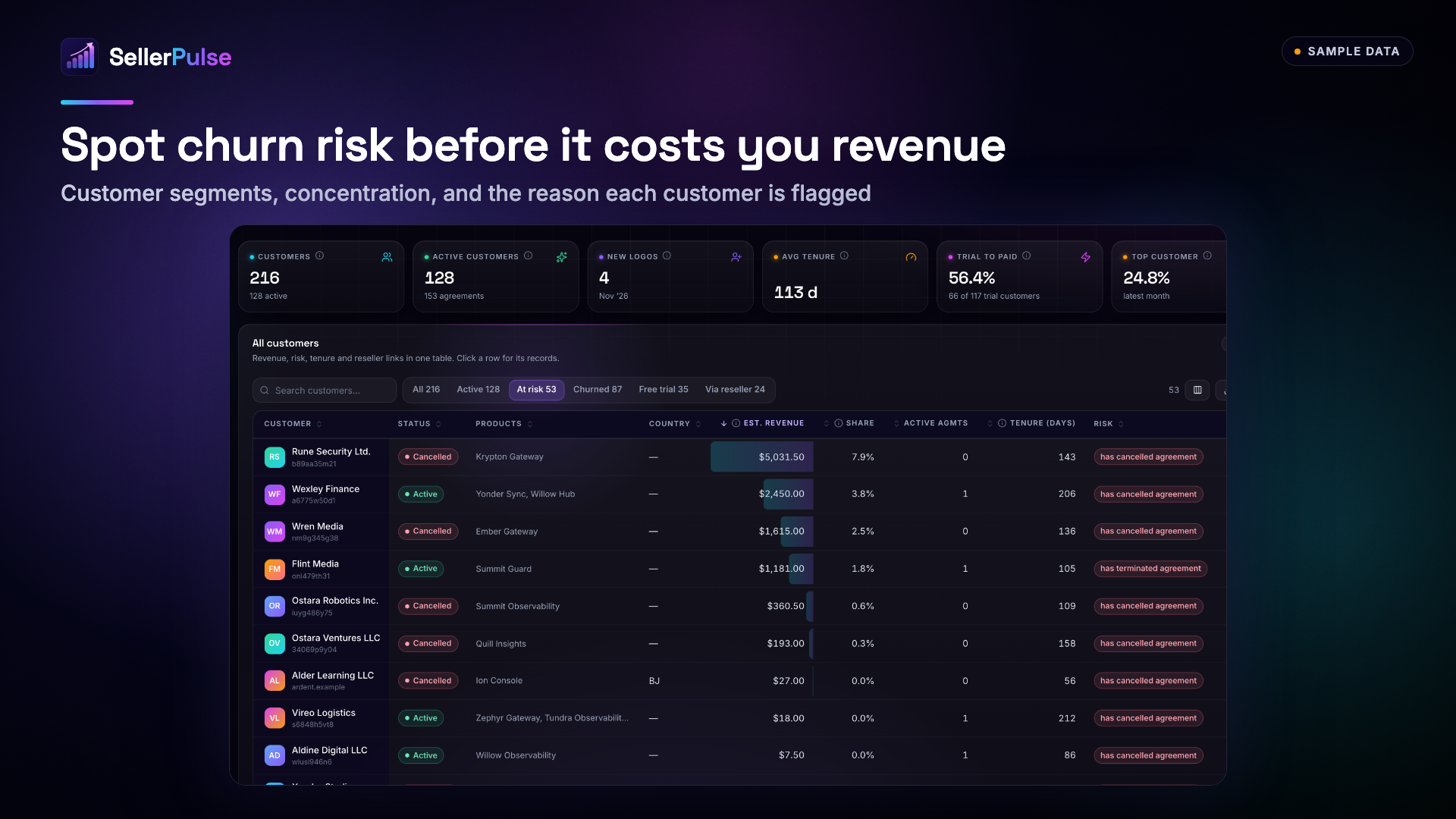
Customers: churn risk and concentration
Image
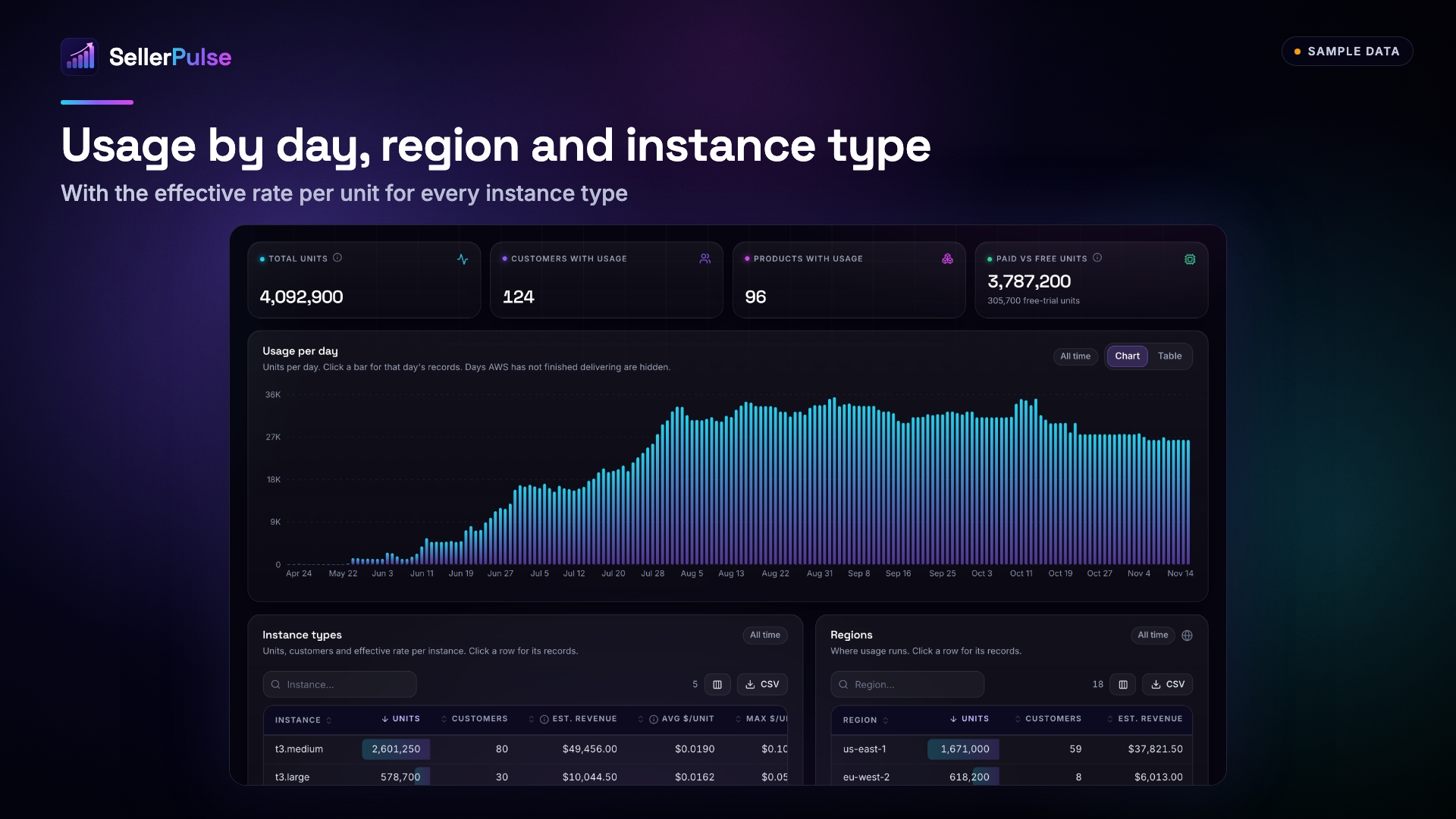
Usage by day, region and instance type
Image
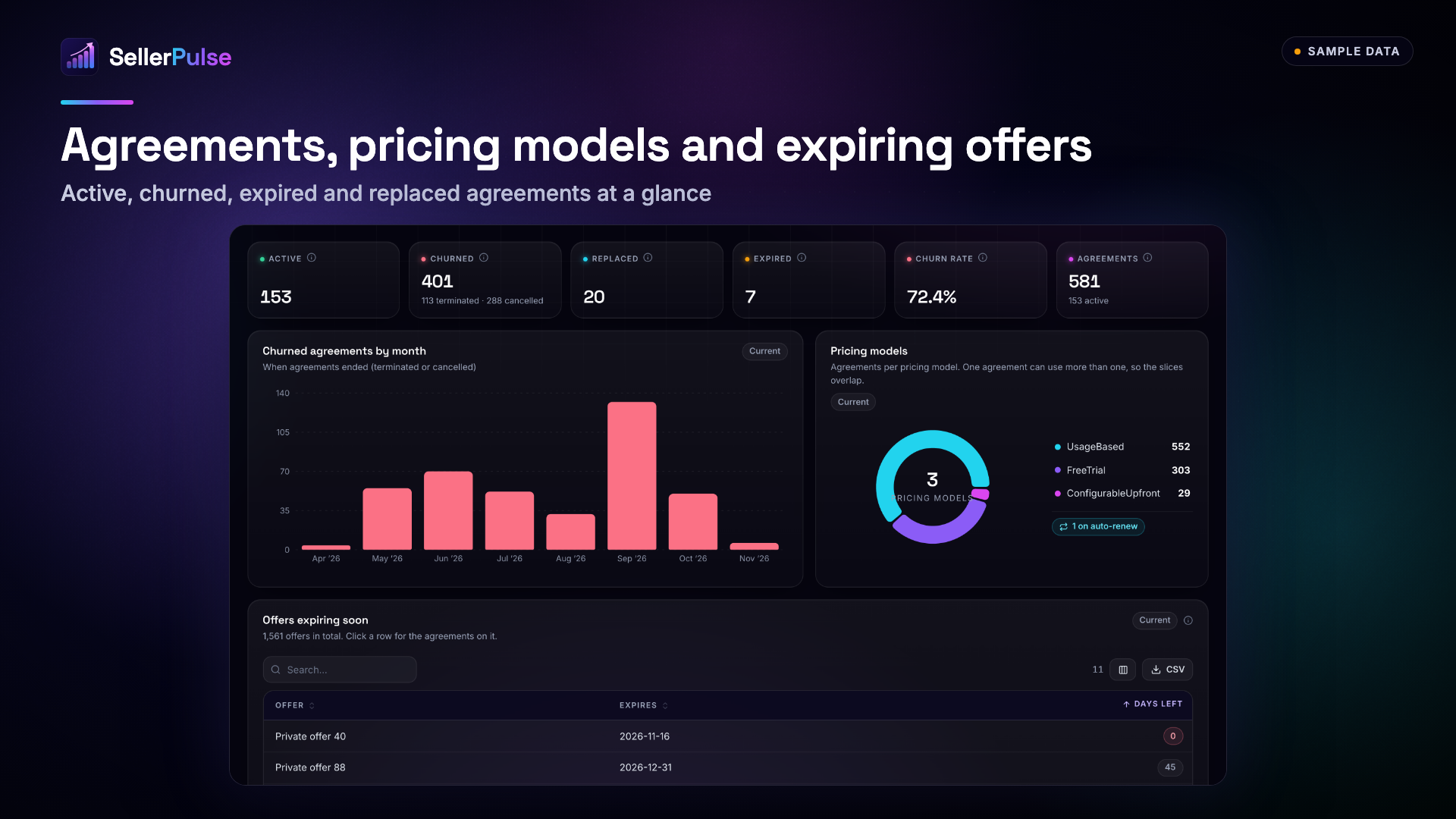
Contracts: agreements, pricing models and offers
Image
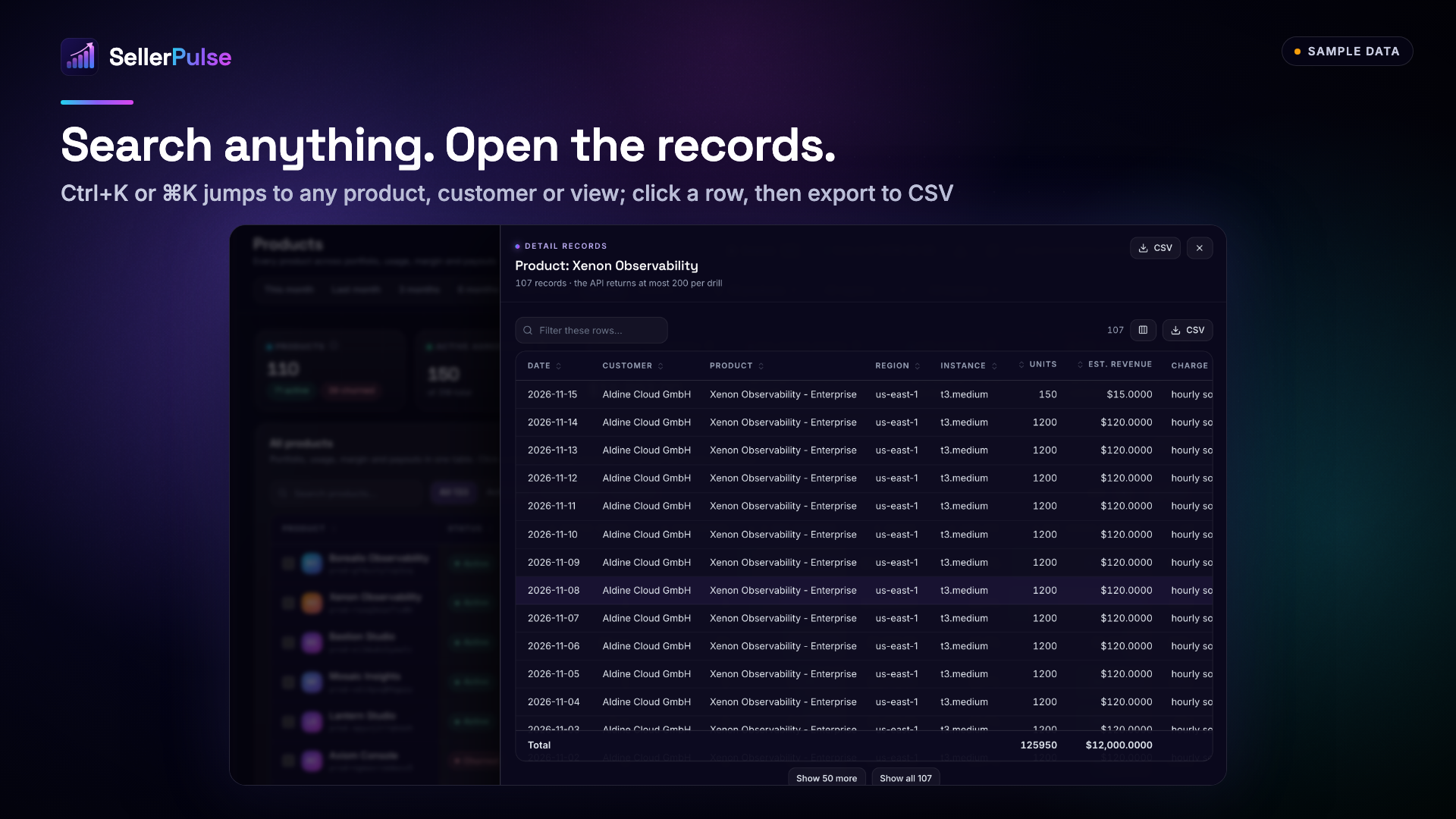
Search anything and open the records
Image
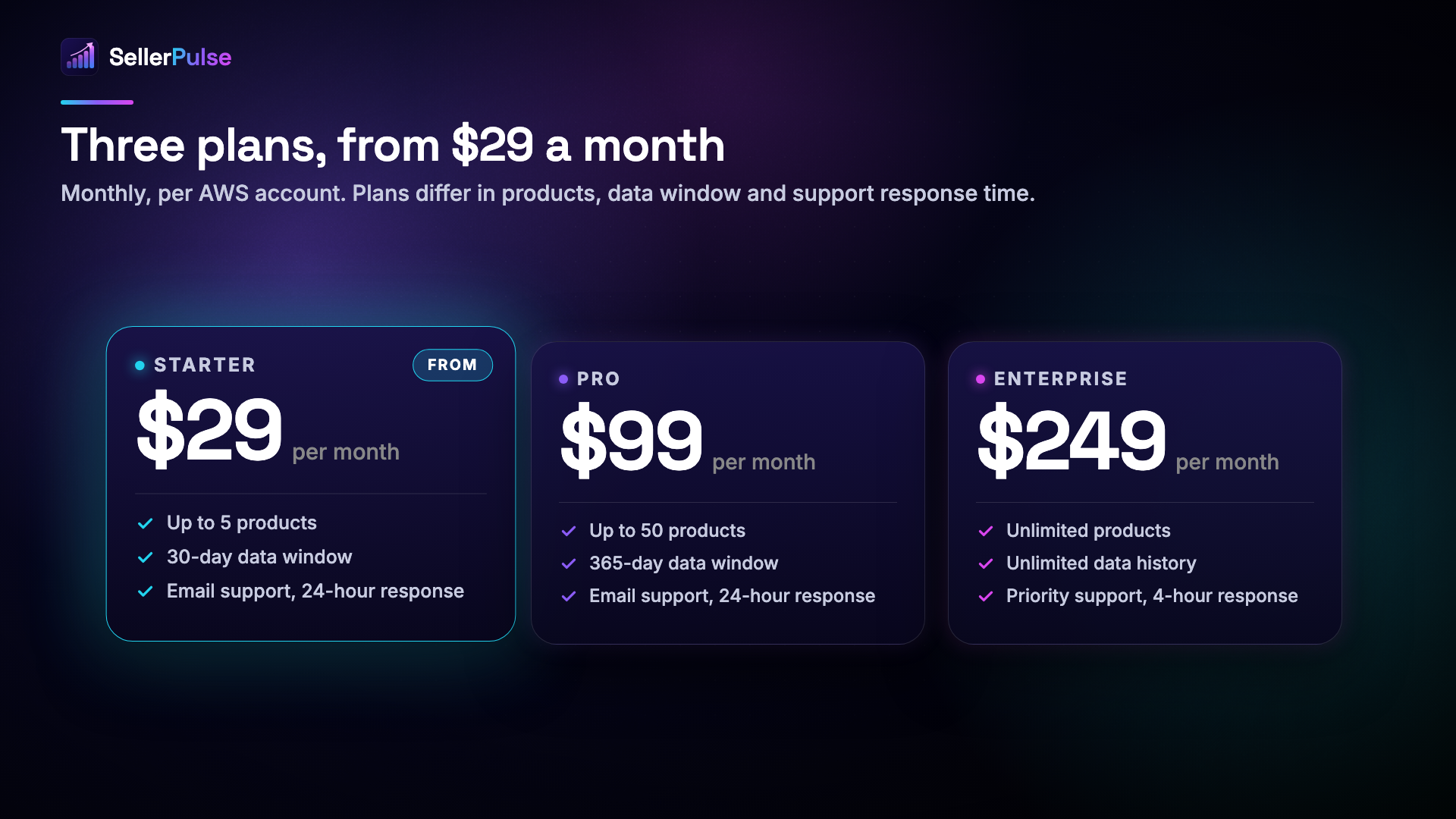
Plans: Starter $29, Pro $99, Enterprise $249
Image
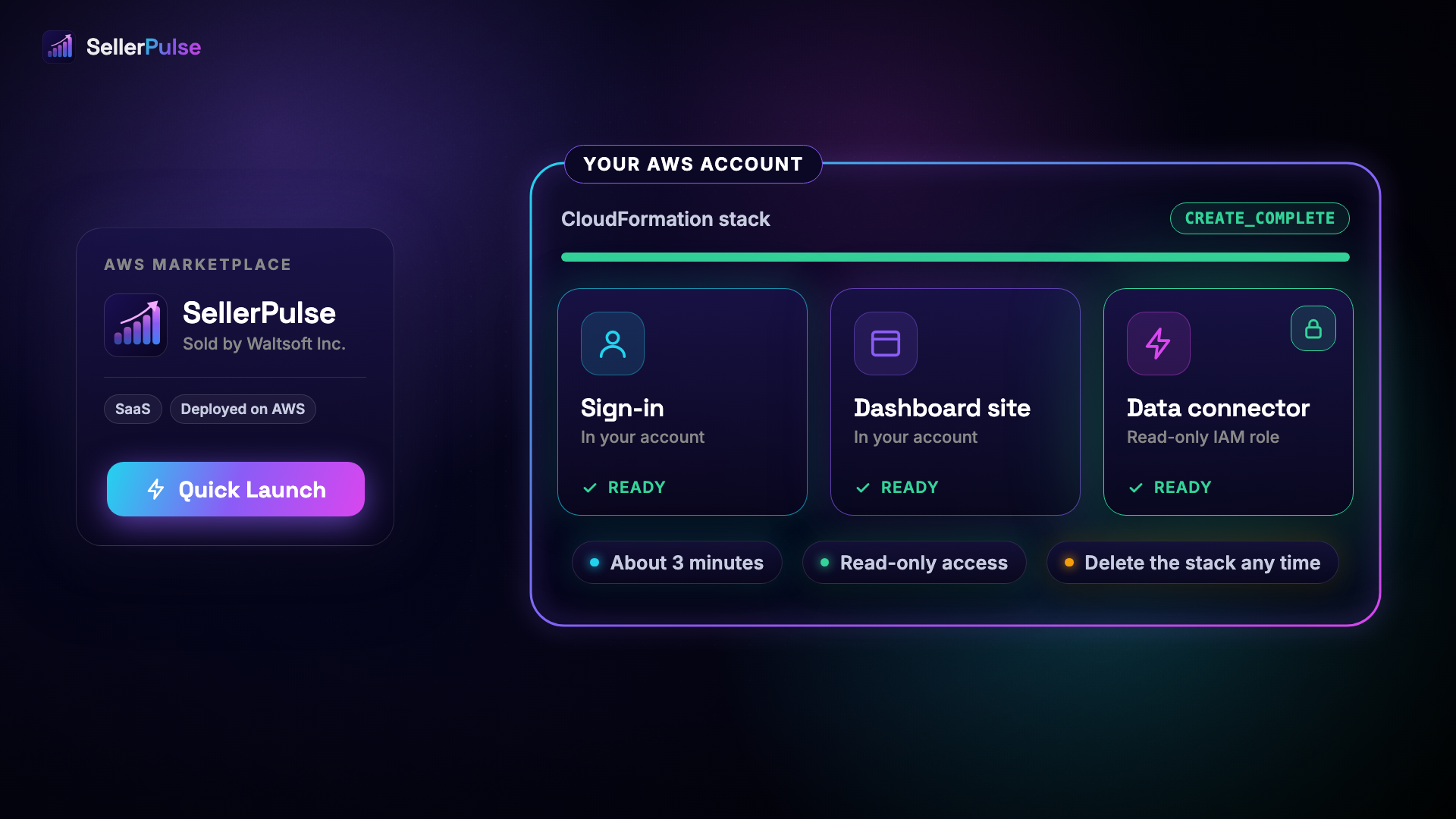
Deploy into your own AWS account in about 3 minutes

Video
SellerPulse iOS App Live Walkthrough
What is SellerPulse?
SellerPulse is a revenue, payout, churn and tax analytics dashboard for AWS Marketplace sellers. It brings your seller reports together in one fast dashboard and calculates what the seller portal does not: MRR, ARR, ARPU, customer concentration and churn risk. It deploys into your own AWS account with one-click CloudFormation (Quick Launch).
Who is it for?
Independent software vendors (ISVs), consulting partners and revenue or finance teams that sell on AWS Marketplace and want finance-grade revenue visibility, faster payout reconciliation and early warning on churn.
What can I track with SellerPulse?
Revenue and cash
- Revenue waterfall from gross revenue to seller net: refunds, AWS listing fee and AWS tax share, with bad debt tracked alongside
- Money flow from invoiced to collected to disbursed, with every bank payout, its reference and bank trace
- Wire reconciliation: the released share less the AWS share equals the bank wire, and any unexplained difference is shown, never hidden
Customers and growth
- MRR, ARR run-rate, ARPU and paying customers, plus new logos by month
- Churn risk worklist with revenue at risk, free-trial to paid conversion and a customer concentration warning
- Reseller and payer relationships, plus offers expiring soon
Products, usage and tax
- One sortable products table with usage, margin, payouts and agreements for every product
- Usage by day, region and instance type with the effective rate per unit
- Tax by country and by jurisdiction level (country, state, county, city and district)
- Agreement lifecycle: active, churned, expired and replaced, with the pricing model mix
How do analysts use it?
- Six views: Overview, Revenue and cash, Products, Customers, Usage and Contracts
- Command palette (Ctrl+K or Cmd+K) to jump to any product, customer or view
- Filter the whole dashboard by product, customer, region or instance type
- Click any row or chart to open its records, then export the table to CSV
- iOS companion app for checking revenue on the go: https://apps.apple.com/ca/app/sellerpulse/id6786930220
How does it work?
- Subscribe on AWS Marketplace. AWS then opens the SellerPulse setup page, where you choose your plan (Starter, Pro or Enterprise) and get your license key. Then launch the one-click CloudFormation stack. It creates your own sign-in, dashboard site and data connector in your AWS account.
- The connector reads your seller data feeds with a read-only, least-privilege IAM role that the stack creates in your account. Delete the stack at any time to end that access.
- Your raw seller reports are processed in memory to compute your metrics and are not stored by Waltsoft. Data is encrypted in transit.
- Setup takes about 3 minutes. After you enable data delivery in AWS Marketplace, AWS needs about 24 hours to deliver your first data, so allow that long for the dashboard to fill.
- The stack runs in your AWS account, so the AWS services it uses are billed to your account at AWS rates, in addition to your SellerPulse plan.
- To stop paying, cancel your subscription in AWS Marketplace under Manage subscriptions. Deleting the stack ends its access to your seller data but does not cancel the subscription.
Pricing (monthly, per AWS account)
- Starter, $29: up to 5 products, 30-day data window, email support with a 24-hour response
- Pro, $99: up to 50 products, 365-day data window, email support with a 24-hour response
- Enterprise, $249: unlimited products, unlimited data history, priority support with a 4-hour response
AWS Marketplace lists these three plans as usage rates, and each unit is one month of one plan. You choose your plan on the SellerPulse setup page right after you subscribe, and you are billed for that one plan only. Starter is selected until you choose another. You can change your plan on that page at any time. On the 1st of each month SellerPulse sends AWS one charge for the plan saved at that time.
Support
Email support@waltsoft.net .
Highlights
- MRR, ARR, ARPU, churn risk and 30+ metrics in one dashboard, beyond what the AWS Marketplace seller portal reports
- Follow every payout from invoice to collection to bank wire, by product, country and agreement, with any unexplained difference shown
- Deploys into your own AWS account with one-click CloudFormation and read-only access to your seller data that you can revoke at any time
Details
Sold by
Delivery method
Deployed on AWS
Features and programs
Financing for AWS Marketplace purchases
AWS Marketplace now accepts line of credit payments through the PNC Vendor Finance program. This program is available to select AWS customers in the US, excluding NV, NC, ND, TN, & VT.

Quick Launch
Leverage AWS CloudFormation templates to reduce the time and resources required to configure, deploy, and launch your software.
Pricing
Pricing is based on actual usage, with charges varying according to how much you consume. Subscriptions have no end date and may be canceled any time.
Additional AWS infrastructure costs may apply. Use the AWS Pricing Calculator to estimate your infrastructure costs.
Dimension | Description | Cost/unit |
|---|---|---|
SellerPulse Starter | Up to 5 products, 30-day data. Choose one plan after subscribing. | $29.00 |
SellerPulse Pro | Up to 50 products, 365-day data. Choose one plan after subscribing. | $99.00 |
SellerPulse Enterprise | Unlimited products and history. Choose one plan after subscribing. | $249.00 |
Dimensions summary
You pick one of three plans, billed per AWS account. All three bill as monthly usage rates. SellerPulse Starter covers up to 5 products with a 30-day data window. SellerPulse Pro covers up to 50 products with a 365-day window. SellerPulse Enterprise covers unlimited products and full data history. The plans scale by how many products you track and how far back your data reaches. After subscribing, you choose one plan on the setup page and are billed for that single plan. You can change plans at any time.
Top-of-mind questions for buyers
A product is one of your listings that sells on AWS Marketplace. SellerPulse tracks usage, margin, payouts and agreements for each. Starter counts up to 5 products, Pro up to 50, and Enterprise has no product cap.
Change your plan on the SellerPulse setup page at any time. Moving to a plan with a higher product count takes effect when you save it. On the 1st of each month, SellerPulse sends AWS one charge for the plan saved at that time.
The plan price is the only SellerPulse charge. The connector stack runs in your own AWS account, so the AWS services it uses (Lambda, API Gateway, CloudFront, Cognito and S3) are billed to your account at AWS rates, in addition to your plan.
sellerpulse.waltsoft.net
Helpful?
Vendor refund policy
No refunds. All sales are final.

Legal
Vendor terms and conditions
Upon subscribing to this product, you must acknowledge and agree to the terms and conditions outlined in the vendor's End User License Agreement (EULA) .
Content disclaimer
Vendors are responsible for their product descriptions and other product content. AWS does not warrant that vendors' product descriptions or other product content are accurate, complete, reliable, current, or error-free.
Delivery details
Software as a Service (SaaS)
SaaS delivers cloud-based software applications directly to customers over the internet. You can access these applications through a subscription model. You will pay recurring monthly usage fees through your AWS bill, while AWS handles deployment and infrastructure management, ensuring scalability, reliability, and seamless integration with other AWS services.
Additional details
Usage instructions
Manual Setup (without Quick Launch)
Prerequisites
- Subscribe to SellerPulse on AWS Marketplace
- Click "Set up your account". The SellerPulse setup page opens: choose your plan (Starter, Pro or Enterprise) and copy your license key. You are billed for that one plan only, and you can change it on that page at any time
- Turn on seller data feeds: in the AWS Marketplace Management Portal, open Set up customer data storage and follow the AWS data feeds guide
- Note the name of the S3 bucket you chose for the feeds
- AWS needs about 24 hours to deliver your first data. You can deploy the connector stack in the meantime: the dashboard fills when the data arrives
Deploy the Connector Stack
- Open CloudFormation in your AWS account
- Create stack > Upload template: <https://waltsoft-marketplace-assets.s3.us-east-1.amazonaws.com/sellerpulse/buyer-stack.yaml>
- Fill in parameters:
- LicenseKey: Your license key from the onboarding page
- DataFeedBucket: Your data feed S3 bucket name
- DataFeedKmsKeyArn: The ARN of the customer-managed KMS key that encrypts your feed bucket. AWS's data feed template creates one: copy its ARN from the Resources tab of that template's stack. If your bucket does not use a customer-managed KMS key, leave this blank
- AdminEmail: Email for your dashboard login
- Check "I acknowledge that AWS CloudFormation might create IAM resources"
- Create stack (takes ~3 minutes)
Access Your Dashboard
- Open the DashboardUrl from the stack Outputs tab
- Sign in with your AdminEmail and the TempPassword from Outputs
- Change your password on first login
Verify Connection
Run: curl "https://sellerpulse.waltsoft.net/api/verify?license=YOUR_LICENSE_KEY"
dataConnected: true confirms your feeds are flowing.
Support
Email support@waltsoft.net with your AWS account ID and issue description.
Resources
Vendor resources
Support
Vendor support
SellerPulse support is available via email at support@waltsoft.net . We respond within 24 hours on business days. Enterprise tier customers receive priority support with a 4-hour response time.
AWS infrastructure support
AWS Support is a one-on-one, fast-response support channel that is staffed 24x7x365 with experienced and technical support engineers. The service helps customers of all sizes and technical abilities to successfully utilize the products and features provided by Amazon Web Services.
Similar products

ZoomInfo (NASDAQ: GTM), the all-in-one AI GTM platform, enables sales, marketing, and customer success teams to execute their go-to-market strategy with confidence. Powered by the industry's most comprehensive B2B data, including more than 100 million companies, 500 million contacts, and billions of signals, ZoomInfo delivers the intelligence, automation, and integrations that modern revenue teams need to identify, engage, and convert their best buyers.

AgentAudit is an x402 commerce intelligence API for AI agent builders and payment teams: it indexes x402 settlements on Base paid to every wallet a CDP Bazaar listing names as its payTo, and returns totals, trending services, the latest settlements, any seller's or buyer's history and receipt verification. Use it over REST, MCP or A2A.
939K monthly downloads. 5-star sentiment scoring for English, German, French, Spanish, Italian, and Dutch. For global brand monitoring and CX analytics.

This is a repackaged open source software product wherein additional charges apply for a pre-hardened AMI with automated startup. Self-hosted error tracking and performance monitoring.
Customer reviews
No customer reviews yet
Be the first to review this product . We've partnered with PeerSpot to gather customer feedback. You can share your experience by writing or recording a review, or scheduling a call with a PeerSpot analyst.