
Sold by: AIERT Ltd
Browser-based Microsoft 365 mailbox cleanup for IT teams. Bulk delete, unsubscribe, and reclaim storage across all company mailboxes - licensed per domain, not per user.
Overview
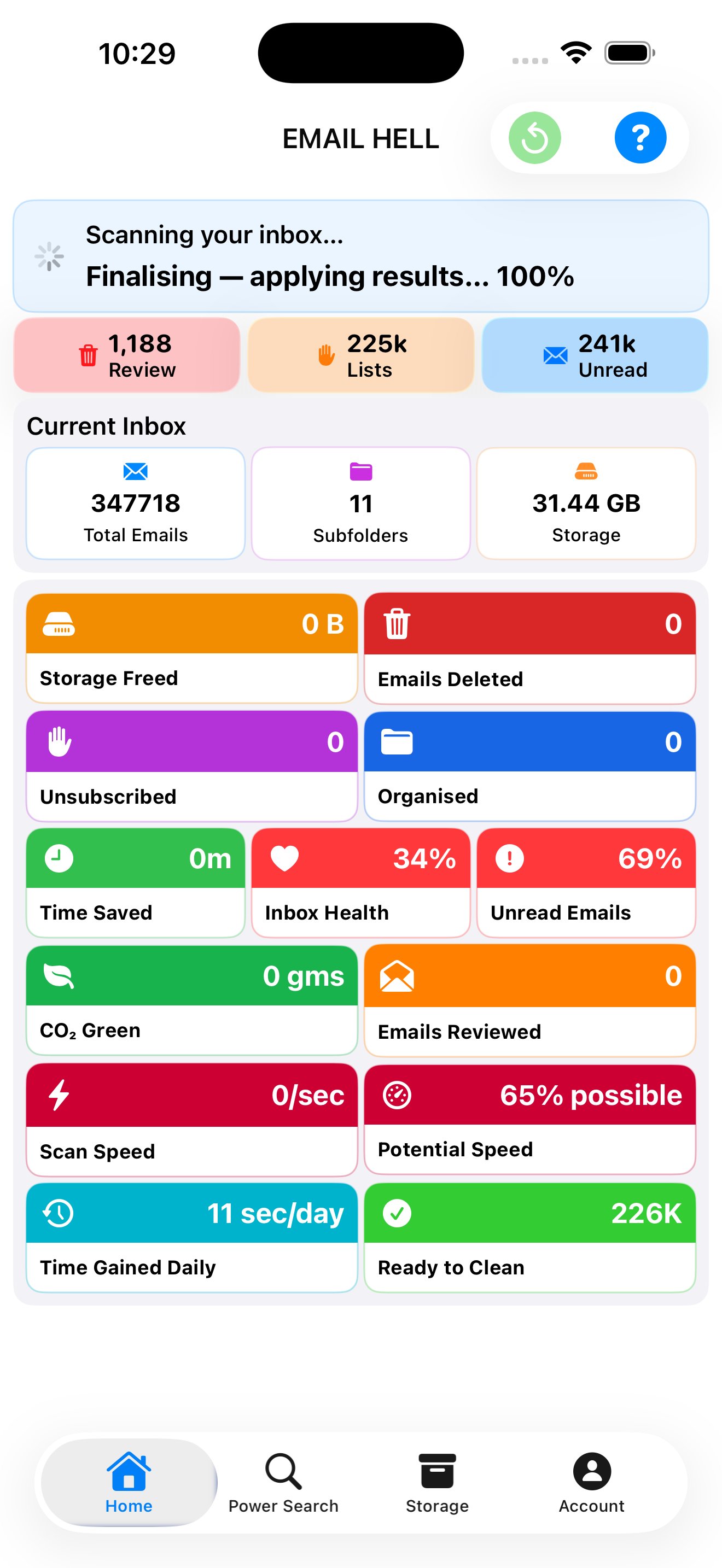
Image
Dashboard
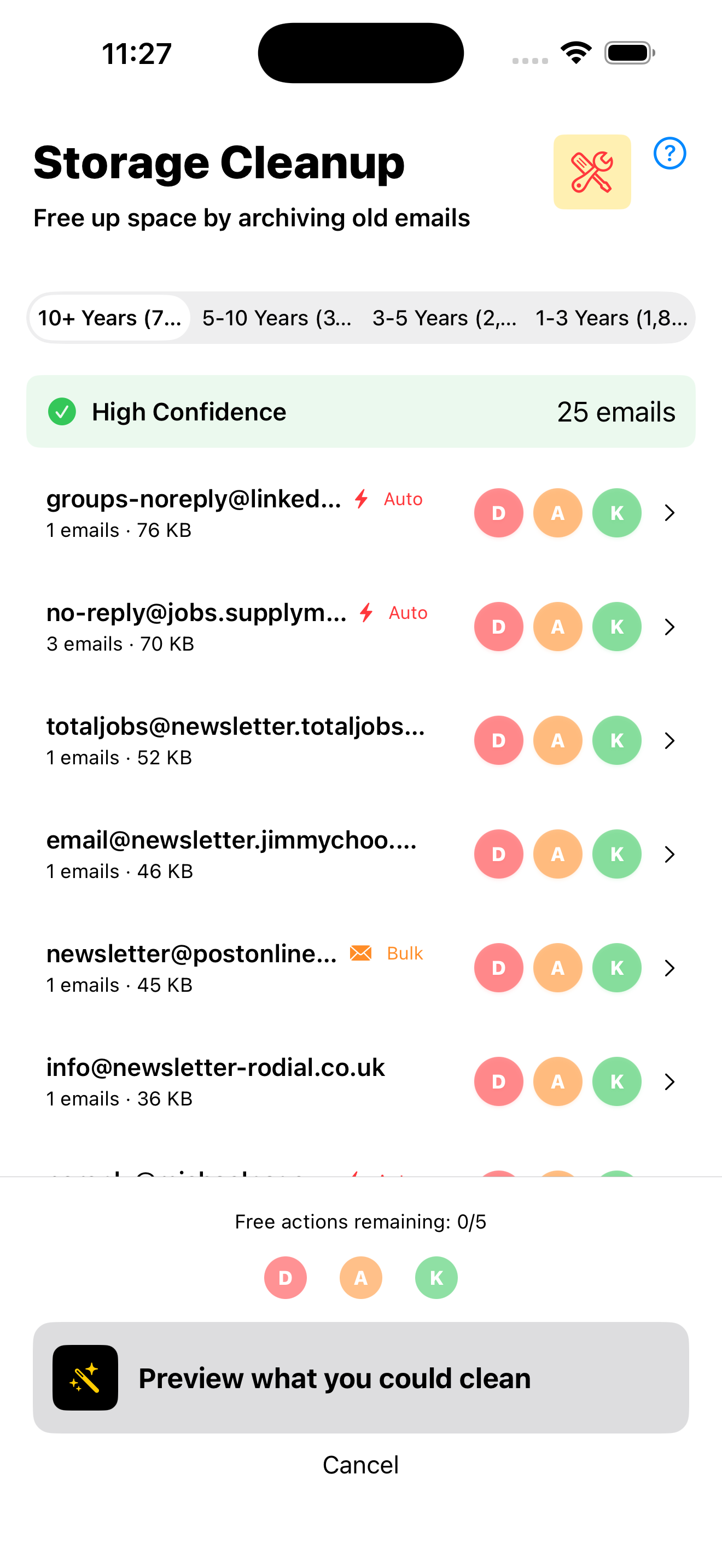
Image
Storage Cleanup
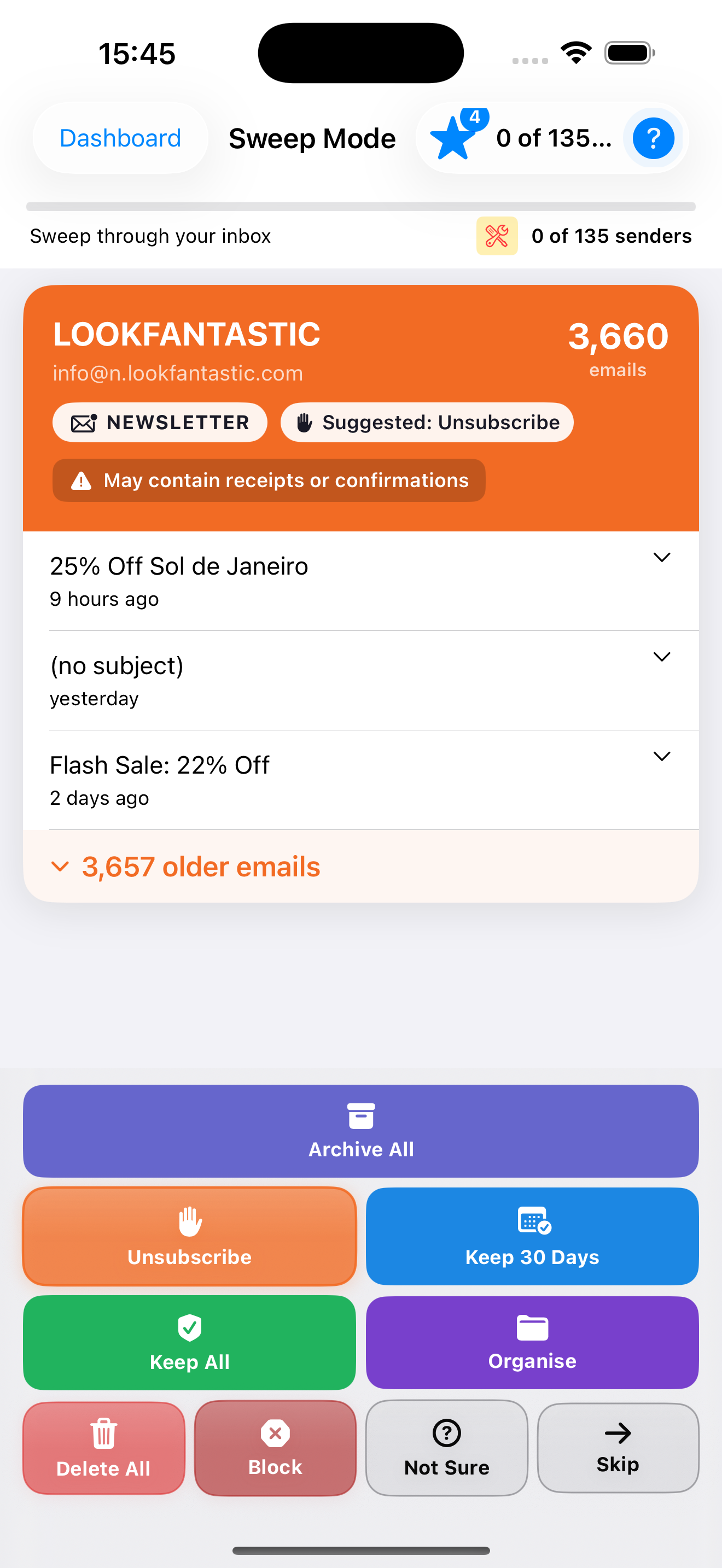
Image
Sweep
MailBroom for Business solves three recurring Microsoft 365 admin problems: rising mailbox storage costs, IT time lost to "mailbox full" helpdesk tickets, and leaver mailboxes that keep costing money and posing a security risk after an employee has left.
Core Features
Smart Sweep - Bulk-deletes or unsubscribes from newsletters and unused mail, grouped and ranked by sender volume. Act on one sender at a time or clean in bulk across personal, shared, and delegated mailboxes.
Storage Cleanup - Finds what is actually consuming space, browsable by age bracket or by sender domain, with a confidence rating on how safe each item is to clear. IT teams can target leaver mailboxes and reclaim storage without guesswork.
Power Search - Finds and bulk-acts on specific mail across folders, querying Microsoft Graph's own server-side search index directly for fast, accurate results.
How Licensing Works
MailBroom is licensed per organisation, not per person. Once your company has an active licence, every employee on the company's Microsoft 365 domain can sign in and get access automatically - no per-user invites to manage, no IT admin setup required. Shared and delegated mailboxes (info@, sales@, a colleague's mailbox) are included at no extra cost, and can optionally be enabled tenant-wide by an admin.
Prerequisites and Compatibility
- Requires Microsoft 365 with Exchange Online (Business Basic, Business Standard, E3, E5, or equivalent plans)
- Works in any modern browser - no desktop software or browser extension to install
- Operates within your existing Exchange Online retention policies and legal holds - items under legal hold are skipped, not deleted
- Connects exclusively via scoped, revocable Microsoft Graph API tokens; MailBroom never stores Microsoft account passwords
Security and Data Handling
MailBroom processes mailbox data in-session via the Microsoft Graph API. No email content or metadata is copied to or stored on MailBroom servers. All connections use TLS encryption in transit. Access tokens are scoped to the minimum permissions required and can be revoked by your Entra ID administrator at any time.
About MailBroom
MailBroom is built and supported by a dedicated engineering team focused exclusively on Microsoft 365 mailbox management. The product connects via Microsoft Graph API with minimal, revocable permissions and is designed with enterprise IT security requirements in mind.
Getting Started
- Purchase a licence for your company domain
- Employees sign in individually at business.mailbroom.app using their existing Microsoft credentials - no IT admin setup required
- Select any mailbox they have access to (personal, shared, or delegated) and begin cleaning
Deployment is typically complete in under five minutes with no IT infrastructure changes required. A Microsoft 365 admin can optionally enable shared and delegated mailbox access tenant-wide for the whole organisation.
Free 30-Day Evaluation
Start a full-featured evaluation at business.mailbroom.app - no payment details required. Every feature is available during the trial period so your team can measure real storage savings before committing. Visit business.mailbroom.app to begin your 30-day evaluation today.
Highlights
- Reduces Exchange Online storage costs and eliminates 'mailbox full' helpdesk tickets. Smart Sweep groups mail by sender volume for bulk-delete or unsubscribe across the entire organisation. Storage Cleanup shows exactly what consumes space - browsable by age or sender domain - with a confidence rating on deletion safety. Ideal for reclaiming storage from leaver mailboxes after offboarding.
- Zero-install, browser-based deployment that goes live in under five minutes. Licensed per organisation, not per user - every employee on the domain signs in with existing Microsoft credentials and gets immediate access via SSO. Supports personal, shared, and delegated mailboxes from one interface with no desktop software, browser extensions, or per-user admin setup required.
- Processes all data in-session via scoped, revocable Microsoft Graph API tokens - MailBroom never stores passwords and never copies email content to its own servers. All connections use TLS encryption. Operates within your existing Exchange Online retention policies and legal holds - items under hold are skipped, not deleted - so compliance posture remains intact throughout cleanup.
Details
Sold by
Categories
Delivery method
Deployed on AWS
New
Introducing multi-product solutions
You can now purchase comprehensive solutions tailored to use cases and industries.

Features and programs
Financing for AWS Marketplace purchases
AWS Marketplace now accepts line of credit payments through the PNC Vendor Finance program. This program is available to select AWS customers in the US, excluding NV, NC, ND, TN, & VT.

Pricing
Pricing is based on the duration and terms of your contract with the vendor. This entitles you to a specified quantity of use for the contract duration. If you choose not to renew or replace your contract before it ends, access to these entitlements will expire.
Additional AWS infrastructure costs may apply. Use the AWS Pricing Calculator to estimate your infrastructure costs.
Dimension | Description | Cost/month |
|---|---|---|
MailBroom for Business: 1-5 Users | MailBroom for Business licence for a company domain with 1-5 employees. Includes Smart Sweep, Storage Cleanup, and Power Search across the whole organisation's Microsoft 365/Exchange Online mailboxes, including shared and delegated mailboxes. | $32.00 |
MailBroom for Business: 6-10 Users | MailBroom for Business licence for a company domain with 6-10 employees. Includes Smart Sweep, Storage Cleanup, and Power Search across the whole organisation's Microsoft 365/Exchange Online mailboxes, including shared and delegated mailboxes. | $59.00 |
MailBroom for Business: 11-25 Users | MailBroom for Business licence for a company domain with 11-25 employees. Includes Smart Sweep, Storage Cleanup, and Power Search across the whole organisation's Microsoft 365/Exchange Online mailboxes, including shared and delegated mailboxes. | $139.00 |
MailBroom for Business: 26-50 Users | MailBroom for Business licence for a company domain with 26-50 employees. Includes Smart Sweep, Storage Cleanup, and Power Search across the whole organisation's Microsoft 365/Exchange Online mailboxes, including shared and delegated mailboxes. | $269.00 |
MailBroom for Business: 51-100 Users | MailBroom for Business licence for a company domain with 51-100 employees. Includes Smart Sweep, Storage Cleanup, and Power Search across the whole organisation's Microsoft 365/Exchange Online mailboxes, including shared and delegated mailboxes. | $469.00 |
Vendor refund policy
Since MailBroom offers a free 30-day evaluation before any purchase, we don't require a further trial period on top of that. If you believe you were charged in error, or experience a critical issue we're unable to resolve, contact support@aiert.co.uk within 14 days of the charge and we'll review your request for a full or partial refund at our discretion. Approved refunds are processed within 5 business days.

Legal
Vendor terms and conditions
Upon subscribing to this product, you must acknowledge and agree to the terms and conditions outlined in the vendor's End User License Agreement (EULA) .
Content disclaimer
Vendors are responsible for their product descriptions and other product content. AWS does not warrant that vendors' product descriptions or other product content are accurate, complete, reliable, current, or error-free.
Delivery details
Software as a Service (SaaS)
SaaS delivers cloud-based software applications directly to customers over the internet. You can access these applications through a subscription model. You will pay recurring monthly usage fees through your AWS bill, while AWS handles deployment and infrastructure management, ensuring scalability, reliability, and seamless integration with other AWS services.
Resources
Vendor resources
Support
Vendor support
Support Channels
Email support is available at support@aiert.co.uk . All enquiries are handled directly by the engineering team building the product, typically within one business day.
Note: There is no phone support at this time.
Help Centre
A full self-service help centre is available at https://business.mailbroom.app/support covering:
- Sign-in and Microsoft Entra ID configuration
- Smart Sweep, Storage Cleanup, and Power Search usage
- Shared and delegated mailbox setup
- Billing and subscription management
- Security, permissions, and data handling
Onboarding
Getting started requires two steps:
- Your company purchases a licence
- Employees sign in individually at business.mailbroom.app with their existing Microsoft credentials
No software installation and no IT admin setup is required for individual employees to get access. Deployment is typically complete in under five minutes. A Microsoft 365 admin can optionally enable shared and delegated mailbox access tenant-wide.
Refunds and Cancellation
For refund requests or subscription changes, contact support@aiert.co.uk . The team will respond within one business day.
AWS infrastructure support
AWS Support is a one-on-one, fast-response support channel that is staffed 24x7x365 with experienced and technical support engineers. The service helps customers of all sizes and technical abilities to successfully utilize the products and features provided by Amazon Web Services.
Similar products

Inbox Zero is an open-source AI email assistant for Gmail and Outlook that helps you reach inbox zero fast. It automatically organizes your inbox, drafts replies in your voice, blocks cold emails, and bulk unsubscribes from clutter, so you spend less time on email and never miss what matters.

M365 Manager Plus is a one-stop Office 365 reporting, auditing, monitoring, management, and alerting solution. It also fulfills your security and compliance needs.

Clarity Business Solutions offers professional services as a partner of MongoDB with certified MongoDB Subject Matter Experts. We provide low-risk application modernization tailored to the unique needs of public sector clients, including those operating in secure, air-gapped environments. Clarity helps agencies modernize legacy systems, ensure cybersecurity compliance, and optimize performance. Services include application assessments, secure architecture design, devops engineer and query tuning. Together, Clarity and MongoDB enable scalable, secure, and efficient cloud migrations and modern data platform adoption in government environments.

Automatically backs up all your Exchange Online email, OneDrive for Business, OneNote, SharePoint, Teams and Groups data to the cloud.
Customer reviews
No customer reviews yet
Be the first to review this product . We've partnered with PeerSpot to gather customer feedback. You can share your experience by writing or recording a review, or scheduling a call with a PeerSpot analyst.