
Sold by: Cloud Infrastructure Services
Deployed on AWS
AWS Free Tier
This product has charges associated with it for AWS support & maintenance. Jenkins Continuous Integration (CI) automation Server. 1500+ Plugins Available. Build, Test & Deploy on AWS
Overview
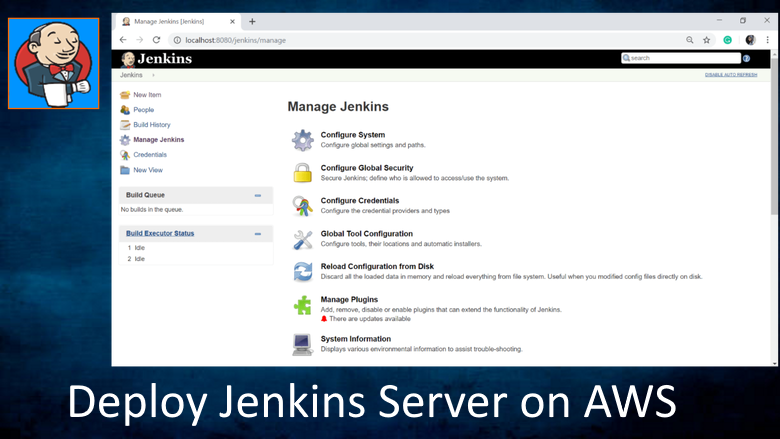
Jenkins on Ubuntu 24.04
This product has charges associated with it for AWS support & maintenance. Jenkins is a continuous Integration (CI) tool, Jenkins allows seamless, ongoing development, testing, and deployment of newly created code. Continuous Integration is a process wherein developers commit changes to source code from a shared repository, and all the changes to the source code are built continuously. This can occur multiple times daily. Each commit is continuously monitored by the CI Server, increasing the efficiency of code builds and verification. This removes the testers burdens, permitting quicker integration and fewer wasted resources.
Install any of the available Jenkins plugins to help with your pipelines for example Jira, Docker, Slack, Maven, jUnit, Mailer, Gradle etc
Jenkins supports the complete development life cycle of software from building, testing, documenting the software, deploying, and other stages of the software development life cycle. Great alternative to GitLab, Bamboo, CircleCI, TeamCity, Travis CI, Bitrise, Bitbucket, Buddy etc
Jenkins Server Features:
- Software build using build systems such as Gradle, Maven, and more.
- Web Portal Administration
- Automation testing using test frameworks such as Nose2, PyTest, Robot, Selenium, and more.
- Create unlimited pipelines
- Schedule Jobs, or Trigger Builds
- Execute test scripts (using Windows terminal, Linux shell, etc.)
- Achieve test results and perform post actions such as printing test reports, and more.
- Execute test scenarios against different input combinations for obtaining improved test coverage.
- Scalable
- Continuous Integration (CI) where the artifacts are automatically created and tested. This aids in identification of issues in the product at an early stage of development.
- Install any of the available Jenkin plugins 1500+
- Integrate with Azure DevOps, Github and other systems
- It supports SCM tools including AccuRev, CVS, Subversion, Git, Mercurial, Perforce, Clearcase and RTC, and can execute Apache Ant and Apache Maven based projects.
Disclaimer: Jenkins® is a registered trademark of LF Charities Inc and is licensed under MIT License License. No warrantee of any kind, express or implied, is included with this software. Use at your risk, responsibility for damages (if any) to anyone resulting from the use of this software rest entirely with the user. The author is not responsible for any damage that its use could cause.
Highlights
- Install any of the available Jenkins plugins to help with your pipelines for example Jira, Docker, Slack, Maven, jUnit, Mailer, Gradle etc
- Jenkins supports the complete development life cycle of software from building, testing, documenting the software, deploying, and other stages of the software development life cycle.
- Great open source CI/CD alternative to GitLab, Bamboo, CircleCI, TeamCity, Travis CI, Bitrise, Bitbucket, Buddy etc
Details
Delivery method
Delivery option
64-bit (x86) Amazon Machine Image (AMI)
Latest version
Operating system
Ubuntu 24.04 LTS
Deployed on AWS
New
Introducing multi-product solutions
You can now purchase comprehensive solutions tailored to use cases and industries.

Features and programs
Financing for AWS Marketplace purchases
AWS Marketplace now accepts line of credit payments through the PNC Vendor Finance program. This program is available to select AWS customers in the US, excluding NV, NC, ND, TN, & VT.

Pricing
Pricing is based on actual usage, with charges varying according to how much you consume. Subscriptions have no end date and may be canceled any time.
Additional AWS infrastructure costs may apply. Use the AWS Pricing Calculator to estimate your infrastructure costs.
If you are an AWS Free Tier customer with a free plan, you are eligible to subscribe to this offer. You can use free credits to cover the cost of eligible AWS infrastructure. See AWS Free Tier for more details. If you created an AWS account before July 15th, 2025, and qualify for the Legacy AWS Free Tier, Amazon EC2 charges for Micro instances are free for up to 750 hours per month. See Legacy AWS Free Tier for more details.
Dimension | Cost/hour |
|---|---|
t2.medium Recommended | $0.03 |
t2.micro | $0.03 |
t3.micro | $0.03 |
t2.nano | $0.03 |
r5d.24xlarge | $0.03 |
m3.xlarge | $0.03 |
r4.16xlarge | $0.03 |
r5a.2xlarge | $0.03 |
t3a.2xlarge | $0.03 |
m5.xlarge | $0.03 |
Dimensions summary
You pay by the hour for Jenkins running on Ubuntu 24.04. The software rate is the same across all options; your cost changes based on which AWS EC2 instance type you pick. Each listed dimension maps to a specific instance size, from small general-purpose types to large memory-, compute-, storage-, and GPU-focused machines. Larger or specialized instances give more CPU, memory, or accelerator capacity and bill at higher hourly rates. You choose the instance that fits your build workload, then pay for the hours it runs. No upfront commitment applies.
Top-of-mind questions for buyers
One unit is one running AWS EC2 instance of the listed type, billed per hour. Each instance type maps to a set amount of CPU, memory, storage, or GPU capacity. You pay for each hour that instance runs, regardless of how many builds it processes.
The software rate meters running time only. A fully stopped instance stops accruing software charges. You may still incur underlying AWS storage fees for the attached disk while the instance is stopped, but that is separate from the hourly software charge.
The software fee stays the same across types. The rate difference reflects the AWS EC2 hardware behind each type. Larger or specialized types (memory, compute, storage, or GPU focused) cost more per hour. Pick the type that matches your build workload's CPU, memory, or accelerator needs.
cloudinfrastructureservices.co.uk
Helpful?
Vendor refund policy
We do not currently support refunds, but you can cancel at any time.

Legal
Vendor terms and conditions
Upon subscribing to this product, you must acknowledge and agree to the terms and conditions outlined in the vendor's End User License Agreement (EULA) .
Content disclaimer
Vendors are responsible for their product descriptions and other product content. AWS does not warrant that vendors' product descriptions or other product content are accurate, complete, reliable, current, or error-free.
Delivery details
64-bit (x86) Amazon Machine Image (AMI)
Amazon Machine Image (AMI)
An AMI is a virtual image that provides the information required to launch an instance. Amazon EC2 (Elastic Compute Cloud) instances are virtual servers on which you can run your applications and workloads, offering varying combinations of CPU, memory, storage, and networking resources. You can launch as many instances from as many different AMIs as you need.
Version release notes
New OS package updates have been installed. Simply run 'sudo apt-get update' to install latest OS updates.
Additional details
Usage instructions
Connect via SSH. Username is: ubuntu
SSH Connection instructions are: https://docs.aws.amazon.com/AWSEC2/latest/UserGuide/AccessingInstancesLinux.html
Once connected, Scroll down to 'Getting Started' on the following URL: https://cloudinfrastructureservices.co.uk/how-to-setup-jenkins-ci-cd-server-on-azureawsgcp/
Resources
Vendor resources
Support
Vendor support
Email support, contact us through our website or leave a comment on our getting started guide
AWS infrastructure support
AWS Support is a one-on-one, fast-response support channel that is staffed 24x7x365 with experienced and technical support engineers. The service helps customers of all sizes and technical abilities to successfully utilize the products and features provided by Amazon Web Services.
Updated weekly
By Cloud Infrastructure Services
By GitLab

By BYNET
Sentiment is AI generated from actual customer reviews on AWS and G2
Functionality
Ease of use
Customer service
Cost effectiveness
Positive reviews
Mixed reviews
Negative reviews
AI generated from product descriptions
Plugin Ecosystem
Support for 1500+ plugins including Jira, Docker, Slack, Maven, jUnit, Mailer, and Gradle for pipeline customization
Build System Support
Compatibility with build systems such as Gradle, Maven, Apache Ant, and Apache Maven-based projects
Source Control Management Integration
Support for SCM tools including Git, GitHub, Azure DevOps, Subversion, Mercurial, Perforce, CVS, AccuRev, Clearcase, and RTC
Automation Testing Frameworks
Integration with automation testing frameworks including Selenium, PyTest, Nose2, and Robot for test execution and validation
Pipeline and Job Management
Capability to create unlimited pipelines with scheduled job execution, triggered builds, and post-action test reporting
Source Code Management
Powerful branching tools and code management capabilities for creating and managing code repositories
CI/CD Pipeline
Advanced continuous integration and continuous deployment with automatic testing, reporting, and release controls
Enterprise Agile Planning
Project planning tools with analytics and insights into team productivity for multi-team usage and scaling organizations
Package Management
Built-in universal package management for creating software supply chains with strict quality standards
AI-Powered Development Assistance
GitLab Duo integration providing code completion, code generation, code explanation, and developer experience enhancements throughout the software development lifecycle
Integrated DevOps Platform
Single application providing project planning, source code management, CI/CD, and monitoring capabilities for the entire software development lifecycle.
Continuous Integration and Continuous Deployment
Automated testing and reporting functionality to maintain quality standards for production code.
Source Code Management
Version control and source code management capabilities integrated within the platform.
Business Performance Visibility
Visibility and insight capabilities into business performance metrics and development operations.
Project Planning and Tracking
Project planning functionality integrated as part of the unified DevOps application.
Standard contract
No
No
Customer reviews
No customer reviews yet
Be the first to review this product . We've partnered with PeerSpot to gather customer feedback. You can share your experience by writing or recording a review, or scheduling a call with a PeerSpot analyst.