Sold by: cloudimg
Deployed on AWS
Free Trial
AWS Free Tier
This product has charges associated with it for seller support. Launch a fully configured GitLab CE DevOps platform in minutes - no manual setup of PostgreSQL, Redis, or nginx required. Backed by 24/7 cloudimg support.
Overview
Image
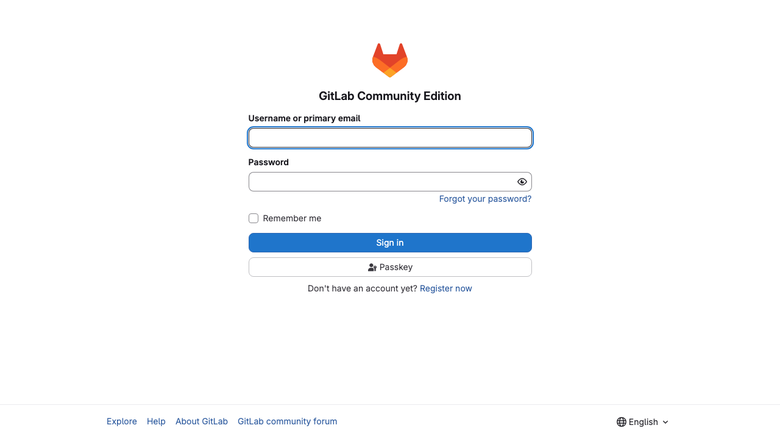
GitLab sign-in page
Image
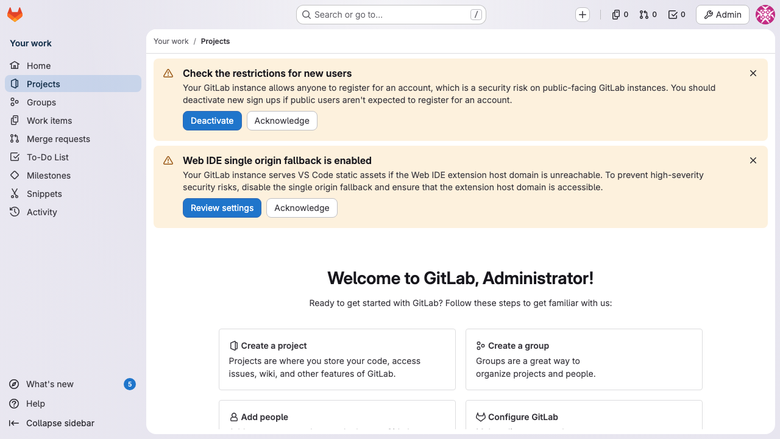
GitLab dashboard
Image
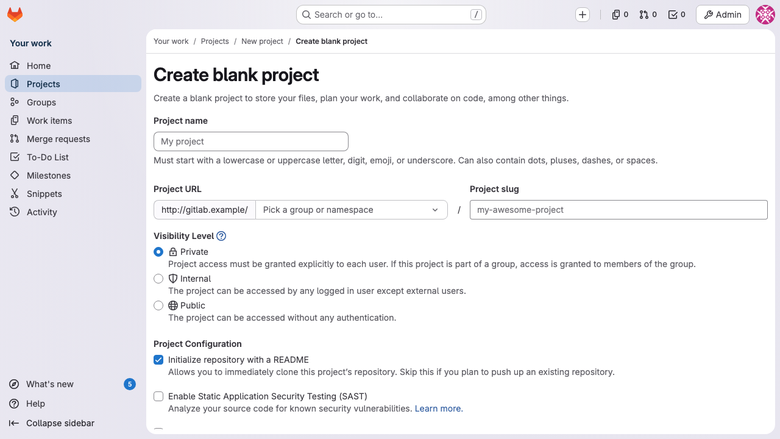
Create new project
Image
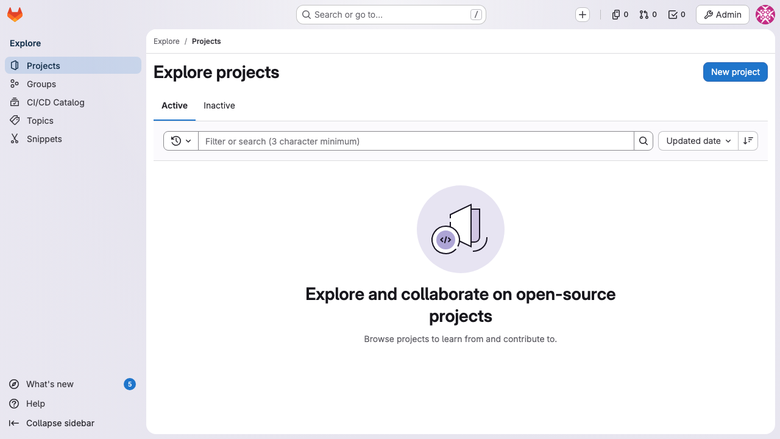
Explore projects
This is a repackaged open source software product wherein additional charges apply for cloudimg support services.
Self-Hosted GitLab CE - Ready in Minutes, Not Hours
Stop spending hours manually installing and configuring GitLab components. This AMI delivers a complete, production-ready GitLab Community Edition platform that starts serving your team within minutes of launch - with no default credentials, no manual database setup, and no service configuration required.
Why This AMI Over a Manual Install or Competing Images
Unlike a bare OS where you must install and configure each component yourself, this image ships with the entire GitLab stack pre-integrated and auto-starting. Unlike other GitLab AMIs that may ship with shared default passwords, every instance generates a unique root credential on first boot and stores it in a root-only file. The container registry is configured and ready out of the box, eliminating a common post-install step that trips up new deployments.
Application Stack
- GitLab CE Omnibus from the official packages.gitlab.com repository
- nginx serving on port 80
- Embedded PostgreSQL database
- Embedded Redis cache and queue
- Sidekiq background workers
- Puma application server
- Gitaly Git RPC service
- GitLab Workhorse for large file transfers
- Container registry included and configured
- Git over SSH on port 22
Secure First Boot
On the first boot a one-shot service rotates the GitLab root administrator password, unique to that instance, and writes it to a file readable only by the root OS user. No shared or default credentials ship in the image - the default Omnibus initial root password file is wiped at build time. This approach supports audit requirements by ensuring every instance has a cryptographically unique administrative credential from the moment it launches.
Security and Network Recommendations
- Data in transit: Configure TLS/HTTPS via Let's Encrypt or your own certificate to encrypt all Git and web traffic
- Data at rest: Enable EBS encryption on the attached volume to protect repositories and database contents
- Network isolation: Deploy in a private subnet within your VPC; use a load balancer or bastion host for access
- Security groups: Open only ports 22 (SSH/Git), 80/443 (HTTP/HTTPS), and 5050 (container registry) to required sources
Minimum Requirements
- Instance type: t3.medium or larger (2 vCPUs, 4 GB RAM minimum)
- Storage: 30 GB root EBS volume minimum; scale based on repository size
- Architecture: x86_64 (AMD64)
- Recommended for: Teams of up to 50 developers per instance; larger teams should consider scaling instance size
Use Cases
- Regulated teams needing data residency: Keep all source code and CI artifacts within your own AWS account and region, meeting data sovereignty requirements for financial services, healthcare, or government projects
- Platform engineering teams: Provide an internal DevOps platform with code review, merge requests, and CI/CD pipelines without depending on external SaaS availability
- Container-based delivery pipelines: Build, tag, and push container images to the integrated registry, then deploy directly to ECS or EKS
- Air-gapped or restricted networks: Run a full DevOps toolchain in environments with no outbound internet access
Getting Started
- Launch the AMI on a t3.medium or larger instance with at least 30 GB EBS storage
- Configure your security group to allow inbound on ports 22, 80, and 443
- SSH into the instance and retrieve your unique root password from /root/.gitlab_root_password
- Browse to the instance public IP or DNS, sign in as root, and start creating projects
- Configure CI runners, enable HTTPS, and invite your team
cloudimg Support
24/7 technical support by email and live chat. Our engineers assist with GitLab deployment, upgrades, runner configuration, registry setup, backup and restore, integrations, and performance tuning. Book a free setup consultation to get guidance on instance sizing, runner architecture, or migration from GitHub or Bitbucket.
All product and company names are trademarks or registered trademarks of their respective holders. Use of them does not imply any affiliation with or endorsement by them.
Highlights
- GitLab CE Omnibus preinstalled and ready, with nginx, PostgreSQL, Redis, Sidekiq, Puma and the container registry, all configured and starting automatically
- Hardened first boot rotates the GitLab root password for every instance and stores it in a file only the root user can read, with no default credentials shipped in the image
- 24/7 technical support from cloudimg, with expert assistance for GitLab deployment, configuration, upgrades, runner setup and performance tuning
Details
Sold by
Delivery method
Delivery option
64-bit (x86) Amazon Machine Image (AMI)
Latest version
Operating system
Ubuntu 24.04
Deployed on AWS
New
Introducing multi-product solutions
You can now purchase comprehensive solutions tailored to use cases and industries.

Features and programs
Financing for AWS Marketplace purchases
AWS Marketplace now accepts line of credit payments through the PNC Vendor Finance program. This program is available to select AWS customers in the US, excluding NV, NC, ND, TN, & VT.

Pricing
Free trial
Try this product free for 7 days according to the free trial terms set by the vendor. Usage-based pricing is in effect for usage beyond the free trial terms. Your free trial gets automatically converted to a paid subscription when the trial ends, but may be canceled any time before that.
Pricing is based on actual usage, with charges varying according to how much you consume. Subscriptions have no end date and may be canceled any time. Alternatively, you can pay upfront for a contract, which typically covers your anticipated usage for the contract duration. Any usage beyond contract will incur additional usage-based costs.
Additional AWS infrastructure costs may apply. Use the AWS Pricing Calculator to estimate your infrastructure costs.
If you are an AWS Free Tier customer with a free plan, you are eligible to subscribe to this offer. You can use free credits to cover the cost of eligible AWS infrastructure. See AWS Free Tier for more details. If you created an AWS account before July 15th, 2025, and qualify for the Legacy AWS Free Tier, Amazon EC2 charges for Micro instances are free for up to 750 hours per month. See Legacy AWS Free Tier for more details.
Dimension | Description | Cost/hour |
|---|---|---|
m5.xlarge Recommended | m5.xlarge | $0.12 |
t3.micro | t3.micro instance type | $0.04 |
t2.micro | t2.micro instance type | $0.04 |
i3.8xlarge | i3.8xlarge instance type | $0.24 |
i7ie.large | i7ie.large instance type | $0.08 |
m6idn.8xlarge | m6idn.8xlarge instance type | $0.24 |
r5b.16xlarge | r5b.16xlarge instance type | $0.24 |
i7i.12xlarge | i7i.12xlarge instance type | $0.24 |
m8azn.large | m8azn.large instance type | $0.08 |
c8in.xlarge | c8in.xlarge instance type | $0.12 |
Vendor refund policy
Refunds available on request.

Legal
Vendor terms and conditions
Upon subscribing to this product, you must acknowledge and agree to the terms and conditions outlined in the vendor's End User License Agreement (EULA) .
Content disclaimer
Vendors are responsible for their product descriptions and other product content. AWS does not warrant that vendors' product descriptions or other product content are accurate, complete, reliable, current, or error-free.
Delivery details
64-bit (x86) Amazon Machine Image (AMI)
Amazon Machine Image (AMI)
An AMI is a virtual image that provides the information required to launch an instance. Amazon EC2 (Elastic Compute Cloud) instances are virtual servers on which you can run your applications and workloads, offering varying combinations of CPU, memory, storage, and networking resources. You can launch as many instances from as many different AMIs as you need.
Version release notes
Initial release of GitLab Community Edition Omnibus.
Additional details
Usage instructions
Connect via SSH on port 22 as the default login user for your operating system variant (the user guide lists it per variant). GitLab is served on port 80 over HTTP. Browse to http://<instance-public-ip>/ and sign in as the 'root' user. Retrieve the generated root password with: sudo cat /root/gitlab-credentials.txt. Git operations over SSH also use port 22 with the gitlab-shell user. To enable HTTPS, follow the Let's Encrypt section of the user guide.
Resources
Vendor resources
Support
Vendor support
cloudimg Support
cloudimg provides 24/7 technical support for this GitLab CE product via email and live chat.
Response Times:
- Critical issues (service down, data at risk): one-hour average response
- General inquiries (configuration, upgrades, best practices): handled during normal support flow
What We Help With:
- Initial deployment and instance sizing guidance
- GitLab upgrades and version migrations
- CI runner configuration and scaling
- Container registry setup and troubleshooting
- Backup and restore procedures
- Performance tuning and resource optimization
- Integration with external services (LDAP, OAuth, SMTP)
- Migration assistance from GitHub, Bitbucket, or other platforms
Getting Started: After launching your instance, retrieve the unique root password from /root/.gitlab_root_password via SSH. Browse to your instance address, sign in as root, and begin creating projects. If you need help with instance sizing, security group configuration, or runner architecture, contact our team for a free setup consultation.
Minimum Requirements:
- Instance type: t3.medium or larger (2 vCPUs, 4 GB RAM)
- Storage: 30 GB EBS minimum; scale with repository growth
- Security groups: ports 22, 80, 443, and 5050 as needed
Contact: Email: support@cloudimg.co.uk Live chat: available 24/7
For refund requests or billing questions, contact us via the same channels and we will respond promptly.
AWS infrastructure support
AWS Support is a one-on-one, fast-response support channel that is staffed 24x7x365 with experienced and technical support engineers. The service helps customers of all sizes and technical abilities to successfully utilize the products and features provided by Amazon Web Services.
Similar products
This product has charges associated with it for seller support. Self-hosted GitLab CE on Ubuntu 24.04 with CI/CD, container registry, and Let's Encrypt SSL. Pre-configured for AWS with24/7 expert support by cloudimg.
Accelerate your adoption of GitLab to maximize the value of your investment with the help of Professional Services.
GitLab is the DevOps platform. The first single application for software development, security, and operations that enables Concurrent DevOps, making the software lifecycle 200% faster and radically improving the speed of business. GitLab will deliver the license file after transaction is completed.
GitLab is the most comprehensive AI-powered DevSecOps platform. GitLab enables organizations to increase developer productivity, improve operational efficiency, reduce security and compliance risk, and accelerate digital transformation. GitLab will deliver the activation code after the transaction is completed.
Enable your software teams to orchestrate their AI agents across the entire SDLC with GitLab Credits, the consumption currency for GitLab Duo Agent Platform.
GitLab Duo with Amazon Q brings together GitLabs comprehensive DevSecOps platform with Amazon Qs advanced AI agents.
Customer reviews
No customer reviews yet
Be the first to review this product . We've partnered with PeerSpot to gather customer feedback. You can share your experience by writing or recording a review, or scheduling a call with a PeerSpot analyst.