Sold by: cloudimg
Deployed on AWS
Free Trial
AWS Free Tier
This product has charges associated with it for the installation, configuration and packaging of Oracle Database 21c Standard Edition 2 21.3 on Windows Server 2022 or 2019, updated at build: per-instance SYS, SYSTEM and PDBADMIN passwords set at first boot, listener on 127.0.0.1 only, CDB ORCL with PDB ORCLPDB. Bring your own Oracle licence.
These options are for Oracle Database 21c Standard Edition 2 on Windows Server 2022 and 2019.
View 3 other optionsOverview
Image
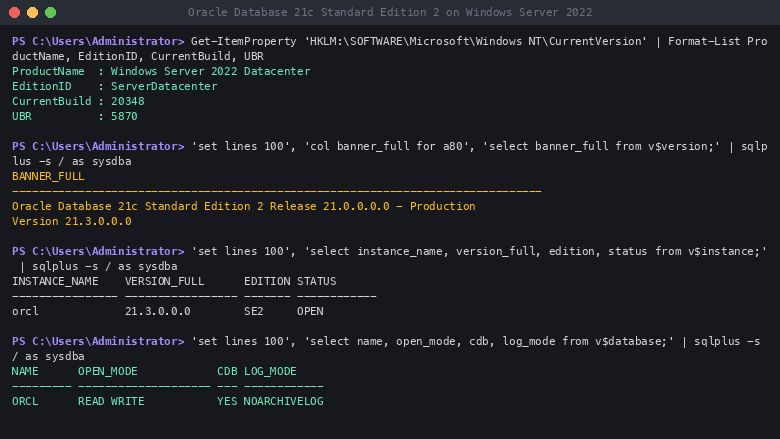
Oracle Database 21c SE2 on Windows Server 2022
Image
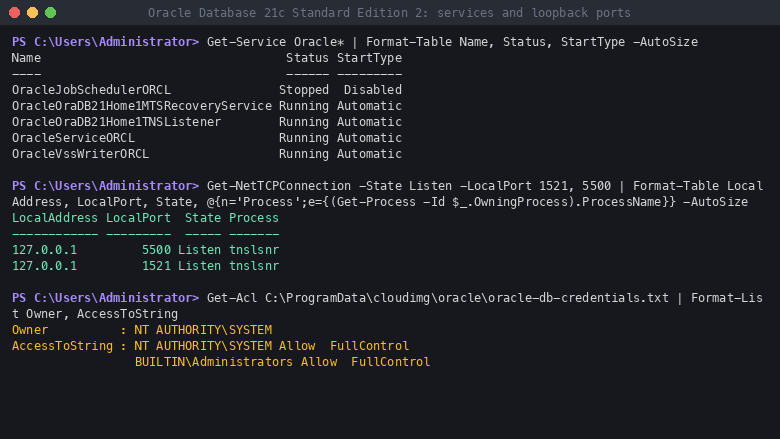
21c SE2 on Windows Server 2022: loopback only
Image
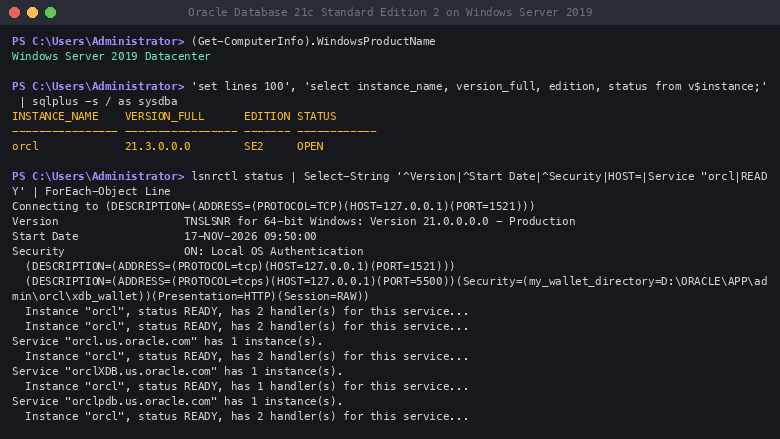
Oracle Database 21c SE2 on Windows Server 2019
This is a repackaged software product wherein additional charges apply for the installation, configuration and packaging of the software in this image by cloudimg.
What cloudimg adds to Oracle Database 21c Standard Edition 2
This image installs Oracle Database 21c Standard Edition 2 (release 21.3.0.0.0) on Windows Server and creates a multitenant database that opens when Windows starts. Choose the operating system when you subscribe:
- Windows Server 2022 Datacenter (build 20348.5870)
- Windows Server 2019 Datacenter (build 17763.9487)
On both versions you get:
- Per-instance database passwords: the image holds no usable database password. At first boot the instance generates its own SYS, SYSTEM and PDBADMIN passwords, checks that each one logs in, and writes them to C:\ProgramData\cloudimg\oracle\oracle-db-credentials.txt, readable by Administrators only
- Listener on loopback only, started at boot: the listener answers on 127.0.0.1:1521 and EM Express on 127.0.0.1:5500; no Oracle port is reachable from outside the instance until you open one
- Windows updated at build: through Windows Update on 16 November 2026
- Oracle software on its own EBS volume: ORACLE_HOME D:\Oracle on a dedicated 20 GB D: volume, separate from the 75 GB C: drive
- A ready-made database: container database ORCL with the pluggable database ORCLPDB, opened at boot by the OracleServiceORCL service
- Administration from the first login: sqlplus / as sysdba as Administrator; SQLPlus, RMAN, Data Pump and SQLLoader on the PATH
- AWS tooling: AWS CLI v2, the SSM Agent (running, ready for Session Manager), EC2Launch v2 and the CloudWatch agent (installed, not configured)
- A step-by-step user guide for launch, the credentials file, the pluggable database, Session Manager connections and troubleshooting
If you launched a version released before 16 November 2026, change SYS and SYSTEM now: those versions start with a password set when the image was built (see the user guide).
Licensing: bring your own Oracle licence
This listing does not include an Oracle Database licence. The Windows Server licence is included in the EC2 instance price charged by AWS. The hourly charge on this listing is cloudimg's, for the installation, configuration and packaging of Oracle Database 21c Standard Edition 2 on Windows Server. You must hold a valid Oracle Database Standard Edition 2 licence and use it under your agreement with Oracle. Oracle's cloud licensing policy allows Standard Edition 2 on Amazon EC2 instances of up to 8 vCPUs; check the current policy for how vCPUs are counted.
Oracle Database 21c is an Innovation Release: Oracle Premier Support ends on 31 July 2027 and there is no Extended Support. Oracle supports 21c on Windows Server 2022 from Release Update 21.4; this image ships the 21.3 base release with no Release Update, so apply a current Release Update under your Oracle support contract before production use, and before any use on the Windows Server 2022 version.
Oracle and Java are registered trademarks of Oracle and/or its affiliates. Microsoft and Windows Server are trademarks of the Microsoft group of companies. cloudimg is not affiliated with or endorsed by Oracle or Microsoft.
Who it is for
- DBAs and developers who need Oracle Database 21c Standard Edition 2 on Windows Server on AWS
- Teams evaluating 21c features (native JSON data type, blockchain and immutable tables, SQL macros) on Windows
- Software vendors testing Windows and .NET applications against Oracle Database 21c
- Test, training and proof-of-concept environments
What Standard Edition 2 includes
Standard Edition 2 provides the core Oracle engine: SQL and PL/SQL, ACID transactions with multi-version read consistency, JSON and XML data, Data Pump export and import, SQL*Loader, RMAN backup and recovery, and Oracle Net connectivity. Enterprise Edition features and options such as Partitioning, Data Guard, the Diagnostics and Tuning Packs and Advanced Security are not part of Standard Edition 2. Standard Edition 2 allows up to three user-created pluggable databases per container database.
Getting started
- Subscribe and choose the Windows Server 2022 or 2019 version (t3.large or m5.large and up, with at least 8 GB of memory; Standard Edition 2 is limited to 8 vCPUs).
- The suggested security group allows RDP from anywhere: change the source to your own IP. Decrypt the Administrator password with your key pair and connect with RDP.
- About 10 minutes after launch, read your database passwords in an elevated PowerShell: Get-Content C:\ProgramData\cloudimg\oracle\oracle-db-credentials.txt.
- Run sqlplus / as sysdba, then open ORCLPDB and save its state, as the user guide shows.
- Keep TCP 1521 closed to the internet: connect through Session Manager port forwarding, or allow 1521 from your own range only, as the user guide shows.
Highlights
- Oracle Database 21c Standard Edition 2 (21.3 base release) on Windows Server 2022 or 2019, updated at build: container database ORCL with pluggable database ORCLPDB on a dedicated 20 GB D: EBS volume.
- Per-instance SYS, SYSTEM and PDBADMIN passwords generated at first boot in an Administrators-only file; the listener answers on 127.0.0.1:1521 only and starts at boot; connect through Session Manager port forwarding.
- Bring your own Oracle Database Standard Edition 2 licence (up to 8 vCPUs); the Windows Server licence is in the EC2 price. The image ships the 21.3 base release with no Release Update: apply a current Release Update before production use.
Features and programs
Financing for AWS Marketplace purchases
AWS Marketplace now accepts line of credit payments through the PNC Vendor Finance program. This program is available to select AWS customers in the US, excluding NV, NC, ND, TN, & VT.

Pricing
Free trial
Try this product free for 7 days according to the free trial terms set by the vendor. Usage-based pricing is in effect for usage beyond the free trial terms. Your free trial gets automatically converted to a paid subscription when the trial ends, but may be canceled any time before that.
Pricing is based on actual usage, with charges varying according to how much you consume. Subscriptions have no end date and may be canceled any time. Alternatively, you can pay upfront for a contract, which typically covers your anticipated usage for the contract duration. Any usage beyond contract will incur additional usage-based costs.
Additional AWS infrastructure costs may apply. Use the AWS Pricing Calculator to estimate your infrastructure costs.
If you are an AWS Free Tier customer with a free plan, you are eligible to subscribe to this offer. You can use free credits to cover the cost of eligible AWS infrastructure. See AWS Free Tier for more details. If you created an AWS account before July 15th, 2025, and qualify for the Legacy AWS Free Tier, Amazon EC2 charges for Micro instances are free for up to 750 hours per month. See Legacy AWS Free Tier for more details.
- ...
Dimension | Description | Cost/hour |
|---|---|---|
t3.large Recommended | t3.large instance type | $0.10 |
t2.micro | t2.micro instance type | $0.06 |
t3.micro | t3.micro instance type | $0.06 |
m7a.large | m7a.large instance type | $0.10 |
m7i-flex.xlarge | m7i-flex.xlarge instance type | $0.15 |
m7i.large | m7i.large instance type | $0.10 |
t3.small | t3.small instance type | $0.06 |
x1e.32xlarge | x1e.32xlarge instance type | $0.28 |
r5b.24xlarge | r5b.24xlarge instance type | $0.28 |
p3.2xlarge | p3.2xlarge instance type | $0.28 |
Dimensions summary
You pay by the hour for the running EC2 instance you choose. The many dimensions are not tiers or feature levels. Each one maps to a specific EC2 instance type and size, from small shared-core options to large metal servers. The hourly rate scales with the size and family of the instance you pick. The charge covers the cloudimg image and 24/7 support. It does not include an Oracle Database license, which you must hold separately. The Windows Server license is part of the EC2 price AWS charges. Standard Edition 2 may run on instances of up to 8 vCPUs.
Top-of-mind questions for buyers
The hourly rate covers the cloudimg image and 24/7 support with a 24-hour response target. It does not include an Oracle Database license, which you must hold separately under your Oracle agreement. The Windows Server license is part of the EC2 instance price AWS charges.
The hourly software charge meters running time. A fully stopped instance does not accrue the hourly image charge, though AWS storage fees for the attached volumes may still apply. Standard Edition 2 may run on instances up to 8 vCPUs; the guide suggests at least 8 GB of memory.
Each dimension maps to one specific EC2 instance type and size, not a feature tier. The software image and support are the same across all of them. Your choice sets the hardware your database runs on, which drives the hourly rate. All dimensions bill the same way, per hour.
www.cloudimg.co.uk
Helpful?
Vendor refund policy
Refunds available on request.

Legal
Vendor terms and conditions
Upon subscribing to this product, you must acknowledge and agree to the terms and conditions outlined in the vendor's End User License Agreement (EULA) .
Content disclaimer
Vendors are responsible for their product descriptions and other product content. AWS does not warrant that vendors' product descriptions or other product content are accurate, complete, reliable, current, or error-free.
Delivery details
64-bit (x86) Amazon Machine Image (AMI)
Amazon Machine Image (AMI)
An AMI is a virtual image that provides the information required to launch an instance. Amazon EC2 (Elastic Compute Cloud) instances are virtual servers on which you can run your applications and workloads, offering varying combinations of CPU, memory, storage, and networking resources. You can launch as many instances from as many different AMIs as you need.
Version release notes
Rebuilt for per-instance passwords: the SYS, SYSTEM and PDBADMIN passwords are generated on each instance at first boot and written to an Administrators-only file; the password set when the earlier image was built does not work on this version. The Oracle listener is bound to 127.0.0.1:1521 and starts at boot (EM Express on 127.0.0.1:5500 only). Windows Server 2019 Datacenter fully updated through Windows Update on 16 November 2026 (OS build 17763.9487). Oracle Database 21c Standard Edition 2 21.3.0.0.0 base release, no Release Update applied. If you run an instance of an earlier version, change SYS and SYSTEM now (see the guide).
Additional details
Usage instructions
Connect with Remote Desktop (3389) as Administrator (Get Windows password with your key pair). The suggested security group allows RDP from anywhere: change the source to your own IP. About 10 minutes after launch, first boot writes this instance's own SYS, SYSTEM and PDBADMIN passwords to C:\ProgramData\cloudimg\oracle\oracle-db-credentials.txt (Administrators only; progress in C:\ProgramData\cloudimg\oracle-firstboot.log). On the instance run sqlplus / as sysdba. Open the pluggable database ORCLPDB and save its state as the guide shows. The listener answers on 127.0.0.1:1521 only. EM Express answers on 127.0.0.1:5500 only. From your workstation use Session Manager port forwarding (AWS-StartPortForwardingSession, portNumber=1521) and connect to localhost:1521/orclpdb.us.oracle.com, or bind the listener to the private address and allow TCP 1521 from your own IP range only; never open 1521 to the internet. Bring your own Oracle licence. Guide: https://www.cloudimg.co.uk/guides/oracle-database-21c-standard-on-windows/
Resources
Vendor resources
Support
Vendor support
cloudimg Support
cloudimg's support team is on hand 24 hours a day by email for this image, with a guaranteed response within 24 hours: launch and first login, connecting over RDP, SQL*Plus sign-in, reading the per-instance SYS, SYSTEM and PDBADMIN passwords, opening the pluggable database, the loopback listener and remote connections through Session Manager, configuration, backup and migration, updates and troubleshooting.
Contact: support@cloudimg.co.uk or https://www.cloudimg.co.uk/support
Contact support@cloudimg.co.uk for product usage questions, technical troubleshooting or to request a refund. Oracle software support, patches and licences come from Oracle under your own agreement.
Feedback: we welcome your reviews. You can leave a review at the bottom of this listing page or via the AMI Catalog in the AWS Console.
AWS infrastructure support
AWS Support is a one-on-one, fast-response support channel that is staffed 24x7x365 with experienced and technical support engineers. The service helps customers of all sizes and technical abilities to successfully utilize the products and features provided by Amazon Web Services.
Similar products
This product has charges associated with it for the installation, configuration and packaging of Oracle Database 19c SE2 (19.3 base release) on Windows Server 2022 or 2019: SYS and SYSTEM passwords generated per instance at first boot, a listener on 127.0.0.1 only and a non-CDB ORCL database that opens at boot. Bring your own Oracle licence.
This product has charges associated with it for the installation, configuration and packaging of Oracle Database 21c Enterprise Edition 21.3 on Windows Server 2022 or 2019, updated at build: per-instance SYS, SYSTEM and PDBADMIN passwords set at first boot, listener on 127.0.0.1 only, CDB ORCL with PDB ORCLPDB. Bring your own Oracle licence.
This product has charges associated with it for the installation, configuration and packaging of Oracle Database 19c Enterprise Edition (19.3 base release) on Windows Server 2022 or 2019: per-instance SYS and SYSTEM passwords set at first boot and a non-CDB ORCL database and listener (127.0.0.1 only) started at boot. Bring your own Oracle licence.
This product has charges associated with it for the installation, configuration and packaging of Oracle Database Client 19c. Oracle Database Client 19c (19.3 base release) on Windows Server 2022 or 2019 with Windows updates to November 2026: SQLPlus, Data Pump, RMAN and SQLLoader on the PATH, plus ODP.NET, JDBC and the Oracle ODBC driver.
Customer reviews
No customer reviews yet
Be the first to review this product . We've partnered with PeerSpot to gather customer feedback. You can share your experience by writing or recording a review, or scheduling a call with a PeerSpot analyst.