
Sold by: cloudimg
Deployed on AWS
Free Trial
AWS Free Tier
This product has charges associated with it for seller support. Launch a fast, plugin based DNS server in minutes. CoreDNS serves your own DNS zones from a simple Corefile with a rich plugin chain, Prometheus metrics and caching, and ships secure by default as an authoritative server that is not an open resolver. Backed by 24/7 cloudimg expert support.
Overview
Image
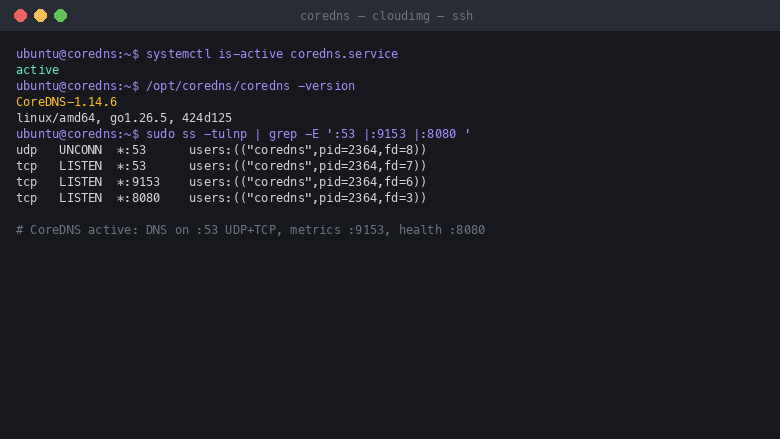
CoreDNS service running
Image
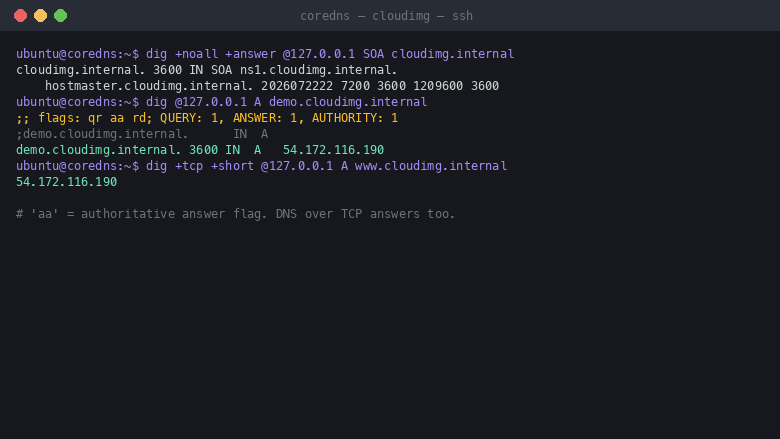
Authoritative demo zone
Image
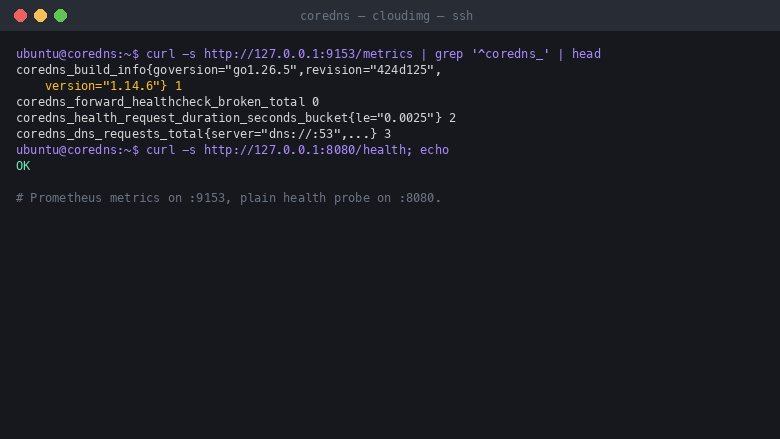
Prometheus metrics and health
Image
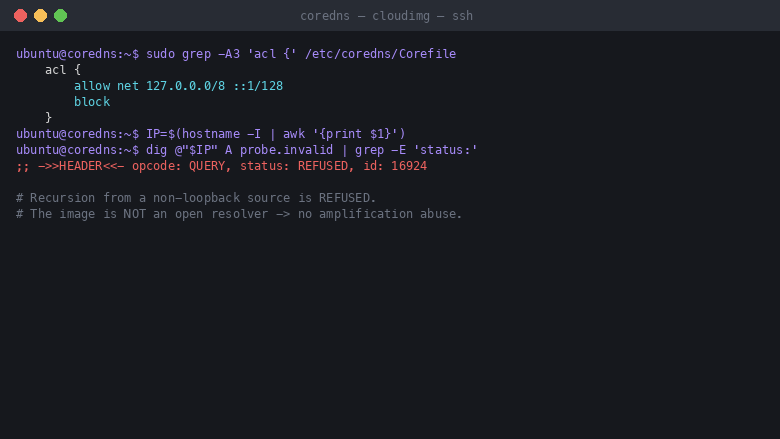
Secure by default: not an open resolver
This is a repackaged open source software product wherein additional charges apply for cloudimg support services.
CoreDNS is a fast, flexible, plugin based DNS server and a CNCF graduated project, best known as the default DNS server for Kubernetes. It is a single self contained Go binary whose entire behaviour is defined by a plain text Corefile, so you compose exactly the DNS pipeline you need from a chain of plugins rather than wiring together several daemons. This image delivers CoreDNS fully installed and configured, running as a hardened systemd service, so a working name server is answering queries within minutes of launch and you skip hours of manual DNS setup and hardening.
CoreDNS is driven entirely by the Corefile at /etc/coredns/Corefile. Each server block picks a set of plugins: file to serve authoritative zones, forward and cache to build a recursive resolver, acl to restrict who may query, prometheus for metrics, health for liveness, and many more. There is no database and no web console to manage, so your DNS configuration lives in version controllable text and reloads with a single command.
Application stack: CoreDNS runs as a dedicated non root service with the Linux CAP_NET_BIND_SERVICE capability so it can bind the privileged DNS port. It answers DNS on port 53 over both UDP and TCP across all interfaces, publishes Prometheus metrics on port 9153, and exposes a loopback health endpoint on port 8080. The systemd resolved stub listener is disabled so CoreDNS owns port 53 cleanly, while the operating system continues to resolve names through the upstream resolver list.
Secure by default: this image is not an open resolver, which removes the DNS amplification and abuse risk of a naively deployed public resolver. The Corefile ships two server blocks, an authoritative block that serves a demonstration zone with the authoritative answer flag on all interfaces, and a recursive cache and forward block whose acl plugin allows recursion only from the local host and refuses every other source. On the first boot of your instance a one shot service bakes the instance IP address into the demonstration zone and provisions the server so DNS answers immediately, with no shared or default credentials of any kind since CoreDNS has no login.
Key capabilities: authoritative DNS for your own zones served from simple zone files; a recursive cache and forward resolver you open to trusted client subnets with a single acl edit; a rich plugin chain including caching, load balancing, rewriting, DNS over TLS and DNS over HTTPS upstreams, and hosts style overrides; built in Prometheus metrics for full observability; and a single binary with no runtime dependencies that reloads its Corefile without downtime.
Get started: review the Corefile and the demonstration cloudimg.internal zone, add your own zones as zone files, open recursion to your trusted networks by editing the acl allow line, then point your clients or your registrar at this instance. cloudimg engineers can walk you through zone design, recursive resolver hardening, DNS over TLS upstreams and Prometheus scraping after purchase.
This is a repackaged open source software product with additional charges for cloudimg support services. CoreDNS is a trademark of its respective owner. All product and company names are trademarks or registered trademarks of their respective holders. Use of them does not imply any affiliation with or endorsement by them.
Highlights
- CoreDNS, the fast plugin based DNS server and CNCF graduated project, fully installed as a hardened systemd service. Serve authoritative zones from a simple Corefile plus zone files, build a recursive cache and forward resolver, and export Prometheus metrics, all from one self contained Go binary.
- Secure by default and not an open resolver: the shipped Corefile serves the demonstration zone authoritatively on all interfaces while the acl plugin restricts recursion to the local host and refuses every other source, so the image cannot be abused for DNS amplification until you deliberately open recursion to your trusted subnets. No shared or default credentials, since CoreDNS has no login.
- 24/7 expert technical support from cloudimg with a one hour average response time for critical issues. Our engineers help with zone design, recursive resolver hardening, acl and forwarding policy, DNS over TLS and DNS over HTTPS upstreams, Prometheus scraping and CoreDNS version upgrades.
Details
Sold by
Categories
Delivery method
Delivery option
64-bit (x86) Amazon Machine Image (AMI)
Latest version
Operating system
Ubuntu 24.04
Deployed on AWS
New
Introducing multi-product solutions
You can now purchase comprehensive solutions tailored to use cases and industries.

Features and programs
Financing for AWS Marketplace purchases
AWS Marketplace now accepts line of credit payments through the PNC Vendor Finance program. This program is available to select AWS customers in the US, excluding NV, NC, ND, TN, & VT.

Pricing
Free trial
Try this product free for 7 days according to the free trial terms set by the vendor. Usage-based pricing is in effect for usage beyond the free trial terms. Your free trial gets automatically converted to a paid subscription when the trial ends, but may be canceled any time before that.
Pricing is based on actual usage, with charges varying according to how much you consume. Subscriptions have no end date and may be canceled any time. Alternatively, you can pay upfront for a contract, which typically covers your anticipated usage for the contract duration. Any usage beyond contract will incur additional usage-based costs.
Additional AWS infrastructure costs may apply. Use the AWS Pricing Calculator to estimate your infrastructure costs.
If you are an AWS Free Tier customer with a free plan, you are eligible to subscribe to this offer. You can use free credits to cover the cost of eligible AWS infrastructure. See AWS Free Tier for more details. If you created an AWS account before July 15th, 2025, and qualify for the Legacy AWS Free Tier, Amazon EC2 charges for Micro instances are free for up to 750 hours per month. See Legacy AWS Free Tier for more details.
Dimension | Description | Cost/hour |
|---|---|---|
m5.large Recommended | m5.large | $0.08 |
t2.micro | t2.micro instance type | $0.04 |
t3.micro | t3.micro instance type | $0.04 |
c5a.12xlarge | c5a.12xlarge instance type | $0.24 |
c5a.16xlarge | c5a.16xlarge instance type | $0.24 |
c5a.24xlarge | c5a.24xlarge instance type | $0.24 |
c5a.2xlarge | c5a.2xlarge instance type | $0.24 |
c5a.4xlarge | c5a.4xlarge instance type | $0.24 |
c5a.8xlarge | c5a.8xlarge instance type | $0.24 |
c5a.large | c5a.large instance type | $0.08 |
Vendor refund policy
Refunds available on request.

Legal
Vendor terms and conditions
Upon subscribing to this product, you must acknowledge and agree to the terms and conditions outlined in the vendor's End User License Agreement (EULA) .
Content disclaimer
Vendors are responsible for their product descriptions and other product content. AWS does not warrant that vendors' product descriptions or other product content are accurate, complete, reliable, current, or error-free.
Delivery details
64-bit (x86) Amazon Machine Image (AMI)
Amazon Machine Image (AMI)
An AMI is a virtual image that provides the information required to launch an instance. Amazon EC2 (Elastic Compute Cloud) instances are virtual servers on which you can run your applications and workloads, offering varying combinations of CPU, memory, storage, and networking resources. You can launch as many instances from as many different AMIs as you need.
Version release notes
Initial release.
Additional details
Usage instructions
Connect via SSH on port 22 as the default login user for your operating system variant (the user guide lists it per variant; Ubuntu 24.04 uses ubuntu). CoreDNS has no login or password, so no credential ships in the image. Read the per instance info note with: sudo cat /root/coredns-aws-info.txt. It records the demonstration zone name, this instance's IP, the metrics URL and the paths to the Corefile and zone file. Confirm the service: systemctl is-active coredns.service and sudo ss -tulnp | grep -E ':53 |:9153 |:8080 '. Query the authoritative demo zone: dig @127.0.0.1 SOA cloudimg.internal and dig @127.0.0.1 A demo.cloudimg.internal (look for the aa authoritative answer flag). The image is secure by default and not an open resolver: the acl plugin in /etc/coredns/Corefile allows recursion only from the local host and answers every other source with REFUSED. To let your own clients recurse, add their subnets to the acl allow net line in the .:53 block and run sudo systemctl restart coredns. Add your own authoritative zones by dropping a zone file into /etc/coredns/zones and adding a matching server block, then sudo systemctl reload coredns. Restrict the security group to your use case: allow UDP 53 and TCP 53 from the clients that will query the server, TCP 22 for administration, and TCP 9153 to your monitoring network only. Never open recursion to the whole internet.
Resources
Vendor resources
Support
Vendor support
cloudimg provides 24/7 technical support for this CoreDNS product by email (support@cloudimg.co.uk ) and live chat. We help with deployment and first boot configuration, designing the Corefile and authoritative zone files, hardening the recursive resolver with the acl plugin, configuring forwarding policy and DNS over TLS or DNS over HTTPS upstreams, enabling caching and load balancing, wiring CoreDNS metrics into Prometheus, delegating your domain at the registrar, CoreDNS version upgrades and patch guidance, performance tuning and troubleshooting. Critical issues receive a one hour average response time. For billing, subscription changes, or refund requests, contact support@cloudimg.co.uk .
AWS infrastructure support
AWS Support is a one-on-one, fast-response support channel that is staffed 24x7x365 with experienced and technical support engineers. The service helps customers of all sizes and technical abilities to successfully utilize the products and features provided by Amazon Web Services.
Similar products

FIPS-validated, hardened CoreDNS EKS add-on that provides DNS resolution within your EKS cluster with near-zero CVEs, continuous rebuilds, and full supply-chain transparency.

This product has charges associated with it for deployment, configuration, and ongoing support. CoreDNS delivers high-performance DNS with plugin-based service discovery and load balancing on EC2.

This product has charges associated with it for seller support. Launch a production-ready etcd key value store with RBAC enabled in minutes. Eliminates manual security setup with auto-generated credentials and 24/7 cloudimg support.

This product has charges associated with it for Websoft9 support. Pre-configured, web-based, cloud-native, secure, one-click to deploy Websoft9 Applications Hosting Platform on AWS. Websoft9 is a lightweight, self-hosting PaaS that allows you to deploy multiple applications on your own cloud infrastructure.
Customer reviews
No customer reviews yet
Be the first to review this product . We've partnered with PeerSpot to gather customer feedback. You can share your experience by writing or recording a review, or scheduling a call with a PeerSpot analyst.