
Sold by: cloudimg
Deployed on AWS
Free Trial
AWS Free Tier
This product has charges associated with it for seller support. Launch a production-ready etcd key value store with RBAC enabled in minutes. Eliminates manual security setup with auto-generated credentials and 24/7 cloudimg support.
Overview
Image
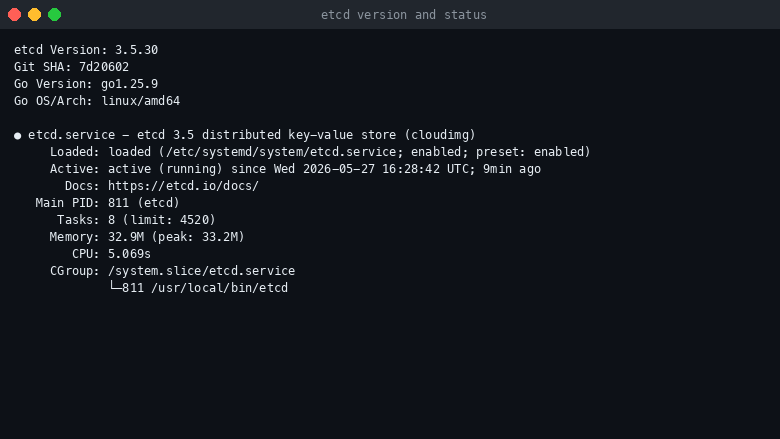
etcd version and service status
Image
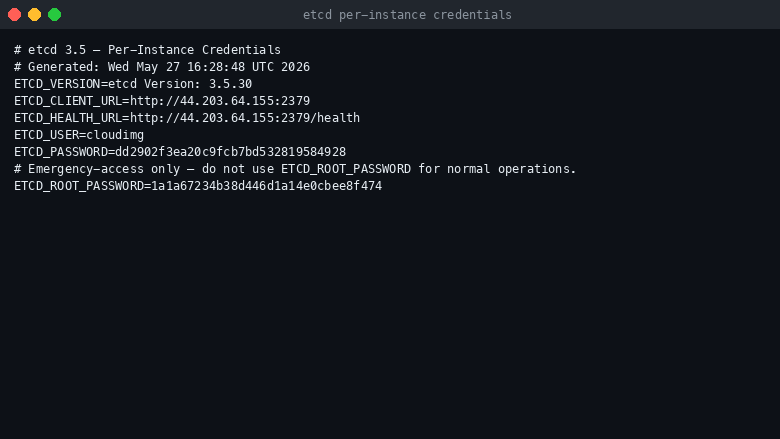
Per-instance credentials
Image
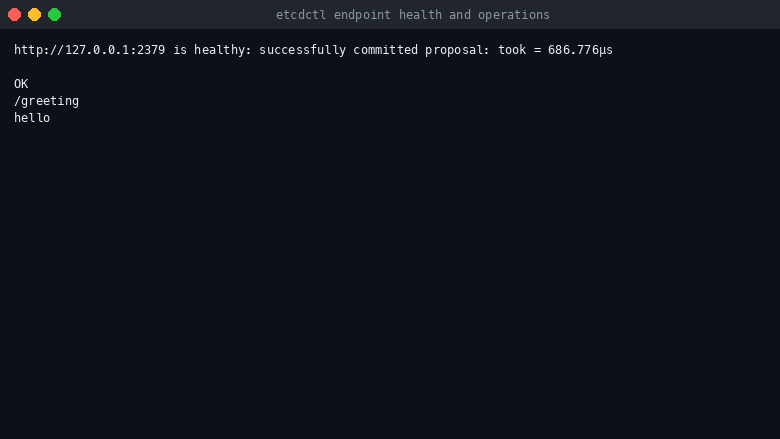
etcdctl health check and operations
This is a repackaged open source software product wherein additional charges apply for cloudimg support services.
Why This AMI Instead of Self-Managed etcd
Deploying etcd manually requires generating TLS certificates, configuring Role Based Access Control, writing systemd units, hardening file permissions, and resolving advertise URLs - a process that can take hours and introduces security risk if any step is missed. This AMI eliminates that operational burden. Within minutes of launch you have a hardened, authenticated etcd instance running on AWS with no manual configuration required. Compared to container-based Helm charts or bare apt-install approaches, you gain a pre-secured single-node deployment backed by expert 24/7 support from cloudimg.
Overview
etcd is a strongly consistent, highly available, distributed key value store designed to reliably store the most critical data of a distributed system. It is the canonical state store behind Kubernetes, CoreDNS, OpenShift and many other distributed systems. This image delivers etcd fully installed and configured as a single node deployment with Role Based Access Control enabled, so a hardened key value service is running within minutes of launch.
Application Stack
etcd 3.5 running as a native binary from the official etcd-io GitHub release. The client port 2379 serves applications; the peer port 2380 stays loopback only for the single node default. etcdctl is preinstalled at /usr/local/bin/etcdctl for command line management. The /health endpoint on port 2379 is anonymous by design so Kubernetes liveness and readiness probes work out of the box.
Secure First Boot
On the first boot of your instance a one-shot service generates a fresh per-instance cloudimg user password and a separate emergency root password, writes them to a root-only file, configures etcdctl Role Based Access Control, and refuses to leave authentication disabled. The advertise URL is rewritten with the instance address resolved from EC2 IMDSv2. No manual security steps are needed - authentication is enforced from the moment the instance is reachable.
Ready To Use
The etcd server, data directory, Role Based Access Control roles and systemd units are all configured. Point your distributed application at port 2379 with the cloudimg user, or sign in to the instance and use etcdctl to manage keys, roles and members directly.
Use Cases With Scenario Detail
- SaaS Platform Kubernetes Control Plane: Teams running 10-50 node Kubernetes clusters on EC2 who need a reliable, secured state store without managing etcd operators or Helm chart upgrades.
- Fintech Service Discovery: Financial services teams using CoreDNS or Consul-like patterns that require strongly consistent configuration data with RBAC to meet compliance requirements.
- Blue-Green Deployment Coordination: Platform engineering teams needing a leader election and feature flag backplane to coordinate zero-downtime deployments across multiple availability zones.
- Development and Proof of Concept: Individual developers or small teams evaluating distributed key value patterns before committing to a multi-node production cluster.
cloudimg Support
24/7 technical support by email and chat. Help with etcd deployment, cluster expansion to multi-node topologies, RBAC design, performance tuning and monitoring. Book a free 15-minute cluster planning consultation by contacting our team to discuss your expansion or production hardening needs.
All product and company names are trademarks or registered trademarks of their respective holders. Use of them does not imply any affiliation with or endorsement by them.
Highlights
- etcd preinstalled and ready as a single node distributed key value store, with Role Based Access Control enabled at first boot and the etcdctl command line preinstalled
- Hardened first boot generates a fresh per instance cloudimg user password and a separate emergency root password, both stored in a file only the root user can read
- 24/7 technical support from cloudimg, with expert assistance for etcd deployment, cluster expansion, RBAC design and performance tuning
Details
Sold by
Delivery method
Delivery option
64-bit (x86) Amazon Machine Image (AMI)
Latest version
Operating system
Ubuntu 24.04
Deployed on AWS
New
Introducing multi-product solutions
You can now purchase comprehensive solutions tailored to use cases and industries.

Features and programs
Financing for AWS Marketplace purchases
AWS Marketplace now accepts line of credit payments through the PNC Vendor Finance program. This program is available to select AWS customers in the US, excluding NV, NC, ND, TN, & VT.

Pricing
Free trial
Try this product free for 7 days according to the free trial terms set by the vendor. Usage-based pricing is in effect for usage beyond the free trial terms. Your free trial gets automatically converted to a paid subscription when the trial ends, but may be canceled any time before that.
Pricing is based on actual usage, with charges varying according to how much you consume. Subscriptions have no end date and may be canceled any time. Alternatively, you can pay upfront for a contract, which typically covers your anticipated usage for the contract duration. Any usage beyond contract will incur additional usage-based costs.
Additional AWS infrastructure costs may apply. Use the AWS Pricing Calculator to estimate your infrastructure costs.
If you are an AWS Free Tier customer with a free plan, you are eligible to subscribe to this offer. You can use free credits to cover the cost of eligible AWS infrastructure. See AWS Free Tier for more details. If you created an AWS account before July 15th, 2025, and qualify for the Legacy AWS Free Tier, Amazon EC2 charges for Micro instances are free for up to 750 hours per month. See Legacy AWS Free Tier for more details.
Dimension | Description | Cost/hour |
|---|---|---|
m5.large Recommended | m5.large | $0.08 |
t2.micro | t2.micro instance type | $0.04 |
t3.micro | t3.micro instance type | $0.04 |
r5dn.2xlarge | r5dn.2xlarge instance type | $0.24 |
r6id.24xlarge | r6id.24xlarge instance type | $0.24 |
m7i-flex.8xlarge | m7i-flex.8xlarge instance type | $0.24 |
r6a.xlarge | r6a.xlarge instance type | $0.12 |
m8a.metal-24xl | m8a.metal-24xl instance type | $0.24 |
r5a.12xlarge | r5a.12xlarge instance type | $0.24 |
gr6.4xlarge | gr6.4xlarge instance type | $0.24 |
Vendor refund policy
Refunds available on request.

Legal
Vendor terms and conditions
Upon subscribing to this product, you must acknowledge and agree to the terms and conditions outlined in the vendor's End User License Agreement (EULA) .
Content disclaimer
Vendors are responsible for their product descriptions and other product content. AWS does not warrant that vendors' product descriptions or other product content are accurate, complete, reliable, current, or error-free.
Delivery details
64-bit (x86) Amazon Machine Image (AMI)
Amazon Machine Image (AMI)
An AMI is a virtual image that provides the information required to launch an instance. Amazon EC2 (Elastic Compute Cloud) instances are virtual servers on which you can run your applications and workloads, offering varying combinations of CPU, memory, storage, and networking resources. You can launch as many instances from as many different AMIs as you need.
Version release notes
Initial release of etcd 3.5 with Role Based Access Control enabled at first boot and per instance credentials.
Additional details
Usage instructions
Connect via SSH on port 22 as the default login user for your operating system variant (the user guide lists it per variant). etcd serves clients on port 2379 with RBAC enabled. Retrieve the per instance password with: sudo cat /root/etcd-credentials.txt. From a client run: etcdctl --endpoints=http://<instance-public-ip>:2379 --user=cloudimg:<ETCD_PASSWORD> put mykey myvalue. The /health endpoint is anonymous and intended for Kubernetes liveness probes. To enable TLS on the client port follow the TLS section of the user guide.
Resources
Vendor resources
Support
Vendor support
cloudimg Support
cloudimg provides 24/7 technical support for this etcd AMI by email and live chat. Our engineers assist with deployment, configuration, cluster expansion to multi-node topologies, RBAC design, performance tuning, updates, and troubleshooting.
Response Times: Critical issues receive a one-hour average response.
Contact: Email support@cloudimg.co.uk or reach us via live chat.
Recommended Instance Sizing
For development and proof-of-concept workloads, a t3.medium instance provides sufficient CPU and memory for single-node etcd. For production workloads serving Kubernetes clusters or high-throughput service discovery, consider m5.large or larger to ensure consistent latency under load. etcd benefits from low-latency SSD storage; use gp3 EBS volumes for the data directory.
Quick-Start Prerequisites
- Security group allowing inbound TCP 2379 from your application subnet
- IMDSv2 enabled on the instance (required for advertise URL resolution)
- SSH access to retrieve the generated credentials from the root-only password file
Deployment Steps
- Launch the AMI with your chosen instance type and security group
- Wait for the first-boot service to complete (typically under 3 minutes)
- SSH into the instance and read credentials from the root-only file
- Connect your application to port 2379 using the cloudimg user credentials
- Optionally use etcdctl at /usr/local/bin/etcdctl to manage keys and roles
Free Consultation
Book a free 15-minute cluster planning call to discuss multi-node expansion or production hardening. Contact support@cloudimg.co.uk with subject line "Cluster Planning" to schedule.
AWS infrastructure support
AWS Support is a one-on-one, fast-response support channel that is staffed 24x7x365 with experienced and technical support engineers. The service helps customers of all sizes and technical abilities to successfully utilize the products and features provided by Amazon Web Services.
Similar products

This product has charges associated with it for seller support. Reduce downtime with pre-configured Nagios Core on AWS. Monitor networks, servers, and apps with 24/7 cloudimg expert support on Alma Linux 9 or Ubuntu.

This product has charges associated with it for seller support. Deploy Oracle Database 19c Standard Edition on Windows Server in minutes with production-ready ENA networking up to 25 Gbps and24x7 cloudimg engineer support.

This product has charges associated with it for seller support. Migrate from CentOS 8 EOL to Alma Linux 8 in under 60 seconds with zero licensing fees. 1:1 RHEL 8 compatible, AWS-optimized, backed by 24/7 support with guaranteed 24hr response SLA.

This product has charges associated with it for seller support. Pre-configured Jenkins CI/CD server on Windows for .NET and DevOps teams. Launch in minutes with guaranteed 24-hour response support from cloudimg.

This product has charges associated with it for seller support. Oracle Database 19c Standard Edition AMI pre-configured on enterprise Linux with BYOL licensing. Deploy production-ready Oracle on AWS with 24/7 expert support from cloudimg.
Customer reviews
No customer reviews yet
Be the first to review this product . We've partnered with PeerSpot to gather customer feedback. You can share your experience by writing or recording a review, or scheduling a call with a PeerSpot analyst.