
Sold by: cloudimg
Deployed on AWS
Free Trial
AWS Free Tier
This product has charges associated with it for seller support. Launch a secure MQTT broker in minutes. Eclipse Mosquitto with per-instance credentials auto-generated on first boot - no default passwords, no manual hardening. Backed by 24/7 cloudimg support.
Overview
Image
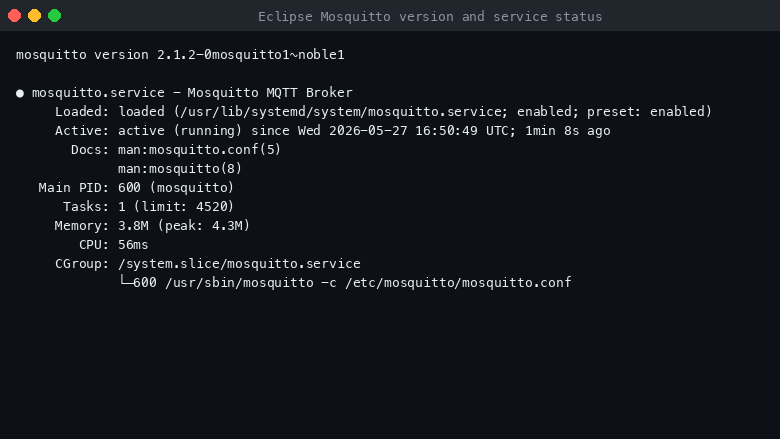
Eclipse Mosquitto version and service status
Image
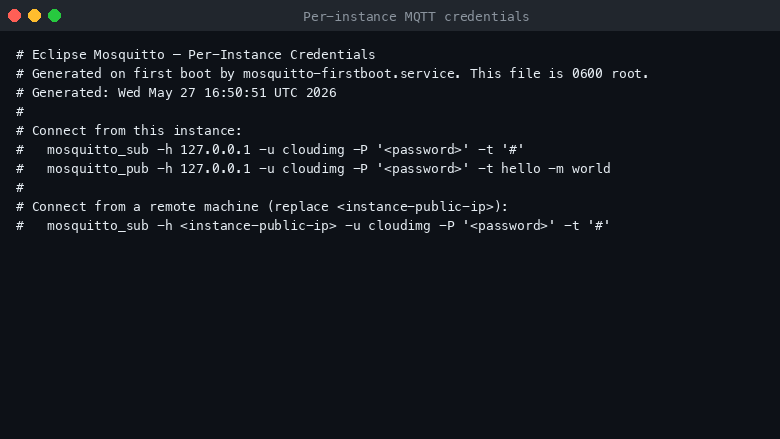
Per-instance MQTT credentials
Image
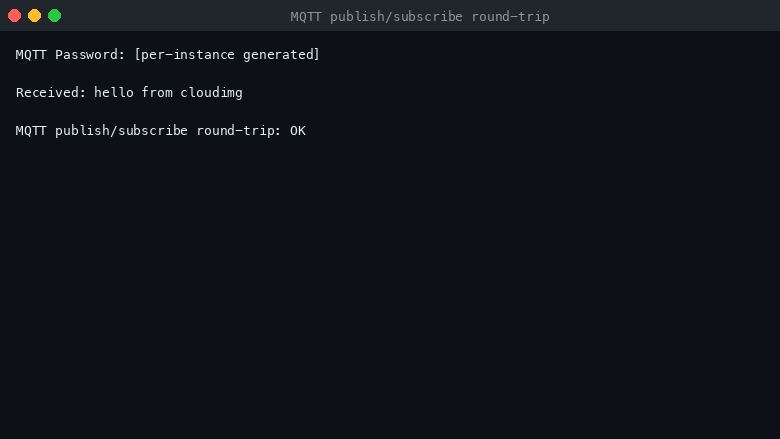
MQTT publish/subscribe round-trip
This is a repackaged open source software product wherein additional charges apply for cloudimg support services.
Overview
Eclipse Mosquitto is the open source message broker that implements the MQTT protocol - the de facto standard for lightweight publish/subscribe messaging on the Internet of Things. It is small, fast, and battle tested, and is the broker recommended by the OASIS MQTT technical committee. Eclipse Mosquitto has been downloaded millions of times and powers IoT deployments worldwide across industries including industrial automation, smart buildings, and fleet management.
This AMI delivers Eclipse Mosquitto fully installed and configured so a working, authenticated MQTT broker is running within minutes of launch. The current stable line is provided.
What Is Included
Eclipse Mosquitto, installed from the official Mosquitto PPA, running as a single node broker. The mosquitto-clients package provides the mosquitto_pub and mosquitto_sub command line tools for publishing and subscribing from the instance itself or remote machines. The broker is the only workload on the image, so the platform stays lean and predictable.
Authentication Enabled By Default
The image ships with password authentication switched on. The Mosquitto configuration sets allow_anonymous to false and points at a password file, so anonymous MQTT connections are rejected from the moment the broker starts. There is no public or default broker access. This eliminates the risk of exposed default credentials - a common attack vector in IoT deployments.
Secure First Boot
On the first boot of your instance a one-shot service generates a fresh, strong password for the cloudimg MQTT user, unique to that instance, applies it to the broker with mosquitto_passwd, and writes it to a file that only the root user can read. No shared or default MQTT credentials ship in the image. Each instance receives its own cryptographically random credentials.
Security and Hardening
- Authentication: Password-based access control enforced from first boot
- TLS encryption in transit: Add a TLS listener on port 8883 with your own certificate following the user guide
- Minimal attack surface: Only the MQTT broker runs on the image; unnecessary packages are removed
- Network isolation: Deploy in a VPC private subnet and restrict Security Group ingress to ports 1883/8883 from trusted CIDR ranges only
- File permissions: Generated credentials stored with root-only read access (chmod 600)
AWS Integrations
This broker integrates with your AWS environment:
- AWS IoT Core: Bridge messages between your local Mosquitto broker and AWS IoT Core for hybrid cloud/edge architectures
- Amazon CloudWatch: Forward broker metrics and logs to CloudWatch for centralized monitoring and alerting
- Amazon Kinesis: Stream MQTT messages into Kinesis Data Streams for real-time analytics pipelines
- VPC and Security Groups: Deploy within your VPC with fine-grained network controls
The broker also works with popular open source platforms such as Node-RED for visual flow programming and Home Assistant for smart home automation.
Use Case: Industrial IoT Telemetry Pipeline
A manufacturing facility with thousands of sensors reporting temperature, vibration, and pressure readings every 30 seconds publishes telemetry to the Mosquitto broker over MQTT. The broker fans out messages to subscribers including a time-series database for historical analysis and an alerting service for threshold breaches. The lightweight protocol keeps bandwidth low even over constrained factory networks.
Ready To Use
- Launch the AMI from AWS Marketplace in your chosen VPC and subnet
- Ensure your Security Group allows inbound TCP on port 1883 (and 8883 if using TLS)
- SSH into the instance using your key pair
- Read the generated password: sudo cat /root/mqtt_password.txt
- Test immediately: mosquitto_pub -h localhost -u cloudimg -P YOUR_PASSWORD -t test -m hello
- Subscribe from another terminal: mosquitto_sub -h localhost -u cloudimg -P YOUR_PASSWORD -t test
The broker listens for MQTT on port 1883 by default; the user guide explains how to add a TLS listener on 8883 with your own certificate.
cloudimg Support
24/7 technical support by email and chat. Help with MQTT broker deployment, authentication and access control, TLS configuration, bridging multiple brokers, AWS IoT Core integration, and broker tuning.
All product and company names are trademarks or registered trademarks of their respective holders. Use of them does not imply any affiliation with or endorsement by them.
Highlights
- Eclipse Mosquitto preinstalled and ready, running as a single node MQTT broker with the mosquitto_pub and mosquitto_sub command line tools, with no manual setup required
- Password authentication is enabled by default and a fresh MQTT password is generated for every instance on first boot and stored in a file only the root user can read
- 24/7 technical support from cloudimg, with expert assistance for MQTT broker deployment, authentication and access control, TLS configuration and broker tuning
Details
Sold by
Categories
Delivery method
Delivery option
64-bit (x86) Amazon Machine Image (AMI)
Latest version
Operating system
Ubuntu 24.04
Deployed on AWS
New
Introducing multi-product solutions
You can now purchase comprehensive solutions tailored to use cases and industries.

Features and programs
Financing for AWS Marketplace purchases
AWS Marketplace now accepts line of credit payments through the PNC Vendor Finance program. This program is available to select AWS customers in the US, excluding NV, NC, ND, TN, & VT.

Pricing
Free trial
Try this product free for 7 days according to the free trial terms set by the vendor. Usage-based pricing is in effect for usage beyond the free trial terms. Your free trial gets automatically converted to a paid subscription when the trial ends, but may be canceled any time before that.
Pricing is based on actual usage, with charges varying according to how much you consume. Subscriptions have no end date and may be canceled any time. Alternatively, you can pay upfront for a contract, which typically covers your anticipated usage for the contract duration. Any usage beyond contract will incur additional usage-based costs.
Additional AWS infrastructure costs may apply. Use the AWS Pricing Calculator to estimate your infrastructure costs.
If you are an AWS Free Tier customer with a free plan, you are eligible to subscribe to this offer. You can use free credits to cover the cost of eligible AWS infrastructure. See AWS Free Tier for more details. If you created an AWS account before July 15th, 2025, and qualify for the Legacy AWS Free Tier, Amazon EC2 charges for Micro instances are free for up to 750 hours per month. See Legacy AWS Free Tier for more details.
Dimension | Description | Cost/hour |
|---|---|---|
m5.large Recommended | m5.large | $0.08 |
t3.micro | t3.micro instance type | $0.04 |
t2.micro | t2.micro instance type | $0.04 |
r7a.xlarge | r7a.xlarge instance type | $0.12 |
c7i.metal-24xl | c7i.metal-24xl instance type | $0.24 |
r5d.16xlarge | r5d.16xlarge instance type | $0.24 |
m8i-flex.8xlarge | m8i-flex.8xlarge instance type | $0.24 |
c8a.4xlarge | c8a.4xlarge instance type | $0.24 |
r8id.16xlarge | r8id.16xlarge instance type | $0.24 |
m8i-flex.large | m8i-flex.large instance type | $0.08 |
Vendor refund policy
Refunds available on request.

Legal
Vendor terms and conditions
Upon subscribing to this product, you must acknowledge and agree to the terms and conditions outlined in the vendor's End User License Agreement (EULA) .
Content disclaimer
Vendors are responsible for their product descriptions and other product content. AWS does not warrant that vendors' product descriptions or other product content are accurate, complete, reliable, current, or error-free.
Delivery details
64-bit (x86) Amazon Machine Image (AMI)
Amazon Machine Image (AMI)
An AMI is a virtual image that provides the information required to launch an instance. Amazon EC2 (Elastic Compute Cloud) instances are virtual servers on which you can run your applications and workloads, offering varying combinations of CPU, memory, storage, and networking resources. You can launch as many instances from as many different AMIs as you need.
Version release notes
Remediates flagged CVEs: full apt update (kernel + userspace); rng-tools added.
Additional details
Usage instructions
Connect via SSH on port 22 as the default login user for your operating system variant (the user guide lists it per variant). Eclipse Mosquitto listens for MQTT on port 1883 on the instance itself. Retrieve the generated MQTT password with: sudo cat /root/mosquitto-credentials.txt. Subscribe to a topic with: mosquitto_sub -h 127.0.0.1 -u cloudimg -P <password> -t '#'. Publish with: mosquitto_pub -h 127.0.0.1 -u cloudimg -P <password> -t hello -m world. The user guide explains how to add a TLS listener on 8883 and how to bridge to other brokers.
Resources
Vendor resources
Support
Vendor support
cloudimg provides 24/7 technical support for this product by email and live chat.
What We Help With
- MQTT broker deployment and initial configuration
- Authentication and access control setup
- TLS certificate configuration for encrypted connections
- Bridging multiple Mosquitto brokers
- AWS IoT Core integration and message bridging
- Performance tuning and resource optimization
- Troubleshooting connectivity and message delivery issues
- Guidance on Security Group and VPC network configuration
Getting Started After Purchase
- Launch the AMI in your chosen AWS region and VPC
- Configure your Security Group to allow inbound TCP on port 1883 (MQTT) and port 22 (SSH)
- SSH into the instance using your EC2 key pair
- Read the auto-generated MQTT password from the root-only file
- Test with mosquitto_pub and mosquitto_sub command line tools included on the instance
- For TLS, add a listener on port 8883 following the user guide instructions
Response Times
Critical issues receive a one-hour average response. All inquiries are handled by engineers with MQTT expertise.
Contact
Email: support@cloudimg.co.uk Live chat: Available 24/7
For refund requests or billing questions, contact cloudimg support via the same channels.
AWS infrastructure support
AWS Support is a one-on-one, fast-response support channel that is staffed 24x7x365 with experienced and technical support engineers. The service helps customers of all sizes and technical abilities to successfully utilize the products and features provided by Amazon Web Services.
Similar products
Code, debug, and modernize IBM zSystems applications with fully integrated tools in your choice of IDE.
Code, debug, and modernize IBM zSystems applications with fully integrated tools in your choice of IDE. Contact Rocket Software for a Private Offer which includes 24/7 Enterprise Support.

Secure Java runtime environment with OpenJDK 8 LTS (Eclipse Temurin) preinstalled and JAVA_HOME configured. Built with the latest Linux security patches and ready to run Java workloads such as Tomcat, Cassandra, Kafka, and other JVM-based applications. Kurian provides this product across multiple Linux distributions including Ubuntu, Debian, Amazon Linux, Rocky Linux, AlmaLinux, Oracle Linux, Fedora, and Red Hat Enterprise Linux.

Secure Java runtime environment with OpenJDK 17 LTS (Eclipse Temurin) preinstalled and JAVA_HOME configured. Built with the latest Linux security patches and ready to run Java workloads such as Tomcat, Cassandra, Kafka, and other JVM-based applications. Kurian provides this product across multiple Linux distributions including Ubuntu, Debian, Amazon Linux, Rocky Linux, AlmaLinux, Oracle Linux, Fedora, and Red Hat Enterprise Linux.

Secure Java runtime environment with OpenJDK 11 LTS (Eclipse Temurin) preinstalled and JAVA_HOME configured. Built with the latest Linux security patches and ready to run Java workloads such as Tomcat, Cassandra, Kafka, and other JVM-based applications. Kurian provides this product across multiple Linux distributions including Ubuntu, Debian, Amazon Linux, Rocky Linux, AlmaLinux, Oracle Linux, Fedora, and Red Hat Enterprise Linux.
Customer reviews
No customer reviews yet
Be the first to review this product . We've partnered with PeerSpot to gather customer feedback. You can share your experience by writing or recording a review, or scheduling a call with a PeerSpot analyst.