
Sold by: Fortinet Inc.
Deployed on AWS
AWS Free Tier
FortiGate-VM delivers next-generation firewall capabilities for organizations of all sizes to protect against malware, exploits, malicious websites, and known and unknown attacks. It enables broad protection and automated management for consistent enforcement and visibility across your cloud environment.
4.3
Overview
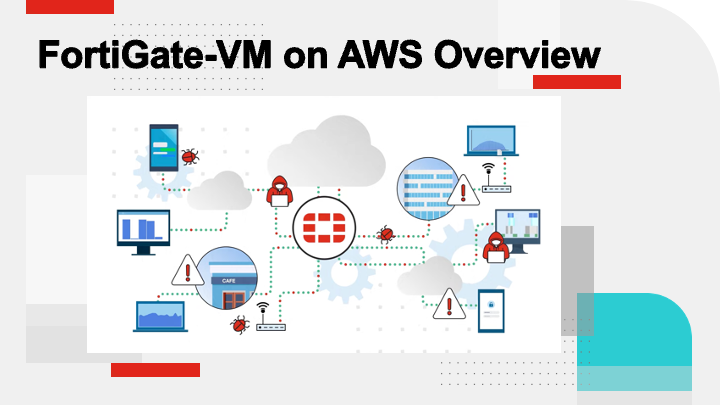
Video
Video 1
Video
Video 2

Video
Product video
FortiGate-VM on AWS delivers next-generation firewall and VPN/SD-WAN capabilities for organizations of all sizes. It enables broad network protection and automated security management for consistent enforcement and visibility across your AWS VPCs and hybrid cloud infrastructure. FortiGate natively integrates with AWS Gateway Load Balancer, AWS Transit Gateway and other AWS security services to simplify and deliver enterprise class security for applications and workloads running on AWS.
FortiGate-VM reduces complexity by combining secure connectivity with advanced threat protection capabilities such as powerful intrusion prevention (IPS), malware detection and protection, and continuous threat intelligence from FortiGuard Labs security services. It offers a management console that provides comprehensive network automation and unified visibility across multi-cloud environments.
FortiGate-VM, in concert with other elements of the Fortinet Security Fabric, enables common deployment scenarios such as cloud security services hub, secure remote access, container security, web application security, and critical workload protection.
Visit the FortiGate-VM on AWS Community Resource Hub to find onboarding, deployment, and technical information and join in discussions: https://community.fortinet.com/t5/FortiGate-VM-on-AWS/gh-p/fortigate-vm-on-aws
Please contact AWSsales@fortinet.com with questions.
Highlights
- ADVANCED THREAT PROTECTION - FortiGate identifies thousands of applications inside network traffic for deep inspection and granular policy enforcement. It protects against malware, exploits, malicious websites, and known and unknown attacks using powerful Intrusion Prevention Service (IPS) and continuous threat intelligence from FortiGuard Labs security services.
- PRICE PERFORMANCE - Fortigate on Graviton-based EC2 instances provide organizations with better cost optimized options compared to other instance types. Also see: https://www.fortinet.com/blog/business-and-technology/fortinet-collaborates-with-aws-to-deliver-low-cost--high-perform
- SECURE CONNECTIVITY and SIMPLIFIED MANAGEMENT - FortiGate provides core networking functionality, including SSL or IPSec VPN to AWS-based workloads, and scales to deliver secure SD-WAN Cloud on-ramp for organizations of all sizes. FortiGate also includes a management console that is simple to use and provides comprehensive network automation and unified visibility across multi-cloud environments.
Details
Sold by
Categories
Delivery method
Delivery option
64-bit (Arm) Amazon Machine Image (AMI)
Latest version
Operating system
OtherLinux 8.0.1
Deployed on AWS
New
Introducing multi-product solutions
You can now purchase comprehensive solutions tailored to use cases and industries.

Features and programs
Trust Center

Access real-time vendor security and compliance information through their Trust Center powered by Drata or Vanta. Review certifications and security standards before purchase.
Buyer guide
Gain valuable insights from real users who purchased this product, powered by PeerSpot.
Financing for AWS Marketplace purchases
AWS Marketplace now accepts line of credit payments through the PNC Vendor Finance program. This program is available to select AWS customers in the US, excluding NV, NC, ND, TN, & VT.

Pricing
Pricing and entitlements for this product are managed through an external billing relationship between you and the vendor. You activate the product by supplying a license purchased outside of AWS Marketplace, while AWS provides the infrastructure required to launch the product. AWS Subscriptions have no end date and may be canceled any time. However, the cancellation won't affect the status of the external license.
Additional AWS infrastructure costs may apply. Use the AWS Pricing Calculator to estimate your infrastructure costs.
Vendor refund policy
This is a BYOL product - there're no refund and cancellation policy applied.

Legal
Vendor terms and conditions
Upon subscribing to this product, you must acknowledge and agree to the terms and conditions outlined in the vendor's End User License Agreement (EULA) .
Content disclaimer
Vendors are responsible for their product descriptions and other product content. AWS does not warrant that vendors' product descriptions or other product content are accurate, complete, reliable, current, or error-free.
Delivery details
64-bit (Arm) Amazon Machine Image (AMI)
Amazon Machine Image (AMI)
An AMI is a virtual image that provides the information required to launch an instance. Amazon EC2 (Elastic Compute Cloud) instances are virtual servers on which you can run your applications and workloads, offering varying combinations of CPU, memory, storage, and networking resources. You can launch as many instances from as many different AMIs as you need.
Version release notes
Additional details
Usage instructions
After deploying the instance, click on Manage in AWS Console to see the running instance and public DNS address to continue the configuration of the FortiGate-VM. Connect to the secured Web UI via the public DNS address: https://<public DNS address>. For any CLI configuration/settings, SSH is required to log into the CLI. Default login credentials are with a username of admin and the AWS Instance ID value as the password. You can reference the FortiGate-VM AWS admin guide is located at: https://docs.fortinet.com/document/fortigate-public-cloud/8.0.0/aws-administration-guide/
Resources
Support
Vendor support
By subscribing to these services, you'll receive a timely response to any technical issues as well as complete visibility on the ticket resolution progress. FortiCare Support Services include firmware upgrades, Support portal access, and associated technical resources. FortiGuard Security Services include up-to-the minute threat intelligence delivered in real time to stop the latest threats. http://www.fortinet.com/support/contact_support.html
AWS infrastructure support
AWS Support is a one-on-one, fast-response support channel that is staffed 24x7x365 with experienced and technical support engineers. The service helps customers of all sizes and technical abilities to successfully utilize the products and features provided by Amazon Web Services.
Similar products

FortiGate-VM delivers next-generation firewall capabilities for organizations of all sizes to protect against malware, exploits, malicious websites, and known and unknown attacks. It enables broad protection and automated management for consistent enforcement and visibility across your cloud environment.

Fortinet FortiGate allows mitigation of blind spots to improve policy compliance by implementing critical security controls within your AWS environment. FortiGate firewall includes all of the security and networking services common to FortiGate physical appliances.

Fortinet FortiGate allows mitigation of blind spots to improve policy compliance by implementing critical security controls within your AWS environment. FortiGate includes all of the security and networking services common to FortiGate physical appliances.

The VM-Series Next Generation Firewall (NGFW) gives security teams complete visibility and control over all networks using powerful traffic identification, malware prevention, and threat intelligence technologies.
Customer reviews
Rameshprabhu Selvaraj
Centralized gateways have simplified secure global access but still have needed automation features
Reviewed on Jul 21, 2026
Review provided by PeerSpot
What is our primary use case?
My main use case for Fortinet FortiGate-VM is to use it as a firewall for protecting the global gateway, and we also use it as a proxy connection for internet access outside our organizations.
A specific example of how we use Fortinet FortiGate-VM as a firewall or proxy in my organization is that we have multiple airports across the globe and provide internet access through this firewall. We configure a proxy IP address in Fortinet FortiGate-VM, and that IP is given to the customer. Basically, they configure the proxy IP on all the PAC files of the workstations, which send the traffic to these proxy IPs. Once the traffic reaches Fortinet FortiGate-VM, it verifies the policies, and only the permitted ones will be allowed. We also do complete inspection of the traffic and then permit that to the internet.
What is most valuable?
Fortinet FortiGate-VM offers a completely useful dashboard where we monitor the complete health checks in one single pane of glass. Fortinet FortiGate-VM's user interface is much friendlier than other firewalls, and the certificates are quite easily configured.
The dashboard of Fortinet FortiGate-VM gives the complete health status of the firewall, measuring CPU utilization, the firewall primary and secondary status, and traffic utilization. Any problematic issues are immediately flagged in the dashboards. Furthermore, certificates are quite automated, as we have all certificates on Fortinet FortiGate-VM which are automated with another Python script, making modifications and updates easier than on other firewalls.
Fortinet FortiGate-VM has positively impacted our organization as it is quite user-friendly to access and easy to deploy. Configurations are pretty straightforward to analyze, study, and configure as well, and the deployment is much easier than with other firewalls.
What needs improvement?
I would like to see an SD-WAN connection for Fortinet FortiGate-VM, which would provide much more automation.
For improvement in Fortinet FortiGate-VM, I would suggest adding many more features such as SD-WAN. It would also be beneficial if traffic monitoring could be simpler to use, allowing for detailed insights into what is happening within the packets at a packet level.
I would appreciate features such as Python integration inside Fortinet FortiGate-VM so that the APIs are easier to script with external scripting languages.
For how long have I used the solution?
I have been using Fortinet FortiGate-VM for the past three and a half years.
What do I think about the stability of the solution?
Fortinet FortiGate-VM is quite stable. I have not had any problems, and it is easy to do OS upgrades and other user-friendly upgrade processes.
What do I think about the scalability of the solution?
Fortinet FortiGate-VM's scalability is quite user-friendly, requiring only access.
How are customer service and support?
Fortinet FortiGate-VM's customer support is good. We have raised multiple TAC cases for support with VM issues impacting Fortinet FortiGate-VM performance, and in many instances, they helped us rebuild or understand issues with interfaces not coming up in virtual environments.
Which solution did I use previously and why did I switch?
We previously used third-party solutions such as Zscaler, but switching to our own product saves money and is easier to manage as well.
What was our ROI?
I have seen a return on investment with Fortinet FortiGate-VM. It acts as a proxy for many customers, which saves time and resources by facilitating internet access. It is completely user-friendly to manage, and the resource utilization on Fortinet FortiGate-VM is well-suited for all the customers.
What's my experience with pricing, setup cost, and licensing?
I am not involved in the pricing and costs associated with Fortinet FortiGate-VM, as those are handled by the CFO. We are in operations, and we just access the product as it is and take care of the service level agreements.
Which other solutions did I evaluate?
Before choosing Fortinet FortiGate-VM, we analyzed multiple partners such as Palo Alto and Zscaler to use as proxies and to secure the firewall, but since our requirements do not call for immense utilization, we chose Fortinet FortiGate-VM, which meets our needs effectively.
What other advice do I have?
Fortinet FortiGate-VM is deployed in our organization in a private cloud across the globe, where we have our servers deployed. Our servers are running on ESXi hosts, and Fortinet FortiGate-VM instances are mostly kept on virtual machines on those servers across the globe, acting as gateways across different geographical locations such as continents.
We use Equinix data centers in Germany and the US for our private cloud setup.
Regarding Fortinet FortiGate-VM's AI capabilities, we have not used them so far, but we look forward to having some features shared with us so that we can benefit from them. Concerning the accuracy and reliability of the output from Fortinet FortiGate-VM's AI capabilities, we have not used them yet, but we would appreciate understanding the product more through information or knowledge shared with our company to increase our awareness.
My advice to others looking into using Fortinet FortiGate-VM is that it is much user-friendly to access the UI and offers additional stability. Fortinet FortiGate-VM's policies are quite easy to configure and operate. However, we would benefit from some additional features, such as SD-WAN and APIs, that can help automate processes with scripts externally to manage multiple devices simultaneously.
Fortinet FortiGate-VM still lacks some more features and has room for improvement in user-friendly traffic inspection. Additionally, it would be beneficial to manage multiple instances of Fortinet FortiGate-VM from a single pane of glass. I appreciate the support they offer and look forward to improved features such as single pane of glass management for device access and enhanced scripting capabilities. I give Fortinet FortiGate-VM a rating of seven out of ten.
Naresh Chintala
Centralized policies have improved secure VPN access and restricted unapproved web applications
Reviewed on Jul 20, 2026
Review provided by PeerSpot
What is our primary use case?
Our main use case for Fortinet FortiGate-VM is for SSL VPN connections, web filtering, and application controls. We are using EPS and Fortinet FortiGate-VM, and we segregate the policies in this organization by not allowing unacceptable web applications such as WhatsApp and Facebook.
A specific example of how we use web filtering and manage the VPN features day-to-day is that we maintain it according to email requests from end-users. They send mail to their team managers, and we approve it for particular end users. We maintain day-to-day activity in these firewalls and have generated logs including local logs, forward logs, and screenshots. When any IPS or IDS triggers in our firewall, we resolve that with the particular end user and maintain communication through email notifications.
Fortinet FortiGate-VM is deployed in our organization on-premises only. We do not have any private or public cloud deployments. We maintain this firewall for our security purposes.
What is most valuable?
Our main valuable features are SSL VPN connections, web filtering, and application controls. We segregate policies in this organization by not allowing unacceptable web applications such as WhatsApp and Facebook.
Fortinet FortiGate-VM has positively impacted our organization by improving both security and productivity. We are currently using the FortiGate firewall 100F model.
What needs improvement?
Fortinet FortiGate-VM's AI capabilities are good, but they could be improved a bit for security purposes. It is easy to manage, but it will be difficult to maintain compared to Palo Alto.
For how long have I used the solution?
We have maintained Fortinet FortiGate-VM for the last three years.
What do I think about the stability of the solution?
Fortinet FortiGate-VM is stable.
What do I think about the scalability of the solution?
Fortinet FortiGate-VM's scalability is very good. The online support is also very good. Previously, we had many tickets, and they resolved our problems in a timely manner.
How are customer service and support?
The customer support for Fortinet FortiGate-VM is very good.
Which solution did I use previously and why did I switch?
Previously, I have worked with Sophos and Palo Alto firewalls.
What was our ROI?
I have seen a return on investment with this firewall. Money was purely saved with this firewall because compared to other vendors, it is very reasonably priced with reasonable licensing costs. We maintain Fortinet FortiGate-VM easily, which is why I recommended this firewall.
What's my experience with pricing, setup cost, and licensing?
My experience with pricing, setup cost, and licensing for Fortinet FortiGate-VM is that licensing is very reasonable. We recently upgraded our licenses with a three-year extension license that we purchased for approximately four lakh.
Which other solutions did I evaluate?
Before choosing Fortinet FortiGate-VM, we evaluated other options including Check Point and Palo Alto.
What other advice do I have?
The advice I would give to others looking into using Fortinet FortiGate-VM is that there is better pricing and better support for this firewall. We recommended it to other organizations and to some of our colleagues.
For security purposes, we have triggered it when malware emails come to our end users, and at that time, we trigger to the peer-to-peer security. For email spam, we segregate that URL, copy-paste it into this firewall, and there is no trigger for any malware. It is not a difficult task for our end because Fortinet FortiGate-VM is easy to manage.
Regarding firmware upgrades every few months, there is a significant difference compared to Sophos or Palo Alto. You can easily trigger web policies, application policies, and user-based policies. It is very easy compared to previous firewalls. Fortinet FortiGate-VM is the best for practice purposes and for live use. You have to maintain firewall notifications and related tasks.
We maintain ISO guidelines and step-by-step documentation. We are implementing additional applications in our organization, such as Office 365, which is completely online. We maintain that particular URL so we can allow end users access. For these triggers and web applications, we are using Fortinet FortiGate-VM. I would rate this product an 8 out of 10.
AkshayPawar
Secure remote access has protected our hybrid cloud and simplifies firewall policy management
Reviewed on Jul 07, 2026
Review provided by PeerSpot
What is our primary use case?
I use Fortinet FortiGate-VM for firewall purposes including traffic allow and deny functions, along with all related firewall policies, VPN, IPsec VPN, SSL VPN, and security purposes.
Fortinet FortiGate-VM firewall is deployed in the environment for security purposes to protect the outside domain from the internet network to the inside network. Additionally, Fortinet FortiGate-VM VPN client is used for VPN purposes including SSL VPN. Connections to branches are established via IPsec.
Use cases include IPsec tunneling and VPN for connecting all users as clients. Fortinet FortiGate-VM is also used to protect the outside network. Multiple firewall policies have been created for blocking outside internet traffic to the inside LAN network.
What is most valuable?
Fortinet FortiGate-VM offers valuable features including SSL VPN, FortiWAF, and FortiManager.
FortiWAF is most valuable in the environment to protect web-related traffic. VPN and SSL VPN are also valuable because there are over a thousand users connecting remotely to the data center.
Fortinet FortiGate-VM protects the environment from the outside and will protect the data center from external threats. It automatically detects signatures that are malfunctioning. When intrusion protections are used, outside domains from countries such as China and Russia are blocked to protect the inside network.
What needs improvement?
Regarding Fortinet FortiGate-VM improvements, there is no current specific suggestion. However, there are multiple upgrades available, and recommendations are received every month. This creates a very difficult situation regarding getting downtime for upgrades. The suggestion is to create a more stable software product so that upgrades are not required every month or within months. If a more refined product is created, downtime or continuous upgrades would not be necessary.
Overall experience is very good, but continuous CVEs require upgrading the firewall to overcome vulnerabilities. The suggestion is to work toward overcoming vulnerabilities to reduce the frequency of upgrades. Due to continuous upgrades required for security patches, the rating given is nine instead of a higher number.
For how long have I used the solution?
I have used Fortinet FortiGate-VM for the last five years.
Which solution did I use previously and why did I switch?
Different options were available before. Previously, Sophos was used, but Sophos had some limitations, which is why the transition was made to Fortinet FortiGate-VM.
Which other solutions did I evaluate?
Palo Alto is used in parallel as an alternative solution. However, Fortinet FortiGate-VM is preferred as it is user-friendly.
What other advice do I have?
The interface is excellent and very useful for troubleshooting. Configuration is very user-friendly and is appreciated when compared with other firewalls. The dashboard of Fortinet FortiGate-VM is valuable for troubleshooting, monitoring, and all functions can be performed on the same device.
FortiGate-VM AI is a new feature that has not had time to be fully explored, but there is anticipation that it will be helpful.
Fortinet FortiGate-VM is user-friendly and can be handled by anyone. The user interface and dashboard are valuable for troubleshooting and monitoring. Fortinet FortiGate-VM is recommended for use.
This review has been rated nine out of ten.
Alexander Jakober
Reliable virtual firewalls have simplified troubleshooting and improved 24/7 client protection
Reviewed on Jul 06, 2026
Review provided by PeerSpot
What is our primary use case?
My main use case for Fortinet FortiGate-VM is using them as standard firewalls for our clients or as a virtual firewall. For one of our clients, we have an Azure environment, and for the firewall, we just have Fortinet FortiGate-VM installed virtually, and we have a site-to-site tunnel to their main campus. Fortinet FortiGate-VM is deployed in our organization both in the public cloud and on-premises.
What is most valuable?
The best features Fortinet FortiGate-VM offers are how easily manageable it is and overall, it just provides a better firewall experience than what I have used in the past. It offers threat protection, web filtering, and all the standard security features that you would expect a firewall to have, but it puts them into the web GUI, making it much better than I have seen in other circumstances. Additionally, troubleshooting is much easier than with Cisco Meraki, which I dislike a lot; Fortinet FortiGate-VM just seems to be much easier to troubleshoot complex issues.
Compared to Meraki, Fortinet FortiGate-VM lets me get into logs a bit easier; whereas Meraki does not provide the whole picture, and sometimes I actually have to create a troubleshooting ticket with Meraki for them to be able to see into the back end of my system, whereas Fortinet FortiGate-VM shows me everything, absolutely everything.
Fortinet FortiGate-VM has impacted my organization positively by providing us with the reliability that we need in firewalls. Basically, clients are relying on these firewalls for their internet 24/7, and Fortinet FortiGate-VM has supplied that to us, giving us a sense of relief knowing that Fortinet FortiGate-VM is just going to work.
A specific example where Fortinet FortiGate-VM's reliability made a difference for our team or clients is that we are constantly having power issues at these clients because their infrastructure is not really set up super reliably, but Fortinet FortiGate-VM has failed over quite well. Whether it is high availability or failing over to the secondary WAN, it just works.
I can definitely attest to time saved; engineers have spent significantly less time on setting up and troubleshooting and dealing with issues on Fortinet FortiGate-VM compared to other firewalls.
What needs improvement?
I think Fortinet FortiGate-VM can be improved. There is not anything about the interface, updates, documentation, or support that I wish was different; support has been good, and documentation has been good. I cannot really think of anything off the top of my head.
One small thing I wish would improve is when I am going through event logs, it defaults to my cloud environment, and I have to switch it over to look at the local disk. That is a small thing, but every time I am looking at event logs, I have to switch it over, so it becomes annoying sometimes.
For how long have I used the solution?
I have been using Fortinet FortiGate-VM for about four years now.
What do I think about the stability of the solution?
Fortinet FortiGate-VM is indeed stable.
What do I think about the scalability of the solution?
I have tested the scalability of Fortinet FortiGate-VM, and it seems to work fairly well. We have not necessarily used it in practice yet because we do not have to, since a lot of our clients are smaller and only have one office. However, we use the management portal to get a good overview of all the clients, so in that respect, it works fairly well.
How are customer service and support?
The customer support for Fortinet FortiGate-VM is good; it has been pretty standard, and they are fairly quick to address tickets and respond. I have not really had a bad experience yet.
Which solution did I use previously and why did I switch?
We have switched from Meraki to Fortinet FortiGate-VM just because, as I mentioned earlier, we prefer Fortinet FortiGate-VM much better for troubleshooting logs and setting up firewall policies. It is just a much better experience and provides much more granular detail that is significantly better than Meraki.
What's my experience with pricing, setup cost, and licensing?
My experience with pricing, setup cost, and licensing is fairly typical. We go through a third-party vendor that gives us a quote and prices it out for us, along with a little bit of a discount, but it seems to be fairly standard.
Which other solutions did I evaluate?
Before choosing Fortinet FortiGate-VM, we did evaluate other options, including some Palo Altos, but we just did not prefer the GUI layout, and Fortinet FortiGate-VM just looked a lot simpler and easier to manage.
What other advice do I have?
Compared to Meraki, Fortinet FortiGate-VM lets me get into logs a bit easier; whereas Meraki does not provide the whole picture, and sometimes I actually have to create a troubleshooting ticket with Meraki for them to be able to see into the back end of my system, whereas Fortinet FortiGate-VM shows me everything, absolutely everything. I do not have anything else to add about the features; that is about it.
I would rate Fortinet FortiGate-VM a 10 on a scale of 1 to 10. I give it a 10 because it is just a perfect combination of web GUI, troubleshooting capabilities, and reliability. It just makes it that perfect 10 compared to other firewalls that I have used.
My advice to others looking into using Fortinet FortiGate-VM is to ensure they understand how to troubleshoot, set up their policies, and configure the firewall correctly. There is a small learning curve on the individual specific details of Fortinet FortiGate-VM, but once you figure that out, it is fairly simple. Fortinet offers extended knowledge training sessions, so people can watch their trainings on Fortinet FortiGate-VM, which are fairly good. My overall rating for this product is 10 out of 10.
V. Rahul
Branch connectivity has improved and centralized security management protects distributed sites
Reviewed on Jul 06, 2026
Review provided by PeerSpot
What is our primary use case?
My main use case for Fortinet FortiGate-VM involves several customers in our IBM Cloud, where we have more than 300 premium accounts. They will use it for their infrastructure and enterprise management, placing these FortiGates at their branch locations and a few at the perimeter edge. Essentially, the use case is for connecting one branch to another branch, where they build IPsec tunnels between two Fortinet FortiGate-VM instances. Security policies and UTM features play a crucial role here, mainly for connectivity between different branches and securing the enterprise environments.
When managing those branch-to-branch connections with Fortinet FortiGate-VM, I find it good and easy to use, similar to Palo Alto. I haven't faced any difficulties because Fortinet FortiGate-VM has a clean UI and CLI. For every firewall, the CLI is good, but if you compare UIs in the market, Fortinet FortiGate-VM and Palo Alto have better UIs compared to Check Point or Juniper. Overall, I find it easy to use.
What is most valuable?
Fortinet FortiGate-VM offers several standout features, with one being its next-generation firewall capabilities that include UTM features. The security processing unit is good in Fortinet FortiGate-VM, and its IPS and VPN SSL inspection help a lot. When comparing price with performance, it has an edge because other vendors such as Palo Alto charge somewhat higher.
Fortinet FortiGate-VM also has a built-in SD-WAN feature, while other devices often require a separate license for this feature. High availability and threat intelligence are common across firewalls, but I find it convenient that you can open a console session directly from Fortinet FortiGate-VM UI, allowing simultaneous access to the CLI. The console feature saves time because you don't need to log in to PuTTY and create another session; you can access the console directly from the GUI. This is particularly valuable in busy environments.
The SD-WAN feature is also crucial as it automatically selects the best performance link out of multiple ISPs based on latency and packet loss, eliminating the need for manual BGP failover. Many customers, including those at NTT and MicroLand, use Fortinet FortiGate-VM SD-WAN, which I have observed. In terms of features, one great aspect is that in security policies, you can also add NAT.
While many elements are common across firewalls, the ease of use of Fortinet FortiGate-VM is significant. A vendor's ability to create an easy-to-navigate device can set them apart. Among the vendors I've seen, only Fortinet and Palo Alto maintain a clean UI, making navigation and creation straightforward. Fortinet FortiGate-VM has positively impacted my organization because the number of bugs reported is less compared to other vendors. For instance, in other vendors such as Palo Alto or Juniper, numerous bugs require fixing in upcoming releases.
However, Fortinet FortiGate-VM releases are stable, so I don't need to frequently upgrade unless a critical vulnerability is identified. I usually upgrade once or twice a year, and the minimal number of bugs is positive, as this reduces work pressure involving critical integrations with other devices.
What needs improvement?
The UI of Fortinet FortiGate-VM could improve further. While I find the UI good, it has potential for enhancement. The CLI is very effective, along with VDOM configurations and root access. On the feature front, I don't see a need for new features in the VM because every device has different rules and limitations. However, they can definitely focus on improving the UI.
While none of the customers I've interacted with have provided feedback on the UI, I believe Fortinet should take such feedback directly from their customers. From my perspective, having worked with Palo Alto, Juniper, and Fortinet FortiGate-VM, I find Palo Alto's UI cleaner, thus suggesting Fortinet could benefit from UI improvements.
For how long have I used the solution?
I have been using Fortinet FortiGate-VM for the past two years, starting from June 2024.
What do I think about the stability of the solution?
Fortinet FortiGate-VM has positively impacted my organization because the number of bugs reported is less compared to other vendors. For instance, in other vendors such as Palo Alto or Juniper, numerous bugs require fixing in upcoming releases. However, Fortinet FortiGate-VM releases are stable, so I don't need to frequently upgrade unless a critical vulnerability is identified. I usually upgrade once or twice a year, and the minimal number of bugs is positive, as this reduces work pressure involving critical integrations with other devices.
With fewer bugs and more stable releases in Fortinet FortiGate-VM, I observe that many people are transitioning from different devices such as Palo Alto and Check Point to Fortinet FortiGate-VM. I've seen many recent migrations among my customers, resulting in a lower number of cases reported. For the Fortinet FortiGate-VM environment specifically, the stability is notable, with few issues unless they involve configuration or external connectivity problems, leading to generally stable usage.
What do I think about the scalability of the solution?
The scalability of Fortinet FortiGate-VM is good; it handles over a hundred policies and can manage a large amount of traffic effectively.
How are customer service and support?
Customer support for Fortinet FortiGate-VM is overall good, but there is room for improvement, particularly since you can't directly raise a Severity 1 ticket. Usually, you must initiate a chat to request raising it to Severity 1, which they could improve, along with prioritization during case handling. Nevertheless, case management is generally effective.
What's my experience with pricing, setup cost, and licensing?
My experience with pricing, setup cost, and licensing for Fortinet FortiGate-VM is good overall.
What other advice do I have?
My advice for others looking to use Fortinet FortiGate-VM is to migrate slowly. They can start with a small branch location that has an existing firewall and test Fortinet FortiGate-VM for a month. Monitoring how the device handles traffic will help them make an informed decision regarding migrating other locations.
I don't have any additional thoughts about Fortinet FortiGate-VM before we wrap up, as it offers a wide range of products and performs well, although competition is high and requires ongoing focus on every aspect to maintain its position as a leader. My overall review rating for Fortinet FortiGate-VM is 8.5 out of 10.