
Sold by: Modality Cloud services
Deployed on AWS
MatchQ is a self-hosted Slurm platform deployed into your AWS VPC to run HPC workloads at scale with full upstream Slurm compatibility.
It automates elastic compute provisioning on AWS, integrates with enterprise identity and networking, and provides integrated dashboards so teams can focus on running HPC workloads rather than managing infrastructure.
Overview
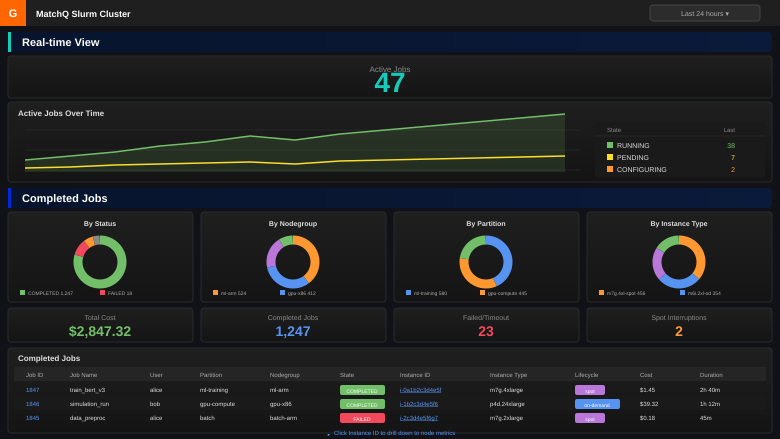
Image
MatchQ cluster monitoring dashboard
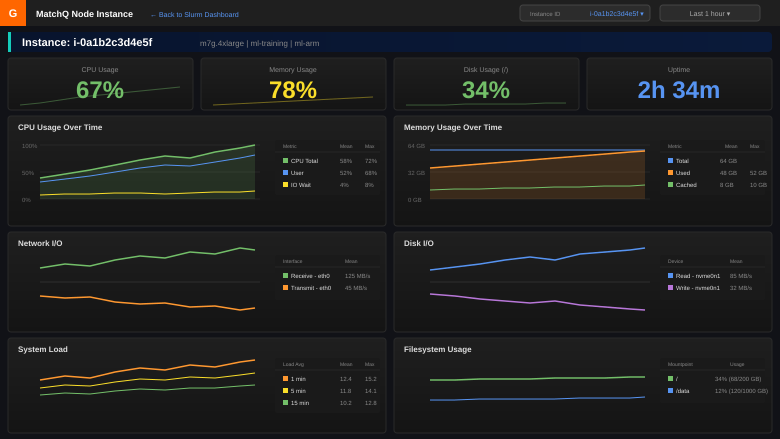
Image
MatchQ instance-level monitoring
MatchQ is a self hosted Slurm platform deployed into the customer's AWS account, providing a familiar operational model for HPC environments while adding cloud specific automation, monitoring, and cost visibility.
The platform supports a wide range of HPC workloads, including semiconductor chip design, bioinformatics, media rendering, machine learning, and AI. MatchQ integrates natively with AWS IAM roles, networking, and tagging, and can operate in cloud only, hybrid, or on premises controlled configurations.
MatchQ includes precompiled multi OS and multi architecture binaries, assisted deployment using CloudFormation, integrated dashboards, and helper scripts to manage partitions, node groups, and scaling policies. This enables teams to focus on running jobs efficiently instead of managing infrastructure.
Pricing is a predictable flat subscription, not tied to instance count, vCPU-hours, or other dynamic usage metrics that can lead to large and unexpected charges as workloads scale.
Subscription tiers MatchQ is offered in three tiers based on cluster size. All tiers include the full MatchQ platform, software updates, onboarding assistance, migration assistance from other job schedulers, and email/ticket support during business hours.
MatchQ Small: For clusters with peak capacity up to 50 concurrent compute nodes. The right fit for development and evaluation environments, smaller production clusters, and teams getting started with HPC on AWS.
MatchQ Medium: For clusters with peak capacity of 50 to 250 concurrent compute nodes. Includes everything in Small, plus 24x7 on-call support for production-critical incidents, defined response SLAs, and quarterly architecture and optimization reviews.
MatchQ Large: For clusters with peak capacity above 250 concurrent compute nodes, or for organizations with complex production requirements. Includes everything in Medium, plus faster response SLAs, dedicated engineer hours per quarter for hands-on optimization and custom integrations, and priority access to new features and beta capabilities.
Customers should select the tier that matches their expected peak concurrent compute node count. Modality reviews usage with each customer at annual renewal to confirm the right tier for the next term.
Highlights
- Self hosted Slurm platform deployed directly into the customer's AWS VPC with full control, native AWS integration, and no vendor lock in.
- Supports multi architecture and multi OS HPC clusters including ARM64 and x86_64 with automated provisioning, monitoring, and cost visibility.
- Precompiled binaries, assisted installation, and helper scripts enable safe, production ready Slurm operation from day one, with monitoring, accounting, and cost visibility included.
Details
Sold by
Categories
Delivery method
Delivery option
MatchQ Slurm Cluster with Monitoring
Latest version
Operating system
AmazonLinux 2023
Deployed on AWS
New
Introducing multi-product solutions
You can now purchase comprehensive solutions tailored to use cases and industries.

Features and programs
Financing for AWS Marketplace purchases
AWS Marketplace now accepts line of credit payments through the PNC Vendor Finance program. This program is available to select AWS customers in the US, excluding NV, NC, ND, TN, & VT.

Pricing
Pricing is based on the duration and terms of your contract with the vendor. This entitles you to a specified quantity of use for the contract duration. If you choose not to renew or replace your contract before it ends, access to these entitlements will expire.
Additional AWS infrastructure costs may apply. Use the AWS Pricing Calculator to estimate your infrastructure costs.
Dimension | Description | Cost/month |
|---|---|---|
MatchQ Platform (Legacy) | Legacy dimension for existing subscribers. New customers should subscribe to MatchQ Small, Medium, or Large. | $600.00 |
MatchQ Small | MatchQ subscription for clusters with peak capacity up to 80 concurrent compute nodes. Includes the full MatchQ platform with no per-instance fees and no caps. | $600.00 |
MatchQ Medium | MatchQ subscription for clusters with peak capacity of 81 to 500 concurrent compute nodes. Includes the full MatchQ platform with no per-instance fees and no caps, plus 24x7 support for production-critical incidents. | $4,800.00 |
MatchQ Large | MatchQ subscription for clusters with peak capacity above 500 concurrent compute nodes. Includes the full MatchQ platform with no per-instance fees and no caps, plus 24x7 support and dedicated engineer hours per quarter. | $12,000.00 |
Dimensions summary
You subscribe under a contract based on your cluster's peak compute capacity. Three active tiers scale by the number of concurrent compute nodes you run. MatchQ Small covers clusters up to 80 nodes. MatchQ Medium covers 81 to 500 nodes and adds 24x7 support for production-critical incidents. MatchQ Large covers more than 500 nodes and adds 24x7 support plus dedicated engineer hours each quarter. All active tiers charge no per-instance fees and set no caps. MatchQ Platform (Legacy) remains only for existing subscribers; new buyers pick Small, Medium, or Large.
Top-of-mind questions for buyers
A concurrent compute node is an EC2 instance provisioned to run jobs at the same time. MatchQ auto-scales these nodes via the Fleet API. Your tier follows the peak number running simultaneously: up to 80 for Small, 81 to 500 for Medium, and above 500 for Large.
No. Each active tier charges a controller subscription with no per-instance fees and no caps. You can scale compute nodes up or down within your tier's range without added platform charges. AWS still bills separately for the EC2 instances you run.
All active tiers include the platform, monitoring, accounting, and cost intelligence. Small covers clusters up to 80 nodes. Medium adds 24x7 support for production-critical incidents. Large adds 24x7 support plus dedicated engineer hours each quarter for ongoing HPC review and guidance.
www.modality.cloud
Helpful?
Vendor refund policy
Refunds are evaluated on a case-by-case basis. Customers may request a refund within 7 days of purchase if the product is unable to function as described. Refund requests must be submitted to matchqsupport@modality.cloud
Custom pricing options
Request a private offer to receive a custom quote.

Legal
Vendor terms and conditions
Upon subscribing to this product, you must acknowledge and agree to the terms and conditions outlined in the vendor's End User License Agreement (EULA) .
Content disclaimer
Vendors are responsible for their product descriptions and other product content. AWS does not warrant that vendors' product descriptions or other product content are accurate, complete, reliable, current, or error-free.
Delivery details
MatchQ Slurm Cluster with Monitoring
This CloudFormation template deploys a complete Slurm HPC cluster optimized for AI/ML, EDA, and scientific computing workloads on AWS.
WHAT'S INCLUDED:
Head Node (Graviton ARM64):
- Slurm controller (slurmctld) and database daemon (slurmdbd)
- Pre-configured Prometheus and Grafana monitoring stack
- CloudConnector for automatic compute node scaling
- Helper scripts for partition and nodegroup management
- GPU/GRES-aware scheduling configuration
- Cost tracking with automatic job tagging
Compute Nodes (Auto-Scaled):
- Multi-architecture support: ARM64 (Graviton) and x86_64
- Multi-OS support: Amazon Linux 2/2023, Ubuntu 22.04/24.04, Rocky Linux 8/9, CentOS 7
- GPU nodegroups with generic resource (GRES) scheduling
- Spot and On-Demand instances via EC2 Fleet API
- Constraint-based scheduling with Slurm features and weights
Infrastructure:
- RDS MySQL for Slurm accounting database
- Security groups with least-privilege access
- IAM roles for EC2 Fleet management
- S3-based binary and script distribution
DEPLOYMENT TIME: Approximately 15 minutes for full cluster deployment.
REQUIREMENTS:
- Existing VPC with public and private subnets
- Key pair for SSH access
- Sufficient EC2 and vCPU quota for desired compute capacity
POST-DEPLOYMENT:
- Access custom Grafana dashboards on port 3000
- SSH to head node and run Slurm commands (sbatch, srun, squeue)
- Use helper scripts to create partitions and nodegroups (including GPU nodegroups)
- Configure hybrid connectivity for on-premises workers (optional)
CloudFormation Template (CFT)
AWS CloudFormation templates are JSON or YAML-formatted text files that simplify provisioning and management on AWS. The templates describe the service or application architecture you want to deploy, and AWS CloudFormation uses those templates to provision and configure the required services (such as Amazon EC2 instances or Amazon RDS DB instances). The deployed application and associated resources are called a "stack."
Version release notes
Overview
MatchQ v1.0.3 builds on the initial release with native GPU scheduling, an additional supported operating system, stronger operational safety, and a number of usability and security improvements. Existing clusters are unaffected until updated; this version applies to new deployments.
New in this release
GPU and generic resource (GRES) scheduling
- Native GPU/GRES support in the cluster management tooling. GPU nodegroups can be defined with a resource count, and the scheduler configuration (including gres.conf) is generated and kept in sync automatically - no manual edits required after configuration changes.
Expanded operating system support
- Added Rocky Linux 9 for compute nodes, alongside the existing Amazon Linux 2/2023, Ubuntu 22.04/24.04, and Rocky Linux 8 options. The correct binaries are selected automatically based on the compute node OS and architecture.
Scheduling and partition management
- Exclusive (whole-node) partition allocation via OverSubscribe=EXCLUSIVE.
- Partition access control using AllowGroups / DenyGroups.
- Ability to pin a specific launch template version when creating a nodegroup.
Operational safety
- Deletion of partitions and nodegroups is now blocked while they have running jobs, and configuration changes that would remove in-use nodegroups are rejected, preventing accidental disruption of active workloads.
- Configuration verification tooling detects drift between the desired configuration and the live cluster, with a diff preview and confirmation step before any change is applied.
Security and reliability
- Removed overly broad monitoring ingress rules; monitoring ports are no longer exposed to a wide internal CIDR range by default.
- Fixed compute node startup on pre-baked AMIs (Slurm service now starts reliably on first boot).
- Improved out-of-memory detection and tuned scheduler timeouts for spot and cloud-bursting environments.
- Usability fixes across the management helper scripts.
Supported regions
Europe (Frankfurt, Ireland, Spain) United States (N. Virginia, Oregon) Middle East (Israel)
Additional details
Usage instructions
Launch the product using the provided AWS CloudFormation template and supply the required parameters, including VPC, subnets, and authentication settings.
After the stack completes, access the MatchQ head node using the configured credentials and begin submitting Slurm jobs using standard Slurm commands. Compute capacity is provisioned automatically based on queue demand, including GPU capacity for jobs that request GPU resources.
Customers may optionally configure separate submit or login machines that connect to the MatchQ cluster for job submission, allowing users to submit and manage jobs without direct access to the head node.
Monitoring dashboards are available once the environment is running. Customers can further customize node groups, instance policies, GPU resources, and hybrid execution settings using the provided configuration options and helper scripts.
Support
Vendor support
Email: matchqsupport@modality.cloud
Support description:
MatchQ is offered and supported by Modality, an AWS Advanced Consulting Partner specializing in HPC and cloud optimization. Support includes onboarding assistance, platform configuration guidance, troubleshooting, and best-practice recommendations for performance, reliability, and cost efficiency. Support tiers include 24x7 on-call coverage and ongoing engagement with senior HPC engineers for production environments. Tier-specific details are described in the product pricing.
AWS infrastructure support
AWS Support is a one-on-one, fast-response support channel that is staffed 24x7x365 with experienced and technical support engineers. The service helps customers of all sizes and technical abilities to successfully utilize the products and features provided by Amazon Web Services.
Similar products

AutoHPC is a cutting-edge Software as a Service (SaaS) solution tailored for high- performance computing (HPC) users and partners seeking the advantages of HPC systems without the substantial upfront investment required for purchasing and maintaining HPC hardware
Qyros ResearchFlow™ is a turnkey, research-optimized solution that accelerates bioinformatics, genomics, and scientific computing workflows on AWS. Built on AWS-native services like Batch, ParallelCluster, and SageMaker, it enables secure, scalable, and HIPAA-ready environments for complex research and data analysis with full automation and cost optimization.

Our managed cloud service handles infrastructure management, security, and compliance, empowering you to focus on your core business.
HubLife is Amazon Quick operations for SMB and Mission Driven Organizations by Ready Secure Managed Cloud. We provide continuous support for agentic workflows, data pipelines and automation.
Customer reviews
No customer reviews yet
Be the first to review this product . We've partnered with PeerSpot to gather customer feedback. You can share your experience by writing or recording a review, or scheduling a call with a PeerSpot analyst.