Sold by: cloudimg
Deployed on AWS
Free Trial
AWS Free Tier
This product has charges associated with it for seller support. Deploy a production-ready data streaming engine in minutes - no JVM, no manual setup. Conduit streams CDC events between Kafka, Postgres, S3 and more via declarative pipelines, driven from a built-in HTTP API and Swagger web UI, with 24/7 cloudimg support.
Overview
Image
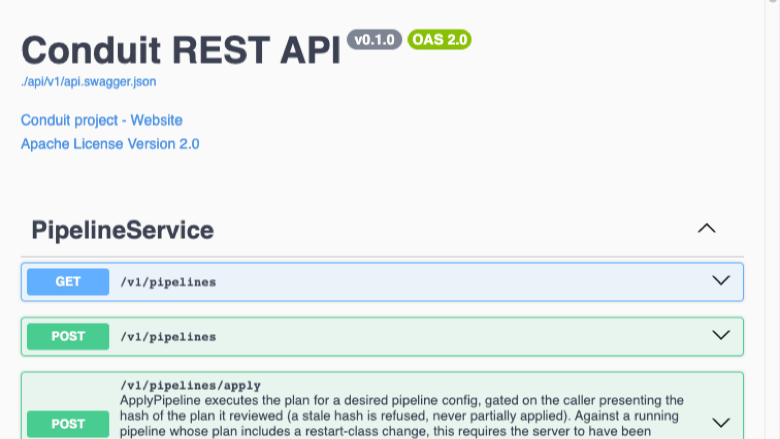
Conduit REST API and Swagger UI
Image
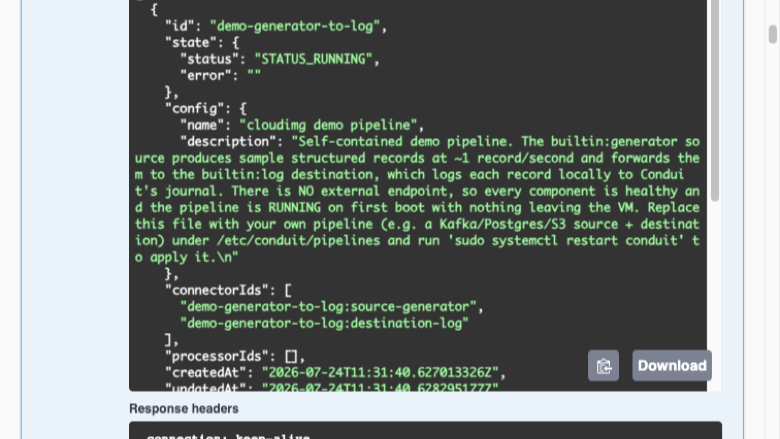
Live demo pipeline running on first boot
Image
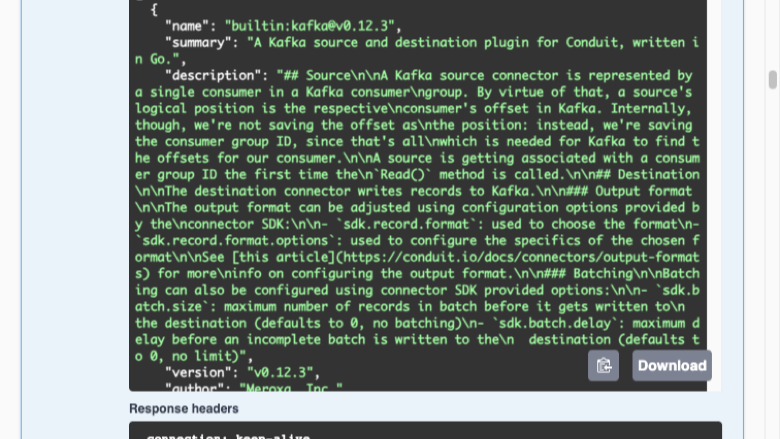
Built-in connector catalog
This is a repackaged open source software product wherein additional charges apply for cloudimg support services.
Conduit is an open source data streaming engine that moves data in real time between data stores and message systems. It connects sources and destinations, Apache Kafka, PostgreSQL, Amazon S3, files and many more, into declarative pipelines that stream change data continuously, with built-in connectors and processors and no JVM required. Conduit exposes an HTTP REST API and an interactive OpenAPI/Swagger web UI so you can create, start, inspect and monitor pipelines and connectors directly from the browser or from automation. This image delivers Conduit as a single Go binary, installed from the pinned upstream release with its checksum verified, run as a dedicated system user under systemd, so a working streaming engine is running within minutes of launch with no manual setup, no service wiring and no reverse proxy configuration required.
Because the Conduit API and UI have no built-in authentication, exposing them directly would be unsafe. This image is hardened for that: Conduit's HTTP and gRPC APIs are bound to the loopback interface only, and nginx fronts the API and UI on port 80 behind an HTTP Basic Auth gate whose password is generated uniquely and at random on the first boot of every instance, so no shared or default credential ever ships in the image. The password is written to a root-only file on the instance, and an unauthenticated health endpoint is provided for load-balancer probes.
The image ships a fully self-contained demo pipeline that generates sample records and logs them locally. Nothing leaves the instance, the pipeline is running and processing records on first boot, and the Swagger UI shows a live working pipeline out of the box, so you can explore a real pipeline immediately and then replace it with your own source and destination.
Security: the API and UI are reachable only through the nginx Basic Auth front on port 80 - restrict that port, and 443 if you terminate TLS, to trusted networks with your security group. Enable AWS EBS encryption on the root volume to protect pipeline configuration and state at rest. Systemd manages Conduit and nginx for automatic restarts and clean logging, the OS is fully patched at build time and continues to receive unattended security updates, and 24/7 cloudimg support is included.
Conduit is a trademark of its respective owners and is distributed under the Apache License 2.0. All product and company names are trademarks or registered trademarks of their respective holders. Use of them does not imply any affiliation with or endorsement by them.
Highlights
- Zero-setup streaming engine: Conduit launches as a systemd-managed service as a single Go binary installed from the pinned upstream release with its checksum verified, with a live self-contained demo pipeline already running and producing records on first boot. Skip the manual install, service wiring and reverse-proxy hardening a DIY EC2 deployment requires - a working engine and its Swagger UI are up within minutes of launch.
- Secure by default, no baked credential: Conduit's HTTP and gRPC APIs are bound to loopback only, and nginx fronts the API and UI on port 80 behind an HTTP Basic Auth gate whose password is generated uniquely at random on the first boot of every instance and written to a root-only file. No shared or default credential ever ships in the image; an unauthenticated health endpoint is provided for load-balancer probes.
- Real-time declarative pipelines: connect sources and destinations - Apache Kafka, PostgreSQL, Amazon S3, files and many more - into pipelines that stream change data continuously, driven from the built-in HTTP API and Swagger UI, with no JVM required. Backed by 24/7 cloudimg technical support via email and live chat for deployment, pipeline and connector configuration, and TLS.
Details
Sold by
Categories
Delivery method
Delivery option
64-bit (x86) Amazon Machine Image (AMI)
Latest version
Operating system
Ubuntu 24.04
Deployed on AWS
New
Introducing multi-product solutions
You can now purchase comprehensive solutions tailored to use cases and industries.

Features and programs
Financing for AWS Marketplace purchases
AWS Marketplace now accepts line of credit payments through the PNC Vendor Finance program. This program is available to select AWS customers in the US, excluding NV, NC, ND, TN, & VT.

Pricing
Free trial
Try this product free for 7 days according to the free trial terms set by the vendor. Usage-based pricing is in effect for usage beyond the free trial terms. Your free trial gets automatically converted to a paid subscription when the trial ends, but may be canceled any time before that.
Pricing is based on actual usage, with charges varying according to how much you consume. Subscriptions have no end date and may be canceled any time. Alternatively, you can pay upfront for a contract, which typically covers your anticipated usage for the contract duration. Any usage beyond contract will incur additional usage-based costs.
Additional AWS infrastructure costs may apply. Use the AWS Pricing Calculator to estimate your infrastructure costs.
If you are an AWS Free Tier customer with a free plan, you are eligible to subscribe to this offer. You can use free credits to cover the cost of eligible AWS infrastructure. See AWS Free Tier for more details. If you created an AWS account before July 15th, 2025, and qualify for the Legacy AWS Free Tier, Amazon EC2 charges for Micro instances are free for up to 750 hours per month. See Legacy AWS Free Tier for more details.
Dimension | Description | Cost/hour |
|---|---|---|
m5.large Recommended | m5.large | $0.08 |
t2.micro | t2.micro instance type | $0.04 |
t3.micro | t3.micro instance type | $0.04 |
c5a.12xlarge | c5a.12xlarge instance type | $0.24 |
c5a.16xlarge | c5a.16xlarge instance type | $0.24 |
c5a.24xlarge | c5a.24xlarge instance type | $0.24 |
c5a.2xlarge | c5a.2xlarge instance type | $0.24 |
c5a.4xlarge | c5a.4xlarge instance type | $0.24 |
c5a.8xlarge | c5a.8xlarge instance type | $0.24 |
c5a.large | c5a.large instance type | $0.08 |
Vendor refund policy
Refunds available on request.

Legal
Vendor terms and conditions
Upon subscribing to this product, you must acknowledge and agree to the terms and conditions outlined in the vendor's End User License Agreement (EULA) .
Content disclaimer
Vendors are responsible for their product descriptions and other product content. AWS does not warrant that vendors' product descriptions or other product content are accurate, complete, reliable, current, or error-free.
Delivery details
64-bit (x86) Amazon Machine Image (AMI)
Amazon Machine Image (AMI)
An AMI is a virtual image that provides the information required to launch an instance. Amazon EC2 (Elastic Compute Cloud) instances are virtual servers on which you can run your applications and workloads, offering varying combinations of CPU, memory, storage, and networking resources. You can launch as many instances from as many different AMIs as you need.
Version release notes
Initial release of the Conduit 0.17.0 data streaming engine.
Additional details
Usage instructions
Connect via SSH on port 22 as the default login user for your operating system variant (the user guide lists it per variant; on Ubuntu it is ubuntu). Retrieve the per-instance Basic Auth password with: sudo cat /root/conduit-data-streaming-credentials.txt. Conduit's HTTP API and Swagger UI are loopback-bound and fronted by nginx on port 80 behind HTTP Basic Auth for user admin: open http://<instance-public-ip>/ in a browser and sign in as admin to reach the Conduit Swagger UI, or from the instance run curl -u admin:<password> http://127.0.0.1/v1/pipelines . An unauthenticated health endpoint answers GET http://<instance-public-ip>/healthz with 200 for load-balancer probes. Pipelines are defined under /etc/conduit/pipelines - replace demo.yaml with your own source and destination and run sudo systemctl restart conduit. Restrict ports 80 and 443 to trusted networks with your security group.
Resources
Vendor resources
Support
Vendor support
cloudimg Support - 24/7 Technical Assistance
cloudimg provides round-the-clock technical support for this Conduit AMI via email and live chat. Our engineers assist with:
- Initial deployment and instance sizing guidance
- Pipeline and connector configuration (Kafka, PostgreSQL, Amazon S3, files and more)
- HTTP API and Swagger UI administration
- Per-instance credential administration and Basic Auth management
- TLS termination and reverse-proxy configuration
- Troubleshooting connectivity and performance issues
Response Times: Critical issues receive a one-hour average response time.
Contact: Email support@cloudimg.co.uk or reach us via live chat.
Getting Started
- Launch the AMI and connect via SSH as the default user for your OS variant.
- Retrieve the generated admin password: sudo cat /root/conduit-data-streaming-credentials.txt
- Open http:/// and sign in as admin to reach the Conduit Swagger UI.
- Replace /etc/conduit/pipelines/demo.yaml with your own pipeline and run sudo systemctl restart conduit.
For sizing recommendations, production architecture planning, or any issues including requesting refunds, contact support@cloudimg.co.uk .
AWS infrastructure support
AWS Support is a one-on-one, fast-response support channel that is staffed 24x7x365 with experienced and technical support engineers. The service helps customers of all sizes and technical abilities to successfully utilize the products and features provided by Amazon Web Services.
Similar products

This product has charges associated with it for deployment, configuration, and ongoing support. Self-hosted lightweight Matrix homeserver in Rust. Fast, self-hosted solution to Synapse with minimal resource usage and easy setup.

Build data apps with workflows you know and love. Our developer-centric code-first platform lets you build, test, and deploy data apps faster and more efficiently without the need for a data engineer. Spend more time building data products as opposed to maintaining fragile data systems that weren't designed for developers.
CloudCookies Enhanced Support provides 24/7/365 contact center and AI agent support for environments built on Amazon Connect. This service includes full break/fix coverage, root cause analysis, configuration assistance, environmental troubleshooting, and tuning for AI voice/chat bots. CloudCookies acts as your single support conduit—augmenting AWS vendor support with unlimited technical requests, architectural guidance, best practices, and advocacy across administrators, supervisors, and business leaders. This service is ideal for companies of all sizes and extends to third-party systems in collaboration with your vendors.

Explore Sencode's Mobile Application Penetration Testing services, meticulously tailored to comply with esteemed OWASP standards. Our adept professionals employ a structured approach to unveil and mitigate vulnerabilities in mobile applications, fortifying them against malicious exploits.
Customer reviews
No customer reviews yet
Be the first to review this product . We've partnered with PeerSpot to gather customer feedback. You can share your experience by writing or recording a review, or scheduling a call with a PeerSpot analyst.