Sold by: NetAI Inc.
Deployed on AWS
NetAI Core is a modern SolarWinds replacement for unified network monitoring and alert management across multi-vendor environments. Deploy via AWS and validate topology visibility and alert unification quickly, without legacy NMS overhead.
Overview


Video
NetAI Topology Overview
Image
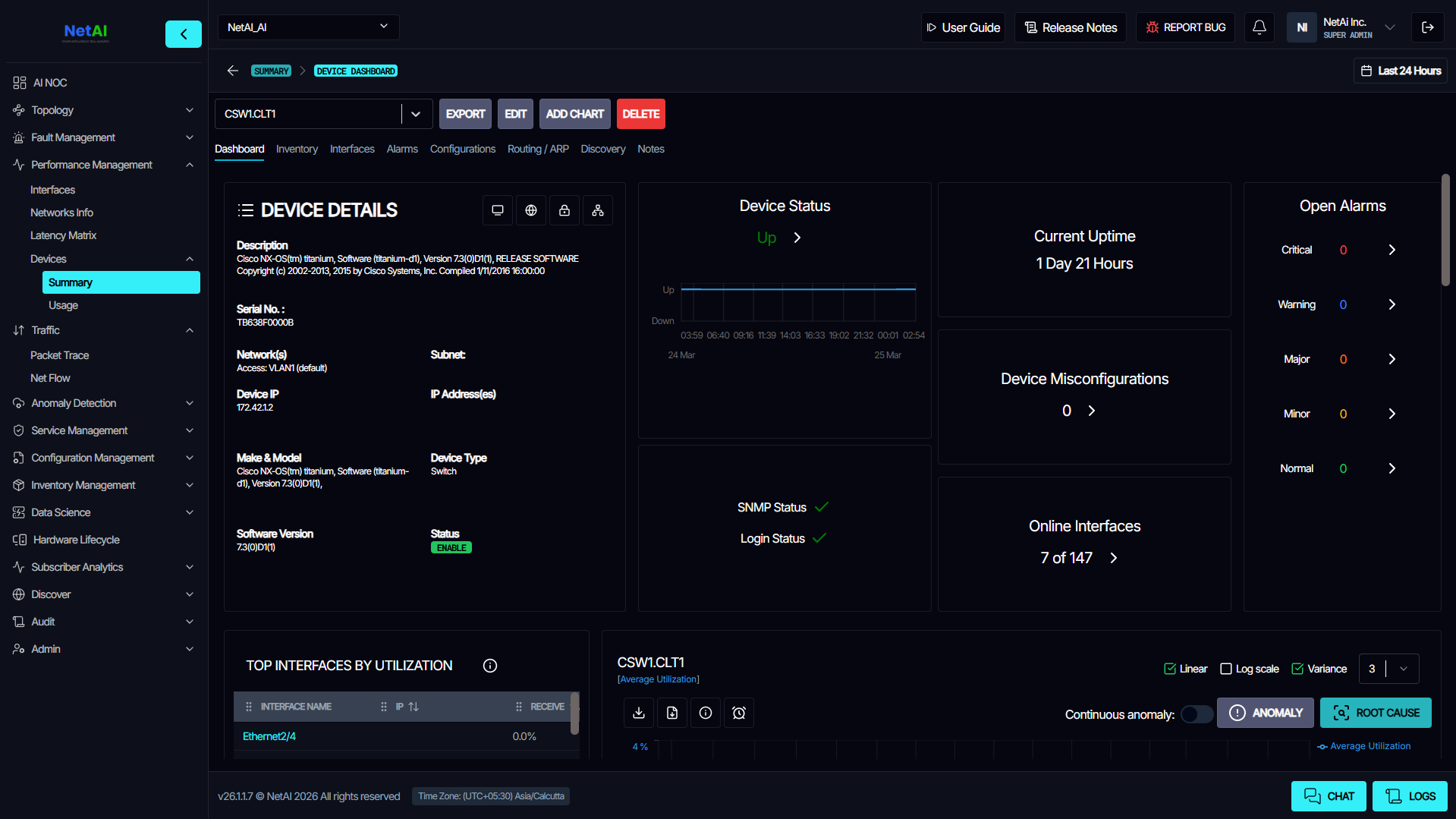
Device Dashboard
Image
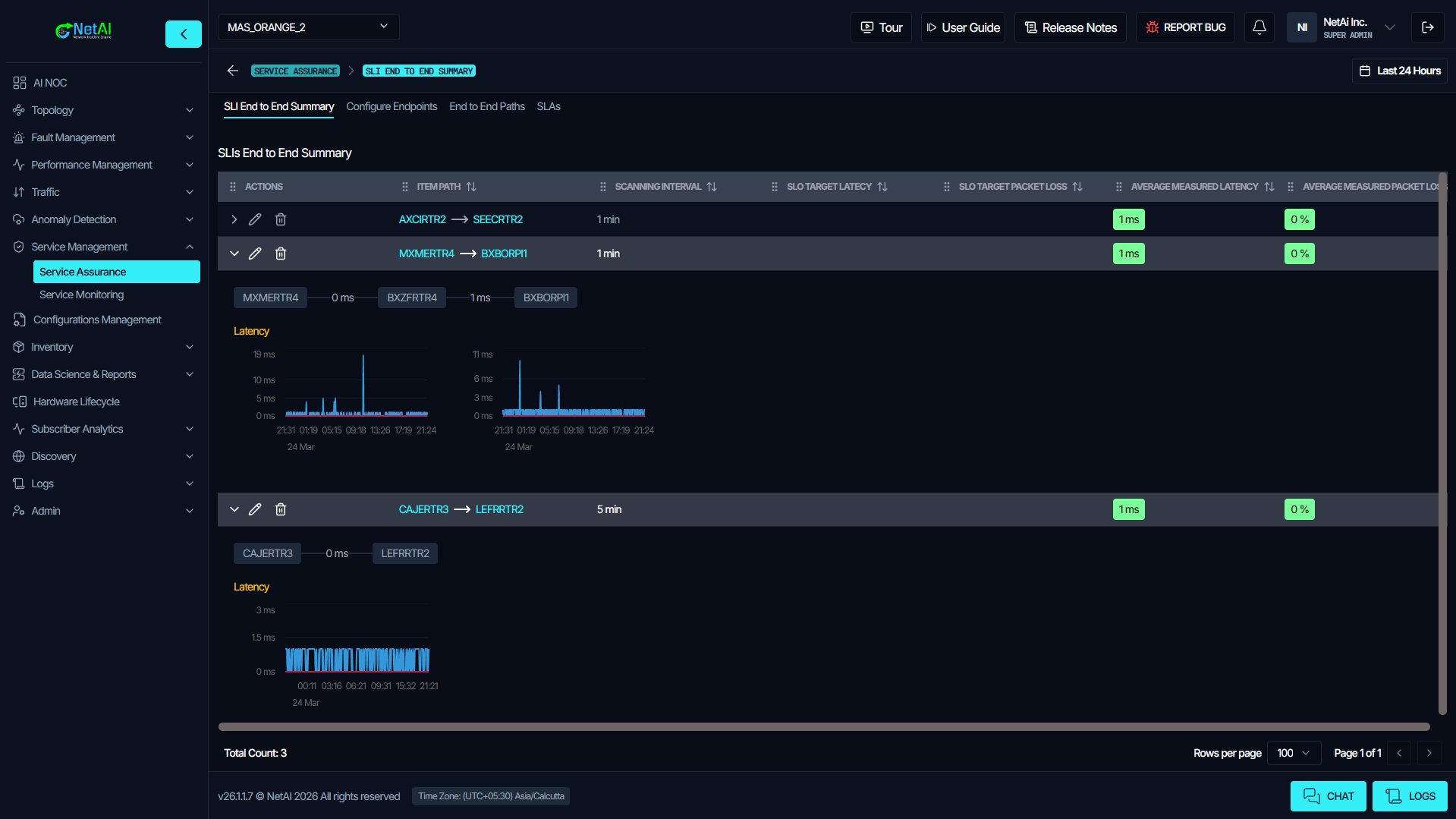
Service Assurance

Video
Product video
NetAI Core is a modern, vendor-agnostic network management system (NMS) built for mission-critical networks where multi-vendor complexity, alert noise, and slow triage increase operational cost. NetAI Core unifies network monitoring and alert management across devices, protocols, and vendors so network operations teams can see the network, prioritize what matters, and resolve incidents faster.
What you can validate in a trial deployment:
- Automated topology discovery and multi-layer visualization to confirm connectivity and dependencies.
- Alert unification and workflow-driven triage to reduce noise and focus operators on actionable issues.
- Device dashboards, reporting, and configuration change tracking with rollback support.
NetAI Core supports deployment in on-premises, cloud, or hybrid environments, with customer-controlled data and infrastructure. It integrates with common ITSM workflows including ServiceNow, Jira, and BMC Remedy to streamline escalation and resolution. NetAI Core is designed to scale to thousands of network elements and high metric volumes in enterprise and service provider environments. For teams that want deterministic incident diagnosis and advanced correlation, NetAI Core provides a clear upgrade path to NetAI GraphIQ, powered by patented Graph Neural Network (GNN) technology.
Highlights
- Fast topology visibility plus unified alerting across multi-vendor networks: Validate topology discovery, dashboards, and alert unification quickly in your AWS account.
- Operational workflows that fit enterprise processes: Configuration change tracking with rollback, plus ITSM integration with ServiceNow, Jira, and BMC Remedy.
- Modern SolarWinds replacement with a clear upgrade path: Start with Core for monitoring and reporting, then expand to NetAI GraphIQ for deterministic GNN-based incident diagnosis and correlation.
Details
Sold by
Categories
Delivery method
Delivery option
NetAI Core - CloudFormation
Latest version
Operating system
Ubuntu 22.04
Deployed on AWS
New
Introducing multi-product solutions
You can now purchase comprehensive solutions tailored to use cases and industries.

Features and programs
Financing for AWS Marketplace purchases
AWS Marketplace now accepts line of credit payments through the PNC Vendor Finance program. This program is available to select AWS customers in the US, excluding NV, NC, ND, TN, & VT.

Pricing
Pricing and entitlements for this product are managed through an external billing relationship between you and the vendor. You activate the product by supplying a license purchased outside of AWS Marketplace, while AWS provides the infrastructure required to launch the product. AWS Subscriptions have no end date and may be canceled any time. However, the cancellation won't affect the status of the external license.
Additional AWS infrastructure costs may apply. Use the AWS Pricing Calculator to estimate your infrastructure costs.
Vendor refund policy
Refund can be initiated via contact details

Legal
Vendor terms and conditions
Upon subscribing to this product, you must acknowledge and agree to the terms and conditions outlined in the vendor's End User License Agreement (EULA) .
Content disclaimer
Vendors are responsible for their product descriptions and other product content. AWS does not warrant that vendors' product descriptions or other product content are accurate, complete, reliable, current, or error-free.
Delivery details
NetAI Core - CloudFormation
NetAI Network Management System (NMS)
This CloudFormation template deploys NetAI Core as a single node instance inside your AWS environment.
The stack provisions the following AWS resources:
Amazon EC2 instance (Vendor recommended m6i.4xlarge) IAM Role and Instance Profile Security Group with SSH 22, HTTP 80, HTTPS 443 access 150 GB gp3 EBS storage volume
NetAI Core provides network monitoring, fault management, alert correlation, and root cause analysis capabilities.
The template enables customers to deploy NetAI securely inside their own AWS account with full control over networking and infrastructure configuration.
This deployment option is ideal for:
Enterprise PoC Small to large scale production environments Controlled VPC based deployments.
CloudFormation Template (CFT)
AWS CloudFormation templates are JSON or YAML-formatted text files that simplify provisioning and management on AWS. The templates describe the service or application architecture you want to deploy, and AWS CloudFormation uses those templates to provision and configure the required services (such as Amazon EC2 instances or Amazon RDS DB instances). The deployed application and associated resources are called a "stack."
Version release notes
NetAI Release Notes - May 2026 (v26.2.1.1)
=== NEW FEATURES ===
-
Application Tour Introduced a guided in-app onboarding tour to improve first-time user experience and feature discoverability. Includes a step-by-step walkthrough across key application areas, smart mount observer support for dynamically rendered UI elements, and automatic waiting for UI readiness before progressing to the next step. Improves onboarding consistency across complex workflows.
-
License Renewal Flow Launched a complete license renewal management workflow with support for multiple deployment environments. Provides an end-to-end license renewal process supporting both remote and air-gapped license renewal, and is seamlessly integrated with the existing auto-approval flow. Simplifies license lifecycle management and renewal operations.
-
Chatbot Feedback Actions Enhanced chatbot usability with built-in response interaction tools. Added Like and Dislike actions for quick feedback collection and introduced Copy Response functionality for easy content reuse. Improves response quality tracking and user productivity.
-
Breadcrumb Refresh and Config Sync Added refresh controls within breadcrumbs for instant data synchronization. The refresh button now re-fetches all APIs with the latest timestamp, ensuring users always view the most up-to-date configuration state. Improves operational accuracy during live monitoring and configuration updates.
-
Alarms and Alerting Enhancements End-to-end improvements across alarm configuration, delivery, and navigation. Introduced Dynamic CRUD APIs for alert configurations, enabling runtime control over batch size, Prometheus timeout, and other alerting parameters. Alerts opened from the bell icon now redirect users to the correct originating site context. Provides a smoother multi-site navigation experience and reduces operational confusion during alarm investigation.
-
MOP History and UI Enhancements Expanded MOP Agent capabilities with historical visibility and UI refinements. Added a dedicated MOP History view, improved visibility into past workflow executions, and refined MOP Agent themes and interface consistency. Enhances workflow tracking and operational auditing.
-
Queue Management, Task Limits and Retention Controls Introduced advanced queue management capabilities within Discovery Settings, backed by new task-limit APIs. Added a new Queue Management tab for Celery queue operations, allowing operators to view and manage queue-specific tasks. New CRUD APIs for task soft and hard limits give operators direct control over task execution thresholds including Time Limit and Soft Time Limit, with changes saved independently per queue row. Added Dashboard Data Retention controls under GNN Configuration. Improves backend task management and operational stability.
-
Configuration Change Excel Reports Added enhanced reporting support for configuration auditing. Configuration change reports can now be exported in Excel format and include complete device configuration details. Simplifies auditing, tracking, and offline analysis.
-
RCA Engine Enhancements Enhanced the Root Cause Analysis engine with improved automation and execution control. Added configurable auto RCA scanning for open alarms with support for selectable auto-scan intervals, and introduced a manual Fire Now execution option. Added frontend and backend performance visibility metrics, and overlapping RCA executions are now prevented for reliable operation. Improves monitoring stability and RCA engine observability.
-
API and Backend Enhancements Backend surface area expanded to support richer frontend experiences and operator control. The backend API now returns the WebSSH connection type in its response, enabling richer frontend rendering of connection metadata. Introduced a description table under agent, providing a structured place to surface agent-level metadata, and added a description column in the Agent listing for easier identification.
=== BUG FIXES ===
-
Alarms and Alerting Resolved a long-standing issue where alarm rules were not reloaded in the VM UI after a new site was created. Fixed SMTP delivery inconsistencies and duplicate alarm generation, along with general alarm implementation fixes for stability and consistency.
-
Security and Authentication Fixed unauthorized access where users could directly open the alarm page from bell-icon notifications. Resolved multiple password reset flow issues including redirect to the reset page on password expiry, automatic logout after password change, and correct eye-icon alignment during font-size changes. Fixed RADIUS integration issues related to password handling, role-mapping group-name interactions, and Radius Group Name rendering which previously failed to display correctly in the UI. Removed unnecessary Sign Up and Email ID fields from the integration form to simplify onboarding.
-
Topology and Visualization Corrected multiple Multilayer Topology issues including background clicks during path changes no longer triggering unintended actions, fixed ghost L3 links appearing across MPLS hops from L2 link interactions, and resolved crashes, alert click handling, VXLAN link selection, and node visibility while dragging. Fixed several Map Topology issues including device dragging from dashboard, link visibility during dragging, interface scrolling behavior, bulk-position discard during page navigation, and device color refresh after disable actions. Improved Link Down and Device UP and Down operations in the 2D topology with more accurate state transitions and rendering. Fixed MSP site World Map topology CSV export, which previously returned no data found; export now correctly returns site-wise data.
-
SSH and Query Handling Fixed SSH window query parameter handling where the hash character was being removed from password values.
-
Forms and User Experience Prevented PDF downloads from triggering without input text. Resolved typing cursor reset issue during rapid typing in form fields. Resolved Error 525 during user name updates, restoring the ability to edit user profiles cleanly. Fixed a Cypress-related issue affecting device and interface peering point traffic when adding new devices or interfaces via the API.
=== IMPROVEMENTS ===
-
Topology and Monitoring Clicking a topology edge now opens a contextual latency graph for the selected link in Subscriber Agent. Enhanced NIE Monitoring to capture all required details for downstream analytics and visualization. Demo devices are now automatically restored after 10 minutes, ensuring consistent demo and trial experiences.
-
Security and Access Management Added a global setting to configure password expiry duration, enforced automatic logout after password changes, added whitespace validation for admin credentials, and synced user information and timezone state globally for consistency.
-
Configuration and User Profile Users can now set a default timezone under their profile, ensuring consistent timestamps across dashboards and alerts. The currently selected timezone date is now displayed in the footer timezone section. Improved Config Scrapper resilience: when no vendor is specified, the scrapper now falls back to trying all supported vendors automatically.
-
UI and Terminology Renamed the Celery Tasks section to Agent for clearer terminology. Removed authorization guard from alert cards to streamline navigation while preserving alarm-page authorization checks.
-
Platform and Workflow Enhancements Added delete-key support in NetAI Studio aligned with the existing production access flow. Improved overall operational consistency and workflow usability across modules.
=== INFRASTRUCTURE AND MAINTENANCE ===
Added a daily Celery task to automatically clean up old records from dashboards and logs, reducing storage bloat and improving query performance. Built and packaged all new binaries for this release cycle.
Additional details
Usage instructions
After the CloudFormation stack creation is complete, wait 2 to 3 minutes to allow all NetAI services to fully initialize on the EC2 instance.
Once the services are ready, navigate to the Outputs tab of your CloudFormation stack in the AWS Console and copy the value listed under CloudFrontDomain. Open that URL in your browser to access the NetAI application. The URL will use HTTPS automatically.
No additional firewall or security group changes are required. The CloudFormation template automatically configures all necessary network access rules. For production deployments, it is strongly recommended to restrict SSH access on port 22 to trusted IP ranges only by updating the EC2 security group after the stack is created.
Instruction Manual For complete setup and configuration guidance, refer to: https://netainms.xyz/instruction
Resources
Vendor resources
Support
Vendor support
AWS infrastructure support
AWS Support is a one-on-one, fast-response support channel that is staffed 24x7x365 with experienced and technical support engineers. The service helps customers of all sizes and technical abilities to successfully utilize the products and features provided by Amazon Web Services.
Similar products
AI governance for regulated enterprises: deterministic policy enforcement that authorizes each AI decision before it executes and cryptographically signs it for offline audit. No LLM in the decision path.

Expand your payment options, and increase collections, while modernizing your interactions with your constituents!

SolidCore is the system of record for enterprise generative AI applications on AWS. It captures every prompt, response, model parameter, guardrail, data being accessed and other metadata from production LLM interactions to deliver complete visibility, governance, and auditability. With real-time detection of misconfigurations, policy violations, and risky usage patterns, SolidCore helps teams identify blind spots across models, apps, and environments. Built for regulated industries, it automates evidence collection, supports compliance frameworks like NiST AI RMF, and provides a trustworthy foundation for safely scaling AI across the enterprise.

"At Core Schedule, our mission is simple yet profound: to empower healthcare providers with the tools they need to deliver exceptional care. Every minute saved on rostering is a minute gained in saving lives." - Dr Stephen C. Pool CEO and Founder
Customer reviews
No customer reviews yet
Be the first to review this product . We've partnered with PeerSpot to gather customer feedback. You can share your experience by writing or recording a review, or scheduling a call with a PeerSpot analyst.