
Sold by: OPSWAT
Deployed on AWS
AWS Free Tier
MetaDefender Core detects over 99% of known and unknown malware and recursively sanitizes 200+ file types, helping organizations secure every file across security workflows and enforce zero trust at the file level.
4.4
Overview
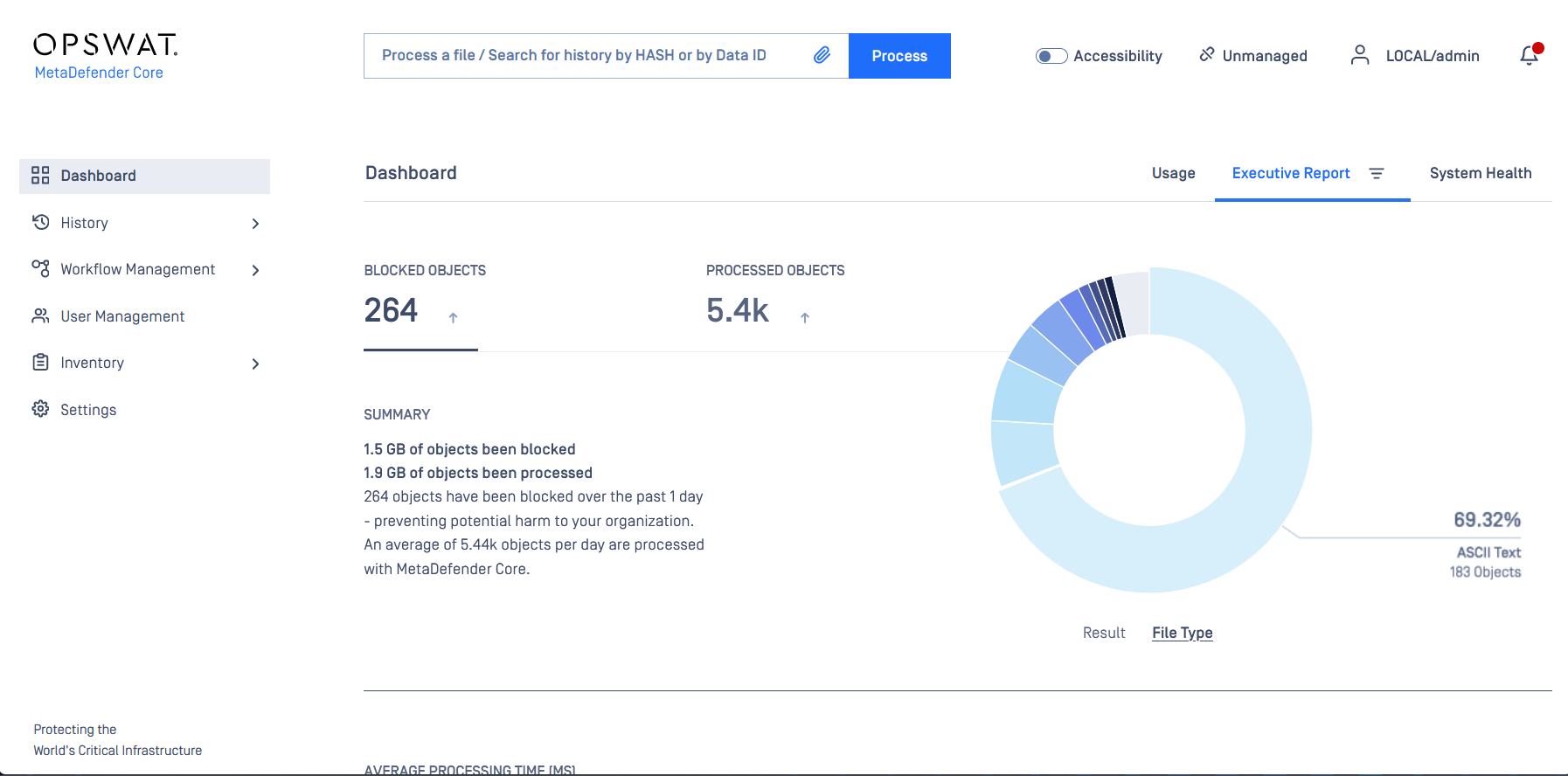
Image
OPSWAT MetaDefender Core Security Dashboard
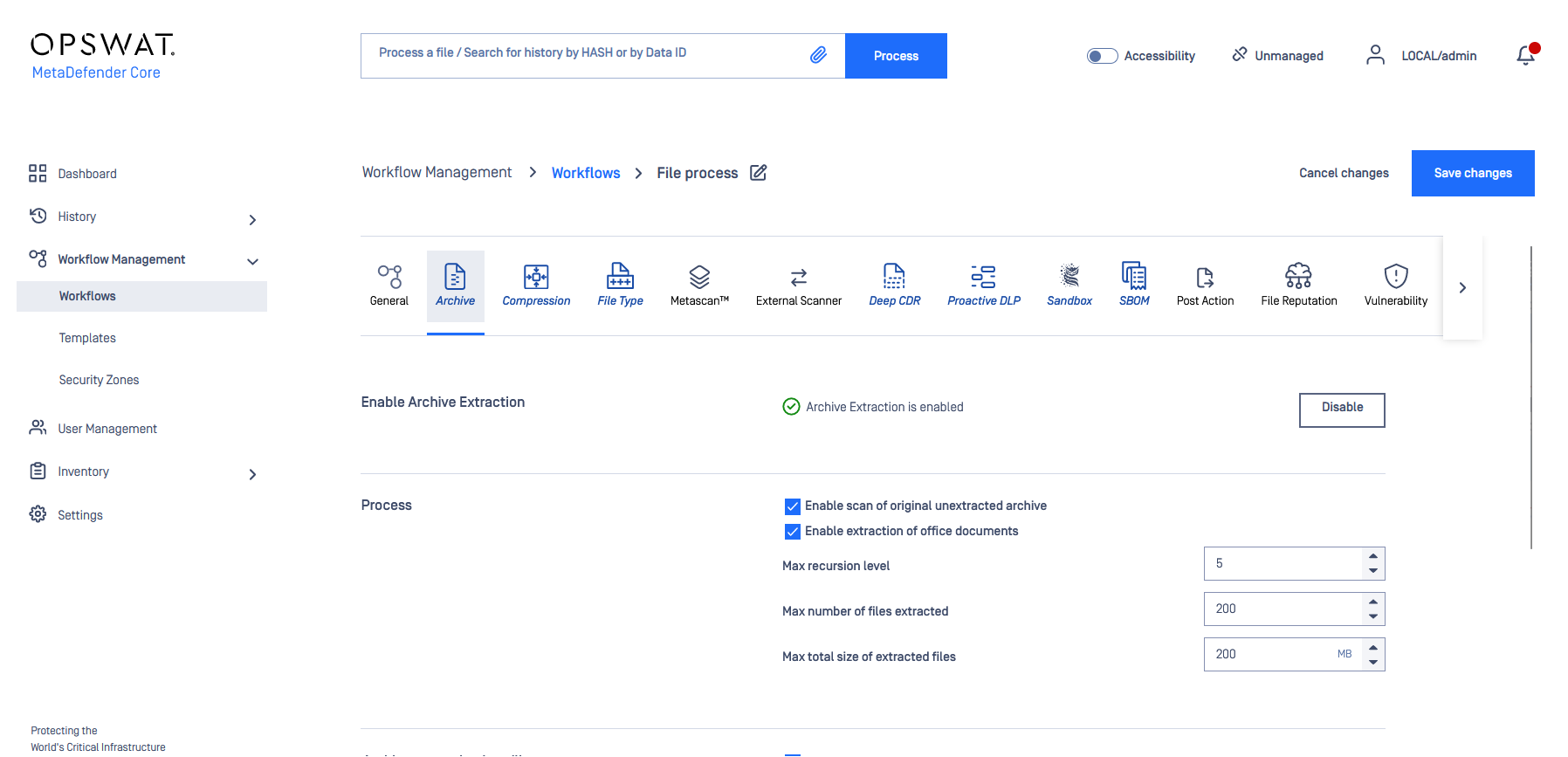
Image
OPSWAT MetaDefender Core Workflow
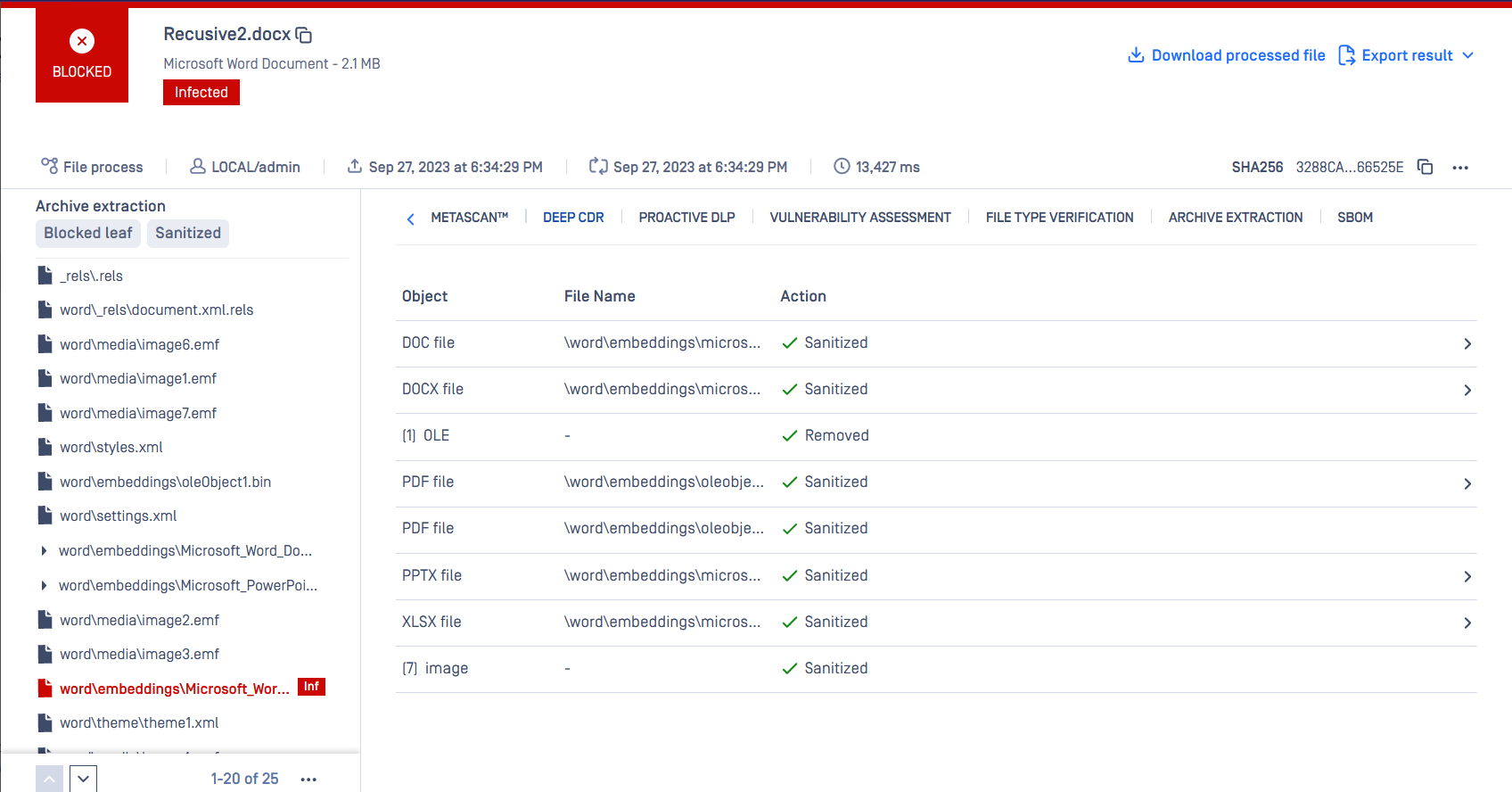
Image
OPSWAT MetaDefender Core Archive Extraction

Video
Product video
MetaDefender Core - Advanced Threat Detection and Prevention for Critical IT and OT Environments
MetaDefender Core is an advanced threat prevention platform that neutralizes malware, ransomware, and zero-day attacks before they infiltrate your environment. It combines AI-enhanced technologies, including Predictive AI, Deep CDR, Metascan Multiscanning, AI Content Inspection, Adaptive Sandbox, Proactive DLP, Threat Intelligence, File-based Vulnerability Assessment, SBOM, and Country of Origin, to secure every file across every channel. Whether protecting uploads, downloads, network transfers, or shared documents, MetaDefender Core helps organizations maintain compliance, reduce operational risk, and build trust. Unlike reactive tools, it proactively analyzes and sanitizes potentially malicious content before execution, enforcing zero trust at the file level.
This is a contract listing for use with a private offer only. To request a private offer, guided demo, or 30-day pilot evaluation, contact apn-sales@opswat.com .
Core Technologies and Buyer Outcomes
Predictive AI uses machine learning to analyze deep file structures and block risky files instantly, without detonation or runtime analysis.
Metascan Multiscanning scans files with 30+ anti-malware engines simultaneously, detecting more than 99% of known and unknown threats and reducing SOC alert fatigue.
Deep CDR (Content Disarm and Reconstruction) recursively sanitizes and rebuilds 200+ file types, neutralizing embedded threats while preserving full file usability.
AI Content Inspector flags AI-generated content, document manipulation, and fraud indicators in images, PDFs, and text-bearing files at ingest, returning policy-ready verdicts.
Proactive DLP removes, redacts, or blocks sensitive data in 125+ file types before content leaves the organization, supporting GDPR, HIPAA, and PCI-DSS compliance.
Adaptive Sandbox detonates and analyzes suspicious files in a controlled environment to improve zero-day detection without risking production systems.
Threat Intelligence extracts sandbox-derived Indicators of Compromise and applies similarity scoring to identify novel variants and campaign-level relationships, with 99.6% detection accuracy.
Reputation classifies files as known good, known bad, or unknown by comparing hashes against a continuously updated database, plus metadata and contextual analysis.
File-based Vulnerability Assessment identifies vulnerabilities in installers, binaries, and applications before installation.
SBOM generates software bills of materials and identifies vulnerabilities in source code and containers, supporting EU CRA, NIS2, EO 14028, and NIST compliance.
Country of Origin determines the true origin and vendor of PE, MSI, and self-extracting files, then blocks or escalates files from high-risk sources.
Industry Use Case: Federal Agency Document Upload Portal
Federal agencies and critical infrastructure operators use MetaDefender Core to analyze citizen-submitted documents at upload portals before files reach backend storage. Every uploaded file passes through multi-layered inspection, neutralizing zero-day, ransomware, and malicious payloads embedded in PDFs, Office documents, or images before they enter the trusted environment. This reduces compliance burden and eliminates false positives from single-engine scanning.
AWS Deployment Options
MetaDefender Core deploys on AWS via Amazon Machine Image (AMI) on EC2 for high-throughput scanning, containers on Amazon EKS for horizontal scaling, or standard EC2 instances sized to scan volume. REST APIs and ICAP protocol enable integration with existing security workflows, web application firewalls, proxies, and storage systems. MetaDefender Core adapts to on-premises, cloud, containerized, air-gapped, or hybrid environments.
Getting Started
Contact apn-sales@opswat.com to request a private offer or schedule a guided demo. Once subscribed, launch the MetaDefender Core AMI on your chosen EC2 instance, activate your license, configure scanning policies via the management console, and integrate using REST API or ICAP protocol.
Compliance and Framework Alignment
MetaDefender Core helps organizations align with Zero Trust Architecture and frameworks including GDPR, HIPAA, and NIST Cybersecurity Framework.
Next Steps
- Request a Guided Demo: see MetaDefender Core in action with a solutions engineer
- Start a 30-Day Pilot: evaluate full functionality in your environment
- Contact Us: email apn-sales@opswat.com for a private offer
Highlights
- Metascan Multiscanning with 30+ anti-malware engines detects over 99% of known and unknown threats while Deep CDR recursively sanitizes 200+ file types to neutralize embedded threats and zero-day exploits - reducing false negatives, eliminating SOC alert fatigue, and ensuring files are safe before execution.
- Deploys flexibly on AWS via AMI on EC2 instances, containers on Amazon EKS, or air-gapped environments. Integrates seamlessly into existing architectures through REST APIs and ICAP protocol - connecting with web application firewalls, proxies, storage systems, and custom applications without requiring infrastructure redesign. Supports on-premises, cloud, hybrid, and disconnected deployments.
- Helps organizations align with zero-trust architecture and regulatory frameworks such as GDPR, HIPAA, NIST, etc. by reducing sensitive data exposure through Proactive DLP and strengthening supply chain visibility with SBOM generation. Trusted by governments, critical infrastructure operators, and over 2,100 global organizations.
Details
Sold by
Categories
Delivery method
Delivery option
64-bit (x86) Amazon Machine Image (AMI)
Latest version
Operating system
AmazonLinux Amazon Linux 2023
Deployed on AWS
New
Introducing multi-product solutions
You can now purchase comprehensive solutions tailored to use cases and industries.

Features and programs
Trust Center

Access real-time vendor security and compliance information through their Trust Center powered by Drata or Vanta. Review certifications and security standards before purchase.
Buyer guide
Gain valuable insights from real users who purchased this product, powered by PeerSpot.

Financing for AWS Marketplace purchases
AWS Marketplace now accepts line of credit payments through the PNC Vendor Finance program. This program is available to select AWS customers in the US, excluding NV, NC, ND, TN, & VT.

Pricing
Pricing is based on the duration and terms of your contract with the vendor. This entitles you to a specified quantity of use for the contract duration. If you choose not to renew or replace your contract before it ends, access to these entitlements will expire.
Additional AWS infrastructure costs may apply. Use the AWS Pricing Calculator to estimate your infrastructure costs.
Dimension | Description | Cost/month |
|---|---|---|
OPSWAT MD Core | Annual subscription for MetaDefender Core | $100,000.00 |
Dimensions summary
This listing has one pricing dimension: an annual subscription for MetaDefender Core, billed per unit. You buy it as a yearly contract, so your commitment runs for a 12-month term. Pricing scales with the number of units you purchase. There are no separate tiers or instance sizes to choose between here. You select the unit quantity that matches your needs, and the cost grows with that quantity. This is the Linux deployment of MetaDefender Core, which you integrate into your environment to scan and process files for threats.
Top-of-mind questions for buyers
One unit licenses the MetaDefender Core software that scans and sanitizes files. It processes files through detection and prevention engines like multiscanning and content disarm technology. The seller does not publish a public per-file or throughput figure per unit, so confirm the exact processing capacity per unit with the vendor.
Engine selection is part of your license configuration, not a separate Marketplace dimension here. You can choose from 4 to more than 30 anti-malware engines based on your needs. All engines bundle into one license. The unit quantity you buy on Marketplace reflects your MetaDefender Core subscription, not each engine.
Pricing scales with the number of units you purchase for the 12-month term. You buy the unit quantity that matches your expected file processing load upfront. Growing volume mid-term means adding units. The annual contract fixes your commitment, so plan capacity before purchase to match your workflow needs.
www.opswat.com+1
Helpful?

Legal
Vendor terms and conditions
Upon subscribing to this product, you must acknowledge and agree to the terms and conditions outlined in the vendor's End User License Agreement (EULA) .
Content disclaimer
Vendors are responsible for their product descriptions and other product content. AWS does not warrant that vendors' product descriptions or other product content are accurate, complete, reliable, current, or error-free.
Delivery details
64-bit (x86) Amazon Machine Image (AMI)
Amazon Machine Image (AMI)
An AMI is a virtual image that provides the information required to launch an instance. Amazon EC2 (Elastic Compute Cloud) instances are virtual servers on which you can run your applications and workloads, offering varying combinations of CPU, memory, storage, and networking resources. You can launch as many instances from as many different AMIs as you need.
Version release notes
Additional details
Usage instructions
Accessing MetaDefender web-based management console:
- To access the MetaDefender Core web-based management console for the first time, connect to the IP address of the instance using a browser (e.g. http://localhost:8008 ). You will then be guided through the setup wizard to configure, license and use the product.
Connecting to MetaDefender Core AMI Instance console:
- To connect to your MetaDefender Core command-line console, you will need to use SSH over port 22. The default username for connecting is ec2-user. For further information about the standard AWS method of connecting to an instance, see information described here: https://docs.aws.amazon.com/AWSEC2/latest/UserGuide/AccessingInstances.html
- Operation of the product is covered here: https://docs.opswat.com/mdcore/operating .
Health and Monitoring
- Maintenance information can be found here: https://docs.opswat.com/mdcore/operating/regular-maintenance
Additional Details
- There are no additional external resources that are required for the product to function.
- Customer data is not collected while running this product.
- To create custom AMI from this OPSWAT AMI is covered here: https://docs.opswat.com/mdcore/cloud-deployment/single-ec2-deployment#opswat-metadefender-ami-from-marketplace-usage
Support
Vendor support
OPSWAT provides technical support for MetaDefender Core customers through the OPSWAT support portal at https://my.opswat.com/ . Customers can submit support tickets, access product documentation, and manage their licenses through this portal.
Contact for Sales and Private Offers: For pricing inquiries, private offer requests, guided demos, or pilot evaluations, contact the OPSWAT AWS sales team at apn-apn-sales@opswat.com .
Self-Service Resources:
- Product documentation and deployment guides: https://www.opswat.com/docs/mdcore
- OPSWAT Academy free training (https://www.opswat.com/academy )
- Knowledge base articles for troubleshooting and configuration: https://www.opswat.com/docs/mdcore/troubleshooting
- REST API documentation for integration support: https://www.opswat.com/docs/mdcore/metadefender-core
Getting Help:
For technical issues including product configuration, scanning policy setup, integration troubleshooting, license activation, and operational questions, submit a ticket through the support portal. For billing questions or refund requests related to your AWS Marketplace subscription, contact apn-sales@opswat.com .
Important Note: This is a contract listing for use with AWS private offers only. Pricing varies depending on customer environment, scan volume requirements, and deployment configuration. Contact apn-sales@opswat.com to discuss your requirements and receive a tailored private offer.
AWS infrastructure support
AWS Support is a one-on-one, fast-response support channel that is staffed 24x7x365 with experienced and technical support engineers. The service helps customers of all sizes and technical abilities to successfully utilize the products and features provided by Amazon Web Services.
Updated weekly
By Cloud Storage Security
By Trend Micro
Sentiment is AI generated from actual customer reviews on AWS and G2
Functionality
Ease of use
Customer service
Cost effectiveness
Positive reviews
Mixed reviews
Negative reviews
AI generated from product descriptions
Multi-Engine Threat Detection
Metascan Multiscanning scans files with 30+ anti-malware engines simultaneously, detecting over 99% of known and unknown threats.
Content Disarm and Reconstruction
Deep CDR recursively sanitizes and rebuilds 200+ file types, neutralizing embedded threats while preserving full file usability.
Predictive Machine Learning Analysis
Predictive AI uses machine learning to analyze deep file structures and block risky files instantly without detonation or runtime analysis.
Data Loss Prevention
Proactive DLP removes, redacts, or blocks sensitive data in 125+ file types before content leaves the organization, supporting GDPR, HIPAA, and PCI-DSS compliance.
Deployment Flexibility
Deploys on AWS via Amazon Machine Image on EC2 instances, containers on Amazon EKS, or air-gapped environments with integration through REST APIs and ICAP protocol.
Multi-Engine Malware Detection
Support for multiple antivirus engines including Sophos, BitDefender, and ClamAV with continuously updated threat intelligence for detection across evolving threats.
Flexible Scanning Models
API-based scanning, event-based real-time scanning on upload, and retroactive on-demand or scheduled scanning for existing objects.
Automated Response and Remediation
Automatic quarantine, tagging, or deletion of detected malware with integration to Slack, Microsoft Teams, Amazon Chime, SIEM platforms, Amazon SNS, AWS Security Hub, and AWS CloudTrail.
In-Tenant Data Residency
All scanning operations execute within the customer's AWS account and region with data never transferred to external environments, supporting private VPC endpoints and linked account management.
Large File Support
Capability to scan files up to 16TB in size across multiple AWS storage services including Amazon S3, EBS, EFS, and FSx with support for diverse file types.
Intrusion Detection and Prevention
Host-based intrusion detection and prevention (IDS/IPS) capabilities to defend against network threats and zero-day exploits
Application Control
Application control functionality to lock down servers and secure Docker containers with DevOps-friendly API security processes
Malware Protection
Anti-malware protection with behavioral analysis and predictive machine learning for Windows and Linux workloads
Integrity Monitoring
File and System Integrity Monitoring to streamline compliance and audit evidence gathering
Vulnerability Exploitation Prevention
Vulnerability exploit shielding to prevent exploitation of unpatched systems without requiring live system patching
Standard contract
No
No
No
Customer reviews
M Kopeichikov
Automated file scanning has protected chat workflows and strengthened daily security checks
Reviewed on Oct 19, 2026
Review provided by PeerSpot
What is our primary use case?
My main use case for MetaDefender is to scan files from chats on a day-to-day basis, because sometimes most of the people are sending something possibly malicious via web chats, and I need to be sure that everything that comes in and comes out of that chat is legitimate and won't affect our company's computer servers.
MetaDefender fits into my workflow for scanning files automatically. We have two MetaDefender Cores working together, and the scanning is working automatically, fast, and smoothly, while we can manually take some files from the quarantine if needed. Everything is automated with the API, so that is how we actually use it.
During my studies, I don't really trust files from the outside, even from my professors or the internet, so I constantly scan them in MetaDefender Core and I appreciate the results. I appreciate how fast it works, and it is easy to manage, implement, and work with.
How has it helped my organization?
MetaDefender has impacted my organization positively because we hear from our customers that everything works fine. I don't have a lot of support tickets about things being broken or working poorly and don't need to upgrade the whole system every week, so everything is great.
The outcomes from using MetaDefender Core include scanning metrics reaching a few milliseconds if you know how to configure it right. This year, I received a few tickets about configuration requests, but none regarding something being broken. Everything worked well and smoothly.
What is most valuable?
The best features MetaDefender offers in my experience include how easily it installs and the great GUI that I find excellent, even though I feel quite confused with the new version. I appreciate how everything connects smoothly, which allows my workflow to cover more directions in my company.
I find the new GUI confusing only because I am used to the previous one. While it is common to need time to adjust to a refreshed GUI, overall, the GUI is still one of the best I have ever seen. Connecting different modules is easy to do, just as installing on your Linux or Windows system and configuring it to work out of the box is straightforward.
I have a great impression of the detection rates provided by MetaScan multi-scanning. It is one of the best I have ever seen.
I assess the effectiveness of Deep CDR in reconstructing files safely and without signatures as a ten out of ten, as I really appreciate how it is done.
The file-based vulnerability assessment feature is useful for identifying potential security risks before deployment, as it helps to detect vulnerabilities at an early stage and reduces the risk of introducing vulnerable components into production environments.
We use the adaptive sandbox analysis, and I appreciate it because it operates on a separate server, MetaDefender IFR. I appreciate the GUI, the design, and the overall reports it generates.
We are using the enhanced reporting and audit visibility features because the reports are very colorful and everything we need is beautifully presented.
I assess the effectiveness of the solution in blocking or sanitizing content based on policy as a ten out of ten.
What needs improvement?
MetaDefender could be improved by enhancing the Central Management feature because sometimes when I need to make configurations inside MetaDefender Core, it is blocked, which necessitates accessing Central Management. I suggest allowing more settings to be adjustable directly in MetaDefender Core itself.
For how long have I used the solution?
I have been using MetaDefender Core for a year now, and in addition to Core, I also use other solutions such as Email Gateway Security, MetaDefender IFR, and ICAP.
What do I think about the stability of the solution?
MetaDefender is one hundred percent stable.
What do I think about the scalability of the solution?
MetaDefender's scalability is straightforward. You can scale by adding multiple MetaDefender Cores that work as a cluster, but you need an external load balancer for this purpose.
Which solution did I use previously and why did I switch?
We used to use FortiSandbox, but we switched to MetaDefender because it is simply better.
What was our ROI?
I cannot share any relevant metrics about return on investment as we are not counting that information.
What's my experience with pricing, setup cost, and licensing?
My experience with pricing, setup cost, and licensing has been excellent. When I ask for the price, it takes less than an hour to get all the information I need, and everything is fast.
Which other solutions did I evaluate?
Before choosing MetaDefender, I cannot really remember evaluating other options besides FortiSandbox and MetaDefender Core, but we ultimately chose MetaDefender Core because it was better.
What other advice do I have?
I have not used MetaDefender's AI capabilities at all because this is a new feature, and both our customers and I have not utilized AI in MetaDefender.
I think the AI capabilities and accuracy of MetaDefender should be at the top based on my expectations, as the product overall is excellent.
My advice for others looking into using MetaDefender is to install it on either a Linux or Windows system, conduct your tests, explore, and you will see that MetaDefender Core is an excellent product.
I rate MetaDefender a ten out of ten.
Seguntaiwo Tao
Endpoint security has improved and remote control now protects devices with swift threat recovery
Reviewed on Oct 13, 2026
Review from a verified AWS customer
What is our primary use case?
My main use case for MetaDefender involves managing endpoints and malware detection and vulnerability assessment. It is an encompassing platform that performs vulnerability assessment, endpoint protection, and malware detection.
We were tasked to protect some endpoints, and they wanted everything to be reported to a particular dashboard, so we had to deploy the agent on each device. The deployment was very seamless, and as an admin, I could do a whole lot of things, such as disable ports, perform DLP, and use many features including Content Disarm and Reconstruction, which is very effective. We also used it on mobile devices.
The main use case was simply protecting the endpoint and being able to do a whole lot of things remotely on those endpoints because the agent is sitting on them. It is very good for remote working, and you can be assured that your devices are protected with MetaDefender.
How has it helped my organization?
MetaDefender has positively impacted my organization by reducing the number of attacks we receive. Most of the attacks we got before we started using MetaDefender were unpremeditated and unplanned. Now, using MetaDefender, we can rest assured that we have excellent endpoint protection, which is more advanced than regular antivirus. This has helped us reduce our expenditures, and our users can work freely without the risk of getting attacked.
The mean time to restore has really gone down. Before MetaDefender, it could take more than an hour depending on the kind of impact, but now, in less than ten minutes, we are back up, which is very good.
What is most valuable?
The best feature MetaDefender offers is Content Disarm and Reconstruction because if there is malware in a particular file and the agent is sitting on it with Content Disarm and Reconstruction enabled, it is going to remove the malware and give you the exact file you need without you even being aware, which is a very good technology.
One of my experiences with Content Disarm and Reconstruction is that I intentionally wrapped a payload into a file and sent it to a particular device on the network to see if this really works. Upon the user clicking it, it was supposed to ransom the user's computer, but it was able to tell the user that this is a malicious file and it would undergo Content Disarm and Reconstruction. Upon clicking, it removed the payload and gave the user the real file beneath the wrapped malware.
Regarding my main use case and how I use MetaDefender, the use of DLP is very important because I work in a setting where you do not want users to exfiltrate your data. Some ports have been shut down, such as USB, and we do not allow external USB devices. DLP helps us to make sure that the USB port will be disabled, and you can also shut down the device if it is stolen. You can run malware detection periodically, and you can configure a lot of policies, which I was able to do using MetaDefender on those devices.
Regarding MetaDefender's AI capabilities, I think the governance and security are good. It is compliant and gives you an overall score of your device to see if it is compliant.
MetaDefender has been dependable for me because if I come into contact with a roadblock, I can ask the AI, and it really helps me twenty-four hours a day, seven days a week.
My impression of the detection rates provided by MetaScan multiscanning is that they are very reliable and can be trusted. While using it, I switched off my Windows Security to see if it would detect threats, and it did, providing recommendations that help you manage your security effectively.
I use adaptive sandbox analysis, which places the file into a sandbox to see its behavior, and it gives me the metric for it. Regarding file-based vulnerability assessment before deployment, it performed a vulnerability scan and provided patches without me having to look for them, and all patches were easily applied from the console screen.
What needs improvement?
I hope that MetaDefender could improve by integrating more advanced features that are not currently available. I understand it is still OPSWAT, but I wish it could be more encompassing.
I would like to see specific advanced features, such as Kiosk, which I have not reviewed but I know OPSWAT has different features apart from MetaDefender that might be more advanced. However, MetaDefender is very good for SMBs and medium-level businesses.
The effectiveness of Deep CDR in reconstructing files safely and without signatures works, but for bigger files, it takes a long time. Sometimes, I have to strike a balance between scanning the file and a user needing it, but I know it does work, especially when using behavioral analysis and sandboxing.
For how long have I used the solution?
I came across MetaDefender during one of my projects where we had to secure some endpoints and needed endpoint protection. It has been about several months ago, and it has been really great so far.
What do I think about the stability of the solution?
MetaDefender is stable and reliable during use. It is very easy to uninstall and off-board, and it protects mobile devices, an area where most other solutions have not been able to perform well.
What do I think about the scalability of the solution?
The scalability of MetaDefender is very good. It scales well as my organization grows, allowing for adjustments as needed, and it does not have a pay-as-you-go pricing plan.
How are customer service and support?
Customer support is very responsive, reaching out to me back in less than ten minutes during their work hours. There is also an AI chatbot that can provide solutions or escalate to the support team if needed. I give their customer support a perfect score of ten out of ten.
Which solution did I use previously and why did I switch?
Previously, we used different solutions such as Qualys and Nessus, and we are currently using ManageEngine to see the features of these products and make a decision. Not that either solution is bad, but we need to choose what is best by trying each of them.
How was the initial setup?
Nothing much is needed for improvements since it was linked with Active Directory, allowing all our computers online to receive the agents. We also used startup scripts to automatically start the deployment when all devices come up, so the deployment was great.
What was our ROI?
I cannot assess the return on investment with MetaDefender since we never invested in it. We only used the trial, and I can answer that once we make a decision on whether to proceed with it.
What's my experience with pricing, setup cost, and licensing?
I started with a thirty-day trial for pricing and setup costs. Right now, we are in the process of comparing ManageEngine and MetaDefender because we are currently using ManageEngine Endpoint Central.
Which other solutions did I evaluate?
Before choosing MetaDefender, I evaluated it against Nessus and Qualys, and now we are using ManageEngine Endpoint Central.
What other advice do I have?
I rate MetaDefender a nine out of ten. I chose nine out of ten because it loses that one point due to the advanced features that are probably not there and also the pricing. We used the trial method first to test the product, and for the job I needed it to cover for the SMEs, it was able to cover all the endpoints and do the job well.
Honestly, I have not reviewed the enhanced reporting and audit visibility features, nor have I tried automating it, but it is something I am planning to do to ease my job as an administrator.
My advice for others looking into using MetaDefender is that it is a great product with a lot of features your organization would need. The policies are easy to control, and navigation is not hard at all. Additionally, it does not take much CPU. My overall rating for MetaDefender is nine out of ten.
Which deployment model are you using for this solution?
Public Cloud
If public cloud, private cloud, or hybrid cloud, which cloud provider do you use?
Amazon Web Services (AWS)
Sandeep Parmar
File security has improved as we scan uploads pre-server and block corrupted content
Reviewed on Oct 11, 2026
Review provided by PeerSpot
What is our primary use case?
The main use case for MetaDefender in the project with B****** is to ensure that files are scanned before sending them to the server, where I created a Java-based service that checks for viruses.
In the project with B******, my main use case for MetaDefender is to scan files that use Excel uploads and basic file uploads to prevent any virus infections, so I send the file bytes to MetaDefender APIs and check for viruses.
I do not know much about Deep CDR, as my integration is mostly for scanning viruses, and we just block files that are corrupted or harmful without reconstructing them.
How has it helped my organization?
MetaDefender has positively impacted B****** organization, as their security has increased significantly by scanning all the files in their environment before sending them to the servers.
I cannot share any specific outcomes or benefits that B****** has seen, as that is an internal organization matter.
What is most valuable?
In my experience, the best feature that MetaDefender offers is its perfect documentation, which is critical for API integrations to ensure files are not corrupted or infected with viruses.
I would add that for the dashboard, while I have used it, I am more fascinated about the API. It is good that we can manage users from one console, and I can see the history of uploads and whether the files are corrupted or not.
I think the detection rates provided by MetaDefender through multi-scanning are good, as it stops almost all of the virus files I have uploaded.
MetaDefender effectively blocks the harmful content based on our policies, as this is working perfectly fine for me, though I cannot share specific policies.
What needs improvement?
In my opinion, MetaDefender could improve its async version of their APIs, as the documentation is not that good for the async APIs and can be a bit complex to navigate for integrations.
Regarding needed improvements for MetaDefender, I think the dashboard could benefit from features that allow tracking IPs from where files are coming, which would enable blocking potential attackers.
I reported this issue, and while it is not directly MetaDefender's fault, it highlights a potential area where they could prevent misconfigurations.
For how long have I used the solution?
I have been using MetaDefender for a project with an Indian client named B******, which is a big client, and they have requested us to integrate MetaDefender with their current flow.
What do I think about the stability of the solution?
I think MetaDefender works as expected without major issues, and I faced one, but it was due to the integration provider, OPSWAT.
There was an incident regarding the sending of hardcoded API keys, which caused me to receive unauthorized errors due to the overriding API key issue from OPSWAT.
In my experience, MetaDefender has been stable, as I have not noticed any downtime while my application uses it 24/7.
What do I think about the scalability of the solution?
I do have concerns about scanning larger file sizes, like 400 MB, since we have set a maximum limit of 65 MB, and I would be worried if we were to increase this limit.
How are customer service and support?
I have not had to reach out to MetaDefender for customer support.
Which solution did I use previously and why did I switch?
I did not use a different solution before MetaDefender, as there was no prior solution.
How was the initial setup?
I think my use case with MetaDefender fits into my workflow well, as it is quite easy to integrate, thanks to the thorough documentation, and we took about two or three days to integrate all of MetaDefender's APIs.
What was our ROI?
I have not seen a return on investment regarding time or money, but the implementation of MetaDefender provides an essential security layer that blocks potential threats.
What's my experience with pricing, setup cost, and licensing?
Regarding pricing, setup cost, and licensing, I cannot provide specifics since it falls under B****** and OPSWAT's management, but from my perspective, the per API hit cost is a factor.
Which other solutions did I evaluate?
Before choosing MetaDefender, I did not evaluate other options, as it was a decision made by the higher management, and my role was to integrate it.
What other advice do I have?
I would rate MetaDefender around seven to eight because I have used their file scan feature, though I have not fully explored all their capabilities. I would give it a seven or eight because I have not used all the functionalities provided, and I deduct a point for the async API documentation which could be better.
Regarding MetaDefender's AI capabilities, I believe they manage governance and security policies quite well, especially since B***** is a large and reputable firm.
MetaDefender is deployed on-premises in the organization, and there is also a trial version available on the cloud, but we are currently only using on-premises.
My advice to others looking into using MetaDefender is to read the documentation first before implementing anything. I would rate MetaDefender an eight out of ten overall.
Pradeep Dubey
Centralized endpoint checks have secured global access to sensitive corporate resources
Reviewed on Oct 05, 2026
Review provided by PeerSpot
What is our primary use case?
Before accessing the company's protected resources, it is being scanned through MetaDefender Endpoint, which scans the local operating system and machine before the request actually hits the company's protected resources.
MetaDefender Endpoint has been installed in the Windows operating system machine, and before accessing any protected resource of the company, MetaDefender scans the request and the resources, and it even scans the local machine. If there is any vulnerability or any kind of malware, then it immediately blocks the resource and does not allow access to the protected resource for the company. In this case, it is the company's protected resource, so access is not allowed. It checks the software and checks the various software that is installed in the machine, and if all are acceptable, then only MetaDefender is allowed to access the protected resources.
For companies that are widely distributed and have resources with company employees widely located across the world, it provides a centralized, secure platform before accessing any protected resource. This is a mandatory software that everyone should install in their machine and ensure that it passes all the quality checks, making it a strong platform in terms of security and securing protected resources.
How has it helped my organization?
MetaDefender is fundamentally a security platform. All resources that are company proprietary resources are secured with MetaDefender Endpoint, and this is what was desired at the company level. It is mandatory for each and every resource in the company located across the globe to be scanned by MetaDefender Endpoint before accessing these protected resources.
All employees in the organization are keeping their machines up to date; all software is regularly upgraded. For example, browser versions or other software such as Notepad++ are being upgraded. They are also conducting full Windows scans, meaning they are doing complete security full scans on their machines on a monthly basis because this is set at the organization security policy where it is mandatory to scan the machine once a month. These security policies are implemented, and MetaDefender is valuing these policies and ensuring that all employees are aligning with the security policy.
What is most valuable?
MetaDefender checks all the software and its latest version, and whether the local software that is installed is aligned with the organization policy that is set by the organization security administrator. MetaDefender passes all this information and checks against those policies that are being set and determines whether the installed software is aligned with the organization policy or not. For example, if any deprecated software or any software that has any kind of malware is in the machine, then it immediately highlights and stops accessing those protected resources.
MetaDefender is always on at startup; it must be enabled during startup of the operating system, and when accessing any protected resource, after authorization and authentication, it immediately checks whether the resource being accessed is allowed for access, and it scans all the software. Whether it is a browser version such as Chrome browser, or if it is having a deprecated or older version, or any operating system software such as WinRAR or Notepad++, any software that is deprecated or has an older version, it will immediately flag that as an error and will not allow access to the protected resources.
This is quite helpful in terms of securing resources; it immediately brings those vulnerabilities or incompatibilities in the system to attention. It also provides the feature to check the status of the operating system or machine status immediately. There is an icon at the taskbar; clicking and rechecking the status of MetaDefender Endpoint shows the current status. If all are acceptable, then it will confirm that all is well, and access to the protected resources can proceed. If there is any issue, it will flag that on the screen when rechecking the status.
MetaDefender highlights all the vulnerabilities the moment of accessing the protected resources, so it scans all the files in the system and brings those issues when clicking the recheck button.
It does the auditing of the local machine and maintains awareness of what is occurring on the machine, specifically from the security perspective. If there is any vulnerability or any kind of malware being deployed in the machine, it immediately stops access to those protected resources.
What needs improvement?
If there is any major vulnerability, then it is understood that it should not allow access to the protected resource. However, if the vulnerabilities are not serious and are at the information or warning level, then MetaDefender should allow access to those protected resources. For example, if using an older Chrome browser version, it should not be a significant security issue. Similarly, older version Notepad++ represents low priority issues that MetaDefender could still allow employees to access the protected resources, but currently, MetaDefender treats these small issues as high priority.
MetaDefender will not automatically open the screen and display vulnerabilities unless the recheck button is clicked, which is something that could be improved. The moment the operating system or machine is opened, it should highlight any issues if there are vulnerabilities rather than waiting for the recheck button to be clicked.
The recheck button needs to be clicked every time. Additionally, low priority issues are taken very seriously and considered blockers. For example, outdated browser versions or any software in the machine that does not have the latest version could be considered low priority if the software is not critical.
The full scan takes considerable time; a complete Windows full scan takes almost 12 hours because it has billions of files. The full scan is time-consuming, and if MetaDefender could scan it more quickly and provide results faster, that would be an improvement.
Regarding improvements, low priority software that is highlighted as a blocker could be reworked to still allow the user to access the protected resources. Additionally, MetaDefender could introduce some kind of workflow or user interface which highlights all issues or vulnerabilities in one place rather than requiring clicking the recheck button and navigating through the browser.
For how long have I used the solution?
This product has been in use for two years.
What do I think about the stability of the solution?
MetaDefender is stable, but it brings or highlights items which are low priority, and software upgrades need to occur very frequently because it checks all the minute details in the operating system and system and brings them forward, necessitating software upgrades.
What do I think about the scalability of the solution?
MetaDefender handles the scale well. There are quite a lot of employees, more than 50,000 employees, and all are using it, making it a quite scalable platform.
How are customer service and support?
Customer service has not been contacted yet because it is a quite stable environment and a stable platform. MetaDefender highlights all the issues and even guides how to resolve vulnerabilities, for example, by installing upgraded software or conducting a full scan. It is quite comprehensive in explaining the issues that are currently encountered.
What was our ROI?
MetaDefender Endpoint has provided benefit from its use. The company's resources are fully protected and secured; no unauthorized access can reach the protected resources. All resources are now secured, and MetaDefender Endpoint can be trusted in this area.
What's my experience with pricing, setup cost, and licensing?
The setup and pricing are managed at the organization level, and the security department or the infrastructure department would have better knowledge of costing and pricing.
Which other solutions did I evaluate?
Previously, the authentication and authorization method was using Azure Active Directory, or Azure Entra ID, and now MetaDefender is also used along with Azure AD.
What other advice do I have?
From the security perspective, I would rate it an eight. MetaDefender is on-premises and managed by the company's platform. For any company where resources are widely located across the globe, MetaDefender Endpoint should be considered as one of the security platforms that ensure all protected resources are very much secure.
Sriparna Banerjee
Advanced file sanitization has strengthened threat detection and protects daily content workflows
Reviewed on Oct 04, 2026
Review provided by PeerSpot
What is our primary use case?
My main use case for MetaDefender is for security purposes, as we are a cybersecurity team, and currently we are using it for purposes such as antivirus scanning and other security measures.
In my day-to-day work, we are working with a company called Opswat, and we have devices, so to keep everything clean and clear, we are using MetaDefender as an antivirus firewall. We are inserting this MetaDefender chip for scanning purposes and using it as a firewall as well, but I do not have much knowledge about it because I am in a non-technical role right now.
In terms of using MetaDefender, we are utilizing it for threat detection, multi-scanning, and enterprise security.
How has it helped my organization?
MetaDefender has impacted my organization positively by adding an extra layer of security to our file and content handling process, and through its CDR, it ensures that files are sanitized before they reach our environment, which has improved our security posture.
I have noticed that the confidence and security of file processing have improved, with multi-engine scanning providing threat detection, and the security checks help us identify malicious files before they enter our environment, although I have not yet observed a specific, quantified business impact.
What is most valuable?
In my experience, MetaDefender offers a Deep CDR, and other major strengths include multi-scanning, Tri-tech AI, Adaptive Sandbox, Proactive DLP, and file vulnerability assessment.
Out of those features, I find myself relying on Deep CDR the most because it is one of MetaDefender's key differentiators; it does not depend only on detecting known malware but sanitizes and reconstructs files to prevent potentially malicious content, including zero-day threats, from reaching the environment.
Regarding MetaDefender's AI features, I think it handles data responsibly and keeps things secure by providing protection in multiple layers through malware scanning, threat detection, and content sanitization, which helps organizations manage security risks while maintaining a good balance between security, control, and compliance.
I find MetaDefender's AI capabilities to be reliable and useful as an additional layer of threat detection, with results that have been generally consistent and provide useful insights when analyzing files, though I have not used the AI capabilities long enough to independently measure accuracy.
My impression of the detection rates from MetaDefender's Metascan Multi-scanning has been positive; using multiple scanning engines provides broader coverage and greater confidence that potential threats will not be missed, and while I have not independently measured the detection rate, the results I have seen are consistent and useful for identifying potential malicious files.
I assess Deep CDR as highly effective in reconstructing files safely and without signatures because it focuses on safely reconstructing files rather than relying only on traditional malware signatures, which is particularly valuable for handling unknown or potentially zero-day threats while keeping reconstructed files usable.
I think the file-based vulnerability assessment feature is valuable because it helps identify potential vulnerabilities before files or applications are deployed, providing an additional preventive security layer that helps organizations address risk earlier rather than discovering them post-deployment.
We are using the reporting and audit visibility features to gain better visibility into scanning activities and results, which help provide a clearer record of what has been scanned and the outcomes, aiding in tracking and audit purposes from an operational perspective.
What needs improvement?
One area where MetaDefender could improve is by making the user experience more intuitive, especially for new users, with clear guidance, simpler navigation, and a more detailed explanation of scan results and outcomes, which would enhance the effectiveness for users, while better onboarding and learning resources would help users get familiar with the different features more quickly.
The usability and onboarding are my main concerns, as I do not have much overview on the technical aspects.
For how long have I used the solution?
I have been using MetaDefender for two to three months.
What other advice do I have?
MetaDefender offers strong security capabilities and multiple layers of threat detection, but since I am still relatively new to this platform, I would explore more of its features before giving it a higher rating. Even though MetaDefender provides a strong, multilayered security and is quite useful and comprehensive, the user experience on onboarding and the clarity of scan results could be simpler, especially for new users.
My advice to organizations looking into using MetaDefender is to seek an additional layer of security around file and content handling, as it is a great choice with multi-engine scanning, CDR, and vulnerability assessment capabilities providing good overall coverage. It is important to clearly understand your organization's security requirements and take time to explore the different features and integrations to get the most value from the platform.
I would rate MetaDefender as an eight out of ten.