
Sold by: DRADIS Trading Automation
Deployed on AWS
Free Trial
Trades prediction markets on your choice of Kalshi or Polymarket using live Binance and equity signals. Nine strategies, an operations dashboard, a paper mode. Your instance, your keys, your data.
Overview
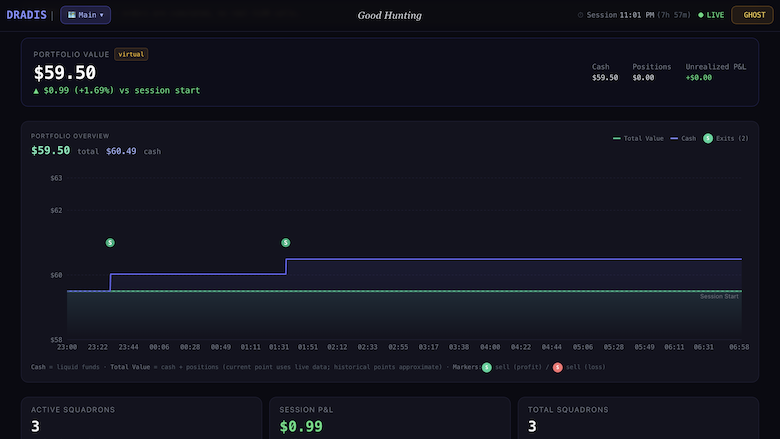
Image
DRADIS Dashboard
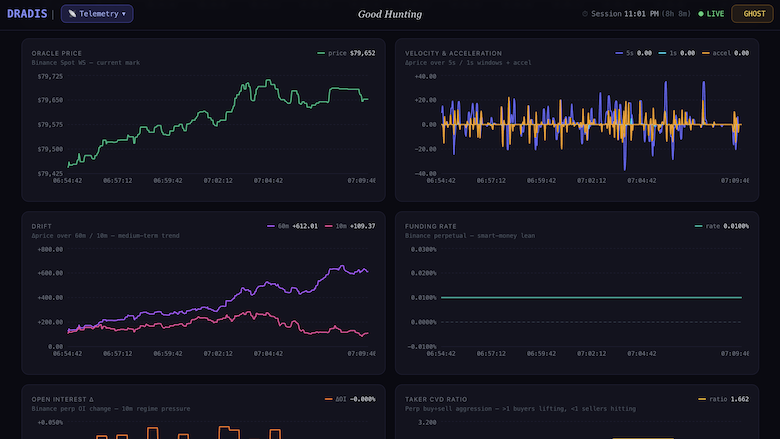
Image
DRADIS Market Telemetry
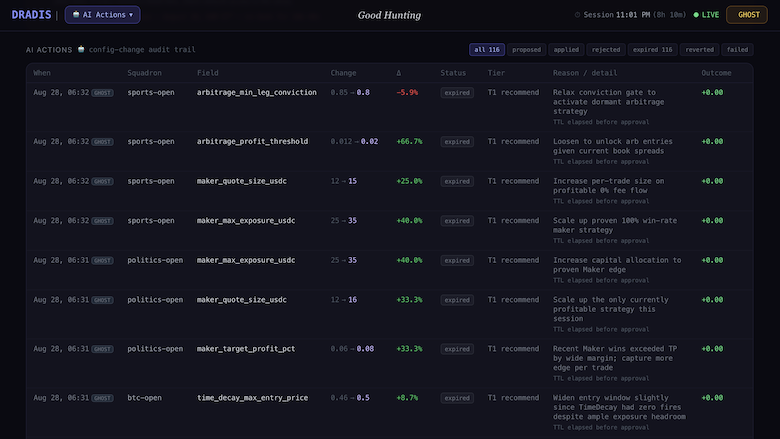
Image
DRADIS AI Controls
DRADIS is a low-latency trading engine for binary prediction markets, written in Rust and deployed as a self-contained instance in your own AWS account. It runs nine autonomous strategies against YES/NO outcome markets on your choice of Kalshi or Polymarket, acting on real-time signals from crypto and equity venues.
HOW IT WORKS
DRADIS separates signal collection from trading decisions. A layer of independent scouts maintains live connections to external data sources: Binance spot prices and velocity, perpetual funding rates, open interest and cumulative volume delta, Bitcoin ETF premium versus synthetic iNAV, and broad TradFi macro velocity. Each normalizes its feed and publishes a snapshot that strategies read without contention.
Nine strategies evaluate those snapshots concurrently on a 50-millisecond loop, each with its own capital budget and risk profile.
Maker: dual-sided passive quoting with adverse-selection protection. Momentum: high-velocity moves in the underlying, expressed in the market. Arbitrage: buys YES and NO when combined asks sum below one dollar, with orphan-leg cover. Time Decay: resting bids during the theta window before expiry. Basis: fades retail skew confirmed by perpetual funding. Fair Value: model price against the live order book. Convergence: directional entry on multi-signal agreement. Trend Reversal: oracle drift over 10-minute and 60-minute windows. GBoost: a gradient-boosted model retrained on market outcomes and promoted only after a holdout check.
Every strategy is gated independently. Order-book imbalance vetoes entries into toxic flow, positions are keyed per strategy so several can hold opposing sides without interfering, and a native watchdog thread outside the async runtime restarts the process if any phase stalls.
CONTROL TOWER
A real-time web dashboard ships with the instance. It shows live positions, PnL, per-strategy status and the specific gate blocking each idle strategy, so the engine's inaction is always explained rather than silent. Every risk and strategy parameter is tunable from the browser and applies without a rebuild or restart. Three starting profiles, conservative, balanced and aggressive, can be applied in one click and then adjusted.
LLM ADVISOR
An optional advisor reviews session history and proposes configuration changes with written reasoning. It runs against a local Ollama model, any OpenAI-compatible endpoint, or Anthropic, and operates under a tiered autonomy policy: recommend only, limited application within bounds you set, or autonomous within a circuit breaker. You choose the tier, and the default only recommends.
SAFETY AND CONTROL
Ghost mode simulates fills against live books so you can run the full system, including the advisor, without placing a real order. Start there.
The instance runs in your AWS account. Your venue credentials are entered through the setup page and stay on your instance. They are never transmitted to us, and there is no external service in the trading path. Trade history and configuration persist in local SQLite, and a full configuration bundle can be exported and imported to migrate between instances.
The image carries all three venue binaries. An operator selects the active venue in the setup page. Switching venues applies on the next restart, and one instance trades one venue at a time.
REQUIREMENTS
An AWS account, a t3.medium or larger instance, and API credentials for the venue you intend to trade. Signal sources that require keys, such as equity market data, are optional. The corresponding scout idles and publishes a neutral snapshot when no key is present, and the remaining strategies operate normally.
RISK
Trading involves substantial risk of loss. DRADIS is a tool for executing strategies you choose and configure, not investment advice, and no outcome is promised or implied. Run in ghost mode and understand each strategy's behavior before committing capital.
DRADIS is an independent product and is not affiliated with, endorsed by, or sponsored by Kalshi, Polymarket, Binance, or any other venue or data provider named here. All trademarks are the property of their respective owners.
Highlights
- Nine autonomous strategies for prediction markets, including passive market making, arbitrage, momentum, theta capture and a live-retrained ML model, each trading YES/NO outcome markets on real-time Binance, funding-rate and equity signals, with its own capital budget and entry gates.
- Runs entirely in your own AWS account. Venue credentials are entered on your instance and never leave it, with no external service in the trading path. Ghost mode simulates fills against live order books, so you can run the whole system before risking capital. All code auditable on GitHub.
- A real-time Control Tower dashboard shows positions, PnL, and the exact gate blocking each idle strategy, so inaction is always explained. Every risk and strategy parameter is tunable from the browser and applies live, with no rebuild or restart.
Details
Sold by
Categories
Delivery method
Delivery option
64-bit (x86) Amazon Machine Image (AMI)
Latest version
Operating system
Ubuntu 24.04 LTS
Deployed on AWS
New
Introducing multi-product solutions
You can now purchase comprehensive solutions tailored to use cases and industries.

Features and programs
Financing for AWS Marketplace purchases
AWS Marketplace now accepts line of credit payments through the PNC Vendor Finance program. This program is available to select AWS customers in the US, excluding NV, NC, ND, TN, & VT.

Pricing
Free trial
Try this product free for 5 days according to the free trial terms set by the vendor. Usage-based pricing is in effect for usage beyond the free trial terms. Your free trial gets automatically converted to a paid subscription when the trial ends, but may be canceled any time before that.
Pricing is based on actual usage, with charges varying according to how much you consume. Subscriptions have no end date and may be canceled any time.
Additional AWS infrastructure costs may apply. Use the AWS Pricing Calculator to estimate your infrastructure costs.
Dimension | Cost/hour |
|---|---|
t3.medium Recommended | $0.05 |
m5.large | $0.05 |
t3.xlarge | $0.05 |
t3.large | $0.05 |
m5.xlarge | $0.05 |
m6i.xlarge | $0.05 |
m6i.large | $0.05 |
c5.large | $0.05 |
c5.xlarge | $0.05 |
c6i.large | $0.05 |
Dimensions summary
You pay by the hour based on the EC2 instance type you run. All eleven dimensions bill the same software on one AMI; the only difference is the underlying compute size. General-purpose options include the m5 and m6i families in large and xlarge sizes, plus t3 medium, large, and xlarge. Compute-optimized options include the c5 and c6i families in large and xlarge sizes. Within each family, larger instance sizes carry a higher hourly rate. Every instance runs the same engine with all venues and features included.
Top-of-mind questions for buyers
Each unit is one running EC2 instance of the type you pick, billed per hour. One instance runs the full engine on a prebuilt AMI, with all three venues and the Control Tower included. The rate reflects the compute size, not any feature difference between instance types.
The hourly software rate meters running instance-hours. A stopped instance does not accrue software charges. Stopped instances may still incur underlying AWS storage fees for attached volumes, but the DRADIS licence bills only while the instance runs.
You upgrade on your own schedule using the Instance Migration bundle, which moves your configuration to a new version without two engines sharing one wallet. Billing stays the same per-hour model; you pay for whichever instance type the new version runs on.
dradis.live+1
Helpful?
Vendor refund policy
Email support@dradis.live with your AWS account ID and the charge date. Hourly billing stops when you stop the instance, so no refund is normally needed; if a defect prevented DRADIS from running, we refund those hours. Trading losses are not refundable: you choose and enable the strategies, and hold the venue account and funds. A free trial period and ghost mode paper trading let you evaluate first.

Legal
Vendor terms and conditions
Upon subscribing to this product, you must acknowledge and agree to the terms and conditions outlined in the vendor's End User License Agreement (EULA) .
Content disclaimer
Vendors are responsible for their product descriptions and other product content. AWS does not warrant that vendors' product descriptions or other product content are accurate, complete, reliable, current, or error-free.
Delivery details
64-bit (x86) Amazon Machine Image (AMI)
Amazon Machine Image (AMI)
An AMI is a virtual image that provides the information required to launch an instance. Amazon EC2 (Elastic Compute Cloud) instances are virtual servers on which you can run your applications and workloads, offering varying combinations of CPU, memory, storage, and networking resources. You can launch as many instances from as many different AMIs as you need.
Version release notes
- Kalshi and Polymarket US: a resting quote is now tracked from the moment the venue accepts it. A good-till-cancelled bid that rests on the book (a Maker quote, a Time Decay theta bid, a FairValue or Basis maker entry) was acknowledged by the venue with nothing filled, and the engine treated that as nothing having happened: the order stayed on the book with nothing watching it, survived the squadron rotating to another market, and when it filled later the contracts appeared as a "ChainAdopted" holding under whichever squadron noticed first. Meanwhile the Maker, seeing its own bid as the new best bid, quoted one tick higher every tick until the account ran out of collateral (five bids in two seconds on 2026-10-29). Now the quote is carried as a pending position at the size and price placed, exactly as it always was on Polymarket International: the venue's fill feed confirms it by order id and sizes it to what actually traded; rotation, stand-down and the Maker's own quote-pull cancel it and clear the pending row; a quote nothing pulls is cancelled after thirty minutes; a second quote is not placed while one already rests on the leg; and a quote is only ever confirmed by its own order (the venue is asked about the order itself when it leaves the open-orders list), never by contracts another strategy or squadron holds on the same leg. An exit signalled on a quote that never filled cancels the order instead of trying to sell contracts that are not held. The Trade Log shows a resting quote as a pending position until it fills or is pulled.
- Kalshi and Polymarket US: a position the engine adopted from the account now follows the account. The sweep that adopts a holding no strategy claims sized it once, at adoption, and never again, so a holding that grew afterwards (more untracked bids filling, as on 2026-10-29, when the engine showed 56.16 contracts while the account held 116.56) or shrank (an operator sale) stayed at its first size with collateral the only sign of the difference. The adopted row now follows the account: once a change has stood for a minute it is resized to what the account holds beyond the strategies' own confirmed fills, at the remainder's own cost, and when adopted contracts leave the account (an operator sale, or Kalshi netting an opposite-side fill against them) the contracts that left are booked at the row's last mark, with the row closed once none remain. When the strategies' own rows claim more than the account holds, nothing is changed and the engine says so once. Contracts a strategy filled through its own order are never moved by a wallet reading, and a quote still resting on the market stops the resize until it fills or is pulled. Two squadrons sharing one account could also both adopt the same holding when they noticed it in the same pass, leaving two rows for one position and booking its exit twice; adoption now happens once across every squadron, and duplicate rows an earlier release wrote are collapsed to the oldest.
Update instructions at https://dradis.live/docs/upgrade
Additional details
Usage instructions
FULL DOCS: https://dradis.live/docs/install (install) and https://dradis.live/docs/upgrade (upgrade). Source: https://github.com/mbordash/DRADIS
-
LAUNCH AND SECURE. Launch on t3.medium or larger. Give the instance a Name tag carrying the version, such as dradis-v1.4.0; an upgrade briefly runs two instances you must tell apart. Before opening the dashboard, restrict the security group: ports 80 and 443 to your own address, port 22 only if you want SSH. The dashboard controls real money once venue credentials are entered, so treat it as an exchange login.
-
FIRST LOGIN. Open https://<instance-public-ip>/ in a browser. The instance generates a self-signed TLS certificate at first boot, so expect a browser warning. Sign in as 'admin' with your EC2 instance ID as the password. That is a one-time claim token: the setup page immediately requires a new admin password, which is hashed and becomes the real one.
-
VENUE AND CREDENTIALS. In the setup page select Kalshi, Polymarket US or Polymarket International. All three ship in the image, one instance trades one venue at a time, and a venue change applies on engine restart. Venue API credentials are stored only on your instance at /opt/dradis/data/secrets.env and are never transmitted anywhere else. Rotate them from the same page. Optional signal source keys are tagged required, recommended or optional; a source with no key idles and publishes a neutral snapshot while the other strategies run normally.
-
PICK A PROFILE. Conservative, balanced and aggressive apply in one click and can then be adjusted. Conservative is the default and the right starting point.
-
RUN IN GHOST MODE FIRST. A new install starts in ghost mode, which simulates fills against live order books without placing an order. Leave it on until you have watched the strategies act on real market data. The dashboard names the gate blocking every idle strategy, so inaction is always explained.
-
GOING LIVE. Turn ghost mode off from the dashboard and fund the venue account with an amount you are prepared to lose. Kalshi holds balances per exchange shard and rejects orders from an unfunded shard: the Setup tab shows your balance by shard, so fund the shard your squadron trades from before leaving ghost mode. Every strategy can be disabled individually and every risk parameter is tunable from the browser without a restart. If the engine behaves unexpectedly, switch ghost mode back on or stop the instance, then contact support.
-
HEALTH CHECKS. In the EC2 console confirm both status checks pass. In the dashboard, the footer shows engine-to-venue latency and the running version, and the strategy panel gives a live reason for every strategy. The Console tab exports a support bundle to attach to any support request. No AWS quota increases are needed beyond one EC2 instance and its EBS volume.
-
OPTIONAL LLM ADVISOR. Reviews session history and proposes configuration changes with written reasoning. Runs against Anthropic, any OpenAI-compatible endpoint, or a local Ollama model, and defaults to recommend-only; higher autonomy tiers are opt-in. A hosted provider bills you directly for tokens. t3.medium cannot host a model locally; see the install guide for sizing.
-
UPGRADING. DRADIS is an immutable image: launch a new instance from the new version, export the config bundle from the Instance Migration panel in the setup page, import it on the new instance, restart, then stop the old instance before the new one trades. The bundle carries your venue credentials, configuration, trade history and GBoost models, so two running engines would cancel each other's orders and claim the same positions. Kalshi operators: check shard balances after upgrading.
RISK: Trading involves substantial risk of loss. DRADIS executes strategies you choose and configure. It is not investment advice, and no outcome is promised or implied.
Support
Vendor support
Email: support@dradis.live Web: https://dradis.live
Support is provided by email in English, with a target first response within two business days. In scope: deployment and setup, configuration questions, suspected defects, interpreting the engine's logs and dashboard, and licensing questions about the commercial terms that accompany this listing.
If the engine is behaving unexpectedly while trading live capital, switch it to ghost mode or stop the instance first, then contact support. Every strategy can also be disabled individually from the Control Tower without restarting.
DRADIS is source-available, and the public repository carries the full technical documentation, a custom strategy guide, a performance tuning guide, and the venue abstraction reference. Bug reports and feature requests can be raised there and are tracked in the open.
Two things fall outside support. DRADIS does not provide trading, financial or investment advice, so questions about which configuration will be profitable cannot be answered. Separately, accounts, funding, settlement and eligibility at any trading venue or data provider are handled by those companies directly, as DRADIS is an independent client with no access to your account with them.
AWS infrastructure support
AWS Support is a one-on-one, fast-response support channel that is staffed 24x7x365 with experienced and technical support engineers. The service helps customers of all sizes and technical abilities to successfully utilize the products and features provided by Amazon Web Services.
Similar products

Dradis Framework is a pentest management platform that enables faster reporting and painless collaboration for cybersecurity teams. Combine multiple scanners (using your own descriptions), add manual findings, and generate a report with one click - or publish to the results portal. This repository contains the official Dradis Community Edition (CE) image. You can find the source code on github:dradis/dradis-ce.

TradeIn is a B2B Saas tool providing an instant evaluation of companies payment behavior with access to 100% of companies Worldwide .

QuickQuotes shortens the response time to RFQs (Request for Quote), through powerful and innovative search capabilities, ML/AI based recommendation system and the integration of your data. This tool reduces the time needed to identify parts correctly and provide accurate quotes, enhancing customer satisfaction, accelerating time-to-sale, and increasing revenue .

Take the guesswork out of the bid process and open the door to new possibilities for successful bid creation with Intellicision’s Bid Predictor. Whether you’re preparing a single quote, multiple quotes, or looking for a price evaluation, the Predictor illuminates the most direct path to a winning bid.
Customer reviews
No customer reviews yet
Be the first to review this product . We've partnered with PeerSpot to gather customer feedback. You can share your experience by writing or recording a review, or scheduling a call with a PeerSpot analyst.