Sold by: Inmatura
Deployed on AWS
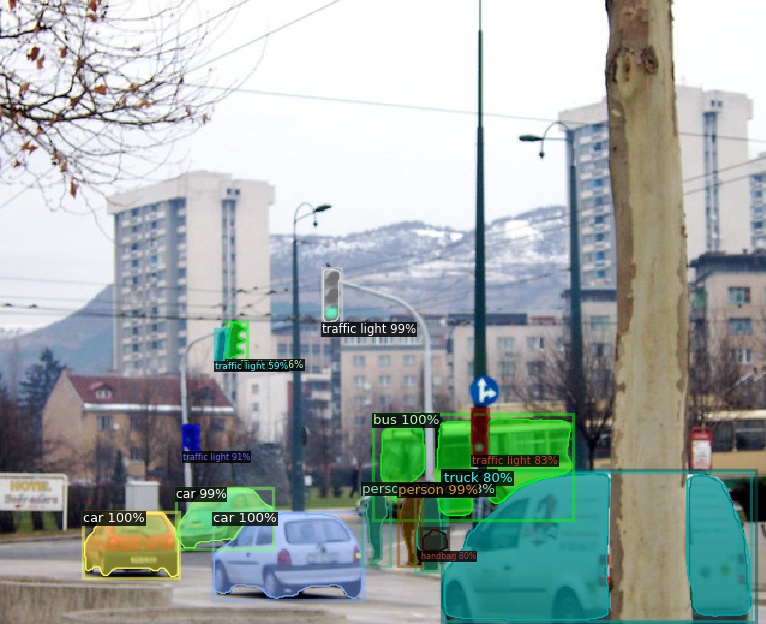
Detect and segment objects on images using the state of the art Mask R-CNN model
Overview
This model provides object detection on images using a Mask R-CNN (ResNetXt 101 + FPN) architecture. This network provides state of the art accuracy the COCO2017 validation (Box AP: 43.0) and at the same time it provides fast inference times. Supports both CPU and GPU and it features a simple pricing model where you only pay for what you use with a simple metered pricing model. See docs and more info at: https://extrapolations.dev/model/instance-segmentation-mask-r-cnn/
Highlights
- Flexible API to detect and classify objects in images with borders
- State of the Art metric on the COCO validation dataset. Box AP: 43.0
- Only pay for what you use with a simple metered pricing model
Details
Sold by
Categories
Delivery method
Latest version
Deployed on AWS
New
Introducing multi-product solutions
You can now purchase comprehensive solutions tailored to use cases and industries.

Features and programs
Financing for AWS Marketplace purchases
AWS Marketplace now accepts line of credit payments through the PNC Vendor Finance program. This program is available to select AWS customers in the US, excluding NV, NC, ND, TN, & VT.

Pricing
Pricing is based on actual usage, with charges varying according to how much you consume. Subscriptions have no end date and may be canceled any time.
Additional AWS infrastructure costs may apply. Use the AWS Pricing Calculator to estimate your infrastructure costs.
Dimension | Description | Cost/host/hour |
|---|---|---|
ml.m5.xlarge Inference (Batch) Recommended | Model inference on the ml.m5.xlarge instance type, batch mode | $1.00 |
ml.m5.xlarge Inference (Real-Time) Recommended | Model inference on the ml.m5.xlarge instance type, real-time mode | $0.10 |
ml.p2.xlarge Inference (Batch) | Model inference on the ml.p2.xlarge instance type, batch mode | $1.00 |
ml.m5.4xlarge Inference (Batch) | Model inference on the ml.m5.4xlarge instance type, batch mode | $1.00 |
ml.m5.12xlarge Inference (Batch) | Model inference on the ml.m5.12xlarge instance type, batch mode | $1.00 |
ml.p2.16xlarge Inference (Batch) | Model inference on the ml.p2.16xlarge instance type, batch mode | $1.00 |
ml.m5.2xlarge Inference (Batch) | Model inference on the ml.m5.2xlarge instance type, batch mode | $1.00 |
ml.p3.16xlarge Inference (Batch) | Model inference on the ml.p3.16xlarge instance type, batch mode | $1.00 |
ml.c5.9xlarge Inference (Batch) | Model inference on the ml.c5.9xlarge instance type, batch mode | $1.00 |
ml.c5.4xlarge Inference (Batch) | Model inference on the ml.c5.4xlarge instance type, batch mode | $1.00 |
Dimensions summary
You pay by the hour for model inference, billed per host-hour the endpoint runs. Pricing splits into two modes: batch and real-time. The software fee stays the same regardless of the instance type you pick. Batch mode carries one flat software rate; real-time mode carries a separate flat rate. The many listed instance types (such as ml.m5, ml.c5, ml.p2, ml.p3, ml.g4dn, ml.r5, and ml.inf1 families in various sizes) let you match compute, memory, and GPU needs. AWS infrastructure charges apply separately and vary by the instance type you select.
Top-of-mind questions for buyers
A host-hour is one hour the inference endpoint runs on your chosen instance type. The software fee meters only running time. When you shut the endpoint down, software charges stop. You pay only for as long as the endpoint stays active.
No. The software fee stays the same across all instance types within each mode. A larger instance does not raise the software rate. Only the separate AWS infrastructure charge changes with instance size, since that depends on the compute, memory, and GPU you select.
Both meter per host-hour the endpoint runs, but each mode carries its own flat software rate. Batch mode handles grouped inference jobs; real-time mode serves live requests through a running endpoint. You choose the mode and instance type that fits your workload, and charges accrue per hour accordingly.
aws.inmatura.com
Helpful?
Vendor refund policy
You may cancel your subscription at any time. We will not refund payments made by you under the agreement.

Legal
Vendor terms and conditions
Upon subscribing to this product, you must acknowledge and agree to the terms and conditions outlined in the vendor's End User License Agreement (EULA) .
Content disclaimer
Vendors are responsible for their product descriptions and other product content. AWS does not warrant that vendors' product descriptions or other product content are accurate, complete, reliable, current, or error-free.
Delivery details
Amazon SageMaker model
An Amazon SageMaker model package is a pre-trained machine learning model ready to use without additional training. Use the model package to create a model on Amazon SageMaker for real-time inference or batch processing. Amazon SageMaker is a fully managed platform for building, training, and deploying machine learning models at scale.
Deploy the model on Amazon SageMaker AI using the following options:
Version release notes
Update dependencies
Additional details
Inputs
- Summary
The input is one imags in jpg or png format. Returns another image or a JSON object.
Sample query using the aws CLI:
aws sagemaker-runtime invoke-endpoint \ --endpoint-name img-obj-mask-r-cnn \ --accept application/json \ --content-type image/jpeg \ --body fileb://./horse-guard.jpg >(cat)For more information and examples on how to use the API see the documentation: https://extrapolations.dev/model/instance-segmentation-mask-r-cnn/api/
- Input MIME type
- image/jpeg, image/png, application/json
https://extrapolations.dev/model/instance-segmentation-mask-r-cnn/examples/
https://extrapolations.dev/model/instance-segmentation-mask-r-cnn/examples/
Input data descriptions
The following table describes supported input data fields for real-time inference and batch transform.
Field name | Description | Constraints | Required |
|---|---|---|---|
image | The Body of the request should be the image to detect objects on. Supported formats: `.jpg` and `.png`. | Type: FreeText | Yes |
Custom attributes
The following table describes custom attributes for real-time inference endpoints.
Field name | Description | Constraints | Required |
|---|---|---|---|
response_type | The type of the response.
If `jpeg` or `png`, the response content will be an image in the selected format. The image will be the same input image with boxes and labels of the objects detected.
If `json` the response will be a JSON object with the labels and coordinates of the objects detected.
| Default value: jpeg
Type: Categorical
Allowed values: jpeg,png,json | No |
Resources
Vendor resources
Support
AWS infrastructure support
AWS Support is a one-on-one, fast-response support channel that is staffed 24x7x365 with experienced and technical support engineers. The service helps customers of all sizes and technical abilities to successfully utilize the products and features provided by Amazon Web Services.
Similar products

This is a Object Detection Answering model from TensorFlow Hub

DeepLab is a powerful model for image semantic segmentation, powered by GluonCV.

This is a Object Detection Answering model from TensorFlow Hub

This is a Object Detection Answering model from TensorFlow Hub
Customer reviews
No customer reviews yet
Be the first to review this product . We've partnered with PeerSpot to gather customer feedback. You can share your experience by writing or recording a review, or scheduling a call with a PeerSpot analyst.