
Sold by: cloudimg
Deployed on AWS
This product has charges associated with it for seller support. Percona Server for MySQL pre-hardened and production-ready on AWS. Unique per-instance credentials on first boot - no defaults to fix. Backed by 24/7 cloudimg expert support.
Overview
Image
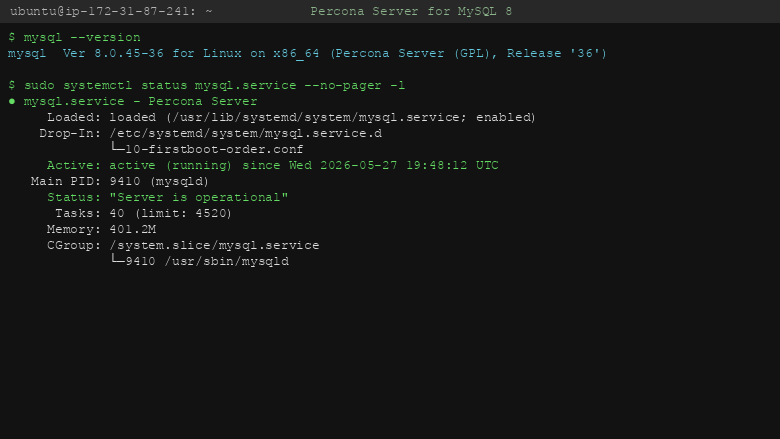
Percona Server version and service status
Image
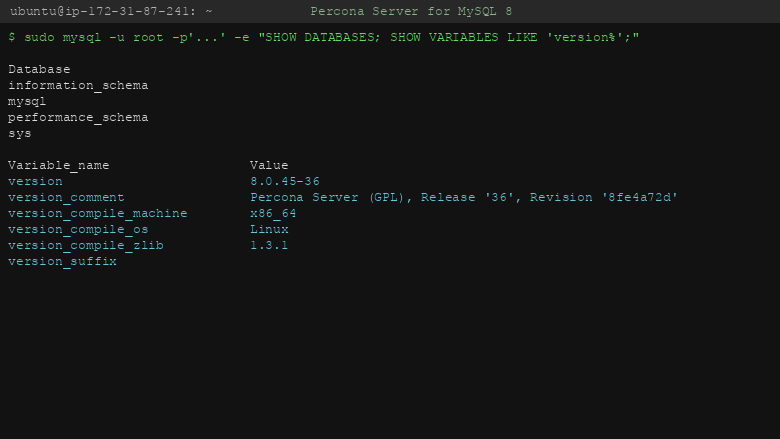
System databases and version variables
Image
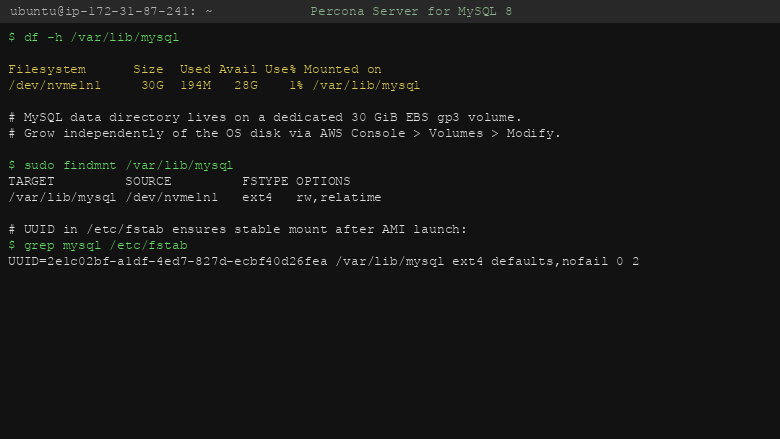
Dedicated MySQL data volume
This is a repackaged open source software product wherein additional charges apply for cloudimg support services.
Percona Server for MySQL - Production-Ready, Hardened, and Fully Supported by cloudimg
Eliminate the time spent hardening, configuring, and securing a MySQL-compatible database from scratch. This AMI delivers Percona Server for MySQL fully installed and tuned so your database is accepting connections within minutes of launch - not hours or days.
Why This AMI Over Alternatives
Unlike generic MySQL images that ship with default credentials or require manual post-launch hardening, this product generates instance-unique passwords for both the MySQL root account and a dedicated application user on every first boot. Credentials are stored in a root-only file - never shared, never reused. Combined with a pre-configured EBS data volume layout and the XtraDB storage engine, you get a production-grade database without a single manual step.
Database Stack
- Percona Server 8.x running as a systemd service in single-node mode on port 3306
- XtraDB storage engine - a fully compatible InnoDB successor with extended instrumentation and diagnostics
- Enhanced Percona thread pool for improved connection handling under high concurrency
- Additional Performance Schema views for deeper observability into query execution and resource usage
- Dedicated EBS data volume - independently resizable, separating data from the OS for simpler backups and scaling
Connect with the standard mysql client, any MySQL-compatible driver, or your existing ORM - full wire-protocol compatibility means zero client-side changes.
Security and Encryption Guidance
- Credentials: Instance-unique passwords generated at first boot; stored in a file readable only by root
- Encryption at rest: Deploy with encrypted EBS volumes via AWS KMS to protect data at rest
- Encryption in transit: Configure TLS for MySQL connections to secure data between your application and the database
- Network isolation: Launch in a private subnet and restrict your security group to allow port 3306 only from trusted application hosts
- Patching: cloudimg monitors upstream Percona releases and publishes updated AMIs; subscribe to notifications for patch availability
Getting Started
- Launch the AMI from AWS Marketplace, selecting your preferred instance type (r5.large or larger recommended for production workloads)
- Ensure your security group allows inbound TCP on port 3306 from your application tier only
- Wait approximately 2-3 minutes for the first-boot service to generate credentials and initialize the database
- SSH into the instance and retrieve credentials: sudo cat /root/.credentials
- Connect using: mysql -u cloudimg -p -h (your-instance-ip)
- Your database is now accepting queries - begin creating schemas and loading data
Use Cases
E-commerce platform migration: A SaaS team running self-managed MySQL on EC2 can switch to this AMI with no application changes, gaining XtraDB instrumentation and eliminating credential management overhead.
OLTP workloads: Applications requiring high transaction throughput benefit from the enhanced thread pool and XtraDB's optimized buffer pool management.
Content management datastores: WordPress, Drupal, and custom CMS platforms connect without driver changes while gaining Percona's extended monitoring.
Analytics and reporting: Workloads that need deeper query-level visibility leverage the additional Performance Schema views for tuning.
cloudimg Support
24/7 technical support by email and live chat. Our engineers assist with deployment, upgrades, replication architecture, performance tuning, and database administration. Critical issues receive a one-hour average initial response.
To discuss your architecture or schedule a guided walkthrough of replication setup and performance tuning, contact support@cloudimg.co.uk .
Low-Risk Evaluation
This product bills hourly with no minimum commitment. Launch a t3.medium instance to evaluate Percona Server in your environment, run your test suite, and confirm compatibility before scaling to production instance types.
All product and company names are trademarks or registered trademarks of their respective holders. Use of them does not imply any affiliation with or endorsement by them.
Highlights
- Percona Server for MySQL preinstalled and ready, with the XtraDB storage engine and the enhanced Percona thread pool, fully wire-protocol-compatible with stock MySQL clients and drivers
- Hardened first boot generates instance-unique MySQL root and application user passwords on every launch, stored in a file only the root user can read, so the database is never left with default credentials
- 24/7 technical support from cloudimg, with expert assistance for Percona Server deployment, configuration, replication and performance tuning
Details
Sold by
Delivery method
Delivery option
64-bit (x86) Amazon Machine Image (AMI)
Latest version
Operating system
Ubuntu 24.04
Deployed on AWS
New
Introducing multi-product solutions
You can now purchase comprehensive solutions tailored to use cases and industries.

Features and programs
Financing for AWS Marketplace purchases
AWS Marketplace now accepts line of credit payments through the PNC Vendor Finance program. This program is available to select AWS customers in the US, excluding NV, NC, ND, TN, & VT.

Pricing
Pricing is based on actual usage, with charges varying according to how much you consume. Subscriptions have no end date and may be canceled any time. Alternatively, you can pay upfront for a contract, which typically covers your anticipated usage for the contract duration. Any usage beyond contract will incur additional usage-based costs.
Additional AWS infrastructure costs may apply. Use the AWS Pricing Calculator to estimate your infrastructure costs.
Dimension | Cost/hour |
|---|---|
m5.large Recommended | $0.08 |
Vendor refund policy
Refunds available on request.

Legal
Vendor terms and conditions
Upon subscribing to this product, you must acknowledge and agree to the terms and conditions outlined in the vendor's End User License Agreement (EULA) .
Content disclaimer
Vendors are responsible for their product descriptions and other product content. AWS does not warrant that vendors' product descriptions or other product content are accurate, complete, reliable, current, or error-free.
Delivery details
64-bit (x86) Amazon Machine Image (AMI)
Amazon Machine Image (AMI)
An AMI is a virtual image that provides the information required to launch an instance. Amazon EC2 (Elastic Compute Cloud) instances are virtual servers on which you can run your applications and workloads, offering varying combinations of CPU, memory, storage, and networking resources. You can launch as many instances from as many different AMIs as you need.
Version release notes
Remediates flagged CVEs: full apt update (kernel + userspace); rng-tools added.
Additional details
Usage instructions
Connect via SSH on port 22 as the default login user for your operating system variant (the user guide lists it per variant). Percona Server for MySQL listens on the standard MySQL port 3306; an nginx listing-identity shim serves a static page on port 80. Retrieve the generated root password with: sudo cat /root/percona-credentials.txt. Connect from the instance: mysql -u root -p (paste the password from the credentials file). Restrict port 3306 to trusted networks. To enable HTTPS or TLS-secured MySQL, follow the user guide sections on configuring a reverse proxy and on the Percona Server require_secure_transport setting.
Resources
Vendor resources
Support
Vendor support
cloudimg Support
cloudimg provides 24/7 technical support for Percona Server for MySQL by email and live chat.
What is covered:
- Deployment assistance and initial configuration
- Percona Server upgrades and patch guidance
- Replication setup and architecture planning
- Performance tuning and query optimization
- Troubleshooting connectivity, storage, and service issues
- Guidance on EBS volume management and backup strategies
Response times:
Critical production issues receive a one-hour average initial response. Non-critical requests are handled during the same business day.
How to reach us:
Email: support@cloudimg.co.uk Live chat: Available 24/7 through our support portal
Refunds and billing:
For billing questions or refund requests, contact support@cloudimg.co.uk with your AWS account ID and instance details.
Getting started:
After launching your instance, allow 2-3 minutes for first-boot initialization. Retrieve credentials via SSH (sudo cat /root/.credentials), then connect on port 3306. If you need help with initial setup, replication planning, or performance tuning, reach out and our engineers will guide you through the process.
AWS infrastructure support
AWS Support is a one-on-one, fast-response support channel that is staffed 24x7x365 with experienced and technical support engineers. The service helps customers of all sizes and technical abilities to successfully utilize the products and features provided by Amazon Web Services.
Similar products

This product has charges associated with it for seller support. Deploy Oracle Database 19c Standard Edition on Windows Server in minutes with production-ready ENA networking up to 25 Gbps and24x7 cloudimg engineer support.

This product has charges associated with it for seller support. Oracle Database 19c Standard Edition AMI pre-configured on enterprise Linux with BYOL licensing. Deploy production-ready Oracle on AWS with 24/7 expert support from cloudimg.

This product has charges associated with it for seller support. Pre-configured RStudio IDE on Windows Server with 24/7 cloudimg support. Deploy a production-ready R data science environment on EC2 in minutes.

This product has charges associated with it for seller support. Migrate from CentOS 8 EOL to Alma Linux 8 in under 60 seconds with zero licensing fees. 1:1 RHEL 8 compatible, AWS-optimized, backed by 24/7 support with guaranteed 24hr response SLA.

This product has charges associated with it for seller support. Pre-configured Jenkins CI/CD server on Windows for .NET and DevOps teams. Launch in minutes with guaranteed 24-hour response support from cloudimg.
Customer reviews
No customer reviews yet
Be the first to review this product . We've partnered with PeerSpot to gather customer feedback. You can share your experience by writing or recording a review, or scheduling a call with a PeerSpot analyst.