Sold by: KloudCare
Deployed on AWS
Free, read-only AWS assessment that runs in your own account. In about 10 minutes it finds wasted spend, security risks and backup gaps, with evidence and estimated monthly savings.
Overview
Image
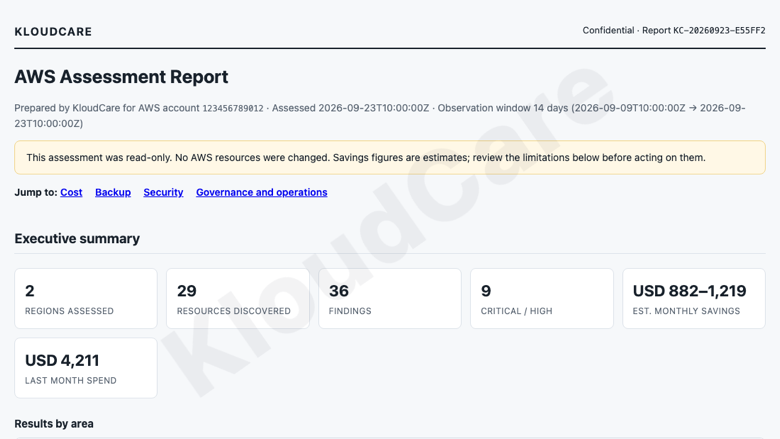
Executive summary of the AWS report
Image
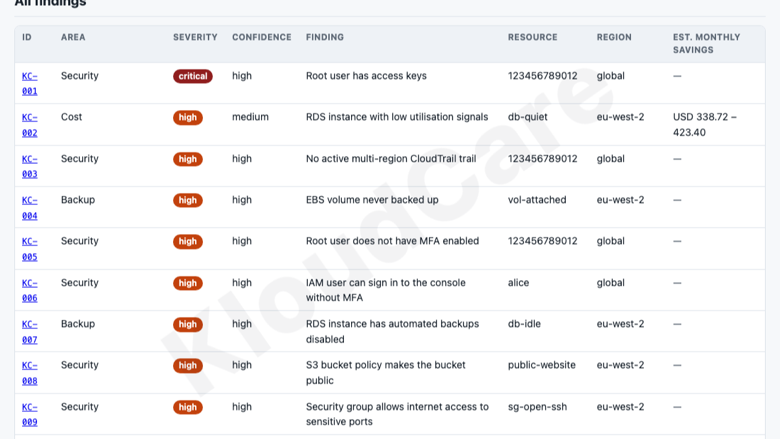
Findings with severity and evidence
KloudCare AWS Assessment is a free, read-only check of your AWS account for wasted spend, security risks and backup gaps. It runs entirely inside your own account as a one-off AWS Fargate task launched from a CloudFormation template, and produces a clear HTML and JSON report in about 10 minutes.
The assessment uses a least-privilege IAM role that can only describe, list and read configuration and metrics. It cannot create, change, stop or delete any resource, and it never reads your data, files, databases or secrets. The report is saved to a private, encrypted S3 bucket in your account and is deleted automatically after the retention period you choose. Nothing is sent to KloudCare. Delete the stack to remove everything.
The report covers four areas. Cost: unattached EBS volumes, unused Elastic IPs, idle or oversized EC2, RDS and ECS capacity, low-traffic NAT gateways, S3 buckets without lifecycle rules, rarely used Lambda functions and last month's spend by service. Backup: AWS Backup plans, EBS snapshots, RDS automated backups and S3 versioning. Security: root user MFA and access keys, IAM users without MFA, old access keys, security groups open to the internet, public S3 buckets, encryption, CloudTrail and GuardDuty. Governance and operations: monitoring alarms, required tags and resources in unexpected regions.
Every finding shows its evidence and observation period, severity, confidence and a recommended action, and cost findings include an estimated monthly saving based on regional on-demand prices. If something cannot be checked, the report says so instead of guessing. AWS charges for the resources used while the assessment runs, typically a few cents of Fargate time and USD 0.01 for one Cost Explorer request, which you can turn off.
Highlights
- Read-only and private: runs as an AWS Fargate task in your own account with a least-privilege, read-only IAM role. It cannot change, stop or delete anything, and the report stays in your own encrypted S3 bucket.
- 36 checks across cost, backup, security and governance, including idle and oversized EC2, RDS and ECS, unattached volumes, NAT gateways, root MFA, old access keys, open ports, public S3, CloudTrail, GuardDuty and encryption.
- Clear HTML and JSON report: every finding shows its evidence, severity, confidence, recommended action and, for cost findings, estimated monthly savings based on regional on-demand prices.
Details
Sold by
Categories
Delivery method
Supported services
Delivery option
Run on AWS Fargate with AWS CloudFormation
Latest version
Operating system
Linux
Deployed on AWS
New
Introducing multi-product solutions
You can now purchase comprehensive solutions tailored to use cases and industries.

Features and programs
Financing for AWS Marketplace purchases
AWS Marketplace now accepts line of credit payments through the PNC Vendor Finance program. This program is available to select AWS customers in the US, excluding NV, NC, ND, TN, & VT.

Pricing
This product is available free of charge. Free subscriptions have no end date and may be canceled any time.
Additional AWS infrastructure costs may apply. Use the AWS Pricing Calculator to estimate your infrastructure costs.
Vendor refund policy
This product is free. AWS Marketplace does not charge for the software; buyers pay only for the AWS infrastructure they use to run it, which is billed by AWS. There is nothing to refund.

Legal
Vendor terms and conditions
Upon subscribing to this product, you must acknowledge and agree to the terms and conditions outlined in the vendor's End User License Agreement (EULA) .
Content disclaimer
Vendors are responsible for their product descriptions and other product content. AWS does not warrant that vendors' product descriptions or other product content are accurate, complete, reliable, current, or error-free.
Delivery details
Run on AWS Fargate with AWS CloudFormation
Supported services: Learn more
- Amazon ECS
Container image
Containers are lightweight, portable execution environments that wrap server application software in a filesystem that includes everything it needs to run. Container applications run on supported container runtimes and orchestration services, such as Amazon Elastic Container Service (Amazon ECS) or Amazon Elastic Kubernetes Service (Amazon EKS). Both eliminate the need for you to install and operate your own container orchestration software by managing and scheduling containers on a scalable cluster of virtual machines.
Version release notes
First AWS Marketplace release of the KloudCare AWS Assessment.
- Read-only assessment of cost, backup, security and governance, run once as an AWS Fargate task in your own account.
- 36 checks, including idle and oversized EC2, RDS and ECS, unattached EBS volumes, low-traffic NAT gateways, S3 lifecycle and versioning, AWS Backup, root user MFA and access keys, old IAM access keys, security groups open to the internet, public S3 buckets, encryption, CloudTrail and GuardDuty.
- HTML and JSON report saved to a private, encrypted S3 bucket in your account, with evidence, severity, confidence, recommended actions and estimated monthly savings.
- Container image runs as a non-root user with a read-only file system.
Additional details
Usage instructions
Run the assessment
- Sign in to the AWS account you want to assess, as a user who can create IAM roles, and choose the AWS Region where you want the report stored.
- Open the CloudFormation template with this quick-create link: https://console.aws.amazon.com/cloudformation/home#/stacks/quickcreate?templateURL=https%3A%2F%2Fkloudcare-marketplace-352333569476.s3.amazonaws.com%2Fassessment%2F0.3.6%2Fmarketplace-ecs.yaml&stackName=KloudCareAssessment Or create a stack in CloudFormation with this template URL: https://kloudcare-marketplace-352333569476.s3.amazonaws.com/assessment/0.3.6/marketplace-ecs.yaml
- Review the parameters (all optional):
- Regions to assess: comma-separated, for example eu-west-2,us-east-1. Leave blank to assess every enabled Region.
- Regions you expect to use: resources elsewhere are flagged.
- Required tag keys: default Owner,Environment.
- Observation window: CloudWatch history used for utilisation checks, default 14 days.
- Include Cost Explorer spend: AWS charges USD 0.01 per request (one per run).
- Network: leave blank to create a small dedicated VPC with no inbound access and no NAT gateway, or set both an existing VPC and subnet that can reach AWS APIs.
- Tick "I acknowledge that AWS CloudFormation might create IAM resources" and choose Create stack.
- The stack runs the assessment once as an AWS Fargate task. After about 5 to 10 minutes, open the stack's Outputs tab, choose the Reports link, open the newest folder and download the .html report. A .json version is saved alongside it.
What it can access The task role can only describe, list and read configuration and metrics (for example ec2:Describe*, iam:ListUsers, cloudwatch:GetMetricStatistics). It cannot create, change, stop or delete resources and does not read data in S3, databases or secrets. Its only write permission is to save the report in the stack's own encrypted bucket.
Run it again Use the RunAgain command in the stack's Outputs, or run a new task in the stack's ECS cluster with the same task definition, subnet and security group. Each run saves a new dated report folder.
Follow progress or troubleshoot The Progress output links to the task history; the task logs are in CloudWatch Logs under /ecs/<stack name>.
Costs There is no charge for the software. AWS bills your account for the resources used: typically a few cents of Fargate time and a public IPv4 address per run, a small amount of S3 storage, and USD 0.01 per Cost Explorer request.
Remove it Delete the CloudFormation stack. This removes the task, roles, network, logs, bucket and all reports.
Support
Vendor support
Email: hello@kloudcare.co.uk
KloudCare provides free email support for this product. We aim to reply within 2 business days (Monday to Friday, UK time). Support covers deploying the CloudFormation template, running the assessment, understanding the report and troubleshooting errors. Please include your AWS Region and the CloudFormation stack events or task log messages if a deployment fails.
AWS infrastructure support
AWS Support is a one-on-one, fast-response support channel that is staffed 24x7x365 with experienced and technical support engineers. The service helps customers of all sizes and technical abilities to successfully utilize the products and features provided by Amazon Web Services.
Similar products

The AWS security assessment is scoped to one environment, workload, or set of related workloads. It consists of the methodology and technical tools to identify the potential risks as well as improvement opportunities in customers' workloads.
eSparkBiz, an AWS Advanced Tier Partner, delivers a fixed-scope Kubernetes assessment for Amazon EKS clusters - identifying cost, security, and reliability gaps with a prioritized remediation roadmap.
A no-cost evaluation of your AWS account. We look for security risks and potential cost savings potential on your monthly cloud spend.

Well-Architected Review undertaken by our experienced and certified AWS experts to help you assess your AWS workloads against the five pillars of the Well-Architected Framework to that ensure they’re efficient, optimized, secure and performant.
Customer reviews
No customer reviews yet
Be the first to review this product . We've partnered with PeerSpot to gather customer feedback. You can share your experience by writing or recording a review, or scheduling a call with a PeerSpot analyst.