
Sold by: cloudimg
Deployed on AWS
Free Trial
AWS Free Tier
This product has charges associated with it for seller support. Production-ready Nchan pub/sub server on nginx. Launches in minutes with per-instance credentials - delivers messages instantly over WebSocket, EventSource, or long polling.
Overview
Image
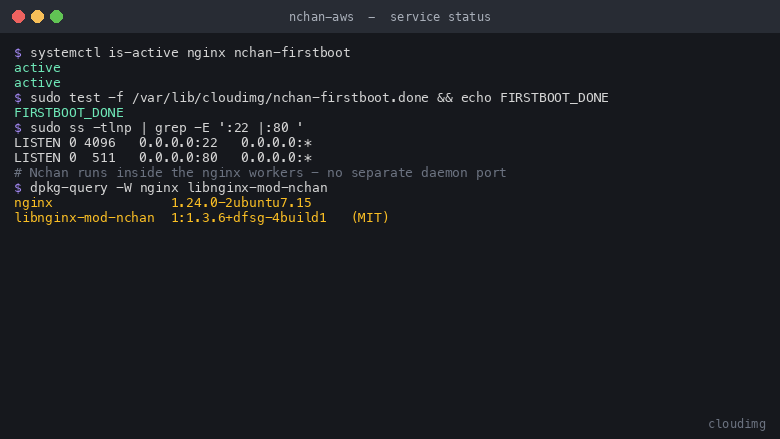
Nchan and nginx service status
Image
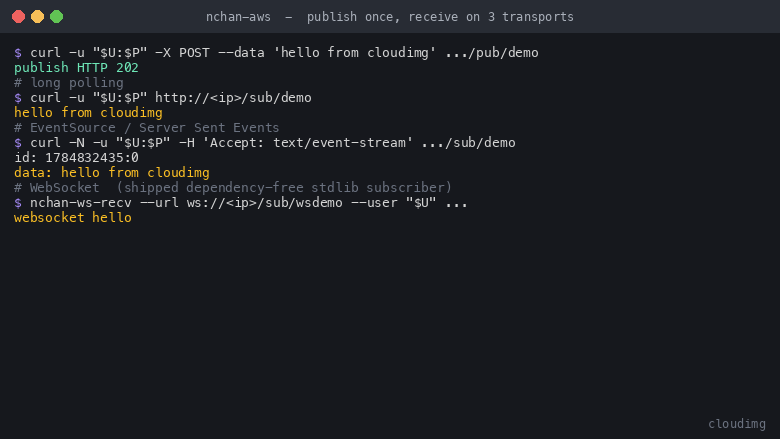
Publish once, receive on three transports
Image
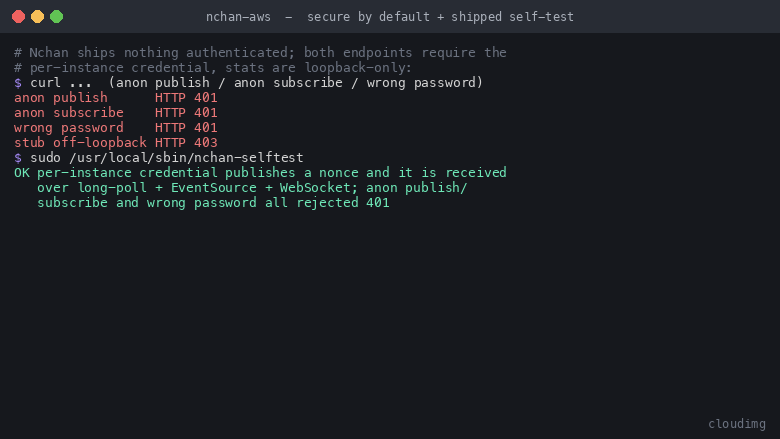
Secure by default and the shipped self-test
This is a repackaged open source software product wherein additional charges apply for cloudimg support services.
Nchan - Production-Ready Publish and Subscribe Message Server AMI
Nchan is an open source publish and subscribe server built as a module for nginx. Your application publishes a message to a named channel with an ordinary HTTP POST, and Nchan delivers it immediately to every connected client over WebSocket, EventSource (Server-Sent Events), or long polling - whichever the client requests. Because the delivery layer is nginx itself, a single instance holds a very large number of idle connections while your application never maintains a persistent real-time socket.
This AMI delivers a complete, working message server within minutes of launch - not a module you still have to compile and configure.
Who This Is For
- Teams building live dashboards, notifications, activity feeds, or chat
- Developers adding collaborative editing or job-progress updates to existing apps
- Anyone who needs to push data to browsers or mobile clients without polling
- Organizations that want pub/sub without managing Redis clusters or external brokers
Why This AMI Over a Manual Install
Instant time-to-value: A wired-up, hardened pub/sub server the moment the instance boots. No source build, no module/ABI juggling, no per-location configuration required.
Secure where the software is not: Nchan endpoints are unauthenticated by default, meaning an open publisher lets anyone inject messages into any channel and an open subscriber leaks every message. This image puts both endpoints behind a credential generated uniquely on each instance's first boot - never baked into the image - so no two instances share one. The statistics endpoint is restricted to loopback only.
Proven, not merely listening: A bundled self-test command publishes a message and confirms delivery across all three transports, so you can verify end-to-end function at any time.
Application Stack
- nginx (BSD-2-Clause) as the front door on port 80
- Nchan dynamic module (libnginx-mod-nchan 1.3.6, MIT) loaded into nginx and pinned to the distribution nginx ABI
- In-memory memstore for channel storage (no external Redis required for single-instance use)
- Dependency-free WebSocket subscriber and shipped self-test proving publish/receive across all three transports
- First-boot systemd oneshot that mints a per-instance credential, resolves the public IP, and writes a root-only instance info file
Preconfigured Defaults
- One hundred messages retained per channel for up to one hour
- Late-connecting subscribers receive the full buffered backlog
- Publisher endpoint, subscriber endpoint (all three transports), loopback statistics endpoint, and health endpoint ready immediately
Security Posture
- No baked credential: htpasswd generated per instance on first boot; both endpoints fail closed until it exists
- Both endpoints authenticated: publisher and subscriber sit behind nginx basic-auth by default
- Statistics restricted: nchan_stub_status bound to loopback only - channel names and subscriber counts never exposed externally
- Nothing pinned or held back: nginx and Nchan are standard distribution packages; ordinary security updates keep them current
Deployment Quickstart
- Launch the AMI on an m5.large or larger EC2 instance
- Open port 80 in your security group (and port 22 for SSH)
- SSH in and read /root/nchan-info.txt for this instance's publisher credential and endpoints
- Publish a message: POST http://your-instance-ip/pub/channel-name with basic auth
- Subscribe over WebSocket, EventSource, or long polling: GET http://your-instance-ip/sub/channel-name with basic auth
- Run sudo /usr/local/sbin/nchan-selftest to confirm end-to-end delivery
Get Started Quickly
Need help integrating TLS termination, replacing basic-auth with your application's authorization layer, or tuning retention for your workload? cloudimg support is available 24/7 to help you go from launch to production as quickly as possible.
About Nchan Upstream
Nchan is a mature, actively maintained project. The most recent upstream release is version 1.3.8 (February 2026), following version 1.3.7 (September 2024). This AMI ships version 1.3.6 as packaged and security-maintained by the underlying Linux distribution.
About cloudimg
cloudimg publishes and maintains production-ready images across AWS and Azure Marketplace, built from a hardened, fully patched base and backed by 24/7 engineering support.
All product and company names are trademarks or registered trademarks of their respective holders. Use of them does not imply any affiliation with or endorsement by them.
Highlights
- Ready-to-run pub/sub server the moment the instance boots. Publish over HTTP and deliver instantly over WebSocket, EventSource, or long polling from one subscriber endpoint. Preconfigured retention keeps one hundred messages per channel for up to one hour, and late-connecting subscribers receive the full buffered backlog. A bundled self-test command verifies end-to-end delivery across all three transports on demand.
- Secure by default where the software is not. Both publisher and subscriber endpoints sit behind a credential generated uniquely on each instance's first boot - never baked into the image, never shared between instances. The statistics endpoint is restricted to loopback only, preventing external exposure of channel names and subscriber counts. Both endpoints fail closed until the per-instance credential exists.
- 24/7 expert support from cloudimg engineers who assist with publishing, subscribing on each transport, tuning retention, replacing basic-auth with your application's authorization via nchan_authorize_request, and TLS termination with Certbot or ALB. nginx and Nchan are installed as standard distribution packages so normal security updates apply with nothing pinned or held back.
Details
Sold by
Delivery method
Delivery option
64-bit (x86) Amazon Machine Image (AMI)
Latest version
Operating system
Ubuntu 24.04
Deployed on AWS
New
Introducing multi-product solutions
You can now purchase comprehensive solutions tailored to use cases and industries.

Features and programs
Financing for AWS Marketplace purchases
AWS Marketplace now accepts line of credit payments through the PNC Vendor Finance program. This program is available to select AWS customers in the US, excluding NV, NC, ND, TN, & VT.

Pricing
Free trial
Try this product free for 7 days according to the free trial terms set by the vendor. Usage-based pricing is in effect for usage beyond the free trial terms. Your free trial gets automatically converted to a paid subscription when the trial ends, but may be canceled any time before that.
Pricing is based on actual usage, with charges varying according to how much you consume. Subscriptions have no end date and may be canceled any time. Alternatively, you can pay upfront for a contract, which typically covers your anticipated usage for the contract duration. Any usage beyond contract will incur additional usage-based costs.
Additional AWS infrastructure costs may apply. Use the AWS Pricing Calculator to estimate your infrastructure costs.
If you are an AWS Free Tier customer with a free plan, you are eligible to subscribe to this offer. You can use free credits to cover the cost of eligible AWS infrastructure. See AWS Free Tier for more details. If you created an AWS account before July 15th, 2025, and qualify for the Legacy AWS Free Tier, Amazon EC2 charges for Micro instances are free for up to 750 hours per month. See Legacy AWS Free Tier for more details.
Dimension | Description | Cost/hour |
|---|---|---|
m5.large Recommended | m5.large | $0.08 |
t2.micro | t2.micro instance type | $0.04 |
t3.micro | t3.micro instance type | $0.04 |
c5a.12xlarge | c5a.12xlarge instance type | $0.24 |
c5a.16xlarge | c5a.16xlarge instance type | $0.24 |
c5a.24xlarge | c5a.24xlarge instance type | $0.24 |
c5a.2xlarge | c5a.2xlarge instance type | $0.24 |
c5a.4xlarge | c5a.4xlarge instance type | $0.24 |
c5a.8xlarge | c5a.8xlarge instance type | $0.24 |
c5a.large | c5a.large instance type | $0.08 |
Vendor refund policy
Refunds available on request.

Legal
Vendor terms and conditions
Upon subscribing to this product, you must acknowledge and agree to the terms and conditions outlined in the vendor's End User License Agreement (EULA) .
Content disclaimer
Vendors are responsible for their product descriptions and other product content. AWS does not warrant that vendors' product descriptions or other product content are accurate, complete, reliable, current, or error-free.
Delivery details
64-bit (x86) Amazon Machine Image (AMI)
Amazon Machine Image (AMI)
An AMI is a virtual image that provides the information required to launch an instance. Amazon EC2 (Elastic Compute Cloud) instances are virtual servers on which you can run your applications and workloads, offering varying combinations of CPU, memory, storage, and networking resources. You can launch as many instances from as many different AMIs as you need.
Version release notes
Initial release of the Nchan open source publish and subscribe message server on AWS.
Additional details
Usage instructions
Connect via SSH on port 22 as the default login user for your operating system variant (the user guide lists it per variant; on Ubuntu it is ubuntu). Nchan runs behind nginx on port 80. SSH in and run sudo cat /root/nchan-info.txt to read this instance's per-instance publisher credential, endpoints and notes - the credential is generated uniquely on first boot and is never baked into the image. Publish a message with POST http://<instance-public-ip>/pub/<channel> using HTTP basic auth, and subscribe with GET http://<instance-public-ip>/sub/<channel> (also basic auth) over WebSocket, EventSource/SSE or long polling - all negotiated from the one subscriber endpoint. Inspect channel state with GET on the publisher endpoint. Run sudo /usr/local/sbin/nchan-selftest at any time to prove a full publish-to-receive round-trip across all three transports. To integrate with your own application's authentication, replace the auth_basic lines in /etc/nginx/sites-available/cloudimg-nchan with nchan_authorize_request and reload nginx.
Resources
Vendor resources
Support
Vendor support
cloudimg Support for Nchan
cloudimg provides 24/7 technical support for this product via email and live chat. Our engineers specialize in nginx and Nchan administration, helping you move from launch to production as quickly as possible.
Support Channels:
- Email: support@cloudimg.co.uk
- Live chat: available around the clock
Response Times:
- Critical issues (service down, security vulnerability): one-hour average response
- General inquiries (configuration, tuning, deployment questions): responded to within the same business day
What We Help With:
- Initial deployment and instance configuration
- Publishing and subscribing over WebSocket, EventSource/SSE, and long polling
- Tuning channel retention (message buffer length and timeout)
- Replacing basic-auth with nchan_authorize_request against your own application
- TLS/HTTPS setup with Certbot or Application Load Balancer termination
- Nchan and OS version upgrades and security patching guidance
- Building a newer Nchan from source against the distro nginx
- Troubleshooting connectivity, port configuration, and security group setup
- Instance sizing guidance based on your expected connection count and message throughput
Getting Started After Purchase:
- Launch the AMI on an m5.large or larger EC2 instance
- Open port 80 (and port 22 for SSH) in your security group
- SSH in and read /root/nchan-info.txt for your credential and endpoints
- Publish and subscribe on any transport, or run the shipped self-test
If you need help at any step, contact our support team and an engineer will guide you through the process. For refund requests or billing questions, email support@cloudimg.co.uk with your AWS account ID and instance details.
AWS infrastructure support
AWS Support is a one-on-one, fast-response support channel that is staffed 24x7x365 with experienced and technical support engineers. The service helps customers of all sizes and technical abilities to successfully utilize the products and features provided by Amazon Web Services.
Customer reviews
No customer reviews yet
Be the first to review this product . We've partnered with PeerSpot to gather customer feedback. You can share your experience by writing or recording a review, or scheduling a call with a PeerSpot analyst.