
Listing Thumbnail

    Spice.ai Enterprise (BYOL)

     Info
    Sold by: Spice AI 
    Deployed on AWS
    Quick Launch
    Spice.ai Enterprise is a portable (<150MB) compute engine built in Rust for data-intensive and intelligent applications. Deployable as a container on AWS ECS, EKS, or hybrid cloud+edge, it includes Enterprise licensing, support, and SLA.

    Overview
    Open image

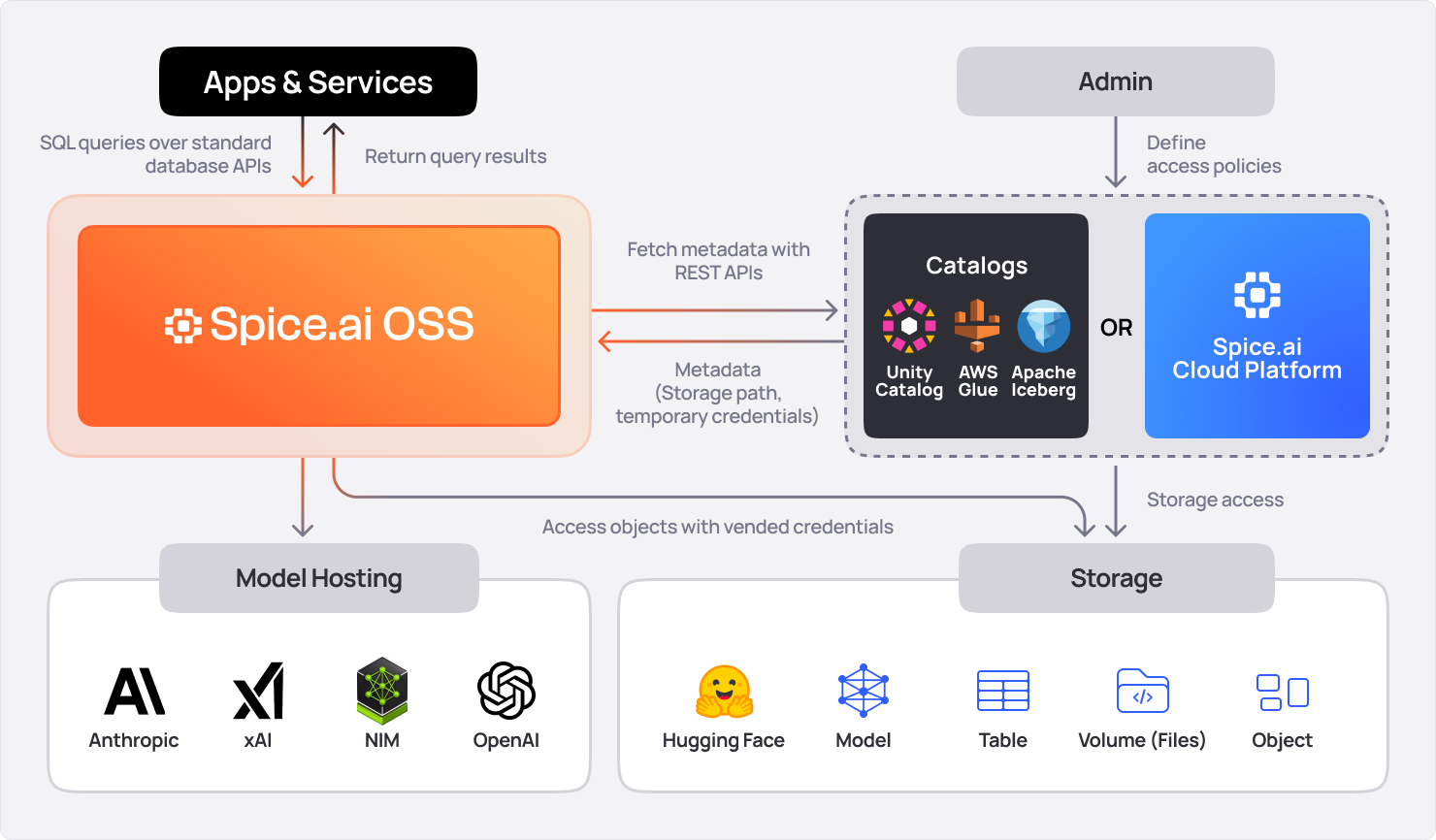
    Spice.ai Enterprise is a portable (<150MB) compute engine built in Rust for data-intensive and intelligent applications. It accelerates SQL queries across databases, data warehouses, and data lakes using Apache Arrow, DataFusion, DuckDB, or SQLite. Integrated and co-deployed with data-intensive applications, Spice materializes and accelerates data from object storage, ensuring sub-second query performance and resilient AI applications. Deployable as a container on AWS ECS, EKS, or hybrid cloud & edge, it includes enterprise licensing, support, and SLAs.

    Note: Spice.ai Enterprise requires an existing commercial license. For details, please contact sales@spice.ai .

    Highlights

    • Unified data query and AI engine accelerating SQL queries across databases, data warehouses, and data lakes. Delivers sub-second query performance while grounding mission-critical AI applications with real-time context to minimize errors and hallucinations.
    • Advanced AI and retrieval tools, featuring vector and hybrid search, text-to-SQL, and LLM memory, enabling data-grounded AI applications with more than 25 data connectors enabling federated queries and real-time applications.
    • Deployable as a container on AWS ECS, EKS, or on-premises, with dedicated support and SLAs for scalable, secure integration into any architecture.

    Details

    Delivery method

    Supported services

    Delivery option
    Container Deployment
    Helm Deployment

    Latest version

    Operating system
    Linux

    Deployed on AWS
    New

    Introducing multi-product solutions

    You can now purchase comprehensive solutions tailored to use cases and industries.

    Multi-product solutions

    Features and programs

    Financing for AWS Marketplace purchases

    AWS Marketplace now accepts line of credit payments through the PNC Vendor Finance program. This program is available to select AWS customers in the US, excluding NV, NC, ND, TN, & VT.

    Financing for AWS Marketplace purchases

    Quick Launch

    Leverage AWS CloudFormation templates to reduce the time and resources required to configure, deploy, and launch your software.

    Pricing

    Spice.ai Enterprise (BYOL)

     Info
    Pricing and entitlements for this product are managed through an external billing relationship between you and the vendor. You activate the product by supplying a license purchased outside of AWS Marketplace, while AWS provides the infrastructure required to launch the product. AWS Subscriptions have no end date and may be canceled any time. However, the cancellation won't affect the status of the external license.
    Additional AWS infrastructure costs may apply. Use the AWS Pricing Calculator  to estimate your infrastructure costs.

    Vendor refund policy

    Refunds for Spice.ai Enterprise container subscriptions are not available after activation, as usage begins immediately upon deployment. Ensure compatibility with AWS ECS, EKS, or on-premises setups before purchase. For billing inquiries, contact AWS Marketplace support or Spice AI directly at support@spice.ai  .

    How can we make this page better?

    We'd like to hear your feedback and ideas on how to improve this page.
    We'd like to hear your feedback and ideas on how to improve this page.

    Legal

    Vendor terms and conditions

    Upon subscribing to this product, you must acknowledge and agree to the terms and conditions outlined in the vendor's End User License Agreement (EULA) .

    Content disclaimer

    Vendors are responsible for their product descriptions and other product content. AWS does not warrant that vendors' product descriptions or other product content are accurate, complete, reliable, current, or error-free.

    Usage information

     Info

    Delivery details

    Container Deployment

    Supported services: Learn more 
    • Amazon ECS
    • Amazon EKS
    • Amazon ECS Anywhere
    • Amazon EKS Anywhere
    Container image

    Containers are lightweight, portable execution environments that wrap server application software in a filesystem that includes everything it needs to run. Container applications run on supported container runtimes and orchestration services, such as Amazon Elastic Container Service (Amazon ECS) or Amazon Elastic Kubernetes Service (Amazon EKS). Both eliminate the need for you to install and operate your own container orchestration software by managing and scheduling containers on a scalable cluster of virtual machines.

    Version release notes

    Spice v1.10.0 (Dec 2, 2025)

    Spice v1.10.0 introduces a new Caching Acceleration Mode with stale-while-revalidate (SWR) semantics for disk-persisted, low-latency queries with background refresh. This release also adds the TinyLFU eviction policy for the SQL results cache, a preview of the DynamoDB Streams connector for real-time CDC, S3 location predicate pruning for faster partitioned queries, improved distributed query execution, and multiple security hardening improvements.

    What's New in v1.10.0

    Caching Acceleration Mode

    Low-Latency Queries with Background Refresh: This release introduces a new caching acceleration mode  that implements the stale-while-revalidate (SWR) pattern. Queries return cached results immediately while data refreshes asynchronously in the background, eliminating query latency spikes during refresh cycles. Cached data persists to disk using DuckDB, SQLite, or Cayenne file modes.

    Key Features:

    • Stale-While-Revalidate (SWR): Returns cached data immediately while refreshing in the background, reducing query latency
    • Disk Persistence: Cached results persist across restarts using DuckDB, SQLite, or Cayenne file modes
    • Configurable Refresh: Control refresh intervals with refresh_check_interval to balance freshness and source load

    Recommendation: Use retention configuration  with caching acceleration to ensure stale data is cleaned up over time.

    Example spicepod.yaml configuration:

    datasets: - from: <http://localhost:7400> name: cached_data time_column: fetched_at acceleration: enabled: true engine: duckdb mode: file # Persist cache to disk refresh_mode: caching refresh_check_interval: 10m retention_check_enabled: true retention_period: 24h retention_check_interval: 1h

    For more details, refer to the Data Acceleration Documentation .

    TinyLFU Cache Eviction Policy

    Higher Cache Hit Rates for SQL Results Cache: A new TinyLFU cache eviction policy  is now available for the SQL results cache. TinyLFU is a probabilistic cache admission policy that maintains higher hit rates than LRU while keeping memory usage predictable, making it ideal for workloads with varying query frequency patterns.

    Example spicepod.yaml configuration:

    runtime: caching: sql_results: enabled: true eviction_policy: tiny_lfu # default: lru

    For more details, refer to the Caching Documentation  and the Moka TinyLFU Documentation  for details of the algorithm.

    DynamoDB Streams Data Connector (Preview)

    Real-Time Change Data Capture for DynamoDB: The DynamoDB connector now integrates with DynamoDB Streams for real-time change data capture (CDC). This enables continuous synchronization of DynamoDB table changes into Spice for real-time query, search, and LLM-inference.

    Key Features:

    • Real-Time CDC: Automatically captures inserts, updates, and deletes from DynamoDB tables as they occur
    • Table Bootstrapping: Performs an initial full table scan before streaming changes, ensuring complete data consistency
    • Acceleration Integration: Works with refresh_mode: changes to incrementally update accelerated datasets

    Note: DynamoDB Streams must be enabled on your DynamoDB table. This feature is in preview.

    Example spicepod.yaml configuration:

    datasets: - from: dynamodb:my_table name: orders_stream acceleration: enabled: true refresh_mode: changes # Enable Streams capture

    For more details, refer to the DynamoDB Connector Documentation .

    OpenTelemetry Metrics Exporter

    Spice can now push metrics to an OpenTelemetry  collector, enabling integration with platforms such as Jaeger , New Relic , Honeycomb , and other OpenTelemetry-compatible backends.

    Key Features:

    • Protocol Support: Supports the gRPC (default port 4317) protocol
    • Configurable Push Interval: Control how frequently metrics are pushed to the collector

    Example spicepod.yaml configuration for gRPC:

    runtime: telemetry: enabled: true otel_exporter: endpoint: 'localhost:4317' push_interval: '30s'

    For more details, refer to the Observability & Monitoring Documentation .

    S3 Connector Improvements

    S3 Location Predicate Pruning: The S3 data connector  now supports location-based predicate pruning, dramatically reducing data scanned by pushing down location filter predicates to S3 listing operations. For partitioned datasets (e.g., year=2025/month=12/), Spice now skips listing irrelevant partitions entirely, significantly reducing query latency and S3 API costs.

    AWS S3 Tables Write Support: Full read/write capability for AWS S3 Tables , enabling direct integration with AWS's managed table format for S3. Use standard SQL INSERT INTO to write data.

    For more details, refer to the S3 Data Connector Documentation  and Glue Data Connector Documentation .

    Faster Distributed Query Execution

    Distributed query  planning and execution have been significantly improved:

    • Fixed executor registration in cluster mode for more reliable distributed deployments
    • Improved hostname resolution for Flight server binding, enabling better executor discovery
    • Distributed accelerator registration: Data accelerators now properly register in distributed mode
    • Optimized query planning: DistributeFileScanOptimizer improvements for faster planning with large datasets

    For more details, refer to the Distributed Query Documentation .

    Search Improvements

    Search  capabilities have been improved with several performance and reliability enhancements:

    • Fixed FTS query blocking: Full-text search queries no longer block unnecessarily, improving query responsiveness
    • Optimized vector index operations: Eliminated unnecessary list_vectors calls for better performance
    • Improved limit pushdown: IndexerExec now properly handles limit pushdown for more efficient searches

    For more details, refer to the Search Documentation .

    Security Hardening

    Multiple security improvements have been implemented:

    • SQL Identifier Quoting: Hardened SQL identifier quoting across all database connectors (PostgreSQL, MySQL, DuckDB, etc.) to prevent SQL injection attacks through table or column names
    • Token Redaction: Sensitive authentication tokens are now fully redacted in debug and error output, preventing accidental credential exposure in logs
    • Path Traversal Prevention: Fixed tar extraction operations to prevent directory traversal vulnerabilities when processing archived files
    • Input Sanitization: Added strict validation for top_n_sample order_by clause parsing to prevent injection attacks
    • Glue Credential Handling: Prevented automatic loading of AWS credentials from environment in Glue connector, ensuring explicit credential configuration

    Developer Experience Improvements

    • Health probe metrics: Added health probe latency metrics for better observability
    • CLI improvements: Fixed .clear history command in the REPL to fully clear persisted history

    Contributors

    Breaking Changes

    No breaking changes.

    Cookbook Updates

    No major cookbook updates.

    The Spice Cookbook  includes 82 recipes to help you get started with Spice quickly and easily.

    Upgrading

    To upgrade to v1.10.0, use one of the following methods:

    CLI:

    spice upgrade

    Homebrew:

    brew upgrade spiceai/spiceai/spice

    Docker:

    Pull the spiceai/spiceai:1.10.0 image:

    docker pull spiceai/spiceai:1.10.0

    For available tags, see DockerHub .

    Helm:

    helm repo update helm upgrade spiceai spiceai/spiceai

    Additional details

    Usage instructions

    Prerequisites

    Ensure the following tools and resources are ready before starting:

    • Docker: Install from https://docs.docker.com/get-docker/ .
    • AWS CLI: Install from https://docs.aws.amazon.com/cli/latest/userguide/getting-started-install.html .
    • AWS ECR Access: Authenticate to the AWS Marketplace registry: aws ecr get-login-password --region us-east-1 | docker login --username AWS --password-stdin 709825985650.dkr.ecr.us-east-1.amazonaws.com
    • Spicepod Configuration: Prepare a spicepod.yaml file in your working directory. A spicepod is a YAML manifest file that configures which components (i.e. datasets) are loaded. Refer to https://spiceai.org/docs/getting-started/spicepods  for details.
    • AWS ECS Prerequisites (for ECS deployment): An ECS cluster (Fargate or EC2) configured in your AWS account. An IAM role for ECS task execution (e.g., ecsTaskExecutionRole) with permissions for ECR, CloudWatch, and other required services. A VPC with subnets and a security group allowing inbound traffic on ports 8090 (HTTP) and 50051 (Flight).

    Running the Container

    1. Ensure the spicepod.yaml is in the current directory (e.g., ./spicepod.yaml).
    2. Launch the container, mounting the current directory to /app and exposing HTTP and Flight endpoints externally:

    docker run --name spiceai-enterprise
    -v $(pwd):/app
    -p 50051:50051
    -p 8090:8090
    709825985650.dkr.ecr.us-east-1.amazonaws.com/spice-ai/spiceai-enterprise-byol:1.8.3-enterprise-models
    --http 0.0.0.0:8090
    --flight 0.0.0.0:50051

    • The -v $(pwd):/app mounts the current directory to /app, where spicepod.yaml is expected.
    • The --http and --flight flags set endpoints to listen on 0.0.0.0, allowing external access (default is 127.0.0.1).
    • Ports 8090 (HTTP) and 50051 (Flight) are mapped for external access.

    Verify and Monitor the Container

    1. Confirm the container is running:

    docker ps

    Look for spiceai-enterprise with a STATUS of Up.

    1. Inspect logs for troubleshooting:

    docker logs spiceai-enterprise

    Deploying to AWS ECS Create an ECS Task Definition and use this value for the image: 709825985650.dkr.ecr.us-east-1.amazonaws.com/spice-ai/spiceai-enterprise-byol:1.10.0-enterprise-models. Configure the port mappings for the HTTP and Flight ports (i.e. 8090 and 50051).

    Override the command to expose the HTTP and Flight ports publically and link to the Spicepod configuration hosted on S3:

    "command": [ "--http", "0.0.0.0:8090", "--flight", "0.0.0.0:50051", "s3://your_bucket/path/to/spicepod.yaml" ]

    Register the task definition in your AWS account, i.e. aws ecs register-task-definition --cli-input-json file://spiceai-task-definition.json --region us-east-1

    Then run the task as you normally would in ECS.

    Resources

    Vendor resources

    Support

    Vendor support

    Spice.ai Enterprise includes 24/7 dedicated support with a dedicated Slack/Team channel, priority email and ticketing, ensuring critical issues are addressed per the Enterprise SLA.

    Detailed enterprise support information is available in the Support Policy & SLA document provided at onboarding.

    For general support, please email support@spice.ai .

    AWS infrastructure support

    AWS Support is a one-on-one, fast-response support channel that is staffed 24x7x365 with experienced and technical support engineers. The service helps customers of all sizes and technical abilities to successfully utilize the products and features provided by Amazon Web Services.

    Similar products

    Customer reviews

    Ratings and reviews

     Info
    0 ratings
    5 star
    4 star
    3 star
    2 star
    1 star
    0%
    0%
    0%
    0%
    0%
    0 reviews
    No customer reviews yet
    Be the first to review this product . We've partnered with PeerSpot to gather customer feedback. You can share your experience by writing or recording a review, or scheduling a call with a PeerSpot analyst.