
Sold by: Inflectra Corporation
Deployed on AWS
AWS Free Tier
Rapise is a codeless test automation platform that simplifies the testing of web, mobile, and desktop applications. It brings together teams with varied technical skills to create robust, easily maintainable test scripts for sophisticated enterprise software. Engineered with cutting-edge self-healing locators and intuitive recording capabilities, Rapise promotes a testing process that is both seamless and resilient. Its unparalleled compatibility with leading platforms, including Salesforce, Microsoft Dynamics, and SAP UI5, amplifies its utility, making it essential for excellence in software quality assurance.
3.7
Overview
Image
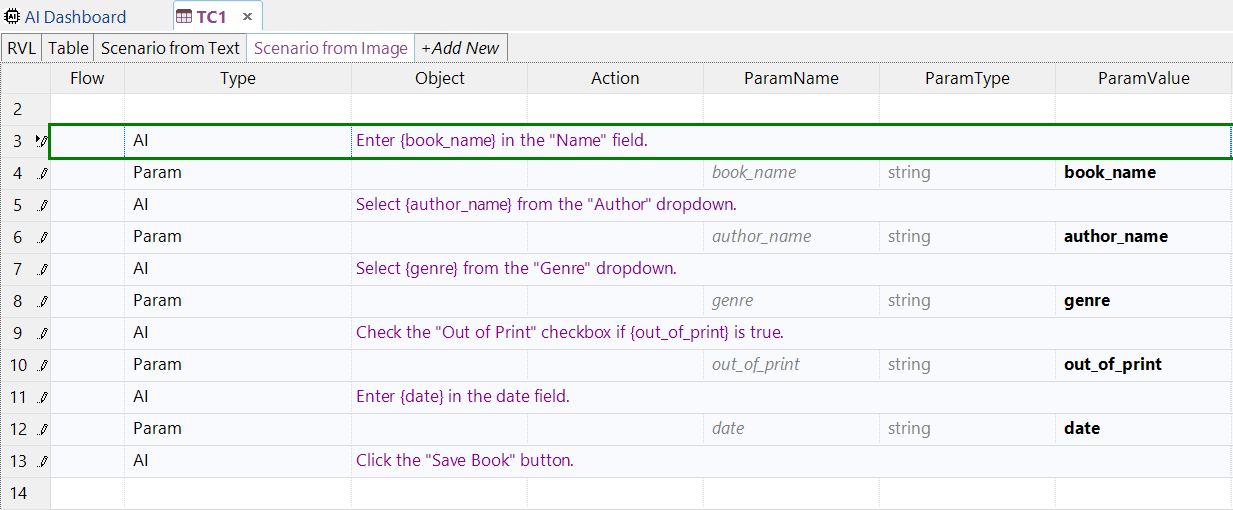
AI-Powered Test Automation using AWS Bedrock
Image
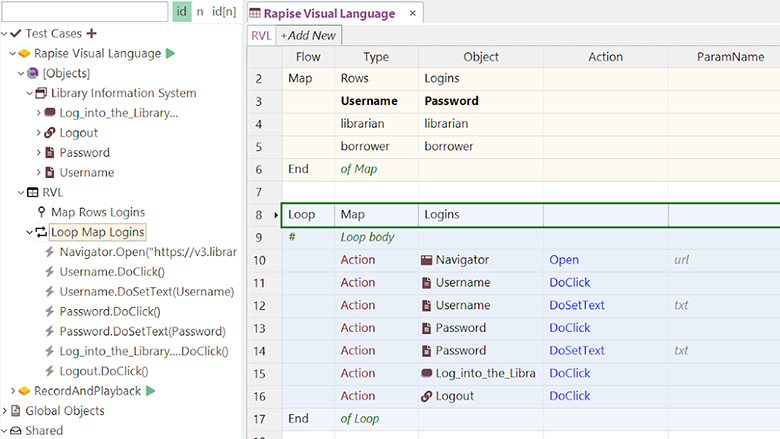
Codeless Software Testing
Image
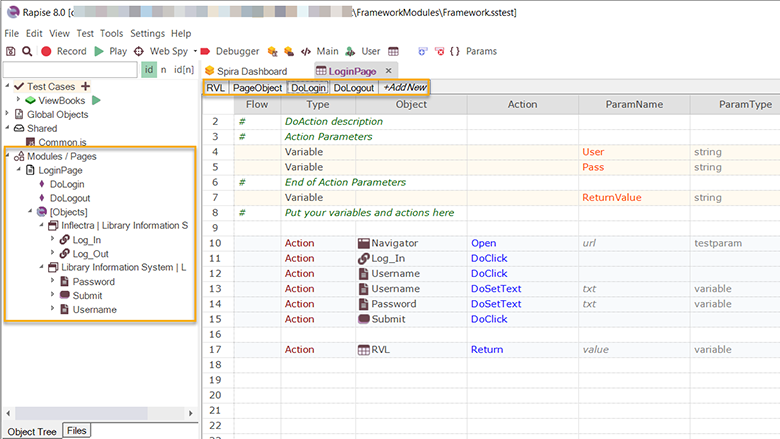
Scalability & Extensibility
Image
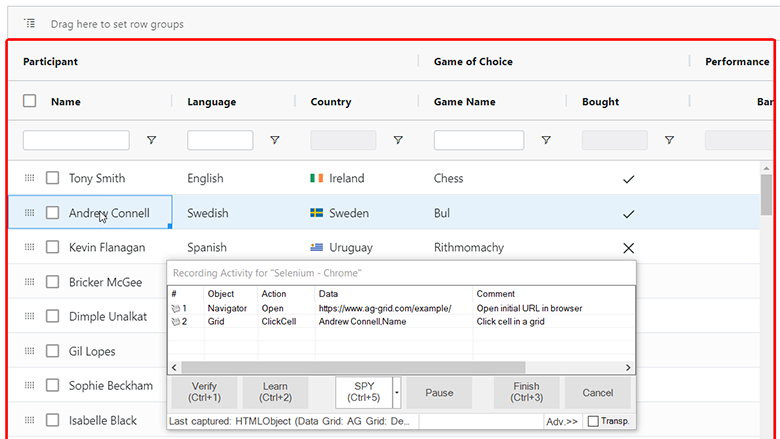
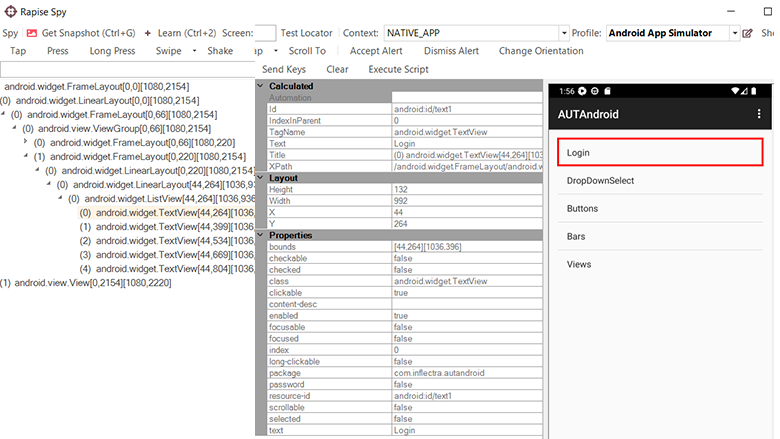
Web Application Testing
Image
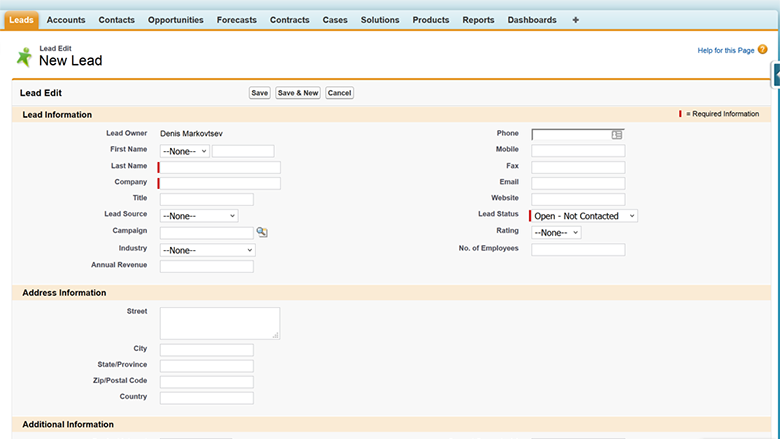
Mobile Application Testing
Image
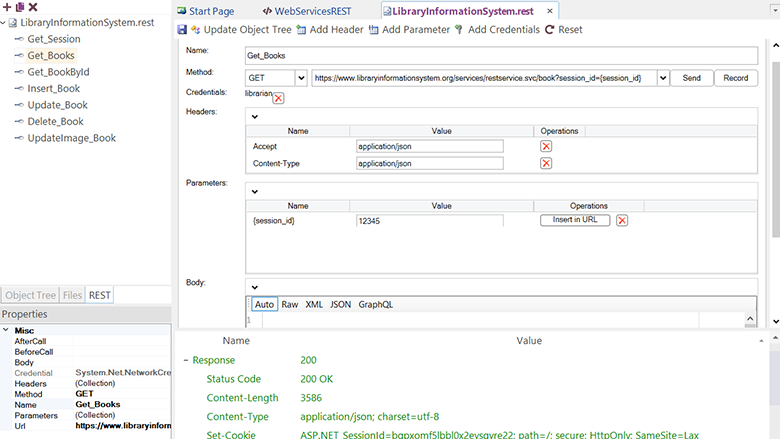
Enterprise ERP/CRM Applications
Image
API Testing

Video
Product video
Rapise is a test automation platform designed to help teams build, execute, and maintain automated tests for web, desktop, and mobile applications. It supports functional, regression, and cross-browser testing, enabling organizations to improve test coverage and accelerate release cycles without relying on complex scripting alone. Rapise uses a low-code approach that combines visual test recording, object-based recognition, and customizable scripting, making it accessible to both technical and non-technical testers. Tests are resilient to UI changes through advanced object identification and AI-assisted locator adaptation, reducing test maintenance and minimizing false failures as applications evolve. The platform supports automation across modern web applications, Windows desktop applications, and mobile environments, and integrates with CI/CD pipelines for continuous testing. Rapise also connects with test management and application lifecycle management tools, allowing teams to orchestrate automated and manual testing within a unified quality workflow. With built-in reporting, reusable test components, and enterprise-grade scalability, Rapise helps organizations reduce manual testing effort, increase automation reliability, and deliver higher-quality software faster. Its flexible architecture supports agile, DevOps, and regulated development environments where consistency, traceability, and repeatability are required.
Highlights
- Test All Your Platforms & Technologies. Rapise can be used to test all of the different technologies you're using. You can even test hybrid applications that mix technologies in the same script.
- Cross-Browser Testing Couldn't be Easier. Record or create one test script and execute the same script across all browsers. Rapise also has built-in support for popular AJAX libraries and plugins.
- Simplify Automated Test Maintenance. Why keep on having to rewrite your tests every time the application changes? With the groundbreaking Agentic AI features of Rapise, you can simply instruct Rapise to test in natural language, and let it do the rest.
Details
Sold by
Delivery method
Delivery option
64-bit (x86) Amazon Machine Image (AMI)
Latest version
Operating system
Win2022 Windows 2022 Server x64
Deployed on AWS
New
Introducing multi-product solutions
You can now purchase comprehensive solutions tailored to use cases and industries.

Features and programs
Buyer guide
Gain valuable insights from real users who purchased this product, powered by PeerSpot.

Financing for AWS Marketplace purchases
AWS Marketplace now accepts line of credit payments through the PNC Vendor Finance program. This program is available to select AWS customers in the US, excluding NV, NC, ND, TN, & VT.

Pricing
Pricing is based on actual usage, with charges varying according to how much you consume. Subscriptions have no end date and may be canceled any time.
Additional AWS infrastructure costs may apply. Use the AWS Pricing Calculator to estimate your infrastructure costs.
If you are an AWS Free Tier customer with a free plan, you are eligible to subscribe to this offer. You can use free credits to cover the cost of eligible AWS infrastructure. See AWS Free Tier for more details. If you created an AWS account before July 15th, 2025, and qualify for the Legacy AWS Free Tier, Amazon EC2 charges for Micro instances are free for up to 750 hours per month. See Legacy AWS Free Tier for more details.
Dimension | Cost/hour |
|---|---|
t2.small Recommended | $1.00 |
t2.micro | $1.00 |
r4.large | $1.00 |
m5.2xlarge | $1.00 |
m4.16xlarge | $1.00 |
p2.8xlarge | $1.00 |
p2.xlarge | $1.00 |
r4.xlarge | $1.00 |
cr1.8xlarge | $2.00 |
r4.8xlarge | $1.00 |
Dimensions summary
You pay by the hour based on the EC2 instance type you run Rapise on. Each dimension maps to a specific instance size, from small general-purpose types to large memory-, compute-, GPU-, and storage-optimized types. There are no tiers or feature differences between them; every option delivers the same software. Your hourly cost changes only with the instance you choose. Larger or specialized instances carry higher hourly rates to match their added compute, memory, or GPU capacity. Pick the instance that fits your workload size and the software runs the same way.
Top-of-mind questions for buyers
Each dimension maps to one running EC2 instance of a specific type, billed per hour. You pay for each hour that instance runs Rapise. Instance size sets the hourly rate. Running two instances at once bills both separately for the hours each is active.
The software charge meters running instance-hours only. A fully stopped instance does not accrue Rapise hourly charges. Underlying AWS storage or other resource fees may still apply while the instance is stopped, but those are separate from the software's hourly metering.
No. Every instance type runs the same Rapise software with the same capabilities. Choosing a compute-, memory-, GPU-, or storage-optimized instance only changes the underlying hardware and the hourly rate. It does not add or remove testing features. Pick the instance that matches your workload size.
www.inflectra.com
Helpful?
Vendor refund policy
Please see our 100% satisfaction guarantee on our website: https://www.inflectra.com/Company/Reasons-To-Buy-From-Us.aspx
Custom pricing options
Request a private offer to receive a custom quote.

Legal
Vendor terms and conditions
Upon subscribing to this product, you must acknowledge and agree to the terms and conditions outlined in the vendor's End User License Agreement (EULA) .
Content disclaimer
Vendors are responsible for their product descriptions and other product content. AWS does not warrant that vendors' product descriptions or other product content are accurate, complete, reliable, current, or error-free.
Delivery details
64-bit (x86) Amazon Machine Image (AMI)
Amazon Machine Image (AMI)
An AMI is a virtual image that provides the information required to launch an instance. Amazon EC2 (Elastic Compute Cloud) instances are virtual servers on which you can run your applications and workloads, offering varying combinations of CPU, memory, storage, and networking resources. You can launch as many instances from as many different AMIs as you need.
Version release notes
Additional details
Usage instructions
Once the instance is running, connect to it using a Remote Desktop Connection (RDP) by right clicking the instance in the EC2 console and selecting "Connect". Once connected to the remote desktop, double click on the Rapise program entry in the Start Menu or Start Page. If you don't see it, the physical program is located at C:\Program Files (x86)\Inflectra\Rapise\Bin\Rapise.exe
Resources
Vendor resources
Support
Vendor support
1-year support (phone, 24-hour email) with purchase. We will return your email or support ticket in one business day. Contact support at https://www.inflectra.com/Support/
With every Inflectra product purchase, you receive: One year of FREE support through our knowledge base, helpful helpdesk, and phone lines. Expert assistance from our team of technical specialists dedicated to resolving your issues quickly. Extensive resources including a comprehensive knowledge base and active community forums. Support Hours: Monday - Friday, with extended global coverage supporting teams in different time zones.
AWS infrastructure support
AWS Support is a one-on-one, fast-response support channel that is staffed 24x7x365 with experienced and technical support engineers. The service helps customers of all sizes and technical abilities to successfully utilize the products and features provided by Amazon Web Services.
Similar products
Automation Anywhere achieved Agentic AI, Generative AI and Conversational AI Competencies and transacts solely through Private Offer. The pricing is quoted based on software customization. Pricing stated in this listing is for reference only. Agentic Process Automation from Automation Anywhere unlocks entirely new levels of business capability, value, and innovation through agentic automation. It delivers end to end intelligent execution with centralized governance and control that works across any agent, model, or system of record, both legacy and modern and one of the first 100 companies worldwide to earn ISO/IEC 42001:2023 certification, the international standard for responsible AI governance.
Deployment Options:
1) Software as a service (SaaS) automation application that is centrally hosted and uniformly managed by AAI
2) Self Managed
3) Certified for AWS WorkSpaces

HBsmith provides AI-powered QA test automation for mobile and web applications using 100% real devices. It automatically learns from your existing test cases and specifications to generate, execute, and analyze tests with minimal scripting. Ideal for teams looking to reduce QA effort, accelerate release cycles, and improve app quality at scale.
ACRA is a no-code Automation Platform for enterprise systems including Oracle JD Edwards, Oracle Cloud, SAP, and Salesforce, plus web, mobile, and API applications. ACRA can be used for Test Automation, Process Automation, and RPA-style workflow automation - covering functional, regression, UAT, and load testing, plus cross-system business processes - while auto-generating audit-ready documentation and cutting ongoing maintenance and manual effort

AssureQA AI Test Automation platform is used for testing application software covering end to end process.
Customer reviews
WIllWorley
The tool needs to improve in the areas of security, though it is a versatile product
Reviewed on Jan 04, 2024
Review provided by PeerSpot
What is our primary use case?
I use Inflectra Rapise in my company since we have contracts with a lot of government entities. Our company could not get the tool to work in a government network because government networks typically have a more secure setup than commercial entities. The tool could never get past the setup of government entities, and they are not going to rewrite their tool for specific companies or organizations. Either Trellix or the government settings within the networks would kill the product and not allow Inflectra Rapise to be utilized.
How has it helped my organization?
Inflectra Rapise didn't help our organization, especially since most of the organizations use SAP GUI and haven't switched to SAP S4HANA or SAP Fiori because of the initial cost of doing the changeover.
What is most valuable?
The most valuable feature of the solution is its versatility. Any automation tool needs to be more than just something meant to be your enterprise solution. It needs to work across different technologies, whether it revolves around .NET, Visual Basic, Oracle, or any tool in today's market, so it has to be versatile because otherwise, it's a very narrow tool with scope for just certain software products.
What needs improvement?
Inflectra Rapise needs to expand its ability. I spoke with Inflectra's executive account rep on the need to expand the tool's ability. The problem with Inflectra Rapise is that a lot of companies are still using SAP GUI. Inflectra has no intention of building Rapise in a way that allows it to interact with SAP GUI. Inflectra Rapise has very limited value for the companies I work with because they they still use SAP GUI since their top priority is SAP testing, and they want to get into automation, for which they need a tool that cannot only used to automate processes, but can also do end-to-end testing where you are not only using SAP GUI, but you are using the interface with old legacy systems that are still in use or with today's more modern technologies.
In the future, the tool needs to increase its versatility. If I am at a company that uses 23 different technologies, like .NET Visual Basic, Oracle, SQL, or whatever, Inflectra Rapise needs to be made as a product that is an out-of-the-box usable tool for any technology.
For how long have I used the solution?
I have been using Inflectra Rapise for six months. I don't remember the version of the solution, but it was one from the previous year.
What do I think about the stability of the solution?
Stability-wise, I rate the solution a four out of ten.
The product's stability just wasn't there since, in a very tightly secured environment, it just doesn't work.
What do I think about the scalability of the solution?
Scalability-wise, I rate the solution a five out of ten.
How are customer service and support?
Inflectra's support was fine. I noticed that with Inflectra's support team, the problem was when you found an issue that is not a part of their roadmap for improvements over time or in their future versions, then it just wasn't addressed at all.
Which solution did I use previously and why did I switch?
Previously, I used Micro Focus UFT One, which used to be HP UFT, and before that, it was Mercury Interactive. I also used QuickTest Professional extensively, but the tool couldn't outlive its lifespan.
How was the initial setup?
The tool's installation wasn't an issue. It was the execution part of the tool that was an issue since it cannot be executed in the environment of a government entity because of all the extra layers of security that are laid out.
The solution is deployed on an on-premises model. I represent a lot of government entities, and unless they already have approved cloud usage, most of their organizations operate on an on-premises model because of security concerns.
What's my experience with pricing, setup cost, and licensing?
I rate the product's price an eight on a scale of one to ten, where ten means very good pricing.
Which other solutions did I evaluate?
During the evaluation phase, I have used Tricentis Tosca. Tricentis was a solution that my company was able to install without any issues in a tightly secured environment, and we were able to use it in a tightly secured environment during its evaluation phase with no issues. Tricentis could be used to automate any existing technology out there that is used today by large market corporations or government entities.
What other advice do I have?
I did a deep dive with a couple of Inflectra's tools, which consisted of not only automation tools but also a test management tool called Rapise, which was a decent tool that was lacking in a few features since some requirements that companies have couldn't be met with it.
During the evaluation phase of Inflectra Rapise, I realized that it doesn't work well if your business deals with government entities. Inflectra Rapise does not work with government security setup. Government IT systems continuously crashed Inflectra Rapise, and it wasn't allowed to be fully launched or utilized. Inflectra Rapise doesn't work with SAP GUI at all. The tool works with SAP S/4HANA or SAP Fiori, meaning you would have to have the aforementioned SAP products installed if you want to work with Inflectra Rapise and the original SAP GUI version, which a lot of clients use. The tool is ineffective as it doesn't work with SAP GUI, and Inflectra doesn't even address the issue.
Inflectra Rapise needs to make sure it works in today's environment because of all the cyber concerns, which are the top concerns in almost all of the large companies, where tools for help are put in place, and unfortunately, such tools most of the time cause the automation tools to not work. Inflectra Rapise needs to put up with the security settings of the current time and basically expand the tool to utilize more technologies.
I rate the overall tool a four out of ten.
Valeria K.
Web, phone and mobile phone
Reviewed on Jan 30, 2021
Review provided by G2
What do you like best about the product?
Connection with SpiraTest and Microsoft Team System. Script for Firefox and Google Chrome.
What do you dislike about the product?
Rapise works well for all my needs, I have no problems.
What problems is the product solving and how is that benefiting you?
I generate script for mobile phone and web browser with special functions.
Recommendations to others considering the product:
Write code for your special web browser, try the free version that Rapise offers.
Sourav S.
Let's test Automation with Rapise
Reviewed on Nov 07, 2020
Review provided by G2
What do you like best about the product?
Rapise has a powerful and easy to use a visual language called RVL (Rapise Visual Language)
What do you dislike about the product?
I haven't found any lag now in using Rapise till now but if found any so far sure would like to recommend for correction. But when I started using Rapise introduced by one of my friends for testing mobiles.
What problems is the product solving and how is that benefiting you?
We are currently using Rapise with SpiraTeam to automate our regression test bed for Microsoft Dynamics AX ERP System. Even my teammates were in confusion couldn't take the decision which tool to use for the use case. But when we suddenly got a recommendation from my friend regarding using Rapise. And Afterall our problem was solved.
Recommendations to others considering the product:
I always recommend others....about the easiness of using Rapise. Recently one of my friends confused about using a visual language product. I suggested him to use RVL. Even we too got the recommendation from one of my friends.
Financial Services
Rapise works where nothing else did.
Reviewed on Apr 06, 2018
Review provided by G2
What do you like best about the product?
The flexibility to work across everything from old technologies right through to mobile apps and everything in between.
What do you dislike about the product?
Nothing Really, we had to inquire about debugging tools which helped going forward.
What problems is the product solving and how is that benefiting you?
Testing financial events over a period of time. Because we have been doing a lot of this manually, we expect to recoup much through Rapise automation
Recommendations to others considering the product:
We found Rapise the only tool to work on our Legacy systems and environments - so the choice was a no-brainer....Given some excellent support for our POC, we have purchased 5 licenses to get going and that we are looking to have this spread across our whole business.
A Jackson - Beegle Ltd
Great to have a cloud based option
Reviewed on Mar 18, 2015
Review from a verified AWS customer
Saves the hassle of setting up servers, especially when linked with the SaS version of SpiraTeam. Also, having cloud based instances means I can set up an instance per client and keep things running smoothly and efficiently.