
Sold by: Kyva AI
Deployed on AWS
Deploy a private AI workspace in your AWS environment with ChatGPT-level capabilities and complete data sovereignty. Create custom AI assistants and process documents while keeping all data in your AWS account, at 70% less cost than ChatGPT Enterprise.
5
Overview
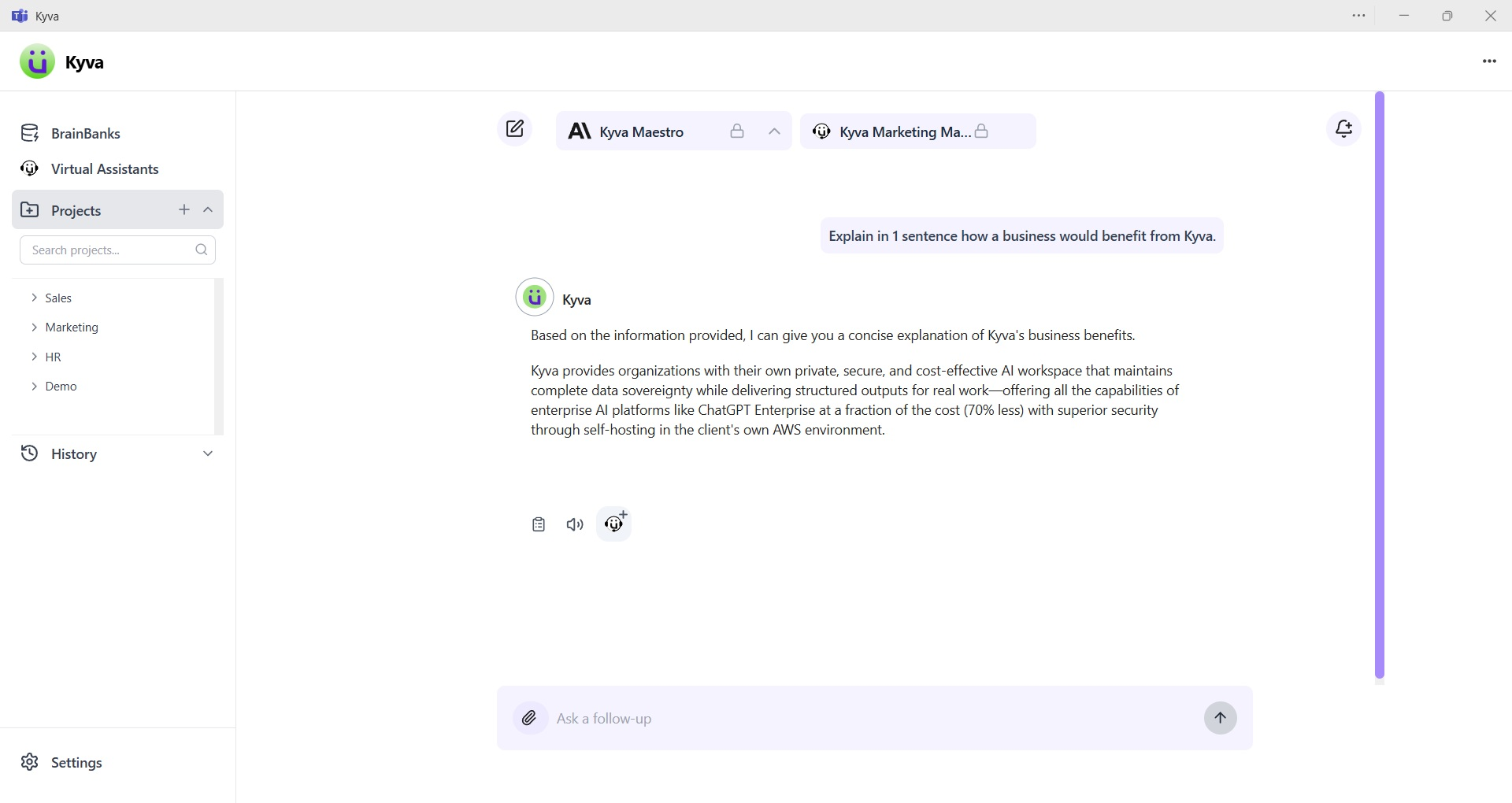
Image
Kyva Interface
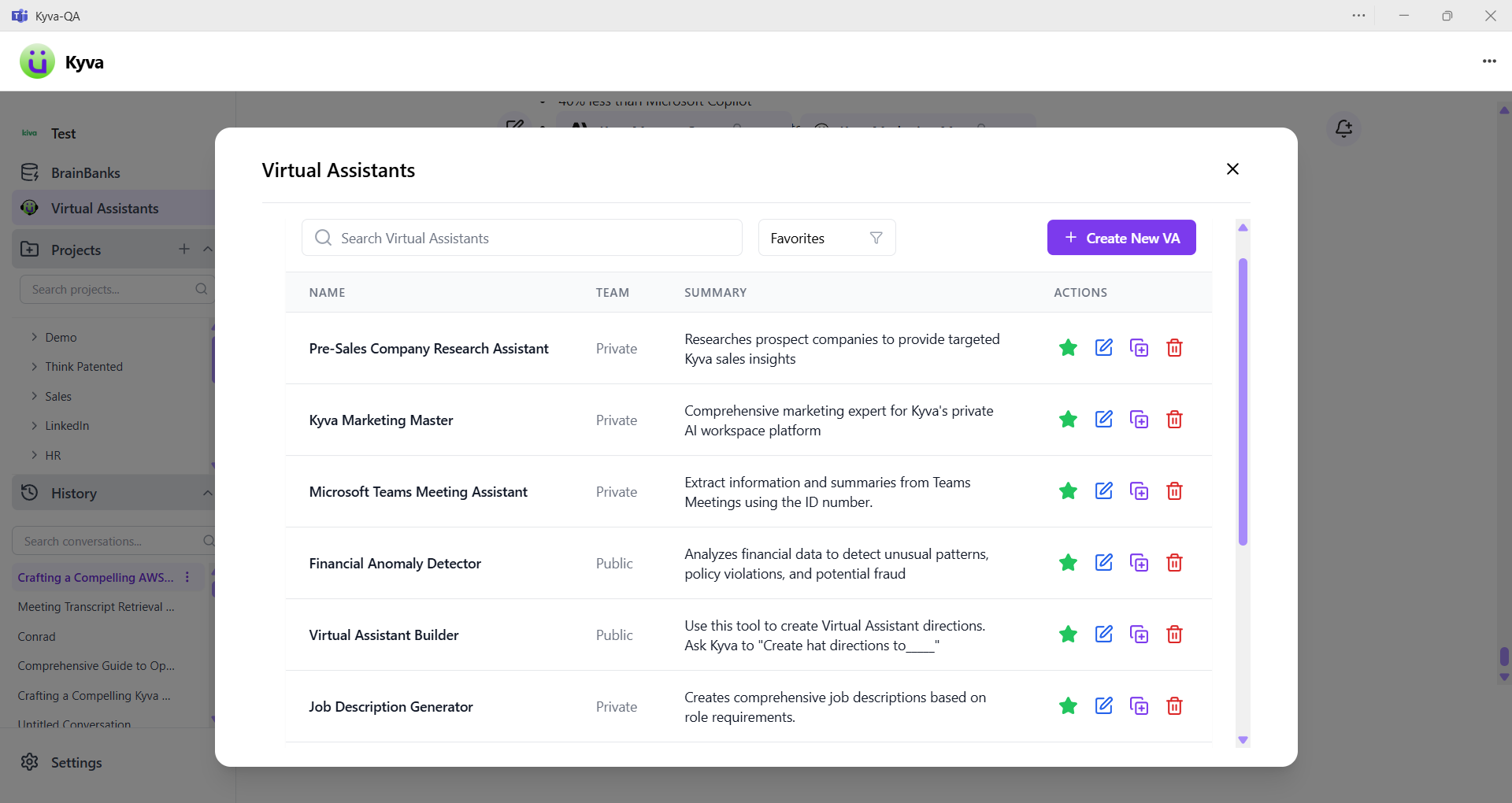
Image
Kyva Virtual Assistants
Private AI workspace with ChatGPT-level capabilities and complete data sovereignty. 70% less cost than ChatGPT Enterprise.
Core Capabilities:
- Document Processing: Upload PDFs, Word docs, Excel files with advanced text extraction
- Virtual Assistants (Agents): Use existing library of Virtual Assistants or create - custom AI assistants with specific instructions and data connections
- API Integrations: Connect to enterprise systems using natural language queries
- Team Collaboration: Share knowledge bases and assistants across teams with permissions
Complete Data Sovereignty:
- All data processing within your AWS account and region
- Zero external data transmission to third-party AI providers
- AWS Bedrock models run entirely within AWS infrastructure
- Enterprise compliance and security requirements met
Proven Cost Savings:
- 70% less than ChatGPT Enterprise
- 40% less than Microsoft Copilot Example: 1,000 users = ~$18K/month total vs $60K for ChatGPT Enterprise
Technical Foundation:
- AWS Bedrock with multiple LLM models including Anthropic, Meta, & AWS models
- Support for self-hosted open source or fine-tuned LLMs
- Browser-based or MS Teams application interface
Highlights
- Kyva eliminates the need to build AI infrastructure in-house, providing a ready-to-deploy containerized solution that runs in your AWS environment. Get enterprise-grade AI capabilities in weeks, not months, while maintaining complete data sovereignty. Save significant development costs and engineering resources while still keeping AI securely within your infrastructure.
- Access multiple AWS Bedrock models through Kyva's platform, giving you flexibility to choose the right model for each use case. Our Virtual Assistant feature lets you create custom AI behaviors with simple instructions, while our document processing pipeline handles complex file types with structure preservation.
- Kyva deploys in your AWS environment with complete data sovereignty, providing secure AI assistants that deliver structured outputs (not just chat) for document-intensive workflows. Our advanced RAG implementation with BrainBanks technology transforms your documents into intelligent resources while keeping sensitive data within your security perimeter.
Details
Sold by
Delivery method
Supported services
Delivery option
production
Latest version
Operating system
Linux
Deployed on AWS
Features and programs
Financing for AWS Marketplace purchases
AWS Marketplace now accepts line of credit payments through the PNC Vendor Finance program. This program is available to select AWS customers in the US, excluding NV, NC, ND, TN, & VT.

Pricing
Pricing is based on the duration and terms of your contract with the vendor. This entitles you to a specified quantity of use for the contract duration. If you choose not to renew or replace your contract before it ends, access to these entitlements will expire.
Additional AWS infrastructure costs may apply. Use the AWS Pricing Calculator to estimate your infrastructure costs.
Dimension | Description | Cost/month | Cost savings % |
|---|---|---|---|
Per Seat User License | Seat based pricing, minimum $200/month | $20.00 | 0% |
Consultant Licensing Package | Base Licensing Package | $200.00 | 0% |
Custom Pricing | Custom Pricing | $500.00 | 0% |
Platform License (Perpetual) | One-time perpetual license for the Kyva production-ready AI platform and accelerator for Amazon Bedrock. Includes complete source code, deployment automation, and 30 days of standard support. | $0.00 | 100% |
Dimensions summary
You choose from four contract-based licensing options that fit different buyer needs. The Per Seat User License bills by the number of users, with a monthly minimum. The Consultant Licensing Package offers a base package for consultant-led use. Custom Pricing lets you arrange terms tailored to your requirements. The Platform License (Perpetual) is a one-time purchase for the production-ready AI platform and Amazon Bedrock accelerator, including source code, deployment automation, and 30 days of standard support. Each option is independent, so you pick the structure that matches whether you scale by seats, package, custom terms, or a single perpetual purchase.
Top-of-mind questions for buyers
A seat maps to one individual user account on the platform. You pay for each named user who accesses the AI assistants. Billing scales with the number of active seats, subject to the stated monthly minimum.
The Platform License is a one-time purchase, not a recurring seat charge. You get the production-ready platform, the Amazon Bedrock accelerator, source code, deployment automation, and 30 days of standard support. The Per Seat option instead bills monthly by user count. Perpetual suits fixed ownership; per seat suits variable teams.
The platform runs inside your own AWS account, so your documents and processing stay in your environment. The perpetual license includes source code and deployment automation to support this self-hosted setup. Support is included for 30 days after purchase.
kyva.ai
Helpful?
Vendor refund policy
If Kyva fails to correct Product issues or re-perform Services within a reasonable time (up to 30 days), the buyer can terminate the Subscription within 30 days after the cure period. Kyva will then refund:
- Any prepaid fees, prorated for the unused portion of the Subscription
- Applicable service credits under Support Services or other policies
This policy applies only to warranty breaches and excludes issues caused by buyer misuse or unauthorized modifications.

Legal
Vendor terms and conditions
Upon subscribing to this product, you must acknowledge and agree to the terms and conditions outlined in the vendor's End User License Agreement (EULA) .
Content disclaimer
Vendors are responsible for their product descriptions and other product content. AWS does not warrant that vendors' product descriptions or other product content are accurate, complete, reliable, current, or error-free.
Delivery details
production
Supported services: Learn more
- Amazon ECS
Container image
Containers are lightweight, portable execution environments that wrap server application software in a filesystem that includes everything it needs to run. Container applications run on supported container runtimes and orchestration services, such as Amazon Elastic Container Service (Amazon ECS) or Amazon Elastic Kubernetes Service (Amazon EKS). Both eliminate the need for you to install and operate your own container orchestration software by managing and scheduling containers on a scalable cluster of virtual machines.
Version release notes
OVERVIEW Version 1.2.2 improves meetings, BrainBank, voice, and integrations. Highlights include live meeting transcript streaming, PDF transcript import, chat attachment sync to BrainBank, Google Calendar integration, Nova Sonic as the default voice model, and admin controls for creating BrainBanks and Virtual Assistants. NEW FEATURES
Live Meeting Transcript Streaming Real-time meeting transcripts are now streamed live using WebSocket.
Audio is recorded and saved to S3 storage. Recording can be paused and resumed. The system retries automatically if an audio chunk upload fails. A recording indicator in the sidebar shows when a meeting is being recorded. Users are warned if they try to close the meeting modal while recording is active. The maximum live meeting duration has been increased to 14,340 seconds (approximately 4 hours).
Imported Transcript (PDF Backup for Meetings) Users can now upload a PDF as a backup transcript for a meeting.
The PDF text is extracted and saved as the imported transcript. The Transcription card shows two tabs: Live Transcript and Imported Transcript. Users can download the original PDF and delete the import. Changes are synced to BrainBank automatically. Password-protected or scanned-only PDFs are handled with clear error messages.
Meeting Transcript Export to BrainBank Meeting transcripts can now be exported and saved to a BrainBank.
New management modals are included in the UI. After a transcript is imported or deleted, the BrainBank copy is updated automatically. If a BrainBank copy has no content left, it is removed instead of being saved empty.
Chat Attachment Sync to BrainBank When a conversation uses a BrainBank, supported file attachments (PDF, DOCX, XLSX, TXT) are automatically synced to the BrainBank after the user sends a message.
The composer includes a Save to BrainBank switch. Users can sync earlier uploaded files using an inline checklist. Sync status is shown on each file chip. Users without permission to add files to a BrainBank see a clear message.
Google Calendar Integration Google Calendar is now connected through an MCP server.
Users can create, read, update, and delete calendar events. Tokens are managed securely in DynamoDB. The UI includes a Google Calendar authentication connector. A Google Calendar Client ID has been added to the staging environment.
BrainBank UI - Chat
Users can select a BrainBank from the navbar in follow-up conversations. The BrainBank picker is locked once a conversation is pinned to a BrainBank. A BrainBank create page has been added inside Meetings.
Nova Sonic Voice Mode and BrainBank Integration
Nova Sonic is now the default voice model. Voice mode is integrated with BrainBank and Virtual Assistant (VA). Excel spreadsheet tool calls are supported in voice mode. The VA lock now activates only when the user selects a BrainBank in the chat.
Admin Restriction for Creating BrainBanks and Virtual Assistants Administrators can now restrict users from creating new BrainBanks and Virtual Assistants.
FIXES AND IMPROVEMENTS VA Directory Scroll Bar and VA Model Change Fix
A scroll bar has been added to the VA directory. Fixed an issue where updating a VA also changed the selected model unexpectedly.
NOTES
Keep the meeting modal open while recording to avoid interrupting a live session. For PDF imports, use text-based PDFs that are not password-protected. Syncing attachments to a BrainBank requires permission to add files to that BrainBank. Supported sync file formats: PDF, DOCX, XLSX, and TXT.
Additional details
Usage instructions
Core Features
BrainBanks: -Knowledge repositories that store your documents -Upload PDFs, Word documents, Excel files, and images (up to 20 files, 10MB each) -Connect these knowledge bases to Virtual Assistants for intelligent responses -Share with specific users or teams based on permissions
Virtual Assistants (VAs): -Customizable AI agents that automate tasks and streamline workflows -Create VAs in seconds through natural conversation with Kyva -Connect VAs to BrainBanks for context-aware responses -Share VAs across your organization -Optional features include image creation, internet browsing, and API integrations
MCP Connectors: -Use natural language to interact with your data in external software -Connect to your existing business systems through API integrations -Query databases, CRMs, and other platforms using simple conversational language -Automate complex workflows across multiple systems -Maintain security while extending AI capabilities to your entire software ecosystem
Projects & History: -Organize conversations into project folders -Access complete history of all AI interactions -Continue previous conversations seamlessly
Enterprise-Ready Administration: -User management with detailed usage reporting -Department-level organization and permissions -Security features with prompt filtering and guardrails -Customizable LLM selection
Getting Started:
- Start a conversation - Use the chat box to ask questions or upload files
- Create a BrainBank - Upload your knowledge documents
- Build a Virtual Assistant - Define instructions for your specific tasks
- Connect them together - Link VAs to relevant BrainBanks and MCP Connectors
Why Kyva? Transform hours of work into seconds with AI that understands your data. Maintain complete control over your information with a private workspace designed for real business use.
Resources
Vendor resources
Support
Vendor support
Support is available at info@kyva.ai Kyva offers comprehensive support for a seamless experience. You will receive personalized onboarding assistance, including guidance on setting up custom knowledge databases and the hats feature. Our dedicated support team is available to assist with deployment, troubleshooting, and general inquiries. Regular updates with new features and improvements keep your solution optimized, and our knowledge base provides detailed documentation, FAQs, and tutorials. We are here to maximize your success with Kyva.
AWS infrastructure support
AWS Support is a one-on-one, fast-response support channel that is staffed 24x7x365 with experienced and technical support engineers. The service helps customers of all sizes and technical abilities to successfully utilize the products and features provided by Amazon Web Services.
Similar products

Glean revolutionizes enterprise productivity through its AI-powered workspace platform. At its core, Glean employs Retrieval-Augmented Generation (RAG) to deliver secure, permission-based access to organizational knowledge. The platform combines a sophisticated enterprise knowledge graph with web-sourced information, enabling contextually rich AI interactions.
Airia is the enterprise AI security, orchestration, and governance platform that enables organizations to deploy AI quickly, safely, and at scale. Built for even the most complex and regulated environments, Airia reduces vulnerabilities in agentic ecosystems and streamlines workflows across agents, models, and an organization’s applications and data sources. Airia removes the complexity that often accompanies AI adoption, allowing enterprises to operationalize AI with trust, control, and measurable impact. Today, hundreds of organizations around the world are transforming the way they work with Airia.

zeb’s “Amazon Q for Business Accelerated Deployment” service helps organizations adopt and integrate Amazon Q for Business, a generative AI-powered solution that provides actionable insights from enterprise data. Benefit from secure, role-based access, and personalized responses tailored to your business needs.
Noca.ai is an AI Agent platform that lets users build business apps, workflows or "AI Agents" using plain language prompts, no programming required. It offers natural-language UI & logic, integrations with CRM and ERP systems, workflow automation, and enterprise-grade security.
Customer reviews
Tim Pearce
Secure assistants have transformed internal workflows and clearly demonstrate AI options to clients
Reviewed on Mar 08, 2026
Review from a verified AWS customer
What is our primary use case?
I use Kyva to build virtual assistants for internal use and to demonstrate AI solutions to clients as part of our Business Partner Service, which specializes in AI.
How has it helped my organization?
It has helped us build our own digital team, experiment safely with AI in practice, and show clients what is possible in a secure environment.
What is most valuable?
The valuable features include security, privacy, ease of building assistants, a simple interface, and the responsiveness and knowledge of the Kyva team.
What needs improvement?
The platform is strong overall, but continued feature development will be important as this category evolves quickly, particularly in AI voice and agentic capabilities.
For how long have I used the solution?
I have used the solution for 10 months.
Which solution did I use previously and why did I switch?
We use a wide range of AI platforms for different purposes.
What's my experience with pricing, setup cost, and licensing?
We see it as reasonable value for money when considering both the direct benefits and the long-term opportunity in this space.
reviewer2805345
Virtual assistance has transformed how we investigate financial planning and compliance options
Reviewed on Feb 26, 2026
Review from a verified AWS customer
What is our primary use case?
It provides multiple methods to improve and investigate our services. We use it to expedite ways to process business and investigate new tax, financial planning details, and updated compliance rules.
It saves an immense amount of time, and it's easy to apply in many circumstances.
How has it helped my organization?
It helps us complete financial plans and investigate new and undiscovered products.
What is most valuable?
So far, the virtual assistance has been excellent.
What needs improvement?
We need to make sure the dates of our investigations are current.
For how long have I used the solution?
I have been using it for nine months.
Which solution did I use previously and why did I switch?
We faced privacy issues.
What's my experience with pricing, setup cost, and licensing?
We are still evaluating, and thus far it is priced fairly.
Which other solutions did I evaluate?
There are alternate solutions we considered.
reviewer2804259
AI virtual assistants have transformed daily workflows and have saved time on research and reporting
Reviewed on Feb 20, 2026
Review from a verified AWS customer
What is our primary use case?
We use it for a variety of purposes in all departments. For example, we use it for research, reporting, writing, planning, etc. The AI Virtual Assistants can support us in a variety of ways.
How has it helped my organization?
It saves us time, ensures data security, and protects privacy. It saves us a great deal of time by using trained VAs to accomplish a number of repeatable tasks.
What is most valuable?
It reports KPIs and results far more efficiently, QA proposals and other documents, conducts legal, HR, and compliance research, recruitment sourcing, and candidate vetting, performs sales prospecting research, meeting analysis and summarizing, and email refinement.
What needs improvement?
Kyva has been very responsive and reactive in addressing support requests or requests for new functionality.
For how long have I used the solution?
We have used the solution for 6 months.
Which solution did I use previously and why did I switch?
We used a mix of AI productivity tools, such as Quillbot, Scribe, etc. We no longer need to pay for these tools because Kyva does it all and more.
What's my experience with pricing, setup cost, and licensing?
The user subscription fee is a fair price per user.
Which other solutions did I evaluate?
We considered alternate solutions such as Clay, HireEZ, and Lindy.
What other advice do I have?
We have benefitted greatly from Kyva, and adoption by our employees has been very successful.