
Sold by: HabileLabs
Deployed on AWS
Mask Aadhaar numbers and Aadhaar QR codes in KYC documents automatically - card scans, photos, e-Aadhaar, loan PDFs, ZIP archives and Excel. Over 99% accuracy in our tests (15,499 of 15,500 Aadhaar documents masked); scales out to mask a 500-page PDF in about a minute. Runs entirely in your own AWS account.
Overview
Image
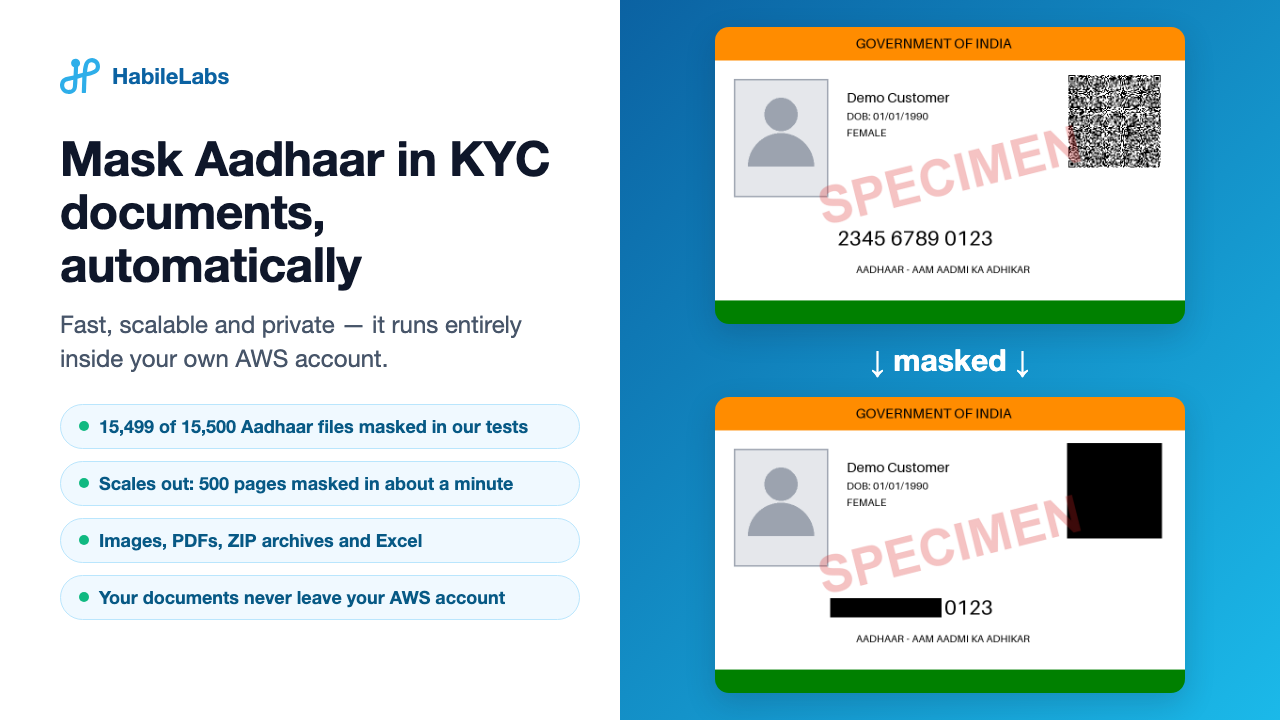
Mask Aadhaar in KYC documents, automatically
Image
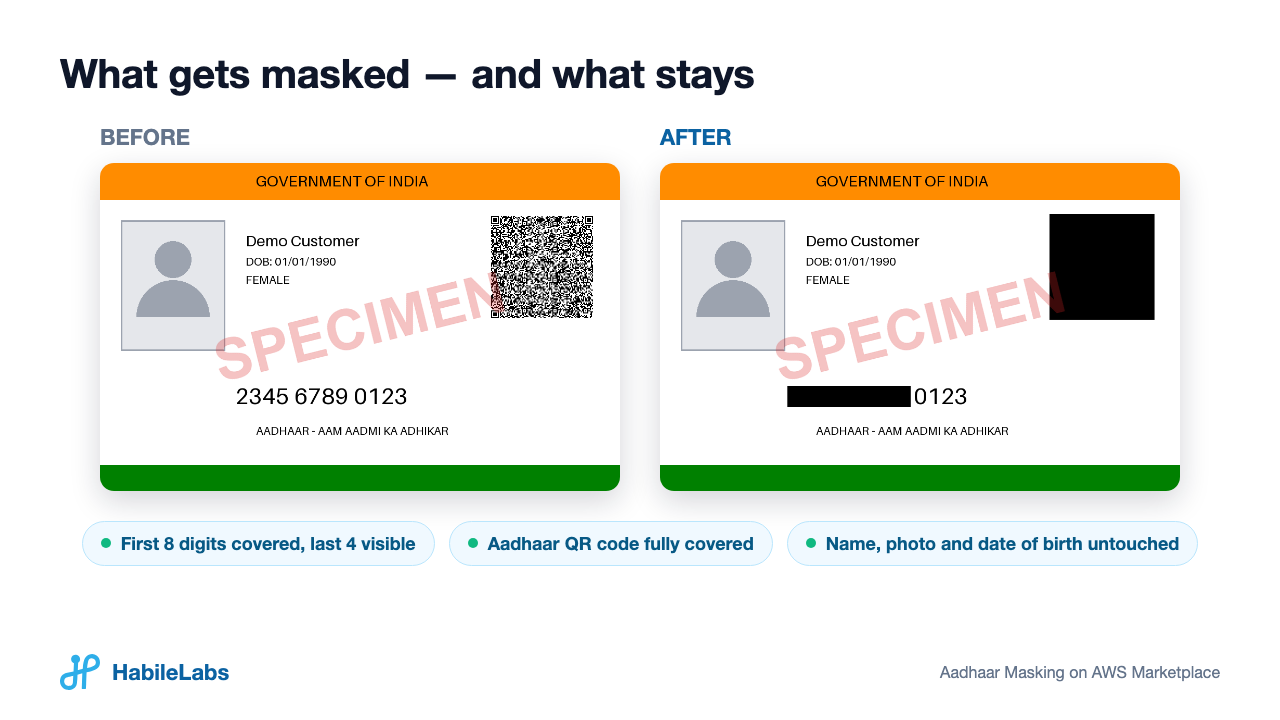
What gets masked, and what stays
Image
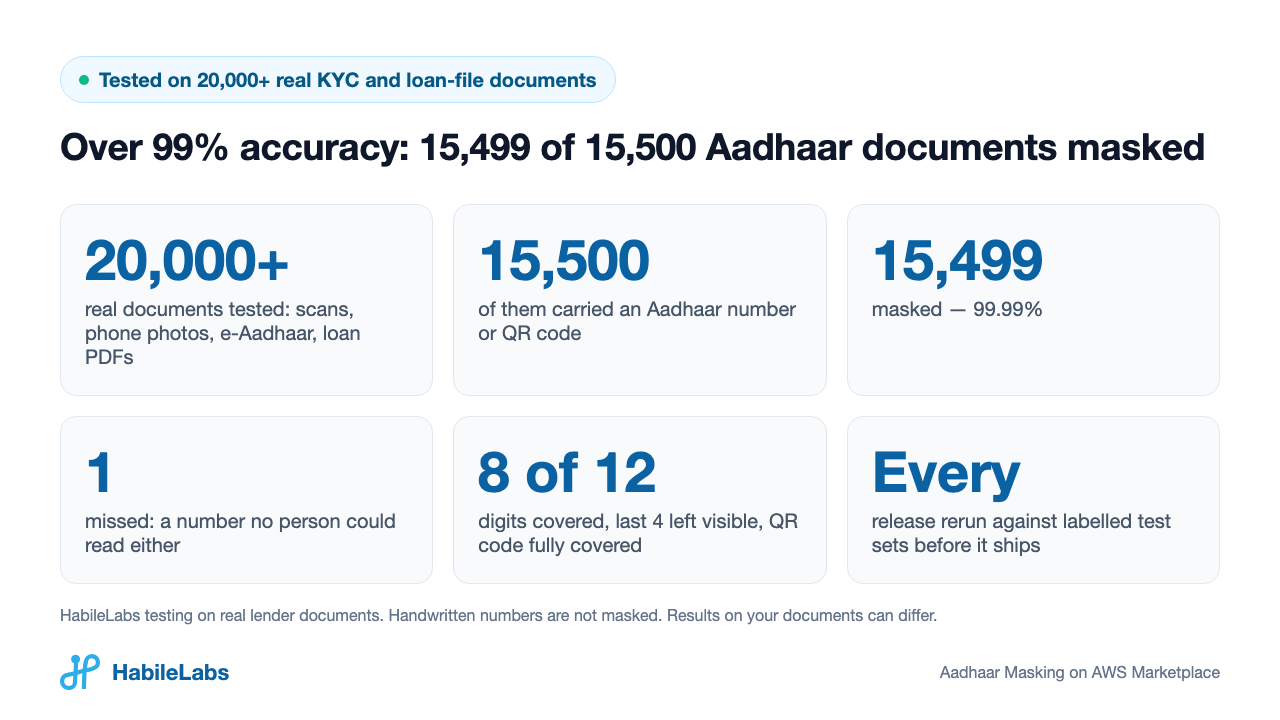
Over 99% accuracy in our tests: 15,499 of 15,500 Aadhaar documents masked
Image
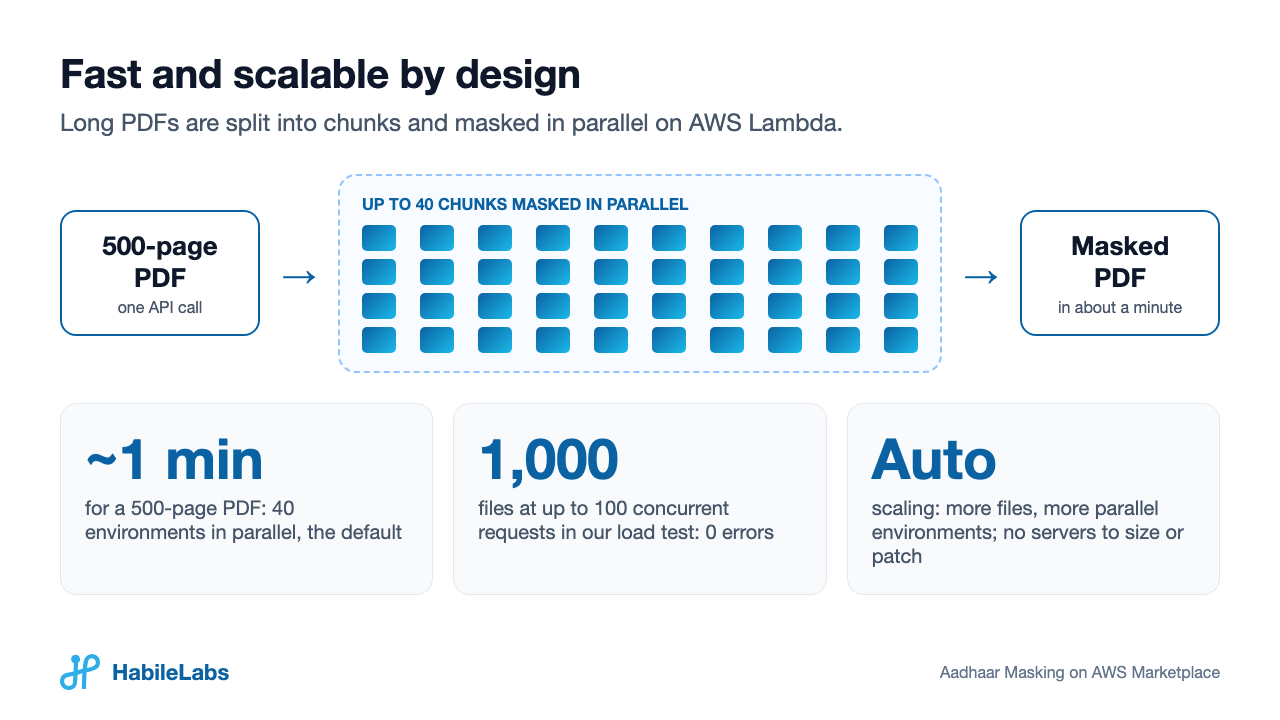
Fast and scalable: a 500-page PDF in about a minute
Image
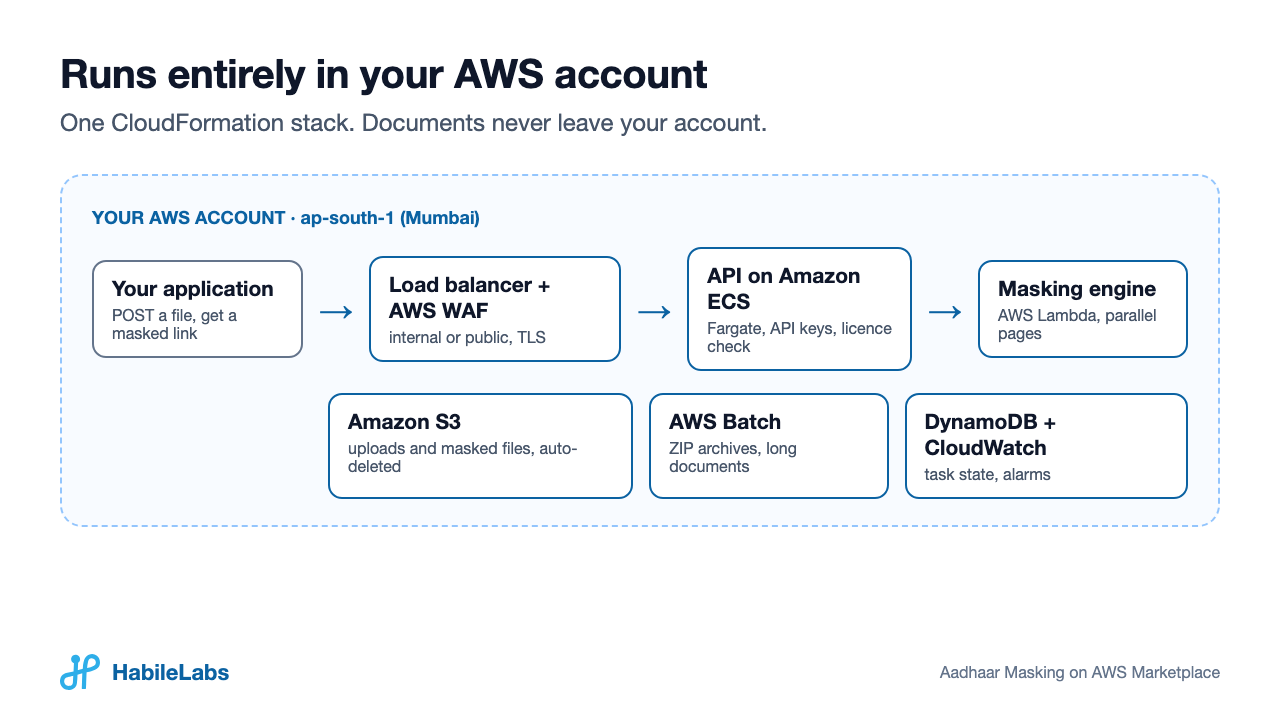
Runs entirely in your AWS account
Image
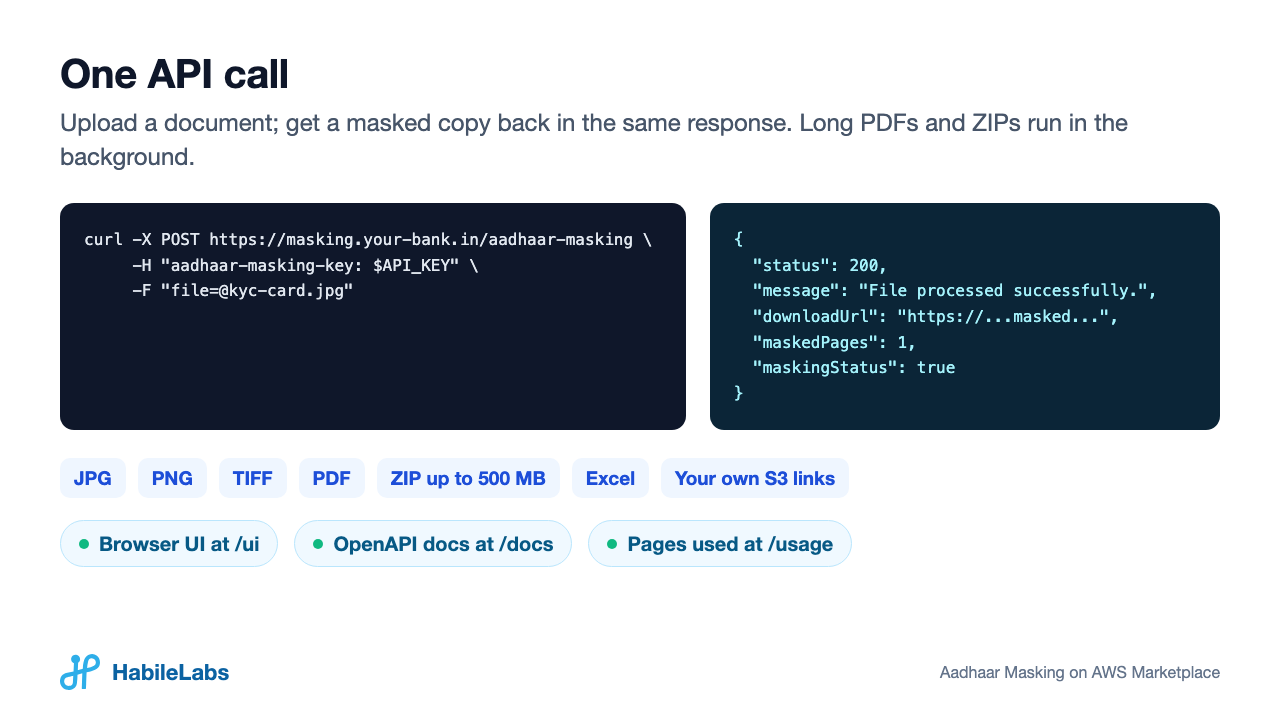
One API call
Image
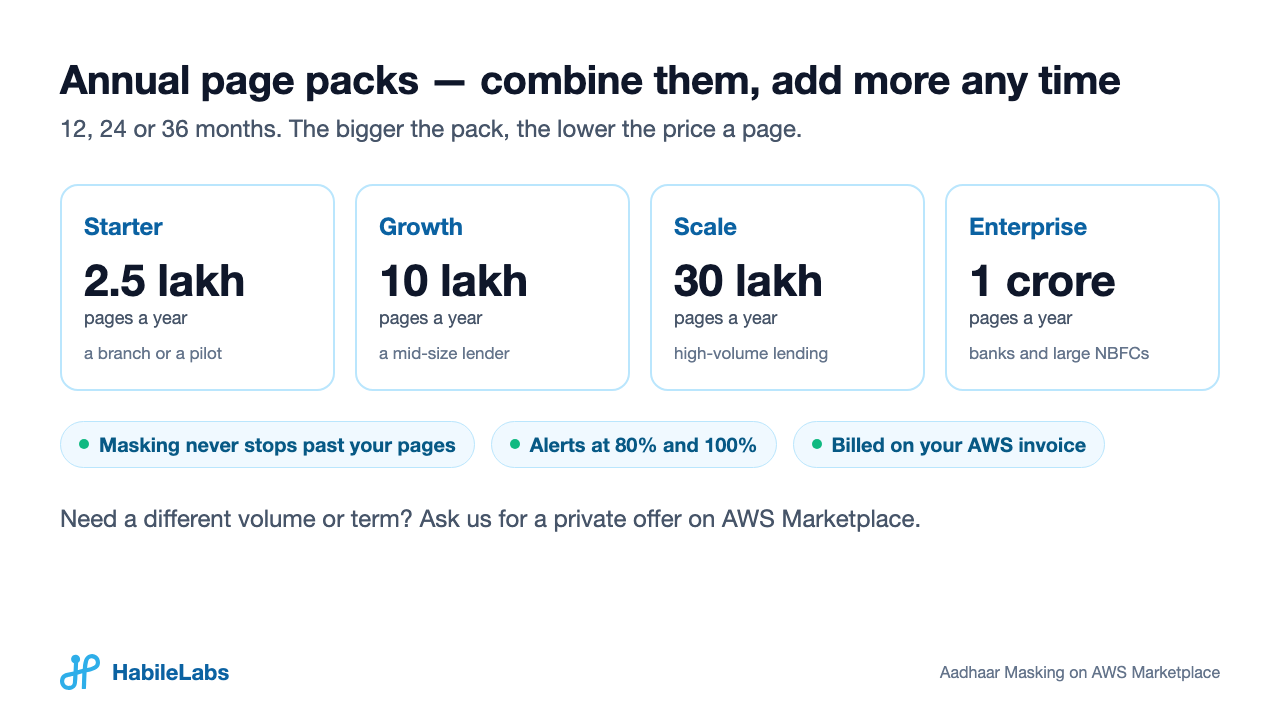
Annual page packs
Stop storing readable Aadhaar numbers Lenders, banks, NBFCs and fintechs collect Aadhaar cards in every loan file. Aadhaar Masking finds the Aadhaar numbers and Aadhaar QR codes in those documents and covers them automatically, in the familiar masked-Aadhaar style (XXXX XXXX 1234), before the files are stored or shared. It runs entirely inside your own AWS account.
Accuracy you can measure
- Tested on 20,000+ real KYC and loan-file documents: card scans, phone photos, e-Aadhaar printouts, UIDAI verification screenshots and multi-page loan PDFs.
- 15,500 of them carried an Aadhaar number or QR code; 15,499 were masked (99.99%). The one miss was a number no person could read either.
- Every release is rerun against labelled test sets before it ships.
Fast and scalable
- Long PDFs are split into chunks that are masked at the same time, each on its own AWS Lambda environment: with 40 running at once, a 500-page PDF comes back in about a minute.
- Images and short PDFs are answered in the same API call, usually in seconds.
- The engine scales out with your load: in our load test, 1,000 files sent up to 100 at a time were all masked, with no errors.
- Serverless throughout - AWS Lambda, Amazon ECS on AWS Fargate and AWS Batch - so there are no servers to size or patch. One stack parameter sets how many environments run at once: 40 by default; raise it for more simultaneous users.
What it masks
- The 12-digit Aadhaar number: the first eight digits covered and the last four left visible (nine covered where the number sits inside a line of text, and all twelve when its reading direction cannot be established - too small, too faint or printed sideways).
- The Aadhaar QR code, fully.
- Numbers on UIDAI verification screenshots, and 12-digit Aadhaar numbers in Excel cells.
- Names, photos, dates of birth and addresses are left as they are, so the document stays usable for KYC.
How it works A detection model finds candidate numbers and QR codes on every page, in every orientation. OCR then reads each candidate and checks it for the marks of an Aadhaar number - twelve digits, the 4-4-4 print, a valid checksum - which keeps PAN numbers, account numbers and dates from being covered.
What it accepts JPG, PNG and TIFF images; PDFs; ZIP archives up to 500 MB, returned as one masked archive with a per-file report; Excel (.xls, .xlsx); and files in your own S3, read and written back by link. Password-protected PDFs are rejected, not masked.
Private by design One CloudFormation template creates the whole service in your AWS account in Asia Pacific (Mumbai): an API behind an Application Load Balancer with AWS WAF (internal to your VPC, or public with your own certificate), the masking engine on AWS Lambda, AWS Batch for archives, an S3 bucket and a DynamoDB table. No document is sent to HabileLabs or any third party. Uploads and masked copies are deleted from your bucket automatically, typically within 24-48 hours. You pay AWS for these resources directly.
Simple pricing Annual contracts of page packs - Starter (2.5 lakh pages a year), Growth (10 lakh), Scale (30 lakh) and Enterprise (1 crore) - combined as needed and added to during the contract, for 12, 24 or 36 months. Masking never stops when you pass your pages: GET /usage and the response headers report the count, and alarms fire at 80% and 100%. Your installs and pages also show in the HabileLabs Marketplace portal, from a daily page count the stack sends (never document content; one setting turns it off). Need a different volume or term? Ask us for a private offer.
Know before you buy Masking is automatic. Handwritten numbers on forms and Virtual IDs (VID) are not masked, and a number no person can read may be missed. To fail safe, a likely number that cannot be read is covered whole, so other print is occasionally covered too. For high-stakes uses, spot-check results.
Highlights
- Over 99% accuracy in our tests: of 20,000+ real KYC and loan documents, 15,500 carried an Aadhaar number or QR code and 15,499 were masked. The one miss was a number no person could read either.
- Fast and scalable: long PDFs are split into chunks masked in parallel on AWS Lambda, 40 at a time by default, so a 500-page PDF comes back in about a minute. Images and short PDFs return in the same API call.
- Private by design: the API, the masking engine and the storage run in your AWS account in Mumbai; documents never leave it and are deleted automatically. JPG, PNG, TIFF, PDF, ZIP (up to 500 MB) and Excel.
Details
Sold by
Categories
Delivery method
Supported services
Delivery option
Amazon ECS and AWS Lambda with CloudFormation
Latest version
Operating system
Linux
Deployed on AWS
New
Introducing multi-product solutions
You can now purchase comprehensive solutions tailored to use cases and industries.

Features and programs
Financing for AWS Marketplace purchases
AWS Marketplace now accepts line of credit payments through the PNC Vendor Finance program. This program is available to select AWS customers in the US, excluding NV, NC, ND, TN, & VT.

Pricing
Pricing is based on the duration and terms of your contract with the vendor. This entitles you to a specified quantity of use for the contract duration. If you choose not to renew or replace your contract before it ends, access to these entitlements will expire.
Additional AWS infrastructure costs may apply. Use the AWS Pricing Calculator to estimate your infrastructure costs.
Dimension | Description | Cost/12 months |
|---|---|---|
Starter pack | 250,000 (2.5 lakh) pages masked a year: images, PDF pages and pages inside ZIP archives. Packs can be combined, and added during the contract. | $1,050.00 |
Growth pack | 1,000,000 (10 lakh) pages masked a year: images, PDF pages and pages inside ZIP archives. Packs can be combined, and added during the contract. | $2,850.00 |
Scale pack | 3,000,000 (30 lakh) pages masked a year: images, PDF pages and pages inside ZIP archives. Packs can be combined, and added during the contract. | $6,400.00 |
Enterprise pack | 10,000,000 (1 crore) pages masked a year: images, PDF pages and pages inside ZIP archives. Packs can be combined, and added during the contract. | $14,200.00 |
Vendor refund policy
Fees for a contract already started are not refundable. HabileLabs will consider a pro-rated refund requested within 30 days of purchase: write to support@habilelabs.io with your AWS account ID and agreement ID. Refunds are processed through AWS Marketplace.

Legal
Vendor terms and conditions
Upon subscribing to this product, you must acknowledge and agree to the terms and conditions outlined in the vendor's End User License Agreement (EULA) .
Content disclaimer
Vendors are responsible for their product descriptions and other product content. AWS does not warrant that vendors' product descriptions or other product content are accurate, complete, reliable, current, or error-free.
Delivery details
Amazon ECS and AWS Lambda with CloudFormation
Supported services: Learn more
- Amazon ECS
Container image
Containers are lightweight, portable execution environments that wrap server application software in a filesystem that includes everything it needs to run. Container applications run on supported container runtimes and orchestration services, such as Amazon Elastic Container Service (Amazon ECS) or Amazon Elastic Kubernetes Service (Amazon EKS). Both eliminate the need for you to install and operate your own container orchestration software by managing and scheduling containers on a scalable cluster of virtual machines.
Version release notes
1.5.0: more Aadhaar numbers found and fewer things covered by mistake. Numbers written into the text of deeds and agreements are covered where they stand, labelled in English or in Hindi (a Devanagari text model now reads Hindi labels), including two parties' numbers on one line, a label on the line above and a number split across two lines. A card's number read with one digit wrong is covered when another page of the same document has it. Aadhaar QR codes holding UIDAI's XML record are found anywhere on the page, and the small second copy of the number on older PVC cards is covered. No longer covered: driving licence numbers, a land record's base year, and words of a card's Hindi address read as digits. A QR code that could hold a page indefinitely now has a time limit. Files are recognised by their content, not their name; iPhone HEIC photos in a ZIP are converted to JPEG and masked; large Excel workbooks are masked without running out of memory. New images (1.5.0). Updating from 1.4.x: replace the template, keep your settings, leave the image fields empty.
Additional details
Usage instructions
Deploy in one click: open "Launch stack" (link below) while signed in to the subscribing account. In Asia Pacific (Mumbai), pick a VPC and two or more of its subnets in different Availability Zones (a default VPC's subnets work as they are), optionally enter an alarm e-mail, tick the IAM acknowledgement and choose Create stack. It is ready in about 8 minutes. Every other setting has a working default; leave the two image fields empty (they mean this version's images). Step-by-step guide: https://habilelabs-aadhaar-masking-marketplace.s3.ap-south-1.amazonaws.com/listing/docs/aadhaar-masking-guide.html
Optional settings: Endpoint type internal (default: reachable from your VPC and networks connected to it) or internet-facing (needs an ACM certificate ARN and your API URL); Allowed callers (CIDR, default 0.0.0.0/0); Parallel masking environments (ReservedConcurrency, default 40: a 500-page PDF in about a minute; your account's Lambda concurrency quota must be at least this plus 100); Always-warm environments (0; about USD 95 a month each); Public IP for tasks (ENABLED; DISABLED for private subnets with a NAT gateway or VPC endpoints); Send HabileLabs a daily page count (ShareUsage, true; false sends nothing).
Use: the API key is in Secrets Manager (output ApiKeysSecretArn, key "initial"). POST a file to <ApiEndpoint>/aadhaar-masking with header aadhaar-masking-key; the answer links the masked file. API guide: <ApiEndpoint>/docs; browser UI: <ApiEndpoint>/ui. Add or rotate keys by writing the secret (a JSON object, name to key); no redeploy. GET /usage shows your contract and this year's pages.
Data: uploads and masked files are in the stack's S3 bucket (uploads/, masked-output/), deleted automatically within 1-2 days; task records (no document content) in DynamoDB; logs (no document content, no keys) in CloudWatch. Nothing leaves your account except licence checks with AWS License Manager and, while ShareUsage is true (the default), a daily page count to HabileLabs: pages per day, Region, stack and version, never document content; set ShareUsage to false to stop it. Encryption: S3 SSE, a TLS-only bucket policy, TLS 1.2+ at the load balancer with a certificate.
IAM roles: the masking function reads uploads and writes masked files, the task table and its own invocations; Batch jobs the same for archives; the API task writes uploads, invokes the function, submits Batch jobs, reads the key secret and your Marketplace licence (and, with ShareUsage, may call HabileLabs' usage endpoint); the copy function reads the published engine image and writes only the stack's repository. Network: the load balancer (with AWS WAF: rate limit, IP reputation, body size) is the only way in; API tasks accept traffic only from it.
Monitoring: alarms (errors, throttles, duration, 5xx, no healthy task, refused documents, failed background jobs, page allowance at 80/100 %, no live contract) publish to the AlarmTopicArn topic; set AlarmEmail or subscribe your on-call.
Backup and recovery: no state lasts beyond a day; recover by updating or recreating the stack. Updating: update the stack with the new version's template (Replace current template, with its URL), keep your settings, and leave the image fields empty (clear them if an older version filled them in). Deleting: the stack keeps its two S3 buckets; delete them once empty.
Costs (AWS, in your account): about USD 0.0003 a masked page plus USD 50-180 a month (load balancer, API task, WAF, warmer, and a provisioned environment if chosen). Licence: annual page packs; masking never stops past the year's pages.
Resources
Vendor resources
Support
Vendor support
E-mail support@habilelabs.io with your AWS account ID and the stack name. We aim to answer within one business day (IST, Monday to Friday). Every new version comes with release notes; updating is a CloudFormation stack update with the new image tags.
AWS infrastructure support
AWS Support is a one-on-one, fast-response support channel that is staffed 24x7x365 with experienced and technical support engineers. The service helps customers of all sizes and technical abilities to successfully utilize the products and features provided by Amazon Web Services.
Similar products

Catch KYC document fraud the human eye cannot in bank statements, utility bills, ID cards, and more

Insight Masking protects your data. Insight Masking prevents data leakage and improves the quality of development and analytics.

One-click AI masks PII, PHI & PCI in docs, images or data streams—directly inside your AWS account. Unlimited usage, audit-ready HIPAA/PCI/NAIC templates

Machine Learning solution to segment customers using KYC information
Customer reviews
No customer reviews yet
Be the first to review this product . We've partnered with PeerSpot to gather customer feedback. You can share your experience by writing or recording a review, or scheduling a call with a PeerSpot analyst.