
Sold by: cloudimg
Deployed on AWS
Free Trial
AWS Free Tier
This product has charges associated with it for seller support. Production-ready SFTP server with chroot-jailed users, one-command management, and full control on your own EC2 - no per-user fees or vendor lock-in on storage.
Overview
Image
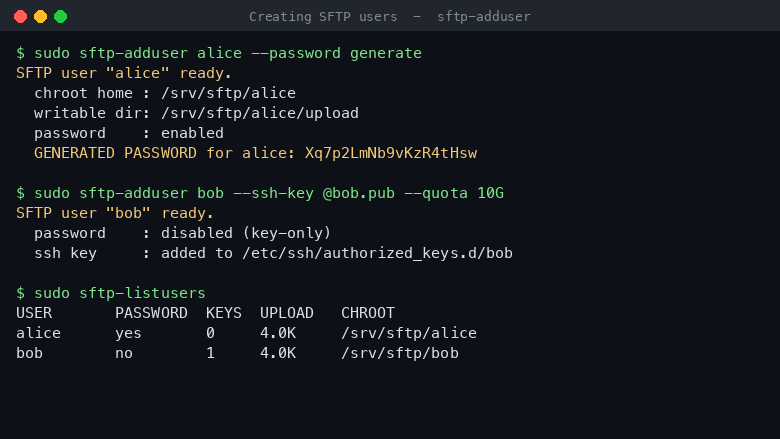
Creating an SFTP user
Image
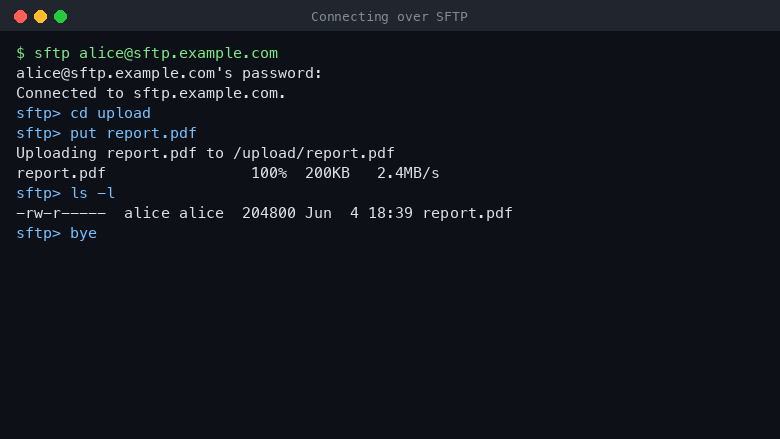
Connecting over SFTP
Image
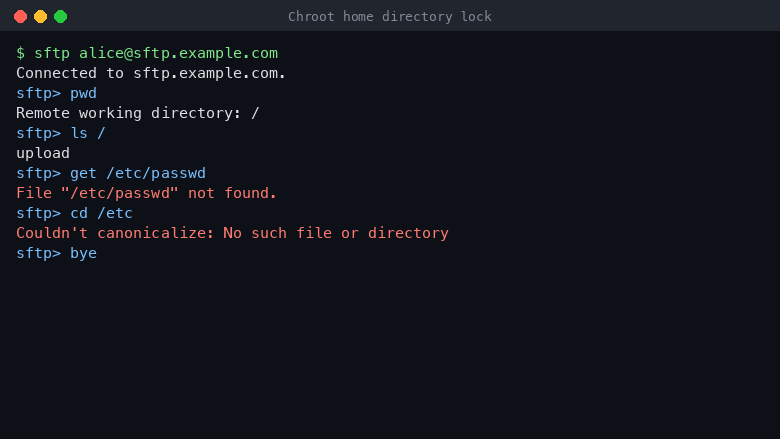
Chroot home directory lock
This is a repackaged open source software product wherein additional charges apply for cloudimg support services.
Production-Ready SFTP Server on OpenSSH
Deploy a fully configured, security-hardened SFTP file transfer server on your own EC2 instance within minutes. Built on OpenSSH - the secure shell suite trusted across the internet - this AMI eliminates the manual sshd_config editing of a bare install and avoids the per-user monthly fees of managed services. You retain full control over your instance, storage, and network configuration with no vendor lock-in.
Why Choose This Over Alternatives?
Unlike managed SFTP services, this server runs on infrastructure you own. There are no per-protocol-hour charges, no per-GB transfer fees beyond standard EC2 networking, and no user-count tiers. Teams in healthcare, financial services, and logistics use this approach to maintain compliance control while keeping costs predictable at scale. A healthcare billing team, for example, can receive nightly claim files from 50+ provider offices - each confined to their own chroot directory with quota limits - while the audit log feeds into a SIEM for HIPAA evidence collection.
Chroot Jailed Users
Every SFTP user is locked into their own home directory with an OpenSSH chroot jail. Users can only see and write inside their own space, never the rest of the filesystem, and are given no interactive shell. User home directories live on a dedicated, independently resizable EBS volume kept separate from the operating system disk, so you can scale storage without touching the OS.
SSH Key and Password Authentication
The image ships key-only - the secure default. Users authenticate with an SSH key out of the box, and password authentication can be enabled for SFTP users with a single command. The administrator account always stays key-only. SSH keys for SFTP users are managed in a central, root-owned location outside every jail, so file ownership rules are always correct.
One-Command User Management
A bundled CLI toolkit makes day-to-day operation simple:
- sftp-adduser - create a user with an SSH key or a generated password
- sftp-deluser - remove a user and optionally their data
- sftp-listusers - list users and their disk usage
- sftp-passwd - reset or lock passwords
- sftp-password-auth - enable or disable password logins globally
No manual config file editing required. These tools are the primary interface to the server.
Hardened by Default
The server ships with fail2ban brute-force protection that bans repeat offenders, per-user disk quotas so one account cannot fill the volume, and transfer audit logging that records every upload, download, and delete to the system journal. Password authentication is off by default and all forwarding features are disabled.
Ready to Use
A per-instance demo user is created on first boot with a fresh SSH key unique to the instance, stored in a root-only file. Confirm the server works immediately, then remove the demo user once your own accounts exist. The included user guide covers creating key-based and password-based users, the chroot model, quotas, reading the audit log, and connecting from common SFTP clients.
Deployment on AWS
This AMI integrates naturally with your existing AWS environment. Place it in a private subnet behind a Network Load Balancer, restrict inbound traffic to port 22 via Security Groups, and attach additional EBS volumes as your user base grows. CloudWatch can ingest the audit journal for centralized monitoring.
Get Started with a Guided Setup
Want help designing your file transfer architecture or onboarding your first users? Contact cloudimg for a free guided setup session. Our engineers will walk you through instance sizing, security group configuration, user provisioning, and audit log integration - so you reach production faster.
Use Cases
- Partner file exchange - Onboard external partners into isolated chroot directories with individual quotas, replacing insecure email attachments or shared FTP servers
- Compliance-focused transfer - Capture a full audit trail of every file operation for regulatory evidence in healthcare, finance, or legal workflows
- Application upload targets - Provide a stable SFTP endpoint for automated batch uploads from ERP, billing, or ETL systems
- Backup and archive ingestion - Accept nightly backup streams from on-premises systems into dedicated per-source directories
All product and company names are trademarks or registered trademarks of their respective holders. Use of them does not imply any affiliation with or endorsement by them.
Highlights
- Production ready SFTP on OpenSSH: every user is locked into a chroot jailed home directory with no shell, hardened with fail2ban brute force protection, per user disk quotas and transfer audit logging, and user files live on a dedicated, independently resizable volume
- Authenticate SFTP users by SSH key out of the box or enable password logins on demand while the administrator stays key only, and manage accounts with one command using the bundled sftp-adduser, sftp-deluser, sftp-listusers, sftp-passwd and sftp-password-auth tools
- 24/7 technical support from cloudimg, with expert assistance for user onboarding, key management, quotas, auditing and secure file transfer architecture
New
Introducing multi-product solutions
You can now purchase comprehensive solutions tailored to use cases and industries.

Features and programs
Financing for AWS Marketplace purchases
AWS Marketplace now accepts line of credit payments through the PNC Vendor Finance program. This program is available to select AWS customers in the US, excluding NV, NC, ND, TN, & VT.

Pricing
Free trial
Try this product free for 7 days according to the free trial terms set by the vendor. Usage-based pricing is in effect for usage beyond the free trial terms. Your free trial gets automatically converted to a paid subscription when the trial ends, but may be canceled any time before that.
Pricing is based on actual usage, with charges varying according to how much you consume. Subscriptions have no end date and may be canceled any time. Alternatively, you can pay upfront for a contract, which typically covers your anticipated usage for the contract duration. Any usage beyond contract will incur additional usage-based costs.
Additional AWS infrastructure costs may apply. Use the AWS Pricing Calculator to estimate your infrastructure costs.
If you are an AWS Free Tier customer with a free plan, you are eligible to subscribe to this offer. You can use free credits to cover the cost of eligible AWS infrastructure. See AWS Free Tier for more details. If you created an AWS account before July 15th, 2025, and qualify for the Legacy AWS Free Tier, Amazon EC2 charges for Micro instances are free for up to 750 hours per month. See Legacy AWS Free Tier for more details.
Dimension | Description | Cost/hour |
|---|---|---|
m5.large Recommended | m5.large | $0.05 |
t2.micro | t2.micro instance type | $0.04 |
t3.micro | t3.micro instance type | $0.04 |
m8i-flex.12xlarge | m8i-flex.12xlarge instance type | $0.24 |
dl1.24xlarge | dl1.24xlarge instance type | $0.24 |
u-3tb1.56xlarge | u-3tb1.56xlarge instance type | $0.24 |
m8id.32xlarge | m8id.32xlarge instance type | $0.24 |
x1e.16xlarge | x1e.16xlarge instance type | $0.24 |
r8id.4xlarge | r8id.4xlarge instance type | $0.24 |
r6a.large | r6a.large instance type | $0.08 |
Vendor refund policy
Refunds available on request.

Legal
Vendor terms and conditions
Upon subscribing to this product, you must acknowledge and agree to the terms and conditions outlined in the vendor's End User License Agreement (EULA) .
Content disclaimer
Vendors are responsible for their product descriptions and other product content. AWS does not warrant that vendors' product descriptions or other product content are accurate, complete, reliable, current, or error-free.
Delivery details
64-bit (x86) Amazon Machine Image (AMI)
Amazon Machine Image (AMI)
An AMI is a virtual image that provides the information required to launch an instance. Amazon EC2 (Elastic Compute Cloud) instances are virtual servers on which you can run your applications and workloads, offering varying combinations of CPU, memory, storage, and networking resources. You can launch as many instances from as many different AMIs as you need.
Version release notes
Remediates flagged CVEs: full apt security update (kernel + userspace); rng-tools added.
Additional details
Usage instructions
Connect via SSH on port 22 as the default login user for your operating system variant (the user guide lists it per variant; on Ubuntu it is 'ubuntu'). The administrator account is SSH key only. Retrieve the demo SFTP user details and its per instance key with: sudo cat /root/sftp-server-info.txt. Create your own SFTP users with 'sudo sftp-adduser <name> --ssh-key @key.pub' (key based) or 'sudo sftp-adduser <name> --password generate' (which enables SFTP password logins automatically); add '--quota 5G' to cap a user's storage. List users with 'sudo sftp-listusers' and toggle password logins with 'sudo sftp-password-auth on|off|status'. SFTP users connect on port 22 and are confined to their own home directory (their writable area is the upload/ subdirectory). Transfer activity is recorded to the system journal (sudo journalctl -t internal-sftp). The user guide covers user management, the chroot model, quotas, auditing and connecting from common clients.
Resources
Vendor resources
Support
Vendor support
Support from cloudimg
cloudimg provides 24/7 technical support for this SFTP Server product by email and live chat. Critical issues receive a one-hour average response time.
Channels:
- Email: support@cloudimg.co.uk
- Live chat: available around the clock
What we help with:
- Deployment and initial configuration on AWS (instance sizing, security group rules, EBS volume setup)
- SFTP user onboarding, SSH key management, and password authentication setup
- Chroot jail configuration and per-user disk quota management
- Audit log review and integration with monitoring tools
- Performance tuning and troubleshooting connectivity issues
- Software updates and security patching guidance
- Secure file transfer architecture design
Guided Setup: New customers can request a free guided setup session where our engineers walk through instance launch, security group configuration for port 22, user provisioning, and audit log verification.
Refunds: For refund requests or billing inquiries, contact support@cloudimg.co.uk with your AWS account ID and instance details.
Prerequisites for Launch:
- An AWS account with EC2 launch permissions
- A VPC with a subnet that allows inbound TCP on port 22
- An SSH key pair registered in your AWS region
- Recommended: t3.small or larger instance type
- An additional EBS volume for user data (size based on expected storage needs)
After launch, connect to the instance using your EC2 key pair, verify the demo user works, then use the bundled CLI tools (sftp-adduser, sftp-passwd, sftp-listusers) to provision your own users.
AWS infrastructure support
AWS Support is a one-on-one, fast-response support channel that is staffed 24x7x365 with experienced and technical support engineers. The service helps customers of all sizes and technical abilities to successfully utilize the products and features provided by Amazon Web Services.
Similar products

This product has charges associated with it for seller support. Deploy Oracle Database 19c Standard Edition on Windows Server in minutes with production-ready ENA networking up to 25 Gbps and24x7 cloudimg engineer support.

This product has charges associated with it for seller support. Oracle Database 19c Standard Edition AMI pre-configured on enterprise Linux with BYOL licensing. Deploy production-ready Oracle on AWS with 24/7 expert support from cloudimg.

This product has charges associated with it for seller support. Pre-configured RStudio IDE on Windows Server with 24/7 cloudimg support. Deploy a production-ready R data science environment on EC2 in minutes.

This product has charges associated with it for seller support. Migrate from CentOS 8 EOL to Alma Linux 8 in under 60 seconds with zero licensing fees. 1:1 RHEL 8 compatible, AWS-optimized, backed by 24/7 support with guaranteed 24hr response SLA.

This product has charges associated with it for seller support. Pre-configured Jenkins CI/CD server on Windows for .NET and DevOps teams. Launch in minutes with guaranteed 24-hour response support from cloudimg.
Customer reviews
No customer reviews yet
Be the first to review this product . We've partnered with PeerSpot to gather customer feedback. You can share your experience by writing or recording a review, or scheduling a call with a PeerSpot analyst.