Sold by: IBM Software
Deployed on AWS
IBM Costing provides a unified view of IT financial and operational data to identify optimization opportunities, optimize application costs, rationalize your portfolio to unlock resources for growth.
4.3
Overview
Image
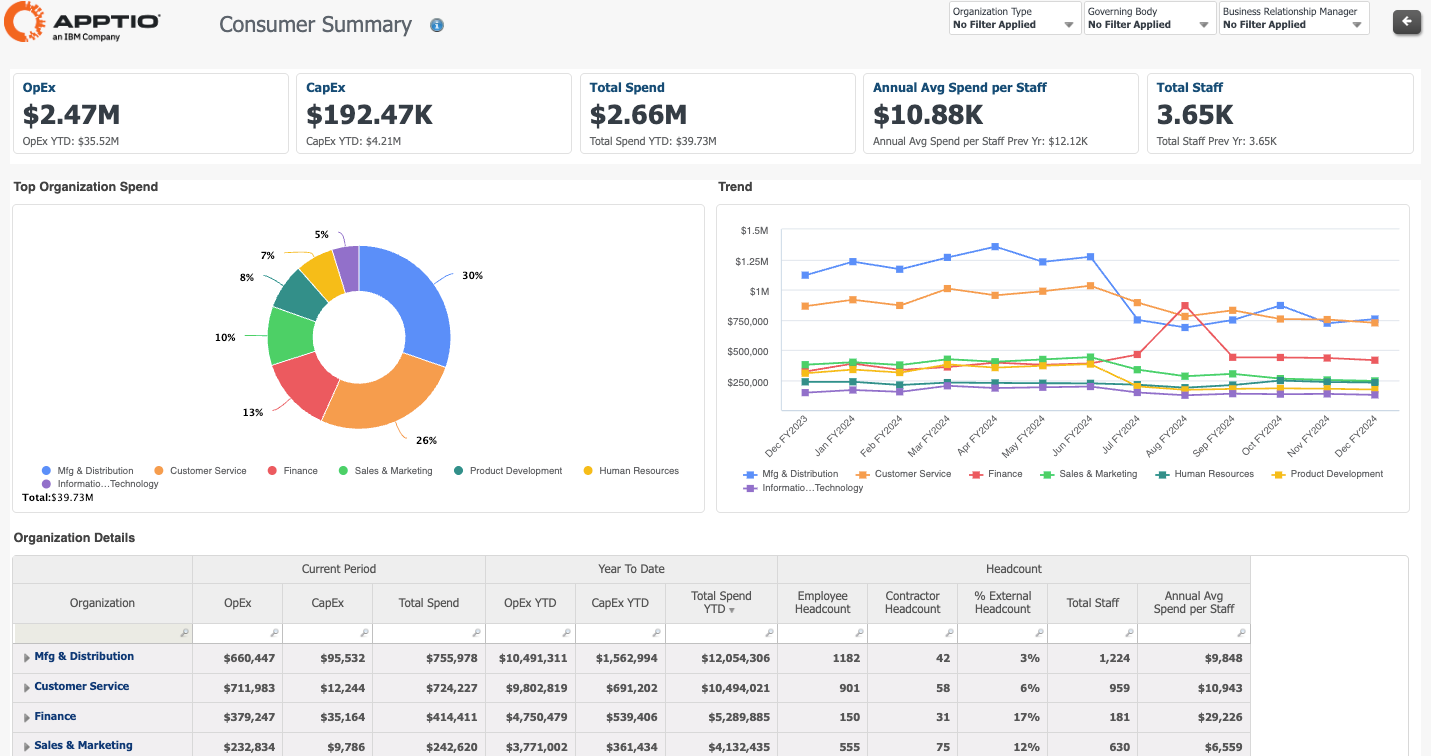
IBM Apptio product screenshot
Image
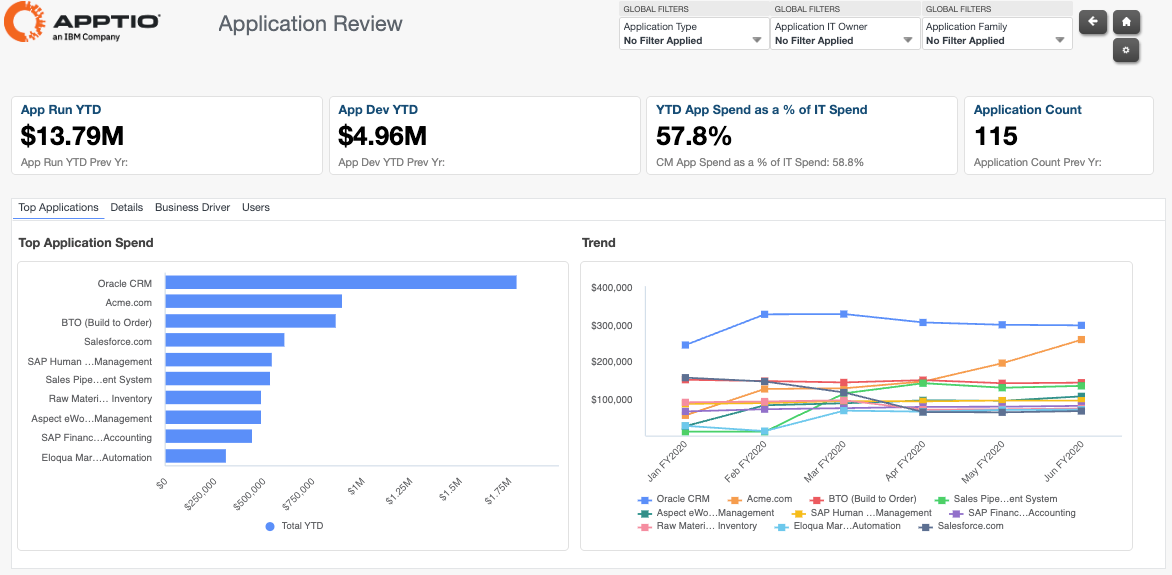
IBM Apptio product screenshot
Image
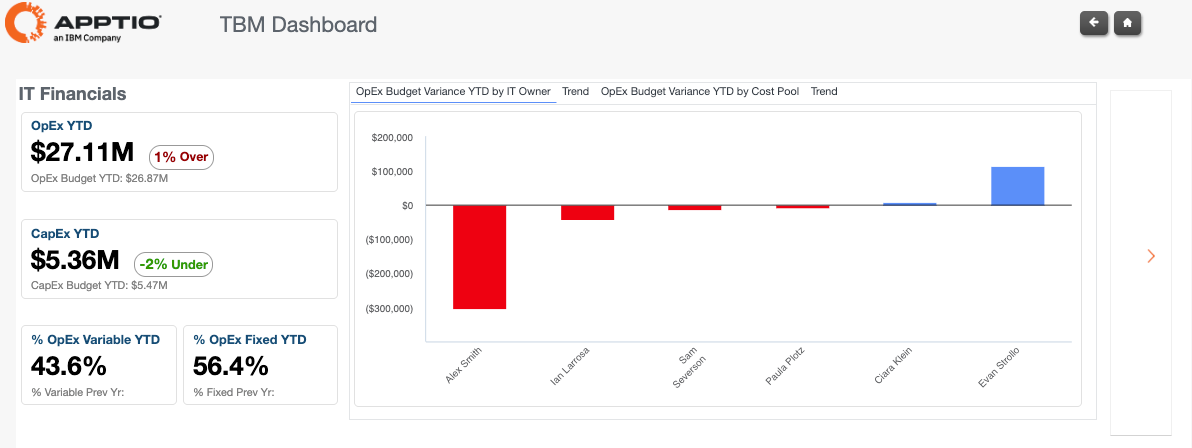
IBM Apptio product screenshot
Purpose-built for technology leaders, IBM Costing delivers a clear, easy-to-understand view of an organization's diverse and evolving tech costs, facilitating impactful discussions across the business and driving informed decisions in a rapidly changing tech landscape. IBM's industry-leading allocation strategies tackle the difficult task of bringing together financial and operational data into a common, centralized framework, providing transparency on key spend drivers tied to business priorities, enabling leaders to focus on business outcomes and the value of each dollar spent, rather than chasing down data or constantly updating spreadsheets. This information can be used balance and rationalize the portfolio and then reinvest the savings into growth projects. Costing enables IT, Technology and Finance leaders to speak the language of the Business partner and with them optimize tech investments and fund digital transformation. IBM Costing is FedRamp certified.
Highlights
- Quickly and easily allocate IT costs to business units, services or applications
- Provide consumption-based allocations to the organization
- Identify cost savings and optimization opportunities - Optimize application costs - Rationalize your portfolio
Details
Sold by
Delivery method
Deployed on AWS
New
Introducing multi-product solutions
You can now purchase comprehensive solutions tailored to use cases and industries.

Features and programs
Buyer guide
Gain valuable insights from real users who purchased this product, powered by PeerSpot.

Financing for AWS Marketplace purchases
AWS Marketplace now accepts line of credit payments through the PNC Vendor Finance program. This program is available to select AWS customers in the US, excluding NV, NC, ND, TN, & VT.

Pricing
Pricing is based on the duration and terms of your contract with the vendor. This entitles you to a specified quantity of use for the contract duration. If you choose not to renew or replace your contract before it ends, access to these entitlements will expire.
Additional AWS infrastructure costs may apply. Use the AWS Pricing Calculator to estimate your infrastructure costs.
Dimension | Description | Cost/12 months |
|---|---|---|
Costing Standard $0-$25M | Manage up to $25M of IT spend for fixed cost; addl fees above $25M/yr | $110,040.00 |
Costing Essentials $0-$25M | Manage up to $25M of IT spend for fixed cost; addl fees above $25M/yr | $80,040.00 |
Vendor refund policy
No refund.
Custom pricing options
Request a private offer to receive a custom quote.

Legal
Vendor terms and conditions
Upon subscribing to this product, you must acknowledge and agree to the terms and conditions outlined in the vendor's End User License Agreement (EULA) .
Content disclaimer
Vendors are responsible for their product descriptions and other product content. AWS does not warrant that vendors' product descriptions or other product content are accurate, complete, reliable, current, or error-free.
Delivery details
Software as a Service (SaaS)
SaaS delivers cloud-based software applications directly to customers over the internet. You can access these applications through a subscription model. You will pay recurring monthly usage fees through your AWS bill, while AWS handles deployment and infrastructure management, ensuring scalability, reliability, and seamless integration with other AWS services.
Resources
Vendor resources
Support
Vendor support
AWS infrastructure support
AWS Support is a one-on-one, fast-response support channel that is staffed 24x7x365 with experienced and technical support engineers. The service helps customers of all sizes and technical abilities to successfully utilize the products and features provided by Amazon Web Services.
Updated weekly
By IBM Software

By Planview

By Inflectra Corporation
Top
10
In Planning and Forecasting
Top
50
In Project Management
Top
50
In Agile Lifecycle Management, Project Management
Sentiment is AI generated from actual customer reviews on AWS and G2
Functionality
Ease of use
Customer service
Cost effectiveness
Positive reviews
Mixed reviews
Negative reviews
AI generated from product descriptions
Cost Allocation Engine
Allocates IT costs to business units, services, or applications using consumption-based allocation strategies
Financial and Operational Data Integration
Consolidates financial and operational data into a centralized framework for unified cost visibility
Cost Optimization Analysis
Identifies cost savings and optimization opportunities across application costs and portfolio rationalization
Portfolio Rationalization
Enables portfolio balancing and rationalization to identify resources for reinvestment into growth initiatives
Portfolio Optimization
Optimizes funding and resource capacity allocation across multiple business functions and project portfolios
End-to-End Visibility
Provides comprehensive visibility across business and technology planning with tracking of actuals against planned metrics
Capacity and Demand Balancing
Balances resource capacity against demand to enable work prioritization and resource focus
Strategic Plan Integration
Connects strategic plans and funding allocation to Agile delivery execution and scaling
Multi-Stakeholder Planning
Supports dynamic planning and collaboration across executives, PMOs, finance, transformation leaders, and development teams
AI-Assisted Content Generation
Inflectra.ai generates user stories, acceptance criteria, and test cases from plain-language input with context-aware automation embedded in the platform.
End-to-End Traceability
Requirements, risks, tasks, tests, and defects are linked in a relational structure enabling impact assessment, coverage validation, and proactive risk management.
Multi-Level Work Hierarchy Management
Unified management of portfolios, programs, projects, releases, and sprints with support for shared resources, budgets, timelines, and dependencies across the organization.
Compliance and Governance Controls
Electronic signatures, user-level audit trails, controlled workflows, and approval processes support regulated industries including healthcare, finance, aerospace, and government.
Real-Time Visibility and Planning Tools
Kanban boards, Gantt charts, real-time dashboards, workload and capacity management features, and built-in time tracking for forecasting and delivery outcome prediction.
Standard contract
No
No
Customer reviews
reviewer2886786
FinOps cost visibility has improved and teams now make informed cloud spend decisions
Reviewed on Sep 24, 2026
Review provided by PeerSpot
What is our primary use case?
Apptio Costing's main use case for our customers is FinOps, for example, for those using Azure. The idea is to help them better monitor any costs related to cloud consumption and see everything related to cloud shadow IT while reflecting all invoices and explaining FinOps best practices.
I start by providing a FinOps discovery workshop and then, depending on the annual consumption, I decide whether it would make sense for that specific customer to offer them managed services. If they agree, then I use Apptio Costing for it. As a specific use case, when a customer has at least 100K euros in annual consumption, I use Apptio Costing.
When a large organization looks to improve transparency and control over their IT cost, which includes financial and operational data, I notice that the organization lacks a consolidated view of how IT spending is allocated across infrastructure, applications, services, business units, and end users. By using Apptio Costing, the organization establishes a structured IT cost model by consolidating data from finance, procurement, cloud platform, infrastructure, application, and organizational sources. The customer was able to allocate IT costs to the appropriate services, applications, business units, and cost centers by using defined allocation rules and cost drivers. Additionally, they understood the complete cost structure of IT services from the underlying infrastructure and software costs to shared services and operational resources. By the end, they were able to compare actual spending against budget and forecast, while also identifying areas where costs were increasing unexpectedly.
What is most valuable?
Apptio Costing offers many good features. One of the main ones is having a single pane, a unique dashboard where you see everything related to cloud consumption. Another important one that I have seen is IT Cost Modeling, because you can map financial data into IT services and applications. I would also say that Cost Allocation is essential to distribute shared IT costs using allocation rules and consumption drivers.
Beyond cost modeling and allocation, I would highlight a few features that make Apptio Costing particularly useful. You have application and service total cost of ownership, which allows you to calculate the full cost of an application or IT service, including infrastructure, software, labor, and shared costs. You also have variance analysis, which helps compare actual, budget, and forecast and understand what drives the difference.
Apptio Costing has positively impacted our organization mainly by improving transparency around IT spending, giving us a much clearer understanding of where our IT costs come from, how they are allocated, and which application services or business units are driving those costs.
I have seen it improve collaboration between IT and finance because both departments now have a common cost model and more consistent data to support discussions and decisions. Apptio Costing has helped us by saving time, improving decision-making, automating cost allocation, and consolidating financial and operational data into a single model. I notice that we spend less time manually collecting, reconciling, and analyzing data from different sources.
What needs improvement?
I see some areas where Apptio Costing could be improved. For the initial setup and configuration, while the platform is very powerful, building and maintaining a complex cost model always requires significant expertise and a good understanding of the underlying data. I think we can bring more from the user experience because the solution is quite intuitive for occasional users, but the configuration could be made much simpler.
Regarding integration, data integration could also be made easier with more out-of-the-box connectors and simpler ways to map and validate data from ERP, cloud, HR, or IT management systems.
For how long have I used the solution?
I have been using Apptio Costing for three years.
What do I think about the stability of the solution?
Apptio Costing is quite stable.
What do I think about the scalability of the solution?
Our experience with Apptio Costing has been positive because the platform is suited to our large and complex enterprise environment. As the organization grows, the cost model can also evolve by adding new data sources, allocation rules, and reporting requirements, making it one of its strengths.
How are customer service and support?
Customer support is great from the vendor side. We are our own partner for that product, and they are very responsive, knowledgeable, and know how to deal with technical questions or configuration-related issues.
I would rate customer support as an eight out of ten. I hesitate between eight or nine, but I keep it at eight because there is still some room for improvement in the response time and handling of more complex cases.
Which solution did I use previously and why did I switch?
As far as I recall, we did not have an equivalent dedicated technology business management and FinOps solution previously. It was more through Excel and financial reports, which made it quite hard to manage.
How was the initial setup?
The mechanism of setting up Apptio Costing is quite approachable. The hardest part is usually designing a cost model that the business trusts. Apptio always provides out-of-the-box cost transparency components, default allocation, data relationships, and standard reports. The typical implementation flow includes finance data, which gives you the cost pool, IT towers, services, and applications, leading to the business units.
What was our ROI?
We have seen a positive return on investment. Although I cannot share specific financial figures, the return on investment comes mainly from improved IT cost transparency, reduced manual effort in financial analysis and cost allocation, faster reporting, and better identification of optimization opportunities. We have also improved our decision-making process by giving IT and finance a common view of application, infrastructure, and service costs.
What's my experience with pricing, setup cost, and licensing?
It is a great experience regarding pricing, setup cost, and licensing. Apptio's sales team was amazing with us, very straightforward and concise with all details. It is quite reasonable for an enterprise-grade solution, although it can represent a significant investment. The license cost is only one part of the overall cost, but organizations also need to consider initial implementation efforts, including data integration, cost model design, configuration, testing, and potential external consulting services, which we relied on. All of this setup cost can be significant but was quite manageable.
Which other solutions did I evaluate?
We evaluated Cloudtamer, which is a US startup, before choosing Apptio Costing.
What other advice do I have?
I would tell others looking into using Apptio Costing to initially prepare their data and define the right objectives before implementing it. The technology is very powerful, but the quality of the results depends heavily on the quality of financial and operational data and having clearly defined allocation rules.
The governance and security aspects of Apptio Costing are great. The platform is quite well monitored for data and security, especially with the connectors handling sensitive financial and IT data. There is the ability to control access based on user roles and responsibilities, and I would like to see continued improvement around security monitoring, auditability, and data governance.
Apptio Costing's AI capabilities are useful, but I would not rely on the output without validation because the accuracy and reliability depend heavily on the quality, completeness, and structure of the underlying data. I gave this review an overall rating of eight out of ten.
Vijendran Lal
Cost transparency has enabled data‑driven decisions and continuous optimization of IT spend
Reviewed on Sep 23, 2026
Review from a verified AWS customer
What is our primary use case?
My main use case for Apptio Costing is to understand the IT cost for the organization, where they are spending, and how much they are spending. It provides full cost transparency and helps me allocate the cost to each business service and business unit based on that business service, which helps the organization to understand, regulate, and take better data-driven decisions.
A specific example of how I use Apptio Costing in my day-to-day work is that it helps me understand where the cost is flowing. Once I raise a purchase order in the organization, it helps me track from there all the way to the cost allocated to the business services. This means once the PO is raised, I check whether the CCGL is mapped to the right business units, and that cost is being pushed to various channels, whether it's a software cost, hardware cost, or labor cost associated with that project. Then, I allocate these costs to the different business units based on the client's requirement.
Being a consultant, I understand the business logic of the client and then customize Apptio Costing to the client's requirement.
What is most valuable?
Apptio Costing offers cost allocation, cost transparency, chargeback, and showback features. It also has Cloudability, which helps me understand the cloud cost and the FinOps cost, and it features Apptio Planning, which helps me plan my cost for five to seven years as per the client's need. It takes into account the entire IT cost.
Out of all those features, I find myself using Costing and IT Financial Planning the most, and these are the main features. I have worked with Cloudability, but these two are the major useful products used by all the clients within the Apptio users.
Apptio Costing has positively impacted my organization, as we did a project where we had to reduce the network cost. We understood where the cost was going high, renegotiated the contracts, and brought down the cost. Overall, it was a two-year implementation project, and we reduced around ten million dollars for the organization.
Apptio Costing helped me identify those savings through its own inbuilt dashboard. Once I feed in all the data, it shows how much is being utilized for which application, how much hardware has been utilized, where and how much it is stored, what kind of server I'm using, what kind of CPUs I'm using, how much RAM is being consumed, how much storage is consumed, and how much cloud cost is being involved in that project. It gives me detailed information about how my infrastructure cost is broken down by the project and by the application, providing an idea of how much I'm spending on the application, what's the service cost, what is the hardware cost, and what is the cost for labor implementation, including full-time employees and contractual employees. It gives me a complete picture of my spend.
What needs improvement?
Regarding how Apptio Costing can be improved, I have not experienced pain points, but it all depends upon the client's data, how clean it is, or if it requires any pre-Apptio work to be done. Once that's cleared up, Apptio Costing does not have many flaws, and the Apptio team is also very good; they provide fixes very soon, so I don't encounter trouble with the application.
I am also working with Apptio, trying to implement or enhance AI features which automatically detect anomalies and understand the repeated cost spend in the same pattern, so less manual intervention is needed. Apptio Costing is improving on that front as well.
For how long have I used the solution?
I have been using Apptio Costing for six or more years.
What do I think about the stability of the solution?
Apptio Costing has been very stable; they notify in advance if they need to perform upgrades or if any technical issue arises. I have not experienced any significant downtime that impacted business operations.
What do I think about the scalability of the solution?
Apptio Costing has good scalability, allowing me to ramp up or ramp down based on client need or business requirements. I would rate it eight or nine out of ten for scalability.
How are customer service and support?
My experience with customer support has been good. They have a structured response system based on the severity of the tickets raised with the Apptio Costing support team, and they are very responsive. The support team is well-educated and trained, providing an overall good experience. I would rate the customer support around eight out of ten.
Which solution did I use previously and why did I switch?
Before Apptio Costing, I was using an old-school application called Digital Fuel, which has since shut down. Apptio Costing is the better version of Digital Fuel, as Digital Fuel was a SQL-based tool and not cloud-based, which prompted us to switch.
What was our ROI?
I have seen a return on investment with Apptio Costing, as organizations that implement it understand their costs very well and utilize their funds wisely. After implementing Apptio Costing, they avoid overspending and have clarity on their spending, which leads to time saved from data handling and fewer employees needed to run the show since tasks are automated. It connects through various ERP systems like SAP, Oracle, CMDB data, cloud data, and Excel uploads, supporting every form of APIs and data connections to provide regular feeds based on requirements.
What's my experience with pricing, setup cost, and licensing?
My experience with pricing, setup cost, and licensing was good. Any organization with a spend above around five hundred to six hundred million finds it good to have Apptio Costing because it is slightly costlier compared to other tools, but it's reliable, secure, and safe, with no data breaches. On licensing and setup cost, it varies from organization to organization and is smooth; they also offer certain discounts, though not much, making it simple.
Which other solutions did I evaluate?
Before choosing Apptio Costing, we evaluated options like Nicus, Yakin, and another named ITBMO. Among those, Apptio Costing was the leader and best solution provider, so we decided to use that.
What other advice do I have?
My advice for others looking into using Apptio Costing is that they should definitely consider it, but only if their spend exceeds two hundred to three hundred million. It is advisable for organizations with spends over three hundred to four hundred million, especially if the business is spread across the globe to track by location, making it good for those with IT spends above five hundred million.
Apptio Costing is a great tool for anyone willing to purchase it, especially if they have a real need for understanding their IT spend, AI spend, or any cloud spend, so they can definitely go for this. I would rate this product a nine out of ten overall.
Which deployment model are you using for this solution?
Hybrid Cloud
If public cloud, private cloud, or hybrid cloud, which cloud provider do you use?
Amazon Web Services (AWS)
Financial Services
Enable Cost Transparency and Enhance Insights for Better Decisions
Reviewed on Sep 01, 2026
Review provided by G2
What do you like best about the product?
Enable cost transparency and enhance insights for decision making
What do you dislike about the product?
Not much to dislike about the product. If there has to be one, it’s the challenge to adopt of OOB report without any customisation.
What problems is the product solving and how is that benefiting you?
It provides a defensible way to connect technology and business in the same conversation. It supports decision-making for things like migration or lifecycle business cases, process changes to reduce technology usage, and the decommissioning of retired applications.
Lin K.
Clear Cost Allocation with a Well-Structured Setup
Reviewed on Aug 13, 2026
Review provided by G2
What do you like best about the product?
Clear structure to allocate cost. Easy to set up and maintain.
What do you dislike about the product?
Currently reporting studio looks old and not very user friendly. Looking forward to the new version.
What problems is the product solving and how is that benefiting you?
Help to show true cost for each application and service provided
Banking
Clear Cost Transparency and Insightful Reports for Smarter Decisions
Reviewed on Aug 13, 2026
Review provided by G2
What do you like best about the product?
They provide clear cost transparency for technology services, which makes it easier to understand what you’re paying for and why. They also deliver insightful reports that help make sense of the details and support better decisions.
What do you dislike about the product?
Sometimes the dashboard isn’t easy to navigate or understand, and it requires fairly deep knowledge to use effectively.
What problems is the product solving and how is that benefiting you?
It provides a charge-out bill to the business for the technology services they consume.