
Sold by: CData Software
Deployed on AWS
Free Trial
Reliable B2B Connectivity. Codeless Visual Interface. Sleek, Modern EDI.
4
Overview
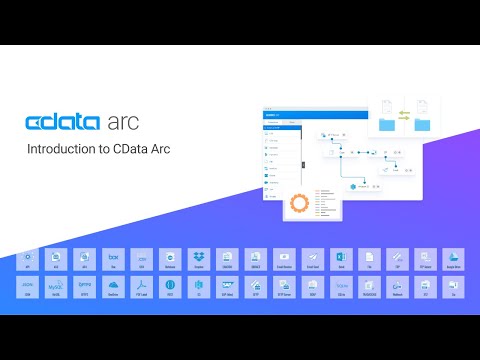
CData Arc is a flexible integration platform that dramatically simplifies enterprise data movement.
Easily create and customize your own automated business workflows in Arc's visual drag-and-drop workflow designer. Built on a modern, lightweight web architecture, Arc provides scalable data processing power along with a sleek and intuitive user experience.
Securely Send & Receive Files
Arc's secure, reliable file transport tools ensure your data is delivered safely. Arc supports client-side and server-side for all major file transfer protocols: AS2, AS4, SFTP, FTPS, OFTP, and more.
Simplify Your EDI Integration
Arc seamlessly translates EDI documents to and from XML, CSV, JSON, flat files, and other popular data formats. It supports all major EDI standards: X12, EDIFACT, and more.
Connect to Any Backend
Automate your data storage & retrieval from SQL-like databases, ERP systems, CRM applications, and more - all through the same streamlined UI.
Consume & Publish Custom APIs
Generate dynamic API requests and publish custom API endpoints to easily integrate REST & SOAP services into your data flow.
Feel Secure with State-of-the-Art Cryptography
Arc supports all modern encryption and authentication standards to protect your data. Use Arc to close dangerous security vulnerabilities from legacy systems. No matter what data formats, transport mechanisms, or backend systems you use, Arc provides the tools to bring them together in a reliable centralized solution.
Highlights
- Best-in-class Secure Managed File Transfer (MFT): Drummond-certified for 15+ years, trusted by experts
- Quick & Easy Setup: Unmatched power and flexibility in integrating with other systems. Plug in, configure and go!
- Intuitive Visual Design: Understand your data flow at-a-glance, without needing a dedicated team of engineers
Details
Sold by
Categories
Delivery method
Delivery option
64-bit (x86) Amazon Machine Image (AMI)
Latest version
Operating system
Ubuntu 22
Deployed on AWS
New
Introducing multi-product solutions
You can now purchase comprehensive solutions tailored to use cases and industries.

Features and programs
Financing for AWS Marketplace purchases
AWS Marketplace now accepts line of credit payments through the PNC Vendor Finance program. This program is available to select AWS customers in the US, excluding NV, NC, ND, TN, & VT.

Pricing
Free trial
Try this product free for 10 days according to the free trial terms set by the vendor. Usage-based pricing is in effect for usage beyond the free trial terms. Your free trial gets automatically converted to a paid subscription when the trial ends, but may be canceled any time before that.
Pricing is based on actual usage, with charges varying according to how much you consume. Subscriptions have no end date and may be canceled any time. Alternatively, you can pay upfront for a contract, which typically covers your anticipated usage for the contract duration. Any usage beyond contract will incur additional usage-based costs.
Additional AWS infrastructure costs may apply. Use the AWS Pricing Calculator to estimate your infrastructure costs.
Dimension | Cost/hour |
|---|---|
m5.large Recommended | $5.95 |
m5.2xlarge | $7.17 |
m4.xlarge | $7.17 |
t3.medium | $4.89 |
m4.large | $5.95 |
m5.xlarge | $7.17 |
t2.medium | $4.89 |
Dimensions summary
You pay by the hour based on the AWS EC2 instance size you run. Seven instance options are available: t2.medium, t3.medium, m4.large, m4.xlarge, m5.large, m5.xlarge, and m5.2xlarge. Each one pairs the software with a different level of compute, memory, and processing capacity. The smaller instances suit lighter integration workloads, while the larger instances handle heavier processing and higher data volumes. Billing scales with the instance you choose and the number of hours it runs. You can pick the instance that matches your expected workflow demand.
Top-of-mind questions for buyers
Billing meters running instance-hours. A fully stopped instance does not accrue software charges. If the instance stays running but idle, hourly charges still apply because billing follows runtime, not active workflow processing. Powered-off instances may still incur underlying AWS storage fees separately.
Each option pairs the software with a specific AWS EC2 instance that sets your compute, memory, and processing capacity. The t2.medium and t3.medium offer lighter capacity. The m4 and m5 sizes step up through large, xlarge, and 2xlarge for heavier data volumes and processing.
No. The software supports the same connectors and flow capabilities across every instance size, including managed file transfer, EDI, database, and application integration. The instance size changes only the compute, memory, and processing capacity, not which features you can use.
arc.cdata.com
Helpful?
Vendor refund policy
We do not currently support refunds, but you can cancel at any time.

Legal
Vendor terms and conditions
Upon subscribing to this product, you must acknowledge and agree to the terms and conditions outlined in the vendor's End User License Agreement (EULA) .
Content disclaimer
Vendors are responsible for their product descriptions and other product content. AWS does not warrant that vendors' product descriptions or other product content are accurate, complete, reliable, current, or error-free.
Delivery details
64-bit (x86) Amazon Machine Image (AMI)
Amazon Machine Image (AMI)
An AMI is a virtual image that provides the information required to launch an instance. Amazon EC2 (Elastic Compute Cloud) instances are virtual servers on which you can run your applications and workloads, offering varying combinations of CPU, memory, storage, and networking resources. You can launch as many instances from as many different AMIs as you need.
Version release notes
Additional details
Usage instructions
- In your web browser, type https://<this_instance_ip_address> . If the connection fails then you should either try again in a few minutes, or double check the Security Group (EC2 Dashboard > Network & Security > Security Groups) assigned to this image, ensuring that HTTPS is added and that your IP address is allowed.
- If you get a security warning in your browser, select the option to proceed. The browser is simply alerting you to the fact that the SSL certificate used by the site is self-signed (not signed by a Certificate Authority), and thus untrusted.
- To login, use "admin" for the username, and the instance id for the password, prefixed with "Arc26:".
- Once logged in, specify a license in the Settings page, and you will be able to transfer files from/to CData Arc, using the intuitive controls provided.
For more details, please refer to https://docs.arc.cdata.com/26.4/self-hosted/en/getting-started/installation/cloud-marketplaces#cloud-marketplaces
Resources
Vendor resources
Support
Vendor support
AWS infrastructure support
AWS Support is a one-on-one, fast-response support channel that is staffed 24x7x365 with experienced and technical support engineers. The service helps customers of all sizes and technical abilities to successfully utilize the products and features provided by Amazon Web Services.
Updated weekly
By CData Software

By Dataddo

Sentiment is AI generated from actual customer reviews on AWS and G2
Functionality
Ease of use
Customer service
Cost effectiveness
Positive reviews
Mixed reviews
Negative reviews
AI generated from product descriptions
Secure File Transfer Protocols
Supports client-side and server-side file transfer for AS2, AS4, SFTP, FTPS, OFTP, and additional major protocols with secure and reliable transport mechanisms.
EDI Document Translation
Translates EDI documents to and from XML, CSV, JSON, and flat files, supporting major EDI standards including X12 and EDIFACT.
Visual Workflow Designer
Provides drag-and-drop workflow designer interface for creating and customizing automated business workflows without requiring code.
Multi-System Backend Connectivity
Enables automated data storage and retrieval integration with SQL-like databases, ERP systems, CRM applications, and other backend systems through unified interface.
API Integration and Cryptography
Supports generation of dynamic API requests, publishing of custom API endpoints for REST and SOAP services, and implements modern encryption and authentication standards for data protection.
Data Source Connectivity
Supports integration with 250+ data sources and 50+ destinations including applications, data warehouses, data lakes, and dashboarding tools
Data Integration Patterns
Supports ETL, ELT, reverse ETL, and database replication patterns for bidirectional data movement between sources and destinations
No-Code Integration Platform
Enables data pipeline configuration and deployment through visual interface without requiring code development
AWS Data Warehouse Support
Fully supports AWS data warehouse and storage services including Redshift, S3, Aurora, and RDS
Security and Compliance Certifications
SOC 2 Type II certified and compliant with ISO 27001 and major global data privacy regulations
Codeless Visual Development Interface
Drag and drop visual UI enabling users to build data integrations without coding, with pre-built templates and integration wizards for accelerated development
Parallel Data Integration Architecture
Highly scalable parallel data integration architecture supporting both ETL and ELT patterns with pushdown optimization for maximum throughput and performance into Amazon Redshift
Multi-Source Connectivity
Native connectors supporting hundreds of applications and data sources across on-premises and cloud environments including AWS services (Redshift, S3, RDS, Aurora) and enterprise applications (Salesforce, Workday, Oracle, SAP, ServiceNow)
FedRAMP Compliance
FedRAMP authorization including Integration Base, Data Integration, and tiered connectors (Tier B, C, D) for government cloud deployments
Data Integration and Synchronization
Capabilities for data warehousing, data lake initiatives, and task flow orchestration with support for scheduling and automation of data synchronization across multiple sources and destinations
Standard contract
No
No
Customer reviews
Rounak S.
my experience is amazing
Reviewed on May 19, 2024
Review provided by G2
What do you like best about the product?
it helped me accessing data easily and easy to use and customer support is amazing, i use it frequently for every small project, ease of integration and implementation
What do you dislike about the product?
website can be made more informative and all good
What problems is the product solving and how is that benefiting you?
CData API Server helps users connect and integrate data from different sources, which can improve data accessibility, streamline workflows, and increase operational efficiency
Desireddy R.
Fresher
Reviewed on Mar 09, 2024
Review provided by G2
What do you like best about the product?
Including Cloud sources GCP, AWS, and Azure
What do you dislike about the product?
A tool that allows you to build, manage, and deploy REST APIs
What problems is the product solving and how is that benefiting you?
Automatic integration process like mass imports/exports/updates, data cleaning, and de-duplication.
Computer Networking
It was a nice experience using it and it is easy to use for everyone
Reviewed on Feb 25, 2024
Review provided by G2
What do you like best about the product?
The everything in the CData API server is good and nothing is bad
What do you dislike about the product?
Sometimes it becomes glitchy and It is very disappointing
What problems is the product solving and how is that benefiting you?
It's solving my colleagues' problem and they are creating APIs easily that makes them burden free
Facilities Services
Unveiling the Power of CDATA: A Comprehensive Review
Reviewed on Nov 22, 2023
Review provided by G2
What do you like best about the product?
The flexibility it offers in connecting various data sources seamlessly and the ease of creating APIs from disparate data formats are some of its standout features. This allows for efficient data integration and management across different platforms.
What do you dislike about the product?
From what I've seen, some users have found the learning curve a bit steep initially, especially if they're not familiar with working extensively with APIs or managing data connections. Additionally, while it's powerful, configuring complex setups can sometimes require meticulous attention to detail.
What problems is the product solving and how is that benefiting you?
CData API Server addresses the challenge of integrating diverse data sources, enabling easier access and interaction with disparate data formats through a unified API. This benefits users by streamlining data management, reducing complexity in application development, and facilitating smoother data workflows across platforms.
MOHAMMAD S.
Best
Reviewed on Nov 18, 2023
Review provided by G2
What do you like best about the product?
It was easy to use and it was easy to access and use it
What do you dislike about the product?
The down sides about it are less when compared to other API server providers it was an great experience to use cdata api server
What problems is the product solving and how is that benefiting you?
It solved about all the things