
Sold by: cloudimg
Deployed on AWS
Free Trial
AWS Free Tier
This product has charges associated with it for seller support. Production-ready Traefik Proxy AMI with automatic Let's Encrypt TLS, unique per-instance credentials, and 24/7 cloudimg support for DevOps teams deploying secure edge routing on AWS.
Overview
Image
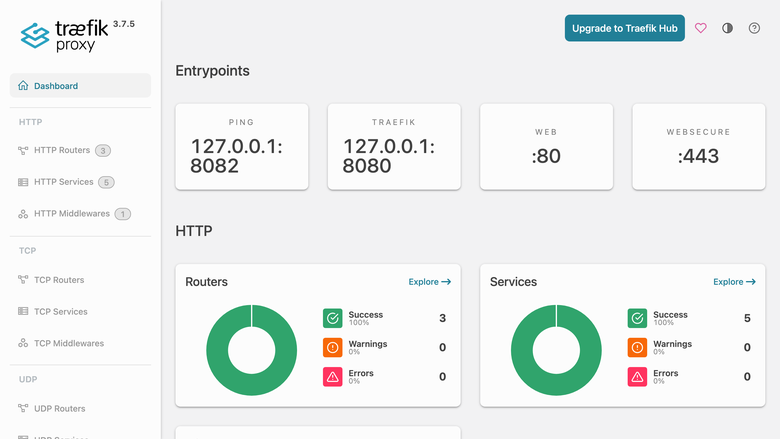
Traefik dashboard
Image
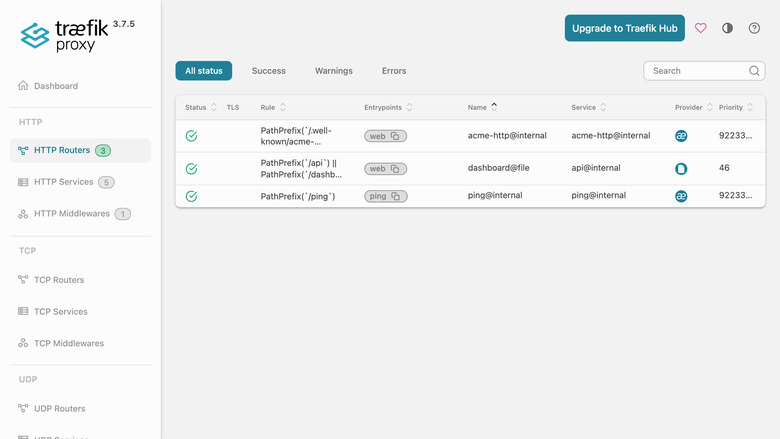
Traefik HTTP routers
Image
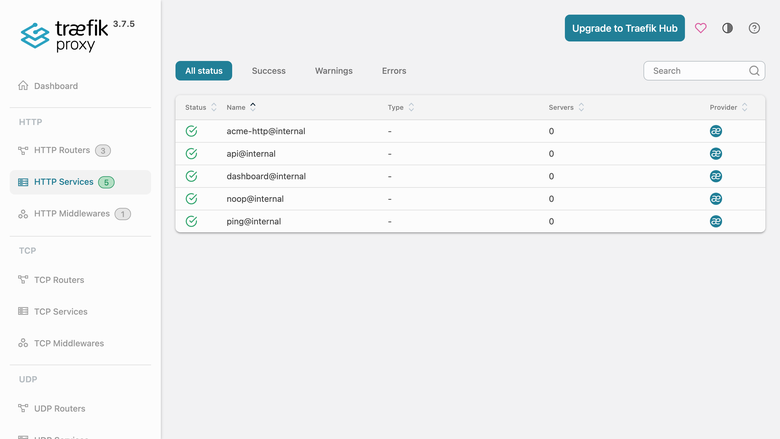
Traefik HTTP services
This is a repackaged open source software product wherein additional charges apply for cloudimg support services.
Overview
Traefik Proxy is a modern, cloud-native reverse proxy and load balancer that makes publishing services simple. This AMI delivers Traefik Proxy fully installed and configured as a systemd service so you have a production-grade edge router running within minutes of launch - eliminating the manual work of writing systemd units, configuring ACME resolvers, partitioning data disks, and generating secure credentials that a self-managed installation requires.
Why This AMI vs. Self-Managed Traefik
Deploying Traefik from scratch requires creating a dedicated service account with minimal privileges, writing a systemd unit with restart policies, partitioning a data disk for config and certificate persistence, configuring an ACME resolver, and generating hashed credentials for dashboard access. This AMI handles all of that at build time and first boot, so your team focuses on defining routes and backends rather than infrastructure plumbing. Combined with 24/7 cloudimg support, you get expert guidance on router configuration, middleware tuning, and edge hardening without maintaining in-house Traefik expertise.
Application Stack
The Traefik static binary is installed under /usr/local/bin and run by a dedicated unprivileged service account granted only the capability to bind privileged ports. A systemd service starts Traefik on boot and restarts it on failure. The static configuration, dynamic configuration directory, and Let's Encrypt certificate store reside on a dedicated data disk so configuration and certificates are independently resizable and survive instance replacement.
Reverse Proxy and Load Balancer
The web entrypoint listens on port 80 and the websecure entrypoint on port 443. Drop router and middleware definitions into the watched dynamic config directory and Traefik hot-reloads them with no restart required. Define backends, weighted load balancing, health checks, sticky sessions, rate limiting, headers, redirects, circuit breakers and more. An automatic Let's Encrypt certificate resolver is pre-configured so HTTPS is one DNS record and one router rule away.
Secure First Boot
The Traefik dashboard ships with no default authentication, so it is never exposed unprotected. The dashboard and API are published only through a router protected by HTTP Basic authentication middleware. On first boot a one-shot service generates a fresh dashboard password unique to that instance, writes the bcrypt-hashed credential into the dynamic config, and stores the plaintext in a file readable only by root. No shared or default credentials ship in the image.
Security Recommendations
For production deployments, cloudimg recommends enabling EBS encryption on the dedicated data disk to protect certificates and configuration at rest. Configure your VPC security group to allow inbound traffic only on ports 80 and 443 from your expected client ranges, and restrict SSH access to a bastion host or Systems Manager. These measures complement the application-level hardening already built into the AMI.
Ready To Use
The dashboard is served on port 80 under the /dashboard path. Sign in with the generated administrator credentials to inspect routers, services, middlewares, entrypoints, and TLS certificates in real time. Point a DNS record at the instance, add a router for your backend in the dynamic config directory, and Traefik routes and secures it automatically.
Example Scenario
A team running a SaaS application with three microservices behind a single domain launches this AMI, points their domain's DNS A record at the instance, and drops three router definitions into the dynamic config directory. Traefik automatically obtains a Let's Encrypt certificate, terminates TLS, and routes requests to each backend based on path prefixes - all without a restart or manual certificate renewal.
cloudimg Support
24/7 technical support by email and live chat with a one-hour average response for critical issues. Our engineers help with deployment, router and middleware configuration, provider setup, automatic TLS and Let's Encrypt, load balancing strategies, and edge hardening.
Use Cases
- Edge router and reverse proxy in front of web applications and APIs
- Automatic HTTPS with Let's Encrypt for any number of domains
- Load balancer across multiple backend instances with health checks
- Single ingress point for microservices with path-based or host-based routing
- TLS termination and HTTP-to-HTTPS redirection
All product and company names are trademarks or registered trademarks of their respective holders. Use of them does not imply any affiliation with or endorsement by them.
Highlights
- Launch a production-ready reverse proxy in minutes, not hours. Traefik Proxy is preinstalled as a systemd service with automatic restart on failure, the file provider watching a hot-reloading dynamic config directory, and a Let's Encrypt certificate resolver pre-configured. No manual systemd unit creation, ACME setup, or disk partitioning required - your team defines routes and backends instead of building infrastructure.
- Automatic HTTPS with zero ongoing maintenance. Point a DNS record at your instance, add a single router rule, and Traefik obtains and renews Let's Encrypt certificates automatically. The dedicated data disk preserves certificates and configuration independently of the instance, so storage is resizable and survives instance replacement without reconfiguration.
- Every instance boots with unique credentials that cannot be shared or reused. A first-boot service generates a fresh dashboard password, stores the bcrypt hash in the dynamic config, and writes plaintext to a root-only file. No default passwords ship in the image. Backed by 24/7 cloudimg support with one-hour average response for critical issues.
Details
Sold by
Delivery method
Delivery option
64-bit (x86) Amazon Machine Image (AMI)
Latest version
Operating system
Ubuntu 24.04
Deployed on AWS
New
Introducing multi-product solutions
You can now purchase comprehensive solutions tailored to use cases and industries.

Features and programs
Financing for AWS Marketplace purchases
AWS Marketplace now accepts line of credit payments through the PNC Vendor Finance program. This program is available to select AWS customers in the US, excluding NV, NC, ND, TN, & VT.

Pricing
Free trial
Try this product free for 7 days according to the free trial terms set by the vendor. Usage-based pricing is in effect for usage beyond the free trial terms. Your free trial gets automatically converted to a paid subscription when the trial ends, but may be canceled any time before that.
Pricing is based on actual usage, with charges varying according to how much you consume. Subscriptions have no end date and may be canceled any time. Alternatively, you can pay upfront for a contract, which typically covers your anticipated usage for the contract duration. Any usage beyond contract will incur additional usage-based costs.
Additional AWS infrastructure costs may apply. Use the AWS Pricing Calculator to estimate your infrastructure costs.
If you are an AWS Free Tier customer with a free plan, you are eligible to subscribe to this offer. You can use free credits to cover the cost of eligible AWS infrastructure. See AWS Free Tier for more details. If you created an AWS account before July 15th, 2025, and qualify for the Legacy AWS Free Tier, Amazon EC2 charges for Micro instances are free for up to 750 hours per month. See Legacy AWS Free Tier for more details.
Dimension | Description | Cost/hour |
|---|---|---|
t3.medium Recommended | t3.medium | $0.04 |
t2.micro | t2.micro instance type | $0.04 |
t3.micro | t3.micro instance type | $0.04 |
p4de.24xlarge | p4de.24xlarge instance type | $0.24 |
i7ie.18xlarge | i7ie.18xlarge instance type | $0.24 |
m6id.12xlarge | m6id.12xlarge instance type | $0.24 |
r8i-flex.xlarge | r8i-flex.xlarge instance type | $0.12 |
r5d.large | r5d.large instance type | $0.08 |
r5d.8xlarge | r5d.8xlarge instance type | $0.24 |
r8idb.8xlarge | r8idb.8xlarge instance type | $0.24 |
Vendor refund policy
Refunds available on request.

Legal
Vendor terms and conditions
Upon subscribing to this product, you must acknowledge and agree to the terms and conditions outlined in the vendor's End User License Agreement (EULA) .
Content disclaimer
Vendors are responsible for their product descriptions and other product content. AWS does not warrant that vendors' product descriptions or other product content are accurate, complete, reliable, current, or error-free.
Delivery details
64-bit (x86) Amazon Machine Image (AMI)
Amazon Machine Image (AMI)
An AMI is a virtual image that provides the information required to launch an instance. Amazon EC2 (Elastic Compute Cloud) instances are virtual servers on which you can run your applications and workloads, offering varying combinations of CPU, memory, storage, and networking resources. You can launch as many instances from as many different AMIs as you need.
Version release notes
Initial release of Traefik Proxy 3.7.5 reverse proxy and load balancer.
Additional details
Usage instructions
Connect via SSH on port 22 as the default login user for your operating system variant (the user guide lists it per variant). The dashboard is served on port 80: browse to http://<instance-public-ip>/dashboard/ and sign in with user admin and the generated password. Retrieve the credentials with: sudo cat /root/traefik-credentials.txt. The web entrypoint (port 80) and websecure entrypoint (port 443) carry your proxied traffic. Define routers, services and middlewares by dropping YAML files into the watched dynamic config directory at /etc/traefik/dynamic/ (Traefik hot-reloads them); the static config is /etc/traefik/traefik.yml. To enable automatic HTTPS, point a DNS record at the instance and attach the pre-configured letsencrypt certificate resolver to a router. The configuration and the Let's Encrypt certificate store live on a dedicated data disk mounted at /etc/traefik.
Resources
Vendor resources
Support
Vendor support
cloudimg provides 24/7 technical support for this product by email and live chat. Our engineers assist with deployment, router and middleware configuration, provider setup, automatic TLS and Let's Encrypt troubleshooting, load balancing strategies, performance tuning, and edge hardening. Critical issues receive a one-hour average response.
Getting Started After Launch
- SSH into your instance and retrieve the generated dashboard password from /root/.traefik_dashboard_password (readable only by root).
- Open your browser to http:///dashboard and sign in with user "admin" and the retrieved password.
- Point a DNS A record at your instance's public IP.
- Create a YAML or TOML file in /etc/traefik/dynamic/ defining your backend router and service.
- Traefik hot-reloads the new route automatically - verify in the dashboard that the router appears with a valid Let's Encrypt certificate.
Prerequisites
- Minimum instance type: t3.small recommended for light workloads
- Security group: allow inbound TCP on ports 80, 443, and 22 (SSH)
- A registered domain name with DNS access for Let's Encrypt validation
- cloudimg recommends enabling EBS encryption on the data volume for at-rest protection
Contact Support
Email: support@cloudimg.co.uk Live chat: available 24/7
We assist with initial deployment, ongoing configuration changes, updates, and troubleshooting. For refund requests, contact us via email with your AWS Marketplace order ID.
AWS infrastructure support
AWS Support is a one-on-one, fast-response support channel that is staffed 24x7x365 with experienced and technical support engineers. The service helps customers of all sizes and technical abilities to successfully utilize the products and features provided by Amazon Web Services.
Similar products

The Cloud Native Application Proxy
Simplify networking complexity while designing, deploying, and operating applications.

Your APIs deserve better Publishing, Securing, and Managing your APIs has never been easier.

This product has charges associated with it for deployment, configuration, and ongoing support. Self-hosted Traefik reverse proxy and load balancer with automatic HTTPS via Let's Encrypt, dynamic service discovery, and Docker-based routing on EC2.

HTTP/HTTPS Proxy on Ubuntu 22.04. Offers Transparent Proxy, URL Filtering, Reverse Proxy & more
Customer reviews
No customer reviews yet
Be the first to review this product . We've partnered with PeerSpot to gather customer feedback. You can share your experience by writing or recording a review, or scheduling a call with a PeerSpot analyst.