
Sold by: cloudimg
Deployed on AWS
Free Trial
AWS Free Tier
This product has charges associated with it for seller support. Deploy a hardened Squid caching forward proxy in your Amazon VPC in minutes. Ideal for DevOps and security teams caching and controlling outbound HTTP and HTTPS egress. Ships default deny with a per instance password generated on first boot, never an open proxy. Backed by 24/7 cloudimg support.
Overview
Image
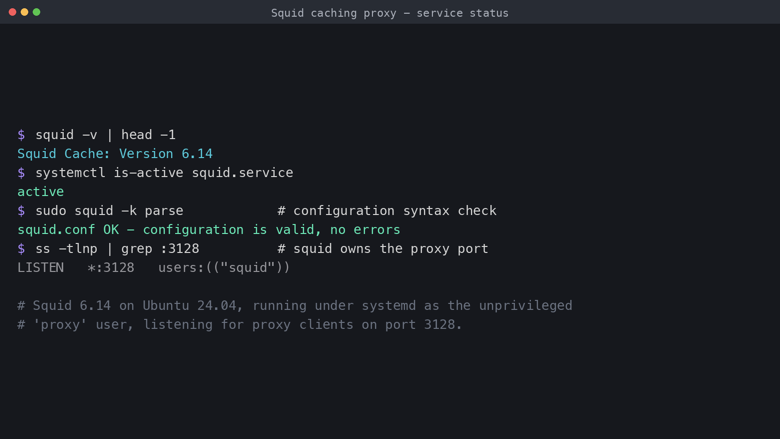
Squid service status
Image
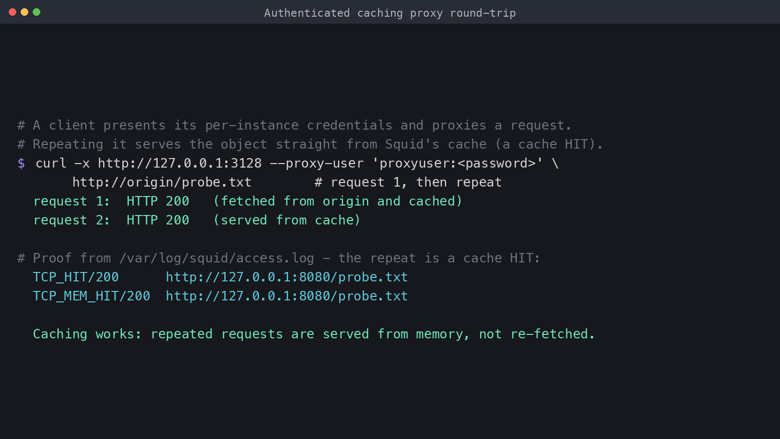
Authenticated caching round-trip
Image
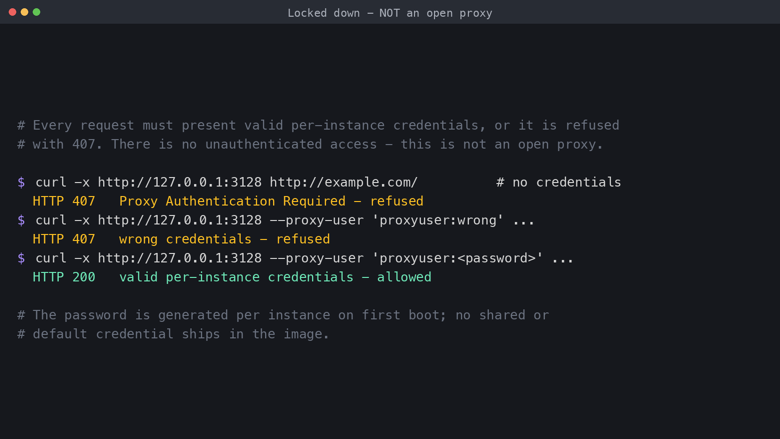
Locked down, not an open proxy
Image
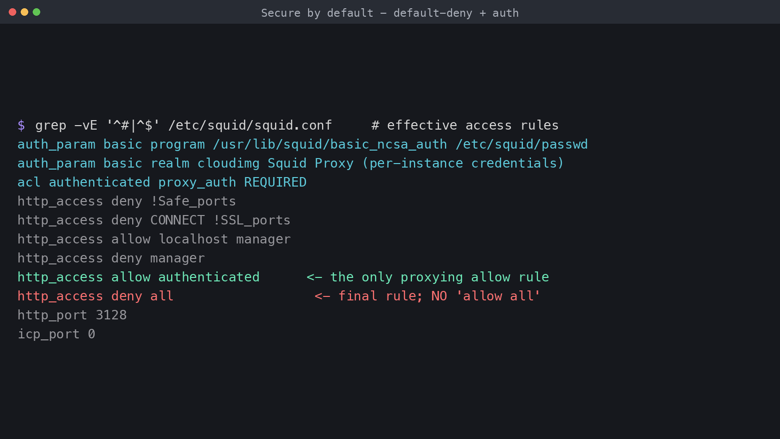
Secure by default configuration
This is a repackaged open source software product wherein additional charges apply for cloudimg support services.
Squid - Secure Caching Forward Proxy for AWS
Deploy a production ready, hardened Squid 6 caching proxy inside your Amazon VPC in minutes. Squid is one of the most widely deployed open source caching proxies in the world, used to cache web content, accelerate repeat requests and control outbound HTTP and HTTPS traffic. This AMI launches with default deny access control, per instance authentication and no shared or default credentials, so you skip hours of manual configuration and security review.
Who is this for?
This image is built for DevOps engineers, platform teams and security architects who need to cache and control outbound HTTP and HTTPS traffic from EC2 instances and other VPC based workloads. Common scenarios include:
- CI/CD dependency caching: a build fleet pulling the same package repositories many times a day serves repeat requests from Squid's on disk cache, cutting egress bandwidth and speeding up pipelines.
- Regulated egress control: teams that must restrict and record outbound connections route traffic through Squid's auditable access control rules and access log before it leaves the VPC.
- Bandwidth and NAT data cost reduction: cacheable HTTP and HTTPS responses are served from cache on repeat, reducing the volume of repeated outbound traffic.
Secure by default, never an open proxy
An unauthenticated forward proxy reachable from the public internet is a magnet for spam relaying, credential stuffing and content laundering, so this image ships default deny with per instance proxy authentication. The shipped configuration denies all traffic as its final rule, requires a valid proxy username and password for every request, blocks CONNECT tunnels to non TLS ports and non web ports, restricts the cache manager to localhost, disables inter cache peering, and suppresses version and forwarding headers. There is deliberately no allow all rule.
No default or shared credentials ship in the image. On the first boot of your instance a one shot service generates a unique proxy password, writes it hashed into the Squid password database, and writes the plaintext login to a file only the root user can read. The captured image ships no usable password at all, so no instance can proxy until first boot provisions it, a stale or guessed password is refused with a 407 response, and every instance ends up with a different password.
Application stack
Squid 6.14 runs as a hardened systemd service listening on port 3128 as the unprivileged proxy user. Cache storage lives under a dedicated on disk cache directory, access is controlled by Basic proxy authentication, requests are recorded to the Squid access log, and the whole configuration is a single reviewed squid.conf so the access rule ordering, and therefore the deny by default guarantee, is fully under control.
How to get started
- Launch the AMI in your VPC and choose an instance type appropriate for your expected request volume.
- Configure the Security Group to allow inbound TCP 3128 only from your trusted client subnets, and TCP 22 from your administration network.
- SSH into the instance and read the generated proxy username and password from the root only credentials file.
- Point any HTTP client at the instance on port 3128 using the retrieved username and password.
- Request the same URL twice and confirm the repeat is served from cache. The proxy is answering authenticated requests within minutes of launch.
cloudimg engineers provide 24/7 support and can help you scope client access lists, restrict the proxy port to trusted subnets, add upstream cache peers, tune caching and refresh rules, configure TLS interception for content filtering, and plan version upgrades.
This image is a caching forward proxy for your OWN authorized clients: content caching, egress control and bandwidth savings inside your network. It is not an anonymizer and is not a way to bypass geo restrictions or run an open public proxy.
cloudimg is not affiliated with or endorsed by the Squid project or the Squid Software Foundation. All product and company names are trademarks or registered trademarks of their respective holders. Use of them does not imply any affiliation with or endorsement by them.
Highlights
- Squid, the widely deployed open source caching forward proxy, fully installed and hardened and listening on port 3128 within minutes of launch. It caches web content for faster repeat requests and lower egress bandwidth, and controls outbound HTTP and HTTPS for your own authorized clients, skipping hours of manual proxy configuration and hardening.
- Secure by default, never an open proxy. The shipped configuration is default deny with per instance Basic proxy authentication: every request needs a valid proxy password, all traffic is denied as the final rule, there is no allow all, CONNECT tunnels to non TLS ports and non web ports are blocked, and the cache manager is localhost only. Every instance generates a unique proxy password on first boot and the image ships no usable or default credential.
- 24/7 expert technical support from cloudimg with a one hour average response time for critical issues. Our engineers help with scoping client access lists, restricting the proxy port to trusted subnets, adding upstream cache peers, tuning caching and refresh rules, and version upgrades.
Details
Sold by
Categories
Delivery method
Delivery option
64-bit (x86) Amazon Machine Image (AMI)
Latest version
Operating system
Ubuntu 24.04
Deployed on AWS
New
Introducing multi-product solutions
You can now purchase comprehensive solutions tailored to use cases and industries.

Features and programs
Financing for AWS Marketplace purchases
AWS Marketplace now accepts line of credit payments through the PNC Vendor Finance program. This program is available to select AWS customers in the US, excluding NV, NC, ND, TN, & VT.

Pricing
Free trial
Try this product free for 7 days according to the free trial terms set by the vendor. Usage-based pricing is in effect for usage beyond the free trial terms. Your free trial gets automatically converted to a paid subscription when the trial ends, but may be canceled any time before that.
Pricing is based on actual usage, with charges varying according to how much you consume. Subscriptions have no end date and may be canceled any time. Alternatively, you can pay upfront for a contract, which typically covers your anticipated usage for the contract duration. Any usage beyond contract will incur additional usage-based costs.
Additional AWS infrastructure costs may apply. Use the AWS Pricing Calculator to estimate your infrastructure costs.
If you are an AWS Free Tier customer with a free plan, you are eligible to subscribe to this offer. You can use free credits to cover the cost of eligible AWS infrastructure. See AWS Free Tier for more details. If you created an AWS account before July 15th, 2025, and qualify for the Legacy AWS Free Tier, Amazon EC2 charges for Micro instances are free for up to 750 hours per month. See Legacy AWS Free Tier for more details.
Dimension | Description | Cost/hour |
|---|---|---|
m5.large Recommended | m5.large | $0.08 |
t2.micro | t2.micro instance type | $0.04 |
t3.micro | t3.micro instance type | $0.04 |
c5a.12xlarge | c5a.12xlarge instance type | $0.24 |
c5a.16xlarge | c5a.16xlarge instance type | $0.24 |
c5a.24xlarge | c5a.24xlarge instance type | $0.24 |
c5a.2xlarge | c5a.2xlarge instance type | $0.24 |
c5a.4xlarge | c5a.4xlarge instance type | $0.24 |
c5a.8xlarge | c5a.8xlarge instance type | $0.24 |
c5a.large | c5a.large instance type | $0.08 |
Vendor refund policy
Refunds available on request.

Legal
Vendor terms and conditions
Upon subscribing to this product, you must acknowledge and agree to the terms and conditions outlined in the vendor's End User License Agreement (EULA) .
Content disclaimer
Vendors are responsible for their product descriptions and other product content. AWS does not warrant that vendors' product descriptions or other product content are accurate, complete, reliable, current, or error-free.
Delivery details
64-bit (x86) Amazon Machine Image (AMI)
Amazon Machine Image (AMI)
An AMI is a virtual image that provides the information required to launch an instance. Amazon EC2 (Elastic Compute Cloud) instances are virtual servers on which you can run your applications and workloads, offering varying combinations of CPU, memory, storage, and networking resources. You can launch as many instances from as many different AMIs as you need.
Version release notes
Initial release.
Additional details
Usage instructions
Connect via SSH on port 22 as the default login user for your operating system variant (the user guide lists it per variant; on Ubuntu it is ubuntu). This is a headless caching forward proxy with no web console. Retrieve the per instance proxy username and password with: sudo cat /root/squid-credentials.txt. The proxy listens on port 3128 and requires those credentials. Prove it end to end at any time with: sudo /usr/local/sbin/squid-roundtrip.sh (an authenticated request succeeds and is cached, an unauthenticated request is refused with 407). Restrict port 3128 in the security group to your trusted client subnets.
Resources
Vendor resources
Support
Vendor support
cloudimg Support - 24/7 Technical Assistance
cloudimg provides round-the-clock technical support for this Squid caching proxy image via email (support@cloudimg.co.uk ) and live chat. Our engineers assist with:
- Initial deployment and first boot configuration
- Scoping client access control lists and restricting the proxy port to trusted subnets
- Managing the per instance proxy password and adding further proxy users
- Adding upstream cache peers and configuring cache hierarchies
- Tuning cache sizing, refresh patterns and object retention
- Enabling TLS interception for content filtering
- Troubleshooting connectivity, caching and access control issues
Critical issues receive a one hour average response time. For billing, subscription changes, or refund requests, contact support@cloudimg.co.uk .
AWS infrastructure support
AWS Support is a one-on-one, fast-response support channel that is staffed 24x7x365 with experienced and technical support engineers. The service helps customers of all sizes and technical abilities to successfully utilize the products and features provided by Amazon Web Services.
Similar products

Squid is a caching proxy for the Web supporting HTTP, HTTPS, FTP, and more. It reduces bandwidth and improves response times by caching and reusing frequently-requested web pages. Squid has extensive access controls and makes a great server accelerator.

This product has charges associated with it for AWS support & maintenance. Squid is a caching proxy for the Web supporting HTTP, HTTPS, FTP, and more. It reduces bandwidth and improves response times by caching and reusing frequently-requested web pages. Squid has extensive access controls and makes a great server accelerator.

This product has charges associated with it for support, maintenance, and pre-configuration to be instantaneously deployed on AWS Marketplace with all security and enterprise standards. Squid Proxy Server Image is packaged to leverage cost-effectiveness, scalability, and flexibility.

Squid is a caching proxy for the Web supporting HTTP, HTTPS, FTP, and more. It reduces bandwidth and improves response times by caching and reusing frequently-requested web pages. Squid has extensive access controls and makes a great server accelerator.

Deploy Squid as a caching proxy with domain-level filtering, user authentication, and ACLs to control and accelerate VPC internet access with advanced content filtering and cost optimization.
Customer reviews
No customer reviews yet
Be the first to review this product . We've partnered with PeerSpot to gather customer feedback. You can share your experience by writing or recording a review, or scheduling a call with a PeerSpot analyst.