Sold by: Shufti
Deployed on AWS
Forensic audit engine to uncover AI-generated and fabricated ID documents that passed existing KYC controls, running fully inside the companys AWS account.
Overview
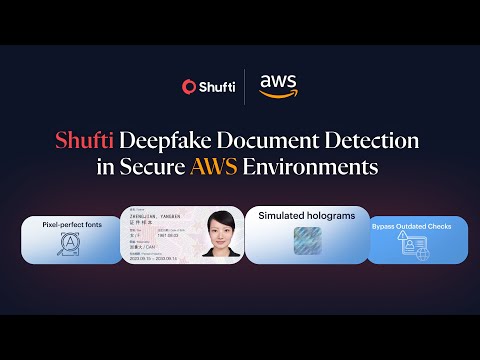
Generative AI can now produce identity documents that pass OCR, template checks, and visual review. Many of these documents were approved before forensic-grade document analysis became necessary, creating silent exposure in the customer base.
Shufti Document Deepfake Detection treats each historic ID document as a forensic object rather than a source of extracted text. The engine analyses fonts, layouts, logos, backgrounds, and security features to identify AI-generated documents and fabricated templates that mimic genuine IDs.
The AMI runs inside the companys AWS environment and processes historic onboarding documents in batches. Clear outcomes allow compliance and fraud teams to measure synthetic document exposure using real data rather than theoretical threat models.
This off-flow audit enables companies to re-check historic approvals or single checks at minimal cost and strengthen document acceptance policies without disrupting live onboarding journeys.
Key Features:
- Identify AI-generated and fabricated identity documents
- Expose synthetic IDs that passed legacy document checks
- Quantify document deepfake exposure across 2023-25 onboarded customers
AI-generated documents often enter systems long before detection controls mature. Shufti Document Deepfake Detection provides a controlled way to rescan historic approvals and understand real exposure.
Deploy directly from AWS Marketplace to assess document deepfake risk inside your companys own cloud environment.
Highlights
- One-click AMI deployment inside the companys AWS account, no lengthy contracts or procurement cycles involved.
- No production integrations required and no disruption to live customer flows.
- No external document processing and no data-privacy concerns as AMIs behaves like an on-premise deployment.
Details
Sold by
Categories
Delivery method
Delivery option
AMI with CloudFormation Template
64-bit (x86) Amazon Machine Image (AMI)
Latest version
Operating system
AmazonLinux 23
Deployed on AWS
New
Introducing multi-product solutions
You can now purchase comprehensive solutions tailored to use cases and industries.

Features and programs
Financing for AWS Marketplace purchases
AWS Marketplace now accepts line of credit payments through the PNC Vendor Finance program. This program is available to select AWS customers in the US, excluding NV, NC, ND, TN, & VT.

Pricing
Pricing is based on the duration and terms of your contract with the vendor. This entitles you to a specified quantity of use for the contract duration. If you choose not to renew or replace your contract before it ends, access to these entitlements will expire.
Additional AWS infrastructure costs may apply. Use the AWS Pricing Calculator to estimate your infrastructure costs.
Dimension | Description | Cost/month |
|---|---|---|
Verification | Number of Units/Requests | $0.04 |
Dimensions summary
This listing uses one pricing dimension based on verification volume. You pay per unit, where each unit is a verification request. Your cost scales directly with how many documents you submit for deepfake analysis. There are no separate tiers or instance sizes to choose from. To budget, you estimate the number of verification requests you expect to run. The tool re-analyzes stored document images to flag AI-generated IDs, so your unit count reflects the size of the document set you audit.
Top-of-mind questions for buyers
One unit is a single verification request. Each stored document image you submit for deepfake analysis counts as one verification. Your unit count reflects the number of records you re-scan, so auditing 50,000 documents means 50,000 verification requests.
Cost scales directly with verification volume. There are no tiers or included amounts, so each additional document adds one more unit at the same per-unit rate. Your total tracks the size of the document set you submit for analysis.
No. The audit re-analyzes document images already stored from original onboarding, so no customer contact is required. You only pay for verification units on the documents you submit for deepfake analysis.
shuftipro.com
Helpful?
Vendor refund policy
Usage based charges are generally non refundable. If you believe you were charged due to a service defect (e.g., container unavailability), open a ticket within 7 days with timestamps and logs. Verified incidents may be credited or refunded at our discretion. Refunds are processed through AWS Marketplace per AWS refund procedures.

Legal
Vendor terms and conditions
Upon subscribing to this product, you must acknowledge and agree to the terms and conditions outlined in the vendor's End User License Agreement (EULA) .
Content disclaimer
Vendors are responsible for their product descriptions and other product content. AWS does not warrant that vendors' product descriptions or other product content are accurate, complete, reliable, current, or error-free.
Delivery details
64-bit (x86) Amazon Machine Image (AMI)
Amazon Machine Image (AMI)
An AMI is a virtual image that provides the information required to launch an instance. Amazon EC2 (Elastic Compute Cloud) instances are virtual servers on which you can run your applications and workloads, offering varying combinations of CPU, memory, storage, and networking resources. You can launch as many instances from as many different AMIs as you need.
Version release notes
Shufti Document Deepfake Audit
Additional details
Usage instructions
Before deploying the Shufti Document Deepfake Audit AMI, ensure you have an AWS account with permissions to launch EC2 instances and create IAM roles and instance profiles, an active subscription to the product in AWS Marketplace, and a network setup including a VPC, Subnet, and Security Group with HTTP (port 80) open. The recommended instance type is r7i.4xlarge or larger (Nitro Enclave support required).
To deploy, launch a new EC2 instance using the AMI and paste the provided Shufti initialization script in Advanced Details User Data. Provisioning typically takes about 25 minutes. After provisioning completes, open the EC2 Console, copy the Public IP of the instance, and access the application at: http://<EC2_PUBLIC_IP>:80.
Ensure the Security Group allows port 80, and if provisioning exceeds 25 minutes, review EC2 system logs or console output. For detailed deployment instructions and API usage, see the full Shufti user guide: https://developers.shuftipro.com/docs/marketplaces/aws/user-guide
Support
AWS infrastructure support
AWS Support is a one-on-one, fast-response support channel that is staffed 24x7x365 with experienced and technical support engineers. The service helps customers of all sizes and technical abilities to successfully utilize the products and features provided by Amazon Web Services.
Similar products
Batch audit of historic KYC selfies to uncover AI-generated faces and face swaps that passed earlier checks, deployed fully inside the companys own AWS environment.
AI-based audit engine to expose spoofed, replayed, and injected liveness sessions that were previously marked as live, running inside the companys own AWS account.
Batch audit of historic ID documents to detect reuse, tampering, and composited identities, deployed inside the companys own AWS environment.

Effortlessly verify user identities worldwide with Shufti AI-powered identity verification solutions, enabling fast, secure, and compliant onboarding experiences.
Customer reviews
No customer reviews yet
Be the first to review this product . We've partnered with PeerSpot to gather customer feedback. You can share your experience by writing or recording a review, or scheduling a call with a PeerSpot analyst.