Sold by: ArcadeDB
Deployed on AWS
Free Trial
Open-source (Apache 2.0) multi-model database: graph, document, key-value, vector, time series and full-text search in one engine, queried with SQL, Cypher, Gremlin and GraphQL.
Overview
Video
ArcadeDB in 2 minutes
Image
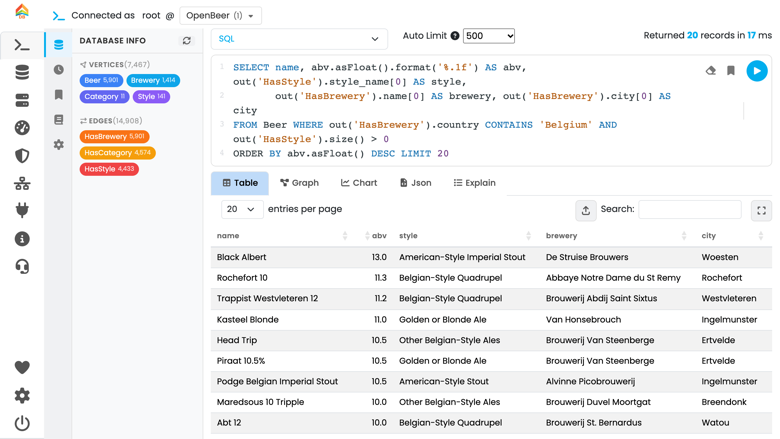
SQL queries across graph relationships
Image
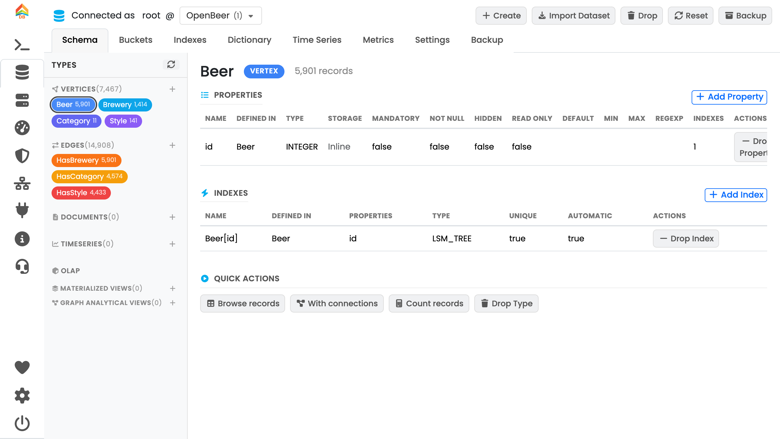
Schema and index management
Image
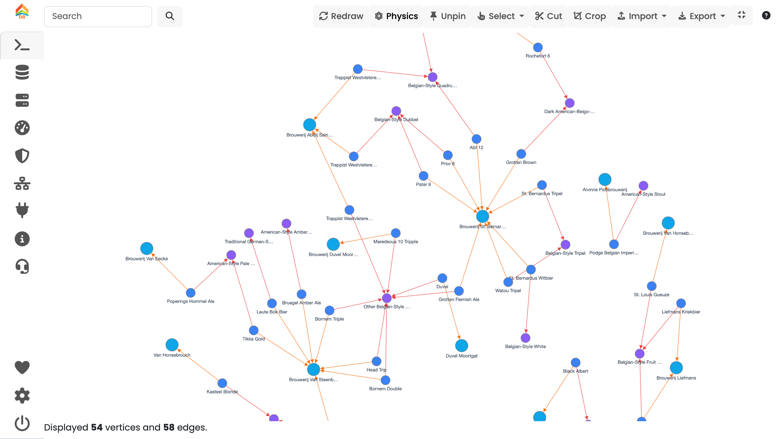
Graph view in ArcadeDB Studio

Video
Product video
ArcadeDB is a fast, open-source multi-model database written in Java and licensed under Apache 2.0. One server stores graphs, documents, key-value pairs, vectors, time series and full-text indexes. You query them with SQL, openCypher, Gremlin or GraphQL, or through the PostgreSQL, MongoDB, Redis and Bolt wire protocols, so many Neo4j and MongoDB applications connect with little or no change.
This image installs ArcadeDB as a systemd service on a CIS-hardened Ubuntu 22.04 LTS with OpenJDK 25, for x86_64 and Graviton (arm64) instances. Every instance generates its own root password on first boot, and there are no default credentials. Studio, the built-in web console, and the HTTP API listen on port 2480.
There are no node, core or feature limits. Community support is available through GitHub issues and the ArcadeDB documentation.
Highlights
- One open-source engine for graph, document, key-value, vector, time series and full-text data, with no node, core or feature limits.
- Query with SQL, Cypher, Gremlin and GraphQL, or connect over the PostgreSQL, MongoDB, Redis and Bolt protocols.
- Hardened Ubuntu 22.04 with Java 25, a unique root password per instance, and builds for x86_64 and Graviton.
Details
Sold by
Categories
Delivery method
Delivery option
64-bit (x86) Amazon Machine Image (AMI)
Latest version
Operating system
Ubuntu 22.04
Deployed on AWS
New
Introducing multi-product solutions
You can now purchase comprehensive solutions tailored to use cases and industries.

Features and programs
Financing for AWS Marketplace purchases
AWS Marketplace now accepts line of credit payments through the PNC Vendor Finance program. This program is available to select AWS customers in the US, excluding NV, NC, ND, TN, & VT.

Pricing
Free trial
Try this product free for 7 days according to the free trial terms set by the vendor. Usage-based pricing is in effect for usage beyond the free trial terms. Your free trial gets automatically converted to a paid subscription when the trial ends, but may be canceled any time before that.
Pricing is based on actual usage, with charges varying according to how much you consume. Subscriptions have no end date and may be canceled any time.
Additional AWS infrastructure costs may apply. Use the AWS Pricing Calculator to estimate your infrastructure costs.
Dimension | Cost/hour |
|---|---|
m6i.large Recommended | $0.04 |
m6i.4xlarge | $0.04 |
m6i.2xlarge | $0.04 |
m6i.xlarge | $0.04 |
m7i.4xlarge | $0.04 |
m7i.2xlarge | $0.04 |
m7i.xlarge | $0.04 |
m7i.large | $0.04 |
r6i.4xlarge | $0.04 |
r6i.2xlarge | $0.04 |
Dimensions summary
You pay by the hour for the EC2 instance that runs ArcadeDB Community Edition. The software itself is open source at no charge; your cost is the hourly rate tied to the instance size you pick. Options span four instance families: t3 for general burstable use, c6i and c7i tuned for compute, m6i and m7i balanced for memory and compute, and r6i and r7i weighted toward memory. Within each family, sizes scale from large up to 16xlarge, with more CPU and memory at each step. Choose the size that matches your workload; billing follows usage.
Top-of-mind questions for buyers
No. ArcadeDB Community Edition is open source under Apache 2.0 at no charge. Your hourly cost pays for the EC2 instance that runs it, billed per hour. There is no separate license fee, no node limits, and no feature gating on the database itself.
The hourly software rate applies only while the instance runs. A fully stopped instance stops accruing the hourly charge. Note that underlying AWS storage for your database volumes may still incur separate fees while the instance is stopped. Billing follows running time.
Each family targets a different balance of resources. The t3 family offers general burstable use. The c6i and c7i families weight toward compute. The m6i and m7i families balance memory and compute. The r6i and r7i families weight toward memory. Within each, larger sizes add CPU and memory.
arcadedb.com
Helpful?
Vendor refund policy
ArcadeDB is provided without refunds. No refunds are offered for software fees, and AWS infrastructure charges (EC2, EBS, data transfer) are billed by AWS and are not refundable by the seller. For questions about your subscription or billing, contact the seller using the support details on this product listing.

Legal
Vendor terms and conditions
Upon subscribing to this product, you must acknowledge and agree to the terms and conditions outlined in the vendor's End User License Agreement (EULA) .
Content disclaimer
Vendors are responsible for their product descriptions and other product content. AWS does not warrant that vendors' product descriptions or other product content are accurate, complete, reliable, current, or error-free.
Delivery details
64-bit (x86) Amazon Machine Image (AMI)
Amazon Machine Image (AMI)
An AMI is a virtual image that provides the information required to launch an instance. Amazon EC2 (Elastic Compute Cloud) instances are virtual servers on which you can run your applications and workloads, offering varying combinations of CPU, memory, storage, and networking resources. You can launch as many instances from as many different AMIs as you need.
Version release notes
ArcadeDB 26.11.1 on Ubuntu 22.04 LTS with OpenJDK 25.
Additional details
Usage instructions
- Launch with your EC2 key pair. Allow inbound TCP 22 and 2480 only from your own IP range. 2. SSH in as ubuntu and read the generated password: cat ~/arcadedb-root-password.txt 3. Open http://<instance-public-ip>:2480 and log in as root. 4. Service: sudo systemctl status arcadedb. Data: /var/lib/arcadedb/databases. Docs: https://docs.arcadedb.com 5. PostgreSQL (5432), Bolt (7687) and Gremlin (8182) are off by default. To use one, open its port only to your own IP range and enable its plugin: https://github.com/ArcadeData/arcadedb-ami/blob/main/marketplace/usage-instructions.md
Resources
Support
Vendor support
Community support through GitHub issues at https://github.com/ArcadeData/arcadedb/issues and the documentation at https://docs.arcadedb.com . No SLA is included with this Community Edition.
AWS infrastructure support
AWS Support is a one-on-one, fast-response support channel that is staffed 24x7x365 with experienced and technical support engineers. The service helps customers of all sizes and technical abilities to successfully utilize the products and features provided by Amazon Web Services.
Similar products
Open-source (Apache 2.0) multi-model database: graph, document, key-value, vector, time series and full-text search in one engine, queried with SQL, Cypher, Gremlin and GraphQL.
OrbisID Community Edition is a free, self-hosted Privileged Access Management (PAM) detection tool that discovers, classifies, and reports on privileged access across up to 10 target systems. It surfaces unknown admin access, ex-employee risk, and compliance gaps against frameworks including NIST 800-53, ISO 27001, and Cyber Essentials, all without your data ever leaving your environment.

OroCommerce Community Edition is an open-source eCommerce platform built from the ground up for B2B companies in manufacturing, distribution, wholesale, and retail.
Customer reviews
No customer reviews yet
Be the first to review this product . We've partnered with PeerSpot to gather customer feedback. You can share your experience by writing or recording a review, or scheduling a call with a PeerSpot analyst.