
Sold by: cloudimg
Deployed on AWS
Free Trial
AWS Free Tier
This product has charges associated with it for seller support. Launch a production-ready OpenSearch 3 search and analytics platform in minutes - no manual setup. Secured per-instance credentials and 24/7 cloudimg support included.
Overview
Image
OpenSearch Dashboards welcome
Image
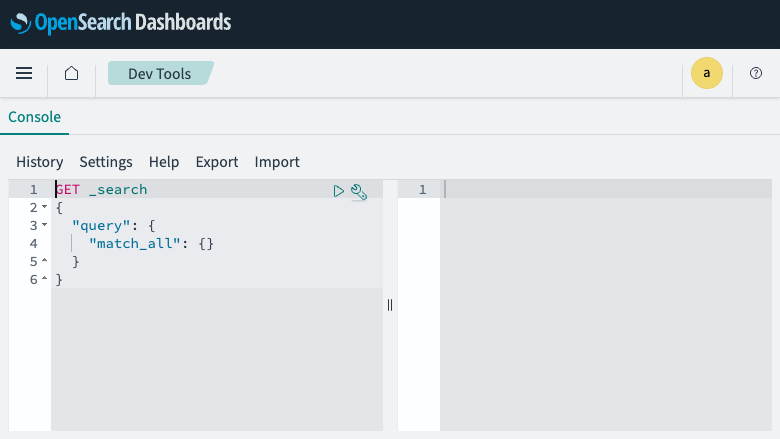
Dev Tools Console
Image
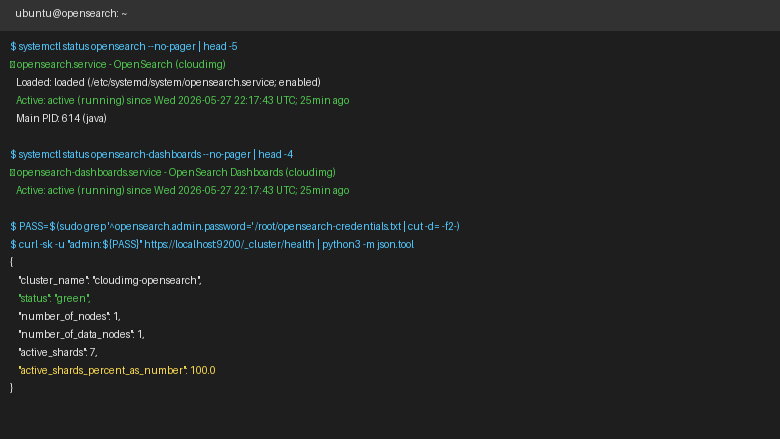
Service status and cluster health
This is a repackaged open source software product wherein additional charges apply for cloudimg support services.
OpenSearch 3 - Ready-to-Run Search and Analytics on AWS
This is a repackaged open source software product wherein additional charges apply for cloudimg support services.
OpenSearch is the open source distributed search and analytics engine forked from Elasticsearch. This AMI delivers OpenSearch 3.6 and OpenSearch Dashboards 3.6 fully installed and running as systemd services, giving DevOps teams and platform engineers a complete search and analytics platform within minutes of launch - eliminating hours of manual installation, dependency resolution, and security hardening.
Why This AMI Over Manual Deployment or Competing Images
- Minutes to first query, not hours: Both OpenSearch and Dashboards start automatically on boot. No package installation, no YAML editing, no plugin configuration required.
- No shared or default credentials: Unlike images that ship with known passwords, every instance generates a unique 20-character admin password on first boot, eliminating credential-sharing risk.
- Isolated data storage: A dedicated 30 GiB gp3 EBS volume for index data means you can resize storage independently without risking your OS root disk - flexibility that managed services often restrict.
Software Stack
- OpenSearch 3.6.0 running as a systemd service with the security plugin enabled (TLS/HTTPS support, role-based access control)
- OpenSearch Dashboards 3.6.0 providing the web UI for index management, visualization, and data exploration
- Both services run under a dedicated system user for process isolation
- Ubuntu base with regular security updates
Secure First Boot
On first boot, a one-shot systemd service generates a fresh 20-character admin password unique to that instance, configures it via the OpenSearch security plugin, and stores the plain text value in a root-only credentials file (/root/.opensearch_credentials). No shared or default credentials remain in the running image. This approach helps teams meet access-control requirements without manual post-launch hardening.
Dedicated Data Disk
OpenSearch index data lives on a separate 30 GiB gp3 EBS volume mounted at /var/lib/opensearch/data. This architecture lets you resize or snapshot index storage independently of the OS root disk - reducing operational risk during scaling events and simplifying backup workflows.
Encryption and Network Security
The OpenSearch security plugin supports TLS/HTTPS on ports 9200 and 5601. The EBS data volume supports AWS encryption at rest via KMS. For production deployments, we recommend launching in a private VPC subnet with security group rules restricting ingress to ports 9200, 5601, and 22 from trusted CIDR ranges only.
AWS Integrations
This AMI works with common AWS services and open source tools for data ingestion and monitoring:
- Amazon S3 - Use snapshot/restore to back up indexes to S3 or ingest data from S3 buckets
- Amazon CloudWatch - Forward instance and application metrics for centralized monitoring
- Fluent Bit / Logstash - Ship logs from containerized workloads or EC2 instances into OpenSearch for analysis
- Prometheus and Grafana - Monitor OpenSearch cluster health metrics alongside your existing observability stack
Use Case: Log Analytics for Containerized Workloads
A DevOps team running microservices on Amazon ECS or EKS can deploy this AMI as a single-node log analytics backend. Fluent Bit sidecars ship structured JSON logs to the OpenSearch REST API on port 9200. OpenSearch Dashboards on port 5601 provides real-time visualization of error rates, latency percentiles, and deployment events - suitable for environments ingesting up to tens of gigabytes per day on appropriately sized instances.
Additional Use Cases
- Application search and full-text search
- E-commerce product search and faceted navigation
- Security information and event management (SIEM)
- Real-time data ingestion and dashboarding
cloudimg Support
24/7 technical support by email and live chat. Our engineers help with OpenSearch deployment, index management, search query optimization, dashboards, cluster configuration, and performance tuning. Critical issues receive a one-hour average response.
Get Started
Launch the AMI, retrieve your unique admin password from /root/.opensearch_credentials, and begin indexing data via the REST API on port 9200 or explore your data through Dashboards on port 5601.
All product and company names are trademarks or registered trademarks of their respective holders. Use of them does not imply any affiliation with or endorsement by them.
Highlights
- Launch a complete OpenSearch 3.6 search and analytics platform in minutes rather than spending hours on manual installation and configuration. Both OpenSearch and OpenSearch Dashboards run as systemd services immediately after boot - no package setup, YAML editing, or plugin installation required. Ideal for DevOps teams and platform engineers who need a single-node search backend for development, staging, or production log analytics workloads.
- Every instance generates a unique 20-character admin password on first boot - unlike competing AMIs that ship with known default credentials. The password is stored in a root-only file, eliminating credential-sharing risk and helping teams meet access-control compliance requirements without manual post-launch hardening. TLS/HTTPS is supported via the OpenSearch security plugin for encrypted communication on ports 9200 and 5601.
- Index data lives on a dedicated 30 GiB gp3 EBS volume, independently resizable and snapshotable without touching the OS root disk. This separation reduces operational risk during scaling events and simplifies backup workflows compared to co-locating data on the root volume. Integrates with Amazon S3 for snapshot storage, Fluent Bit and Logstash for log ingestion, and CloudWatch for monitoring.
Details
Sold by
Categories
Delivery method
Delivery option
64-bit (x86) Amazon Machine Image (AMI)
Latest version
Operating system
Ubuntu 24.04
Deployed on AWS
New
Introducing multi-product solutions
You can now purchase comprehensive solutions tailored to use cases and industries.

Features and programs
Financing for AWS Marketplace purchases
AWS Marketplace now accepts line of credit payments through the PNC Vendor Finance program. This program is available to select AWS customers in the US, excluding NV, NC, ND, TN, & VT.

Pricing
Free trial
Try this product free for 7 days according to the free trial terms set by the vendor. Usage-based pricing is in effect for usage beyond the free trial terms. Your free trial gets automatically converted to a paid subscription when the trial ends, but may be canceled any time before that.
Pricing is based on actual usage, with charges varying according to how much you consume. Subscriptions have no end date and may be canceled any time. Alternatively, you can pay upfront for a contract, which typically covers your anticipated usage for the contract duration. Any usage beyond contract will incur additional usage-based costs.
Additional AWS infrastructure costs may apply. Use the AWS Pricing Calculator to estimate your infrastructure costs.
If you are an AWS Free Tier customer with a free plan, you are eligible to subscribe to this offer. You can use free credits to cover the cost of eligible AWS infrastructure. See AWS Free Tier for more details. If you created an AWS account before July 15th, 2025, and qualify for the Legacy AWS Free Tier, Amazon EC2 charges for Micro instances are free for up to 750 hours per month. See Legacy AWS Free Tier for more details.
Dimension | Description | Cost/hour |
|---|---|---|
t3.medium Recommended | t3.medium | $0.04 |
t3.micro | t3.micro instance type | $0.04 |
t2.micro | t2.micro instance type | $0.04 |
c6id.large | c6id.large instance type | $0.08 |
vt1.3xlarge | vt1.3xlarge instance type | $0.24 |
inf1.6xlarge | inf1.6xlarge instance type | $0.24 |
r8a.16xlarge | r8a.16xlarge instance type | $0.24 |
m6in.large | m6in.large instance type | $0.08 |
c8ib.large | c8ib.large instance type | $0.08 |
g6e.xlarge | g6e.xlarge instance type | $0.12 |
Vendor refund policy
Refunds available on request.

Legal
Vendor terms and conditions
Upon subscribing to this product, you must acknowledge and agree to the terms and conditions outlined in the vendor's End User License Agreement (EULA) .
Content disclaimer
Vendors are responsible for their product descriptions and other product content. AWS does not warrant that vendors' product descriptions or other product content are accurate, complete, reliable, current, or error-free.
Delivery details
64-bit (x86) Amazon Machine Image (AMI)
Amazon Machine Image (AMI)
An AMI is a virtual image that provides the information required to launch an instance. Amazon EC2 (Elastic Compute Cloud) instances are virtual servers on which you can run your applications and workloads, offering varying combinations of CPU, memory, storage, and networking resources. You can launch as many instances from as many different AMIs as you need.
Version release notes
Remediates flagged CVEs: full apt update (kernel + userspace); rng-tools added.
Additional details
Usage instructions
Connect via SSH on port 22 as the 'ubuntu' user. OpenSearch REST API is on port 9200, OpenSearch Dashboards on port 5601. Retrieve the generated admin password with: sudo cat /root/opensearch-credentials.txt. Browse to http://<instance-public-ip>:5601 and sign in as 'admin' with the generated password. The REST API is available at http://<instance-public-ip>:9200 with the same credentials. Restrict ports 9200 and 5601 to trusted networks. See the user guide for index management, REST API usage, and HTTPS configuration.
Resources
Vendor resources
Support
Vendor support
cloudimg Technical Support
cloudimg provides 24/7 technical support for this OpenSearch AMI by email and live chat.
What We Help With:
- OpenSearch deployment and initial configuration
- Index management and search query optimization
- OpenSearch Dashboards setup and visualization
- Cluster configuration and performance tuning
- Instance sizing recommendations for your workload
- Troubleshooting and issue resolution
- Security plugin configuration (TLS, RBAC)
- EBS data volume resizing and snapshot guidance
Response Times:
Critical issues receive a one-hour average response time. Our engineers are available around the clock to help resolve problems impacting your search infrastructure.
Instance Sizing Guidance:
For development and testing workloads, instances with 2-4 vCPUs and 8-16 GiB RAM are typically sufficient. For production log analytics or search workloads handling higher data volumes, consider instances with 8+ vCPUs and 32+ GiB RAM. Our support team can help you select the right instance type based on your indexing rate and query patterns.
How to Get Help:
Contact us at support@cloudimg.co.uk for any issues including deployment assistance, troubleshooting, configuration questions, or to request a refund. Live chat is also available for real-time assistance.
Launch Prerequisites:
Ensure your security group allows inbound traffic on port 9200 (OpenSearch API), port 5601 (Dashboards), and port 22 (SSH) from your trusted IP ranges. After launch, retrieve your admin password from /root/.opensearch_credentials via SSH.
AWS infrastructure support
AWS Support is a one-on-one, fast-response support channel that is staffed 24x7x365 with experienced and technical support engineers. The service helps customers of all sizes and technical abilities to successfully utilize the products and features provided by Amazon Web Services.
Similar products

This product has charges associated with it for seller support. Hossted Platform offers an intuitive dashboard and CLI that delivers comprehensive security, monitoring, logging, and applicative insights.

For customers interested in migrating to Amazon OpenSearch Service, Cloudtech can cut the migration timeline in half, saving both capital and human resources. Deliverables include automated schema conversion, data migration strategy, and data migration support.

This product has charges associated with it for the deployment and maintenance of AI Layer for Self-hosted OpenSearch on Ubuntu 24.04 with professional support by ATH. An AI Layer for self-hosted OpenSearch is an added intelligence layer that enhances search capabilities using machine learning and generative AI.

This product has charges associated with it for the deployment and maintenance of AI Layer for Self-hosted OpenSearch on Ubuntu 24.04 with professional support by ATH. An AI Layer for self-hosted OpenSearch is an added intelligence layer that enhances search capabilities using machine learning and generative AI.
Customer reviews
No customer reviews yet
Be the first to review this product . We've partnered with PeerSpot to gather customer feedback. You can share your experience by writing or recording a review, or scheduling a call with a PeerSpot analyst.