
Sold by: cloudimg
Deployed on AWS
Free Trial
AWS Free Tier
This product has charges associated with it for seller support. Appsmith open-source low-code platform preinstalled for building internal tools, dashboards, and admin panels. Unique encryption secrets per instance, backed by 24/7 cloudimg support.
Overview
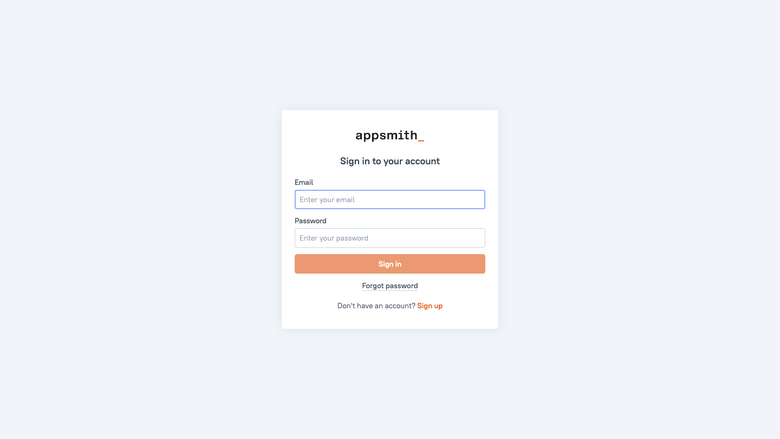
Image
Appsmith sign in and signup
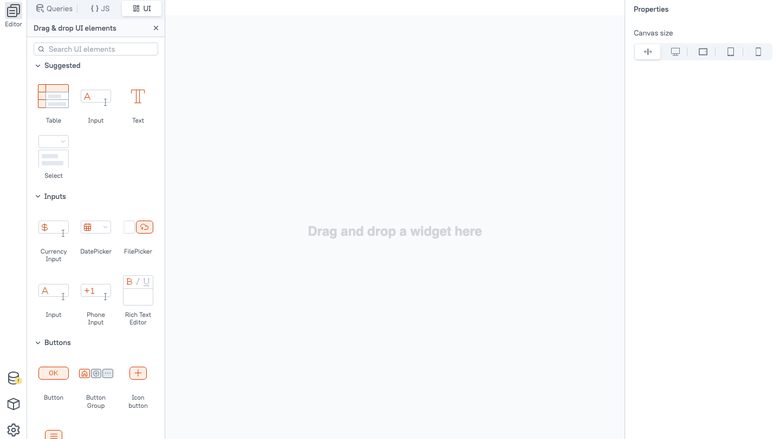
Image
The visual app builder canvas
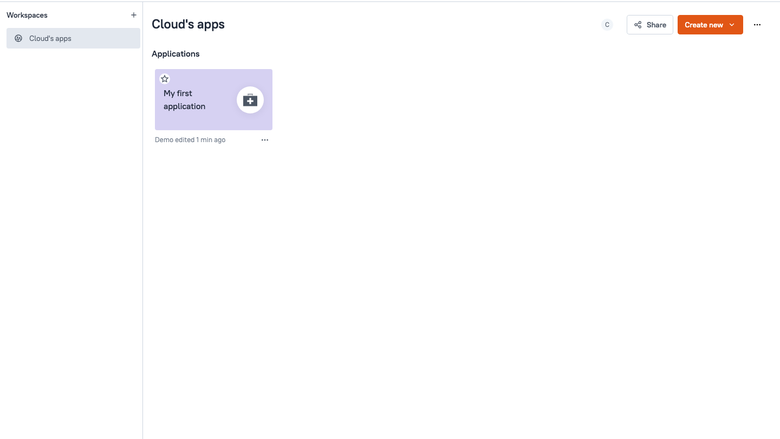
Image
Workspace applications listing
This is a repackaged open source software product wherein additional charges apply for cloudimg support services.
Appsmith is the open-source low-code platform for building internal tools, admin panels, dashboards, and CRUD applications. Teams connect their databases and APIs, drag and drop UI widgets onto a canvas, bind them with short JavaScript expressions, and ship an internal app in minutes rather than weeks of hand-coded development.
Why This AMI Instead of Self-Managed Appsmith?
Deploying Appsmith yourself means configuring containers, wiring services, managing encryption secrets, setting up persistent storage volumes, and handling ongoing patching. This AMI eliminates that operational burden entirely. You get a production-ready platform from first boot - no package management, no service wiring, no shared secrets baked into the image. Combined with cloudimg's 24/7 professional support, you receive guaranteed response times and hands-on help that community forums cannot provide.
What Is Included
This image delivers Appsmith Community Edition v1.99series as the official all-in-one container. A complete low-code platform is running within minutes of launch. The single container bundles the visual app builder client, the application server, the document database, the cache, and the web frontend, all supervised together.
Supported Integrations
Appsmith connects to dozens of datasources out of the box, including PostgreSQL, MySQL, MongoDB, Amazon S3, REST APIs, GraphQL, Snowflake, Google Sheets, Microsoft SQL Server, and more. Teams can query any combination of databases and APIs from a single application, making it straightforward to build tools that span multiple backend systems.
Visual App Builder
The browser-based app builder lets you assemble pages from tables, forms, charts, buttons, and dozens of other widgets, wire them to queries with a few lines of JavaScript, and preview the result instantly. Built applications are deployed from the same interface and shared with workspace members.
Dedicated Storage Tier
The platform stack data - including the bundled document database, cache state, configuration, and logs - lives on a separate, independently resizable storage volume. This means you can grow your data tier without disturbing the operating system disk and avoid data loss during OS-level upgrades or instance replacements.
Secure First Boot
On the first boot of every instance, a one-shot service generates encryption secrets unique to that instance and writes them into the platform configuration before the application starts. The platform uses these secrets to encrypt datasource credentials it stores, so no shared encryption secret is ever baked into the image. This eliminates a common security risk found in pre-built images that ship with static keys.
Ready To Use
The application server, document database, cache, and web frontend are all configured and start automatically at boot. Browse to the instance address, complete the signup form to create the first administrator account, and begin building internal tools straight away.
Use Case Example
A fintech operations team connects their PostgreSQL transaction database, builds a refund-approval dashboard with role-based access controls, and deploys it to15 support agents in under a day. Previously, this workflow required weeks of custom development and a dedicated engineering sprint.
Additional Use Cases
- Internal admin panels and back-office tools
- Operational dashboards over existing databases and APIs
- Customer support and content moderation consoles
- CRUD applications and approval workflows built without a full development cycle
cloudimg Support
24/7 technical support by email and chat. Our engineers help with platform deployment, datasource configuration, application building, TLS setup, upgrades, and storage management. Critical issues receive a one-hour average response time.
Get Started
Launch this AMI, wait for the platform to initialize, navigate to your instance address, and create your first admin account. To schedule a free deployment walkthrough with a cloudimg engineer, reach out via our support channels.
All product and company names are trademarks or registered trademarks of their respective holders. Use of them does not imply any affiliation with or endorsement by them.
Highlights
- Appsmith low-code platform launches production-ready in minutes as the official all-in-one container. No manual package installation, service wiring, or configuration required - the visual app builder, application server, document database, cache, and web frontend start automatically at boot. Connects to PostgreSQL, MySQL, MongoDB, Amazon S3, REST APIs, GraphQL, Snowflake, and more out of the box, so teams can build internal tools across multiple backend systems immediately.
- Platform data lives on a separate, independently resizable storage volume kept off the operating system disk. This architecture protects your document database, cache state, and configuration during OS-level upgrades or instance replacements, eliminating a common cause of data loss in single-volume deployments. Grow storage capacity on demand without downtime or reconfiguration of the application tier.
- Unique encryption secrets are generated on every first boot - no shared keys are ever baked into the image - so datasource credentials are protected from the moment you launch. cloudimg provides 24/7 technical support with a one-hour average response for critical issues, covering deployment, datasource configuration, TLS setup, application building, and upgrades. This goes beyond community support with guaranteed response times and hands-on engineering help.
Details
Sold by
Delivery method
Delivery option
64-bit (x86) Amazon Machine Image (AMI)
Latest version
Operating system
Ubuntu 24.04
Deployed on AWS
New
Introducing multi-product solutions
You can now purchase comprehensive solutions tailored to use cases and industries.

Features and programs
Financing for AWS Marketplace purchases
AWS Marketplace now accepts line of credit payments through the PNC Vendor Finance program. This program is available to select AWS customers in the US, excluding NV, NC, ND, TN, & VT.

Pricing
Free trial
Try this product free for 7 days according to the free trial terms set by the vendor. Usage-based pricing is in effect for usage beyond the free trial terms. Your free trial gets automatically converted to a paid subscription when the trial ends, but may be canceled any time before that.
Pricing is based on actual usage, with charges varying according to how much you consume. Subscriptions have no end date and may be canceled any time. Alternatively, you can pay upfront for a contract, which typically covers your anticipated usage for the contract duration. Any usage beyond contract will incur additional usage-based costs.
Additional AWS infrastructure costs may apply. Use the AWS Pricing Calculator to estimate your infrastructure costs.
If you are an AWS Free Tier customer with a free plan, you are eligible to subscribe to this offer. You can use free credits to cover the cost of eligible AWS infrastructure. See AWS Free Tier for more details. If you created an AWS account before July 15th, 2025, and qualify for the Legacy AWS Free Tier, Amazon EC2 charges for Micro instances are free for up to 750 hours per month. See Legacy AWS Free Tier for more details.
Dimension | Description | Cost/hour |
|---|---|---|
m5.large Recommended | m5.large | $0.08 |
t2.micro | t2.micro instance type | $0.04 |
t3.micro | t3.micro instance type | $0.04 |
m7a.large | m7a.large instance type | $0.08 |
m5dn.16xlarge | m5dn.16xlarge instance type | $0.24 |
c6a.12xlarge | c6a.12xlarge instance type | $0.24 |
z1d.xlarge | z1d.xlarge instance type | $0.12 |
r6a.2xlarge | r6a.2xlarge instance type | $0.24 |
m5zn.3xlarge | m5zn.3xlarge instance type | $0.24 |
inf2.48xlarge | inf2.48xlarge instance type | $0.24 |
Vendor refund policy
Refunds available on request.

Legal
Vendor terms and conditions
Upon subscribing to this product, you must acknowledge and agree to the terms and conditions outlined in the vendor's End User License Agreement (EULA) .
Content disclaimer
Vendors are responsible for their product descriptions and other product content. AWS does not warrant that vendors' product descriptions or other product content are accurate, complete, reliable, current, or error-free.
Delivery details
64-bit (x86) Amazon Machine Image (AMI)
Amazon Machine Image (AMI)
An AMI is a virtual image that provides the information required to launch an instance. Amazon EC2 (Elastic Compute Cloud) instances are virtual servers on which you can run your applications and workloads, offering varying combinations of CPU, memory, storage, and networking resources. You can launch as many instances from as many different AMIs as you need.
Version release notes
Initial release of the Appsmith low-code platform on AWS.
Additional details
Usage instructions
Connect over HTTP on port 80 in a web browser to the instance public address to reach the Appsmith app builder. On the first visit, complete the signup form to create the first administrator account for this instance. To administer the host, connect via SSH on port 22 as the default login user for your operating system variant (the user guide lists it per variant). The instance address and first boot information are recorded in /stage/scripts/appsmith-access.log. Appsmith, the application server, the bundled document database and the cache all start automatically at boot. To enable HTTPS with a real certificate, point a domain at the instance and run: sudo docker exec appsmith appsmithctl install-ssl your-domain your-email.
Resources
Vendor resources
Support
Vendor support
cloudimg provides 24/7 technical support for this Appsmith AMI product by email and live chat. Our engineers assist with:
- Initial deployment and instance configuration
- Datasource connection setup (PostgreSQL, MySQL, MongoDB, REST APIs, and others)
- TLS/SSL certificate configuration
- Application building guidance and troubleshooting
- Platform upgrades and version migrations
- Storage volume management and resizing
- Performance tuning and optimization
Response Times: Critical issues receive a one-hour average response. Our team works to resolve problems hands-on rather than directing you to community documentation.
Getting Started: After launching the AMI, if you need assistance with first-boot configuration, admin account creation, or connecting your first datasource, contact our support team and an engineer will guide you through the process.
Refunds and Billing: For questions about charges, billing adjustments, or refund requests, contact our support team through the same channels.
Contact: support@cloudimg.co.uk
Support covers the Appsmith platform as delivered in this AMI. For issues related to underlying AWS infrastructure (EC2 instance health, VPC networking, IAM permissions), AWS Support should be contacted directly.
AWS infrastructure support
AWS Support is a one-on-one, fast-response support channel that is staffed 24x7x365 with experienced and technical support engineers. The service helps customers of all sizes and technical abilities to successfully utilize the products and features provided by Amazon Web Services.
Similar products

Appsmith is a low-code platform to build and deploy internal tools or admin panels.
This product has a fee associated with the provision and deployment of the application and AMI support. Appsmith is a low code framework to build internal applications.

This product has charges associated with it for seller support. Simple, Secure and Supported deployment with the Hossted CLI, for easy self-maintenance.

This product has charges associated with it for seller support. Rapidly build and deploy internal tools with Appsmith, preconfigured on AWS and supported by Meetrix.io for security, scalability, and ease of use.
Customer reviews
No customer reviews yet
Be the first to review this product . We've partnered with PeerSpot to gather customer feedback. You can share your experience by writing or recording a review, or scheduling a call with a PeerSpot analyst.