
Sold by: airSlate
Deployed on AWS
Free Trial
AWS Free Tier
Fill out, edit, create, and manage PDF documents online. pdfFiller is an all-in-one solution for paperless document management that allows individuals and organizations of all sizes to speed up document workflows and reduce paper-related costs.
4.6
Overview
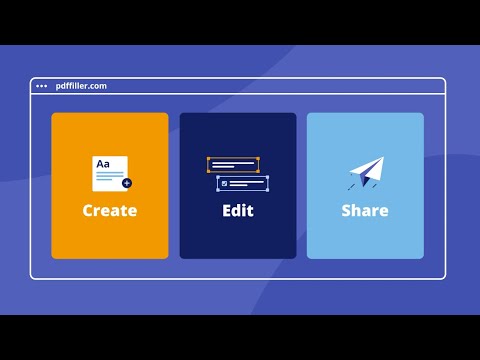
pdfFiller is an end-to-end solution that allows you to create, edit, and manage PDF documents in the cloud hassle-free. The product features an easy-to-use drag and drop editor that empowers users to modify or completely rewrite original PDF content. The software includes convenient annotation tools, powerful eSignature functionality, a straightforward PDF form builder, file converter, and many other features that accelerate business operations and make them less labor-intensive.
pdfFiller is an essential tool for digitizing document processes and reducing paperwork hassles. Edit or fill out PDF documents on any device, create fillable PDF forms and share them online, sign or send documents for eSignature, save time with reusable templates, and securely manage documents in the cloud.
With more than 56 million users worldwide and an overall user rating of 4.6 out of 5 on major review platforms, pdfFiller helps teams and individuals increase productivity, improve compliance, and reduce operating costs. Take advantage of the pdfFiller web and mobile apps to handle PDF-related tasks anytime and anywhere.
Interested in a free 30-day trial? Just reach out to your AWS Account Manager, your trusted AWS partner, or email us at AWSmarketplace@airslate.com to get started!
Highlights
- Increase productivity - pdfFiller empowers individuals and teams to reduce document turnaround from weeks to minutes. All thanks to a straightforward editor, advanced collaboration tools, eSignature functionality, and document management tools.
- Cut paperwork costs - Save up to $30 per document by eliminating the need to print, scan, fax, and deliver paper documents. Reduce paper consumption and other related storage costs. Go fully paperless and optimize your expenses in no time.
- Enhance security and compliance - pdfFiller maintains compliance with industry-leading security standards and regulations including HIPAA, GDPR, SOC 2 Type II, and others, keeping user data protected at all times.
Details
Sold by
Delivery method
Deployed on AWS
New
Introducing multi-product solutions
You can now purchase comprehensive solutions tailored to use cases and industries.

Features and programs
Financing for AWS Marketplace purchases
AWS Marketplace now accepts line of credit payments through the PNC Vendor Finance program. This program is available to select AWS customers in the US, excluding NV, NC, ND, TN, & VT.

Pricing
Free trial
Try this product free according to the free trial terms set by the vendor.
Pricing is based on the duration and terms of your contract with the vendor. This entitles you to a specified quantity of use for the contract duration. If you choose not to renew or replace your contract before it ends, access to these entitlements will expire.
Additional AWS infrastructure costs may apply. Use the AWS Pricing Calculator to estimate your infrastructure costs.
Dimension | Description | Cost/month |
|---|---|---|
pdfFiller Premium | 5 user included to pdfFiller Premium subscription | $40.00 |
Dimensions summary
This listing offers one pricing option: a pdfFiller Premium subscription that includes 5 users. You buy it as a contract, so pricing is fixed for the committed term rather than charged by usage. The single dimension covers a set number of users under the Premium plan. There are no separate tiers or add-on options in this listing. To support more than 5 users, contact the vendor about your options.
Top-of-mind questions for buyers
A user is one individual account with access to the Premium plan. The subscription includes 5 such accounts. Each person who edits, signs, or collaborates on PDFs uses one of these seats. Shared logins are not separate users, but each named account counts individually toward your 5.
This contract includes a fixed set of 5 users under the Premium plan. It does not add users automatically as your team grows. To support more than 5 people, contact the vendor about expanding your subscription.
No. This is a contract subscription for 5 Premium users, not usage-based billing. Your price stays fixed for the committed term regardless of how many documents you edit, sign, or share. Only the user count defines what you buy.
www.airslate.com
Helpful?
Vendor refund policy
All fees are non-refundable except as required by law.

Legal
Vendor terms and conditions
Upon subscribing to this product, you must acknowledge and agree to the terms and conditions outlined in the vendor's End User License Agreement (EULA) .
Content disclaimer
Vendors are responsible for their product descriptions and other product content. AWS does not warrant that vendors' product descriptions or other product content are accurate, complete, reliable, current, or error-free.
Delivery details
Software as a Service (SaaS)
SaaS delivers cloud-based software applications directly to customers over the internet. You can access these applications through a subscription model. You will pay recurring monthly usage fees through your AWS bill, while AWS handles deployment and infrastructure management, ensuring scalability, reliability, and seamless integration with other AWS services.
Resources
Vendor resources
Support
Vendor support
pdfFiller provides professional and prompt customer service via multiple support channels including live chat, email, and phone (for Enterprise users only). Please feel free to contact the pdfFiller support team at any time should you have any questions or requests. Live Chat: https://www.pdffiller.com/en/support.htm , Email Support: support@pdffiller.com , Phone Support: 1 (617) 982 1800
AWS infrastructure support
AWS Support is a one-on-one, fast-response support channel that is staffed 24x7x365 with experienced and technical support engineers. The service helps customers of all sizes and technical abilities to successfully utilize the products and features provided by Amazon Web Services.
Similar products
pdfRest API Toolkit delivers powerful, secure, and scalable PDF processing, developed by the document experts at Datalogics.
With dozens of flexible API endpoints, it supports document conversion, editing, security controls, data extraction, redaction, XFA forms and Acroform handling, PDF to Office exports, and more. Easily integrate into any application or workflow to automate bulk, batch, and real-time document processing with full control via a dedicated EC2-based REST API.
Built on the Adobe® PDF Library™ - the same core technology that powers Adobe Acrobat - pdfRest offers the gold-standard solution for high-quality, customizable PDF automation trusted by developers and enterprises worldwide.
Run the full pdfRest PDF processing API as a self-hosted container in your own AWS account - 40+ REST API endpoints, entirely inside your VPC. Bring your own pdfRest license.

React PDF Kit is a developer-friendly, high-performance PDF viewer built for React.js applications. It offers easy customization of toolbars, zoom, layout, and more, all without iframes or wrappers.
Customer reviews
Construction
Cloud-Based PDF App That Keeps You in Control
Reviewed on Oct 14, 2026
Review provided by G2
What do you like best about the product?
I like that it is a cloud based app and it doesn't hijack my files. I feel like I am in control unlike other pdf apps.
What do you dislike about the product?
I would like to be able to rotate images in the app - it might be an available function, but I wasn't able to locate that option.
What problems is the product solving and how is that benefiting you?
I am able to add images and save in whatever format I need. Helps me with updating plans and drawings.
Anonymous
Highly Customizable Forms, but Cumbersome to Use
Reviewed on Oct 13, 2026
Review provided by G2
What do you like best about the product?
I like that pdfFiller lets me create PDFs with customized fill-in features, including watermarking, Bates numbering, and form filling. I can assign signature and other fields to recipients, customize and prefill fields with hints, and have entries checked so, for example, letters aren’t accepted in a number field. Its e-signature document chain gives me a certificate for the signature, and recipients can sign without creating an account. I also find pdfFiller more versatile than the signing software I used before, and I like that I can save my documents there. Creating forms takes me about half an hour, but I like how customizable they are.
What do you dislike about the product?
I find creating a form very cumbersome; it usually takes about half an hour. The menu system isn’t intuitive, with menu items hidden in illogical places, and I often have to get help. There’s no AI feature for easy solutions, and I’m charged when I go to chat for help. The iOS app is pretty basic and limited, so I have to use the desktop for most special features. Setup wasn’t easy, and I have to pay extra for additional features.
What problems is the product solving and how is that benefiting you?
I use pdfFiller to create PDFs with customized fill-in features that differ from other PDF generators and native Apple iOS options. I can add e-signatures with a certificate, assign recipients fields to sign or fill out, and let them sign without creating an account.
Medical Tattooing B.
Intuitive PDF Management with Robust Features
Reviewed on Oct 13, 2026
Review provided by G2
What do you like best about the product?
I rely on pdfFiller to sign legal documents and prepare insurance documentation. I really appreciate how easy it is to sign documents and return them for finalization. The intuitive tools make it a breeze to figure out and use. I also like that I can share our pdfFiller account with our team, which is particularly useful given our team size of less than ten members. Plus, I think that pdfFiller has a fair price point that suits our needs. The setup was very easy, and adding new members is uncomplicated. The fact that I can click on a tool, add my own uploaded signature, and easily adjust the font size to fit a space adds to the efficiency of the platform.
What do you dislike about the product?
It took us a little while to figure out which download button is ideal. I don't want to download into a cloud. I most often want to download to my own computer and depending on where I click or select to download, it wants to add it to a cloud or some other function. So it took a little while to figure out which option downloads to my computer.
What problems is the product solving and how is that benefiting you?
pdfFiller makes signing documents quick, and helps with filling and submitting insurance forms. I like its fairness in pricing, intuitive tools, and easy team sharing.
Souhail B.
Easy PDF Access, Streamlined Workflow
Reviewed on Oct 12, 2026
Review provided by G2
What do you like best about the product?
I really like that pdfFiller makes accessing PDF files easy and fast. It's extremely helpful that I can access these files on my phone, which is very convenient for my business needs. The app makes it straightforward to get to these files, streamlining my work process significantly. Additionally, the initial setup was very easy, which made getting started a breeze.
What do you dislike about the product?
NOTHING
What problems is the product solving and how is that benefiting you?
pdfFiller makes tasks much faster and easier, providing seamless access to PDF files, even on my phone.
Anonymous
Effortless Document Integration and Editing
Reviewed on Oct 12, 2026
Review provided by G2
What do you like best about the product?
I use pdfFiller to easily create one document out of multiple for music needs for my choir. I like how pdfFiller connects directly to Google Drive, which makes saving my documents there convenient. I also appreciate the ability to sign documents and change text for documents that need edits, making it really practical for my work.
What do you dislike about the product?
PDF filler has limitations such as being able to rotate documents and making edits to text that is within a hymn like music document.
What problems is the product solving and how is that benefiting you?
I use pdfFiller to easily combine music documents for my choir and create different versions for players. It connects to Google Drive, allowing me to save files easily, and lets me sign documents and edit text without printing, making my workflow simpler.