
Sold by: Aicura
Deployed on AWS
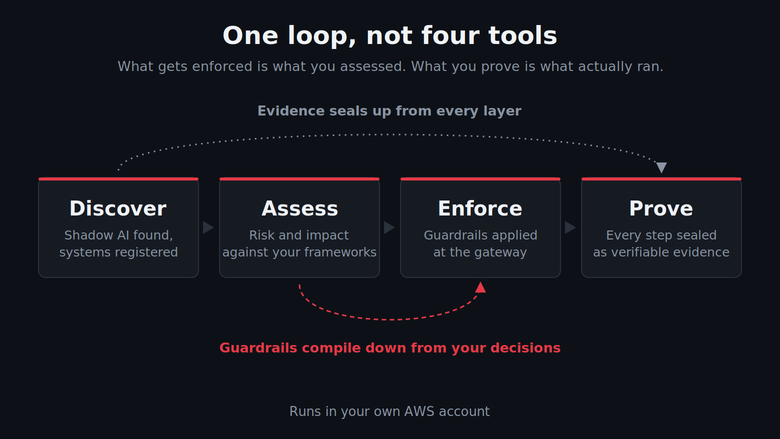
AI governance that runs in your own AWS account. Discover the AI in use, assess it, enforce guardrails at the gateway and prove what happened.
Overview
Image
Discover, assess, enforce and prove in one loop
Image
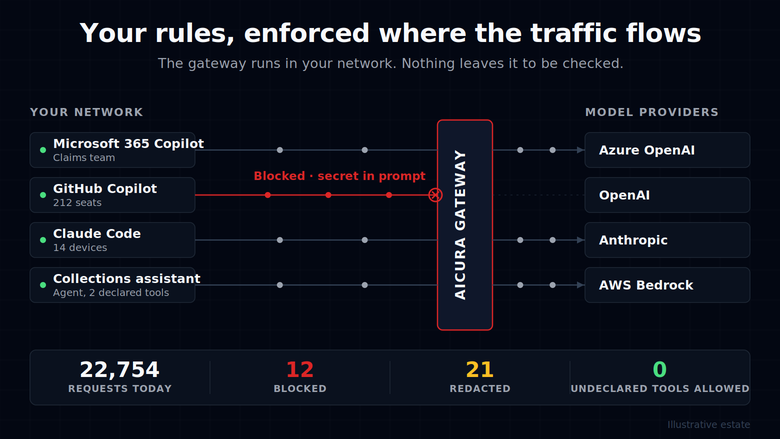
Guardrails enforced in the live request path
Image
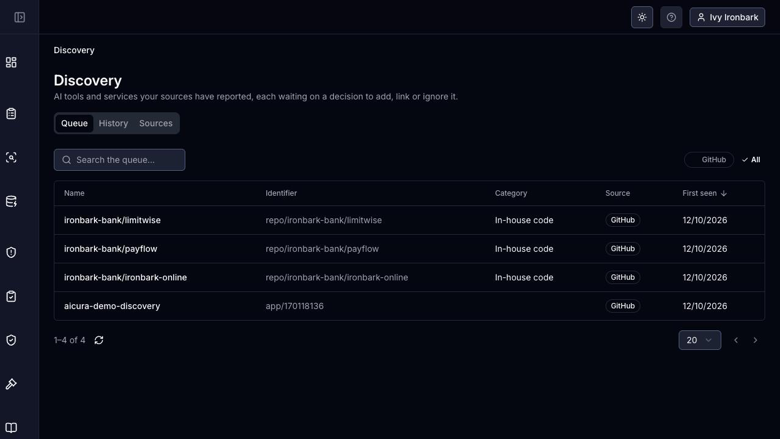
Find the AI already in use in your organisation
Image
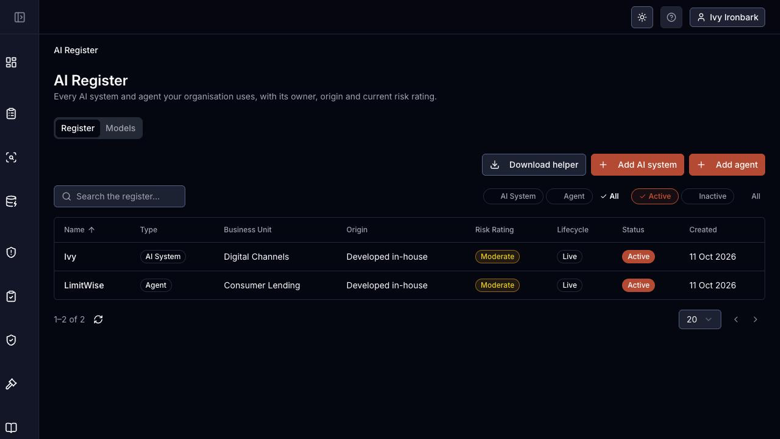
One register for every AI system and agent
Image
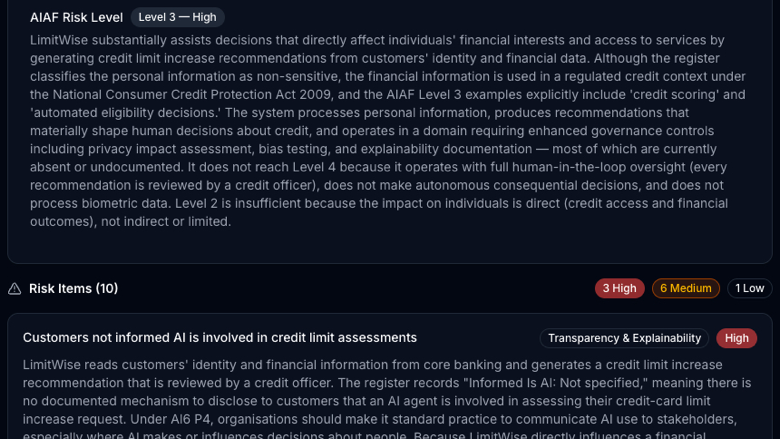
Risk assessments that keep up as systems change
Image
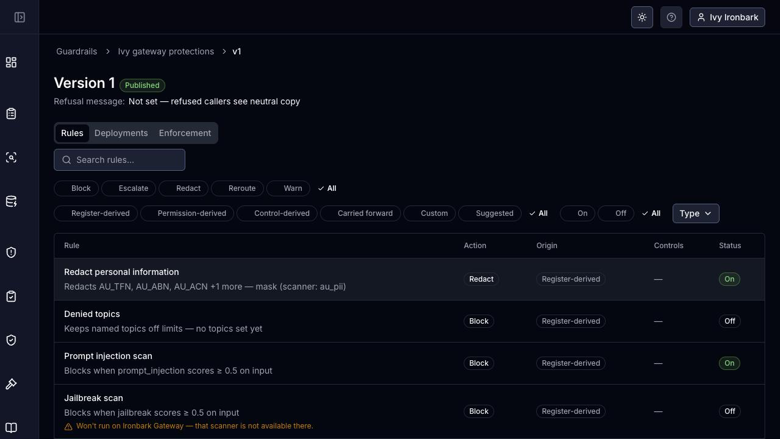
Governance decisions become guardrail rules
Image
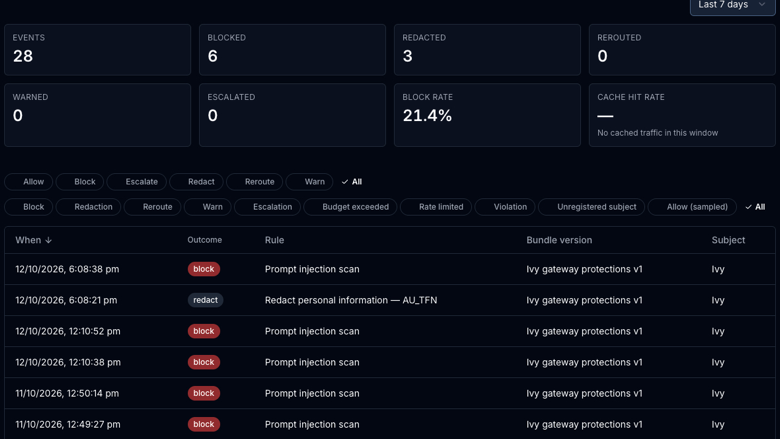
Every block and redaction recorded
Image
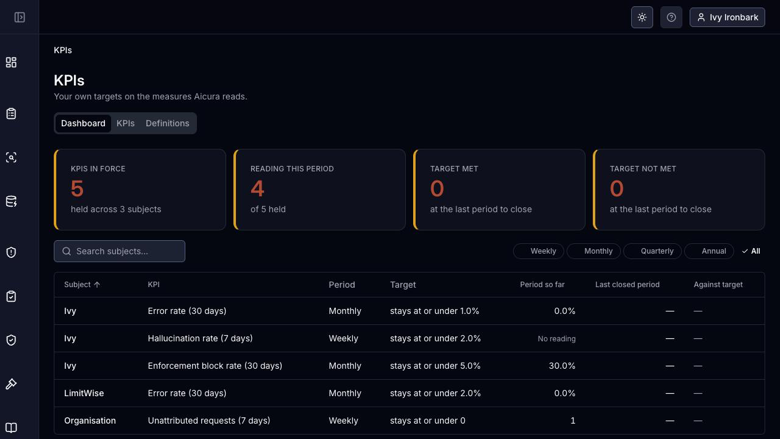
KPIs held against the targets you set
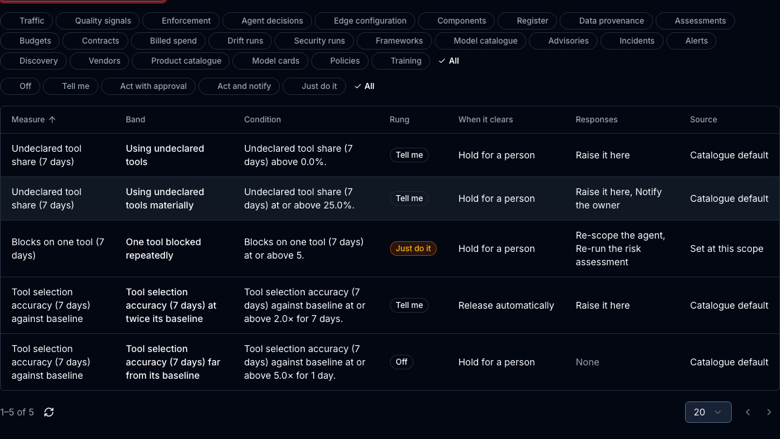
Image
Guardian responds when AI goes wrong
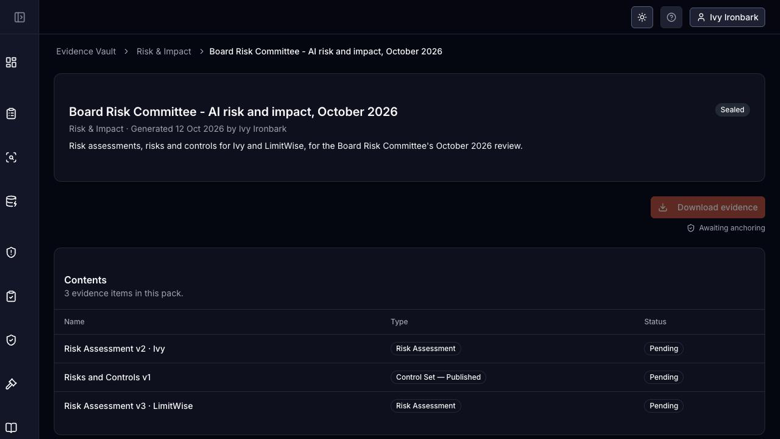
Image
Evidence for whoever is asking
Aicura covers the whole of AI governance.
It discovers the AI already in use and registers every system and agent, including the models and data behind each. It generates risk and impact assessments using the frameworks that apply and derives risks and controls from them. It compiles guardrails that enforce those controls at the gateway, and monitors production against limits and targets. It tracks incidents through to closure and reports the picture to the board. Every step is sealed into an independently verifiable evidence record.
Aicura deploys into your own AWS account. Your data, prompts and evidence never leave your environment. Unlimited AI systems, users and storage.
Framework coverage spans ISO 42001, the NIST AI RMF, the EU AI Act, and regimes in Australia, the UK, Singapore and the United States. Both editions carry the full set.
Aicura Standard runs the whole loop. You find what is already in use, register it, assess it, and turn those decisions into guardrails the gateway enforces on live traffic, with budgets capping what AI spend can run away to. Monitoring reports what is happening against the limits you set, incidents are tracked through to closure, and the evidence of all of it is sealed in the vault and exported as packs an auditor can verify independently.
Aicura Complete is for organisations that have to answer to someone. Committees vote and record dissent, board reports carry multiple signatures, and attestations make your governance position something you can assert rather than describe. The Trust Centre publishes it outward. Behind that, the security and drift engines watch for behaviour drifting away from what was assessed, security test runs probe your systems before someone else does, and Guardian decides how much the platform may do about any of it on its own, band by band, with you setting how far its hands reach. Vendor and contract records, GRC and provenance syncing, webhooks and your own rating scales connect it to the rest of the organisation.
Highlights
- Governance and enforcement in one platform. Your assessments and controls compile down into guardrails the gateway enforces on live traffic, so what runs is what you approved. Most platforms do the paperwork or the runtime controls. Aicura does both, which is what makes the evidence worth anything.
- Runs entirely in your own AWS account. Your data, prompts and evidence never leave your environment, there is no vendor-hosted tenancy to assess, and there are no caps on AI systems, users or storage.
- Evidence an auditor can verify without trusting us. Every decision, assessment and enforcement event is sealed into the vault and exported as packs that stand up on their own.
Details
Sold by
Categories
Delivery method
Supported services
Delivery option
ECS Fargate (CloudFormation)
Latest version
Operating system
Linux
Deployed on AWS
New
Introducing multi-product solutions
You can now purchase comprehensive solutions tailored to use cases and industries.

Features and programs
Financing for AWS Marketplace purchases
AWS Marketplace now accepts line of credit payments through the PNC Vendor Finance program. This program is available to select AWS customers in the US, excluding NV, NC, ND, TN, & VT.

Pricing
Pricing is based on the duration and terms of your contract with the vendor. This entitles you to a specified quantity of use for the contract duration. If you choose not to renew or replace your contract before it ends, access to these entitlements will expire.
Additional AWS infrastructure costs may apply. Use the AWS Pricing Calculator to estimate your infrastructure costs.
Dimension | Description | Cost/12 months |
|---|---|---|
Aicura Standard | The full governance loop with unlimited AI systems, users and storage. Discovery and AI register, risk and impact assessments, risks and controls, governance policies, model cards and decision disclosure, AI use requests, incidents and agents. Guardrail authoring with the edge gateway, so guardrails and budgets are enforced on live traffic rather than written down. Monitoring with KPIs, thresholds and alerts. Evidence Vault with evidence packs. All frameworks included: ISO 42001, NIST AI RMF, the EU AI Act, and Australian, UK, Singapore and US regimes. | $85,000.00 |
Aicura Complete | Everything in Standard, plus oversight, advanced engines and the integration surface. Governance and ethics committees with voting, quorum and recorded dissent. Multi-signer board reports, attestations and the Trust Centre. The security and drift engines, drift reporting and security test runs. Guardian, which sets how far the platform may act on its own, band by band. Vendor and contract records, GRC and data provenance syncing, webhooks, and your own rating scales, categories and control inventory. | $150,000.00 |
Vendor refund policy
Contracts are non-refundable once the subscription period begins. If you believe a refund is warranted, contact support@aicura.com.au within 30 days of purchase and we will review the request. Refunds agreed with us are processed through AWS Marketplace. Pro-rata refunds are not provided for early termination. Terms negotiated in a private offer take precedence over this policy.

Legal
Vendor terms and conditions
Upon subscribing to this product, you must acknowledge and agree to the terms and conditions outlined in the vendor's End User License Agreement (EULA) .
Content disclaimer
Vendors are responsible for their product descriptions and other product content. AWS does not warrant that vendors' product descriptions or other product content are accurate, complete, reliable, current, or error-free.
Delivery details
ECS Fargate (CloudFormation)
Supported services: Learn more
- Amazon ECS
Container image
Containers are lightweight, portable execution environments that wrap server application software in a filesystem that includes everything it needs to run. Container applications run on supported container runtimes and orchestration services, such as Amazon Elastic Container Service (Amazon ECS) or Amazon Elastic Kubernetes Service (Amazon EKS). Both eliminate the need for you to install and operate your own container orchestration software by managing and scheduling containers on a scalable cluster of virtual machines.
Version release notes
First release of Aicura on AWS Marketplace.
What this version deploys
One CloudFormation root stack in your own AWS account, in one region across two Availability Zones: the Aicura application and its web app on Amazon ECS Fargate, Amazon RDS for PostgreSQL (Multi-AZ by default), the Evidence Vault on S3 with Object Lock and its verifiable log on Amazon EFS, Temporal for background workflows, an Amazon Cognito user pool for sign-in with optional SAML or OIDC single sign-on, an ACM Private CA for edge component certificates, and the Trust Centre on CloudFront. Everything is encrypted with your own customer managed KMS key, every secret is generated inside the account, and no template parameter carries a secret. The application is internal by default and reachable only from the network ranges you name; it can be opened to the internet behind CloudFront and your own AWS WAF web ACL. The hub-api endpoint your edge components connect to is internal by default as well, reachable from the same ranges, and can be opened to the internet on a public load balancer that accepts only the ranges you name, always behind mutual TLS.
Install kinds
The same template installs as an evaluation, a non-production environment or production, chosen by the first stack parameter, which sets the defaults for sizing, backups, the Evidence Vault lock and what a stack delete keeps; any of them can be overridden. Evaluation and non-production installs are ephemeral: their Evidence Vault bucket is versioned but not locked, and deleting the stack removes everything it created, unless a non-production install is told to keep its stores. Production keeps its data stores, keys and a final database snapshot on delete and locks evidence in compliance mode for seven years. A subscription has one seat, which every running install holds whatever its kind, and a deleted install frees it within an hour; production and a test install side by side take a subscription in each account.
Editions
The product is sold as a contract with one of two dimensions, one seat each. The deployment reads which one you bought from AWS License Manager every fifteen minutes, so changing edition is a Marketplace purchase, never a reinstall.
Aicura Standard: Dashboard and news, the AI Register of systems and agents, Shadow AI Discovery, the prefilled AI product and model catalogue, reports and the library, privacy policy scanning and fixes, model cards and decision disclosures, risk assessments, risks and controls, governance policies, guardrail and preflight rule authoring and deployment, the edge components (hub, gateway, collector and preflight engine), monitoring with KPIs, thresholds and alerts, budgets and spend, the Evidence Vault and evidence packs, AI use requests, impact assessments and incidents, training, single sign-on with directory group roles, and every framework: ADM under the Privacy Act, AI6, NSW AIAF, the AI Ethics Principles, DTA, ISO 42001, NIST AI RMF, NDB, and the EU, UK, Singapore and US frameworks.
Aicura Complete: everything in Standard plus the Guardian, boards and committees, vendors and contracts, security test runs with the security and drift engines, attestations, the Trust Centre, GRC and data provenance syncing, webhooks, and rating scales, categories and the control inventory.
Reference content
The AI product and model catalogues, the framework assessment sets and the news feed arrive as signed content releases an administrator fetches and applies from Content Updates inside the application; nothing is applied until its signature and hash are verified in your account. A fresh install carries none, so apply the current release after the first sign-in.
Before you launch
Enable Amazon Bedrock model access in the deployment account and region for the four models you will name in the stack parameters (a light, a standard and a heavy model tier, and a 1024-dimension embedding model). Have a Route 53 zone and ACM certificates for the application and hub hostnames and the Trust Centre suffix, a verified Amazon SES sending identity, and the network ranges and Transit Gateway that will reach the application. The usage instructions list every parameter and prerequisite.
Regions
Every commercial region where Amazon Bedrock offers the Anthropic Claude models. The China and GovCloud partitions are not offered.
Known findings in third-party components
Three published vulnerabilities remain in the third-party images this version ships, because the upstream projects have not yet released builds without them. CVE-2026-118264 is in the Echo HTTP framework inside the Temporal 1.32.1 command-line tool; CVE-2026-118333 and CVE-2026-118337 are in the Chromium that the Gotenberg 8.39.0 document converter renders documents with. Gotenberg answers only the application's own tasks inside the cluster, over mutually authenticated connections, and is reachable from nowhere else; the Temporal tool runs once during installation and upgrade to apply schemas and serves no traffic. All three clear when the next upstream builds are adopted.
Known constraints
Temporal is upgraded one minor version at a time, so a later version's release notes may name an intermediate version to deploy first. The drift engine's semantic layer is unavailable in this version: its runtime has no release for the engine's Python, so a drift run skips that layer and reports the other layers as usual. The organisation's country is fixed at install. The Evidence Vault signing keys are rotated only with Aicura's support, since a rotation is a re-anchor.
Additional details
Usage instructions
Aicura deploys as one CloudFormation root stack in your own AWS account and region. Launch it from the template link on this page.
Before you launch
- Amazon Bedrock: enable the four models named in the BedrockLightModelId, BedrockStandardModelId, BedrockHeavyModelId and BedrockEmbedModelId parameters (three text models or inference profiles and a 1024-dimension embedding model) in the deployment account and region, before you launch and before any update that changes one; the application cannot enable a model itself.
- Network: the ranges that open the application (AppAllowedCidrs), a VpcCidr of /17 or larger overlapping none of them, and optionally a Transit Gateway (TransitGatewayId). The application and the hub-api endpoint are internal by default; AppAccess set to internet adds CloudFront in front of the application, behind your WAF web ACL (WebAclArn) if given; hub-api takes HubApiAllowedCidrs (edge ranges not in AppAllowedCidrs), else AppAllowedCidrs; HubApiAccess internet makes it public.
- DNS and certificates: a Route 53 zone for AppDomainName and HubApiDomainName (private when internal, public when internet), a public zone for the Trust Centre suffix (and for HubApiDomainName when hub-api is public), an ACM certificate in the deployment region covering both hostnames, one in us-east-1 covering the wildcard under TrustCentreSuffix, and, for AppAccess internet only, one in us-east-1 covering AppDomainName.
- Email: verify EmailFromAddress in Amazon SES in the deployment region, with production access if the account is in the SES sandbox.
- Optional: the Sso parameters connect your SAML or OIDC identity provider; otherwise users sign in with a Cognito password and an authenticator.
- Quotas: two Application Load Balancers, two NAT gateways, an RDS instance of the chosen class, an ACM Private CA and Fargate vCPU.
Launch
Create the root stack with the template link. InstallKind comes first: evaluation or non-production (ephemeral: no evidence lock, removed whole on delete) or production. Each running install holds the subscription's one seat, freed within an hour of its delete; production and test take a subscription each, in separate accounts. Give the organisation, country, first administrator and the parameters above; sizing and retention left empty take the kind's values. It takes 30 to 45 minutes and runs Systems Manager automations: prepare (roles, schemas, web app), Temporal namespace, finish (licence, organisation, administrator). At CREATE_COMPLETE the administrator has been invited. A failed automation fails the stack with its message; its log is /aicura/<stack>/deployment.
First sign-in
Open the AppUrl stack output. With single sign-on the administrator uses their company login; otherwise the Cognito invitation email, then a password and an authenticator. Then open Content Updates and apply the current reference content release (catalogues, framework assessment sets, news).
Edge components (Aicura Complete)
Register a hub under Edge, issue it a client certificate with the IssueHubCertificateDocument automation named in the stack outputs, and run the edge-hub image in your network with AICURA_PLATFORM_URL set to the HubApiUrl output. Gateways, collectors and engines register the same way.
Operate and upgrade
Services log to /aicura/<stack>/services; alarms publish to AlarmTopicArn or a topic that emails the administrator. The licence is re-read every fifteen minutes, so changing edition is a purchase, not a reinstall. To upgrade, update the root stack with the new version's root.yaml, keeping every parameter; never skip a Temporal minor version (the release notes name any intermediate version).
Remove
Delete the root stack. A production install keeps its buckets, file system, backup vault, keys and a final database snapshot, once deletion protection is off on the database, load balancers and user pool. Evaluation and non-production installs remove everything.
Support: support@aicura.com.au .
Support
Vendor support
Aicura is supported directly by its engineering team.
Contact Email: support@aicura.com.au
Support hours 9:00am to 5:00pm Australian Eastern Time, Monday to Friday, excluding Victorian public holidays. Severity 1 issues raised outside these hours are addressed on a best-effort basis.
Response targets Severity 1, a core function of the software is unavailable or a security issue has been identified: first response within 4 business hours. Severity 2, significant degradation with a workaround available: first response within 1 business day. Severity 3 and 4, questions, minor defects and enhancement requests: first response within 3 business days.
Response targets apply to defects in Aicura software. Aicura deploys into your own AWS account, so availability of the underlying infrastructure is managed by you. We will assist with deployment and configuration questions within the response targets above.
Security patching Critical security patches to Aicura software are released within 14 days of identification. Third-party components bundled with the product are patched within 14 days of an upstream fix being available. Customers are notified directly.
Version support The current major version and the one preceding it are supported, or twelve months from release, whichever is longer.
Extended support Extended hours, dedicated support contacts and custom service levels are available. Contact us to discuss.
AWS infrastructure support
AWS Support is a one-on-one, fast-response support channel that is staffed 24x7x365 with experienced and technical support engineers. The service helps customers of all sizes and technical abilities to successfully utilize the products and features provided by Amazon Web Services.
Similar products
Fully-managed, always-on graph database as a service for intelligent, context-driven applications using connected data sets. Built on the battle-tested Neo4j graph platform, Aura offers a scalable and reliable service with advanced security, built-in visualization and developer tools.

Ataccama is the leading AI-powered data management platform empowering organizations to accelerate their business initiatives with trusted, high-quality, governed data.

By BMRLab
atypica AI is an AI powered business research platform that helps teams understand how people think decide and react in real market situations. It uses multiple AI agents that work together to explore consumer emotions opinions and decision drivers instead of relying only on numbers and surveys.
With built in research planning social listening interview simulation and persona modeling atypica AI helps product marketing and strategy teams quickly turn questions into clear insights. The system remembers past studies and continuously improves its understanding so teams can avoid repetitive research and focus on better decisions faster.

Data breaks. We ensure your team is the first to know and the first to solve with end-to-end data observability.
Customer reviews
No customer reviews yet
Be the first to review this product . We've partnered with PeerSpot to gather customer feedback. You can share your experience by writing or recording a review, or scheduling a call with a PeerSpot analyst.