
Sold by: cloudimg
Deployed on AWS
Free Trial
AWS Free Tier
This product has charges associated with it for seller support. Convert PDF, DOCX, PPTX, HTML and images to Markdown or JSON entirely within your AWS account - no documents sent to a third party. Pre-hardened Docling Serve AMI with offline OCR and a unique per-instance credential, ready in minutes. Includes 24/7 cloudimg support.
Overview
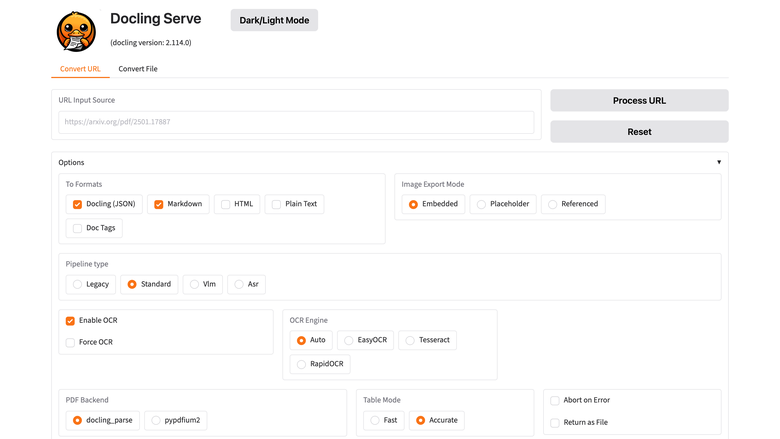
Image
Conversion playground
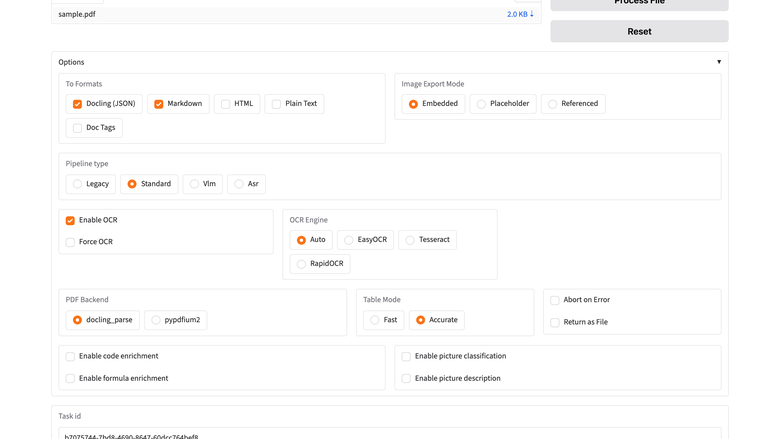
Image
Structured Markdown output
Image
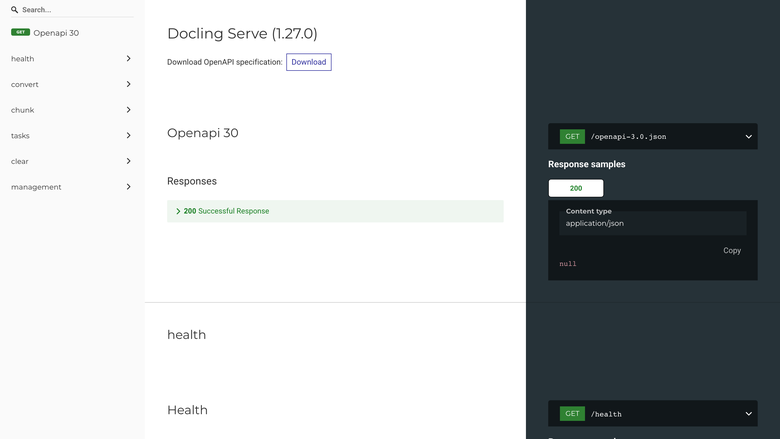
API reference
This is a repackaged open source software product wherein additional charges apply for cloudimg support services.
Convert Documents to Structured Markdown or JSON - Entirely in Your AWS Account
Docling Serve is a self-hosted HTTP API that converts PDF, DOCX, PPTX, HTML and image files into clean, machine-readable Markdown or JSON with real layout and table understanding. Backed by the Linux Foundation AI and Data community, this AMI delivers a fully built, hardened conversion appliance that is operational within minutes of launch - no manual package installation, no documents leaving your network, and no third-party API dependencies.
Why Buyers Choose This AMI Over a Manual Install
This image eliminates the manual work of building a Python environment, installing CPU-only PyTorch and docling-serve, downloading and licence-vetting machine-learning models, authoring systemd units, configuring an authenticated reverse proxy and hardening credentials. The layout, table-structure and OCR models are baked in at build time and verified against their licence, so document and scanned-image conversion works fully offline out of the box. Launch the instance, read your unique credential, and start converting documents immediately.
Evaluation path: Launch a small instance for a short session to test the API against your own documents at minimal infrastructure cost. No long-term commitment is required - terminate the instance when your evaluation is complete.
Concrete Use Cases
- Document ingestion for AI and RAG pipelines: convert PDFs, Office documents and HTML into clean Markdown or JSON as the pre-processing step feeding a retrieval-augmented-generation system or search index, entirely within your own account
- Table and layout extraction: extract structured tables and reading-order layout from invoices, reports and scientific papers into machine-readable form
- Offline OCR of scanned documents: convert scanned or image-only documents to text with the baked OCR engine, with no document ever leaving the instance
Application Stack
The docling-serve backend runs under systemd as an unprivileged system user and binds to the loopback interface only. It is fronted by an nginx reverse proxy on port 80 that requires HTTP Basic Auth on every path except a static, unauthenticated health probe for load balancers. The standard docling-serve client paths are preserved unchanged through the proxy, so existing clients, the interactive UI and Swagger docs all work by pointing at the instance with credentials. systemd starts the service and the web server on boot and restarts them on failure.
Baked, Licence-Vetted Models
Document conversion is driven by machine-learning models that are separately licensed artifacts. This image bakes only permissively licensed models, each verified at build time against its own model card and recorded with a per-file checksum in an on-image provenance file:
- Layout analysis: the Docling heron layout model (Apache-2.0)
- Table structure: Docling TableFormer (CDLA-Permissive-2.0)
- OCR: RapidOCR / PP-OCR for scanned and image documents (Apache-2.0)
All permit commercial use and redistribution. A fail-closed build-time scan aborts on any copyleft or non-commercial marker anywhere in the model download, and a whole-environment licence sweep rejects any restrictive transitive dependency.
Security Hardening
- Network isolation: the conversion backend binds exclusively to the loopback interface; only the authenticated nginx proxy is exposed, and the security group opens only SSH and HTTP
- No default or shared credentials: a cryptographically random API password is generated on each instance's first boot and written only to a root-only file
- Authenticated by default: this image never exposes an open, unauthenticated conversion endpoint
- Least privilege: the service runs as an unprivileged system user under a hardened systemd unit
- Offline conversion: the models are baked and model downloads are disabled, so uploaded documents never leave your instance
Basic Auth rides over HTTP by default; terminate TLS on port 443 in front of the instance for production, as described in the deployment guide.
AWS Integration
Deploy on any EC2 instance type. Front the instance with an Application Load Balancer terminating TLS with your own certificate, and use the unauthenticated health path as the target-group health check. Back up your configuration with EBS snapshots or AWS Backup.
Get Started
Launch an instance from this AMI, retrieve your unique credential from the root-only file, and send your first document conversion request via curl or the built-in Swagger UI. For a guided deployment walkthrough or help integrating the API into your pipeline, contact cloudimg support at any time.
Highlights
- Working, authenticated document-conversion API in minutes with zero manual setup. This image completes every build and hardening step at creation time - Python environment, CPU-only PyTorch, docling-serve, model downloads, systemd units and authenticated reverse proxy are all pre-configured. Launch an instance, retrieve your unique credential, and start converting PDF, DOCX, PPTX, HTML and images to structured Markdown or JSON immediately.
- Fully offline conversion including OCR - no document ever leaves your instance. The layout, table-structure and OCR machine-learning models are baked into the image and licence-verified at build time (all Apache-2.0 or CDLA-Permissive-2.0). Both text-layer documents and scanned images convert without any network call, making this suitable for sensitive workloads and air-gapped environments.
- Unique per-instance credential with defence-in-depth security, backed by 24/7 cloudimg support. A cryptographically random API password is generated on first boot; the backend binds to loopback only and is reachable solely through the authenticated nginx proxy. cloudimg provides 24/7 technical support via email and chat for deployment, TLS termination, pipeline integration and conversion tuning.
Details
Sold by
Delivery method
Delivery option
64-bit (x86) Amazon Machine Image (AMI)
Latest version
Operating system
Ubuntu 24.04
Deployed on AWS
New
Introducing multi-product solutions
You can now purchase comprehensive solutions tailored to use cases and industries.

Features and programs
Financing for AWS Marketplace purchases
AWS Marketplace now accepts line of credit payments through the PNC Vendor Finance program. This program is available to select AWS customers in the US, excluding NV, NC, ND, TN, & VT.

Pricing
Free trial
Try this product free for 7 days according to the free trial terms set by the vendor. Usage-based pricing is in effect for usage beyond the free trial terms. Your free trial gets automatically converted to a paid subscription when the trial ends, but may be canceled any time before that.
Pricing is based on actual usage, with charges varying according to how much you consume. Subscriptions have no end date and may be canceled any time. Alternatively, you can pay upfront for a contract, which typically covers your anticipated usage for the contract duration. Any usage beyond contract will incur additional usage-based costs.
Additional AWS infrastructure costs may apply. Use the AWS Pricing Calculator to estimate your infrastructure costs.
If you are an AWS Free Tier customer with a free plan, you are eligible to subscribe to this offer. You can use free credits to cover the cost of eligible AWS infrastructure. See AWS Free Tier for more details. If you created an AWS account before July 15th, 2025, and qualify for the Legacy AWS Free Tier, Amazon EC2 charges for Micro instances are free for up to 750 hours per month. See Legacy AWS Free Tier for more details.
Dimension | Description | Cost/hour |
|---|---|---|
m5.large Recommended | m5.large | $0.08 |
t2.micro | t2.micro instance type | $0.04 |
t3.micro | t3.micro instance type | $0.04 |
c5a.12xlarge | c5a.12xlarge instance type | $0.24 |
c5a.16xlarge | c5a.16xlarge instance type | $0.24 |
c5a.24xlarge | c5a.24xlarge instance type | $0.24 |
c5a.2xlarge | c5a.2xlarge instance type | $0.24 |
c5a.4xlarge | c5a.4xlarge instance type | $0.24 |
c5a.8xlarge | c5a.8xlarge instance type | $0.24 |
c5a.large | c5a.large instance type | $0.08 |
Vendor refund policy
Refunds available on request.

Legal
Vendor terms and conditions
Upon subscribing to this product, you must acknowledge and agree to the terms and conditions outlined in the vendor's End User License Agreement (EULA) .
Content disclaimer
Vendors are responsible for their product descriptions and other product content. AWS does not warrant that vendors' product descriptions or other product content are accurate, complete, reliable, current, or error-free.
Delivery details
64-bit (x86) Amazon Machine Image (AMI)
Amazon Machine Image (AMI)
An AMI is a virtual image that provides the information required to launch an instance. Amazon EC2 (Elastic Compute Cloud) instances are virtual servers on which you can run your applications and workloads, offering varying combinations of CPU, memory, storage, and networking resources. You can launch as many instances from as many different AMIs as you need.
Version release notes
Initial release of Docling Serve as a ready-to-use, CPU-only document-conversion API, built from source and fronted by an authenticated nginx proxy, with the layout, table-structure and OCR models baked and licence-vetted for fully offline conversion, and a unique API credential generated on each instance's first boot.
Additional details
Usage instructions
Connect via SSH on port 22 as the default login user for your operating system variant (for the Ubuntu 24.04 variant the user is ubuntu). Read the per-instance API credential with: sudo cat /root/docling-credentials.txt. The conversion API is served through an authenticated nginx proxy at http://<instance-public-ip>/ - every path requires HTTP Basic Auth (user admin, password from that file) except the unauthenticated /healthz probe. Convert a document with: curl -u admin:PASSWORD -X POST http://<instance-public-ip>/v1/convert/file -F 'files=@document.pdf;type=application/pdf' -F 'to_formats=md' -F 'do_ocr=false'. An interactive playground is at /ui and Swagger docs at /docs (same credentials). The instance security group opens ports 22 and 80 only; the conversion backend binds to loopback and is reachable only through the proxy. Basic Auth rides over HTTP by default - terminate TLS on 443 in front of the instance for production. The services run under systemd: systemctl status docling-serve nginx.
Resources
Vendor resources
Support
Vendor support
cloudimg Support
cloudimg provides 24/7 technical support for this product by email and live chat.
Contact: support@cloudimg.co.uk
What we help with:
- Deployment and initial configuration of the Docling Serve AMI
- Terminating TLS with your own domain and certificate in front of the API
- Instance sizing guidance for your workload volume
- Integrating the conversion API into your document or RAG pipeline
- Tuning conversion options (OCR settings, output formats, table extraction)
- Updates and security patching guidance
- Troubleshooting conversion errors or service health issues
Getting started: After launching your instance, contact us for a guided deployment walkthrough or help integrating the API into your existing workflow.
Refunds: For refund requests, contact support@cloudimg.co.uk with your AWS account ID and subscription details. We will respond and begin processing your request promptly.
AWS infrastructure support
AWS Support is a one-on-one, fast-response support channel that is staffed 24x7x365 with experienced and technical support engineers. The service helps customers of all sizes and technical abilities to successfully utilize the products and features provided by Amazon Web Services.
Similar products

Turn documents into AI-ready data. Build accurate search, RAG, and agentic workflows more efficiently.

Private AI Document Intelligence Server with Docling by Optick helps users convert business documents, PDFs, Word files, reports, and web sources into AI ready Markdown, structured output, and RAG ready chunks inside their own AWS account. It includes a simplified Optick Converter, advanced Docling Web UI, API docs, password protected access, and optional S3 output using an EC2 IAM role. This product has charges associated with it for the provision and deployment of the application and AMI support.
This product has charges associated with it for deployment, configuration, and ongoing support. Self-hosted PDF, DOCX, PPTX to structured data conversion for RAG pipelines on EC2.
Private AI document search, Docling conversion, Qdrant vector indexing, and MCP-ready retrieval workflows running inside your own AWS account. This product has charges associated with it for the provision and deployment of the application and AMI support.
Customer reviews
No customer reviews yet
Be the first to review this product . We've partnered with PeerSpot to gather customer feedback. You can share your experience by writing or recording a review, or scheduling a call with a PeerSpot analyst.