
Sold by: cloudimg
Deployed on AWS
Free Trial
AWS Free Tier
This product has charges associated with it for seller support. Production-ready Memcached AMI with SASL authentication enabled by default. Unique credentials generated per instance on first boot. Backed by 24/7 cloudimg support.
Overview
Image
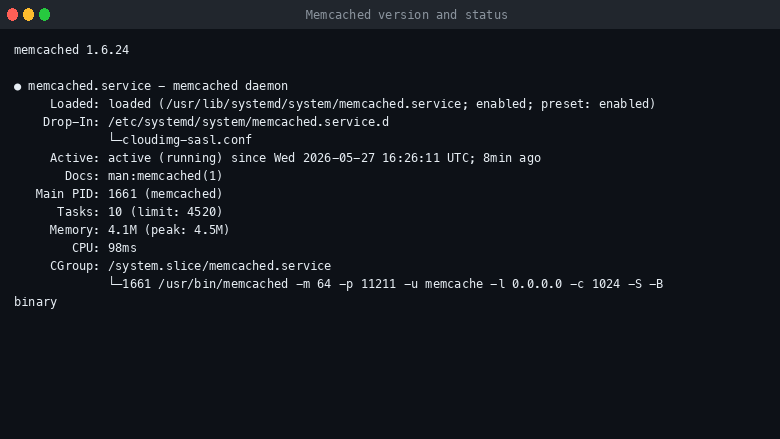
Memcached version and service status
Image
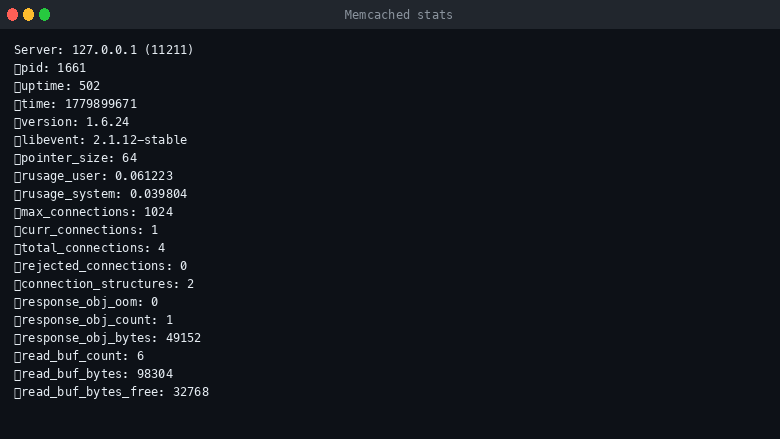
Memcached stats command output
Image
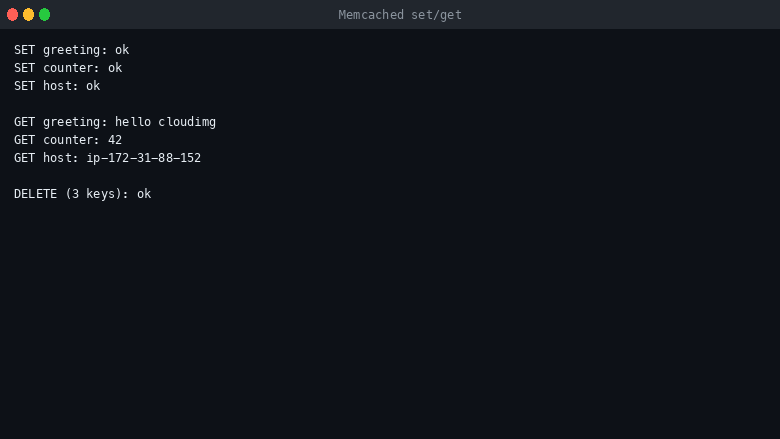
Memcached set and get operations
This is a repackaged open source software product wherein additional charges apply for cloudimg support services.
Memcached - Production-Ready Distributed Cache by cloudimg
Memcached is the high-performance, open-source distributed memory object caching system used by web frameworks, APIs, and high-traffic services to offload database load and accelerate dynamic web applications. This AMI delivers Memcached fully installed, authenticated, and configured so you have a working, secure cache server within minutes of launch.
Why This Image Instead of Alternatives
Stock Memcached ships with no authentication - any client that can reach port 11211 can read and write your cache. Most competing AMIs use shared default passwords that are identical across every deployment. This image solves both problems: SASL PLAIN authentication is compiled in and required by default, and every instance generates its own unique credentials on first boot. Unlike AWS ElastiCache, you retain full control over SASL configuration, instance placement, and OS-level tuning.
What Is Included
- Memcached from the OS package repository with SASL PLAIN authentication compiled in and required
- cyrus-sasl2 plumbing for credential management
- libmemcached-tools client utilities (memcstat, memcset, memcget)
- python3-pylibmc client library for Python integration
- nginx healthcheck shim on port 80 for AWS load balancer and scanner probes
- Memcached service enabled, starts on boot, listens on 11211
Integrations
This image works with the tools and services your team already uses:
- AWS Services: Deploy within Amazon VPC for network isolation, place behind an Application Load Balancer using the nginx healthcheck on port 80, and monitor with Amazon CloudWatch custom metrics.
- Web Frameworks: Compatible with Django (django-pymemcache), Ruby on Rails (dalli gem), Laravel (Memcached cache driver), and Express/Node.js (memjs) - any SASL-aware client library connects immediately.
- Databases: Use as a read-through cache layer in front of Amazon RDS, MySQL, or PostgreSQL to reduce query load during traffic spikes.
Secure First Boot
On every instance's first boot, a one-shot service generates a fresh SASL PLAIN password for the cloudimg user, writes it to the SASL credential database, and records it in a root-only file at /root/memcached-credentials.txt. No shared or default credentials ship in the image.
Network Posture
Memcached listens on 0.0.0.0:11211 so application servers in your VPC can connect. Restrict the inbound security group rule to your application CIDR before deploying real workloads. The nginx healthcheck shim serves a static response on port 80 for AWS Marketplace scanners and external load balancers; customer traffic uses port 11211.
Ready To Use
Connect over SSH, read the generated credentials from /root/memcached-credentials.txt, and immediately start storing and retrieving objects with memcset/memcget or any SASL-aware client library.
Example Use Case: E-Commerce Catalog Caching
An e-commerce platform running Django behind an ALB experiences database saturation during flash sales as thousands of concurrent users query the same product catalog. By routing repeated catalog queries through this Memcached instance, the team eliminates redundant database reads, keeps sub-millisecond GET latency on cached items, and maintains responsive page loads even at peak traffic - all with authenticated access that prevents cache poisoning from rogue clients in the VPC.
Additional Use Cases
- Session storage for web applications (replacing sticky sessions or shared database tables)
- API response caching for high-traffic microservices
- Rate limiter counters and ephemeral key-value state
- Database query result caching to reduce read replica load
Get Started
Launch the AMI, retrieve your unique credentials, and connect your application's Memcached client. For a guided sizing consultation or security review, contact cloudimg support - available 24/7 by email and chat.
All product and company names are trademarks or registered trademarks of their respective holders. Use of them does not imply any affiliation with or endorsement by them.
Highlights
- Memcached preinstalled with SASL PLAIN authentication compiled in and required by default, listening on 11211 and started on boot
- Per instance credentials: a fresh SASL password for the cloudimg user is generated on first boot and recorded in a root only file
- 24/7 technical support from cloudimg for cache configuration, sizing, client integration, security review and upgrades
Details
Sold by
Categories
Delivery method
Delivery option
64-bit (x86) Amazon Machine Image (AMI)
Latest version
Operating system
Ubuntu 24.04
Deployed on AWS
New
Introducing multi-product solutions
You can now purchase comprehensive solutions tailored to use cases and industries.

Features and programs
Financing for AWS Marketplace purchases
AWS Marketplace now accepts line of credit payments through the PNC Vendor Finance program. This program is available to select AWS customers in the US, excluding NV, NC, ND, TN, & VT.

Pricing
Free trial
Try this product free for 7 days according to the free trial terms set by the vendor. Usage-based pricing is in effect for usage beyond the free trial terms. Your free trial gets automatically converted to a paid subscription when the trial ends, but may be canceled any time before that.
Pricing is based on actual usage, with charges varying according to how much you consume. Subscriptions have no end date and may be canceled any time. Alternatively, you can pay upfront for a contract, which typically covers your anticipated usage for the contract duration. Any usage beyond contract will incur additional usage-based costs.
Additional AWS infrastructure costs may apply. Use the AWS Pricing Calculator to estimate your infrastructure costs.
If you are an AWS Free Tier customer with a free plan, you are eligible to subscribe to this offer. You can use free credits to cover the cost of eligible AWS infrastructure. See AWS Free Tier for more details. If you created an AWS account before July 15th, 2025, and qualify for the Legacy AWS Free Tier, Amazon EC2 charges for Micro instances are free for up to 750 hours per month. See Legacy AWS Free Tier for more details.
Dimension | Description | Cost/hour |
|---|---|---|
m5.large Recommended | m5.large | $0.08 |
t2.micro | t2.micro instance type | $0.04 |
t3.micro | t3.micro instance type | $0.04 |
c8in.metal-48xl | c8in.metal-48xl instance type | $0.24 |
m5ad.2xlarge | m5ad.2xlarge instance type | $0.24 |
c8ine.2xlarge | c8ine.2xlarge instance type | $0.24 |
r5n.2xlarge | r5n.2xlarge instance type | $0.24 |
i7ie.3xlarge | i7ie.3xlarge instance type | $0.24 |
t3.xlarge | t3.xlarge instance type | $0.12 |
m8i.32xlarge | m8i.32xlarge instance type | $0.24 |
Vendor refund policy
Refunds available on request.

Legal
Vendor terms and conditions
Upon subscribing to this product, you must acknowledge and agree to the terms and conditions outlined in the vendor's End User License Agreement (EULA) .
Content disclaimer
Vendors are responsible for their product descriptions and other product content. AWS does not warrant that vendors' product descriptions or other product content are accurate, complete, reliable, current, or error-free.
Delivery details
64-bit (x86) Amazon Machine Image (AMI)
Amazon Machine Image (AMI)
An AMI is a virtual image that provides the information required to launch an instance. Amazon EC2 (Elastic Compute Cloud) instances are virtual servers on which you can run your applications and workloads, offering varying combinations of CPU, memory, storage, and networking resources. You can launch as many instances from as many different AMIs as you need.
Version release notes
Initial release of Memcached 1.6 on AWS.
Additional details
Usage instructions
Connect via SSH on port 22 as the default login user for your operating system variant (the user guide lists it per variant). Memcached is already running and listening on 11211 with SASL PLAIN required. Read the per instance credentials with: sudo cat /root/memcached-credentials.txt. Test the cache with libmemcached-tools: memcstat --servers=127.0.0.1:11211 --binary --username='cloudimg' --password='<password>'. Restrict the inbound 11211 security group rule to your application CIDR before exposing the cache to real traffic.
Resources
Vendor resources
Support
Vendor support
cloudimg Support
cloudimg provides 24/7 technical support for this Memcached AMI by email and live chat.
What We Help With:
- Deployment and initial configuration
- Cache sizing and EC2 instance type recommendations
- Client integration (Django, Rails, Laravel, Express, and other SASL-aware libraries)
- SASL authentication setup and security review
- Performance tuning and troubleshooting
- Upgrades and patching
Response Times:
Critical issues receive a one-hour average response time. Our engineers work with you through resolution, not just initial acknowledgment.
Sizing Consultation:
Not sure which instance type fits your workload? Contact us for a guided sizing consultation to match your cache requirements to the right EC2 configuration.
Contact:
Email: support@cloudimg.co.uk
Live chat available 24/7.
For billing questions, refund requests, or subscription management, contact us at the same email address and we will assist promptly.
AWS infrastructure support
AWS Support is a one-on-one, fast-response support channel that is staffed 24x7x365 with experienced and technical support engineers. The service helps customers of all sizes and technical abilities to successfully utilize the products and features provided by Amazon Web Services.
Similar products

This product has charges associated with it for seller support. Deploy Oracle Database 19c Standard Edition on Windows Server in minutes with production-ready ENA networking up to 25 Gbps and24x7 cloudimg engineer support.

This product has charges associated with it for seller support. Oracle Database 19c Standard Edition AMI pre-configured on enterprise Linux with BYOL licensing. Deploy production-ready Oracle on AWS with 24/7 expert support from cloudimg.

This product has charges associated with it for seller support. Pre-configured RStudio IDE on Windows Server with 24/7 cloudimg support. Deploy a production-ready R data science environment on EC2 in minutes.

This product has charges associated with it for seller support. Migrate from CentOS 8 EOL to Alma Linux 8 in under 60 seconds with zero licensing fees. 1:1 RHEL 8 compatible, AWS-optimized, backed by 24/7 support with guaranteed 24hr response SLA.

This product has charges associated with it for seller support. Pre-configured Jenkins CI/CD server on Windows for .NET and DevOps teams. Launch in minutes with guaranteed 24-hour response support from cloudimg.
Customer reviews
No customer reviews yet
Be the first to review this product . We've partnered with PeerSpot to gather customer feedback. You can share your experience by writing or recording a review, or scheduling a call with a PeerSpot analyst.