
Sold by: cloudimg
Deployed on AWS
Free Trial
AWS Free Tier
This product has charges associated with it for seller support. Pre-configured Prometheus AMI with dedicated TSDB storage and 24/7 cloudimg support. Launch production-ready monitoring and alerting in minutes with no manual setup.
Overview
Image
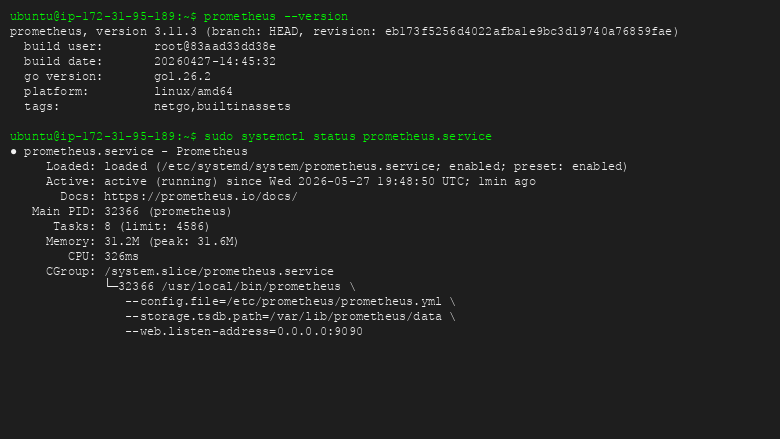
Prometheus service status
Image
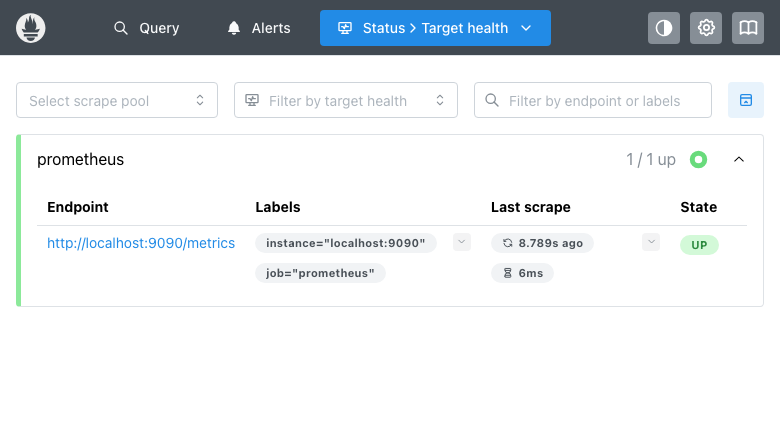
Prometheus Targets page
Image
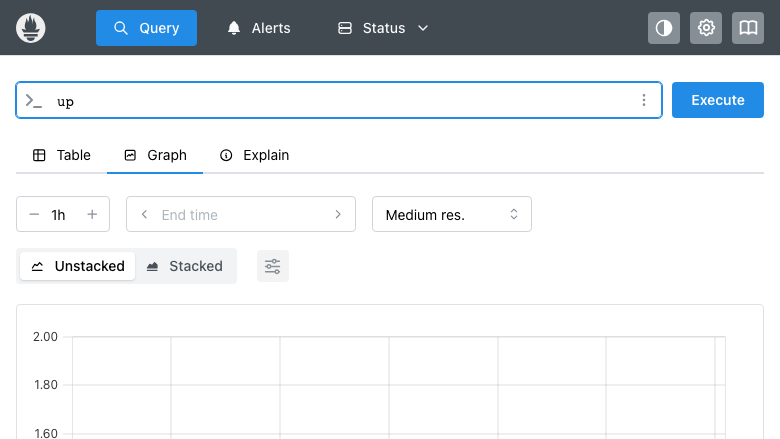
Prometheus Graph/PromQL query
This is a repackaged open source software product wherein additional charges apply for cloudimg support services.
Production-Ready Prometheus Monitoring on AWS
Launch a fully operational Prometheus monitoring and alerting system with no manual installation. This AMI delivers the official Prometheus binary, a dedicated EBS data volume, and a systemd-managed service - all configured and running at first boot. Start collecting metrics and writing alerting rules within minutes of launch.
Why Choose This AMI
This is a repackaged open source software product with additional charges for cloudimg support services. Unlike a bare Prometheus install, this AMI eliminates the operational overhead of binary installation, storage configuration, and service management. The dedicated EBS volume architecture means your time series data persists independently of the compute instance, surviving instance stops, restarts, and replacements - a critical advantage over ephemeral or root-volume storage approaches that risk data loss.
Monitoring Stack Details
- Prometheus Service: Running as a systemd unit, installed from the official prometheus.io binary tarball. Automatic start on boot with restart-on-failure behavior.
- Default Configuration: Ships with a scrape configuration that monitors Prometheus itself, providing immediate visibility into system health.
- Expression Browser: The built-in Prometheus web UI and PromQL query engine are available on port 9090 immediately after launch.
- Alerting Engine: The native alerting engine is ready for rule configuration. Connect to Alertmanager for routing alerts to PagerDuty, Slack, email, or custom webhooks.
- Extensible Scrape Targets: Add EC2 instances, Kubernetes endpoints, application exporters, and custom targets by editing the prometheus.yml configuration file.
Production-Ready Storage Architecture
- Prometheus TSDB data is stored on a dedicated, independently resizable EBS volume separate from the root filesystem.
- The data directory is mounted at boot via filesystem UUID in fstab, ensuring stable mount behavior across instance reboots and AMI launches.
- Storage retention and compaction are controlled via Prometheus command-line flags, allowing you to tune data lifecycle to your requirements.
- Because the data volume is independent, you can resize storage without replacing the instance or risking data corruption.
Security Considerations
Buyers should note that the Prometheus web UI on port 9090 does not include built-in authentication. We recommend restricting access via AWS Security Groups, placing Prometheus behind a reverse proxy with authentication, or using AWS PrivateLink for internal-only access. Configure your VPC security groups to limit inbound traffic on port 9090 to trusted CIDR ranges only.
Requirements and Limitations
Buyers should ensure their deployment meets these baseline requirements:
- Ports: Security group must allow inbound TCP on port 9090 for the Prometheus UI and API.
- Storage: The dedicated EBS data volume is provisioned at launch. Resize as needed based on retention period and scrape target count.
- Scaling: Performance depends on the number of active time series and scrape interval. Monitor Prometheus self-metrics for resource saturation.
Use Cases
- Infrastructure Monitoring: Collect CPU, memory, disk, and network metrics from EC2 fleets using node-exporter, with threshold-based alerts routed through Alertmanager to your on-call system.
- Kubernetes Observability: Monitor EKS or self-managed Kubernetes clusters using kube-state-metrics and node-exporter for pod, node, and cluster-level visibility.
- Grafana Dashboard Backend: Use this Prometheus instance as the data source for Grafana dashboards, enabling team-wide visibility into application and infrastructure health.
- Custom Alerting Pipelines: Build multi-condition alerting rules with PromQL expressions and route notifications through Alertmanager to Slack, PagerDuty, or email.
- Cloud Resource Monitoring: Track AWS resource utilization across multiple accounts by scraping CloudWatch exporter metrics into Prometheus.
cloudimg Support
24/7 technical support by email and live chat. Our engineers assist with Prometheus deployment, PromQL query optimization, alerting rule design, retention tuning, Grafana integration, and troubleshooting. Critical issues receive a one-hour average response time.
To get started, launch the AMI, browse to port 9090, and begin building your monitoring stack. For guided onboarding assistance, contact cloudimg support.
All product and company names are trademarks or registered trademarks of their respective holders. Use of them does not imply any affiliation with or endorsement by them.
Highlights
- Prometheus launches fully operational at first boot - the official binary runs as a systemd service with automatic restart, the expression browser is live on port 9090, and default self-monitoring scrape is active. No SSH session, no package installation, no manual configuration steps required. Start writing PromQL queries and alerting rules immediately after instance launch, eliminating the typical setup overhead of deploying Prometheus from scratch.
- Dedicated EBS data volume keeps your Prometheus TSDB independent from the root filesystem, persisted via stable UUID-based fstab entries. This architecture means your monitoring history survives instance stops, restarts, and replacements without data loss. Resize storage independently as your retention needs grow, without replacing compute resources or risking time series corruption during volume operations.
- 24/7 technical support from cloudimg engineers with a one-hour average response time for critical issues. Get expert help with PromQL query optimization, alerting rule design, retention tuning, Grafana integration, and scrape target configuration. Unlike generic cloud support, cloudimg specializes in Prometheus operations - helping you move from basic metrics collection to a production-grade observability stack.
Details
Sold by
Delivery method
Delivery option
64-bit (x86) Amazon Machine Image (AMI)
Latest version
Operating system
Ubuntu 24.04
Deployed on AWS
New
Introducing multi-product solutions
You can now purchase comprehensive solutions tailored to use cases and industries.

Features and programs
Financing for AWS Marketplace purchases
AWS Marketplace now accepts line of credit payments through the PNC Vendor Finance program. This program is available to select AWS customers in the US, excluding NV, NC, ND, TN, & VT.

Pricing
Free trial
Try this product free for 7 days according to the free trial terms set by the vendor. Usage-based pricing is in effect for usage beyond the free trial terms. Your free trial gets automatically converted to a paid subscription when the trial ends, but may be canceled any time before that.
Pricing is based on actual usage, with charges varying according to how much you consume. Subscriptions have no end date and may be canceled any time. Alternatively, you can pay upfront for a contract, which typically covers your anticipated usage for the contract duration. Any usage beyond contract will incur additional usage-based costs.
Additional AWS infrastructure costs may apply. Use the AWS Pricing Calculator to estimate your infrastructure costs.
If you are an AWS Free Tier customer with a free plan, you are eligible to subscribe to this offer. You can use free credits to cover the cost of eligible AWS infrastructure. See AWS Free Tier for more details. If you created an AWS account before July 15th, 2025, and qualify for the Legacy AWS Free Tier, Amazon EC2 charges for Micro instances are free for up to 750 hours per month. See Legacy AWS Free Tier for more details.
Dimension | Description | Cost/hour |
|---|---|---|
m5.large Recommended | m5.large | $0.08 |
t2.micro | t2.micro instance type | $0.04 |
t3.micro | t3.micro instance type | $0.04 |
c5d.12xlarge | c5d.12xlarge instance type | $0.24 |
t3a.nano | t3a.nano instance type | $0.00 |
i3en.24xlarge | i3en.24xlarge instance type | $0.24 |
m5a.2xlarge | m5a.2xlarge instance type | $0.24 |
c8a.metal-48xl | c8a.metal-48xl instance type | $0.24 |
c5d.9xlarge | c5d.9xlarge instance type | $0.24 |
m8azn.metal-24xl | m8azn.metal-24xl instance type | $0.24 |
Vendor refund policy
Refunds available on request.

Legal
Vendor terms and conditions
Upon subscribing to this product, you must acknowledge and agree to the terms and conditions outlined in the vendor's End User License Agreement (EULA) .
Content disclaimer
Vendors are responsible for their product descriptions and other product content. AWS does not warrant that vendors' product descriptions or other product content are accurate, complete, reliable, current, or error-free.
Delivery details
64-bit (x86) Amazon Machine Image (AMI)
Amazon Machine Image (AMI)
An AMI is a virtual image that provides the information required to launch an instance. Amazon EC2 (Elastic Compute Cloud) instances are virtual servers on which you can run your applications and workloads, offering varying combinations of CPU, memory, storage, and networking resources. You can launch as many instances from as many different AMIs as you need.
Version release notes
Initial release of Prometheus 3 monitoring toolkit.
Additional details
Usage instructions
Connect via SSH on port 22 as the 'ubuntu' user using your key pair. The Prometheus web interface is available on port 9090. Browse to http://<instance-public-ip>:9090 to access the expression browser and status pages. The Prometheus configuration file is at /etc/prometheus/prometheus.yml. Edit this file to add scrape targets and alerting rules, then reload with: curl -X POST http://localhost:9090/-/reload . The endpoint info including private IP and config paths is written to /root/prometheus-info.txt on first boot. The Prometheus data directory is at /var/lib/prometheus/data on a dedicated resizable EBS volume.
Resources
Vendor resources
Support
Vendor support
cloudimg Support for Prometheus AMI
cloudimg provides 24/7 technical support for this Prometheus AMI product via email and live chat.
Support Scope:
- Prometheus deployment and initial configuration assistance
- PromQL query optimization and alerting rule design
- Retention and storage tuning for the dedicated EBS data volume
- Grafana integration and dashboard configuration
- Alertmanager setup and notification routing
- Performance troubleshooting and scrape target configuration
- Guidance on security group configuration for port 9090 access
- Assistance with product updates and version upgrades
Response Times:
Critical issues receive a one-hour average response time. Support is available around the clock, seven days a week.
How to Get Help:
Contact cloudimg support at support@cloudimg.co.uk for any issues including deployment problems, configuration questions, performance concerns, or refund requests. Live chat is also available for real-time assistance.
Getting Started:
After launching the AMI, the Prometheus service starts automatically. Browse to port 9090 to access the expression browser. Edit the prometheus.yml configuration file to add scrape targets. For guided onboarding or help configuring your monitoring stack, reach out to the support team.
AWS infrastructure support
AWS Support is a one-on-one, fast-response support channel that is staffed 24x7x365 with experienced and technical support engineers. The service helps customers of all sizes and technical abilities to successfully utilize the products and features provided by Amazon Web Services.
Similar products

This product has charges associated with it for seller support. Launch a private server and container monitoring dashboard in minutes - pre-hardened, pre-configured with nginx reverse proxy, and backed by 24/7 cloudimg support.

This product has charges associated with it for seller support. Deploy Oracle Database 19c Standard Edition on Windows Server in minutes with production-ready ENA networking up to 25 Gbps and24x7 cloudimg engineer support.

This product has charges associated with it for seller support. Oracle Database 19c Standard Edition AMI pre-configured on enterprise Linux with BYOL licensing. Deploy production-ready Oracle on AWS with 24/7 expert support from cloudimg.

This product has charges associated with it for seller support. Pre-configured RStudio IDE on Windows Server with 24/7 cloudimg support. Deploy a production-ready R data science environment on EC2 in minutes.

This product has charges associated with it for seller support. Migrate from CentOS 8 EOL to Alma Linux 8 in under 60 seconds with zero licensing fees. 1:1 RHEL 8 compatible, AWS-optimized, backed by 24/7 support with guaranteed 24hr response SLA.

This product has charges associated with it for seller support. Pre-configured Jenkins CI/CD server on Windows for .NET and DevOps teams. Launch in minutes with guaranteed 24-hour response support from cloudimg.
Customer reviews
No customer reviews yet
Be the first to review this product . We've partnered with PeerSpot to gather customer feedback. You can share your experience by writing or recording a review, or scheduling a call with a PeerSpot analyst.