
Sold by: cloudimg
Deployed on AWS
Free Trial
AWS Free Tier
This product has charges associated with it for seller support. Launch a pre-hardened, passkey-only OIDC provider with zero baked-in credentials: the per-instance admin setup closes before the instance is reachable. 24/7 support from cloudimg with a one-hour average response for critical issues.
Overview

Image
Passwordless passkey sign-in
Image
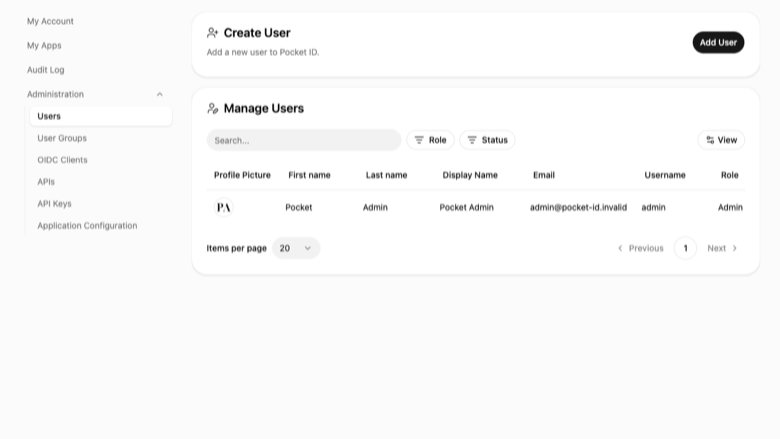
Admin user management
Image
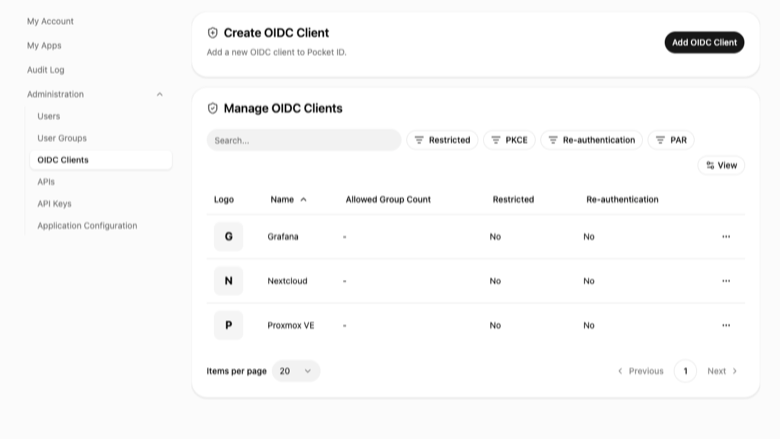
OIDC client applications
Image
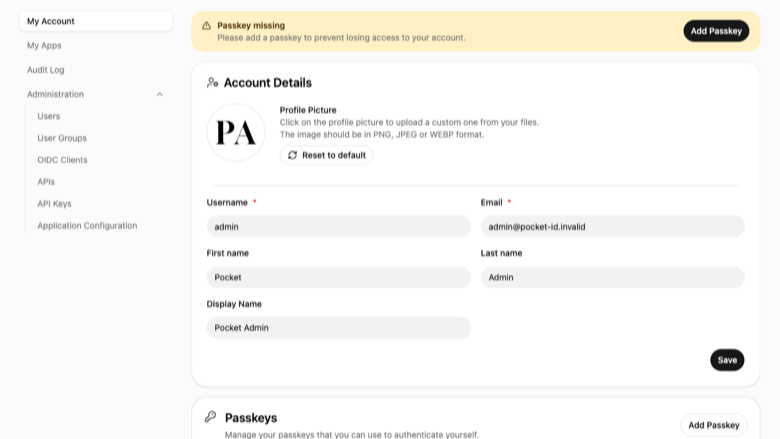
Passkey enrolment
This is a repackaged open source software product wherein additional charges apply for cloudimg support services.
Why This AMI Instead of Self-Deploying?
Pocket ID is a simple, self-hosted OpenID Connect (OIDC) provider that authenticates your users with passkeys instead of passwords. Point your existing applications at it as their identity provider and everyone signs in with the fingerprint reader, face unlock, or hardware security key they already carry.
Deploying Pocket ID yourself means installing the binary, creating a service account, writing systemd units, hardening an nginx reverse proxy, generating per-host secrets, and closing the initial-setup window before an attacker finds it. This AMI eliminates that effort entirely: a hardened, tested single sign-on service is running within minutes of launch, backed by 24/7 expert support with a one-hour average response for critical issues.
Concrete Use Case: A DevOps Team With Multiple Internal Tools
A 10-person engineering team runs Grafana, Gitea, and Portainer on AWS. Rather than manage separate credentials for each, they point all three at Pocket ID as their OIDC provider, and every developer signs in once with a fingerprint. One identity plane, zero passwords to rotate.
Application Stack
Pocket ID ships as a single self-contained binary that embeds its own web interface and stores everything in an embedded database, so the entire identity plane is one process run by an unprivileged service account. It listens on the loopback address and an nginx reverse proxy fronts it on port 80, serving an unauthenticated health endpoint for load-balancer probes and proxying everything else to the application. A systemd service starts it on boot and restarts it on failure.
Secure By Default - Documented Security Baseline
This image IS your identity plane, so it ships with no known credential of any kind:
- No admin account, no passkey, and no secret are baked into the image
- The sole admin is created for each instance on its first boot, which closes the initial-setup route before the instance is publicly reachable - so no one can claim your identity provider
- The admin has no password and no passkey: the only way in is a single-use, one-hour sign-in link generated on that instance and stored in a root-only file
- A fresh sign-in link is minted over SSH at any time, so your SSH key is the root of trust
- A unique encryption key is generated for every instance and stored with strict permissions
- The application is bound to loopback and reached only through the nginx proxy, so the OIDC service is never exposed directly
These controls mean the AMI has a zero-credential attack surface at launch - unlike images that ship default admin accounts or static API keys that must be rotated post-deployment.
How This Compares to Alternatives
- vs. manual Pocket ID deployment: eliminates hours of systemd unit authoring, nginx configuration, secret generation, and the race to close the open admin-setup window.
- vs. full identity suites such as Keycloak or Authentik: one binary, one process, no Java runtime, no external database - dramatically fewer moving parts to secure and maintain.
- vs. managed SaaS providers such as Auth0 or Okta: your identity data stays in your own VPC. No vendor lock-in, no per-user fees at scale, full control over your authentication plane.
Passkeys Need Your Own Domain
Passkeys use WebAuthn, which requires a secure context (HTTPS) and a registrable domain name as the relying party identifier, so a passkey can never be registered against a bare IP address. The instance boots fully working on its public IP for the one-time-link admin sign-in and all configuration; a single bundled command points it at your own domain, after which you add TLS and register passkeys. The user guide walks through this exact path.
What You Avoid By Using This AMI
- Manual binary installation, service-account creation, and systemd unit authoring
- Generating and securely storing per-host secrets and encryption keys
- Closing the open initial-admin setup window before an attacker reaches it
- Ongoing maintenance and security patching without expert guidance
cloudimg Support
24/7 technical support by email and chat with a one-hour average response for critical issues. Our engineers help with deployment, pointing Pocket ID at your own domain, TLS termination, connecting OIDC client applications, passkey enrolment, backups, and upgrades.
Use Cases
- Passwordless single sign-on across self-hosted applications for small engineering teams
- A lightweight, self-hosted alternative to a full identity suite when you need OIDC without the complexity of Keycloak
- Centralised OIDC authentication you fully own, in your own VPC, for compliance-sensitive workloads
All product and company names are trademarks or registered trademarks of their respective holders. Use of them does not imply any affiliation with or endorsement by them.
Highlights
- Zero-credential security posture: no admin account, no passkey, and no secret are baked into the image. The sole admin is created per instance on first boot, closing the setup window before the instance is publicly reachable.
- Passwordless OIDC in minutes: a hardened Pocket ID deployment - binary, systemd service, nginx reverse proxy, and per-instance encryption key - is running and ready to accept passkey sign-ins shortly after launch.
- 24/7 expert support from cloudimg with a one-hour average response for critical issues, covering deployment, domain setup, TLS, OIDC client integration, passkey enrolment, backups, and upgrades.
Details
Sold by
Categories
Delivery method
Delivery option
64-bit (x86) Amazon Machine Image (AMI)
Latest version
Operating system
Ubuntu 24.04
Deployed on AWS
New
Introducing multi-product solutions
You can now purchase comprehensive solutions tailored to use cases and industries.

Features and programs
Financing for AWS Marketplace purchases
AWS Marketplace now accepts line of credit payments through the PNC Vendor Finance program. This program is available to select AWS customers in the US, excluding NV, NC, ND, TN, & VT.

Pricing
Free trial
Try this product free for 7 days according to the free trial terms set by the vendor. Usage-based pricing is in effect for usage beyond the free trial terms. Your free trial gets automatically converted to a paid subscription when the trial ends, but may be canceled any time before that.
Pricing is based on actual usage, with charges varying according to how much you consume. Subscriptions have no end date and may be canceled any time. Alternatively, you can pay upfront for a contract, which typically covers your anticipated usage for the contract duration. Any usage beyond contract will incur additional usage-based costs.
Additional AWS infrastructure costs may apply. Use the AWS Pricing Calculator to estimate your infrastructure costs.
If you are an AWS Free Tier customer with a free plan, you are eligible to subscribe to this offer. You can use free credits to cover the cost of eligible AWS infrastructure. See AWS Free Tier for more details. If you created an AWS account before July 15th, 2025, and qualify for the Legacy AWS Free Tier, Amazon EC2 charges for Micro instances are free for up to 750 hours per month. See Legacy AWS Free Tier for more details.
Dimension | Description | Cost/hour |
|---|---|---|
m5.large Recommended | m5.large | $0.08 |
t2.micro | t2.micro instance type | $0.04 |
t3.micro | t3.micro instance type | $0.04 |
r8in.metal-96xl | r8in.metal-96xl instance type | $0.24 |
r8idn.8xlarge | r8idn.8xlarge instance type | $0.24 |
g6f.xlarge | g6f.xlarge instance type | $0.12 |
m5d.16xlarge | m5d.16xlarge instance type | $0.24 |
r7iz.32xlarge | r7iz.32xlarge instance type | $0.24 |
c7a.8xlarge | c7a.8xlarge instance type | $0.24 |
r5d.metal | r5d.metal instance type | $0.24 |
Vendor refund policy
Refunds available on request.

Legal
Vendor terms and conditions
Upon subscribing to this product, you must acknowledge and agree to the terms and conditions outlined in the vendor's End User License Agreement (EULA) .
Content disclaimer
Vendors are responsible for their product descriptions and other product content. AWS does not warrant that vendors' product descriptions or other product content are accurate, complete, reliable, current, or error-free.
Delivery details
64-bit (x86) Amazon Machine Image (AMI)
Amazon Machine Image (AMI)
An AMI is a virtual image that provides the information required to launch an instance. Amazon EC2 (Elastic Compute Cloud) instances are virtual servers on which you can run your applications and workloads, offering varying combinations of CPU, memory, storage, and networking resources. You can launch as many instances from as many different AMIs as you need.
Version release notes
Initial release of Pocket ID 2.11.0, a self-hosted passwordless OIDC provider.
Additional details
Usage instructions
Connect via SSH on port 22 as the default login user for your operating system variant (the user guide lists it per variant; on Ubuntu it is 'ubuntu'). Pocket ID is served by nginx on port 80: browse to http://<instance-public-ip>/ once you have a sign-in link. This image ships with NO admin password and NO passkey. Retrieve the per-instance one-time admin sign-in link with: sudo cat /root/pocket-id-credentials.txt. The link is single use and expires one hour after first boot; mint a fresh one at any time with: sudo pocket-id-admin-link. Passkeys require a registrable domain (never a bare IP): point a DNS name at the instance, run sudo pocket-id-set-url https://id.example.com , add TLS, then sudo pocket-id-admin-link and register your passkey on your domain. The app runs on loopback 127.0.0.1:1411 and is reached only through the nginx proxy on port 80. Configuration lives in /etc/pocket-id/pocket-id.env and the datastore under /var/lib/pocket-id. Services are managed with systemctl (pocket-id.service, pocket-id-firstboot.service, nginx.service). The user guide covers first sign-in, changing the admin email, pointing the provider at your own domain, enabling HTTPS, and connecting OIDC client applications.
Resources
Vendor resources
Support
Vendor support
cloudimg provides 24/7 technical support for this product by email and live chat.
Response Times
Critical issues receive a one-hour average response. Our engineers are available around the clock to help resolve problems that block your single sign-on.
What We Help With
- Deployment and initial configuration
- Pointing Pocket ID at your own domain and enabling HTTPS/TLS
- Connecting OIDC client applications
- Passkey enrolment and WebAuthn troubleshooting
- Admin account recovery and one-time sign-in links
- Backup strategies and data recovery
- Software updates and patch guidance
- Troubleshooting and issue resolution
- Refund requests
How to Reach Us
Email: support@cloudimg.co.uk Live chat: Available 24/7
We respond to all inquiries and work with you until your issue is resolved. If you need help at any stage - from first launch to ongoing maintenance - our team is here to assist.
AWS infrastructure support
AWS Support is a one-on-one, fast-response support channel that is staffed 24x7x365 with experienced and technical support engineers. The service helps customers of all sizes and technical abilities to successfully utilize the products and features provided by Amazon Web Services.
Similar products

This product has charges associated with it for seller support. Launch a production-ready backend in minutes. PocketBase delivers a REST API, realtime subscriptions, auth, and file storage as a single binary on EC2 with 24/7 cloudimg support.

This product has charges associated with it for deployment, configuration, and ongoing support. Self-hosted backend with embedded database, auth, file storage, and real-time subscriptions via WebSocket, deployed on EC2.

As Cloud environments are constantly evolving to support the needs of your dynamic business, it pays to undertake an AWS Well-Architected Review of the current payloads on AWS. PolarSeven will Review your current security and compliance posture, and the cost effectiveness of the way you are running your payloads.
We can recommend the Remediation to be undertaken to secure and optimise the environment to reduce risk, provide cost savings and reduce deployment cycle timeframes.

An API-based inference server for spatially aware, objective-driven AI-assisted molecular design. It enables the generation of novel molecular structures tailored to specific shapes and binding sites, supporting advanced drug discovery and precision molecular engineering workflows.
Customer reviews
No customer reviews yet
Be the first to review this product . We've partnered with PeerSpot to gather customer feedback. You can share your experience by writing or recording a review, or scheduling a call with a PeerSpot analyst.