
Sold by: cloudimg
Deployed on AWS
Free Trial
AWS Free Tier
This product has charges associated with it for seller support. Pre-hardened Hoverfly AMI for API simulation and service virtualization. Capture, replay and modify HTTP traffic in minutes with JWT authentication, a unique admin credential minted on first boot, no database, and 24/7 cloudimg support.
Overview
Image
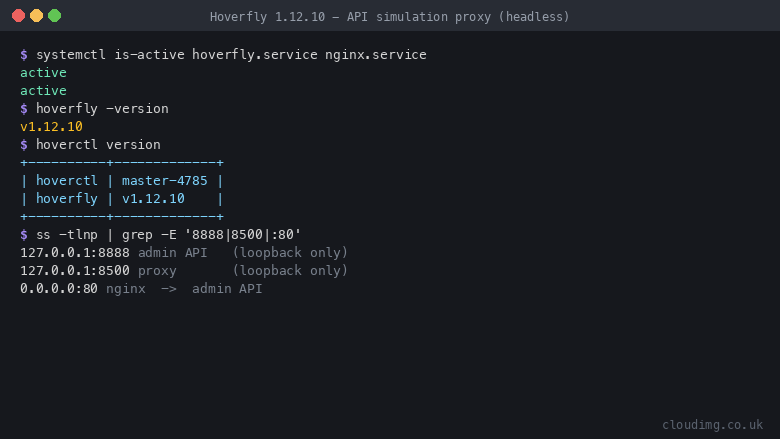
Hoverfly running (headless)
Image
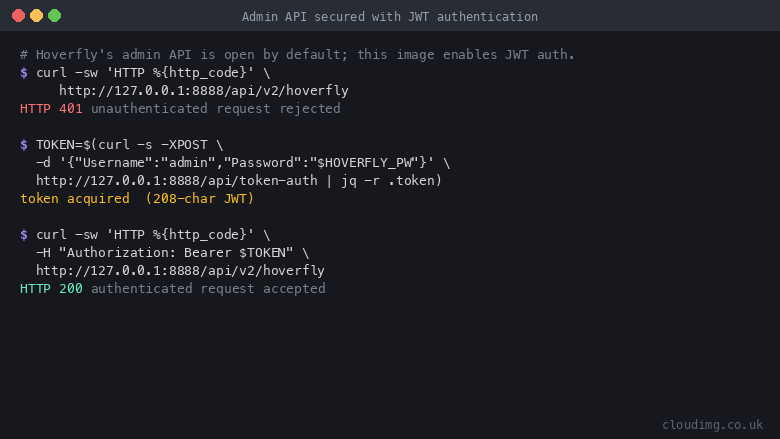
Admin API secured with JWT auth
Image
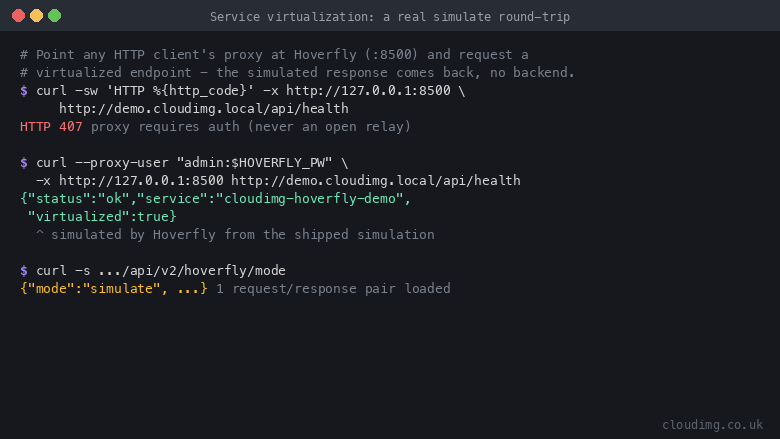
A real service virtualization round-trip
This is a repackaged open source software product wherein additional charges apply for cloudimg support services.
Overview
Hoverfly is a lightweight, open source API simulation and service virtualization proxy used by development teams worldwide. It sits between your application and the APIs it depends on, capturing real traffic, replaying it as fast deterministic simulations, spying on requests, or modifying responses, so your teams can develop and test against slow, flaky, rate limited, or unavailable third party APIs without ever calling the real service.
This AMI delivers Hoverfly fully installed as a single self contained Go binary under systemd, with the hoverctl command line tool, an nginx reverse proxy in front of the admin API, and JWT authentication enabled. Your API simulator is serving within minutes of launch with no manual wiring required.
Why This AMI vs. Running Hoverfly Yourself
- Secure by default, not an open proxy: Hoverfly's admin API is unauthenticated out of the box and a forward proxy is an abuse magnet. This image enables JWT authentication, binds both the admin API and the proxy to loopback only, fronts the admin API with nginx, and requires proxy authentication, so your instance can never be abused as an open relay.
- Unique credentials on every launch: Many images ship with a published default password. This image generates a unique admin password and a unique JWT signing secret on every launch, stored only in a root only file. No shared or default credential ever exists.
- No database to manage: Hoverfly needs only portable simulation JSON files and a small embedded store, so there is no database server to provision, tune, patch or back up. You eliminate an entire failure domain and reduce monthly cost.
- Production ready in minutes: A shipped demo simulation proves the round trip immediately after boot. You go from launch to first simulated response without writing configuration.
Application Stack
Hoverfly runs as an unprivileged systemd service and imports a demo simulation at startup, so the proxy is virtualizing traffic the moment the instance boots. nginx answers on port 80 and reverse proxies the loopback bound admin API on port 8888, gated by Hoverfly's JWT authentication. The proxy port 8500 is bound to loopback only and protected by proxy authentication. hoverctl manages simulations: capture live traffic, export it to JSON, and import it to replay as a virtual service.
Security and Hardening
- JWT authentication is enabled on the admin API, with a unique admin password and JWT signing secret generated on first boot and stored only in a root only file
- The admin API and the proxy are both bound to loopback only; nginx fronts the admin API on port 80, and the proxy requires authentication so it is never an open relay
- The image ships with no usable or default credential; every instance mints its own on first boot
- The security group opens only SSH on port 22 and the nginx fronted admin API on port 80; the proxy is kept loopback only until you deliberately expose it to trusted clients
- TLS termination is recommended via an AWS Application Load Balancer or your own certificate on the instance
Use Cases
- Development and QA teams replacing slow, flaky, rate limited or unavailable APIs with fast, deterministic virtual services, so tests run reliably and in isolation.
- CI and CD pipelines running integration and contract tests against captured API simulations instead of live dependencies, removing external flakiness and network cost from the build.
- Platform and microservices teams simulating fault, latency and edge case responses to prove how services behave when a dependency is degraded, before it happens in production.
Getting Started
- Launch the AMI from the AWS Marketplace listing.
- SSH into the instance and retrieve the generated admin password from the root only credentials file.
- Obtain a JWT token from the admin API via nginx on port 80.
- Point any HTTP client's proxy setting at Hoverfly to replay the shipped demo simulation.
- Use hoverctl to capture live traffic, export it to JSON, and import your own simulations.
The shipped demo simulation proves the full round trip immediately after launch. A step by step deployment guide is published at https://www.cloudimg.co.uk/guides/hoverfly-aws/ .
Evaluate at Low Cost
Hoverfly is comfortable on small instance types, so you can evaluate the product on a small instance, run your tests, and terminate at any time. There is no lock in or minimum commitment.
Hoverfly is developed by SpectoLabs Ltd and licensed under Apache-2.0. This product is not affiliated with or endorsed by SpectoLabs. This is a repackaged open source software product with additional charges for cloudimg support services. All product and company names are trademarks or registered trademarks of their respective holders.
cloudimg Support
Highlights
- Launch and simulate in minutes: Hoverfly is fully installed as a single Go binary under systemd with the hoverctl CLI. A demo simulation loads at boot so the proxy is virtualizing traffic immediately, with no database and no manual configuration. Hoverfly is comfortable on small instance types, so you can evaluate it at minimal cost and terminate any time.
- Secure by default with unique per instance credentials: every launch generates a fresh admin password and JWT signing secret stored in a root only file. The admin API and proxy are bound to loopback only, nginx gates external access, and proxy authentication is enforced, so your instance can never be abused as an open relay. No shared or default credential ever exists in the image.
- 24/7 expert support from cloudimg with a one hour average response time for critical issues. Our engineers help with Hoverfly simulation authoring, hoverctl capture and import workflows, proxy exposure to trusted clients, custom domains and HTTPS, upgrades and troubleshooting.
Details
Sold by
Categories
Delivery method
Delivery option
64-bit (x86) Amazon Machine Image (AMI)
Latest version
Operating system
Ubuntu 24.04
Deployed on AWS
New
Introducing multi-product solutions
You can now purchase comprehensive solutions tailored to use cases and industries.

Features and programs
Financing for AWS Marketplace purchases
AWS Marketplace now accepts line of credit payments through the PNC Vendor Finance program. This program is available to select AWS customers in the US, excluding NV, NC, ND, TN, & VT.

Pricing
Free trial
Try this product free for 7 days according to the free trial terms set by the vendor. Usage-based pricing is in effect for usage beyond the free trial terms. Your free trial gets automatically converted to a paid subscription when the trial ends, but may be canceled any time before that.
Pricing is based on actual usage, with charges varying according to how much you consume. Subscriptions have no end date and may be canceled any time. Alternatively, you can pay upfront for a contract, which typically covers your anticipated usage for the contract duration. Any usage beyond contract will incur additional usage-based costs.
Additional AWS infrastructure costs may apply. Use the AWS Pricing Calculator to estimate your infrastructure costs.
If you are an AWS Free Tier customer with a free plan, you are eligible to subscribe to this offer. You can use free credits to cover the cost of eligible AWS infrastructure. See AWS Free Tier for more details. If you created an AWS account before July 15th, 2025, and qualify for the Legacy AWS Free Tier, Amazon EC2 charges for Micro instances are free for up to 750 hours per month. See Legacy AWS Free Tier for more details.
Dimension | Description | Cost/hour |
|---|---|---|
m5.large Recommended | m5.large | $0.04 |
t2.micro | t2.micro instance type | $0.04 |
t3.micro | t3.micro instance type | $0.04 |
c5a.12xlarge | c5a.12xlarge instance type | $0.24 |
c5a.16xlarge | c5a.16xlarge instance type | $0.24 |
c5a.24xlarge | c5a.24xlarge instance type | $0.24 |
c5a.2xlarge | c5a.2xlarge instance type | $0.24 |
c5a.4xlarge | c5a.4xlarge instance type | $0.24 |
c5a.8xlarge | c5a.8xlarge instance type | $0.24 |
c5a.large | c5a.large instance type | $0.08 |
Vendor refund policy
Refunds available on request.

Legal
Vendor terms and conditions
Upon subscribing to this product, you must acknowledge and agree to the terms and conditions outlined in the vendor's End User License Agreement (EULA) .
Content disclaimer
Vendors are responsible for their product descriptions and other product content. AWS does not warrant that vendors' product descriptions or other product content are accurate, complete, reliable, current, or error-free.
Delivery details
64-bit (x86) Amazon Machine Image (AMI)
Amazon Machine Image (AMI)
An AMI is a virtual image that provides the information required to launch an instance. Amazon EC2 (Elastic Compute Cloud) instances are virtual servers on which you can run your applications and workloads, offering varying combinations of CPU, memory, storage, and networking resources. You can launch as many instances from as many different AMIs as you need.
Version release notes
Initial release of Hoverfly 1.12.10 as a ready-to-use API simulation and service virtualization proxy, with JWT authentication enabled and the admin password and JWT secret generated on first boot.
Additional details
Usage instructions
Connect via SSH on port 22 as the default login user for your operating system variant (for the Ubuntu 24.04 variant the user is ubuntu). Retrieve the per-instance admin credentials with: sudo cat /root/hoverfly-credentials.txt. The Hoverfly admin API is reachable off-box through nginx at http://<instance-public-ip>/ and is protected by JWT authentication: POST your username and password as JSON to http://<instance-public-ip>/api/token-auth to obtain a Bearer token, then call the admin API (for example GET /api/v2/hoverfly) with an Authorization: Bearer header. The service-virtualization proxy listens on 127.0.0.1:8500 and is loopback-only by default (an internet-facing open proxy is an abuse risk); with authentication enabled it also requires HTTP Basic proxy credentials. Test the shipped demo with: curl --proxy-user admin:<password> -x http://127.0.0.1:8500 http://demo.cloudimg.local/api/health . Manage simulations with hoverctl (capture, export, import). The security group opens ports 22 and 80. Services run under systemd: systemctl status hoverfly nginx.
Resources
Vendor resources
Support
Vendor support
cloudimg Support
cloudimg provides 24/7 technical support for this Hoverfly AMI by email (support@cloudimg.co.uk ) and live chat. Critical issues receive a one hour average response time.
What We Help With
- Deployment and first boot setup: retrieving your generated admin password, obtaining a JWT via the admin API, and configuring security groups (ports 22 and 80)
- Simulation authoring: using hoverctl to capture live traffic, export it to JSON, and import it to replay as a virtual service; editing simulations by hand
- Proxy exposure and hardening: exposing the proxy to trusted clients via an SSH tunnel or a scoped security group rule, custom domain and HTTPS configuration, and nginx tuning
- Instance sizing: guidance on selecting the right EC2 instance type for your workload throughput
- Upgrades and troubleshooting: version upgrade guidance and diagnosing simulation or proxy errors
How to Reach Us
Email: support@cloudimg.co.uk Live chat: Available 24/7 through our support portal.
Critical issues receive a one hour average response time. For billing, subscription changes, or refund requests, contact support@cloudimg.co.uk .
AWS infrastructure support
AWS Support is a one-on-one, fast-response support channel that is staffed 24x7x365 with experienced and technical support engineers. The service helps customers of all sizes and technical abilities to successfully utilize the products and features provided by Amazon Web Services.
Similar products

Hoverfly Cloud is an API simulation platform that simplifies testing and development for teams facing complex dependencies. Cloud-hosted and cost-effective, it provides reliable API simulations that free your dev and test workflows from live system constraints, making iterative development fast and frictionless.
Customer reviews
No customer reviews yet
Be the first to review this product . We've partnered with PeerSpot to gather customer feedback. You can share your experience by writing or recording a review, or scheduling a call with a PeerSpot analyst.