
Sold by: ORHAKSS LLC
Deployed on AWS
AWS Free Tier
This product has charges associated with it for automated deployment, security hardening, first-boot credential generation, system optimization, and support services provided by ORHAKSS LLC.
Overview
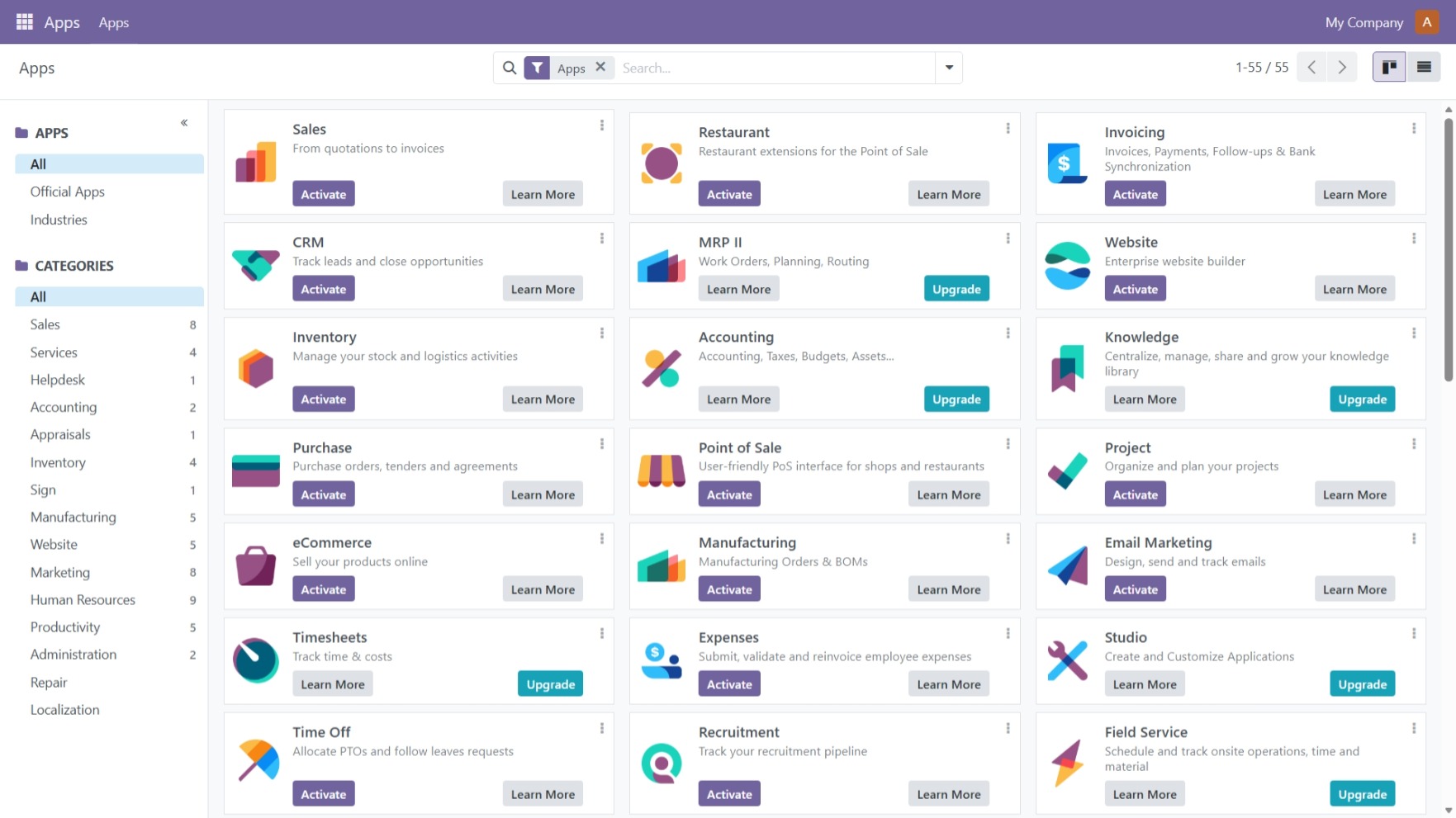
This is a repackaged open source software product wherein additional charges apply for professional support, enterprise security hardening, automated deployment configuration, performance optimization, and ongoing maintenance services provided by ORHAKSS LLC.
WHAT YOU ARE PAYING FOR
- Professional AMI configuration and optimization
- Security hardening with SSH hardening and UFW firewall
- Automated first-boot deployment scripts
- Unique credential generation per instance
- Technical support for deployment and configuration
ABOUT ODOO
Odoo is a leading open-source business management platform trusted by millions of companies worldwide. It provides a comprehensive suite of integrated applications including CRM, Sales, Accounting, Inventory, Manufacturing, HR, and Project Management. The software is free and open-source under the LGPL license.
TECHNICAL SPECIFICATIONS
- Odoo 18 Community Edition (Latest Stable)
- Ubuntu 24.04 LTS with 5 years security support
- Python 3.12 with virtual environment
- PostgreSQL 16 database server
- Nginx reverse proxy
- Node.js 18 LTS for asset management
- wkhtmltopdf for PDF report generation
- Certbot pre-installed for free SSL certificates
AUTOMATED DEPLOYMENT
Zero-configuration first boot setup:
- Unique master password and admin credentials generated per instance
- Fresh PostgreSQL database created automatically
- All services started and configured
- System ready in 3-5 minutes after launch
ENTERPRISE SECURITY HARDENING
- UFW firewall pre-configured for ports 22, 80, 443
- SSH hardening with root login disabled and key-only authentication
- PostgreSQL access restricted to localhost only
- No default passwords or shared credentials
- All credentials stored securely in ~/credentials.txt
GETTING STARTED
- Launch an EC2 instance from this AMI
- Allow ports 22, 80, and 443 in the security group
- Select an SSH key pair and launch
- Wait 3-5 minutes for first-boot to complete
- SSH in and run: cat ~/credentials.txt
- Open http://instance-ip/web and sign in with email: admin
RECOMMENDED INSTANCE TYPES
Testing only: t3.medium (minimum) Small business: t3.large or t3.xlarge Large business: t3.2xlarge or larger
Note: t3.large or larger is strongly recommended for production use.
SSL CONFIGURATION
sudo certbot --nginx -d yourdomain.com Certificate auto-renewal configured automatically.
SYSTEM REQUIREMENTS AND DEPENDENCIES
- Minimum instance type: t3.medium (2 vCPU, 4 GB RAM)
- Minimum storage: 30 GB EBS volume recommended
- An EC2 key pair is required for SSH access
- Ports 22, 80, and 443 must be open in the security group
- This product uses EC2 IMDSv2 during first-boot to retrieve instance information. No external packages are downloaded at launch. All software is pre-installed in the AMI.
PRODUCT LIMITATIONS
- Single-node deployment without high availability or auto scaling by default
- HTTPS not pre-configured. Customers must install their own SSL certificate
- SMTP not pre-configured. Manual configuration required in Odoo Settings
- OS and application updates are the responsibility of the customer
- This is Odoo Community Edition. Enterprise Edition features are not included
- Static IP not included. An Elastic IP is recommended for production use
SUPPORT
Contact: info@orhakssllc.com Website: https://orhakssllc.com
ABOUT ORHAKSS LLC
ORHAKSS LLC specializes in cloud deployment solutions, delivering production-grade hardened AMIs with professional support and deployment automation services.
ODOO LICENSE
Odoo Community Edition is licensed under GNU Lesser General Public License v3.0 and is free and open-source software. AMI charges are for professional configuration, security hardening, automated deployment, and support services provided by ORHAKSS LLC.
Highlights
- Production-ready Odoo 18 Community Edition on Ubuntu 24.04 LTS with automated first-boot setup, unique instance credentials, and preconfigured Python/PostgreSQL/Nginx stack.
- Security-focused deployment with key-based SSH access, disabled root SSH login, disabled password authentication, and no shared default customer credentials.
- Complete ERP and business management platform with CRM, Sales, Accounting, Inventory, HR and more - automatically configured and ready in minutes with support from ORHAKSS LLC.
Details
Sold by
Categories
Delivery method
Delivery option
64-bit (x86) Amazon Machine Image (AMI)
Latest version
Operating system
Ubuntu 24.04
Deployed on AWS
New
Introducing multi-product solutions
You can now purchase comprehensive solutions tailored to use cases and industries.

Features and programs
Financing for AWS Marketplace purchases
AWS Marketplace now accepts line of credit payments through the PNC Vendor Finance program. This program is available to select AWS customers in the US, excluding NV, NC, ND, TN, & VT.

Pricing
Pricing is based on the duration and terms of your contract with the vendor. This entitles you to a specified quantity of use for the contract duration. If you choose not to renew or replace your contract before it ends, access to these entitlements will expire.
Additional AWS infrastructure costs may apply. Use the AWS Pricing Calculator to estimate your infrastructure costs.
Dimension | Description | Cost/month |
|---|---|---|
Odoo 18 License | Scalable Odoo Infrastructure: Pre-configured AMI with Expert Support by Orhakss | $1,000.00 |
Vendor refund policy
Charges are based on actual usage. You can terminate your EC2 instance at any time to stop incurring charges. No refunds are provided for partial usage periods. For billing inquiries or disputes, please contact us at info@orhakssllc.com before submitting a claim through AWS.

Legal
Vendor terms and conditions
Upon subscribing to this product, you must acknowledge and agree to the terms and conditions outlined in the vendor's End User License Agreement (EULA) .
Content disclaimer
Vendors are responsible for their product descriptions and other product content. AWS does not warrant that vendors' product descriptions or other product content are accurate, complete, reliable, current, or error-free.
Delivery details
64-bit (x86) Amazon Machine Image (AMI)
Amazon Machine Image (AMI)
An AMI is a virtual image that provides the information required to launch an instance. Amazon EC2 (Elastic Compute Cloud) instances are virtual servers on which you can run your applications and workloads, offering varying combinations of CPU, memory, storage, and networking resources. You can launch as many instances from as many different AMIs as you need.
Version release notes
RELEASE: Odoo 18 Community Edition on Ubuntu 24.04 LTS Release Date: March 2026 Prepared by: ORHAKSS LLC
WHAT IS INCLUDED
Software versions:
- Odoo 18 Community Edition
- Ubuntu 24.04.4 LTS
- Python 3.12 with virtual environment
- PostgreSQL 16
- Nginx 1.24
- Node.js 18 LTS
- wkhtmltopdf
- Certbot pre-installed
- UFW firewall pre-configured
AUTOMATED FIRST-BOOT SYSTEM
Each instance launch triggers a one-time initialization that:
- Waits for PostgreSQL to become fully ready
- Retrieves instance metadata via IMDSv2
- Falls back to private IP if no public IP is assigned
- Generates unique master password and admin password
- Creates a fresh Odoo database using odoo-bin
- Sets admin credentials via passlib hash
- Starts all services and waits for Odoo to respond
- Writes all credentials to ~/credentials.txt (chmod 600)
- Creates a lock file to prevent re-running on reboot
SECURITY CONFIGURATION
- PermitRootLogin: disabled
- PasswordAuthentication: disabled
- PostgreSQL: localhost only access
- Nginx: server version info suppressed
- No hardcoded credentials in AMI
- No shared default passwords
- All credentials unique per instance
KNOWN LIMITATIONS
- HTTPS not pre-configured. Customers must install SSL certificate
- SMTP not pre-configured. Manual configuration required in Odoo Settings
- No Elastic IP assigned by default
- This is Community Edition. Enterprise features are not included
- Minimum recommended instance type is t3.large for production use
OPEN SOURCE NOTICE
Odoo Community Edition is licensed under GNU Lesser General Public License v3.0.
SUPPORT
Email: info@orhakssllc.com Website: https://orhakssllc.com
Additional details
Usage instructions
CONNECTING TO YOUR INSTANCE
After launching, wait 3-5 minutes for first-boot initialization to complete.
Connect via SSH: ssh -i your-key.pem ubuntu@YOUR_PUBLIC_IP
Retrieve your credentials: cat ~/credentials.txt
This file contains your admin email, admin password, master password, and database information.
ACCESSING ODOO
Open a browser and navigate to: http://YOUR_PUBLIC_IP/web
Sign in with: Email: admin Password: (from credentials.txt)
Change your administrator password immediately after first login.
MASTER PASSWORD
The master password is used for database management at: http://YOUR_PUBLIC_IP/web/database/manager
Keep this password secure. It is stored in ~/credentials.txt.
SECURITY GROUP REQUIREMENTS
The following ports must be open:
- Port 22 (TCP) - SSH access
- Port 80 (TCP) - Web access
- Port 443 (TCP) - HTTPS after SSL setup
For security, restrict port 22 to your own IP address after launch.
RECOMMENDED INSTANCE TYPES
Testing only: t3.medium (2 vCPU, 4 GB RAM) Small business: t3.large (2 vCPU, 8 GB RAM) Medium business: t3.xlarge (4 vCPU, 16 GB RAM) Large business: t3.2xlarge (8 vCPU, 32 GB RAM)
SSL AND DOMAIN SETUP
- Point your domain DNS A record to your Elastic IP
- Run: sudo certbot --nginx -d yourdomain.com
- HTTPS will be configured automatically
CHECKING SERVICE STATUS
sudo systemctl status odoo sudo systemctl status nginx sudo systemctl status postgresql
RESTARTING SERVICES
sudo systemctl restart odoo sudo systemctl restart nginx sudo systemctl restart postgresql
VIEWING FIRST-BOOT LOG
sudo cat /var/log/odoo-first-boot.log
IMPORTANT NOTES
- credentials.txt is readable only by the ubuntu user (chmod 600)
- The first-boot script runs only once. Rebooting will not regenerate credentials
- Each launched instance receives unique credentials
- Root SSH login is disabled. Always connect as the ubuntu user
- Password-based SSH authentication is disabled. Key pair is required
- Minimum recommended instance type for production is t3.large
Support
Vendor support
Technical support for this product is provided by ORHAKSS LLC.
Support contact: Email: info@orhakssllc.com Website: https://orhakssllc.com
Support scope includes: AMI launch guidance First-boot initialization assistance Credentials retrieval guidance Odoo web panel access troubleshooting Nginx, Python, and PostgreSQL service checks Deployment best-practice guidance for AWS
Support scope does not include: Custom Odoo module development Third-party module debugging Business workflow customization Data migration services
Response times and support availability may vary depending on request complexity and business hours.
AWS infrastructure support
AWS Support is a one-on-one, fast-response support channel that is staffed 24x7x365 with experienced and technical support engineers. The service helps customers of all sizes and technical abilities to successfully utilize the products and features provided by Amazon Web Services.
Similar products

This product has charges associated with it for Websoft9 support. Pre-configured, web-based, cloud-native, secure, one-click to deploy Odoo 18/17/16/15 Community Edition with Websoft9 Applications Hosting Platform on AWS. Odoo is a suite of web based open source business apps.

Odoo 18.0 is a powerful, open-source business management platform that integrates CRM, eCommerce, accounting, inventory, point of sale, and more into a unified solution. Designed for flexibility and scalability, Odoo 18.0 is ideal for businesses of all sizes looking to streamline operations.

Experience the power of Odoo 19, the ultimate suite of business applications. This pre-configured and hardened Odoo 19 image on Alma Linux, offered by Elyxia Global Limited, with any additional charges clearly specified in the pricing information section, delivers a comprehensive ERP solution that integrates seamlessly with your business processes, enhancing efficiency and productivity.

This product has charges associated with it for seller support. Deploy a fully configured Odoo 14 ERP on Windows Server in minutes. Ideal for teams needing CRM, sales, inventory, and accounting on familiar Windows infrastructure with24/7 expert support.
Customer reviews
No customer reviews yet
Be the first to review this product . We've partnered with PeerSpot to gather customer feedback. You can share your experience by writing or recording a review, or scheduling a call with a PeerSpot analyst.