Sold by: Cloud Infrastructure Services
Deployed on AWS
AWS Free Tier
This product has charges associated with it, which includes support from Cloud Infrastructure Services. Pre-configured FreeRADIUS server with daloRADIUS GUI. Centralize network authentication, authorization, and accounting for WiFi, VPN, and enterprise access control.
Overview
Cloud RADIUS Server - FreeRADIUS + daloRADIUS
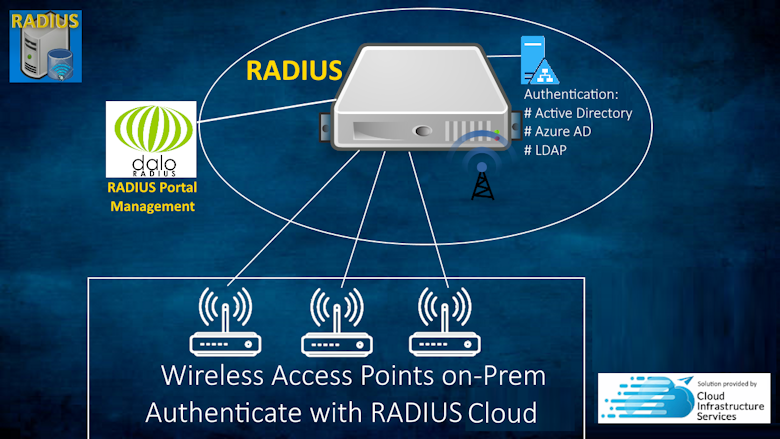
This AMI delivers a fully pre-configured RADIUS stack - FreeRADIUS, daloRADIUS management GUI, and MariaDB backend - ready to authenticate users immediately after launch. Instead of spending hours installing packages, configuring database schemas, and integrating components, you get a tested, production-ready deployment with vendor-provided support and maintenance from Cloud Infrastructure Services.
This is a repackaged open source software product wherein additional charges apply for support & maintenance.
FreeRADIUS is the most widely deployed RADIUS server in the world, forming the basis for many commercial RADIUS products. This AMI packages that proven technology with a web-based management interface and AWS-native integrations so your team can focus on network policy rather than server administration.
Solve These Network Access Challenges
- Eliminate per-device VPN configuration - Centralize authentication for all remote access connections through a single RADIUS policy engine
- Unify wireless access control - Authenticate 802.1x WiFi users against Active Directory, LDAP, or local databases without managing credentials on each access point
- Simplify multi-vendor environments - Support almost one hundred vendor-specific attribute dictionaries including Cisco, Juniper, HP ProCurve, Microsoft, and more from a single server
- Reduce onboarding/offboarding time - Add or remove network access for users in one place rather than updating every switch, AP, and VPN concentrator
Pre-Configured Stack Components
- FreeRADIUS - High-performance multi-protocol policy server supporting RADIUS, TACACS+, and VMPS
- daloRADIUS - Web-based management GUI for user administration, reporting, accounting graphs, hotspot management, and billing
- MariaDB - Backend database pre-configured with the RADIUS schema on the EC2 instance
- Ubuntu 24.04 LTS - Long-term support operating system base
Authentication Protocols and Methods
- Simple authentication: PAP, CHAP, MS-CHAP, MS-CHAPv2, SIP Digest
- EAP types: EAP-MD5, EAP-SIM, EAP-TLS, EAP-TTLS, EAP-PEAP, Cisco LEAP
- Full RFC 2865 and RFC 2866 compliance
- Pre-authentication and post-authentication policy support
- IP Pool management and VLAN assignment via VMPS protocol
- RADIUS proxying for distributed deployments
- Multiple virtual server instances
AWS-Native Integration
- AWS Directory Service - Authenticate users against AWS Managed Microsoft AD or Simple AD
- Active Directory and LDAP - Connect to existing directory infrastructure within your VPC
- VPC Security - Deploy within private subnets with security groups restricting RADIUS ports (1812/1813) to authorized NAS devices only
- CloudWatch - Monitor RADIUS server performance, authentication success/failure rates, and accounting metrics
- Multi-AZ Deployment - Deploy across multiple availability zones for high availability
- Auto Scaling - Compatible with AWS Auto Scaling groups for handling variable authentication loads
daloRADIUS Management Features
- User Management - Create, modify, and disable RADIUS users through an intuitive web interface
- Visual Reporting - Real-time accounting data with graphs showing bandwidth usage, session duration, and connection patterns
- Activity Monitoring - Track authentication attempts, active sessions, and user connection history
- Hotspot Management - Configure captive portals and manage wireless hotspot access
- Billing Engine - Integrated billing for ISP and service provider deployments
- Geographic Mapping - GoogleMaps integration for geo-locating connected users and NAS devices
Getting Started After Launch
- Launch the AMI in your VPC with a security group allowing UDP ports 1812 and 1813 from your NAS devices, and HTTPS (443) for daloRADIUS access
- Follow our getting started guide under vendor resources below for setup & configuration details.
Supported Use Cases
FreeRADIUS authenticates users on 802.1x WiFi networks, dial-up connections, PPPoE, VPNs, VoIP systems, authenticating switches, and ISP subscriber management. Control access based on user identity, IP address, device type, AD group membership, time of day, and custom policies.
Licensing: FreeRADIUS and daloRADIUS are licensed under GNU General Public License v2.0.
Highlights
- Pre-integrated RADIUS stack ready to authenticate on launch - FreeRADIUS server, daloRADIUS web management GUI, and MariaDB backend pre-configured on Ubuntu 24.04 LTS. Skip hours of manual installation and configuration. Manage users, view accounting graphs, configure hotspots, and run billing through the daloRADIUS web interface instead of command-line administration. Includes vendor support and maintenance from Cloud Infrastructure Services.
- Centralize network access control across your entire infrastructure - authenticate 802.1x WiFi, VPN, VoIP, PPPoE, dial-up, and switching from a single policy engine. Supports almost one hundred vendor-specific attribute dictionaries including Cisco, Juniper, HP ProCurve, and Microsoft. Integrates with Active Directory, AWS Directory Service, and LDAP so you can leverage existing identity infrastructure without duplicating user databases.
- RADIUS deployment with enterprise integrations - deploy within your VPC with security groups restricting RADIUS ports (1812/1813) to authorized NAS devices. Supports CloudWatch monitoring for authentication metrics, multi-availability-zone deployment for high availability, and Auto Scaling group compatibility. Authenticate against AWS Managed Microsoft AD or connect to on-premises directories via Direct Connect or VPN.
Details
Categories
Delivery method
Delivery option
64-bit (x86) Amazon Machine Image (AMI)
Latest version
Operating system
Ubuntu 24.04 LTS
Deployed on AWS
New
Introducing multi-product solutions
You can now purchase comprehensive solutions tailored to use cases and industries.

Features and programs
Financing for AWS Marketplace purchases
AWS Marketplace now accepts line of credit payments through the PNC Vendor Finance program. This program is available to select AWS customers in the US, excluding NV, NC, ND, TN, & VT.

Pricing
Pricing is based on actual usage, with charges varying according to how much you consume. Subscriptions have no end date and may be canceled any time.
Additional AWS infrastructure costs may apply. Use the AWS Pricing Calculator to estimate your infrastructure costs.
If you are an AWS Free Tier customer with a free plan, you are eligible to subscribe to this offer. You can use free credits to cover the cost of eligible AWS infrastructure. See AWS Free Tier for more details. If you created an AWS account before July 15th, 2025, and qualify for the Legacy AWS Free Tier, Amazon EC2 charges for Micro instances are free for up to 750 hours per month. See Legacy AWS Free Tier for more details.
Dimension | Cost/hour |
|---|---|
t2.medium Recommended | $0.05 |
t2.micro | $0.05 |
t3.micro | $0.05 |
m3.medium | $0.05 |
m3.large | $0.05 |
m3.xlarge | $0.05 |
m3.2xlarge | $0.05 |
m4.large | $0.05 |
m4.xlarge | $0.05 |
m4.2xlarge | $0.05 |
Vendor refund policy
Contact us for details

Legal
Vendor terms and conditions
Upon subscribing to this product, you must acknowledge and agree to the terms and conditions outlined in the vendor's End User License Agreement (EULA) .
Content disclaimer
Vendors are responsible for their product descriptions and other product content. AWS does not warrant that vendors' product descriptions or other product content are accurate, complete, reliable, current, or error-free.
Delivery details
64-bit (x86) Amazon Machine Image (AMI)
Amazon Machine Image (AMI)
An AMI is a virtual image that provides the information required to launch an instance. Amazon EC2 (Elastic Compute Cloud) instances are virtual servers on which you can run your applications and workloads, offering varying combinations of CPU, memory, storage, and networking resources. You can launch as many instances from as many different AMIs as you need.
Version release notes
Latest OS updates available, simply run 'sudo apt-get update' to install latest OS package updates.
Additional details
Usage instructions
First step is to login via SSH using your SSH Keys with username: ubuntu
Instructions on this can be found on : https://docs.aws.amazon.com/AWSEC2/latest/UserGuide/AccessingInstancesLinux.html
Once logged into freeRADIUS you will need to perform the following steps:
1.) Setup and Configure MariaDB Database for FreeRADIUS 2.) Setup and Configure daloRADIUS 3.) Setup your RADIUS Users
For complete setup instructions, Scroll down to 'Getting Started' on the following Url: https://cloudinfrastructureservices.co.uk/setup-cloud-freeradius-server-on-azure-aws-gcp/
Resources
Vendor resources
Support
Vendor support
Support from Cloud Infrastructure Services
This product includes support and maintenance from Cloud Infrastructure Services. Our team assists with deployment, configuration, troubleshooting, and ongoing maintenance of your FreeRADIUS and daloRADIUS environment on AWS.
How to Get Support:
Submit a support ticket via our website: https://cloudinfrastructureservices.co.uk/contact-us/ Follow our post deployment setup guide on: https://cloudinfrastructureservices.co.uk/setup-cloud-freeradius-server-on-azure-aws-gcp/
Support Scope:
- Initial deployment and configuration assistance
- FreeRADIUS and daloRADIUS troubleshooting
- Active Directory and LDAP integration guidance
- AWS Directory Service configuration
- Security group and network configuration for RADIUS ports
- Software updates and patch guidance
AWS infrastructure support
AWS Support is a one-on-one, fast-response support channel that is staffed 24x7x365 with experienced and technical support engineers. The service helps customers of all sizes and technical abilities to successfully utilize the products and features provided by Amazon Web Services.
Updated weekly
By Cloud Infrastructure Services

By Solve DevOps

By TheWebMachine Networks
Top
10
In Monitoring
Top
10
In Contact Center, IT Business Management
Top
25
In Collaboration & Productivity
Sentiment is AI generated from actual customer reviews on AWS and G2
Functionality
Ease of use
Customer service
Cost effectiveness
Positive reviews
Mixed reviews
Negative reviews
AI generated from product descriptions
Multi-Protocol Authentication Support
Supports RADIUS, TACACS+, and VMPS protocols with authentication methods including PAP, CHAP, MS-CHAP, MS-CHAPv2, EAP-MD5, EAP-TLS, EAP-TTLS, EAP-PEAP, and Cisco LEAP with full RFC 2865 and RFC 2866 compliance
Web-Based Management Interface
daloRADIUS GUI provides user administration, real-time accounting graphs, bandwidth usage tracking, session monitoring, hotspot management, billing engine, and geographic mapping with GoogleMaps integration
Directory Service Integration
Supports authentication against AWS Managed Microsoft AD, Simple AD, Active Directory, LDAP, and on-premises directory infrastructure within VPC or via Direct Connect
Vendor Attribute Dictionary Support
Supports approximately one hundred vendor-specific attribute dictionaries including Cisco, Juniper, HP ProCurve, and Microsoft for multi-vendor network environments
AWS-Native Deployment Capabilities
Deploys within VPC with security group controls on RADIUS ports 1812/1813, CloudWatch monitoring for authentication metrics, multi-availability-zone deployment support, and Auto Scaling group compatibility
Open Source PBX Platform
Built on Asterisk with FreePBX framework, including core modules for voicemail, SIP settings, PM2, and UCP pre-installed and pre-configured.
Cloud Monitoring and Logging
CloudWatch agent integration that ships Asterisk, FreePBX, Apache, syslog, and auth logs to CloudWatch Logs with 30-day retention, and publishes CPU, memory, disk, TCP connection, and process metrics.
Systems Management Integration
AWS Systems Manager agent installed for Session Manager access, Patch Manager integration, and Run Command execution without requiring inbound SSH.
Security Hardening
SSH key-only authentication with root login disabled, pre-configured firewall restricting SIP/HTTP/SSH ports, Fail2ban integration for brute-force protection, and HTTPS/TLS encryption for administrative access.
Multi-Protocol Device Compatibility
Support for SIP-compatible endpoints including Cisco, Avaya, Polycom, Yealink phones and softphones such as Zoiper and Linphone, with Sangoma commercial plugin support for advanced functionality.
PBX Platform and Core Components
Debian 12 operating system paired with FreePBX 17 and Asterisk 21 with full Commercial Module support through Sangoma
Web-Based Configuration Interface
Convenient web-based configuration for system management and administration
Endpoint Provisioning and Management
Automatic remote endpoint provisioning and management capabilities
Single-Command System Upgrade
Unique single-command SmartUpgrade system for simplified updates and maintenance
AWS Ecosystem Integration
AWS-specific features and drivers optimized for deployment within the AWS ecosystem
Standard contract
No
Customer reviews
No customer reviews yet
Be the first to review this product . We've partnered with PeerSpot to gather customer feedback. You can share your experience by writing or recording a review, or scheduling a call with a PeerSpot analyst.