Sold by: HabileLabs
Deployed on AWS
Quick Launch
AWS-native document management system (DMS) for NBFCs, banks, insurers and other document-heavy enterprises. Deployed by CloudFormation into your own AWS account: loan files, KYC and compliance records with full-text search, approval workflows, audit trails, OCR and AI. Annual plans by users and data.
Overview
Image
Plans at a glance
Image
Runs in your AWS account
Image
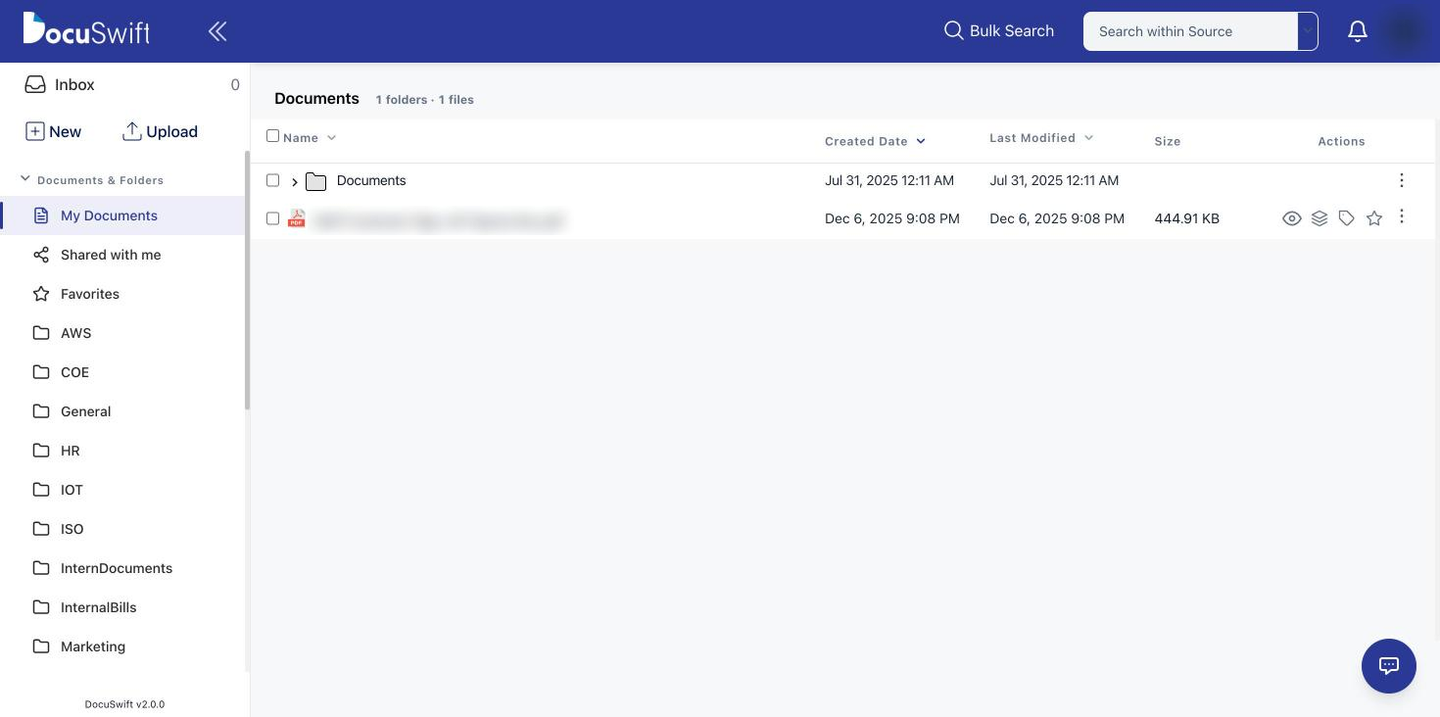
Documents, folders and metadata
Image
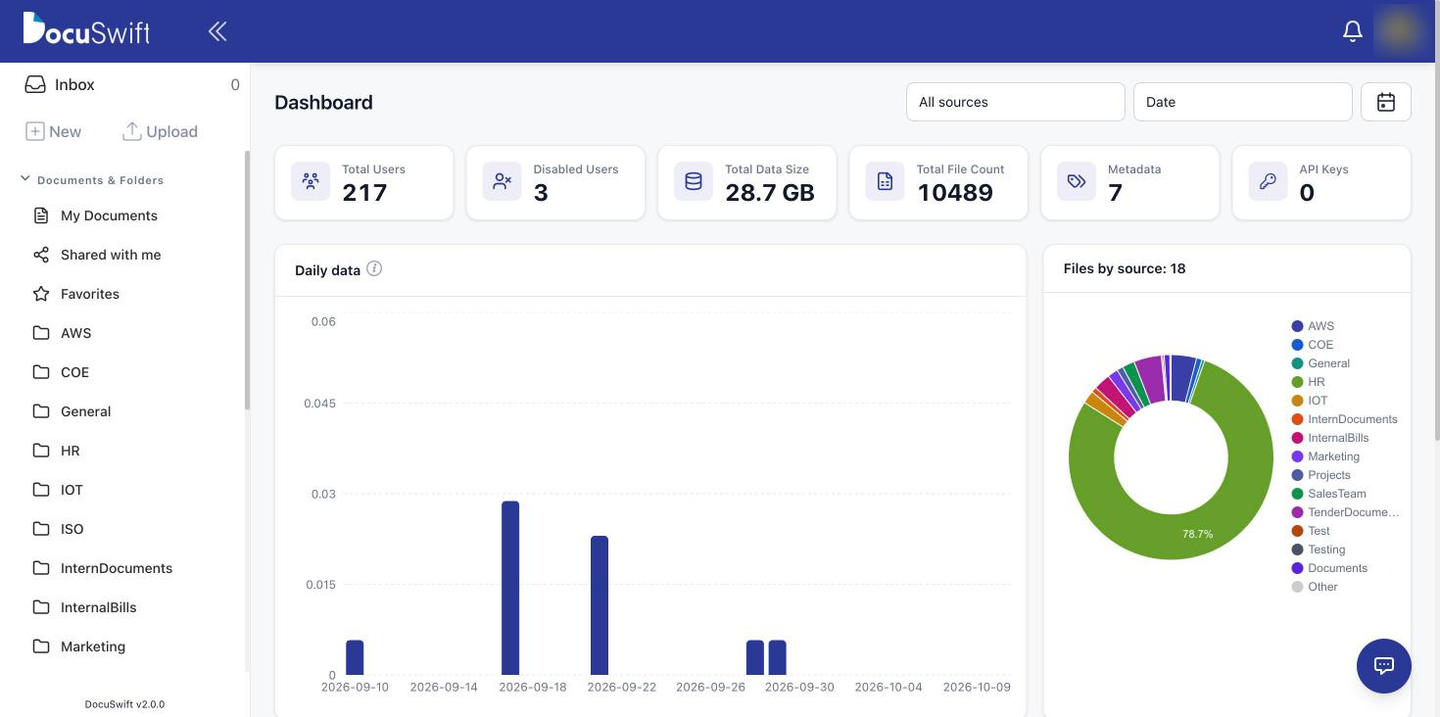
Admin dashboard
Image
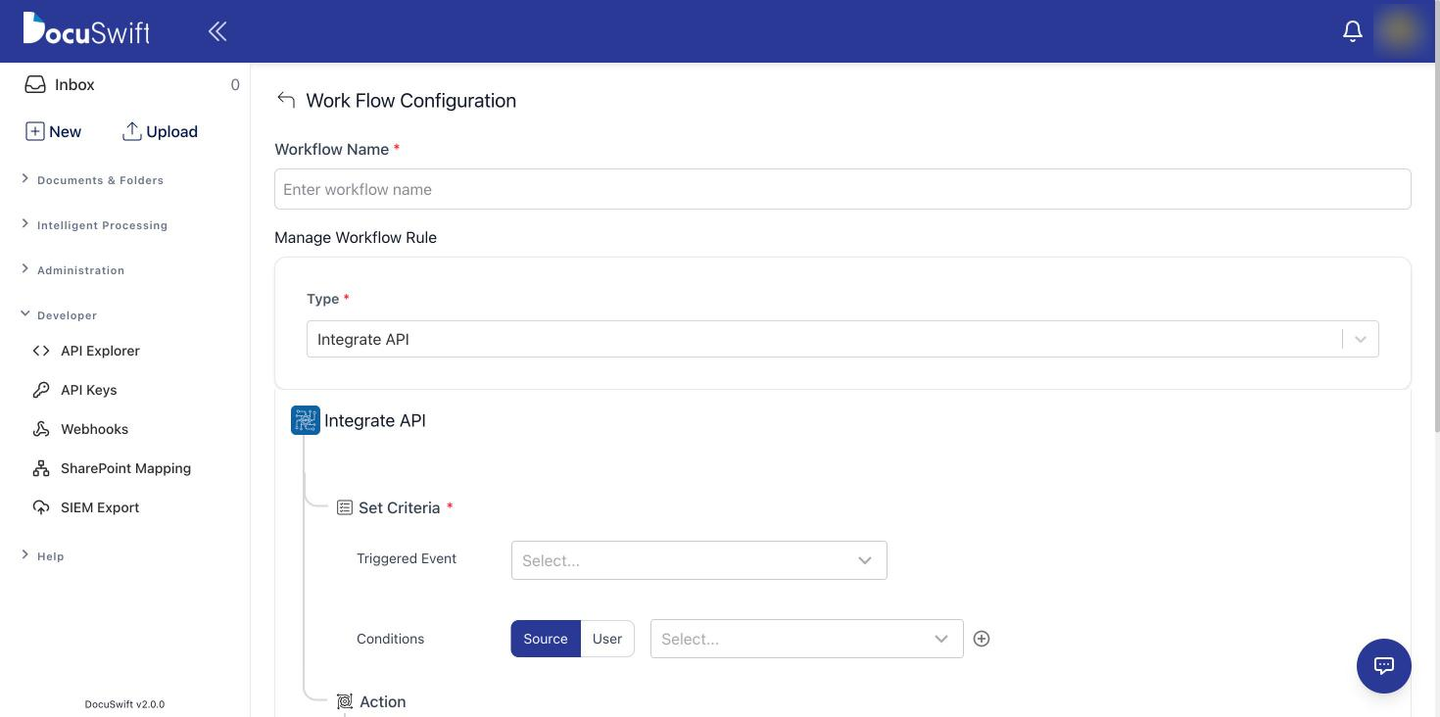
Visual workflow editor
Image
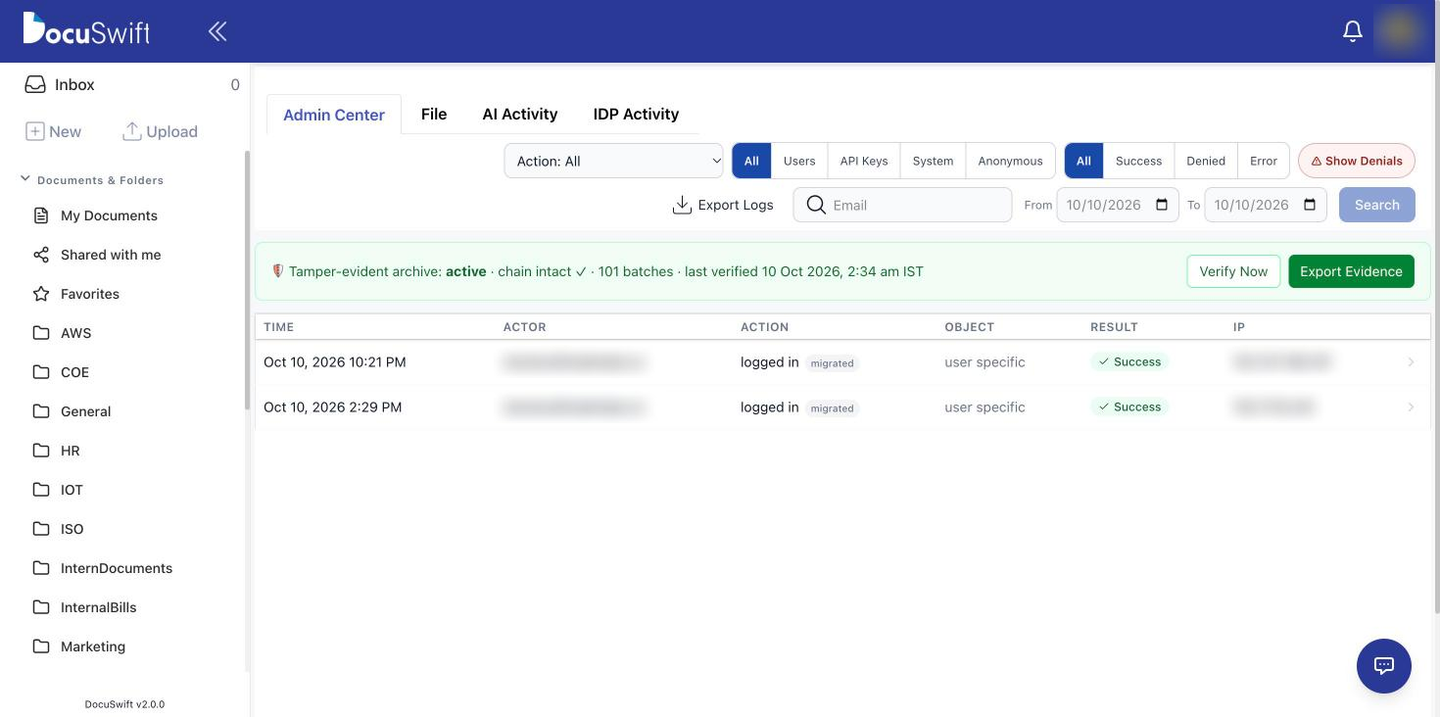
Immutable audit trail
Image
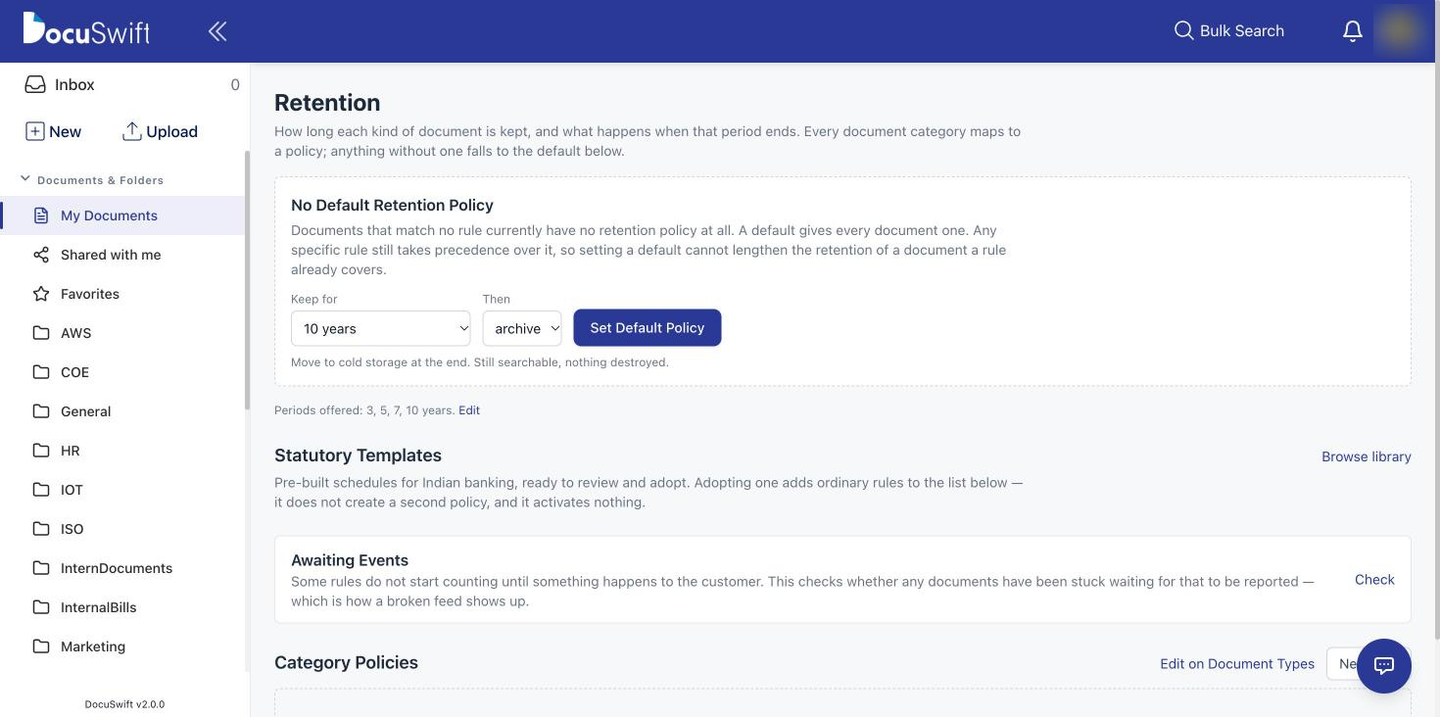
Retention rules and legal holds
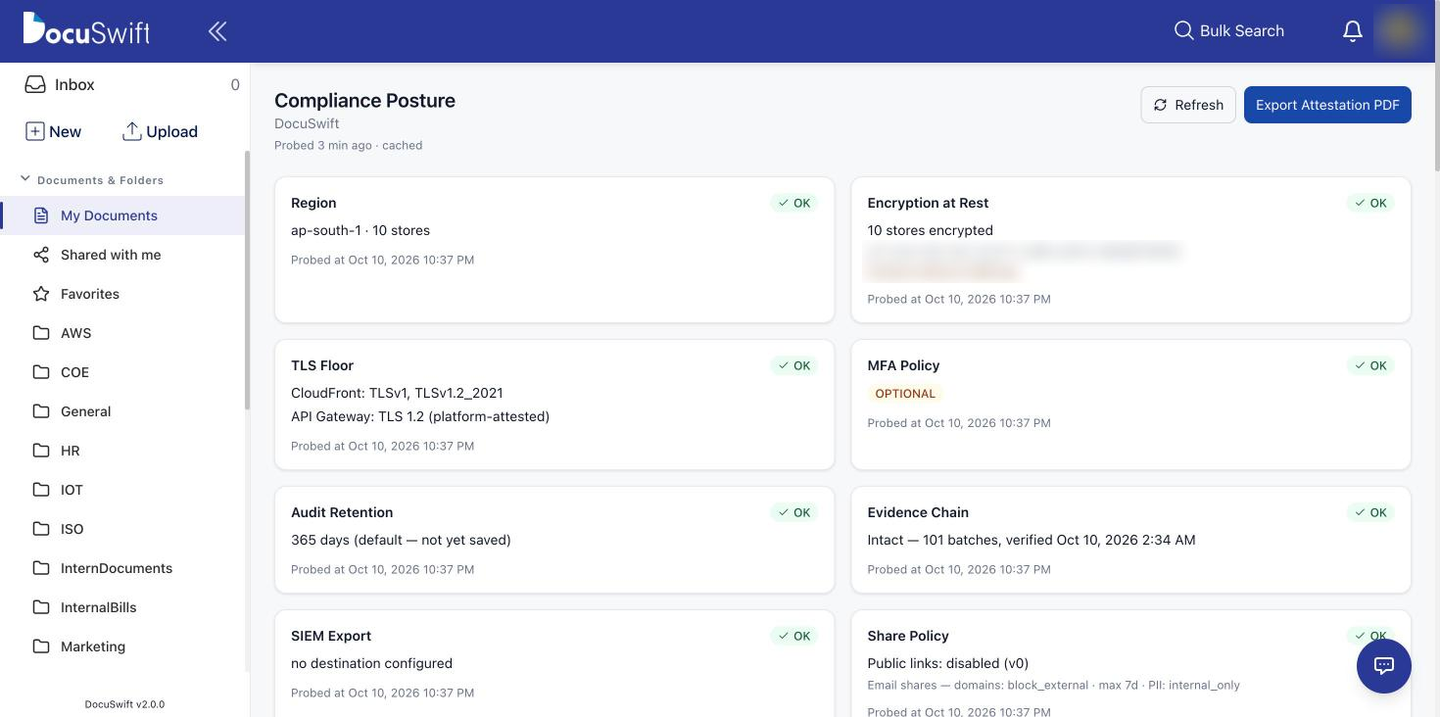
Image
Compliance posture
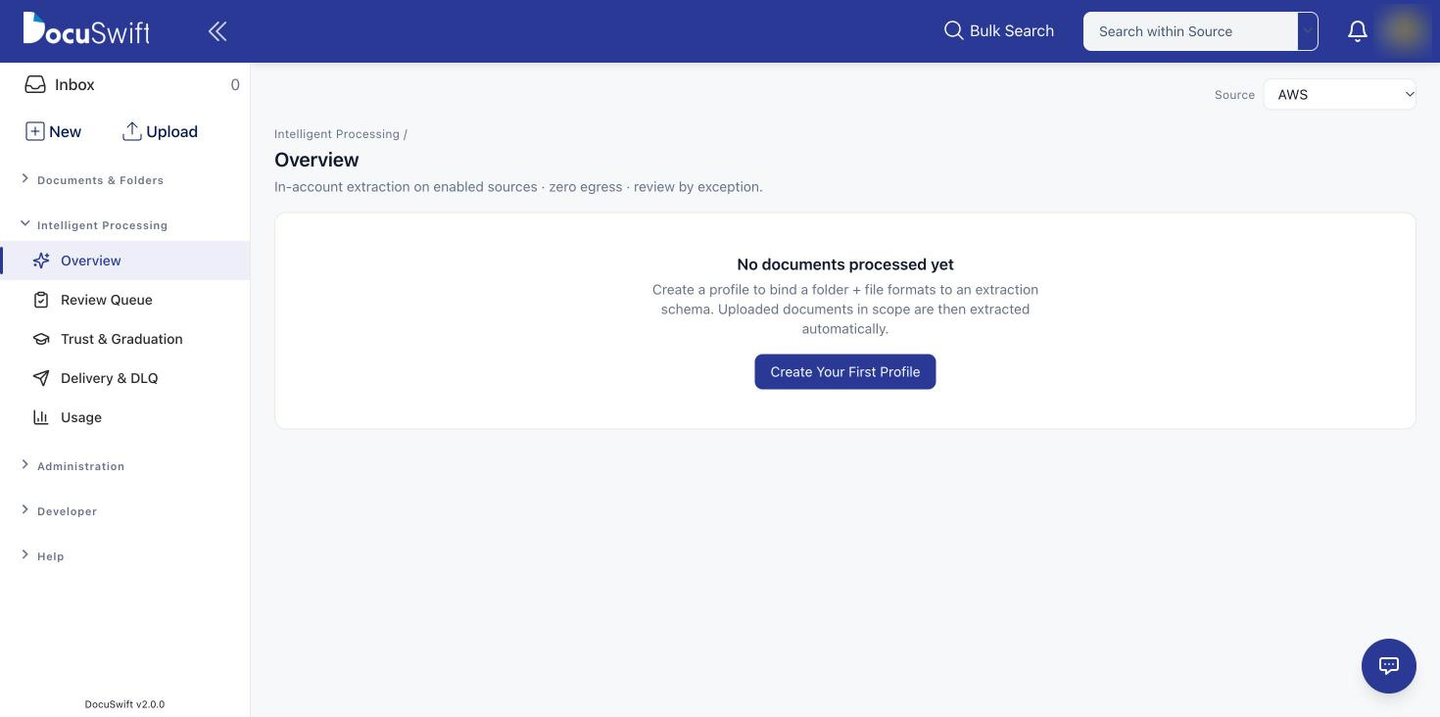
Image
Intelligent document processing
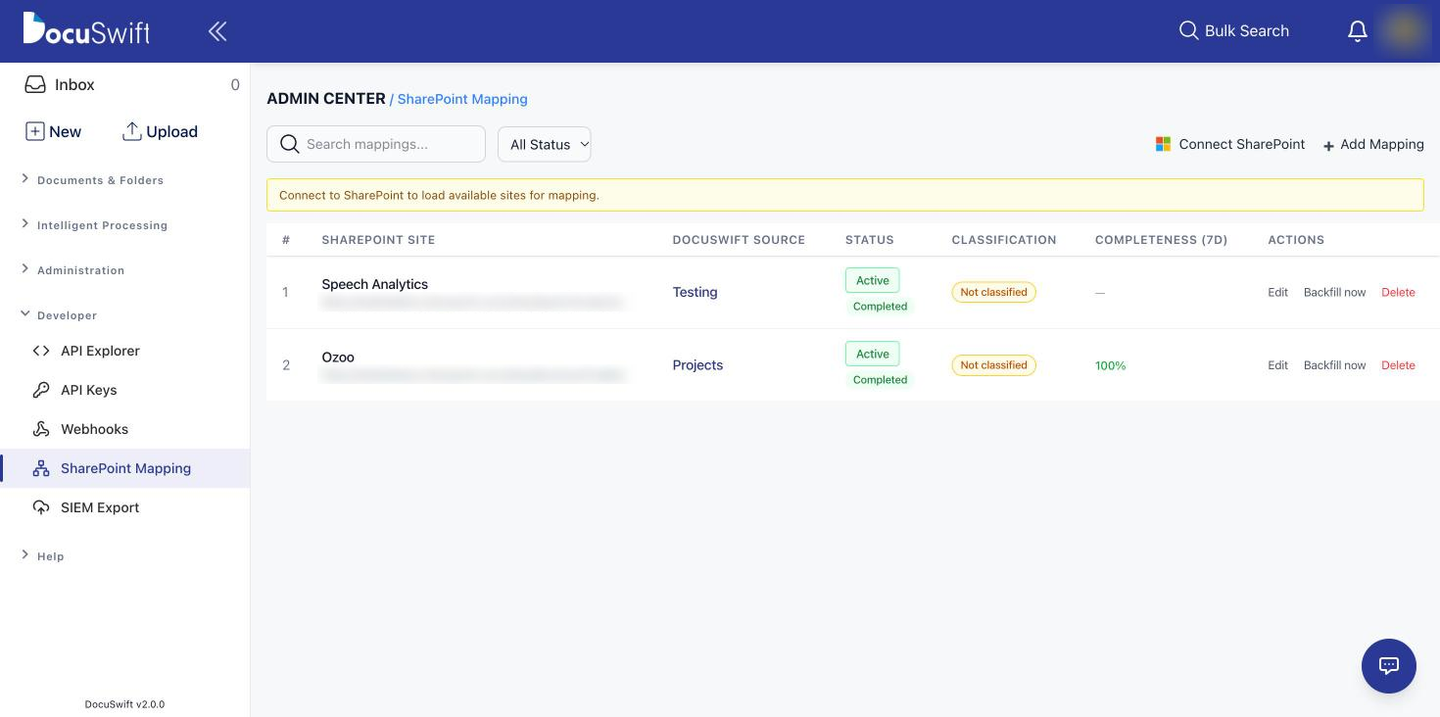
Image
SharePoint two-way sync
DocuSwift is a serverless, AWS-native Document Management System (DMS) built for regulated, document-heavy organisations: NBFCs, housing-finance companies, small finance and co-operative banks, microfinance institutions, insurers, and the operations teams of healthcare, logistics and manufacturing enterprises. It centralises loan files, KYC packets, customer records, agreements and compliance documents, makes them searchable in seconds, and governs every action with role-based access, approval workflows and an immutable audit trail.
Why teams choose DocuSwift
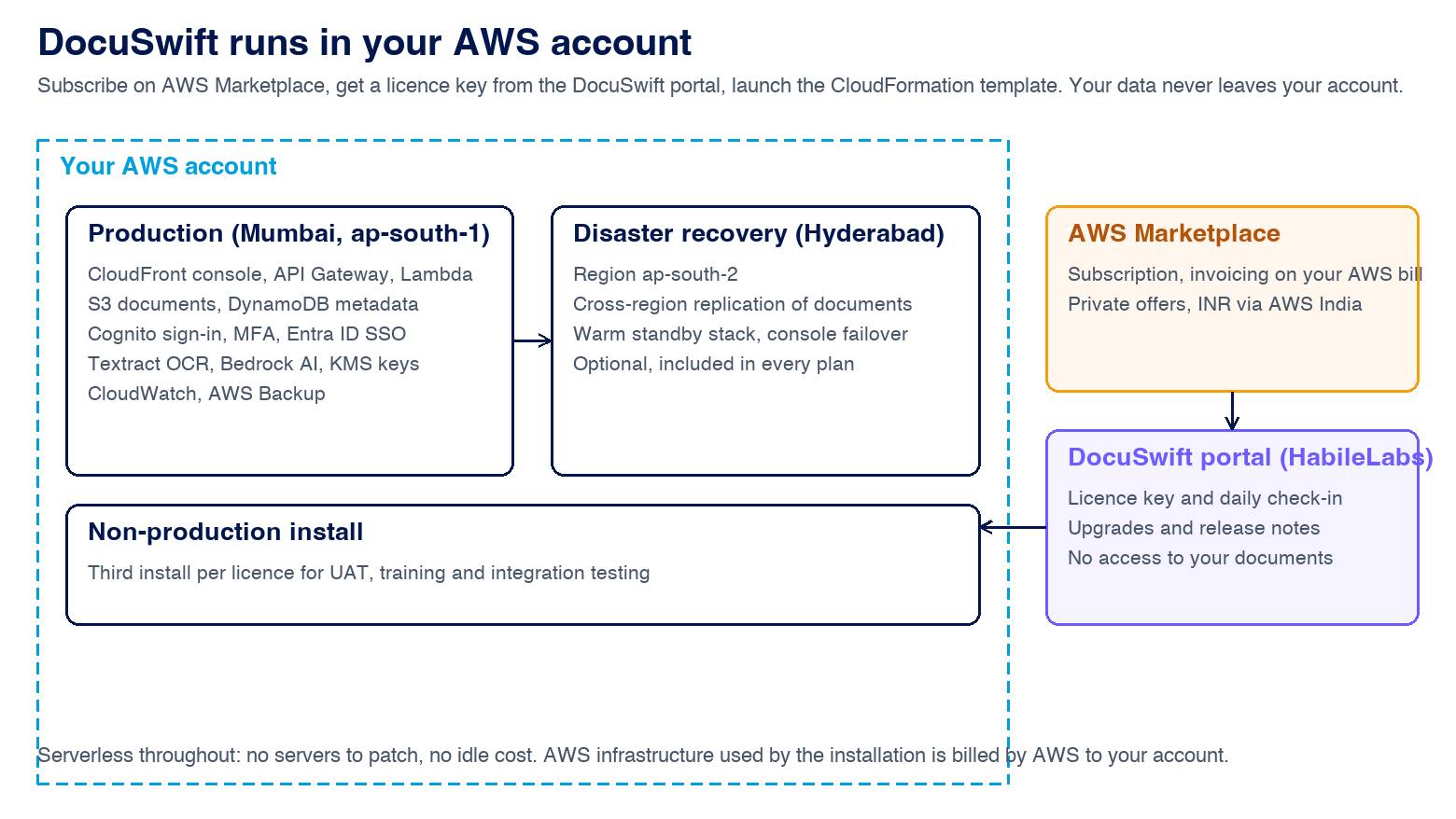
- Your documents never leave your AWS account. DocuSwift is provisioned with AWS CloudFormation into the account and region you choose (Asia Pacific Mumbai, with optional disaster recovery in Hyderabad). HabileLabs has no access to your data; you own the buckets, the keys and the bill.
- Retrieve any document in seconds. Full-text search over OCR'd content, metadata search by Loan ID, Branch, Customer ID or any field you define, and bulk search from an Excel list of identifiers for audits, legal requests and collections.
- Compliance evidence built in. Encryption in transit and at rest (AWS KMS), Amazon Cognito authentication with TOTP multi-factor and Microsoft Entra ID single sign-on, retention rules, legal holds, access reviews, a compliance-posture dashboard and tamper-resistant audit logs with SIEM export. Data residency in India supports DPDP Act and RBI expectations.
- Automation that removes the email chase. Multi-level approval chains with criteria-based routing, an approver inbox with reminders and escalation, event-driven workflows and webhooks, and electronic signatures on PDFs.
- AI where it pays off, inside your region. OCR on ingest with Amazon Textract, extraction schemas with a human review queue, document summaries and chat with Amazon Bedrock models, and automatic Aadhaar and PII masking and redaction.
- Open by design. Every console action is available through a documented REST API with scoped API keys and a JavaScript SDK; connectors for SharePoint (two-way sync), Salesforce and Microsoft 365; push and pull documents from LOS, LMS and core banking platforms keyed by your own identifiers.
What is included in every plan
Sources, folders and sharing; business metadata schemas with validation; document types and bulk upload; previews for PDF, Office, images, CAD and more; version control; comments and annotations; white-label console on your own domain; admin dashboard with storage, document and user analytics; CloudWatch monitoring; AWS Backup and cross-region replication; three installs per licence (production, disaster recovery, non-production).
Pricing in brief
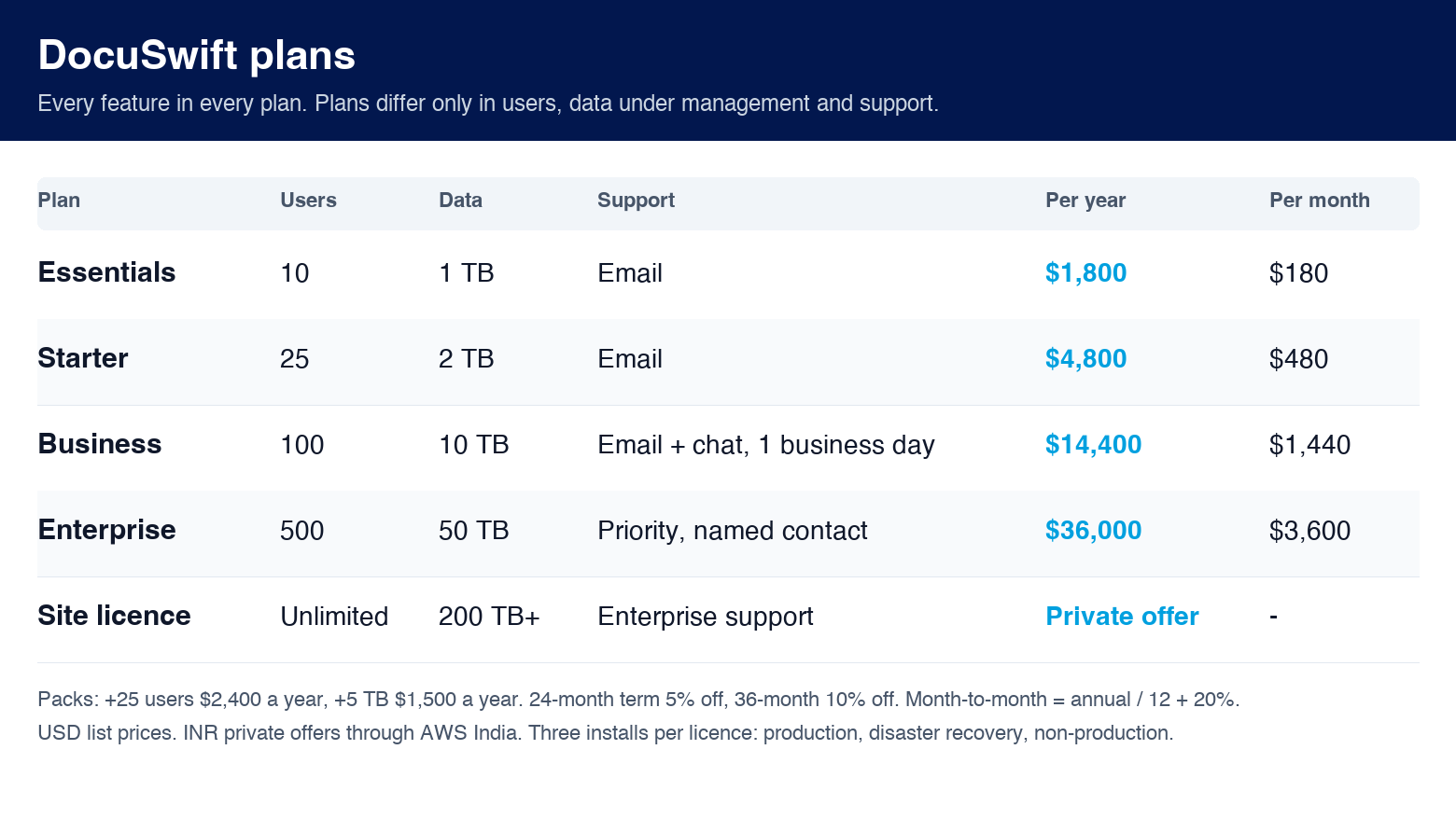
Plans differ only in named users, data under management and support level. Essentials: 10 users, 1 TB. Starter: 25 users, 2 TB. Business: 100 users, 10 TB. Enterprise: 500 users, 50 TB. Add 25-user and 5 TB packs to any plan, choose 12, 24 or 36-month terms (5% and 10% off) or month-to-month, and request a private offer for site licences, INR billing through AWS India, or a 30-day trial. AWS infrastructure consumed by your installation (S3, Lambda, DynamoDB, Textract, Bedrock) is billed by AWS separately and shown in your own account.
Proven at scale
DocuSwift is AWS Qualified Software and runs in production at Indian lenders and banks. One listed housing-finance NBFC manages more than 35 TB of loan records on DocuSwift across Mumbai and Hyderabad with 99.99% uptime and a 60% lower infrastructure management cost than its previous DMS.
Frequently asked questions
How is DocuSwift deployed? Subscribe here, create your account on the DocuSwift customer portal, and launch the CloudFormation template in your AWS account with the licence key the portal gives you. A standard deployment is provisioned in under a day; most customers configure sources, metadata, roles and workflows within one to two weeks.
Do we need to manage servers? No. DocuSwift uses AWS Lambda, Amazon API Gateway, Amazon DynamoDB, Amazon S3 and Amazon Cognito, which scale automatically and carry no idle cost.
Can we migrate from an existing DMS or shared drives? Yes. Bulk import preserves folder structures and metadata, and HabileLabs offers a fixed-scope implementation and migration service through AWS Marketplace.
Which file formats are supported? Any file can be stored; PDF, Word, Excel, PowerPoint, images, HTML, text, JSON and CAD (DWG) preview in the browser, and scanned documents are OCR'd so their content is searchable.
What support is included? Email support on every plan, chat on Business, and priority support with a named contact, assisted upgrades and DR drills on Enterprise. Standard hours are Monday to Friday, 10:00 to 19:00 IST. More at docuswift.habilelabs.io.
Highlights
- Runs in your AWS account in Mumbai with optional Hyderabad disaster recovery: your data, keys and bill stay yours. Serverless, so no servers to patch and no idle cost.
- Every feature in every plan: full-text and metadata search, bulk Excel search, multi-level approvals, e-signatures, retention and legal holds, immutable audit trail, OCR, AI summaries, Aadhaar and PII masking.
- Integrates with your loan origination, loan management and core banking systems through a documented REST API, webhooks, SharePoint two-way sync, Salesforce and Microsoft 365 sign-in.
Details
New
Introducing multi-product solutions
You can now purchase comprehensive solutions tailored to use cases and industries.

Features and programs
Financing for AWS Marketplace purchases
AWS Marketplace now accepts line of credit payments through the PNC Vendor Finance program. This program is available to select AWS customers in the US, excluding NV, NC, ND, TN, & VT.

Quick Launch
Leverage AWS CloudFormation templates to reduce the time and resources required to configure, deploy, and launch your software.
Pricing
Pricing is based on the duration and terms of your contract with the vendor, and additional usage. You pay upfront or in installments according to your contract terms with the vendor. This entitles you to a specified quantity of use for the contract duration. Usage-based pricing is in effect for overages or additional usage not covered in the contract. These charges are applied on top of the contract price. If you choose not to renew or replace your contract before the contract end date, access to your entitlements will expire.
Additional AWS infrastructure costs may apply. Use the AWS Pricing Calculator to estimate your infrastructure costs.
Dimension | Description | Cost/month |
|---|---|---|
Essentials plan | Up to 10 users and 1 TB under management. Every feature; production, DR and non-production installs; email support. | $180.00 |
Starter plan | Up to 25 users and 2 TB under management. Every feature; production, DR and non-production installs; email support. | $480.00 |
Business plan | Up to 100 users and 10 TB under management. Every feature; production, DR and non-production installs; email and chat support within one business day. | $1,440.00 |
Enterprise plan | Up to 500 users and 50 TB under management. Every feature; production, DR and non-production installs; priority support with a named contact, assisted upgrades and DR drills. | $3,600.00 |
25 additional users | Adds 25 named users to the Starter, Business or Enterprise plan for the contract term. | $240.00 |
5 TB additional data under management | Adds 5 TB of data under management to any plan for the contract term. | $150.00 |
Implementation services | Sold as a separate HabileLabs professional-services offer on AWS Marketplace. | $0.00 |
Dimension | Description | Cost/unit |
|---|---|---|
Storage Usage (TB per month) | Storage consumption measured in terabytes per month. | $0.00 |
Dimensions summary
You choose one annual plan sized by user count and data under management. The Essentials, Starter, Business, and Enterprise plans scale from fewer users and less data up to larger limits, with support levels rising across them. Every plan includes all features plus production, DR, and non-production installs. Two add-ons let you grow a plan during the term: packs of 25 named users and packs of 5 TB of data. Storage is also billed separately per terabyte each month. Implementation services are sold as a separate professional-services offer.
Top-of-mind questions for buyers
If you go up to 10% over a limit, nothing changes and nothing is paused. Above that, you add a user or data pack, or settle at renewal. The system never pauses for an overage. You add 25-user packs or 5 TB data packs to grow mid-term.
A user is one named user account on your plan. Data under management is the volume of documents the system manages, measured in terabytes. Each plan sets limits on both. User packs add 25 named users; data packs add 5 TB. User packs apply from the Starter plan upward.
Your chosen plan sets the base cost by user and data limits. Add-on packs raise it when you grow mid-term. Storage usage bills per terabyte each month on top. The plan usually dominates, with storage and packs adding as your document volume and user count rise.
portal.docuswift.habilelabs.io
Helpful?
Vendor refund policy
To request a refund, contact our support team within 7 days of the billing date with relevant details. Approved refunds will be processed through AWS Marketplace as per their policies.
Custom pricing options
Request a private offer to receive a custom quote.

Legal
Vendor terms and conditions
Upon subscribing to this product, you must acknowledge and agree to the terms and conditions outlined in the vendor's End User License Agreement (EULA) .
Content disclaimer
Vendors are responsible for their product descriptions and other product content. AWS does not warrant that vendors' product descriptions or other product content are accurate, complete, reliable, current, or error-free.
Delivery details
Software as a Service (SaaS)
SaaS delivers cloud-based software applications directly to customers over the internet. You can access these applications through a subscription model. You will pay recurring monthly usage fees through your AWS bill, while AWS handles deployment and infrastructure management, ensuring scalability, reliability, and seamless integration with other AWS services.
Additional details
Usage instructions
Deploy DocuSwift in your AWS account
DocuSwift runs entirely in your own AWS account. Deployment takes about 30 minutes and needs an AWS account with permissions to create the resources listed in the IAM policy next to the template.
1. Subscribe and create your DocuSwift portal account
After subscribing on AWS Marketplace you are redirected to the DocuSwift customer portal . Create your account there; the portal shows your licence key and the installs your plan allows (production, disaster recovery, non-production).
2. Launch the production stack in Asia Pacific (Mumbai)
The stack starts with a pre-flight check: it requests the API Gateway quota "Routes per HTTP API" (400) in your account if it is lower, waits for AWS to approve it (usually a minute), and stops early with a clear message if DynamoDB tables from an earlier DocuSwift installation are still present.
Use Quick Launch with the "DocuSwift 3.2.2 production (Mumbai)" template, or open the template URL in the CloudFormation console in ap-south-1. Give the stack a name (for example docuswift) and fill in:
- LicenseKey: the key from the portal
- InstallSlot: production
- AdminName and AdminEmail: the first administrator; the sign-in invitation goes to this address
- SenderEmail: the address DocuSwift sends share and workflow e-mails from (verify it in Amazon SES)
- AppEnvironment (default prod): a short name used in resource names; it must be unique per stack in the account, so use prod for production, proddr for disaster recovery and prodnonprod for non-production (letters, digits, dots and slashes only; the portal's launch links set these for you). StackRole: keep primary for production
- Optional: ConsoleDomainName and ConsoleCertificateArn to serve the console on your own domain, ExistingCognitoUserPoolId to reuse a user pool, and the Azure / Microsoft Entra ID settings for single sign-on
Acknowledge that the template creates IAM resources and create the stack. The stack outputs the console URL and the API URL.
3. Optional: disaster recovery in Asia Pacific (Hyderabad)
Launch the "DocuSwift 3.2.2 disaster recovery (Hyderabad)" template in ap-south-2 with the same licence key, InstallSlot dr, StackRole dr and AppEnvironment proddr. Documents replicate to the DR region and the console fails over automatically.
4. Sign in and configure
Open the console URL from the stack outputs, sign in as the administrator, and set up sources, metadata schemas, groups and approval flows. See the product documentation for the details.
Upgrades and support
The install checks in with the portal daily; new releases appear in the portal with release notes and are applied by updating the stack with the new template. Support: info@habilelabs.io , Monday to Friday 10:00 to 19:00 IST. HabileLabs also offers a fixed-scope implementation and migration service on AWS Marketplace.
Resources
Support
Vendor support
HabileLabs provides dedicated support for DocuSwift customers to ensure smooth onboarding, configuration, deployment assistance, and ongoing product usage.
Customers can reach our support team for assistance with product setup, user access, document workflow configuration, issue resolution, technical queries, and general platform guidance.
Support includes:
Product onboarding and setup assistance User access and role configuration support Document workflow and approval flow configuration guidance Technical issue resolution and troubleshooting Platform usage guidance for administrators and business users Support for backup, monitoring, and document management-related queries Assistance with AWS Marketplace subscription or deployment-related questions
Support Contact: Email: info@habilelabs.io Website: https://www.habilelabs.io/products/docuswift Support Availability: Monday to Friday, 10:00 AM to 7:00 PM IST, excluding public holidays.
Response Time: Our team typically responds within 24 business hours, depending on the severity and nature of the request.
AWS infrastructure support
AWS Support is a one-on-one, fast-response support channel that is staffed 24x7x365 with experienced and technical support engineers. The service helps customers of all sizes and technical abilities to successfully utilize the products and features provided by Amazon Web Services.
Similar products
DocuSwift is an AWS-native Document Management System built for document-heavy enterprises, especially BFSI and NBFCs managing legacy loan files, customer records, KYC documents, compliance files, and approval workflows. It helps organizations centralize document storage, improve searchability, control access, maintain audit trails, and digitize document operations at scale.
Fixed-scope implementation of DocuSwift in your AWS account: production, DR and non-production stacks, SSO, folder and metadata design, admin training and go-live support. Pairs with the DocuSwift subscription on AWS Marketplace.

NetDocuments intelligent DMS is trusted by 7000+ law firms, in-house legal teams, and public sector entities worldwide, and is home to the industry's first and only Legal Context Graph, connecting every matter, project, and communication in real time.
Qabinet is Quantiphi’s Gen AI-enabled document management platform, that leverages AWS services such as S3, Lambda, OpenSearch, Bedrock, ECS, API Gateway, and more, to provide intelligent storage and contextual search across vast volumes of unstructured documents.
It leverages Bedrock foundation models such as Claude and Nova to enable users to find relevant information using natural language queries, eliminating the need for exact keywords or filenames, ultimately enhancing productivity, ensuring compliance, and reducing costs.
Customer reviews
No customer reviews yet
Be the first to review this product . We've partnered with PeerSpot to gather customer feedback. You can share your experience by writing or recording a review, or scheduling a call with a PeerSpot analyst.