Sold by: cloudimg
Deployed on AWS
Free Trial
AWS Free Tier
This product has charges associated with it for seller support. Gel is a graph-relational database on PostgreSQL for backend teams who need typed schemas, composable queries, and secure deployment on EC2 in minutes - not hours.
Overview
Image
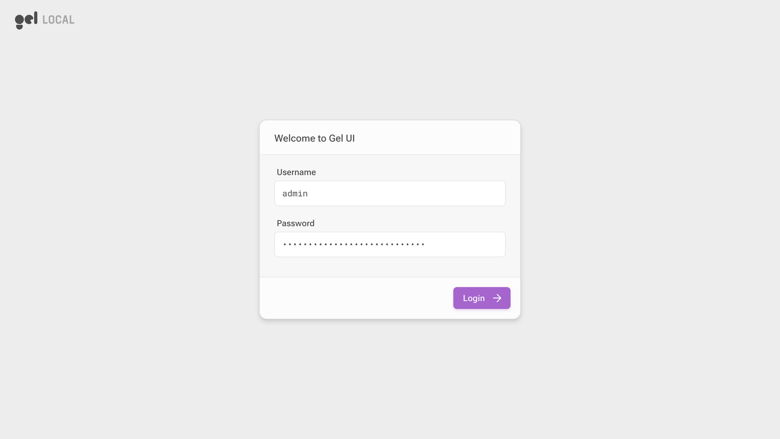
Gel UI sign in
Image
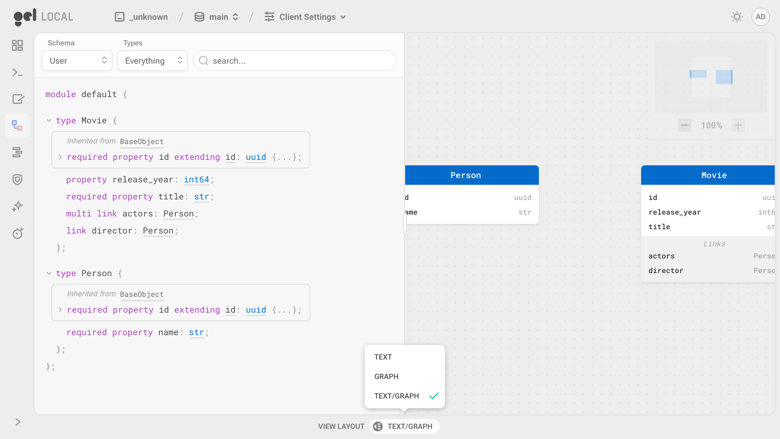
Typed schema browser
Image
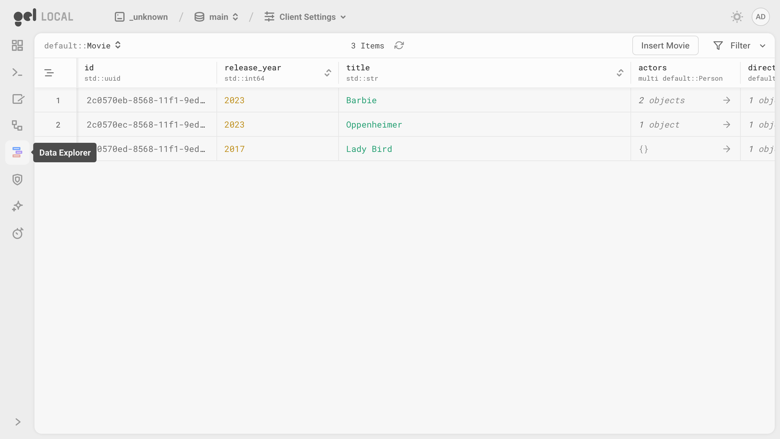
Data explorer
Image
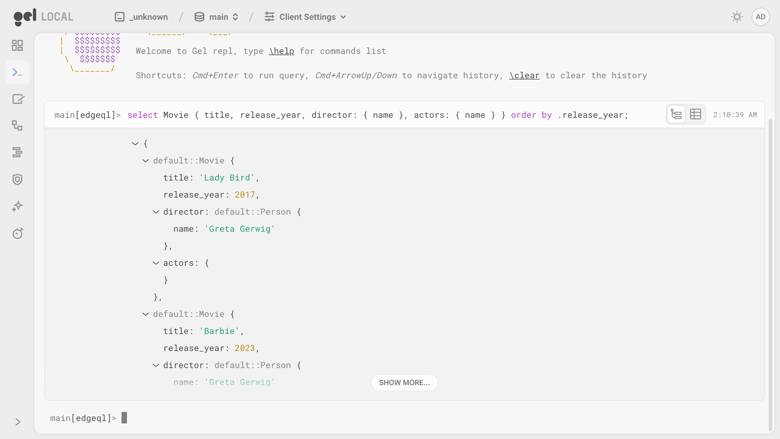
EdgeQL REPL
This is a repackaged open source software product wherein additional charges apply for cloudimg support services.
Why Gel on AWS Marketplace?
Backend engineers and data-modelling teams running workloads on AWS EC2 often face a choice: spend 30-60 minutes manually installing a database, configuring TLS, setting up a reverse proxy, and generating credentials - or use a managed service that limits control. This Gel AMI eliminates that trade-off. You get a fully configured graph-relational database that is query-ready on first boot, with production-grade security defaults and full administrative access.
What Is Gel?
Gel (formerly EdgeDB) is an open source graph-relational database built on top of PostgreSQL. You describe your data as typed object types with links and properties in a declarative schema, evolve it through versioned migrations, and query it with EdgeQL - a composable query language that returns rich, deeply nested results without hand-written joins. Gel ships a built-in web admin interface (the Gel UI) with a schema browser, an interactive REPL, and a data explorer. Official client libraries cover popular languages.
How This AMI Saves You Time
- Boot to first query in minutes: Gel is installed from the official package repository and runs under systemd behind an nginx reverse proxy. No manual package installation, no proxy configuration, no credential setup.
- Demo schema pre-seeded: A small schema and data set are loaded via a recorded migration on first boot, so the schema browser and data explorer are populated the moment you sign in.
- Paired deployment guide included: Walk through reading your credentials, exploring the schema, running EdgeQL, applying a migration, and connecting a client library.
Compare this to a bare EC2 install where you would manually add the Gel repository, configure systemd units, generate TLS certificates, set up nginx, and create authentication credentials - steps that typically take 30-60 minutes and introduce configuration drift across instances.
Security by Design
Unlike images that ship shared credentials, this AMI generates all secrets fresh on every first boot:
- Unique superuser password - randomly generated per instance, never baked into the image
- Unique self-signed TLS certificate - created during data directory initialisation
- Unique nginx reverse-proxy password - no two instances share authentication material
The database process binds only to the loopback interface and is reachable solely through the authenticated nginx proxy on port 80. systemd manages the service for automatic restarts and clean logging. The image is captured with the data directory wiped and the server disabled, ensuring every launch starts clean.
Example Use Case
Consider a SaaS product catalog with deeply nested categories, variant options, and cross-linked recommendations. In raw PostgreSQL you would write multi-level JOINs or recursive CTEs. With Gel, you model categories, products, and recommendations as typed object types with links, then retrieve an entire nested product tree in a single EdgeQL query - no ORM layer, no manual join assembly. The Gel UI lets you visually browse that schema and test queries interactively before wiring them into your Next.js or Python backend via the official client library.
What Is Included
- Gel 7 (current release) installed from the official repository
- nginx reverse proxy with HTTP basic authentication on port 80
- Self-signed TLS between proxy and database
- systemd service management with automatic restart
- Pre-seeded demo schema and data set
- Deployment guide covering credentials, schema exploration, EdgeQL, migrations, and client connection
- 24/7 cloudimg support via email and live chat
Getting Started
Launch the AMI on your preferred EC2 instance type, wait for first-boot initialisation to complete, then retrieve your generated credentials from the instance. Sign into the Gel UI through your browser, explore the demo schema, run EdgeQL queries in the REPL, and connect your application using an official client library. The deployment guide walks you through each step.
Gel and EdgeDB are trademarks of their respective owner. All product and company names are trademarks or registered trademarks of their respective holders. Use of them does not imply any affiliation with or endorsement by them.
Highlights
- Ready-to-use Gel database on first boot. Gel (formerly EdgeDB), the graph-relational database built on PostgreSQL, is installed from the official package repository and runs under systemd behind an nginx reverse proxy. A small demo schema and data set are seeded automatically, so the built-in Gel UI schema browser, interactive REPL and data explorer are populated the moment you sign in - no manual package install and no proxy configuration required.
- Secure by default, with no baked credential. Every instance generates its own superuser password, its own self-signed TLS certificate and its own nginx reverse-proxy password on first boot - nothing is shared across instances. The database binds to the loopback interface only and is reachable solely through the authenticated nginx proxy on port 80, so it is never exposed unauthenticated and no two instances are alike.
- Around-the-clock cloudimg support with a one-hour average response for critical issues. Engineers assist via email and live chat with deployment sizing, schema modelling and EdgeQL, applying migrations, connecting the official client libraries, TLS termination with your own domain and certificate, backups and Gel version upgrades.
Details
Sold by
Delivery method
Delivery option
64-bit (x86) Amazon Machine Image (AMI)
Latest version
Operating system
Ubuntu 24.04
Deployed on AWS
New
Introducing multi-product solutions
You can now purchase comprehensive solutions tailored to use cases and industries.

Features and programs
Financing for AWS Marketplace purchases
AWS Marketplace now accepts line of credit payments through the PNC Vendor Finance program. This program is available to select AWS customers in the US, excluding NV, NC, ND, TN, & VT.

Pricing
Free trial
Try this product free for 7 days according to the free trial terms set by the vendor. Usage-based pricing is in effect for usage beyond the free trial terms. Your free trial gets automatically converted to a paid subscription when the trial ends, but may be canceled any time before that.
Pricing is based on actual usage, with charges varying according to how much you consume. Subscriptions have no end date and may be canceled any time. Alternatively, you can pay upfront for a contract, which typically covers your anticipated usage for the contract duration. Any usage beyond contract will incur additional usage-based costs.
Additional AWS infrastructure costs may apply. Use the AWS Pricing Calculator to estimate your infrastructure costs.
If you are an AWS Free Tier customer with a free plan, you are eligible to subscribe to this offer. You can use free credits to cover the cost of eligible AWS infrastructure. See AWS Free Tier for more details. If you created an AWS account before July 15th, 2025, and qualify for the Legacy AWS Free Tier, Amazon EC2 charges for Micro instances are free for up to 750 hours per month. See Legacy AWS Free Tier for more details.
Dimension | Description | Cost/hour |
|---|---|---|
m5.large Recommended | m5.large | $0.08 |
t2.micro | t2.micro instance type | $0.04 |
t3.micro | t3.micro instance type | $0.04 |
t3.small | t3.small instance type | $0.04 |
m5ad.8xlarge | m5ad.8xlarge instance type | $0.24 |
c8ine.8xlarge | c8ine.8xlarge instance type | $0.24 |
g6.4xlarge | g6.4xlarge instance type | $0.24 |
d3.4xlarge | d3.4xlarge instance type | $0.24 |
gr6.8xlarge | gr6.8xlarge instance type | $0.24 |
i7i.24xlarge | i7i.24xlarge instance type | $0.24 |
Vendor refund policy
Refunds available on request.

Legal
Vendor terms and conditions
Upon subscribing to this product, you must acknowledge and agree to the terms and conditions outlined in the vendor's End User License Agreement (EULA) .
Content disclaimer
Vendors are responsible for their product descriptions and other product content. AWS does not warrant that vendors' product descriptions or other product content are accurate, complete, reliable, current, or error-free.
Delivery details
64-bit (x86) Amazon Machine Image (AMI)
Amazon Machine Image (AMI)
An AMI is a virtual image that provides the information required to launch an instance. Amazon EC2 (Elastic Compute Cloud) instances are virtual servers on which you can run your applications and workloads, offering varying combinations of CPU, memory, storage, and networking resources. You can launch as many instances from as many different AMIs as you need.
Version release notes
Initial release.
Additional details
Usage instructions
Connect via SSH on port 22 as the default login user for your operating system variant (the user guide lists it per variant; on Ubuntu it is 'ubuntu'). Gel is served on port 80 through nginx, which enforces HTTP basic authentication; the Gel server itself binds to 127.0.0.1:5656. Retrieve the per-instance credentials with: sudo cat /root/gel-credentials.txt. Open http://<public-ip>/ui in a browser, pass the nginx basic-auth prompt with GEL_UI_USER and GEL_UI_PASSWORD, then sign in to the Gel UI as 'admin' with GEL_ADMIN_PASSWORD. From the CLI: printf '%s\n' "$GEL_ADMIN_PASSWORD" | gel --host 127.0.0.1 --port 5656 --user admin --tls-security insecure --password-from-stdin query 'SELECT count(Movie);'. Full walkthrough: https://www.cloudimg.co.uk/guides/gel-aws/
Resources
Vendor resources
Support
Vendor support
cloudimg Support
cloudimg provides 24/7 technical support for this Gel AMI via email and live chat.
Contact: support@cloudimg.co.uk
Response Times:
- Critical issues (service down, data loss risk): one-hour average response
- General inquiries: responded to within business hours
Support Scope:
Our engineers assist with the full lifecycle of your Gel deployment:
- Initial deployment guidance and instance sizing recommendations
- Schema modelling with object types, links and properties, and EdgeQL query help
- Applying and rolling back versioned migrations
- Connecting the official Gel client libraries from your application
- nginx reverse proxy configuration, TLS termination with Let's Encrypt or a custom certificate, and exposing the database securely
- Backups, restores and data directory management
- Gel server and CLI version upgrades
Getting Help:
Email support@cloudimg.co.uk or use live chat with a description of your issue. For deployment questions before purchase, reach out to the same address. Include your instance ID and AWS region to expedite troubleshooting.
Refunds:
If you experience issues with the product, contact support@cloudimg.co.uk . Our team will work to resolve your concern or assist with the refund process through AWS Marketplace.
AWS infrastructure support
AWS Support is a one-on-one, fast-response support channel that is staffed 24x7x365 with experienced and technical support engineers. The service helps customers of all sizes and technical abilities to successfully utilize the products and features provided by Amazon Web Services.
Similar products

Alteon VA supports the complex functionality requirements of Enterprise applications which go beyond basic availability and quality of experience features. These include: Layer 7 Rewrite, Application Level Traffic Steering, Caching, SSL Offload, compression, acceleration. WAF (AppWall), SecureUR L

The soft robotics market is growing rapidly driven by flexible compliant materials advanced actuation sensors and control systems enabling safe human interaction and delicate handling. Healthcare logistics manufacturing and human machine collaboration lead adoption while innovation in AI materials and wearable systems expands application scope globally.

Alteon VA supports the complex functionality requirements of Enterprise applications which go beyond basic availability and quality of experience features. These include:Layer 7 RewriteApplication Level Traffic SteeringCachingSSL OffloadingWAF (AppWall)

The Food Colors Market size was valued at USD 3.36 billion in 2023, and is predicted to reach USD 6.85 billion by 2030, with a CAGR of 10.9% from 2024 to 2030. Food colors signify natural or synthetic substances added to food and beverages to enhance the color of the product. This market encompasses various products, including liquid, gel, and powder colorants designed to meet diverse industry requirements.
Customer reviews
No customer reviews yet
Be the first to review this product . We've partnered with PeerSpot to gather customer feedback. You can share your experience by writing or recording a review, or scheduling a call with a PeerSpot analyst.