Sold by: Sigmodata
Deployed on AWS
Free Trial
Chat, reasoning and image understanding from the open Qwen3.8-27B model, served on one GPU with vLLM. Runs on a SageMaker endpoint in your own AWS account with no network access, so prompts and images are not sent to a third-party API.
Overview
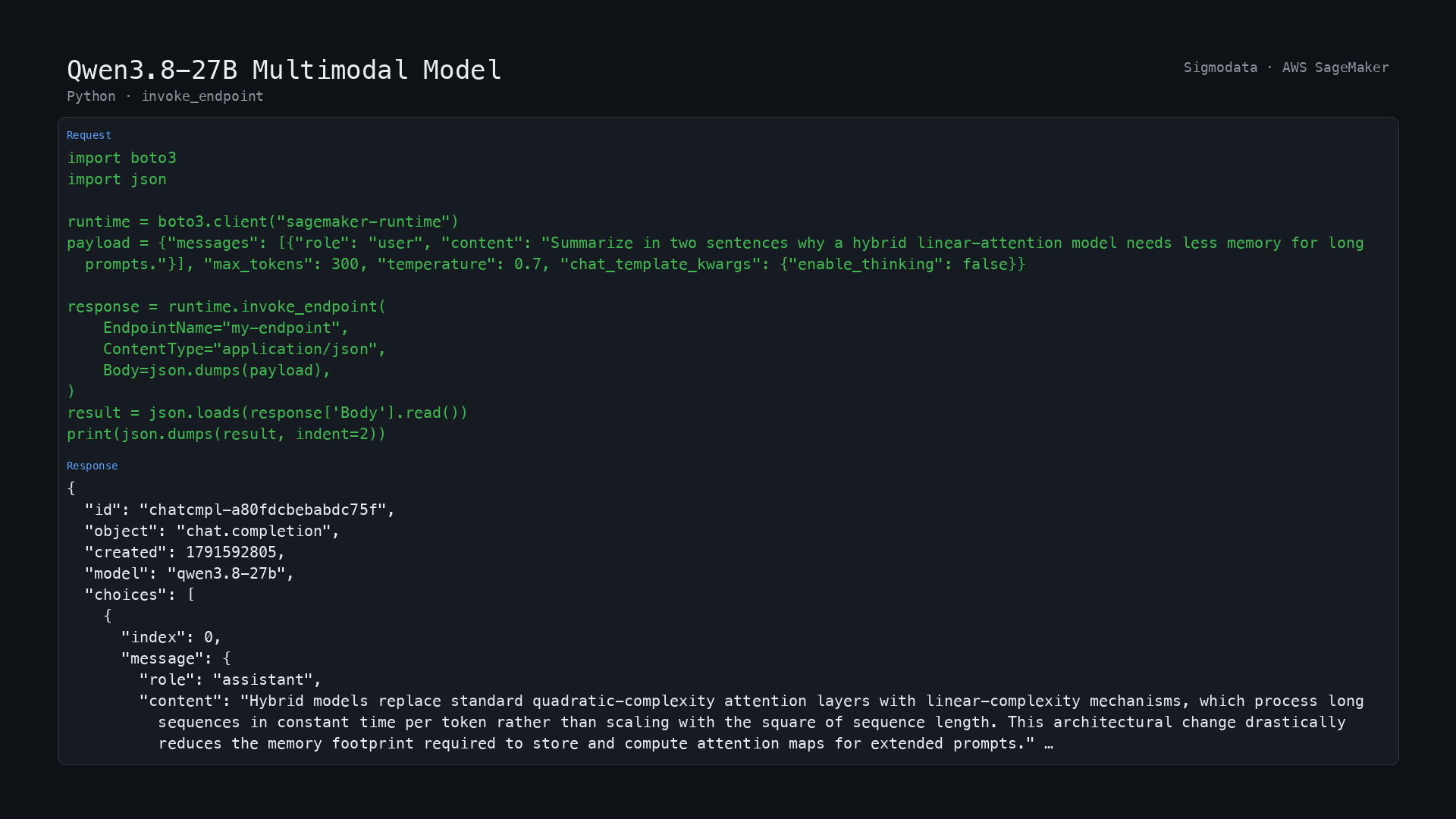
Image
Python invoke_endpoint
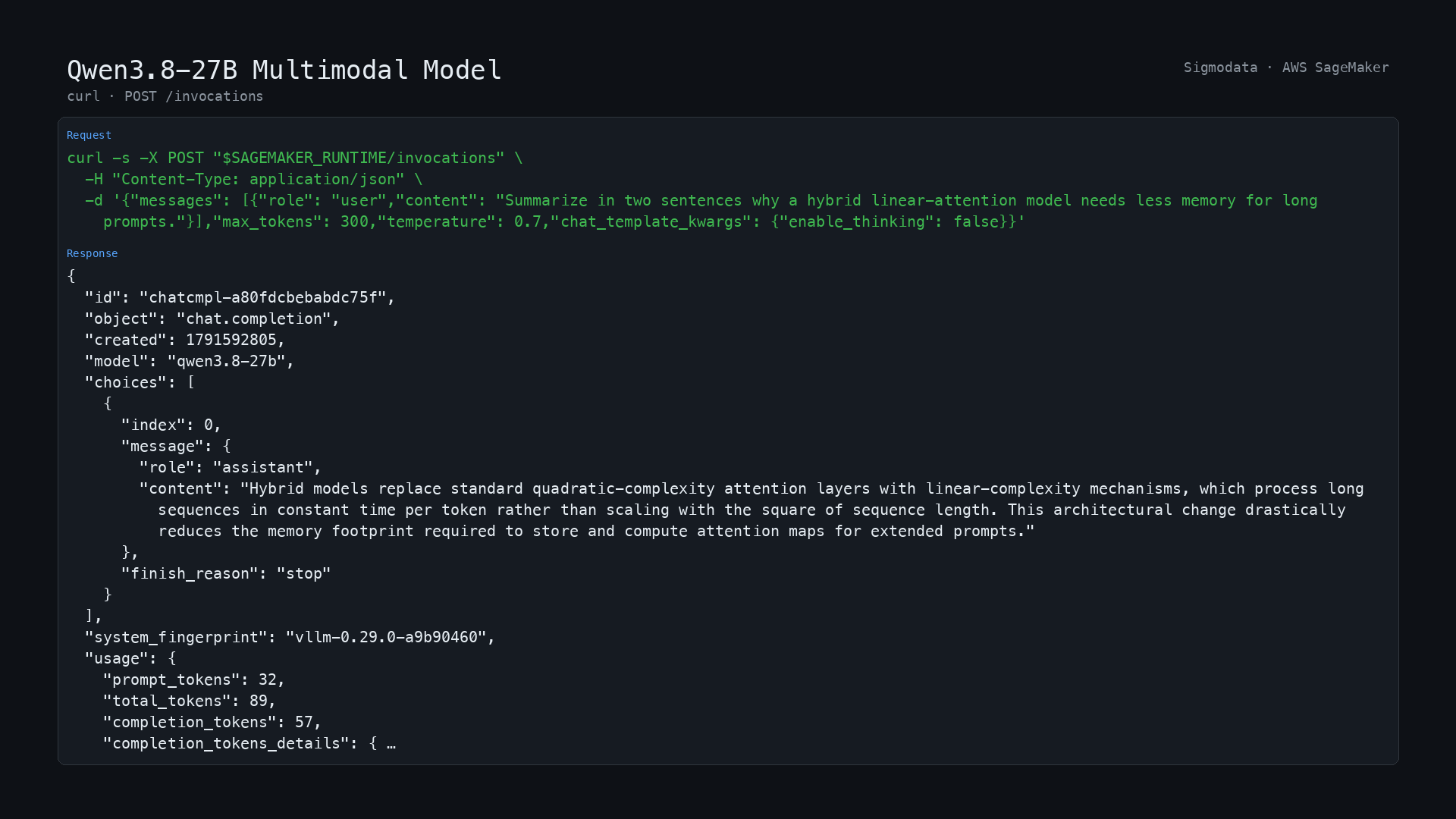
Image
POST /invocations
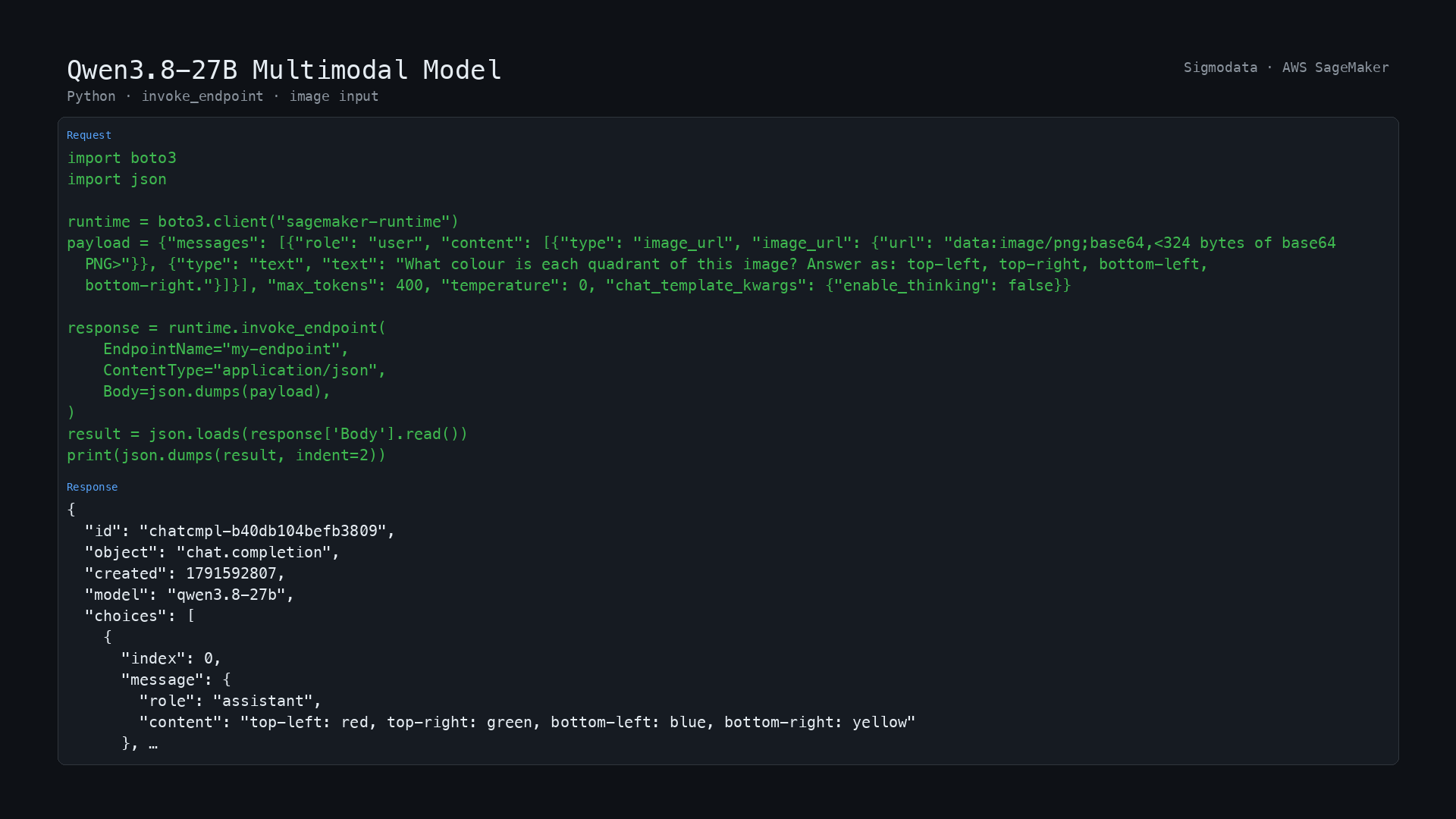
Image
Image input
Runs inside your own AWS account: your prompts and images are processed on a SageMaker endpoint you control, in network isolation, and are never sent to a third-party API.
This SageMaker model package serves Qwen3.8-27B, an open-weight (Apache-2.0) multimodal language model from Alibaba Cloud's Qwen team, as an OpenAI-style chat service. It accepts text and images (and one short video) in the same request and answers in text.
What it does for each supported content type
- application/json, real-time endpoint: a chat request (a list of messages, or just {"inputs": "..."}) returns a chat completion. Messages can include images. A request can stream its answer.
- application/json or application/jsonlines, batch transform: one chat request per line, one response line per input line, in order. Tested with a 24-record job on ml.g6e.xlarge.
Typical uses are question answering and summarisation over long documents, reasoning and code assistance, extracting information from screenshots, charts and scanned pages, and agent workflows that call tools. The model thinks before it answers by default; thinking can be switched off per request for short, fast replies.
Context: 262,144 tokens by default. The container can be started with a larger context (up to 524,288 tokens on one instance, using YaRN) by setting the environment variable MAX_MODEL_LEN on the SageMaker model; that mode was tested with one request of about 456,000 tokens and has not been evaluated for short-prompt quality.
Runs on vLLM 0.29 using the 4-bit (W4A16, group size 128) checkpoint from Red Hat AI; the vision tower is not quantised. The model is included in the container, so the endpoint needs no network access at runtime.
We welcome your feedback at support@sigmodata.com .
Known limitations
- Use streaming for long or thinking-heavy requests. A real-time InvokeEndpoint call is cut off at 60 seconds by SageMaker, and this model can think for longer; call InvokeEndpointWithResponseStream (set "stream": true) instead. A prompt of about 200,000 tokens takes about two minutes before the first token.
- On harder questions the model sometimes thinks until it reaches the output limit without answering: 10 of 56 questions in our run did so at a 4,096-token limit. Set a generous max_tokens, switch thinking off (chat_template_kwargs: {"enable_thinking": false}), or lower the reasoning effort for latency-sensitive work.
- Images must be sent inline as base64 data: URLs. The endpoint has no network access and cannot fetch http(s) image links. At most 8 images and 1 video per request by default.
- One GPU per container: up to 8 requests are processed together. For more throughput add instances.
- Answers can be wrong or invented. Test on your own data and keep a person in the loop for decisions that matter.
- Not evaluated: any language other than English, video, and any SageMaker instance type other than ml.g6e.xlarge.
Model and training data
Base model Qwen3.8-27B by Alibaba Cloud (Qwen team), Apache-2.0, used as published. Its training data is not published in detail; see the model card at https://huggingface.co/Qwen/Qwen3.8-27B . The 4-bit checkpoint is RedHatAI/Qwen3.8-27B-INT4 (Apache-2.0), pinned to revision 91bd022d5b49442a868bc35008f6c21e1860edfa. Sigmodata did not train or fine-tune either. Qwen is a trademark of its owner; this product is not made or endorsed by Alibaba Cloud or Red Hat.
Measured performance
- Accuracy, measured by us through this package on a SageMaker endpoint at a 4,096-token output limit: 37 of 40 correct on a 40-question sample of GSM8K, and 39 of 56 correct on a 56-question stratified sample of MMLU-Pro (4 per category). These are small samples (the 95 percent interval on 56 questions is about plus or minus 12 points) meant to show the package works, not a benchmark.
- Reported by the checkpoint's publisher (Red Hat AI, on its model card, for the unquantised baseline versus this INT4 build): MMLU-Pro 84.46 vs 83.45, GPQA Diamond 89.23 vs 87.88, GSM8K Platinum 95.75 vs 96.77. We have not reproduced these.
- Throughput on ml.g6e.xlarge (one NVIDIA L40S, 48 GB), measured on the same container outside SageMaker: about 60 output tokens per second for a single request, and about 175 and 386 tokens per second in total with 4 and 8 requests at the same time.
- Memory: the container holds the model in 18.5 GiB and has room for about 560,000 tokens of context in total (2.15 requests of 262,144 tokens).
- Latency on the SageMaker endpoint (one request at a time, thinking on, 4,096-token limit): the first streamed token arrived after a median of 0.2 s (95th percentile 0.4 s). A GSM8K answer took a median of 3 s (95th percentile 23 s) and an MMLU-Pro answer a median of 9 s (95th percentile 67 s).
- Start-up: a new endpoint reached InService in about 12 minutes, including pulling the 22.4 GB compressed container image.
Highlights
- Open Qwen3.8-27B multimodal model: text and images in, text out, 262,144-token context, thinking can be switched off per request
- Runs in network isolation inside your own AWS account and VPC - your prompts and images are never sent to a third-party API
- About 60 tokens per second for one request and 386 per second with 8 at once on ml.g6e.xlarge, measured by us
Details
Sold by
Delivery method
Latest version
Deployed on AWS
Features and programs
Financing for AWS Marketplace purchases
AWS Marketplace now accepts line of credit payments through the PNC Vendor Finance program. This program is available to select AWS customers in the US, excluding NV, NC, ND, TN, & VT.

Pricing
Free trial
Try this product free for 5 days according to the free trial terms set by the vendor.
Pricing is based on actual usage, with charges varying according to how much you consume. Subscriptions have no end date and may be canceled any time.
Additional AWS infrastructure costs may apply. Use the AWS Pricing Calculator to estimate your infrastructure costs.
Dimension | Description | Cost/host/hour |
|---|---|---|
ml.g6e.xlarge Inference (Batch) Recommended | Model inference on the ml.g6e.xlarge instance type, batch mode | $0.10 |
ml.g6e.xlarge Inference (Real-Time) Recommended | Model inference on the ml.g6e.xlarge instance type, real-time mode | $0.10 |
Dimensions summary
This model deploys on SageMaker and bills by host hour on the same instance type, the ml.g6e.xlarge. You pick between two inference modes. Batch mode processes grouped inputs, while real-time mode serves live requests. Both share one instance size, so the mode you choose is the main pricing variable. You pay per hour the instance runs, with no upfront commitment. Charges scale with how long you keep each instance active. Add the matching AWS infrastructure cost for the instance on top of the software rate.
Top-of-mind questions for buyers
Both modes bill per host hour on the same ml.g6e.xlarge instance. Real-time mode keeps an endpoint running to serve live requests, so you pay while it stays active. Batch mode spins up to process grouped inputs, then stops, so you pay only during each run.
Charges accrue per host hour the instance stays active, even with no requests in flight. A running real-time endpoint keeps billing until you stop or delete it. Batch jobs stop automatically when processing finishes, so charges end then. AWS infrastructure fees for the instance apply separately.
The host hour rate covers the software only. You also pay the AWS infrastructure cost for the ml.g6e.xlarge instance running in your own AWS account. Both charges appear together and scale with how long each instance stays active. The model deploys through SageMaker.
www.sigmodata.com
Helpful?
Vendor refund policy
No refunds offered but you may cancel at any time

Legal
Vendor terms and conditions
Upon subscribing to this product, you must acknowledge and agree to the terms and conditions outlined in the vendor's End User License Agreement (EULA) .
Content disclaimer
Vendors are responsible for their product descriptions and other product content. AWS does not warrant that vendors' product descriptions or other product content are accurate, complete, reliable, current, or error-free.
Delivery details
Amazon SageMaker model
An Amazon SageMaker model package is a pre-trained machine learning model ready to use without additional training. Use the model package to create a model on Amazon SageMaker for real-time inference or batch processing. Amazon SageMaker is a fully managed platform for building, training, and deploying machine learning models at scale.
Deploy the model on Amazon SageMaker AI using the following options:
Version release notes
Initial release.
- Qwen3.8-27B (RedHatAI INT4 checkpoint) on vLLM 0.29, model included in the container
- Text and image input, 262,144-token context (up to 524,288 with MAX_MODEL_LEN), streaming responses
- Real-time endpoints and batch transform (JSON Lines)
- Runs on ml.g6e.xlarge in network isolation
Additional details
Inputs
- Summary
A JSON chat request: "messages" (a list of {role, content}; content is a string or a list of text and image_url parts with base64 data: URLs), or just "inputs" (a string). Optional "max_tokens", "temperature", "top_p", "stream", and "chat_template_kwargs" (for example {"enable_thinking": false}). For batch transform send application/jsonlines: one request per line.
- Input MIME type
- application/json, application/jsonlines
{"messages": [{"role": "user", "content": "What is the capital of France? Answer in one word."}], "max_tokens": 256, "chat_template_kwargs": {"enable_thinking": false}}
{"messages": [{"role": "user", "content": "What is 17 * 23? Give only the number."}], "max_tokens": 256, "chat_template_kwargs": {"enable_thinking": false}}
Input data descriptions
The following table describes supported input data fields for real-time inference and batch transform.
Field name | Description | Constraints | Required |
|---|---|---|---|
messages | Chat messages; content may include base64 image_url parts | - | Yes |
inputs | A single user prompt as a string, used when "messages" is not sent | - | No |
max_tokens | Maximum tokens in the answer, including thinking (set it generously) | - | No |
temperature | Sampling temperature | - | No |
stream | Stream the answer (use InvokeEndpointWithResponseStream) | - | No |
chat_template_kwargs | Set {"enable_thinking": false} for short replies without thinking | - | No |
Resources
Vendor resources
Support
Vendor support
Support contact: Email: support@sigmodata.com Support URL: https://www.sigmodata.com/contact
Support description: Email support@sigmodata.com or https://www.sigmodata.com/contact . We reply within one business day, Monday through Friday, US Pacific time.
AWS infrastructure support
AWS Support is a one-on-one, fast-response support channel that is staffed 24x7x365 with experienced and technical support engineers. The service helps customers of all sizes and technical abilities to successfully utilize the products and features provided by Amazon Web Services.
Similar products

A European decision model that works like TypeSafe's Jev and runs in your own AWS account. Give it a document and your questions; it picks an answer from your options and says how sure it is. 115 languages, 27 European ones trained. Your documents never leave your VPC.
A self-hosted, production-ready Qwen 3.8 27B Uncensored model deployed into your AWS environment with a single click. Because everything runs entirely within your private cloud, your data stays secure, isolated, and fully under your control. Best of all, unlimited tokens.
A self-hosted, production-ready Qwen 3.6 35B model, with 3 billion active parameters deployed into your AWS environment with a single click. Because everything runs entirely within your private cloud, your data stays secure, isolated, and fully under your control. Best of all, unlimited tokens.
A self-hosted, production-ready Qwen 3.8 27B model deployed into your AWS environment with a single click. Because everything runs entirely within your private cloud, your data stays secure, isolated, and fully under your control. Best of all, unlimited tokens.
Customer reviews
No customer reviews yet
Be the first to review this product . We've partnered with PeerSpot to gather customer feedback. You can share your experience by writing or recording a review, or scheduling a call with a PeerSpot analyst.