
Sold by: cloudimg
Deployed on AWS
Free Trial
AWS Free Tier
This product has charges associated with it for seller support. Launch a complete PrestaShop 9 online store in minutes with zero manual setup. Pre-configured with Apache 2.4, PHP 8.3, and MariaDB 10.11, backed by 24/7 cloudimg support.
Overview
Image
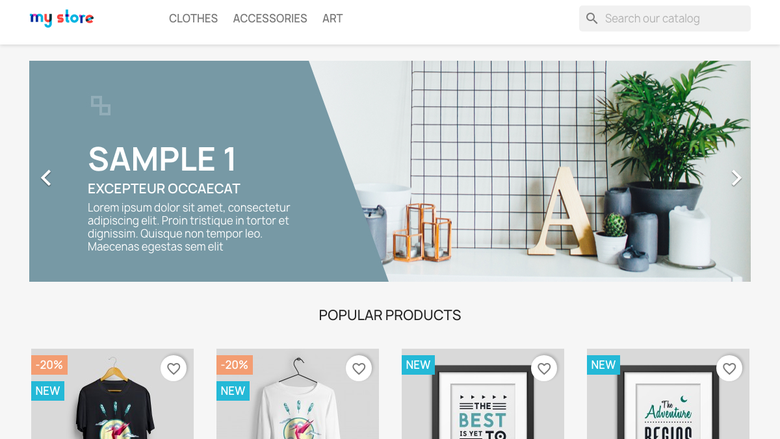
PrestaShop storefront
Image
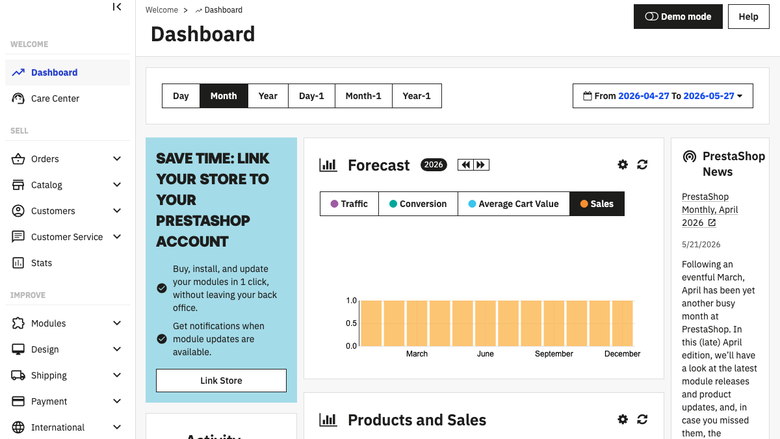
Admin dashboard
Image
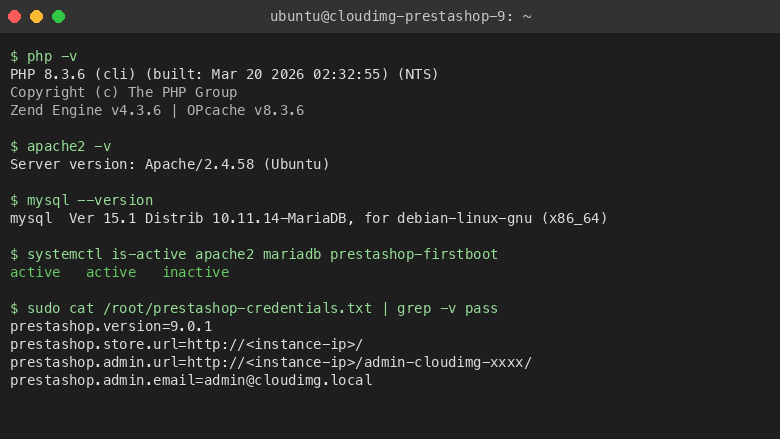
Stack information
This is a repackaged open source software product wherein additional charges apply for cloudimg support services.
Launch a Complete Online Store in Minutes
PrestaShop is a leading open source e-commerce platform trusted by over 300,000 merchants worldwide. This AMI delivers PrestaShop 9.0.1 fully installed and configured on AWS, so your storefront is live within minutes of launch - no manual package installation, database setup, or configuration file editing required. Unlike manual installs or competing AMIs that ship with shared default credentials, every instance of this image generates unique, secure passwords on first boot.
Application Stack
- PrestaShop 9.0.1 - Latest stable release with modern admin back office
- Apache 2.4 - Production-ready web server with optimized configuration
- PHP 8.3 - All required extensions pre-installed and tuned
- MariaDB 10.11 - High-performance database on a dedicated EBS volume
The database and web files each reside on their own dedicated EBS volume. This separation lets you resize storage independently - scale your product catalog without touching the database volume, or expand database capacity without a full instance migration.
Security-First Architecture
Unique Per-Instance Credentials: On first boot, a one-shot service generates a fresh MariaDB root password, a fresh database user password, and a fresh PrestaShop administrator password. The admin back office URL is randomized to a unique path, preventing automated discovery. All credentials are written to /root/prestashop-credentials.txt (readable by root only). No shared or default credentials ship in the image - eliminating the risk of credential reuse attacks common with other pre-built images.
Data in Transit: Apache is pre-configured and ready for TLS termination. Attach your SSL certificate or use AWS Certificate Manager with a load balancer to encrypt all storefront and admin traffic.
Network Isolation: Deploy the instance in a private subnet behind an Application Load Balancer for production workloads. Restrict SSH access via security groups to your management IP range. Open only ports 80 and 443 for web traffic.
EBS Encryption: Enable EBS encryption at launch to protect stored product data, customer records, and database contents at rest using AWS-managed or customer-managed KMS keys.
Getting Started
- Launch the AMI from AWS Marketplace, selecting your preferred instance type and VPC
- Ensure your security group allows inbound traffic on ports 22 (SSH), 80 (HTTP), and 443 (HTTPS)
- Wait approximately 2-3 minutes for the first-boot provisioning to complete
- SSH into the instance and read /root/prestashop-credentials.txt for your admin URL and passwords
- Browse to the instance public IP to view your live storefront
- Navigate to the randomized admin URL to manage products, orders, customers, and themes
Use Cases
- Online retailers launching a new storefront without DevOps overhead
- Merchants migrating from hosted SaaS to self-hosted for greater control and lower long-term costs
- Developers building custom PrestaShop themes and modules in an isolated environment
- Agencies deploying client e-commerce stores rapidly and repeatably
24/7 cloudimg Support
Every subscription includes expert technical support by email and live chat. Our engineers assist with PrestaShop deployment, upgrades, theme installation, module configuration, database administration, and performance tuning. Critical issues receive a one-hour average response time.
To discuss a guided onboarding session or migration consultation, contact our team through the support channels listed below.
All product and company names are trademarks or registered trademarks of their respective holders. Use of them does not imply any affiliation with or endorsement by them.
Highlights
- PrestaShop 9 e-commerce platform preinstalled and ready, with Apache 2.4, PHP 8.3 and MariaDB 10.11 and no manual setup required
- Hardened first boot generates fresh MariaDB and PrestaShop administrator passwords for every instance and stores them in a file only the root user can read
- 24/7 technical support from cloudimg, with expert assistance for PrestaShop deployment, configuration, upgrades and performance tuning
Details
Sold by
Delivery method
Delivery option
64-bit (x86) Amazon Machine Image (AMI)
Latest version
Operating system
Ubuntu 24.04
Deployed on AWS
New
Introducing multi-product solutions
You can now purchase comprehensive solutions tailored to use cases and industries.

Features and programs
Financing for AWS Marketplace purchases
AWS Marketplace now accepts line of credit payments through the PNC Vendor Finance program. This program is available to select AWS customers in the US, excluding NV, NC, ND, TN, & VT.

Pricing
Free trial
Try this product free for 7 days according to the free trial terms set by the vendor. Usage-based pricing is in effect for usage beyond the free trial terms. Your free trial gets automatically converted to a paid subscription when the trial ends, but may be canceled any time before that.
Pricing is based on actual usage, with charges varying according to how much you consume. Subscriptions have no end date and may be canceled any time. Alternatively, you can pay upfront for a contract, which typically covers your anticipated usage for the contract duration. Any usage beyond contract will incur additional usage-based costs.
Additional AWS infrastructure costs may apply. Use the AWS Pricing Calculator to estimate your infrastructure costs.
If you are an AWS Free Tier customer with a free plan, you are eligible to subscribe to this offer. You can use free credits to cover the cost of eligible AWS infrastructure. See AWS Free Tier for more details. If you created an AWS account before July 15th, 2025, and qualify for the Legacy AWS Free Tier, Amazon EC2 charges for Micro instances are free for up to 750 hours per month. See Legacy AWS Free Tier for more details.
Dimension | Description | Cost/hour |
|---|---|---|
m5.large Recommended | m5.large | $0.08 |
t2.micro | t2.micro instance type | $0.04 |
t3.micro | t3.micro instance type | $0.04 |
r6in.8xlarge | r6in.8xlarge instance type | $0.24 |
x2iedn.16xlarge | x2iedn.16xlarge instance type | $0.24 |
r7a.12xlarge | r7a.12xlarge instance type | $0.24 |
c7a.medium | c7a.medium instance type | $0.04 |
d3.2xlarge | d3.2xlarge instance type | $0.24 |
i7i.xlarge | i7i.xlarge instance type | $0.12 |
c8in.32xlarge | c8in.32xlarge instance type | $0.24 |
Vendor refund policy
Refunds available on request.

Legal
Vendor terms and conditions
Upon subscribing to this product, you must acknowledge and agree to the terms and conditions outlined in the vendor's End User License Agreement (EULA) .
Content disclaimer
Vendors are responsible for their product descriptions and other product content. AWS does not warrant that vendors' product descriptions or other product content are accurate, complete, reliable, current, or error-free.
Delivery details
64-bit (x86) Amazon Machine Image (AMI)
Amazon Machine Image (AMI)
An AMI is a virtual image that provides the information required to launch an instance. Amazon EC2 (Elastic Compute Cloud) instances are virtual servers on which you can run your applications and workloads, offering varying combinations of CPU, memory, storage, and networking resources. You can launch as many instances from as many different AMIs as you need.
Version release notes
Remediates CVE-2024-38475 + flagged CVEs: apache upgraded to 2.4.68 (ondrej PPA), full apt update; rng-tools added.
Additional details
Usage instructions
Connect via SSH on port 22 using the ec2-user for your OS variant (ubuntu for Ubuntu). PrestaShop storefront is served on port 80. Browse to http://<instance-public-ip>/ to view the store. Retrieve admin credentials with: sudo cat /root/prestashop-credentials.txt. To enable HTTPS follow the Let's Encrypt section of the user guide.
Resources
Vendor resources
Support
Vendor support
cloudimg 24/7 Technical Support
cloudimg provides around-the-clock technical support for this PrestaShop 9 AMI via email and live chat.
What We Help With:
- Initial deployment and instance configuration
- PrestaShop upgrades and patch application
- Theme installation and customization guidance
- Module configuration and troubleshooting
- MariaDB database administration and optimization
- Apache and PHP performance tuning
- Backup and restore procedures
- Security hardening recommendations
Response Times:
Critical issues (store down, data loss risk) receive a one-hour average response. General inquiries and configuration questions are handled during the same business day.
Getting Started:
After launching your instance, SSH in and retrieve your credentials from /root/prestashop-credentials.txt. If you need guided onboarding or a migration consultation, reach out to our team and we will schedule a session.
Contact: support@cloudimg.co.uk
For billing questions, refund requests, or subscription changes, contact the same email address and our team will assist promptly.
AWS infrastructure support
AWS Support is a one-on-one, fast-response support channel that is staffed 24x7x365 with experienced and technical support engineers. The service helps customers of all sizes and technical abilities to successfully utilize the products and features provided by Amazon Web Services.
Similar products

This product has charges associated with it for seller support. It is an online platform that allows users to create an e-commerce presence, enabling them to sell products and services through the web to an online audience. Business owners looking to move their company online can use It to build their website, add features and, with sum up, take payments.

This product has charges associated with it for seller support and pre-configured stack (phpMyAdmin and Webmin). Intuz PrestaShop is a pre-configured, ready to run image on Amazon EC2 and has Apache2, MySQL, PHP, phpMyAdmin, Webmin, PrestaShop and Scripts which make it easy for you to use PrestaShop

This product has charges associated with it for seller support and pre-configured stack (phpMyAdmin and Webmin). Intuz PrestaShop is a pre-configured, ready-to-run AMI that includes Apache2, MySQL, PHP, phpMyAdmin, Webmin, PrestaShop, and automation Scripts - making it easy to deploy and manage your PrestaShop store on cloud infrastructure.

This product has charges associated with it for deployment, configuration, and ongoing support. Full-featured e-commerce platform with product catalog, checkout, and payments on EC2.
Customer reviews
No customer reviews yet
Be the first to review this product . We've partnered with PeerSpot to gather customer feedback. You can share your experience by writing or recording a review, or scheduling a call with a PeerSpot analyst.