Sold by: Nsasoft US LLC
Deployed on AWS
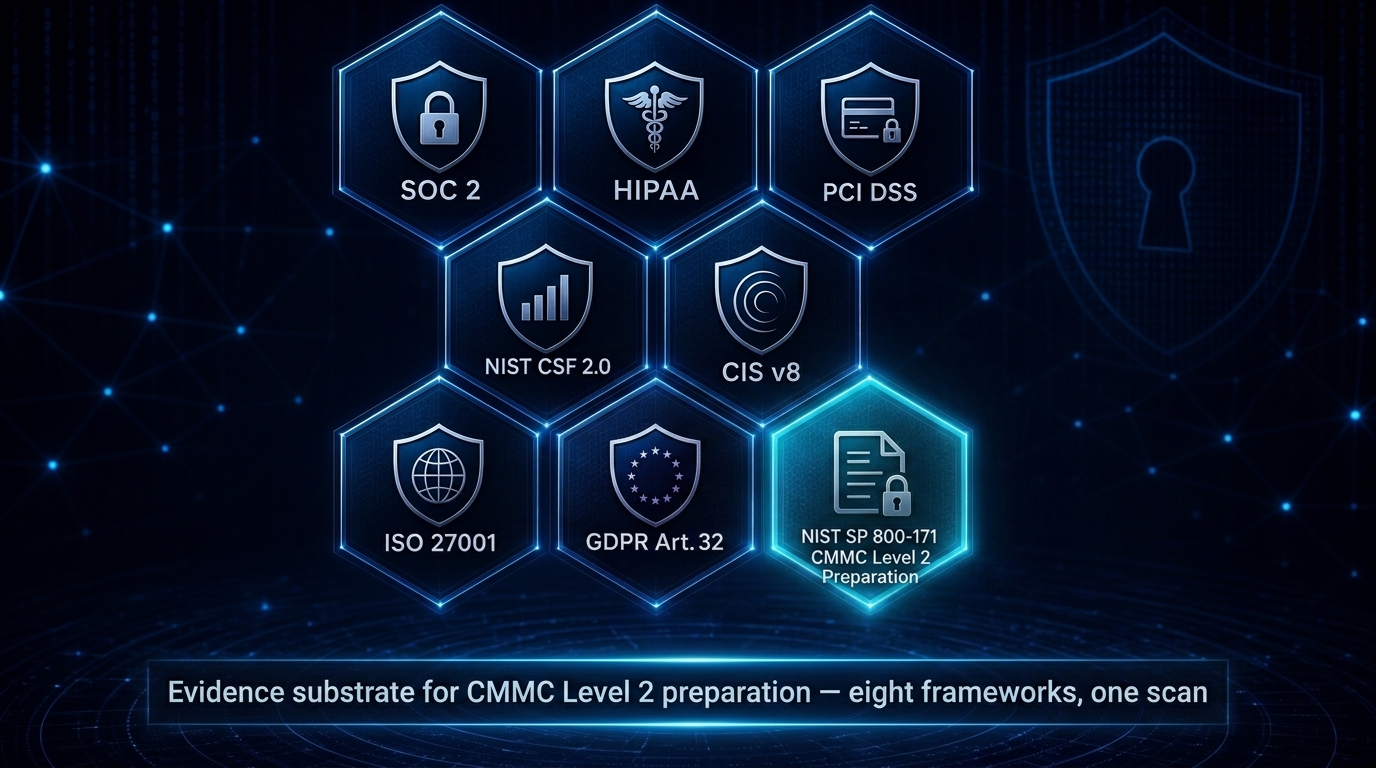
NSAuditor AI Enterprise turns one read-only cloud scan into eight auditor-ready evidence packs mapped to SOC 2, HIPAA, NIST CSF 2.0, PCI DSS, ISO 27001, CIS Controls v8, GDPR Article 32, and NIST SP 800-171 Rev 2 evidence substrate for CMMC Level 2 preparation. Each framework's manifest can be signed with your operator-held Ed25519 key and verified offline. It audits AWS, Azure, and GCP from inside your infrastructure with Zero Data Exfiltration: no scan data or evidence is sent to Nsasoft, there is no telemetry and no SaaS backend, and the one default path that carries scan content (the CVE lookup to NIST's NVD) can be switched off for air-gapped operation.
Overview
Video
NSAuditor AI Enterprise Product Overview
Image
Eight-Framework Compliance Evidence Coverage
NSAuditor AI Enterprise Edition is a self-hosted, multi-cloud security and compliance auditor that converts a single read-only scan into auditor-ready compliance evidence. In one pass it maps findings to eight frameworks at once: SOC 2, HIPAA, NIST CSF 2.0, PCI DSS, ISO 27001, CIS Controls v8, GDPR Article 32, and NIST SP 800-171 Rev 2 evidence substrate for CMMC Level 2 preparation. Every evidence pack carries a cover-page scope attestation and SHA-256 chain-of-custody sidecars, so auditors can independently verify report integrity.
The evidence-integrity chain is cryptographic and operator-controlled at every layer. compliance sign-pack signs one framework's chain-of-custody manifest and the artifacts it enumerates with an operator-held Ed25519 key - an authorship proof relative to your key custody, never a vendor attestation - and compliance verify-pack verifies it offline, recomputing every artifact hash the manifest lists; the same verification is reproducible with openssl alone. Suppression approvals can be signed with an operator-held Ed25519 key, and a report verifies those signatures only for approvers whose identity-registry entry carries key material. Opt-in RFC 3161 trusted timestamps bind report hashes to a Time-Stamp Authority you name - an outbound call to that authority only, with no default TSA.
Built for Zero Data Exfiltration, NSAuditor runs inside your own infrastructure using read-only APIs and offline licensing. No scan data or evidence artifact is sent to Nsasoft, there is no telemetry and no SaaS backend, and your cloud credentials go only to your own cloud providers, so no BAA or DPA with Nsasoft is needed. Every outbound path is listed in a published register; of those on by default, the one that carries scan content is the CVE lookup, which sends each identified service's vendor, product and version to NIST's NVD unless you set NSAUDITOR_OFFLINE_ONLY=1 with a local NVD store. For isolated enclaves, offline CVE data travels on your terms: feed bundle packages the NVD feeds you downloaded on a connected host - optionally with your own CISA KEV and FIRST EPSS files - and feed import loads them on the isolated host. No feed or exploit data ships with the product.
Under the hood, NSAuditor performs deep auditing across AWS, Azure, and GCP with 28 cloud plugins (56 in total), including transitive security-group reachability, IAM shadow-admin chains, KMS key custody, and backup and snapshot exposure. CVE matching - against NVD, or offline from feeds you import - is joined with exploit intelligence: CISA KEV known-exploited flags and FIRST EPSS exploitation probabilities drive prioritization, from data you supply. Compliance evidence can be pushed to Vanta, Drata, or Secureframe. Delivered as a container for deployment in your own VPC, ECS, EKS, or on-premises environment, it integrates with existing pipelines so compliance evidence generation becomes a repeatable, automated step rather than a manual scramble before each audit.
Highlights
- One scan, eight frameworks: auditor-ready evidence packs with SHA-256 chain-of-custody for SOC 2, HIPAA, NIST CSF 2.0, PCI DSS, ISO 27001, CIS Controls v8, GDPR Article 32, and NIST SP 800-171 Rev 2 evidence substrate for CMMC Level 2 preparation - each framework's manifest signable with an operator-held Ed25519 key and verifiable offline.
- Zero Data Exfiltration: runs inside your infrastructure with read-only APIs and offline licensing. No scan data is sent to Nsasoft, no telemetry, and every outbound path is listed in a published register.
- Deep multi-cloud auditing across AWS, Azure, and GCP with 28 cloud plugins (56 in total); CVE matching joined with CISA KEV and FIRST EPSS exploit intelligence from data you supply; compliance evidence push to Vanta, Drata, or Secureframe.
Details
Sold by
Categories
Delivery method
Supported services
Delivery option
NSAuditor AI Enterprise 2.1.1 (container)
Latest version
Operating system
Linux
Deployed on AWS
New
Introducing multi-product solutions
You can now purchase comprehensive solutions tailored to use cases and industries.

Features and programs
Financing for AWS Marketplace purchases
AWS Marketplace now accepts line of credit payments through the PNC Vendor Finance program. This program is available to select AWS customers in the US, excluding NV, NC, ND, TN, & VT.

Pricing
Pricing is based on the duration and terms of your contract with the vendor. This entitles you to a specified quantity of use for the contract duration. If you choose not to renew or replace your contract before it ends, access to these entitlements will expire.
Additional AWS infrastructure costs may apply. Use the AWS Pricing Calculator to estimate your infrastructure costs.
Dimension | Description | Cost/12 months |
|---|---|---|
Enterprise Base | Enterprise tier, up to 5 seats | $2,000.00 |
Enterprise Growth | Enterprise tier, up to 25 seats | $5,000.00 |
Enterprise Scale | Enterprise tier, unlimited seats (1000) | $10,000.00 |
Dimensions summary
You pick one of three Enterprise tiers based on how many seats you need. A seat is one installation on one machine, node, or CI runner. Enterprise Base covers up to 5 seats. Enterprise Growth covers up to 25 seats. Enterprise Scale covers unlimited seats (listed as 1000). All three tiers include the same Enterprise feature set; the tiers differ only by seat capacity and the level of support you receive. Billing is contract-based and runs to your AWS account, with consolidated billing and Private Offers for custom terms.
Top-of-mind questions for buyers
One seat is one installation of the software on one machine. That includes a laptop, server, container image, or CI runner. It is counted per installation, not per named user. If one engineer installs it on a laptop and a build server, that counts as two seats.
Nothing breaks at runtime. Seat enforcement is contractual, not technical, so there are no lockouts or remote check-ins. The license status command shows your seat number. If you outgrow your tier, you move to a tier with more capacity; usage is reconciled and prorated at renewal.
All three tiers include the same Enterprise feature set. Enterprise Base adds email support and an onboarding call. Enterprise Growth adds a dedicated support channel and priority response. Enterprise Scale adds a dedicated support engineer, a 4-hour critical response window, and custom plugin development.
www.nsauditor.com+1
Helpful?
Vendor refund policy
Refunds are governed by the EULA and the applicable AWS Marketplace order terms. Except as required by AWS Marketplace policies, all fees are non-refundable. Contact support@nsauditor.com for cancellation or refund requests.

Legal
Vendor terms and conditions
Upon subscribing to this product, you must acknowledge and agree to the terms and conditions outlined in the vendor's End User License Agreement (EULA) .
Content disclaimer
Vendors are responsible for their product descriptions and other product content. AWS does not warrant that vendors' product descriptions or other product content are accurate, complete, reliable, current, or error-free.
Delivery details
NSAuditor AI Enterprise 2.1.1 (container)
Supported services: Learn more
- Amazon ECS
- Amazon EKS
Container image
Containers are lightweight, portable execution environments that wrap server application software in a filesystem that includes everything it needs to run. Container applications run on supported container runtimes and orchestration services, such as Amazon Elastic Container Service (Amazon ECS) or Amazon Elastic Kubernetes Service (Amazon EKS). Both eliminate the need for you to install and operate your own container orchestration software by managing and scheduling containers on a scalable cluster of virtual machines.
Version release notes
EE 2.1.1 / CE 1.1.1 - a patch release: no plugin added or removed, no coverage-matrix or peer-floor change, and the supported Node.js floor is unchanged (24.22.1 or newer); this image runs Node.js 24.22.2.
For Enterprise cloud scans: the GCP Cloud Storage auditor (1024) and the GCP IAM auditor (1025) report themselves down, with the cause, when no GCP project is set or no usable credential loads, and call no API, as the GCP security audit (1021) does. Each control that maps a 1024 or 1025 rule shows the scanner-down evidence-gap row quoting the cause (SOC 2, HIPAA and NIST SP 800-171 through both; CIS v8 and ISO/IEC 27001 through the Cloud Storage auditor only; NIST CSF 2.0 through the IAM auditor only; PCI DSS and GDPR map neither plugin). Across an upgrade, under either condition, the earlier scan's 1024 and 1025 violations are listed as could not measure, never as cleared.
Community 1.1.1 moves its OpenAI client to openai 7. Its AI stage says at the head of the assessment when the provider reports reading less than half of the input, by the stage's own estimate, and a tool refused for the caller's licence names the tools the caller can use.
This image installs Enterprise and Community at its own install root: @azure/identity 4.14.1, @azure/msal-node 7.1.2 and zod 4.6.7, past GHSA-xcx6-jx8p-x3h5 and GHSA-mrhx-c7xc-m3w5, and the build fails if any installed copy of msal-node or zod is below its fixed version. @azure/identity 4.14.1 declares msal-node ^7.1.0, so 7.1.2 is inside its declared range.
Limits: without impersonation, resolving a GCP credential fetches no token, so a key file that loads but is revoked, or a principal without the IAM permission, still fails at the first call and stays a LOW evidence gap with the plugin up. The partial-read check estimates the input as characters / 4 for every provider; the threshold was not measured on the Claude provider.
Plugin count unchanged at 29; all eight coverage matrices unchanged. Paired with CE 1.1.1 and agent-skill 1.1.2; the Community floor stays CE >= 1.0.0.
Additional details
Usage instructions
-
LICENSE KEY (once, after subscribing). Register at https://www.nsauditor.com/ai/marketplace/register/ with your email, this subscription's 12-digit AWS account ID and Agreement ID ('agmt-...', AWS Console -> Manage subscriptions). Your ES256-signed key (JWT) arrives by email. Support: support@nsauditor.com .
-
PULL (bash). IMG=709825985650.dkr.ecr.us-east-1.amazonaws.com/nsasoft-us/nsasoft/nsauditor-ai-enterprise:2.1.1 aws ecr get-login-password --region us-east-1 | docker login -u AWS --password-stdin ${IMG%%/*} docker pull $IMG
-
RUN with your key in NSAUDITOR_LICENSE_KEY: docker run --rm -e NSAUDITOR_LICENSE_KEY=<key> $IMG --help
NEW IN 2.1.1 (Enterprise cloud scans). The GCP Cloud Storage auditor (1024) and the GCP IAM auditor (1025) report themselves down, with the cause, when no GCP project is set or no usable credential loads, and call no API, as the GCP security audit (1021) does; each control they map shows a scanner-down evidence-gap row quoting the cause. Since 2.1.0, an instance or VM inventory the GCP, Azure or EC2 auditor could not read in full is an evidence gap, not a finding: CIS v8 Safeguards 4.1, 4.2 and 4.6 fail closed on it rather than reading as passing. Runtime: Node.js 24.22.2.
DRIFT (since 2.0.0). Each one-shot compliance scan writes scan_drift_<fw>.json beside its pack: controls to fail or to pass, controls that lost measurement (with the scanners, in sources), violations new or cleared, and what could not be measured with its reason. Include the port scanner (003) in the scans you compare. Add --notify-webhook <public https URL> --notify-format slack|teams|generic to be told when a control goes to fail or loses measurement; the first scan is a baseline and sends nothing.
WHAT CHANGED SINCE THE LAST SCAN (Pro and Enterprise). Write both scans with this image to the same --out directory with the same --plugins set, including the port scanner (003), then compare them: docker run --rm -e NSAUDITOR_LICENSE_KEY=<key> -v "$PWD/out:/out" $IMG report --from /out --format executive --since prior The report files a finding the run recorded it could not measure as NOT-COMPARABLE with the reason on the row.
-
CLOUD SCAN (read-only credentials: the scanner reads configuration and metadata only and never needs create, write, modify or delete permissions): docker run --rm -e NSAUDITOR_LICENSE_KEY=<key> -e AWS_ACCESS_KEY_ID -e AWS_SECRET_ACCESS_KEY -e AWS_REGION
-v "$PWD/out:/out" $IMG --host aws --plugins all --compliance soc2,hipaa,pci --out /out Azure: -e AZURE_CLIENT_ID -e AZURE_CLIENT_SECRET -e AZURE_TENANT_ID -e AZURE_SUBSCRIPTION_ID ... --host azure (a Reader role). GCP: -e GCP_PROJECT_ID=<project> -e GOOGLE_APPLICATION_CREDENTIALS=/gcp/key.json -v <key file of a service account holding roles/viewer>:/gcp/key.json:ro ... --host gcp. -
EVIDENCE. Each run writes JSON, Markdown and HTML into --out, plus the compliance pack for every framework you name. Eight frameworks map from one read-only scan: SOC 2, HIPAA, NIST CSF 2.0, PCI DSS v4.0.1, ISO/IEC 27001:2022, CIS Controls v8, GDPR Article 32 (infrastructure substrate only) and NIST SP 800-171 Rev 2 (evidence substrate for CMMC Level 2 preparation - not a certification, and this product does not assess or grant one).
-
TIME AND INTEGRITY, both opt-in and both yours to verify. Set NSAUDITOR_TSA_URL and each artifact ships a .tsr sidecar holding the Time-Stamp Response from the Time-Stamp Authority you name - outbound to that authority only, never a default, and refused outright under an offline-only posture. A chain-of-custody envelope names exactly the artifacts it covers and re-hashes each one at verification; files it does not enumerate are outside it, which the tool prints rather than leaving you to assume.
-
NETWORK SCAN: replace --host aws with a host or CIDR. ECS and EKS are the supported runtimes.
Resources
Vendor resources
Support
Vendor support
Support: support@nsauditor.com | +1-702-625-0401 | https://www.nsauditor.com/support.html
Enterprise Base: Email support plus an onboarding call, across the full Enterprise feature set and cloud scanners.
Enterprise Growth: Dedicated Slack / email channel with priority response (SLA per contract) and custom compliance-mapping help.
Enterprise Scale: A dedicated support engineer and a custom SLA (4-hour critical, 24-hour standard) plus custom plugin development.
AWS infrastructure support
AWS Support is a one-on-one, fast-response support channel that is staffed 24x7x365 with experienced and technical support engineers. The service helps customers of all sizes and technical abilities to successfully utilize the products and features provided by Amazon Web Services.
Similar products

Unified Knowledge Source for Accelerated Time to Insight

ThoughtSpot Agentic Analytics for AWS
Sema4.ai Enterprise Edition: Build, run, and manage Secure, Accurate, Fast, and Extensible (SAFE) AI agents in your AWS VPC.
The most powerful answer engine for businesses. Powering curiosity with answers backed by up-to-date sources. This is where knowledge begins.
Customer reviews
No customer reviews yet
Be the first to review this product . We've partnered with PeerSpot to gather customer feedback. You can share your experience by writing or recording a review, or scheduling a call with a PeerSpot analyst.