Sold by: cloudimg
Deployed on AWS
Free Trial
AWS Free Tier
This product has charges associated with it for seller support. Production-ready Node.js LTS AMI with PM2, nginx, and secure auto-generated credentials - serving traffic on first boot.
Overview
Image
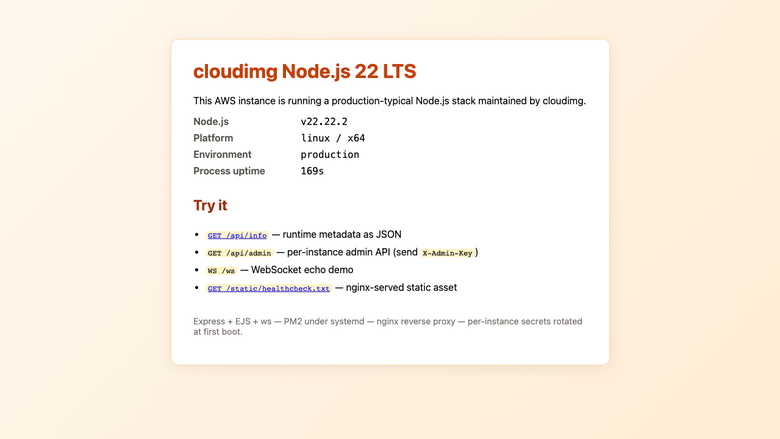
Sample Express welcome page
Image
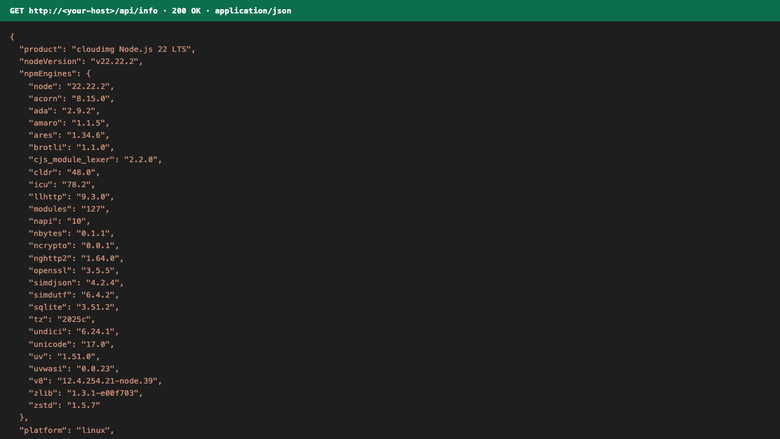
GET /api/info JSON response
Image
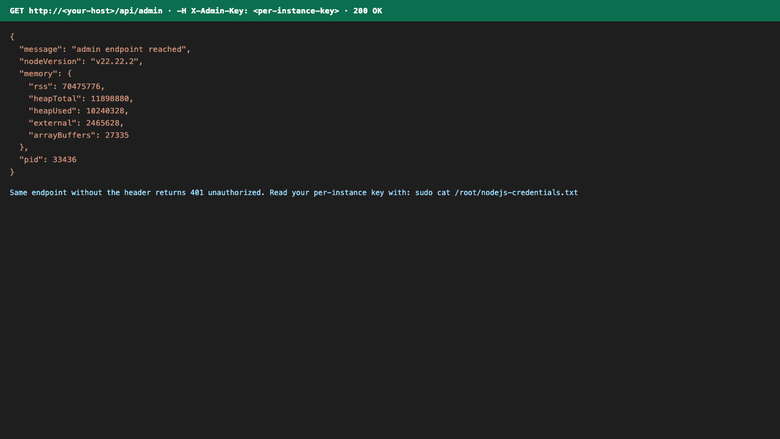
Authenticated /api/admin response
This is a repackaged open source software product wherein additional charges apply for cloudimg support services.
Overview
Node.js is the JavaScript runtime that powers modern server-side workloads - REST APIs, GraphQL gateways, real-time WebSocket services, server-side rendered web apps, and build tooling. This AMI delivers Node.js LTS fully installed and serving traffic from the moment your instance boots, with PM2 process management and nginx reverse proxying already configured. Unlike launching a bare EC2 and spending20-30 minutes installing packages, configuring systemd services, and hardening credentials, this image is production-ready on first boot.
Application Stack
- Node.js LTS from the official NodeSource repository with bundled npm
- pnpm and PM2 installed globally
- Sample Express + EJS application running under PM2's pm2-runtime, managed by systemd, listening on 127.0.0.1:3000
- nginx1.24 fronting the app on port 80, reverse-proxying dynamic routes and serving static assets directly
- WebSocket upgrade headers pre-configured so /ws works out of the box
Secure First Boot
On every instance's first boot, a one-shot systemd service generates a fresh SESSION_SECRET and a unique ADMIN_API_KEY, writing them to a root-only file. No shared or default credentials ship in the image. The admin endpoint returns 401 until the per-instance key is supplied as the X-Admin-Key header. Note that TLS is not configured by default - you can set up Let's Encrypt directly or terminate SSL at an upstream load balancer, and cloudimg support can assist with either approach.
Security Considerations
- Per-instance cryptographic secrets generated at boot (no shared credentials)
- Admin API key stored in a root-only file with600 permissions
- nginx listens on port 80; configure security groups to allow inbound TCP 80 (and 443 if adding TLS)
- For production deployments, cloudimg recommends adding TLS via Let's Encrypt or an AWS ALB, restricting SSH access, and enabling unattended security updates
Prerequisites
- An AWS account with EC2 launch permissions
- A key pair for SSH access to the instance
- Security group allowing inbound TCP port 80 (and 22 for SSH management)
- Minimum recommended instance: t3.small (2 vCPU, 2 GB RAM) for development; t3.medium or larger for production workloads
- The instance begins serving HTTP traffic within approximately 60 seconds of launch
Ready To Use
Node.js, nginx, PM2, and the sample app are all running immediately. Browse to the instance public IP to view the welcome page with live runtime metadata, hit /api/info for a JSON response, or run:
curl -H'X-Admin-Key: <KEY>' http://<host>/api/admin
Replace the sample app with your own by dropping code under /opt/nodeapp/cloudimg or pointing the ecosystem.config.js at a different entry point.
Use Case: Production SSR Application
A development team deploying a Next.js server-side rendered application can leverage this image by replacing the sample Express app with their Next.js build output. PM2 cluster mode saturates all available CPU cores, nginx handles static asset caching and WebSocket upgrades, and the admin API key enables health-check endpoints for an Application Load Balancer. The result is a containerless production deployment with process supervision and automatic restarts - no Kubernetes overhead required.
Additional Use Cases
- REST and GraphQL API backends
- Real-time WebSocket services
- Server-side rendered React, Next.js, and Nuxt applications
- Build agents and CI workers running Node tooling
- Microservice components in containerless deployments
- JavaScript runtime base image for further customization
cloudimg Support
24/7 technical support by email and chat. Expert assistance for Node.js deployment, PM2 cluster mode configuration, nginx tuning, TLS setup via Let's Encrypt or upstream load balancers, log shipping, and runtime upgrades.
All product and company names are trademarks or registered trademarks of their respective holders. Use of them does not imply any affiliation with or endorsement by them.
Highlights
- Node.js LTS runtime preinstalled with PM2 cluster mode, pnpm, and nginx 1.24 reverse proxy - your instance serves HTTP traffic within approximately 60 seconds of launch, eliminating the 20-30 minutes of manual package installation, systemd configuration, and process manager setup that a bare EC2 requires. The sample Express app and WebSocket support work immediately, so you can validate your deployment pipeline before swapping in production code.
- Hardened first-boot security without shared credentials - unlike many competing AMIs that ship default passwords or require manual secret rotation, every instance automatically generates a unique SESSION_SECRET and ADMIN_API_KEY stored in a root-only file (600 permissions). The admin endpoint enforces authentication from the start, returning 401 until the per-instance X-Admin-Key header is supplied.
- 24/7 technical support from cloudimg engineers via email and live chat, with critical issues receiving a one-hour average response time. Most open-source Node.js images on Marketplace offer zero vendor support - cloudimg provides expert assistance for PM2 cluster mode tuning, nginx optimization, TLS configuration via Let's Encrypt, log shipping setup, and Node.js runtime upgrades.
Details
Sold by
Delivery method
Delivery option
64-bit (x86) Amazon Machine Image (AMI)
Latest version
Operating system
Ubuntu 24.04
Deployed on AWS
New
Introducing multi-product solutions
You can now purchase comprehensive solutions tailored to use cases and industries.

Features and programs
Financing for AWS Marketplace purchases
AWS Marketplace now accepts line of credit payments through the PNC Vendor Finance program. This program is available to select AWS customers in the US, excluding NV, NC, ND, TN, & VT.

Pricing
Free trial
Try this product free for 7 days according to the free trial terms set by the vendor. Usage-based pricing is in effect for usage beyond the free trial terms. Your free trial gets automatically converted to a paid subscription when the trial ends, but may be canceled any time before that.
Pricing is based on actual usage, with charges varying according to how much you consume. Subscriptions have no end date and may be canceled any time. Alternatively, you can pay upfront for a contract, which typically covers your anticipated usage for the contract duration. Any usage beyond contract will incur additional usage-based costs.
Additional AWS infrastructure costs may apply. Use the AWS Pricing Calculator to estimate your infrastructure costs.
If you are an AWS Free Tier customer with a free plan, you are eligible to subscribe to this offer. You can use free credits to cover the cost of eligible AWS infrastructure. See AWS Free Tier for more details. If you created an AWS account before July 15th, 2025, and qualify for the Legacy AWS Free Tier, Amazon EC2 charges for Micro instances are free for up to 750 hours per month. See Legacy AWS Free Tier for more details.
Dimension | Description | Cost/hour |
|---|---|---|
m5.large Recommended | m5.large | $0.08 |
t2.micro | t2.micro instance type | $0.04 |
t3.micro | t3.micro instance type | $0.04 |
m7i.2xlarge | m7i.2xlarge instance type | $0.24 |
p3dn.24xlarge | p3dn.24xlarge instance type | $0.24 |
m6idn.32xlarge | m6idn.32xlarge instance type | $0.24 |
r5dn.24xlarge | r5dn.24xlarge instance type | $0.24 |
c8ine.xlarge | c8ine.xlarge instance type | $0.12 |
m5ad.xlarge | m5ad.xlarge instance type | $0.12 |
m5a.large | m5a.large instance type | $0.08 |
Vendor refund policy
Refunds available on request.

Legal
Vendor terms and conditions
Upon subscribing to this product, you must acknowledge and agree to the terms and conditions outlined in the vendor's End User License Agreement (EULA) .
Content disclaimer
Vendors are responsible for their product descriptions and other product content. AWS does not warrant that vendors' product descriptions or other product content are accurate, complete, reliable, current, or error-free.
Delivery details
64-bit (x86) Amazon Machine Image (AMI)
Amazon Machine Image (AMI)
An AMI is a virtual image that provides the information required to launch an instance. Amazon EC2 (Elastic Compute Cloud) instances are virtual servers on which you can run your applications and workloads, offering varying combinations of CPU, memory, storage, and networking resources. You can launch as many instances from as many different AMIs as you need.
Version release notes
Initial release of the Node.js LTS runtime on AWS.
Additional details
Usage instructions
Connect via SSH on port 22 as the default login user for your operating system variant (the user guide lists it per variant , for the Ubuntu 24.04 AMI it is ubuntu). Node.js, PM2, the sample Express app (cloudimg-app.service) and nginx are already running. On first boot the nodejs-firstboot service writes per-instance credentials to /root/nodejs-credentials.txt (mode 0600). Run sudo cat /root/nodejs-credentials.txt to view the SESSION_SECRET and ADMIN_API_KEY. The sample app is reachable at http://<host>/ , try /api/info for the JSON runtime metadata and curl -H 'X-Admin-Key: <KEY>' http://<host>/api/admin for the authenticated endpoint.
Resources
Vendor resources
Support
Vendor support
cloudimg provides 24/7 technical support for this product by email (support@cloudimg.co.uk ) and live chat. Our engineers assist with deployment, configuration, updates, performance tuning, and troubleshooting.
Response Times
- Critical issues: one-hour average response
- General inquiries: handled during the same business day
What We Help With
- Node.js deployment and runtime upgrades
- PM2 process management and cluster mode configuration
- nginx tuning, reverse proxy setup, and WebSocket configuration
- TLS setup via Let's Encrypt or upstream load balancer integration
- Log shipping and monitoring configuration
- Security group and network configuration guidance
- Troubleshooting application errors and performance issues
Prerequisites for Launching
- AWS account with EC2 launch permissions
- Key pair for SSH access
- Security group allowing inbound TCP port 80 (and port 22 for SSH management; add 443 if configuring TLS)
- Minimum recommended instance: t3.small for development, t3.medium or larger for production
Getting Started
After launching, your instance serves traffic within approximately 60 seconds. SSH into the instance and retrieve your unique ADMIN_API_KEY from the root-only credentials file to access the admin endpoint.
For refund requests or billing inquiries, contact support@cloudimg.co.uk with your AWS account ID and instance details.
AWS infrastructure support
AWS Support is a one-on-one, fast-response support channel that is staffed 24x7x365 with experienced and technical support engineers. The service helps customers of all sizes and technical abilities to successfully utilize the products and features provided by Amazon Web Services.
Similar products

This product has charges associated with it for seller support. The Node.js 18 on Amazon Linux 2023 AMI provides a robust environment for developing and deploying scalable applications in the cloud. With the latest features of NodeJS, including improved performance and enhanced security, this AMI allows developers to take advantage of modern JavaScript capabilities while maintaining compatibility with existing applications. It is pre-configured for optimal performance on Amazon EC2, ensuring quick and efficient instance launch with minimal setup time. Ideal for building RESTful APIs, web applications, and server-side microservices, this AMI streamlines development workflows and integrates seamlessly with AWS services like Lambda and DynamoDB. Unlock the potential of cloud-native development with this reliable and flexible solution, designed to meet the needs of today's fast-paced programming environment.

Node.js 22 provides supported JavaScript runtime capabilities. Run server-side JavaScript applications and package-based workflows on the Node.js 22

This product has charges associated with it, which includes support from Cloud Infrastructure Services. The latest version of Node.JS on Ubuntu Server. JavaScript runtime built on Chromes V8 JavaScript engine. Build Scalable applications on AWS.

Node.js 22 provides supported JavaScript runtime capabilities. Run server-side JavaScript applications and package-based workflows on the Node.js 22

Pre-configured Node.js 22 runtime environment on Ubuntu 24.04 LTS (ARM64) with Nginx reverse proxy and PM2 process manager. Features the latest V8 engine, npm package manager, build-essential for native modules, and security hardening. Optimized for AWS Graviton instances with better price-performance. Launch a production-ready Node.js server in minutes.
Customer reviews
No customer reviews yet
Be the first to review this product . We've partnered with PeerSpot to gather customer feedback. You can share your experience by writing or recording a review, or scheduling a call with a PeerSpot analyst.