
Sold by: cloudimg
Deployed on AWS
Free Trial
AWS Free Tier
This product has charges associated with it for seller support. Production-ready TensorFlow Serving AMI with nginx basic-auth, Docker runtime, and per-instance credential rotation. Built for ML engineers who need secure model inference without manual setup.
Overview
Image
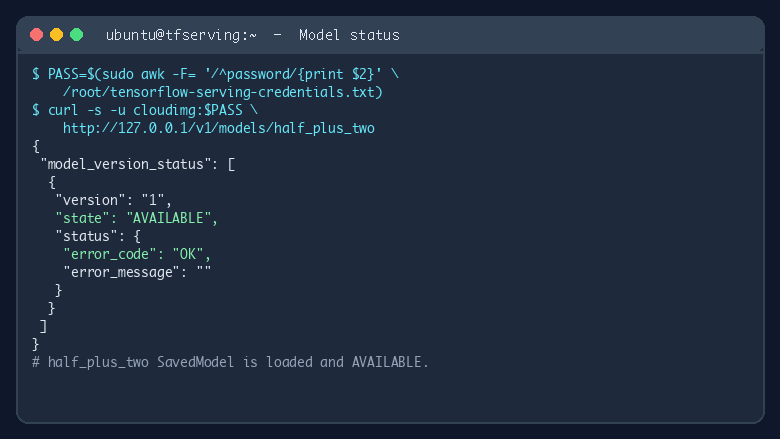
TensorFlow Serving model status
Image
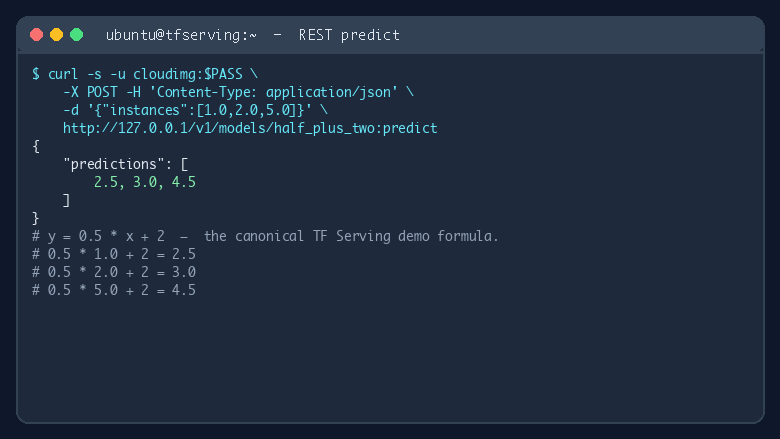
REST predict request
Image
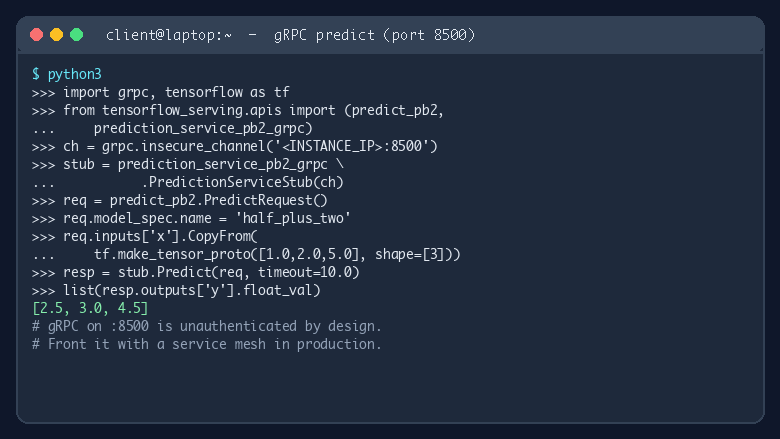
gRPC predict example
This is a repackaged open source software product wherein additional charges apply for cloudimg support services.
Why This AMI Instead of Manual Setup
Launching TensorFlow Serving from a raw Docker image means configuring authentication, writing systemd units, setting up reverse proxies, and hardening credentials - hours of work before your first prediction. This AMI eliminates that overhead. You get a secured, production-grade TF Serving stack that is ready to score inputs on first boot, with per-instance credentials automatically rotated so no two instances share secrets. Compared to an unprotected default TF Serving container, this image ensures your model endpoints are never exposed unauthenticated on the public internet.
Application Stack
The official tensorflow/serving CPU image runs as a Docker container managed by Docker Compose v2 and supervised by systemd. Two endpoints are exposed: a gRPC predict endpoint on port 8500 and a REST predict endpoint on port 8501. An nginx reverse proxy on port 80 fronts the REST API and enforces HTTP Basic authentication, protecting your model server from unauthorized access.
Secure First Boot
On first boot, a one-shot systemd unit generates a high-entropy password using OpenSSL, writes /etc/nginx/.htpasswd, and saves the credentials along with a sample curl command to /root/tensorflow-serving-credentials.txt (readable only by root). Every instance gets a unique password - no shared secrets across your fleet.
Sample Model and Model Replacement
Google's canonical half_plus_two SavedModel is bundled at /var/lib/tfserving/models/half_plus_two/1/ so the server has a working model on first boot. To deploy your own model, drop a new versioned directory under /var/lib/tfserving/models/ and restart the service. Multi-model serving is supported by adding additional model directories.
Getting Started
- Launch the AMI on your preferred EC2 instance type.
- SSH into the instance and retrieve credentials from /root/tensorflow-serving-credentials.txt.
- Browse to http:///v1/models/half_plus_two with user "cloudimg" and the per-instance password to confirm the model status is AVAILABLE.
- POST inference requests to /v1/models/half_plus_two:predict to score inputs.
- Replace the sample model with your own TensorFlow SavedModel to begin production serving.
Use Case: E-Commerce Recommendation Scoring
An e-commerce team deploys two model versions under /var/lib/tfserving/models/ - a production model serving 90% of traffic and a challenger model serving 10%. By comparing conversion rates across versions through their application layer, the team validates model improvements before full rollout. The nginx auth layer ensures only authorized backend services can reach the scoring endpoints, while gRPC support keeps latency low for real-time product recommendations at scale.
Additional Use Cases
- Low-latency online inference for TensorFlow SavedModels via REST or gRPC
- A/B testing model versions with traffic splitting at the application layer
- Edge or regional model hosting for latency-sensitive workloads
- Multi-model serving from a single container for resource efficiency
cloudimg Support
24/7 technical support by email and live chat. Our engineers assist with TensorFlow Serving deployment, model upgrades, gRPC and REST integration, nginx hardening, and TLS termination. To schedule a guided deployment walkthrough or get help with your specific use case, contact our support team.
TensorFlow and the TensorFlow logo are trademarks of Google LLC. All other product and company names are trademarks or registered trademarks of their respective holders. Use of them does not imply any affiliation with or endorsement by them.
Highlights
- Skip hours of manual configuration - TensorFlow Serving launches production-ready on first boot with Docker Compose v2, systemd supervision, and the canonical half_plus_two sample model pre-loaded. Deploy your own SavedModel by dropping a versioned directory and restarting the service, with no additional tooling required.
- Eliminate unauthenticated exposure - unlike a stock TF Serving container that listens openly, this AMI enforces nginx basic-auth on every REST request. Per-instance OpenSSL-generated credentials rotate automatically on first boot and are stored in a root-only file, so no two instances share secrets and no endpoint is publicly accessible without authentication.
- Around-the-clock expert assistance from cloudimg engineers who specialize in TF Serving deployment, model version upgrades, gRPC and REST integration, nginx hardening, and TLS termination. Critical issues receive a one-hour average response time via email or live chat, helping you maintain uptime for production inference workloads.
Details
Sold by
Delivery method
Delivery option
64-bit (x86) Amazon Machine Image (AMI)
Latest version
Operating system
Ubuntu 24.04
Deployed on AWS
New
Introducing multi-product solutions
You can now purchase comprehensive solutions tailored to use cases and industries.

Features and programs
Financing for AWS Marketplace purchases
AWS Marketplace now accepts line of credit payments through the PNC Vendor Finance program. This program is available to select AWS customers in the US, excluding NV, NC, ND, TN, & VT.

Pricing
Free trial
Try this product free for 7 days according to the free trial terms set by the vendor. Usage-based pricing is in effect for usage beyond the free trial terms. Your free trial gets automatically converted to a paid subscription when the trial ends, but may be canceled any time before that.
Pricing is based on actual usage, with charges varying according to how much you consume. Subscriptions have no end date and may be canceled any time. Alternatively, you can pay upfront for a contract, which typically covers your anticipated usage for the contract duration. Any usage beyond contract will incur additional usage-based costs.
Additional AWS infrastructure costs may apply. Use the AWS Pricing Calculator to estimate your infrastructure costs.
If you are an AWS Free Tier customer with a free plan, you are eligible to subscribe to this offer. You can use free credits to cover the cost of eligible AWS infrastructure. See AWS Free Tier for more details. If you created an AWS account before July 15th, 2025, and qualify for the Legacy AWS Free Tier, Amazon EC2 charges for Micro instances are free for up to 750 hours per month. See Legacy AWS Free Tier for more details.
Dimension | Description | Cost/hour |
|---|---|---|
c5.xlarge Recommended | c5.xlarge | $0.08 |
t2.micro | t2.micro instance type | $0.04 |
t3.micro | t3.micro instance type | $0.04 |
d3.4xlarge | d3.4xlarge instance type | $0.24 |
t3.small | t3.small instance type | $0.04 |
m5ad.8xlarge | m5ad.8xlarge instance type | $0.24 |
c8ine.8xlarge | c8ine.8xlarge instance type | $0.24 |
g6.4xlarge | g6.4xlarge instance type | $0.24 |
r5a.16xlarge | r5a.16xlarge instance type | $0.24 |
m5a.xlarge | m5a.xlarge instance type | $0.12 |
Vendor refund policy
Refunds available on request.

Legal
Vendor terms and conditions
Upon subscribing to this product, you must acknowledge and agree to the terms and conditions outlined in the vendor's End User License Agreement (EULA) .
Content disclaimer
Vendors are responsible for their product descriptions and other product content. AWS does not warrant that vendors' product descriptions or other product content are accurate, complete, reliable, current, or error-free.
Delivery details
64-bit (x86) Amazon Machine Image (AMI)
Amazon Machine Image (AMI)
An AMI is a virtual image that provides the information required to launch an instance. Amazon EC2 (Elastic Compute Cloud) instances are virtual servers on which you can run your applications and workloads, offering varying combinations of CPU, memory, storage, and networking resources. You can launch as many instances from as many different AMIs as you need.
Version release notes
Initial release of TensorFlow Serving 2 with nginx basic-auth gateway and bundled half_plus_two sample SavedModel on a dedicated 20 GiB model volume.
Additional details
Usage instructions
Connect via SSH on port 22 as the default login user for your operating system variant (the user guide lists it per variant). The basic-auth-gated REST API is served on port 80 at the /v1/ prefix. Retrieve the generated credentials with: sudo cat /root/tensorflow-serving-credentials.txt. Health check: curl -u cloudimg:<password> http://<instance-public-ip>/v1/models/half_plus_two. Predict: curl -u cloudimg:<password> -d '{"instances":[1.0,2.0,5.0]}' -H 'Content-Type: application/json' http://<instance-public-ip>/v1/models/half_plus_two:predict. The raw TF Serving REST port 8501 and gRPC port 8500 are also published but unauthenticated -- restrict or remove those security group rules in production.
Resources
Vendor resources
Support
Vendor support
cloudimg Support
cloudimg provides 24/7 technical support for this TensorFlow Serving AMI via email and live chat.
What We Help With:
- TensorFlow Serving deployment and configuration
- Model upgrades and version management
- gRPC and REST endpoint integration
- Nginx hardening and TLS termination
- Performance tuning and troubleshooting
- Instance sizing and scaling guidance
Response Times:
Critical issues receive a one-hour average response time. Our engineers work with you until resolution.
How to Get Help:
Email: support@cloudimg.co.uk Live chat: Available 24/7
For guided deployment walkthroughs or pre-purchase questions, reach out to our support team at the email above. We assist with all aspects of running this product, including troubleshooting, configuration changes, and refund requests.
Scope of Support:
Support covers the full application stack delivered in this AMI - TensorFlow Serving, Docker, nginx, systemd units, and credential management. For issues related to underlying AWS infrastructure (EC2, VPC, IAM), we provide guidance on configuration relevant to this product.
AWS infrastructure support
AWS Support is a one-on-one, fast-response support channel that is staffed 24x7x365 with experienced and technical support engineers. The service helps customers of all sizes and technical abilities to successfully utilize the products and features provided by Amazon Web Services.
Similar products

Intuz offers TensorFlow, a free and open-source software library designed to assist developers of all levels, from novice to advanced, in building ML models for desktop, mobile, web, and cloud applications.

This is a Image Classification model from TensorFlow Hub

Pre-configured Deep Learning environment with TensorFlow 2.15 and Keras 3.0 on Ubuntu 22.04 LTS. This optimized AMI includes the complete machine learning stack ready for immediate deployment. Perfect for AI research, computer vision, NLP projects, and production ML workflows.
Includes full Python data science toolkit: Jupyter Lab, pandas, NumPy, scikit-learn, OpenCV, and matplotlib. GPU-ready configuration supports both CPU and accelerated computing. Enterprise-grade setup saves hours of installation and configuration time. This product wherein additional charges apply for support provided by Galaxys

This product has charges associated with it for pre-configuration and packaging by Intuz. It includes a pre-installed deep learning environment featuring PyTorch, TensorFlow, and JupyterLab for rapid AI/ML development on AWS.
Customer reviews
No customer reviews yet
Be the first to review this product . We've partnered with PeerSpot to gather customer feedback. You can share your experience by writing or recording a review, or scheduling a call with a PeerSpot analyst.